
Argil vs Freebeat
Plans, free access, limits and intended use side by side, taken from each vendor’s own pages. No score and no winner: the facts show where the two differ.
Change tools
AI video production studio that keeps characters, sets and style on record while a Director agent plans and shoots each film

AI music video generator that builds beat-synced visuals from a song
- Free access
- Argil: Not verified
- Freebeat: Free access
- Paid from
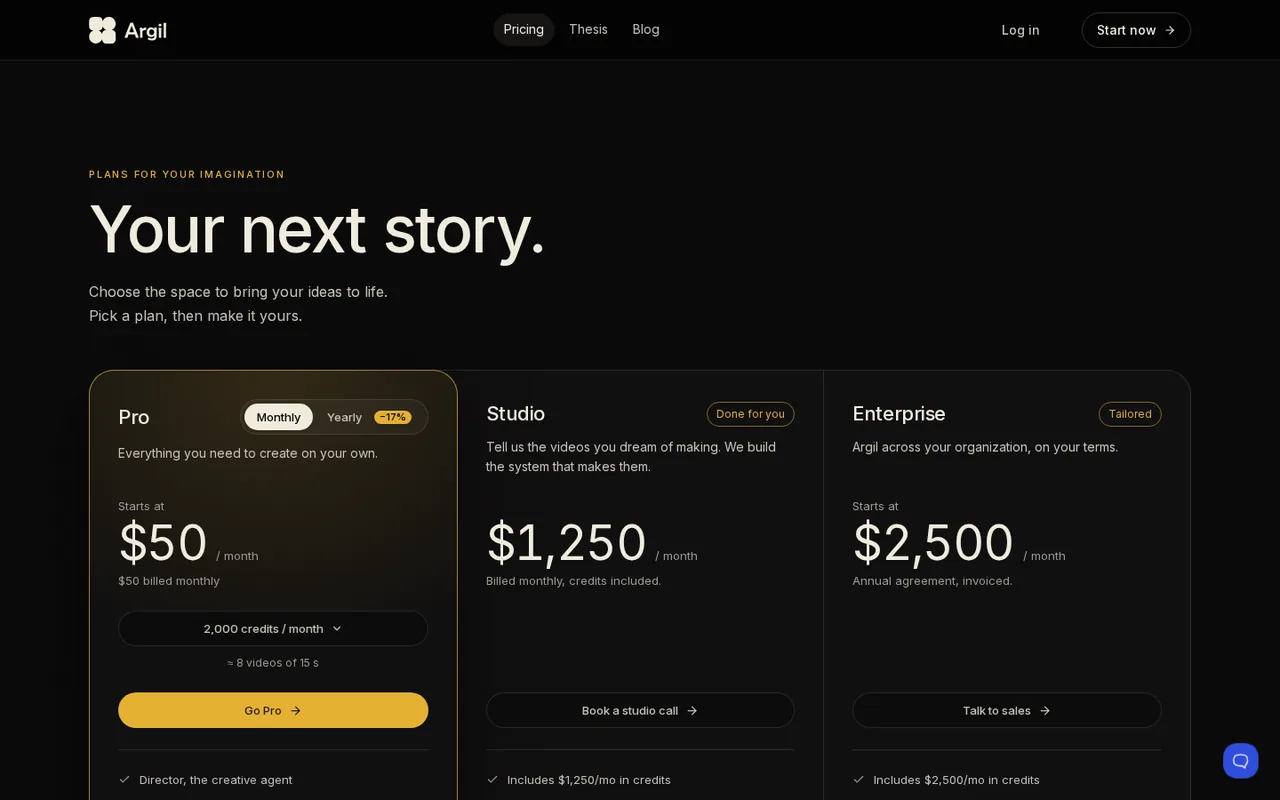
- Argil: USD 50 per month
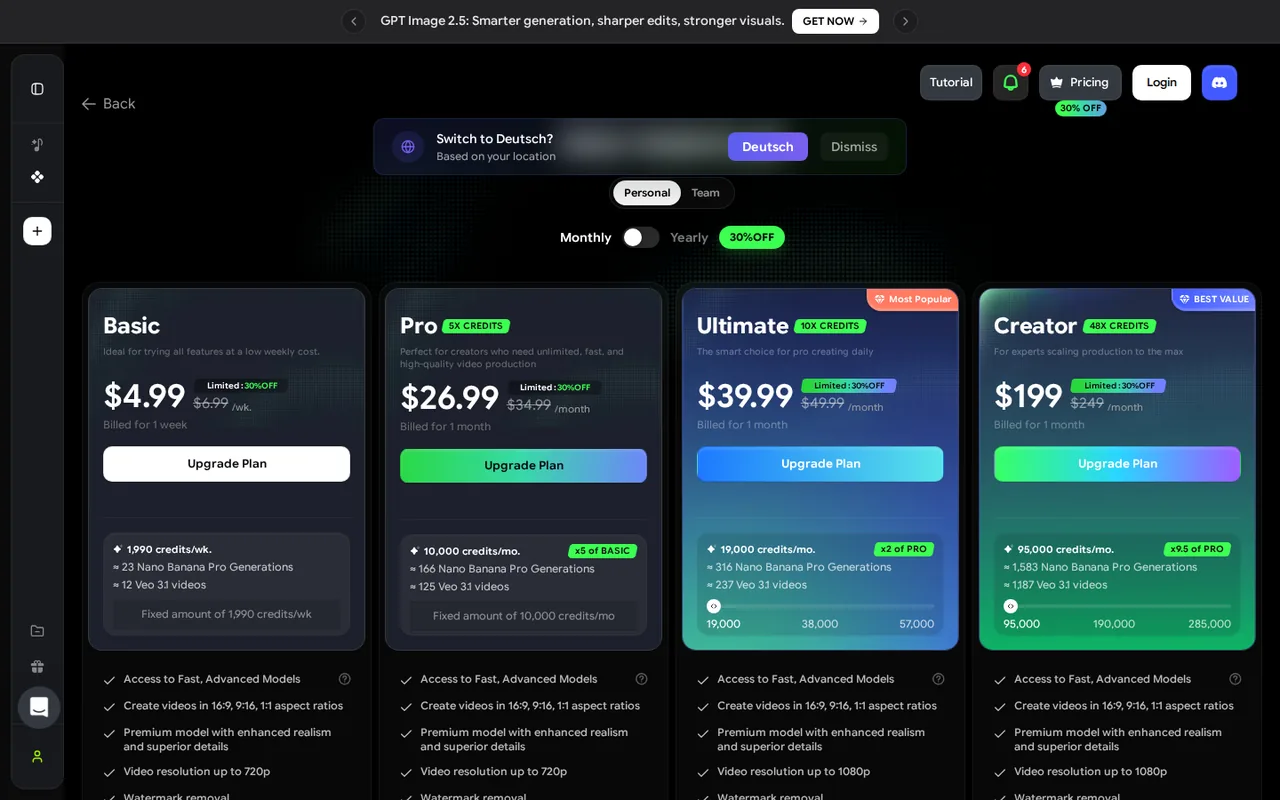
- Freebeat: USD 4.99 per week
- Plans listed
- Argil: 3
- Freebeat: 6
- Public API
- Argil: Not confirmed
- Freebeat: Not confirmed
Where Argil and Freebeat differ
- PlansArgil lists 3 plans and Freebeat lists 6.
Head to head
Each value from the tool’s profile and the vendor’s own pages
| Argil | Fact | Freebeat |
|---|---|---|
| Access and price | ||
| Not verified | Free accessDiffers | Free access availableFree · USD 0 |
| USD 50 per monthPro | Lowest listed paid plan | USD 4.99 per weekBasic · list $6.99 |
| Paid from $50 a month; no free plan listed | Pricing model | Free 500 credits (non-commercial); paid plans $4.99 a week to $199 a month |
| 3 | Plans listedDiffers | 6 |
| Not confirmed | Public API | Not confirmed |
| Not confirmed | Card to start | Not confirmed |
| Not confirmed | Open source | Not confirmed |
| What it is for | ||
| Creators and teams who make many AI videos and need the same characters, locations and look to carry across every one | Built for | Turning a finished track into a vertical or widescreen music video |
| Video & editing | CategorySame | Video & editing |
| Platforms |
|
| Works with |
|
| How current | ||
| Profile sources checked | ||
| Prices confirmed · Oct 25, 2026 | Pricing checkSame | Prices confirmed · Oct 11, 2026 |
Official source check for both tools. No hands-on testing and no score: “Differs” marks a documented difference, not a better tool.
Plans and prices
Argil
Prices confirmed · Oct 25, 2026- ProUSD 50 per month
- StudioUSD 1,250 per month
- EnterpriseUSD 2,500 per month
Freebeat
Prices confirmed · Oct 11, 2026- FreeUSD 0
- BasicUSD 4.99 per weeklist $6.99
- ProUSD 26.99 per monthlist $34.99
- UltimateUSD 39.99 per monthlist $49.99
- CreatorUSD 199 per monthlist $249
Show 1 more plan
- Credit packsUSD 7.99 for 2,000 credits; $18.99 for 5,000; $26.99 for 8,000
Strengths and limits
Argil
Strengths
- One workspace for the whole film: Brief, storyboard, shooting and editing sit in one session instead of separate tools.
- Reusable cast and style: Characters, worlds and styles are saved and reused across videos.
- Commercial use listed: Pro lists commercial use and the Terms transfer ownership of generated content to the user.
Limits to plan around
- Entry price: Pro starts at $50 a month and the page lists no free plan, so there is no cost-free way to try it on the pricing page.
- Pro price steps hidden: The credit selector runs from 2,000 to 100,000 credits a month and the price of each step was not readable.
- Purchases are final: The Terms say all purchases are non-refundable, including credits and paid plans.
Freebeat
Strengths
- Free credits that do not expire: The Terms of Service describe the Free plan as 500 non-expiring credits, so a first render can be checked before paying.
- Built around a song: Freebeat analyses tempo and song sections first, which the homepage presents as the difference from generic text-to-video tools.
- Credits and resolution shown by plan: The pricing page gives each plan's credit pool, resolution cap and an estimated number of Veo 3.1 videos.
Limits to plan around
- Prices disagree between pages: The pricing page and the homepage FAQ list different plans and amounts, and the pricing page shows a limited 30% discount.
- Free credits are non-commercial: The Terms of Service limit the Free plan to non-commercial use, and the pages do not say whether free renders carry a watermark or what resolution they use.
- Narrow refunds and no renewal reminder: Only completely unused, unexpired subscriptions can be fully refunded, credit packs are non-refundable, and no reminder is sent before a renewal charge.
See both products


Start from your task, not from a winner.
Run both tools on the same real task, then compare the result, how much editing it needs and how fast it uses your plan’s allowance.
How we reviewChange this pair
Choose tools
Choose two tools below. You can replace either selection at any time.
Audio & voice
Automation
Coding
Data & spreadsheets
Images & design
Presentations
Research & sources
Video & editing
Website builders
Writing & content
Comparing tools from different categories is fine, and often useful — a writing assistant and a research tool solve different halves of the same job. The table will show you exactly where they diverge.
Questions about comparing tools
How does the comparison work?
Add two tools to the comparison tray from any tool card, then open this page. The table pulls each tool's verified plan details, platforms, strengths and limits from its profile, so both columns carry the same kind of evidence, with a separate source-check date for each tool.
Do you declare a winner?
No. The table sets two tools against each other on documented facts, not on a score. Which one wins depends on your task, your budget and your usage volume — three things we cannot see from here.
Why are some cells empty or marked unverified?
Because we could not confirm that detail on the vendor's own pages. Rather than filling the gap with a figure from elsewhere, we mark it and say why on the tool's profile.
Can I compare more than two tools?
Not at once. Two columns keep the differences readable and force a real decision. Remove either selected tool to replace it, or clear both to start a new pair.
Every figure in the table above comes from the linked profile, where the source and the verification date are listed. Browse all tools or read the editorial policy.