

What is Freebeat, in short?
Updated October 11, 2026 · By Elias Brandt · Documentation review, not tested hands-on
Pros
- Free credits that do not expire
- Built around a song
- Credits and resolution shown by plan
- Reaches agents and chat clients
Cons
- Prices disagree between pages
- Free credits are non-commercial
- Narrow refunds and no renewal reminder
- Uploads go to outside model providers
Best forMusicians and Suno creators with finished tracksShort-form posters who need 720pNot for unreleased or unlicensed tracks without a checkNot for anyone who needs a fixed, settled priceNot for paid client work on the Free plan
Strengths, limits and who it suits, in full
Strengths
- Free credits that do not expire The Terms of Service describe the Free plan as 500 non-expiring credits, so a first render can be checked before paying.
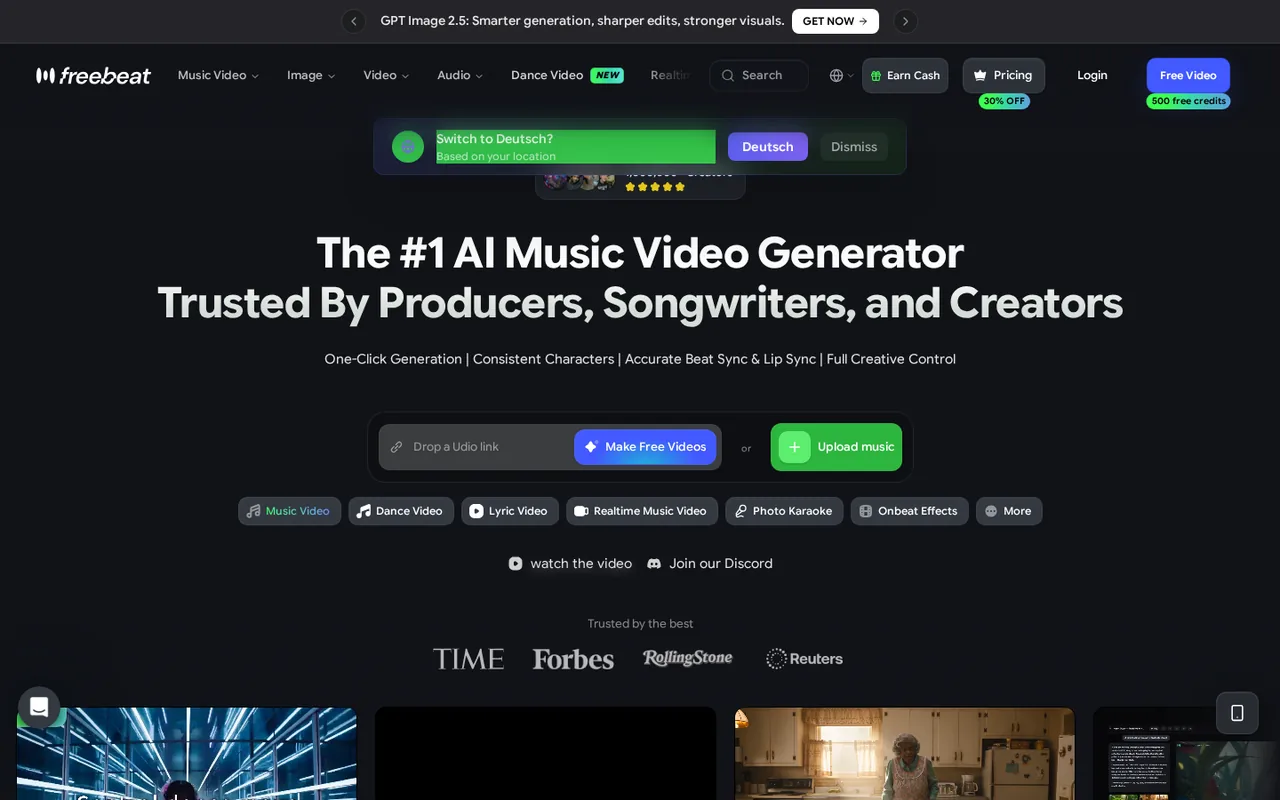
- Built around a song Freebeat analyses tempo and song sections first, which the homepage presents as the difference from generic text-to-video tools.
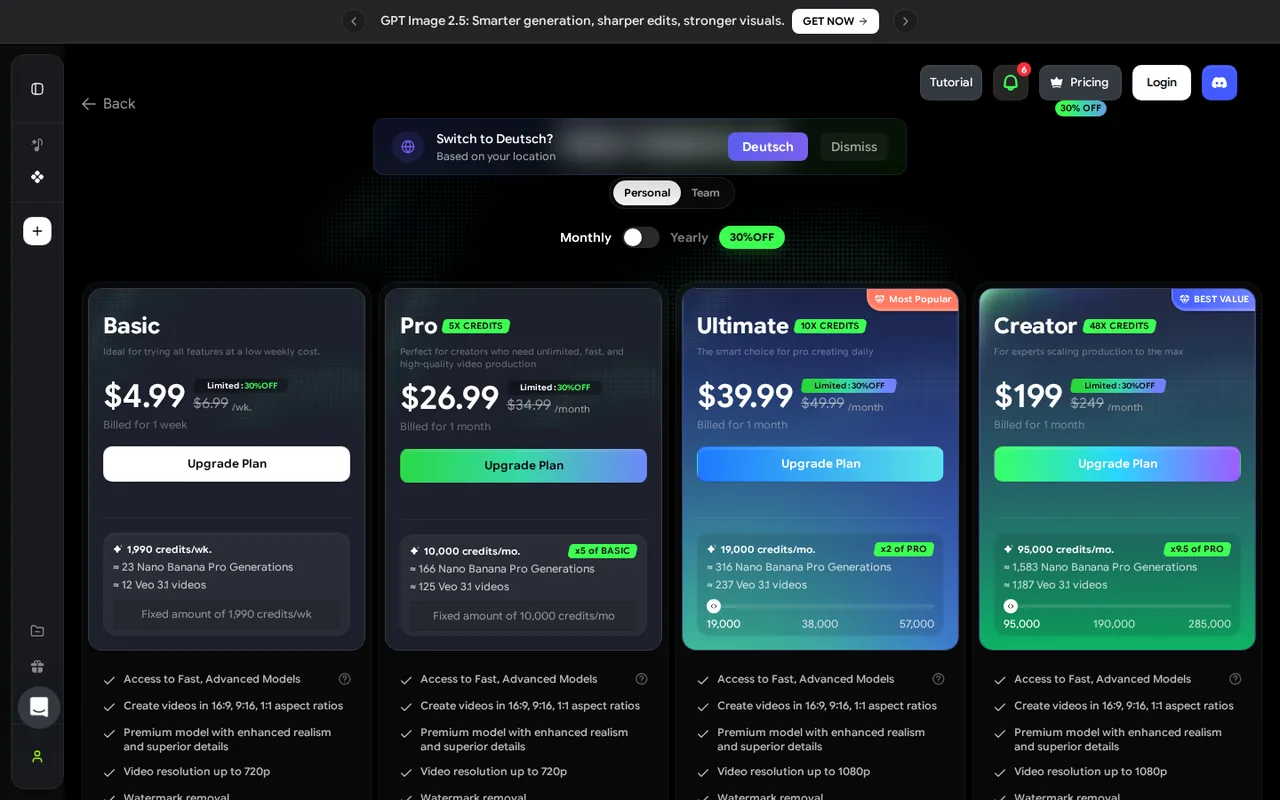
- Credits and resolution shown by plan The pricing page gives each plan's credit pool, resolution cap and an estimated number of Veo 3.1 videos.
- Reaches agents and chat clients The MCP page documents setup for Claude Desktop, Cursor, Windsurf and Claude Code.
Limits
- Prices disagree between pages The pricing page and the homepage FAQ list different plans and amounts, and the pricing page shows a limited 30% discount.
- Free credits are non-commercial The Terms of Service limit the Free plan to non-commercial use, and the pages do not say whether free renders carry a watermark or what resolution they use.
- Narrow refunds and no renewal reminder Only completely unused, unexpired subscriptions can be fully refunded, credit packs are non-refundable, and no reminder is sent before a renewal charge.
- Uploads go to outside model providers The privacy policy says prompts and uploaded media, including faces and voices, are sent to providers such as ByteDance's Seedance and OpenAI.
Who it suits
- Musicians and Suno creators with finished tracks The homepage accepts uploaded audio and links from Suno, Udio, YouTube, SoundCloud and Spotify, and exports vertical, square and widescreen.
- Short-form posters who need 720p 720p is the cap on Basic and Pro, which suits phone-sized vertical clips more than widescreen releases.
- Not for unreleased or unlicensed tracks without a check uploads can reach third-party providers and may feed model training unless you opt out, and you must hold rights to the music you upload.
- Not for anyone who needs a fixed, settled price The pricing page and homepage FAQ list different plans, so confirm the checkout total first.
- Not for paid client work on the Free plan The Terms of Service limit the 500 free credits to non-commercial use, so client or monetised videos need a paid plan.
How much does Freebeat cost?
Prices confirmed · checked
Regional prices: Prices are in USD as shown on the pricing page in its monthly view, read through a US proxy; tax is not mentioned.
Each paid plan carries a limited 30% discount against the list price shown beside it, and the pages do not say how long it lasts. A yearly switch exists on the page, but its prices were not captured, and the Team tab was not read. Paid subscriptions auto-renew at the price then shown, with no reminder before each charge. The homepage FAQ lists a different set: Basic $4.99 a week, Standard $9.99 a month and Pro $24.99 a month, and we cannot tell from the pages which list is current. Subscriptions bought through the App Store or Google Play are billed and refunded by the store.
| Plan | Price | What you get |
|---|---|---|
| Free | $0 sourceFrom freebeat.ai/pricing, checked Oct 11, 2026 (opens in a new tab) | 500 non-expiring credits for non-commercial use under the Terms of Service; watermark and export resolution of free renders are not stated on the pages read. |
| Basic | $4.99 per weeklist $6.99 sourceFrom freebeat.ai/pricing, checked Oct 11, 2026 (opens in a new tab) | 1,990 credits a week; billed for one week and auto-renews; video up to 720p; watermark removal listed; unused credits expire at the end of the billing period; shown as a limited 30% discount. |
| Pro | $26.99 per monthlist $34.99 sourceFrom freebeat.ai/pricing, checked Oct 11, 2026 (opens in a new tab) | 10,000 credits a month; video up to 720p; watermark removal listed; unused credits expire at the end of the billing period; shown as a limited 30% discount. |
| Ultimate | $39.99 per monthlist $49.99 sourceFrom freebeat.ai/pricing, checked Oct 11, 2026 (opens in a new tab) | 19,000 credits a month; video up to 1080p; unlimited PixVerse generations; unused credits expire at the end of the billing period; shown as a limited 30% discount. |
| Creator | $199 per monthlist $249 sourceFrom freebeat.ai/pricing, checked Oct 11, 2026 (opens in a new tab) | 95,000 credits a month; video up to 1080p; unlimited PixVerse generations and 7-day unlimited GPT Image 2.0 and Nano Banana Pro; unused credits expire at the end of the billing period; shown as a limited 30% discount. |
| Credit packs | $7.99 for 2,000 credits; $18.99 for 5,000; $26.99 for 8,000 sourceFrom freebeat.ai/pricing, checked Oct 11, 2026 (opens in a new tab) | One-off Boost Packs bought on top of a plan. |
Which plan fits?
Smallest plan whose monthly credits cover your number with 15% spare for regenerations. Arithmetic from the plan table above, not a usage test.
How far does it go?
- What one Veo 3.1 video costs on each planThe pricing page estimates about 12 Veo 3.1 videos on Basic, 125 on Pro, 237 on Ultimate and 1,187 on Creator. Dividing each price gives about $0.42 on Basic ($4.99 / 12), $0.22 on Pro ($26.99 / 125), $0.17 on Ultimate ($39.99 / 237) and $0.17 on Creator ($199 / 1,187). The page does not give the clip length, resolution or audio setting behind these estimates, and Basic's figure implies about 166 credits per video against 80 on the other plans, so treat the Basic number cautiously. Arithmetic on published figures, not a Freebeat statement.
Arithmetic from the published allowances above, not a usage test.
Taxes, currency and promotions can change the price you see at checkout.
Try Freebeat free (opens in a new tab)
Key features
| Feature | What it does | Watch out |
|---|---|---|
| Reads an uploaded song or a pasted link from Spotify, SoundCloud, YouTube, Suno or Udio, then plans visuals around its beats and song sections (homepage) | — | |
| Music videos from 15 seconds up to about six minutes, exported at 720p or 1080p in 16:9, 9:16 or 1:1 (homepage FAQ) | — | |
| Separate tools for lyric videos, dance videos, realtime music videos, photo karaoke and an AI editor, listed in the homepage menu (homepage) | — | |
| Image and video models from several providers on one credit balance, such as Seedance, MiniMax and Veo 3.1 (pricing page) | — | |
| An MCP server and command-line tool that let Claude, Cursor, Windsurf and Claude Code start a music video from a chat (MCP page) | The MCP page shows adding the freebeat-mcp package to an AI client with an API key from your profile, so an agent can upload a song and render a video. | The page does not say how MCP renders are billed against credits. |
| Credits per plan | Basic gives 1,990 credits a week; Pro, Ultimate and Creator give 10,000, 19,000 and 95,000 credits a month, and credits can be topped up with one-off packs. | The pages do not say whether unused credits roll over. |
| Resolution by plan | The pricing page caps video at 720p on Basic and Pro and at 1080p on Ultimate and Creator. | The homepage FAQ only says 720p and 1080p are supported, without tying them to plans. |
| Unlimited model access | Ultimate and Creator list unlimited PixVerse generations, and Creator adds 7-day unlimited GPT Image 2.0 and Nano Banana Pro. | The page limits this to manual use in the web app; API, automated and batch use is prohibited. |
Which Freebeat price list is current?
Freebeat’s pricing page and the FAQ on its homepage disagree. The pricing page lists Basic at $4.99 a week, Pro at $26.99, Ultimate at $39.99 and Creator at $199 a month, each marked as a limited 30% discount from $6.99, $34.99, $49.99 and $249. The homepage FAQ instead names Standard at $9.99 a month and Pro at $24.99 a month, with no Ultimate or Creator tier. We cannot tell which list is current, so the profile uses the pricing page, which carries the plan comparison and upgrade buttons. Read the total at checkout, and note that the pages do not say whether the discount is permanent.
What happens to the music and faces you upload?
The Terms of Service say you keep your rights to what you upload and generate, and that Freebeat may use anonymized data to improve its models, with an opt-out available. The privacy policy goes further: uploads, prompts and outputs may be used in identifiable or anonymized form, and prompts and media are sent to third-party model providers, naming ByteDance’s Seedance and OpenAI. Neither page says where the opt-out is. Deleted content can stay on active servers for up to 30 days and in backups after that. For an unreleased track or a recognisable face, find the opt-out before uploading.
How could you check Freebeat before paying?
Proposed evaluation · not performed yet
See what the free credits buy and what the first free render looks like, using a short track you own.
- Upload a 60-second instrumental you made yourself, or paste a Suno link you generated, and pick a 9:16 vertical format.
- Note the credits shown before the render and the credits left afterwards, then compare the cost with the roughly 80 credits per Veo 3.1 video implied by the pricing page’s Pro estimate (10,000 credits for about 125 videos).
- Look at the export for a watermark and its resolution, then decide whether the 720p limit on Basic and Pro is enough for your platform.
Freebeat alternatives
Other video & editing tools checked with the same method. Pick by the job, not by a score.

Developers and small teams who want a conversational video avatar for support, sales or tutoring and need to budget by minutes

Short animated stories from a script or prompt

Teachers, students and math YouTubers who want 3Blue1Brown-style explainer clips from a description, with an editable Manim code playground when they want control

Relighting or changing the background of short video clips

Creators and small teams who want video, image and audio generation under one credit balance

Small businesses that want social posts and clips generated and scheduled

Turning long recordings into short vertical clips

Mac editors who want Claude, Codex or Cursor to cut video
Used Freebeat? Write the first review. Visitor opinions are moderated and kept separate from our source checks.
Frequently asked questions
How much does a Freebeat subscription cost?
On its pricing page, Freebeat charges $4.99 a week for Basic, then $26.99 for Pro, $39.99 for Ultimate and $199 for Creator a month, each shown as a limited 30% discount. Paid plans auto-renew and unused credits expire each period. The homepage FAQ lists other prices, such as Standard at $9.99 a month, so check the checkout total before paying.
Is Freebeat free?
Yes, within limits. The Terms of Service describe the Free plan as 500 non-expiring credits for non-commercial use, and the homepage offers them through its Free Video button. The pages we read do not say whether free videos carry a watermark or which resolution they export at, while watermark removal is listed as a paid-plan feature. Check both on the first free render.
Can I use Freebeat videos commercially?
Paid plans, probably, but the pages are not fully consistent. The homepage FAQ says you keep your rights and that generated visuals come with a commercial-use licence, and the Terms say you own what you create. The Terms limit the Free plan's credits to non-commercial use. You must also hold rights to any song or footage you upload.
Does Freebeat train its models on my uploads?
It may. The Terms of Service say Freebeat may use anonymized data to improve its AI models, with an opt-out available, and the privacy policy adds that uploads, prompts and outputs may be used in identifiable or anonymized form, subject to opt-out preferences. Neither page explains how to opt out. Uploads can also be sent to model providers such as ByteDance's Seedance and OpenAI.
How do I cancel Freebeat and get a refund?
Cancel on the Pricing page by selecting Cancel auto-renew, or in Profile under Manage Plan & Billing; you keep access until the paid period ends, and no reminder is sent before a renewal. Only completely unused, unexpired subscriptions get a full refund, credit packs are non-refundable, and App Store or Google Play subscriptions are handled by the store.
Sources and method5 official sources · 21 details checked · Oct 11, 2026
How we checked this profile
21 details on this page were checked against Freebeat's own pages and help documentation (Oct 11, 2026). 1 is still open and listed below.
See the checks by section20 documented1 open
| Section | Checks | Last checked | Sources |
|---|---|---|---|
| Article text | 2 documented | freebeat.aifreebeat.ai/privacy-policy | |
| Features | 2 documented | freebeat.aifreebeat.ai/pricing | |
| Plans and prices | 7 documented 1 open | freebeat.aifreebeat.ai/pricingfreebeat.ai/terms-of-service | |
| Questions | 7 documented | freebeat.aifreebeat.ai/privacy-policyfreebeat.ai/terms-of-service | |
| Platforms and integrations | 2 documented | freebeat.ai/mcpfreebeat.ai |
Still open
- The homepage FAQ lists a different set of plans: Basic $4.99 a week, Standard $9.99 a month and Pro $24.99 a month.Not confirmed · checked · Source (opens in a new tab)
Sources for this profile
- Pricing page with plan cards and credit packsfreebeat.ai
- Freebeat homepage and FAQfreebeat.ai
- Terms of Servicefreebeat.ai
- Privacy Policyfreebeat.ai
All 5 sources
Official pages read on 2026-10-11: homepage with its FAQ, pricing page, Terms of Service, privacy policy and the MCP page. The site blocks ordinary requests, so pages were fetched through a browser proxy. We did not create an account or render a video. Conflicts found: the homepage FAQ lists Basic, Standard and Pro plans while the pricing page lists Basic, Pro, Ultimate and Creator at different prices; the homepage FAQ promises a commercial-use licence while the Terms limit the Free plan to non-commercial use; the Terms require users to be 18 while the privacy policy refers to children under 13. The Terms and privacy policy do not name a legal operator, and the Terms show no effective date. The pricing page's collapsed Billing, Credits and Refund FAQ sections could not be read; the Terms were used for cancellation and refunds. Store and social links come from the rendered homepage footer, and the store listings were not opened. Third-party reviews, press coverage and the provider's own comparison articles were not used.
Sources checked Oct 11, 2026. Found something out of date? See how we correct profiles.


