

What is Flowith, in short?
Updated October 10, 2026 · By Elias Brandt · Documentation review, not tested hands-on
Pros
- Free plan to try first
- Costs shown per job
- No training without consent
- Commercial use on paid plans
Cons
- Six-month storage guarantee
- Conflicting Starter terms
- Narrow refund conditions
- Credit costs are estimates
- No public API yet
Best forPeople turning research into slides or a web pageSteady image and video creatorsNot for shared team loginsAnyone relying on long-term storage
Strengths, limits and who it suits, in full
Strengths
- Free plan to try first Starter costs $0 and includes 300 credits plus one Deep Research, one slide and one website task in the comparison table.
- Costs shown per job The pricing table converts each plan into images, video seconds and Agent Neo tasks, so plans can be compared by output.
- No training without consent The privacy policy says prompts, inputs and outputs are not used for model training without explicit consent.
- Commercial use on paid plans The terms allow commercial use of outputs, and the pricing table lists a commercial licence on Pro, Ultimate and Infinite.
Limits
- Six-month storage guarantee The terms store inputs, files and outputs for up to six months, after which they may be archived or deleted without a reminder.
- Conflicting Starter terms The plan card shows 300 credits as a monthly benefit, while the comparison table calls them one-time.
- Narrow refund conditions A refund needs a request within 48 hours and fewer than 200 paid credits used; the terms call fees non-refundable unless law requires.
- Credit costs are estimates Listed costs apply at the lowest settings, and free or promotional credits only work with certain models.
- No public API yet Custom integrations and API access are listed as coming soon, and only on Infinite.
Who it suits
- People turning research into slides or a web page Agent Neo lists Deep Research, Slides and Website as task types, and the pricing table counts each per plan.
- Steady image and video creators yearly Ultimate adds three credit-free image models for 365 days for $538.92 a year, which pays off with regular generation rather than occasional use.
- Not for shared team logins Accounts are personal; the terms and help centre forbid sharing logins, credits or subscription benefits.
- Anyone relying on long-term storage download what you want to keep, because the terms guarantee stored content for six months only.
How much does Flowith cost?
Prices confirmed · checked
Regional prices: Prices are in USD as shown on the pricing page from a Germany-based server; tax is not mentioned.
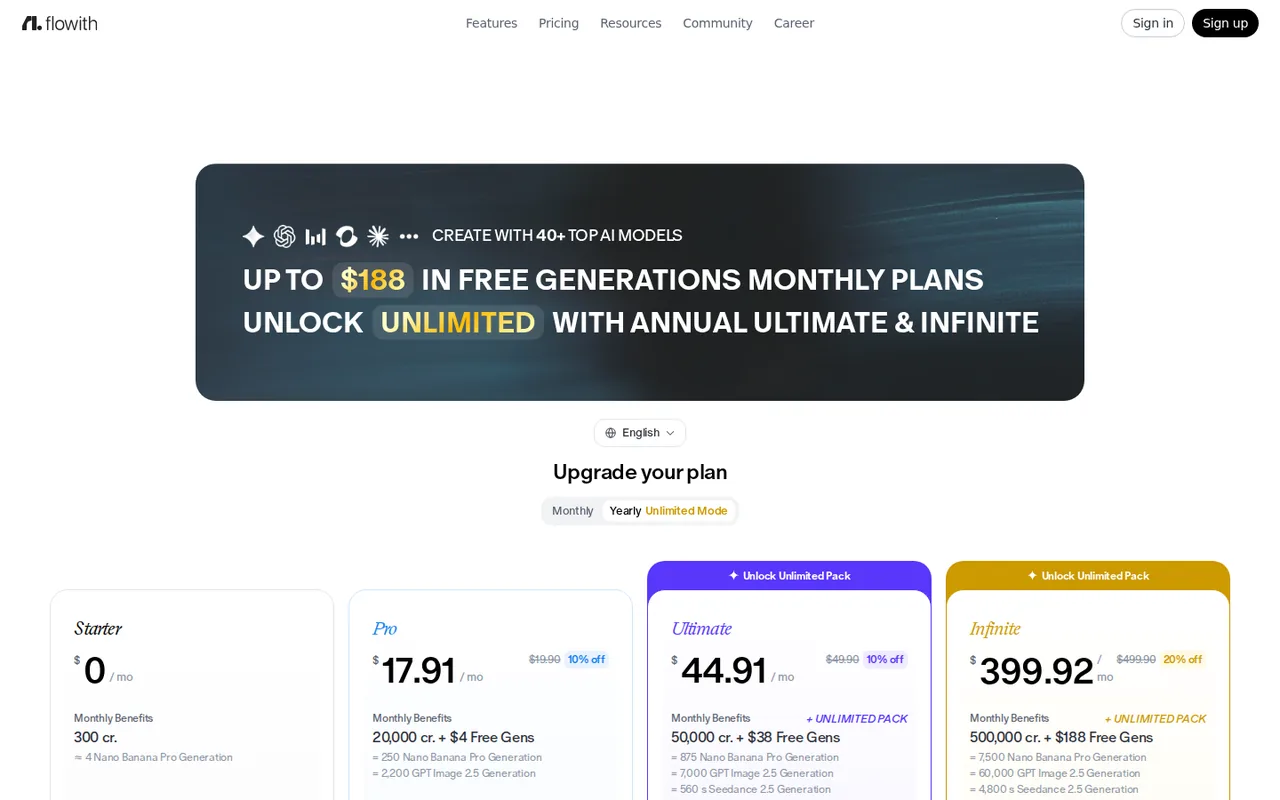
Yearly plans are billed up front ($214.92, $538.92 or $4,799.04), which the page shows as $17.91, $44.91 and $399.92 a month. The monthly Infinite price was shown as 10% off a $499.90 list price, and the comparison table shows $499.90 as the monthly figure. Subscription credits reset at the end of each billing cycle and do not carry over. Free generations apply only to four named models (Seedance 2.5, Seedance 2.0, GPT Image 2.5 and Nano Banana Pro); monthly Pro has none. The comparison table lists 22,000 basic credits for Pro, against 20,000 on the plan card. Top-up credits can be bought, but no top-up prices appear on the pricing page.
| Plan | Price | What you get |
|---|---|---|
| Starter | $0 sourceFrom flowith.io/pricing, checked Oct 10, 2026 (opens in a new tab) | 300 credits, shown as a monthly benefit on the plan card and as one-time in the comparison table; limited models; one Deep Research, one slide and one website task; no batch generation or commercial licence. |
| Pro | $19.90 per monthor $214.92 billed yearly sourceFrom flowith.io/pricing, checked Oct 10, 2026 (opens in a new tab) | 20,000 credits a month; the yearly plan adds $4 of free generations; 40+ premium models, batch mode, top-up packs, 50 concurrent tasks, commercial licence. |
| Ultimate | $49.90 per monthor $538.92 billed yearly sourceFrom flowith.io/pricing, checked Oct 10, 2026 (opens in a new tab) | 50,000 credits plus $38 of free generations a month; yearly adds the Unlimited Pack (GPT Image 2, Nano Banana 2 and Seedream 5.0 Flash for 365 days, Kling V2.6 Pro for 30 days); 100 concurrent tasks. |
| Infinite | $449.91 per monthor $4,799.04 billed yearly sourceFrom flowith.io/pricing, checked Oct 10, 2026 (opens in a new tab) | 500,000 credits plus $188 of free generations a month; yearly adds the Unlimited Pack, all four models for 365 days; unlimited concurrent tasks; API access listed as coming soon. |
How far does it go?
- What one Deep Research task costs on each planThe comparison table lists 1, 36, 116 and 1,000 Agent Neo Deep Research tasks a month for Starter, Pro, Ultimate and Infinite. Its image counts imply credit pools of 22,000, 70,000 and 600,000 for the paid plans, which works out to about 600 credits per task. Free generations are tied to named image and video models, so on basic credits alone (20,000, 50,000 and 500,000) that is about 33, 83 and 833 tasks: $19.90 / 33 = about $0.60 a task on Pro, $49.90 / 83 = $0.60 on Ultimate and $449.91 / 833 = $0.54 on Infinite. Arithmetic on published figures, not a Flowith statement.
Arithmetic from the published allowances above, not a usage test.
Taxes, currency and promotions can change the price you see at checkout.
Try Flowith free (opens in a new tab)
Key features
| Feature | What it does | Watch out |
|---|---|---|
| Canvas where every prompt and reply becomes a node you can continue, branch from or quote in a later prompt (Node Interaction guide) | — | |
| Agent Neo splits a goal into a step-by-step plan it calls a Recipe, picks tools and shows a live execution log (Agent Neo documentation) | The pricing table counts Neo jobs instead of credits: 1, 36, 116 and 1,000 Deep Research tasks a month on Starter, Pro, Ultimate and Infinite, with separate counts for slides and websites. | The counts appear to include free generations that the plan cards tie to named image and video models, so credit-only capacity is lower. |
| Neo tools include web search, a live browser, document, image, webpage, 3D, video, music and speech generation, and emailing results (capabilities page) | — | |
| Knowledge Garden imports your files and notes as knowledge units that flows can match to a task (Knowledge Garden documentation) | Imported files and notes are split into knowledge units that the canvas and Neo can draw on for a task. | The documentation gives no file size limits or supported formats, and stored files fall under the six-month default storage term. |
| Text, image and video models from several providers on one credit balance, with per-output credit costs in the pricing table (pricing page) | The table lists, for example, 80 credits for a Nano Banana Pro image at 1K or 2K and 617 credits per five seconds of Seedance 2.5 video at 480p. | The help centre calls these estimates at the lowest settings; resolution, mode and output count can raise the real cost. |
| Shared flows are view-only by default; the owner grants edit rights per member (sharing guide) | — |
How do Flowith credits turn into finished work?
Every model on Flowith draws on one credit balance, and the pricing page translates that balance into output. Its comparison table lists 80 credits for a Nano Banana Pro image at 1K or 2K, 15 for a Nano Banana 2.1 image, 617 credits for five seconds of Seedance 2.5 video at 480p and 2,000 for five seconds of Veo 3.1 with audio. For Agent Neo it gives task counts instead: 36 Deep Research runs a month on Pro, 116 on Ultimate and 1,000 on Infinite, with 22, 70 and 600 slide decks.
Treat these as floors. The help centre says the listed cost is a reference at the lowest settings, and that resolution, generation mode, output quantity and task complexity can push the final charge higher. Free and promotional credits only work with certain models, so a visible balance does not guarantee access to every model, and credits taken by a failed task are returned only after a support review.
Yearly Ultimate and Infinite add an Unlimited Pack: GPT Image 2, Nano Banana 2 and Seedream 5.0 Flash without credits for 365 days, and Kling V2.6 Pro for 30 days on Ultimate or 365 days on Infinite. Monthly plans do not include it, and the pricing FAQ says the unlimited channel runs behind credit-paying jobs at busy times.
Which models does Flowith offer right now?
The pricing page advertises more than 40 models and warns that availability may change. The Updates page entry dated October 9, 2026 added Claude Sonnet 5.5, Claude Haiku 5.5, Claude Fable 5.1, Gemini 3.8 Flash, Grok 4.7 and DeepSeek V4.1 Flash for text, plus Seedream 5.0 Flash for images, and said some earlier models will be retired. The changelog for the second half of September added Claude Opus 5.5, GPT-6 Sol and Luna, and GPT-6.1 Sol.
Image and video models in the comparison table include Google’s Nano Banana family and Veo 3.1, OpenAI’s GPT Image 2 and 2.5, ByteDance’s Seedream and Seedance, Kling 3.0, Wan, Grok Image 2.0 and Z Image Turbo. Starter is described only as having limited models: its column in the table shows no image or video allowance, although its plan card equates the 300 credits to about four Nano Banana Pro images.
What happens to your files, prompts and outputs?
Storage is time-limited. The Terms of Service, effective August 31, 2026, keep inputs, files, workflows, tasks and outputs for up to six months from creation unless a plan says otherwise; after that Flowith may archive, compress, restrict or permanently delete them, and you should not expect a reminder. None of the plans on the pricing page states a longer period, so export anything you need to keep.
On training, the Privacy Policy says prompts, inputs and outputs are not used to train models without your explicit consent, although they are processed to provide and improve the service. Personal data can be shared with service providers, affiliates and business partners, and processed in other countries. Deleting an account is a support request: the help article says history may not be recoverable and the same account cannot be used to register again.
Output rights are worded three ways. The terms grant you a limited, non-exclusive licence to outputs for your own purposes, yet say you may use them commercially; the privacy and legal FAQ says you hold full ownership and Flowith assigns its rights to you; the pricing table lists a commercial licence only on paid plans. If commercial use matters, a paid plan is the reading all three sources support.
How do cancelling, plan changes and refunds work?
Cancel from the Usage page under Manage Subscription. The help centre advises doing it at least 24 hours before the next billing date; access continues to the end of the paid period, and unused subscription credits expire when the cycle ends.
Plan changes are described inconsistently. The pricing FAQ says changes take effect in the next billing cycle, while the plan change article says an upgrade applies as soon as you pay and the old subscription is refunded according to the time or credits left, with nothing back if the credits are used up. An annual plan cannot be switched to monthly, and unused months of an annual plan are not refunded pro rata.
The terms call all fees non-refundable unless the law requires otherwise, but the pricing FAQ and help centre allow a refund if you ask within 48 hours of payment and have used fewer than 200 paid credits. At the listed rates, 200 credits is two and a half Nano Banana Pro images, or about a third of one Deep Research task. Approved refunds take 1 to 10 business days, and a breach of the usage rules lets Flowith keep all fees.
How could you check Flowith before paying?
Proposed evaluation · not performed yet
Measure what one research task costs and where its output is kept, using a public, non-personal brief.
- Create a free account and note the credit balance and whether it is labelled monthly or one-time.
- Start an Agent Neo Deep Research task with the brief “Compare the published free plans of three note-taking apps in a one-page table, with a link to each pricing page”.
- Watch the execution log and record which tools Neo uses and whether each claim in the result links to a source.
- Record the credits used and compare them with the roughly 600 credits per task implied by the pricing table.
- Download or export the result and check the format you get.
- Look in Settings for an option to delete the flow and the account, or confirm that deletion is by support request only.
Accept if the task finishes within the free balance, every pricing claim links to the right page and the result can be exported. Reject if the task stops for lack of credits without saying so, cites pages that do not support its figures, or cannot be saved outside Flowith. No result is recorded here.
Used Flowith? Write the first review. Visitor opinions are moderated and kept separate from our source checks.
Frequently asked questions
What is Flowith?
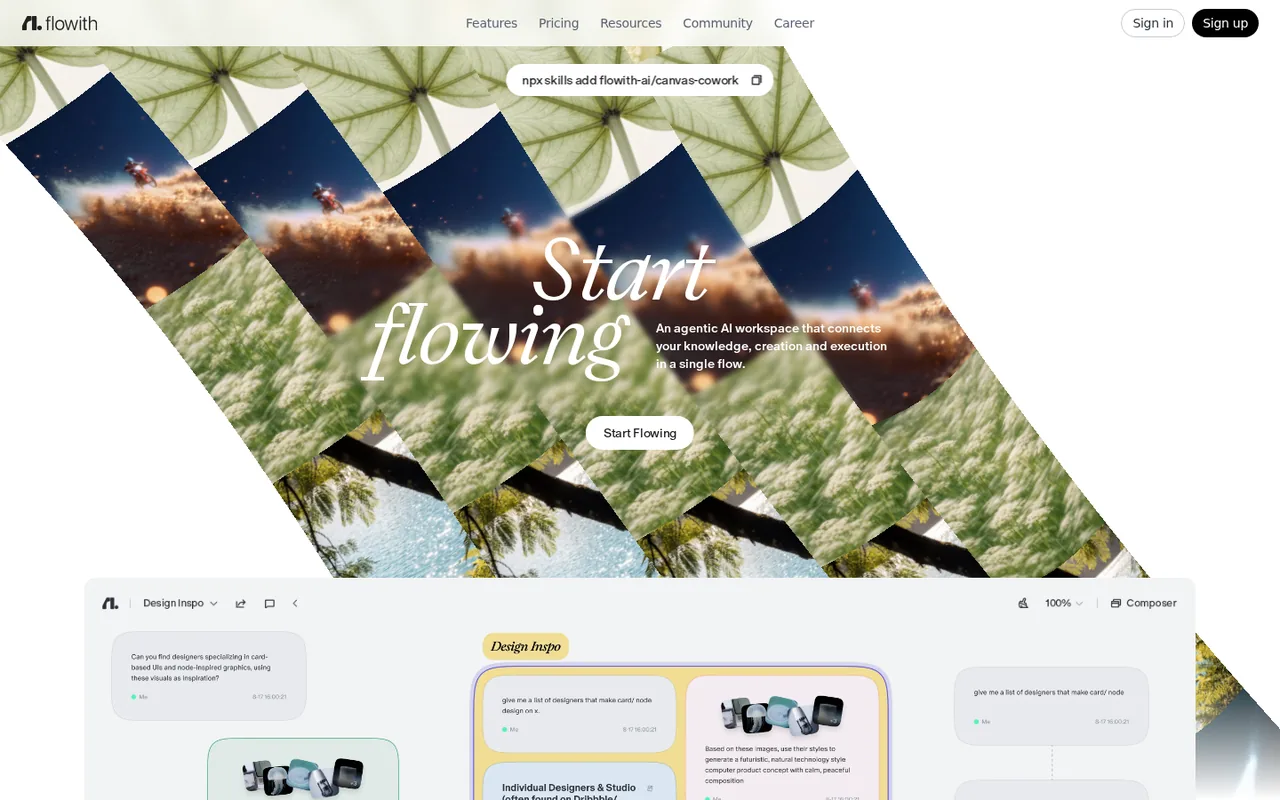
Flowith describes itself as an agentic AI workspace, and its terms cover AI conversations, image and audio generation, and building and managing AI workflows. You work on a visual canvas, hand larger jobs to Agent Neo, and attach notes and documents through Knowledge Garden. It runs in the web browser, and the company behind it is based in Singapore.
Is Flowith free to use?
Yes, with limits. The Starter plan costs $0 and comes with 300 credits, which the plan card shows as a monthly benefit and the comparison table as one-time. It lists limited models, a single Deep Research, slide and website task, no batch generation and no commercial licence. Paid plans start at $19.90 a month, or $214.92 billed yearly.
Does Flowith use my prompts to train AI?
Not without your explicit consent, according to the privacy policy and the help centre. Prompts and outputs are still processed to run and improve the service, and personal data may go to service providers, affiliates and business partners. The policy does not name the AI model providers involved or describe a setting for giving or withdrawing consent.
Who operates Flowith?
Flowith Technologies Pte. Ltd., a private company limited by shares incorporated in Singapore, according to the terms and privacy policy. Singapore law governs the terms and disputes go to Singapore courts. The terms give no uptime guarantee, cap liability at the fees paid in the previous 12 months, and allow age-verified adults to view adult content on some models.
Is there a Flowith app or API?
The documentation lists a Download iOS App option in the account menu, but an App Store search for Flowith found no listing from Flowith Technologies, and similarly named store apps come from other developers. The pricing page lists custom integrations and API access as coming soon on the Infinite plan only. Agent Neo can send finished results by email.
Is Unlimited Mode really unlimited?
Only within fair use. Supported models stop using credits while it is on, but jobs wait in a separate queue whose speed and concurrency can drop at peak load, and your plan's concurrency cap still applies. Scripts, automation tools and account sharing are banned, and access ends immediately if the subscription lapses or moves to a plan without the feature.
Sources and method21 official sources · 35 details checked · Oct 10, 2026
How we checked this profile
35 details on this page were checked against Flowith's own pages and help documentation (Oct 10, 2026). 2 are still open and listed below.
See the checks by section32 documented1 editorial assessment2 open
| Section | Checks | Last checked | Sources |
|---|---|---|---|
| Article text | 10 documented | flowith.io/homeflowith.io/pricingflowith.io/credit-returnsflowith.io/manage-subscriptionflowith.io/change-planflowith.io/get-refundflowith.io/terms-of-serviceflowith.io/privacy-policyflowith.io/delete-accountflowith.io/updates | |
| Questions | 4 documented 1 open | flowith.io/terms-of-serviceflowith.io/pricingflowith.io/landing | |
| Features | 7 documented | flowith.io/node-interactionflowith.io/aboutflowith.io/capabilitiesflowith.io/overviewflowith.io/shareflowith.io/pricingflowith.io/credit-usage-estimate | |
| Plans and prices | 5 documented 1 editorial 1 open | flowith.io/pricingflowith.io/how-subscriptions-work | |
| Strengths and limits | 5 documented | flowith.io/pricingflowith.io/credits-not-applyingflowith.io/refund-policyflowith.io/terms-of-serviceflowith.io/privacy-policy | |
| Who it suits | 1 documented | flowith.io/account-sharing |
Still open
- The comparison table lists Starter basic credits as 300 (one-time) and Pro as 22,000.Not confirmed · checked · Source (opens in a new tab)
- The documentation lists a Download iOS App option in the account menu; an App Store search for Flowith found no listing from Flowith Technologies.Not confirmed · checked · Source (opens in a new tab)
Sources for this profile
- Pricing page with plan comparison table and FAQflowith.io
- Flowith homepageflowith.io
- Terms of Service, effective 31 August 2026flowith.io
- Privacy Policy, effective 22 January 2026flowith.io
All 21 sources
- Updates page (model changes dated 2026-09-30 and 2026-10-09)flowith.io
- Documentation: About Agent Neoflowith.io
- Documentation: Current capabilities supported by Neoflowith.io
- Documentation: Introduction to Knowledge Gardenflowith.io
- Documentation: Node Interaction Mode guideflowith.io
- Documentation: How to share a flowflowith.io
- Documentation: The landing pageflowith.io
- Help centre: How Flowith subscriptions workflowith.io
- Help centre: How to manage a subscriptionflowith.io
- Help centre: How to change a subscription planflowith.io
- Help centre: Refund policyflowith.io
- Help centre: Why actual credit usage may differ from the estimateflowith.io
- Help centre: Why credits may not applyflowith.io
- Help centre: When credits can be returnedflowith.io
- Help centre: FAQ about privacy and legalflowith.io
- Help centre: How to request account deletionflowith.io
- Help centre: Can a Flowith account be sharedflowith.io
Official pages read on 10 Oct 2026: homepage, pricing page (rendered in a browser, monthly and yearly views and the plan comparison table), Terms of Service, Privacy Policy, the Updates page, documentation on Agent Neo, Knowledge Garden, the canvas and sharing, and help centre articles on subscriptions, credits, refunds, privacy and account deletion. We did not create an account or run a task. flowith.io opens the app canvas, so the homepage is at /home/. Conflicts found: Starter credits are monthly on the plan card but one-time in the table, and the card equates them to about four Nano Banana Pro images while the table shows no Starter image allowance; Pro shows 20,000 credits on the card and 22,000 in the table; the pricing FAQ says plan changes apply from the next billing cycle while the help centre says upgrades apply at once; the terms call fees non-refundable while the pricing FAQ and help centre allow refunds within 48 hours; the terms grant a limited licence to outputs while the help centre says Flowith assigns all rights to you. The documentation mentions an iOS app, but an App Store search found no listing from Flowith Technologies. Third-party reviews, prices and AI search summaries were not used.
Sources checked Oct 10, 2026. Found something out of date? See how we correct profiles.