Free AI Tools by Task: Limits, Watermarks and Commercial Use
32 AI tools with an ongoing free plan, grouped by job. Each card gives the real free limit, the rule on commercial use and the date its plan terms were checked.
By Elias Brandt · Updated 9 Oct 2026 · About 13 min read · Plan terms taken from each tool profile
The short answer
Writing or research? ChatGPT Free has no cap on text chats with the basic model. Perplexity Free adds cited search with 3 Pro Searches a day, and Elicit Basic searches papers without limit.
Images, video or voice? Leonardo.Ai’s help center allows commercial use of images made on Free. Every free video plan here leaves a watermark. TTSMaker and TTSMP3 let you use free MP3s commercially.
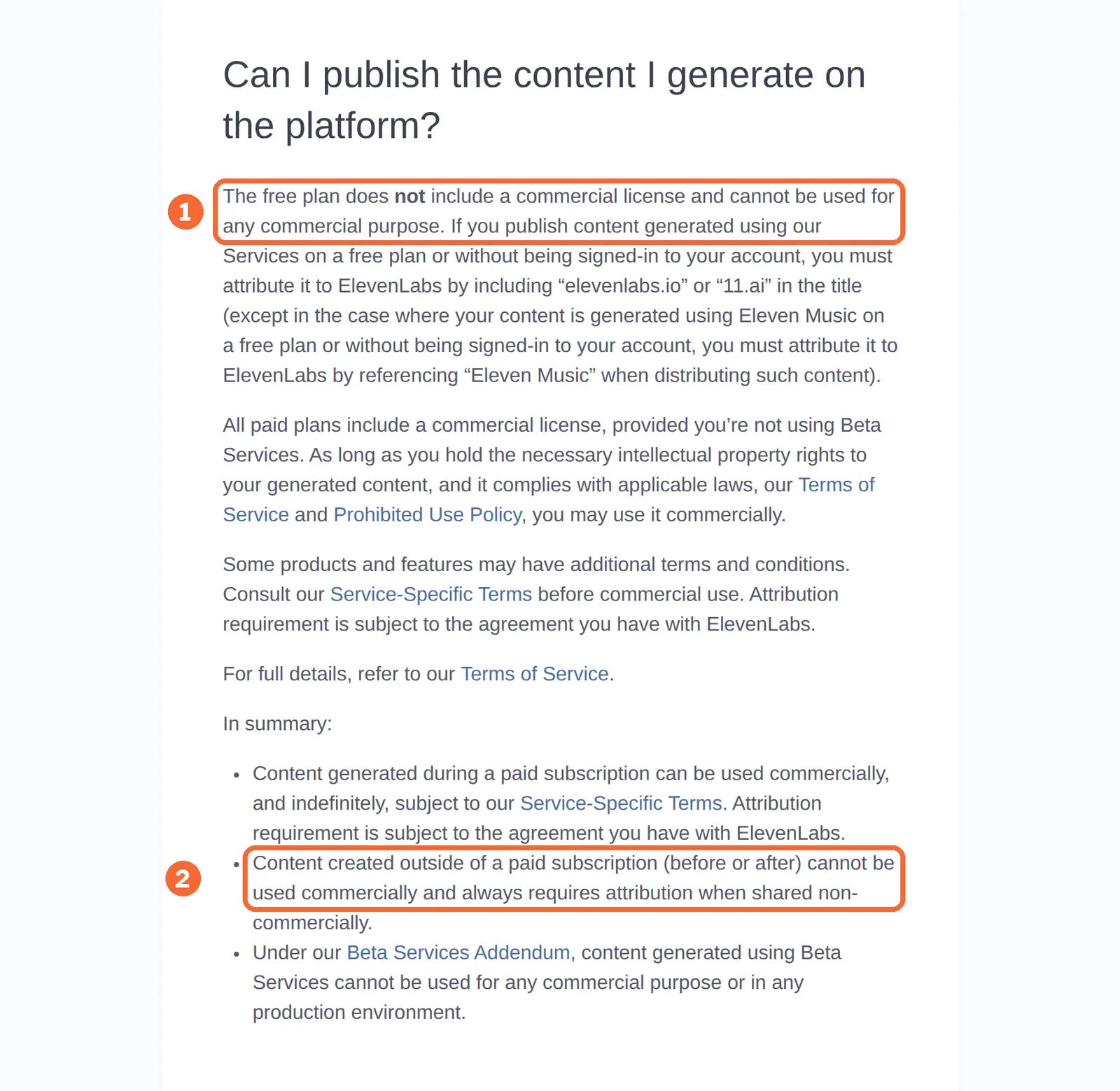
Will you sell what you make? Free output from ElevenLabs, Suno, Recraft and Kling is not for commercial use, and upgrading later does not change that for ElevenLabs files, or for Suno songs outside case-by-case exceptions.
Which free AI tool fits your task?
Ten tasks, three or four free plans each
In shortA selection by task from the tools with a published profile, not the full directory or a ranking: a tool missing here may still have a free plan.
| Task | Free plans in this guide | What usually limits the free plan |
|---|---|---|
| Chat and writing |  ChatGPT ChatGPT Claude Claude QuillBot QuillBot | Limits on uploads, images and run length; commercial terms not stated |
| Research with sources |  Perplexity Perplexity Gemini Notebook Gemini Notebook Elicit Elicit | Daily or monthly caps on deep searches and reports |
| Images and design |  Canva Canva Adobe Firefly Adobe Firefly Leonardo.Ai Leonardo.Ai Recraft Recraft | Commercial rights split: allowed on Leonardo.Ai, not on Recraft |
| Video |  Kling AI Kling AI HeyGen HeyGen Descript Descript | Every free plan here exports with a watermark |
| Presentations and diagrams |  Gamma Gamma Napkin AI Napkin AI Pitch Pitch | Badge, logo or watermark on free exports |
| Speech and voiceover |  ElevenLabs ElevenLabs TTSMaker TTSMaker TTSMP3 TTSMP3 Murf Murf | Whether the file downloads, and whether you may sell it |
| Music, audio cleanup and transcripts |  Suno Suno Auphonic Auphonic Otter.ai Otter.ai | Personal use only, a jingle, or TXT-only export |
| Coding and app building |  GitHub Copilot GitHub Copilot Replit Replit Lovable Lovable | Limited agent use; a free Replit app goes down after 30 days |
| Automation |  Zapier Zapier Make Make n8n n8n | Tasks or credits a month; n8n is free only self-hosted |
| Run it on your own computer |  Gemma 4 Gemma 4 Upscayl Upscayl FramePack FramePack | No meter, but your GPU and disk are the cost |
Free AI tools for writing, chat and research
Chat and writing
ChatGPT
Best for everyday drafting and questions
- Checked 2026-09-24
- Free plan
- Free: Projects subject to account and workspace availability; unlimited text chats with the basic model; uploads, image generation, voice, deep research and memory are limited.
- Commercial use
- Not covered in the sources checked
See the ChatGPT profile for plans, limits and sources.
Claude
Best for drafting with files and Artifacts
- Checked 2026-09-24
- Free plan
- Free: Chat, web search, file creation, code execution, Artifacts and up to five projects.
- Commercial use
- Not covered in the sources checked
- Watch for
- Training on your chats can be switched off in privacy settings.
See the Claude profile for plans, limits and sources.
QuillBot
Best for rewording a sentence or short paragraph
- Checked 2026-10-07
- Free plan
- Free: Per the pricing page: paraphrase up to 125 words in Standard and Fluency modes, basic grammar fixes, summaries up to 1,200 words, humanize up to 125 words with limited usage, limited AI detector.
- Commercial use
- Not covered in the sources checked
See the QuillBot profile for plans, limits and sources.
Sources: ChatGPT pricing, Claude pricing, QuillBot pricing.
Research with sources
Perplexity
Best for quick answers with sources you can open
- Checked 2026-10-01
- Free plan
- Free: Search with citations and basic AI models under limited usage; the Help Center comparison table puts it at 3 Pro Searches a day, 1 Research query a month and limited uploads.
- Commercial use
- Not covered in the sources checked
See the Perplexity profile for plans, limits and sources.
Gemini Notebook
Best for questions about your own documents
- Checked 2026-09-24
- Free plan
- Standard · Free, with a Google account: 100 notebooks, 50 sources per notebook, 50 chats, 3 Audio Overviews and 3 Video Overviews a day, plus 10 Deep Research runs a month.
- Commercial use
- Not covered in the sources checked
- Watch for
- Audio Overviews can be played, downloaded or shared.
See the Gemini Notebook profile for plans, limits and sources.
Elicit
Best for finding papers and keeping a cited report
- Checked 2026-09-24
- Free plan
- Basic: Unlimited search across more than 138 million papers, unlimited summaries, chat with papers and Zotero import; limited Research Agent and Research Reports usage.
- Commercial use
- Not covered in the sources checked
- Watch for
- Research Reports download as PDF or Word on Basic; table exports need Plus.
See the Elicit profile for plans, limits and sources.
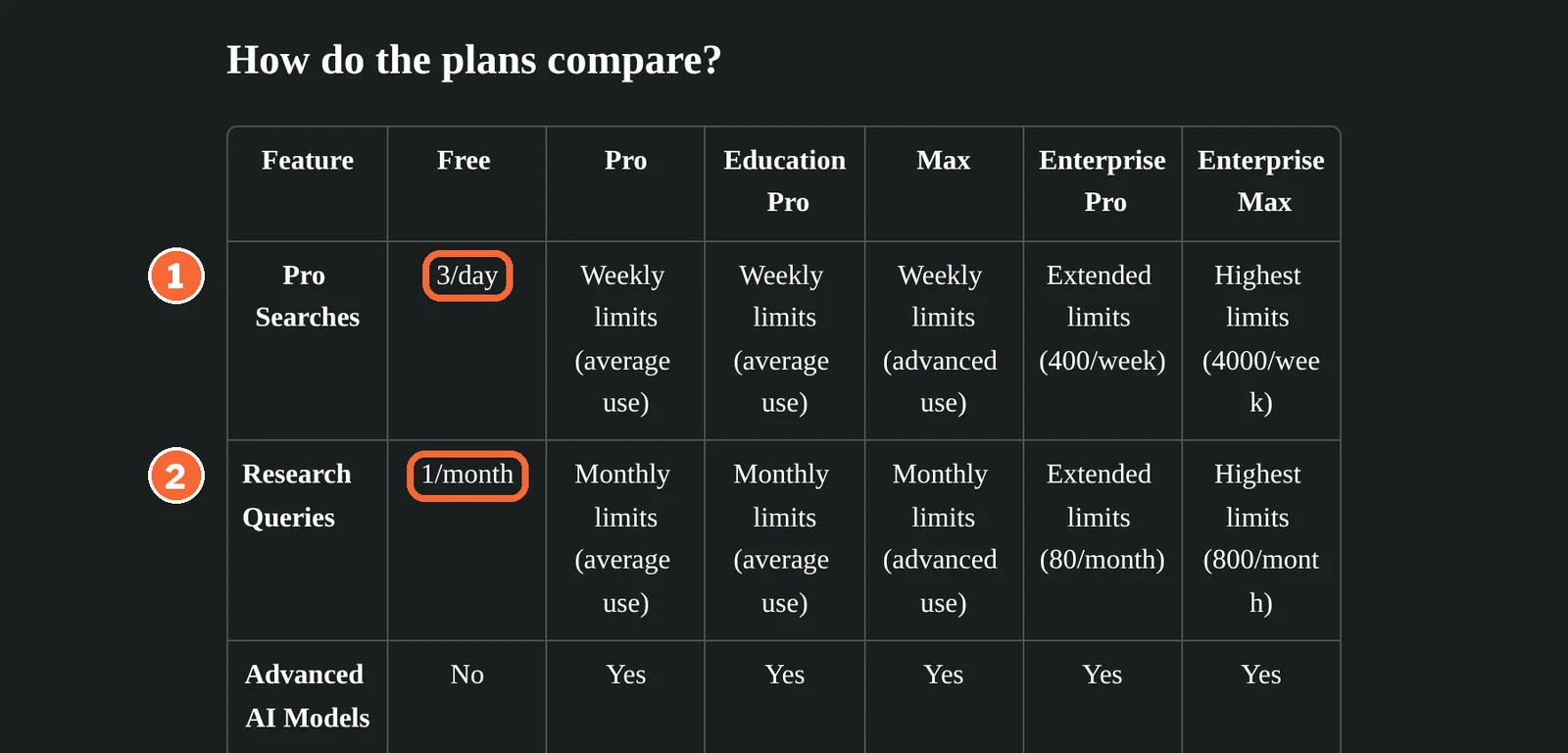
Sources: Perplexity pricing, Gemini Notebook limits, Elicit pricing.
Free AI tools for images, video and presentations
Images and design
Canva
Best for AI images placed into a template layout
- Checked 2026-10-02
- Free plan
- Free · EUR 0, for one person: Up to 20 Standard or Premium AI uses per month; 1.6M+ templates; one Brand Kit (3 colours only); 5GB storage.
- Commercial use
- Not covered in the sources checked
- Watch for
- A design with a premium element can be finished, but a download without the watermark needs a license or an upgrade.
See the Canva profile for plans, limits and sources.
Adobe Firefly
Best for daily tries across image, video and audio
- Checked 2026-09-24
- Free plan
- Firefly Free: Limited free daily generations across image, video and audio on select models; limits refresh every day.
- Commercial use
- Not covered in the sources checked
- Watch for
- Adobe attaches Content Credentials to fully generated assets.
See the Adobe Firefly profile for plans, limits and sources.
Leonardo.Ai
Best for daily image generation you may use commercially
- Checked 2026-09-24
- Free plan
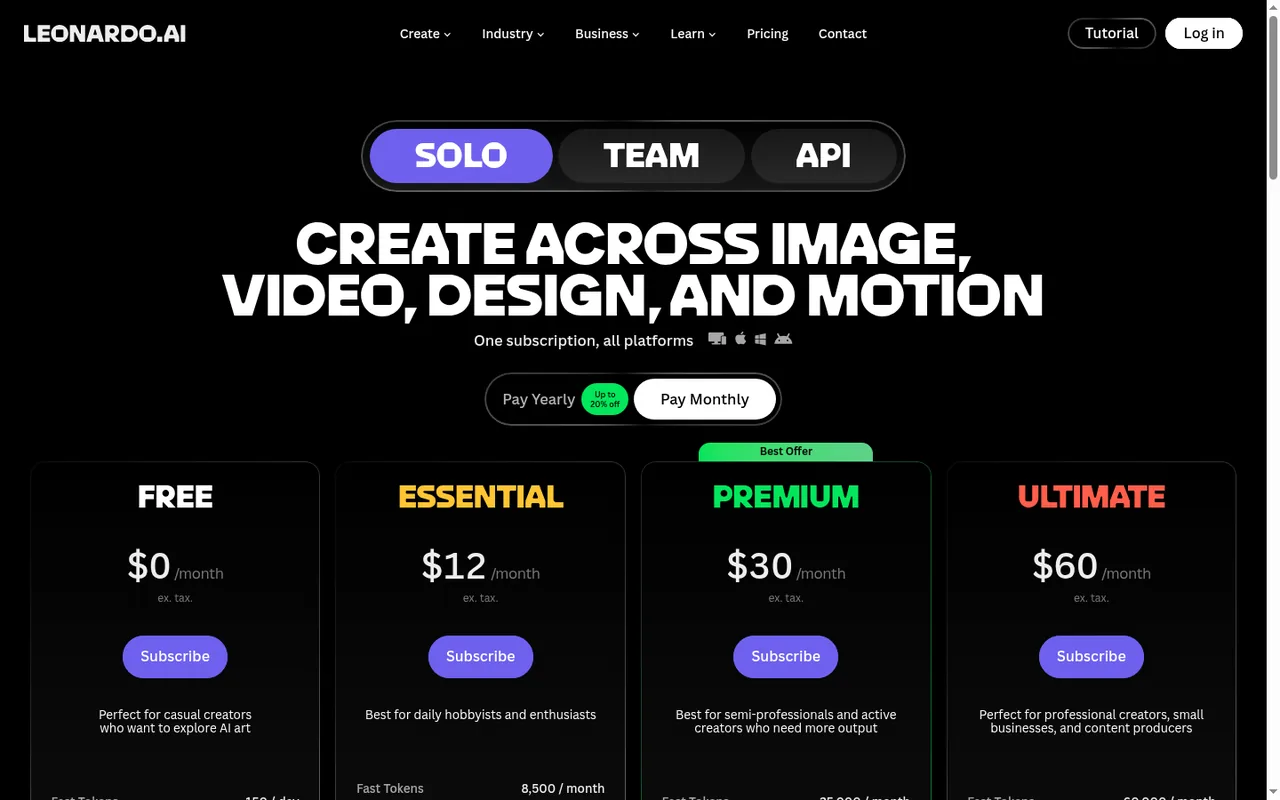
- Free · USD 0 per month: 150 fast tokens per day that do not carry over; public generations; 1 personal collection; limited Blueprints, Realtime Canvas and Elements.
- Commercial use
- Allowed: the help center says generated images may be used commercially, including by free users.
- Watch for
- Videos made on Free carry a watermark.
See the Leonardo.Ai profile for plans, limits and sources.
Recraft
Best for trying raster and vector styles before paying
- Checked 2026-10-04
- Free plan
- Recraft Free: Limited free credits, 3 generations per style per day, 3 uploads a day, up to 2 images per generation, basic editing, Recraft models only.
- Commercial use
- Not licensed: free images are owned by Recraft and shown in its community gallery.
See the Recraft profile for plans, limits and sources.
Sources: Canva pricing, Adobe Firefly plans, Leonardo.Ai pricing, Leonardo.Ai commercial usage, Recraft pricing.
Video
In shortIs there a fully free AI video maker? Not among these three: each free plan exports with a watermark.
Kling AI
Best for trying short clips from text or images
- Checked 2026-09-26
- Free plan
- Basic: Free monthly credits claimed at login, valid 31 days (amount not listed); one video per generation; no 1080p or 4K, watermark removal or commercial use.
- Commercial use
- Not on Basic: the terms let paid subscribers use generated content commercially.
See the Kling AI profile for plans, limits and sources.
HeyGen
Best for a one-minute avatar video draft
- Checked 2026-09-24
- Free plan
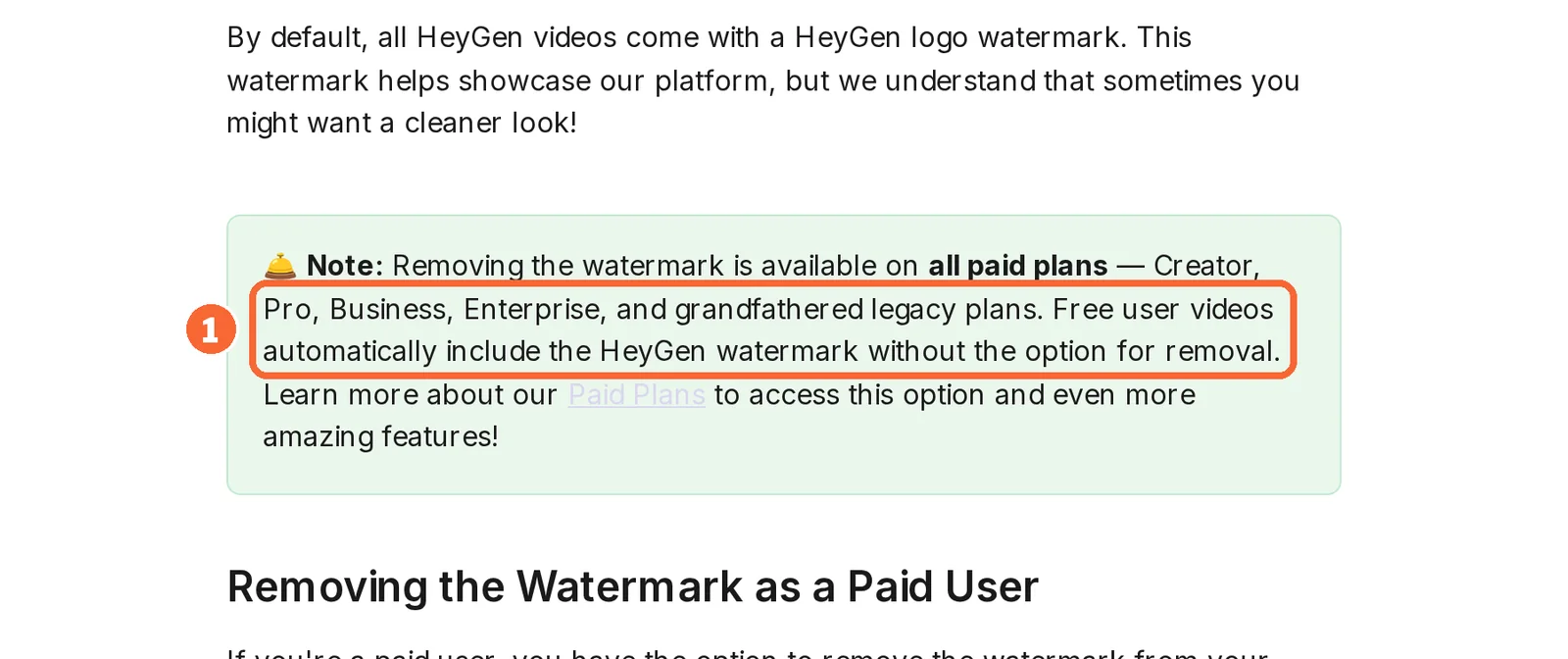
- Free · USD 0 per month, no credit card required: 3 videos per month on the pricing page (help center: 1 to 3 depending on region); videos up to 1 minute; watermark on all videos; 720p sharing link; no credits.
- Commercial use
- Not covered in the sources checked
See the HeyGen profile for plans, limits and sources.
Descript
Best for editing a recording through its transcript
- Checked 2026-09-27
- Free plan
- Free: One person, 60 media minutes per month, 100 one-time AI credits, 5GB storage. Video exports at 720p with a watermark; audio follows a separate export policy.
- Commercial use
- Not covered in the sources checked
See the Descript profile for plans, limits and sources.
Sources: Kling AI membership plans, HeyGen pricing, HeyGen watermark removal, Descript pricing.
Presentations and diagrams
Gamma
Best for a first deck drafted from a prompt
- Checked 2026-09-24
- Free plan
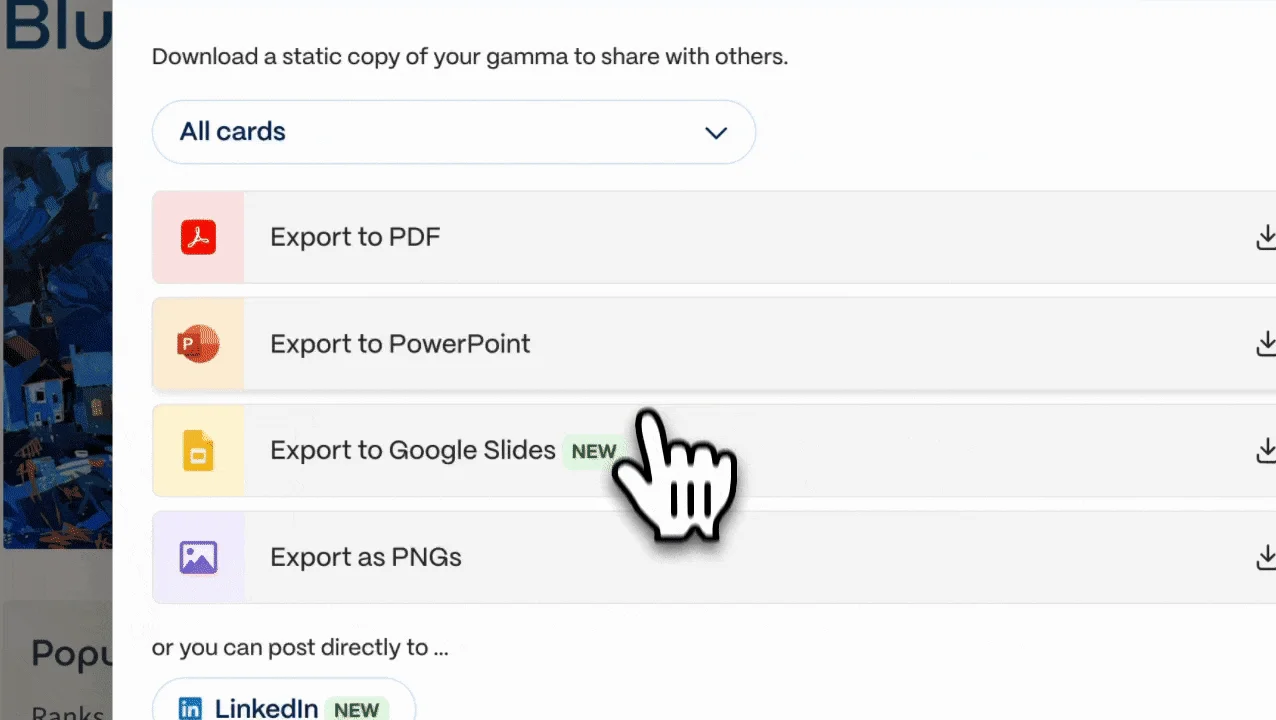
- Free · Free (EUR 0 shown): 400 credits at signup, one-time; up to 10 slides per prompt; PDF, PPTX and PNG export with a Gamma badge on PDF and PPTX files.
- Commercial use
- Not covered in the sources checked
See the Gamma profile for plans, limits and sources.
Napkin AI
Best for turning text into diagrams
- Checked 2026-09-29
- Free plan
- Free: 500 AI credits per week; unlimited editing, file import (PPT, DOC, PDF, HTML, MD) and PNG and PDF export; built-in styles and standard icons; Napkin branding on visuals.
- Commercial use
- Not covered in the sources checked
- Watch for
- SVG and PPT export need Plus or Pro.
See the Napkin AI profile for plans, limits and sources.
Pitch
Best for co-editing decks with up to five people
- Checked 2026-09-24
- Free plan
- Free · Free, forever: Up to 5 members and 2 guests; 100 AI credits once, which do not refresh; branded PDF export.
- Commercial use
- Not covered in the sources checked
- Watch for
- A PDF drops speaker notes and comments.
See the Pitch profile for plans, limits and sources.
For a full deck rather than one visual, the presentation task page compares more tools on that job.
Sources: Gamma pricing, Gamma export help, Napkin AI pricing, Napkin watermark help, Pitch pricing, Pitch PDF export.
Free AI tools for voice, music and audio
Speech and voiceover
ElevenLabs
Best for personal narration you can credit
- Checked 2026-09-25
- Free plan
- Creative Free · Free, no card (10,000 credits a month): Noncommercial use with attribution; three custom voice slots for Voice Design.
- Commercial use
- Noncommercial only, with attribution when published.
See the ElevenLabs profile for plans, limits and sources.
TTSMaker
Best for free voiceover files for commercial projects
- Checked 2026-09-27
- Free plan
- Free: 20,000 characters per week; selected unlimited voices have separate conditions.
- Commercial use
- Allowed under the provider terms.
- Watch for
- Free history is short-lived, so save the file at once; the per-conversion limit depends on the voice.
See the TTSMaker profile for plans, limits and sources.
TTSMP3
Best for short daily voice lines as MP3
- Checked 2026-09-29
- Free plan
- Free: Regular Voices up to about 3,000 characters (about 375 words) a day; AI Voices up to about 1,000 characters (about 125 words) a day; MP3 download; ads shown.
- Commercial use
- Allowed: the FAQ permits free MP3s in commercial projects without crediting TTSMP3.
See the TTSMP3 profile for plans, limits and sources.
Murf
Best for auditioning voices on your own script
- Checked 2026-09-25
- Free plan
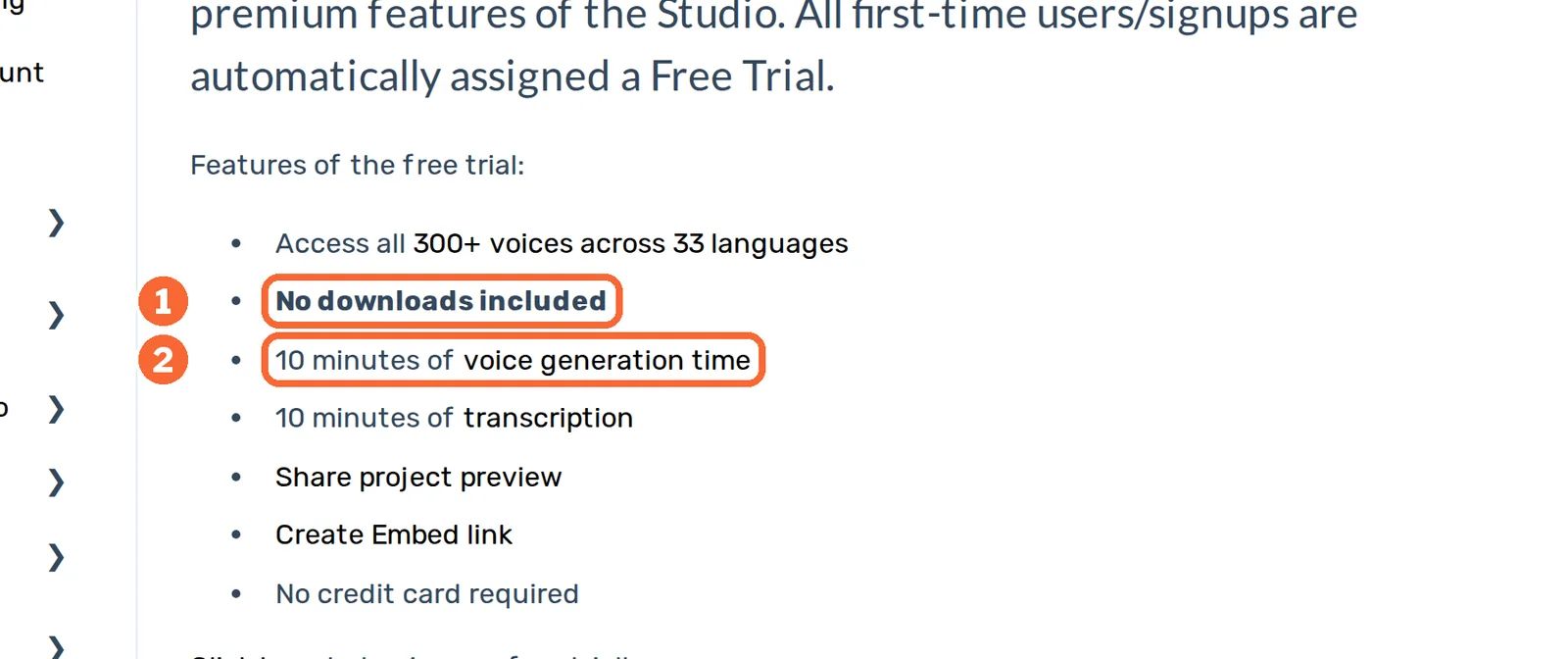
- Free · USD 0, no credit card required: 10 minutes of voice generation (one-time), 10 projects, 1 editor; no downloads and no commercial rights.
- Commercial use
- No commercial rights on Free.
- Watch for
- HTML Embed works on Free; removing Murf branding from the player is Enterprise only.
See the Murf profile for plans, limits and sources.
For pronunciation fixes and handing over the final file, follow the voiceover workflow.
Sources: ElevenLabs pricing, Eleven Rights, TTSMaker free converter, TTSMaker terms, TTSMP3 FAQ, Murf pricing, Murf free-plan downloads.
Music, audio cleanup and transcripts
Suno
Best for personal songs from a prompt or your lyrics
- Checked 2026-09-26
- Free plan
- Free · EUR 0, no credit card required: 50 credits a day (about 10 songs), v6-mini model, personal non-commercial use only, no monthly downloads, no stem separation, shared queue of 4 generations.
- Commercial use
- Personal, non-commercial use only.
See the Suno profile for plans, limits and sources.
Auphonic
Best for leveling and cleaning podcast audio
- Checked 2026-09-24
- Free plan
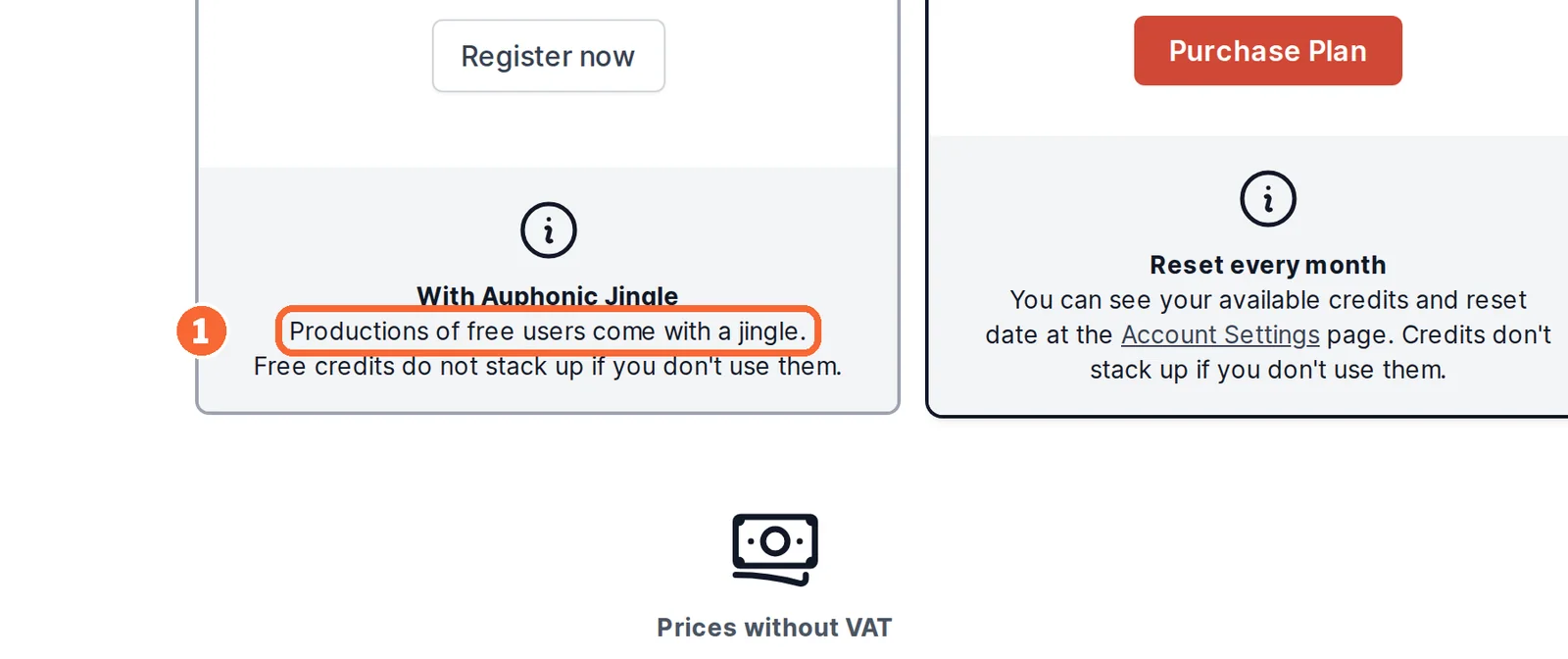
- Auphonic Free: 2 hours of processed audio per month; productions include an Auphonic jingle; unused free hours do not carry over; no speech recognition, watch folders or batch productions.
- Commercial use
- Not covered in the sources checked
See the Auphonic profile for plans, limits and sources.
Otter.ai
Best for transcribing meetings of up to 30 minutes
- Checked 2026-09-26
- Free plan
- Basic · USD 0, free with no end date: 300 transcription minutes a month, 30 minutes per conversation, 3 lifetime file imports, 25 most recent conversations, 20 AI Chat queries a month, TXT export.
- Commercial use
- Not covered in the sources checked
See the Otter.ai profile for plans, limits and sources.
Sources: Suno pricing, Suno free-plan rights, Auphonic pricing, Otter pricing, Otter Basic plan limits.
Free AI tools for coding, automation and running models yourself
Coding and app building
GitHub Copilot
Best for adding AI to the editor you already use
- Checked 2026-10-02
- Free plan
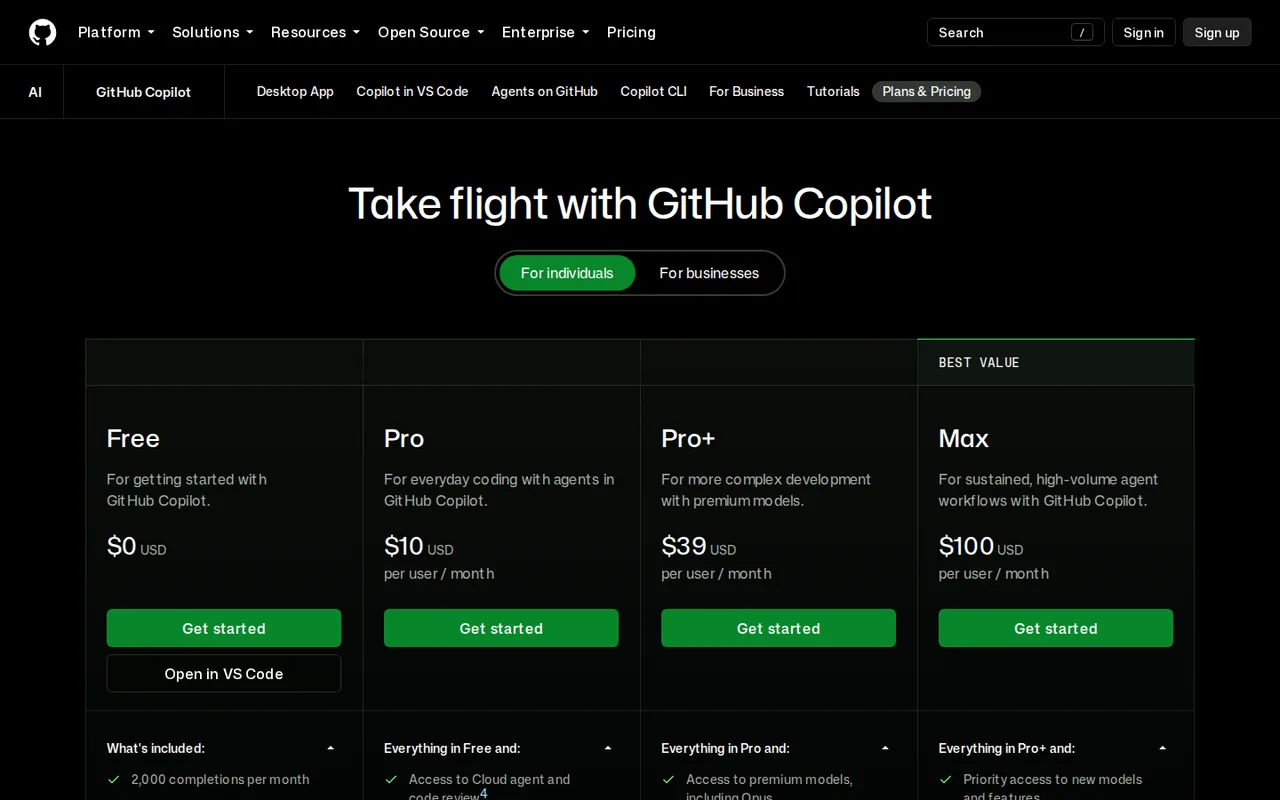
- Free: Limited chat and agent usage; 2,000 inline completions per month; no cloud agent or paid code review.
- Commercial use
- Not covered in the sources checked
See the GitHub Copilot profile for plans, limits and sources.
Replit
Best for a prototype that needs a live link
- Checked 2026-10-05
- Free plan
- Starter: Limited daily Agent credits up to a monthly cap, monthly credits for databases, storage and publishing; one free published app that goes down after 30 days; Lite build only.
- Commercial use
- Not covered in the sources checked
- Watch for
- The pricing page we read showed no Starter card; confirm the free plan in your account.
See the Replit profile for plans, limits and sources.
Lovable
Best for building a web app by chat and keeping the code
- Checked 2026-09-26
- Free plan
- Free: 5 build credits a day, up to 30 a month; 20 Cloud and 4 AI credits a month; 5 lovable.app domains; Git sync; read-only code editor.
- Commercial use
- Allowed: Lovable states you own the apps and code you create and may use the code commercially.
See the Lovable profile for plans, limits and sources.
Sources: GitHub Copilot plans, Replit Starter plan, Lovable pricing, Lovable hosting and ownership.
Automation
Zapier
Best for simple trigger-and-action automations
- Checked 2026-09-24
- Free plan
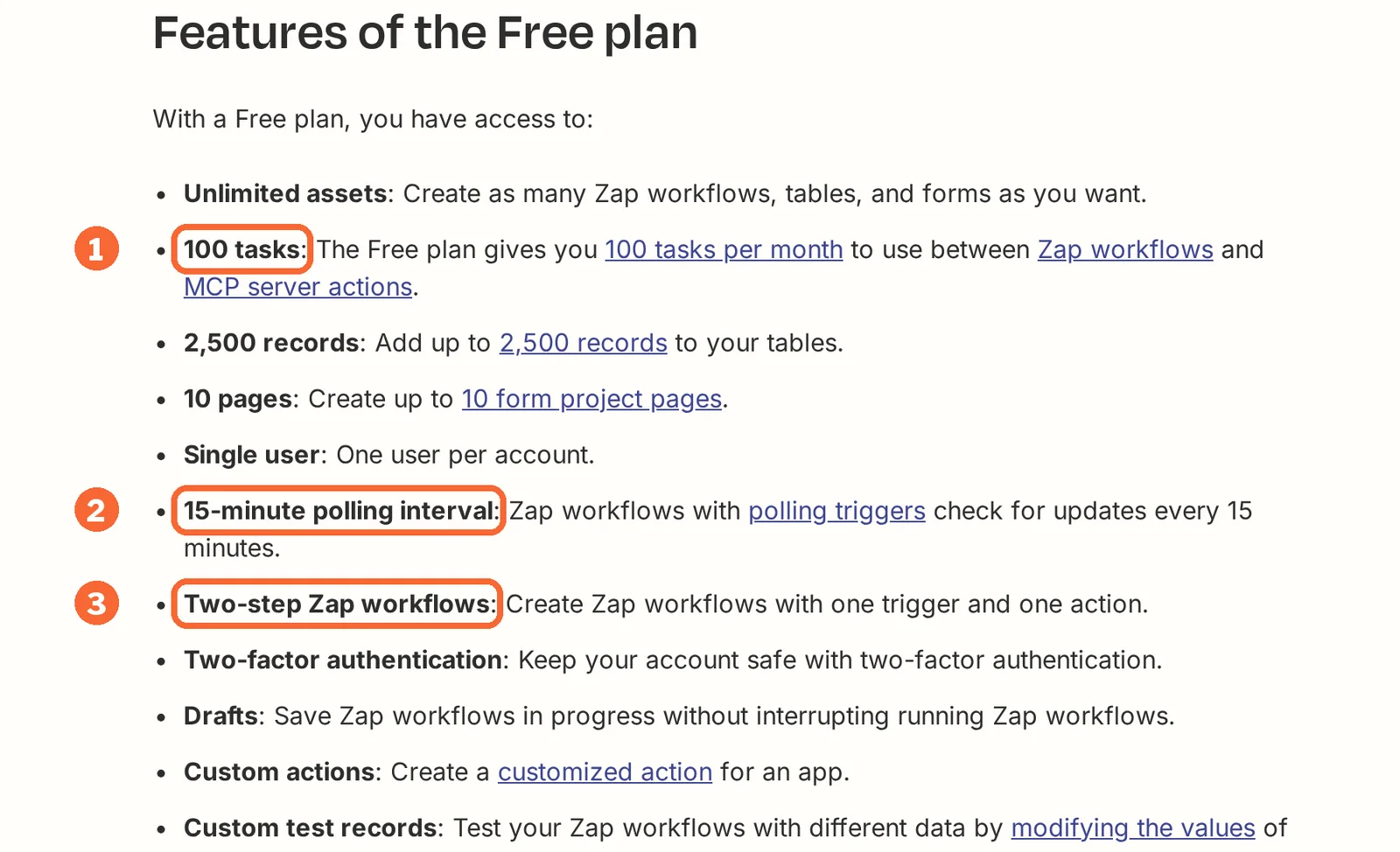
- Free: 100 tasks per month, unlimited Zaps, Tables and Forms, two-step Zaps and 15-minute polling.
- Commercial use
- Not covered in the sources checked
See the Zapier profile for plans, limits and sources.
Make
Best for small visual scenarios on a schedule
- Checked 2026-09-25
- Free plan
- Free: Up to 1,000 monthly credits, 2 active scenarios and a 15-minute minimum scheduled interval.
- Commercial use
- Not covered in the sources checked
- Watch for
- Free keeps execution logs for 7 days.
See the Make profile for plans, limits and sources.
n8n
Best for teams that can run their own server
- Checked 2026-09-24
- Free plan
- Community: Self-hosted with no time limit; servers, upkeep and external services are yours to run.
- Commercial use
- Not covered in the sources checked
- Watch for
- n8n Cloud has no free plan after its 14-day trial.
See the n8n profile for plans, limits and sources.
Sources: Zapier Free plan, Make pricing, n8n pricing.
Run it on your own computer
Gemma 4
Best for a model you host and may use commercially
- Checked 2026-09-29
- Free plan
- Open weights (Apache 2.0): All five sizes in pre-trained and instruction-tuned versions from Hugging Face, Kaggle or Ollama; commercial use permitted; you pay only for your own hardware, storage and power.
- Commercial use
- Allowed: the Apache 2.0 license permits commercial use.
- Watch for
- The 31B size needs 17.5 GB of GPU memory even at 4-bit.
See the Gemma 4 profile for plans, limits and sources.
Upscayl
Best for enlarging small images on your own GPU
- Checked 2026-10-02
- Free plan
- Upscayl desktop app: Free and open source (AGPL-3.0); runs on your own Vulkan-compatible computer.
- Commercial use
- Not covered in the sources checked
- Watch for
- Many CPUs and integrated GPUs do not work, and it cannot fix out-of-focus photos.
See the Upscayl profile for plans, limits and sources.
FramePack
Best for image-to-video on an NVIDIA desktop
- Checked 2026-09-28
- Free plan
- Free (open source, Apache-2.0): Repository code and Windows one-click package at no charge; your costs are an NVIDIA GPU, disk space and electricity.
- Commercial use
- Not for vendor-supported commercial work: the model weights download separately with no declared license.
- Watch for
- Needs an NVIDIA RTX 30, 40 or 50 GPU with at least 6 GB; first use downloads more than 30 GB of models.
See the FramePack profile for plans, limits and sources.
Sources: Gemma 4 license, Gemma 4 memory requirements, Upscayl README, FramePack repository.
Free plans side by side: output rights and resets
What you may do with free output
In short5 of the 32 free plans state that output may be used commercially; 21 profiles do not say.
| Rule on the free plan | Tools |
|---|---|
| Commercial use stated | Leonardo.Ai, TTSMaker, TTSMP3, Lovable, Gemma 4 |
| Not for commercial use | ElevenLabs, Suno, Recraft, Kling AI, Murf; FramePack weights carry no declared license |
| Rights fixed when the file is made | ElevenLabs, Suno: a later upgrade does not convert free files (Suno allows case-by-case exceptions) |
| A mark stays on the output | Watermark: HeyGen, Descript, Kling AI; badge, logo or watermark: Gamma, Napkin AI, Pitch; jingle: Auphonic |
| Little or nothing to keep | Murf (no downloads), Otter.ai (transcripts as TXT only), Replit (free app down after 30 days) |
| Public by default | Leonardo.Ai (public generations), Recraft (community gallery) |
| Not stated in the profile sources | ChatGPT, Claude, QuillBot, Perplexity, Gemini Notebook, Elicit, Canva, Adobe Firefly, HeyGen, Descript, Gamma, Napkin AI, Pitch, Auphonic, Otter.ai, GitHub Copilot, Replit, Zapier, Make, n8n, Upscayl |
For client delivery, plan for the first paid tier that removes the mark, and keep unreleased work off plans that publish generations.
Sources: Leonardo.Ai commercial usage, TTSMP3 FAQ, Eleven Rights, Suno free-plan rights.
Daily, weekly, monthly or once: how free allowances reset
In shortA daily allowance you skip is gone; a one-time allowance never comes back. Each sum stays in the tool’s own unit; units are never added together.
| Resets | Tool and free allowance | Over a 30-day month, in the tool’s own unit |
|---|---|---|
| Daily | Leonardo.Ai: 150 fast tokens | 4,500 tokens (150 × 30), if used every day |
| Daily | Suno: 50 credits, about 10 songs | About 300 songs, for personal use |
| Daily | TTSMP3: about 3,000 characters, Regular Voices | About 90,000 characters |
| Daily | Perplexity: 3 Pro Searches | About 90, but 1 Research query a month |
| Daily, capped | Lovable: 5 build credits, 30 a month | Cap reached after 6 full days |
| Weekly | TTSMaker: 20,000 characters | 80,000 over four weeks |
| Weekly | Napkin AI: 500 AI credits | 2,000 over four weeks |
| Monthly | Otter.ai: 300 minutes, 30 per conversation | 10 full-length conversations |
| Monthly | Zapier: 100 tasks, 1 per two-step run | About 3 runs a day |
| Monthly | Make: 1,000 credits | An hourly check uses about 720 |
| Monthly | Auphonic: 2 hours, 3-minute minimum per production | 40 short productions at most |
| Once | Gamma: 400 credits; Pitch: 100 AI credits; Murf: 10 minutes | Murf’s 10 minutes cover about 1,700 words |
| No meter | n8n Community, Gemma 4, Upscayl, FramePack | Hardware, disk and power |
Sources: Leonardo.Ai pricing, Suno pricing, TTSMaker free converter, Zapier Free plan, Make pricing, Auphonic pricing.
Sums assume each allowance is used in full; they are not observed usage.
Questions, and what this guide does not judge
Common questions
Is there an AI for free?
Yes. Many AI tools keep a free plan with no end date. Claude Free covers chat, web search, file creation and Artifacts, Perplexity Free keeps cited search with a few Pro Searches a day, and Gemini Notebook's Standard access needs only a Google account. Each one caps something different, such as research runs or daily overviews, so match the cap to your task.
Is there a 100% free AI video maker?
Not among the video tools profiled here. Kling's Basic plan gives monthly credits but no watermark removal or commercial use, HeyGen marks every free video and stops it at one minute, and Descript exports free video at 720p with a watermark. Removing the mark starts on the first paid plan: Standard on Kling, Creator on HeyGen, Hobbyist on Descript.
Can I use output from free AI tools commercially?
Only where the vendor says so. TTSMaker and TTSMP3 allow free MP3s in commercial projects, Leonardo.Ai's help center permits commercial use of images made on Free, and Gemma 4 is released under Apache 2.0. ElevenLabs, Suno and Recraft rule it out on Free; for ElevenLabs a later upgrade does not change files already made, and Suno allows that only case by case.
Do free AI plans reset every month?
Not all of them. Leonardo.Ai, Suno and TTSMP3 refill every day, TTSMaker and Napkin AI every week, and ElevenLabs, Zapier, Make and Otter.ai every month. Gamma's 400 credits, Pitch's 100 AI credits and Murf's 10 minutes of voice generation arrive once and never refill. Leonardo.Ai's daily tokens and Auphonic's free hours do not carry over.
Is ChatGPT free to use?
Yes. On the Free plan, chatting by text with the basic model has no limit, while file uploads, image creation, voice, deep research and memory each have caps. Paying raises those caps: Go is listed at EUR 8 a month as a local price that may include ads, and Plus costs USD 20 a month.
What free AI tools are on this list?
The list covers 32 AI tools with an ongoing free plan, grouped into ten tasks: chat and writing, research, images and design, video, presentations, speech, music and audio, coding, automation, and tools you run on your own computer. Each task has three or four plans with the free limit, reset and output rights. It is a selection from published profiles, not every free tool.
What this guide does not judge
Which assistant writes better, which image or voice is more natural, and how fast or easy each tool is are what most free AI lists rank on. The vendor pages behind this guide do not document these, so they are not judged here and no tool is called the best.
Google Gemini, Microsoft Copilot, CapCut, Codeium, Phind, OpenRouter, Groq and Google AI Studio appear in other free AI lists. They are left out until each has a profile with checked plan terms. Free trials of paid plans are not listed.
Pick one real deliverable, such as a 60-second narration or a 10-slide deck, and one tool from its task. On the free plan, note the allowance before and after one complete attempt, export the file, reopen it on another device and compare it with the plan’s stated marks and rights.
How this guide was made
The 32 tools come from this site’s published profiles that record an ongoing free plan. Each card’s free plan text and check date are read from the profile when the page is built; profiles cite the vendors’ pricing, help and license pages. Sections follow the topics top-ranking free AI lists cover. No rating is given. See our editorial policy.