
Wordtune vs Jasper
Plans, free access, limits and intended use side by side, taken from each vendor’s own pages. No score and no winner: the facts show where the two differ.
Change tools
Metered by daily rewrites and monthly summaries

Marketing-focused AI workspace for on-brand copy, agents and content pipelines.
- Free access
- Wordtune: Free access
- Jasper: Free trial only
- Paid from
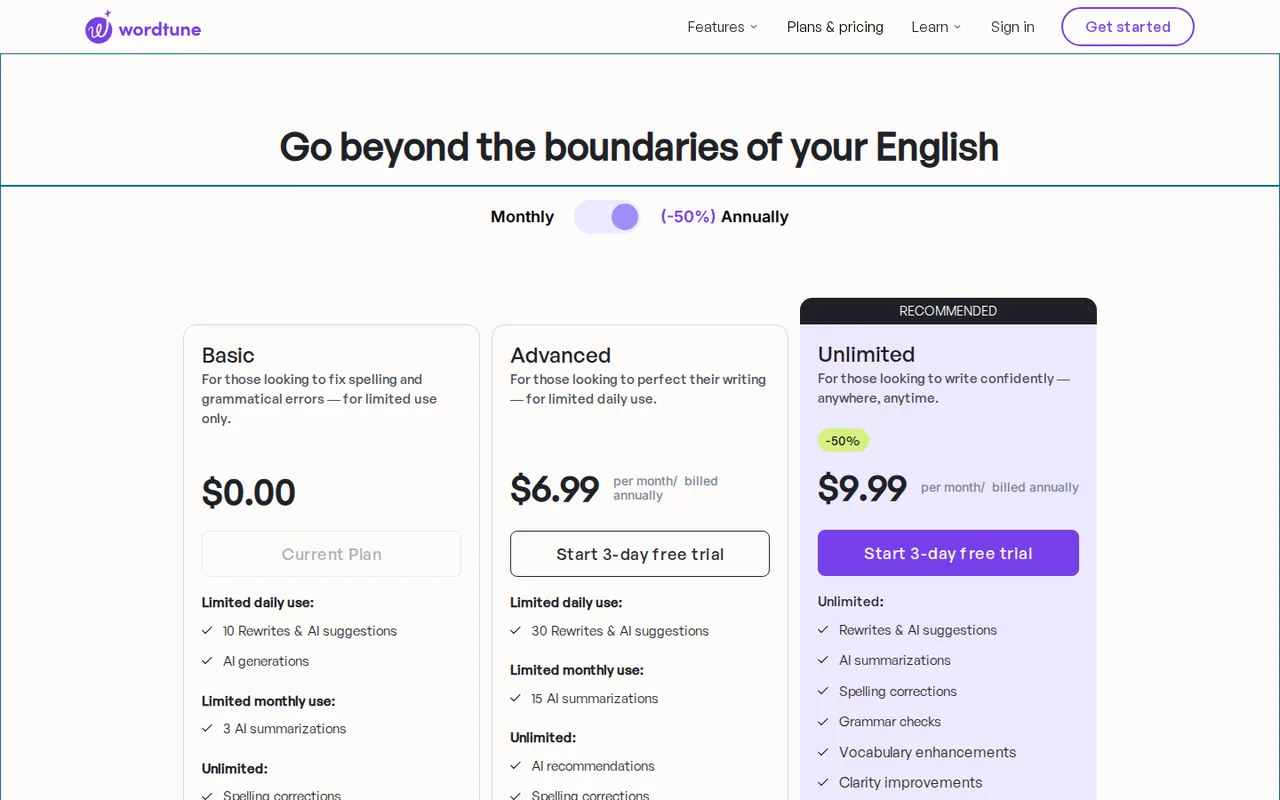
- Wordtune: USD 13.99 per month billed monthly; $6.99 per month billed annually
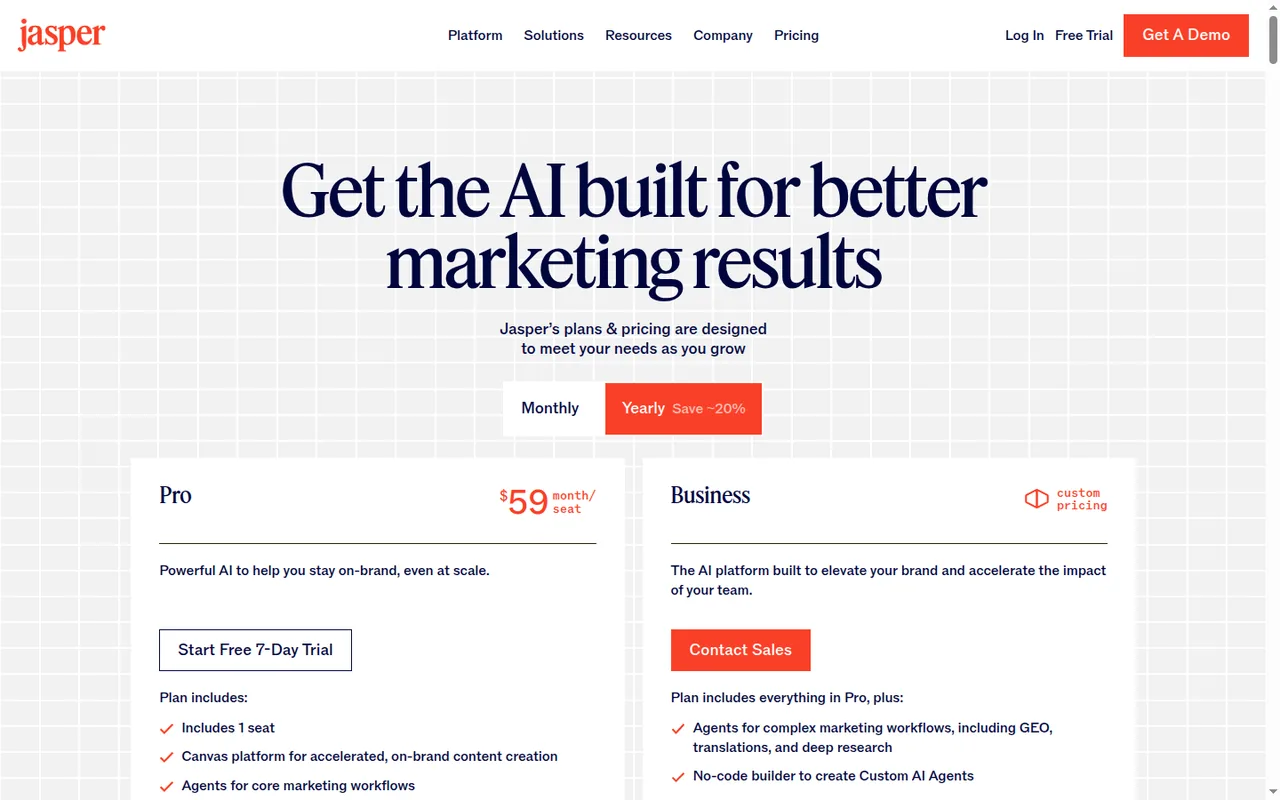
- Jasper: USD 59 per month
- Plans listed
- Wordtune: 4
- Jasper: 3
- Public API
- Wordtune: Not confirmed
- Jasper: Yes
Where Wordtune and Jasper differ
- AccessWordtune offers free access, while Jasper offers a free trial only.
- Pricing checkPrices confirmed for Wordtune; pricing review due for Jasper.
- PlansWordtune lists 4 plans and Jasper lists 3.
Head to head
Each value from the tool’s profile and the vendor’s own pages
| Wordtune | Fact | Jasper |
|---|---|---|
| Access and price | ||
| Free access availableBasic · USD 0 | Free accessDiffers | Free trial onlyFree trial · Free for 7 days |
| USD 13.99 per month billed monthly; $6.99 per month billed annuallyAdvanced | Lowest listed paid plan | USD 59 per monthPro · billed yearly · USD 69 billed monthly |
| Free; Advanced $13.99/mo monthly or $6.99/mo billed annually | Pricing model | 7-day trial; Pro from USD 59; Business custom |
| 4 | Plans listedDiffers | 3 |
| Not confirmed | Public API | Yes |
| Not confirmed | Card to start | Required |
| Not confirmed | Open source | No |
| What it is for | ||
| Rewriting and adjusting the tone of your own drafts in the browser | Built for | On-brand marketing copy with stored brand context |
| Writing & content | CategorySame | Writing & content |
| Platforms |
|
| Not listed | Works with |
|
| How current | ||
| Profile sources checked | ||
| Prices confirmed · Oct 4, 2026 | Pricing checkDiffers | Pricing review due · Sep 24, 2026 |
Official source check for both tools. No hands-on testing and no score: “Differs” marks a documented difference, not a better tool.
Plans and prices
Wordtune
Prices confirmed · Oct 4, 2026- BasicUSD 0
- AdvancedUSD 13.99 per month billed monthly; $6.99 per month billed annually
- UnlimitedUSD 19.99 per month billed monthly; $9.99 per month billed annually
- BusinessCustom or not stated
Jasper
Pricing review due · Sep 24, 2026- Free trialFree for 7 dayscredit card required
- ProUSD 59 per monthbilled yearly · USD 69 billed monthly
- BusinessContact provider
Strengths and limits
Wordtune
Strengths
- Free plan has no card requirement: The home page says the free tier needs no credit card.
- Limits are stated per plan: The pricing page lists daily and monthly numbers for Basic and Advanced.
- Works inside common writing apps: The FAQ lists Google Docs, Gmail, Slack and LinkedIn among supported places.
Limits to plan around
- Free rewrites run out quickly: Basic lists 10 rewrites per day and only 3 summaries per month.
- Meaning can change: Wordtune says a suggestion may slightly change the meaning of the text.
- No refunds: The FAQ says subscriptions are not refundable at this time.
Jasper
Strengths
- Brand, audience and product context in one place: Brand Voices, Audiences and knowledge assets apply to Chat, agents and documents instead of being pasted into each prompt.
- Monthly billing without commitment: Pro at USD 69 a month can be cancelled anytime, with access kept to the end of the billing cycle.
- Several download formats: Finished assets download as Word, PDF, plain text or Markdown files.
Limits to plan around
- No free plan: Access starts with a 7-day trial that requires a credit card and rolls into a paid subscription unless cancelled.
- Pro is a single seat: Collaboration, sharing, team analytics and extra users all require the custom-priced Business plan.
- Key features gated to Business: API access, Studio custom agents, Grid, the Style Guide and SSO are listed for Business only.
See both products

Start from your task, not from a winner.
Run both tools on the same real task, then compare the result, how much editing it needs and how fast it uses your plan’s allowance.
How we reviewChange this pair
Choose tools
Choose two tools below. You can replace either selection at any time.
Audio & voice
Automation
Coding
Data & spreadsheets
Images & design
Presentations
Research & sources
Video & editing
Website builders
Writing & content
Comparing tools from different categories is fine, and often useful — a writing assistant and a research tool solve different halves of the same job. The table will show you exactly where they diverge.
Questions about comparing tools
How does the comparison work?
Add two tools to the comparison tray from any tool card, then open this page. The table pulls each tool's verified plan details, platforms, strengths and limits from its profile, so both columns carry the same kind of evidence, with a separate source-check date for each tool.
Do you declare a winner?
No. The table sets two tools against each other on documented facts, not on a score. Which one wins depends on your task, your budget and your usage volume — three things we cannot see from here.
Why are some cells empty or marked unverified?
Because we could not confirm that detail on the vendor's own pages. Rather than filling the gap with a figure from elsewhere, we mark it and say why on the tool's profile.
Can I compare more than two tools?
Not at once. Two columns keep the differences readable and force a real decision. Remove either selected tool to replace it, or clear both to start a new pair.
Every figure in the table above comes from the linked profile, where the source and the verification date are listed. Browse all tools or read the editorial policy.