


Wordtune: rewrites inside Docs, Gmail and Slack, but Basic stops at 10 a day and Advanced costs $13.99 per month
Updated October 4, 2026 · By Elias Brandt · Documentation review, not tested hands-on
Pros
- Free plan has no card requirement
- Limits are stated per plan
- Works inside common writing apps
Cons
- Free rewrites run out quickly
- Meaning can change
- No refunds
Bottom line
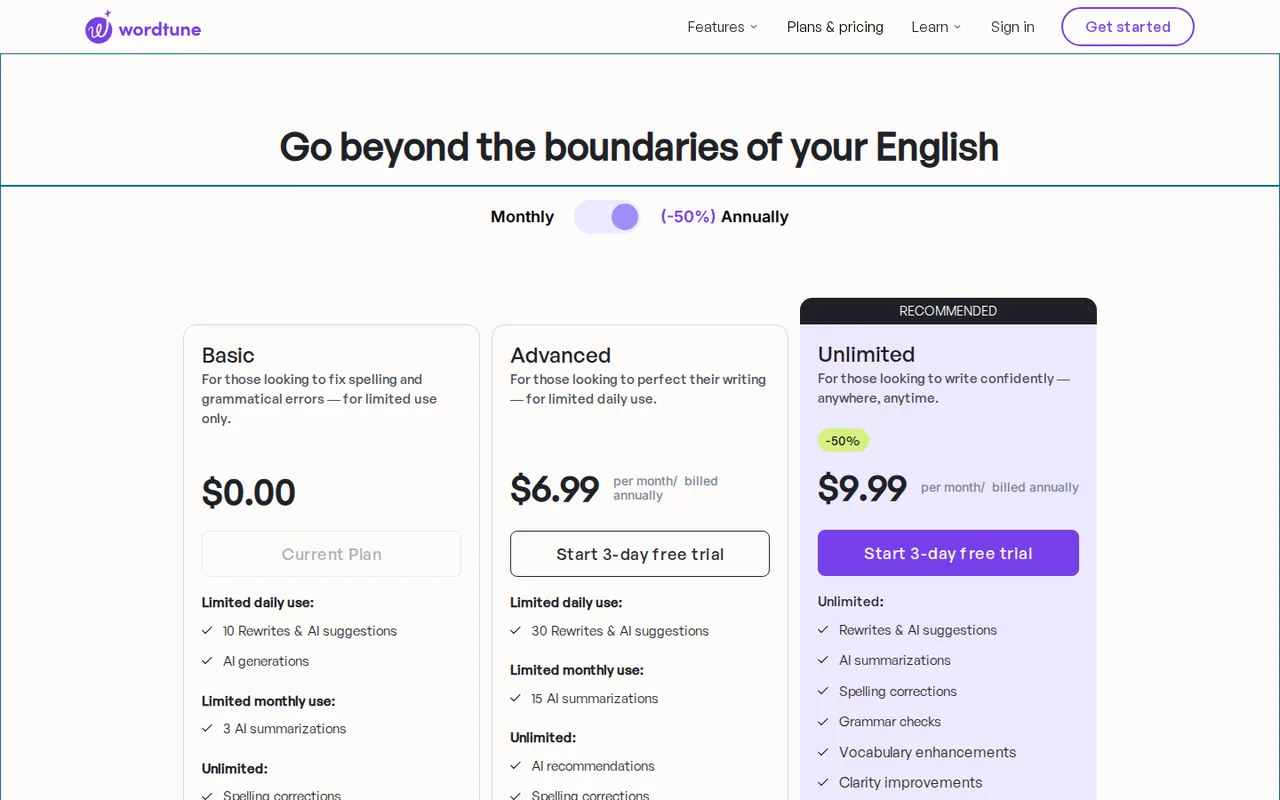
10 rewrites and AI suggestions per day; 3 AI summarizations per month; unlimited spelling corrections and grammar checks.
You polish a few short emails or messages a day in Gmail, Google Docs, Slack or LinkedIn: Basic needs no card and gives 10 rewrites daily.
You expect a refund if a paid plan disappoints: the FAQ says subscriptions are not refundable, so use Basic or the 3-day trial before paying.
Best forWriters polishing short emails and messagesHeavy daily editorsNon-native English writers
Strengths, limits and who it suits, in full
Strengths
- Free plan has no card requirement The home page says the free tier needs no credit card.
- Limits are stated per plan The pricing page lists daily and monthly numbers for Basic and Advanced.
- Works inside common writing apps The FAQ lists Google Docs, Gmail, Slack and LinkedIn among supported places.
Limits
- Free rewrites run out quickly Basic lists 10 rewrites per day and only 3 summaries per month.
- Meaning can change Wordtune says a suggestion may slightly change the meaning of the text.
- No refunds The FAQ says subscriptions are not refundable at this time.
Who it suits
- Writers polishing short emails and messages 10 daily rewrites on Basic cover a handful of short messages a day.
- Heavy daily editors Unlimited is the only tier listed without a rewrite cap.
- Non-native English writers the translate-into-English feature supports ten source languages.
How much does Wordtune cost?
Prices confirmed · checked
- $13.99Advanced
- $19.99Unlimited
Regional prices: Browser toggles checked on 2026-10-04: Advanced $13.99 per month billed monthly or $6.99 per month billed annually; Unlimited $19.99 monthly or $9.99 per month billed annually.
The annual display advertises about 50% off; no exact annual invoice is inferred. Paid plans offer a 3-day trial; confirm payment and renewal terms before starting. The FAQ says subscriptions are not refundable. Business pricing is not stated.
| Plan | Price | What you get |
|---|---|---|
| Basic | $0 sourceFrom wordtune.com/plans, checked Oct 4, 2026 (opens in a new tab) | 10 rewrites and AI suggestions per day; 3 AI summarizations per month; unlimited spelling corrections and grammar checks. |
| Advanced | $13.99 per month billed monthly; $6.99 per month billed annually sourceFrom wordtune.com/plans, checked Oct 4, 2026 (opens in a new tab) | 30 rewrites and AI suggestions per day; 15 AI summarizations per month; unlimited AI recommendations, spelling and grammar checks; 3-day free trial requiring payment details. Annual total not stated. |
| Unlimited | $19.99 per month billed monthly; $9.99 per month billed annually sourceFrom wordtune.com/plans, checked Oct 4, 2026 (opens in a new tab) | Unlimited rewrites, AI suggestions and summaries; vocabulary, clarity and fluency features; premium support; 3-day free trial requiring payment details. Annual total not stated. |
| Business | Custom or not stated | Team plan available self-serve or through sales; price not on the pages read. |
How far does it go?
- Count requests, not emailsIllustrative workload: five sentences with two rewrite attempts each already uses ten requests if each attempt counts once. Basic lists ten daily rewrites, but the provider pages do not define every billable interaction. Record the account meter before planning the workload; do not assume unused daily capacity is banked.
Arithmetic from the published allowances above, not a usage test.
Taxes, currency and promotions can change the price you see at checkout.
Try Wordtune free (opens in a new tab)
Key features
| Feature | What it does | Watch out |
|---|---|---|
| Rewrite suggestions for sentences and paragraphs | — | |
| Tone changes between casual and formal, and expand or shorten | — | |
| AI summaries of text, articles and videos | — | |
| Grammar and spelling checks | — | |
| Translation from ten languages into English | Spanish, Mandarin, Arabic, Hindi, Korean, Hebrew, Russian, German, French or Portuguese can be translated into English, then rewritten. | Output language is English. |
| Chrome and Edge extensions, web editor and iOS app | — | |
| Daily and monthly meters | Basic lists 10 rewrites and AI suggestions per day and 3 summaries per month; Advanced lists 30 and 15; Unlimited lists no cap. | The pages read do not say when the daily count resets. |
| Tone and length controls | The FAQ describes casual-to-formal tone changes, expanding and shortening, and paragraph rewrites as Premium features. | The FAQ predates the current tiers, so the tier that unlocks each is not confirmed. |
Protect commitments when polishing an email
A smoother sentence can still be a worse business message if it changes a deadline, removes a qualification or turns a possibility into a promise. Wordtune’s FAQ acknowledges that suggestions can shift meaning. Keep a short fact checklist beside the draft and accept changes individually rather than replacing a whole paragraph because it sounds more confident.
Measure requests on the day you need them
The plan table separates daily rewrites from monthly summaries. Three rewrites of one difficult sentence can matter more than the number of emails you send. A theoretical 30-day allowance is not a bank of requests available today. The sources checked do not establish the exact reset time or which interactions consume a request, so observe the account meter before choosing a tier for a deadline-heavy workflow.
Check a fictional delivery update
Proposed evaluation · not performed yet
Use Basic with the following original fixture: “We can send two sample layouts by Thursday if the images arrive on Tuesday. Final artwork is not included. The estimate remains €240, excluding printing.” No customer data is needed.
- Record the remaining daily allowance, request one rewrite and note the change in the meter.
- Compare the suggestion with five invariants: two samples, Thursday target, Tuesday dependency, excluded final artwork and the same price and printing exclusion.
- Reject a suggestion that turns the conditional target into a guarantee. Try a second phrasing only if allowance remains.
- Inspect tone or shortening controls without assuming Free includes them. If a plan prompt appears, record the requirement and stop that branch.
Accept a revision only when every invariant survives and the intended tone improves for your reader. This is a proposed comparison exercise, not an accuracy or originality guarantee.
Choose the editor that keeps your features
The FAQ lists Chrome and Edge extensions and the Wordtune Editor site, with support inside Google Docs, Gmail, Slack and LinkedIn. Feature coverage differs by surface: Spices works only in Google Docs and the Wordtune Editor, not in the Chrome extension. If you rely on it, draft in one of those two places and paste the result into email or chat.
Is Wordtune worth it?
Documentation review plus dated public user reports. Documentation review, not tested hands-on. Not scored.
Worth it if
- You polish a few short emails or messages a day in Gmail, Google Docs, Slack or LinkedIn: Basic needs no card and gives 10 rewrites daily.
- You draft in Spanish, German, Hindi or another of the ten supported languages and want English text you can then rephrase in the same tool.
- You edit all day and would hit a daily cap: Unlimited is the only tier without rewrite or summary limits, at $9.99 per month billed annually.
Probably not if
- You expect a refund if a paid plan disappoints: the FAQ says subscriptions are not refundable, so use Basic or the 3-day trial before paying.
- You mainly need to summarize many articles or videos: Basic allows 3 summaries a month and Advanced 15, which runs out on a research-heavy week.
- You need the final text in a language other than English: the translation feature only outputs English.
Wordtune alternatives
Other writing & content tools checked with the same method. Pick by the job, not by a score.

General drafting, files and everyday research

Brand-consistent sales and marketing content for teams

Correcting and polishing everyday writing

On-brand marketing copy with stored brand context

Pay-per-use access to many AI models without separate subscriptions

AI help inside a Notion team workspace

Students and writers who rewrite their own short passages and want to review each change

Job seekers who want a resume score and line-by-line fixes
Used Wordtune? Write the first review. Visitor opinions are moderated and kept separate from our source checks.
Frequently asked questions
Is there a Wordtune discount for students or nonprofits?
Yes. The Wordtune FAQ says students and educators with a valid .edu email, and staff at non-profits or NGOs, can apply for a 30% discount on monthly or annual plans. The discount is applied after an application, so confirm it is active on your account before you pick a billing period.
Can I get a refund on a Wordtune subscription?
No. The FAQ says subscriptions are not refundable at this time, but you can downgrade to the free plan before the next billing cycle. Advanced and Unlimited offer a 3-day trial that asks for payment details, so cancel within the trial if the daily limits or features do not fit your work.
Which languages can Wordtune translate?
Wordtune can translate Spanish, Mandarin, Arabic, Hindi, Korean, Hebrew, Russian, German, French or Portuguese into English and then rewrite the result. The provider pages describe English as the output language, so it suits writers who draft in one of those languages and send the final message in English.
How much does Wordtune Business cost?
The pages we read do not state a Business price. The FAQ says a team plan exists and can be bought self-serve or through sales. For individual use, Advanced is $13.99 per month billed monthly and Unlimited is $19.99 per month billed monthly, with lower monthly equivalents when billed annually.
Sources and method4 official sources · 12 details checked · Oct 4, 2026
How we checked this profile
12 details on this page were checked against Wordtune's own pages and help documentation (Oct 4, 2026).
See the checks by section12 documented
| Section | Checks | Last checked | Sources |
|---|---|---|---|
| Plans and prices | 6 documented | wordtune.com/planswordtune.com/faq | |
| Platforms and integrations | 1 documented | wordtune.com/faq | |
| Features | 3 documented | wordtune.com/faq | |
| Strengths and limits | 1 documented | wordtune.com/faq | |
| Questions | 1 documented | wordtune.com/faq |
Sources for this profile
- Plans and pricingwordtune.com
- Product overviewwordtune.com
- FAQwordtune.com
- Rewrite feature pagewordtune.com
Both pricing toggles were clicked and captured in a fresh browser on 2026-10-04. Monthly showed Advanced $13.99 and Unlimited $19.99; annual showed monthly equivalents of $6.99 and $9.99. These replace the earlier incorrectly labelled figures. Annual invoice totals were not observed. The provider FAQ uses older Premium terminology, so individual tone-feature access is not mapped to a current tier. Reset time and exact request counting remain unverified. No hands-on writing test was performed.
Sources checked Oct 4, 2026. Found something out of date? See how we correct profiles.