
ComicInk vs Recraft
Plans, free access, limits and intended use side by side, taken from each vendor’s own pages. No score and no winner: the facts show where the two differ.
Change tools
Credit-priced AI comic and story-video maker with locked characters and a built-in store

Check ownership and credit-versus-API billing before you generate
- Free access
- ComicInk: Free access
- Recraft: Free access
- Paid from
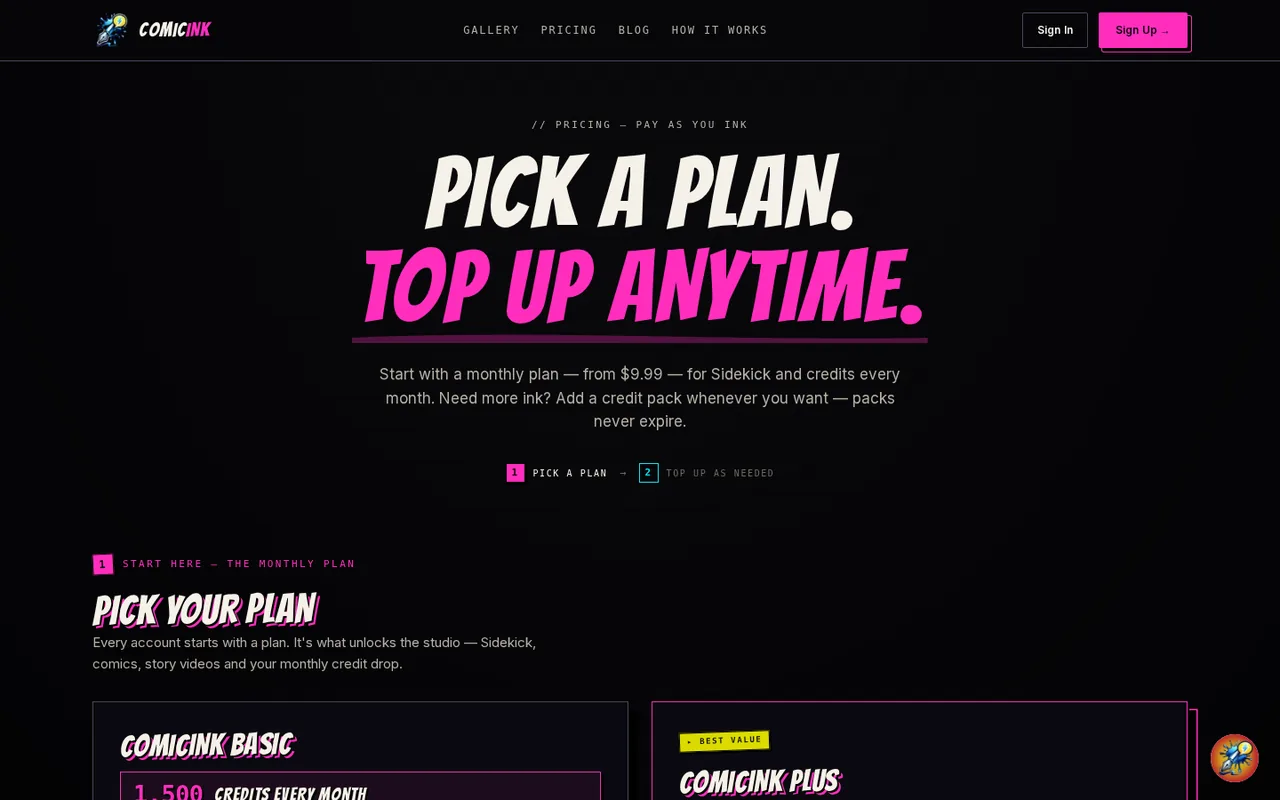
- ComicInk: USD 9.99 per month
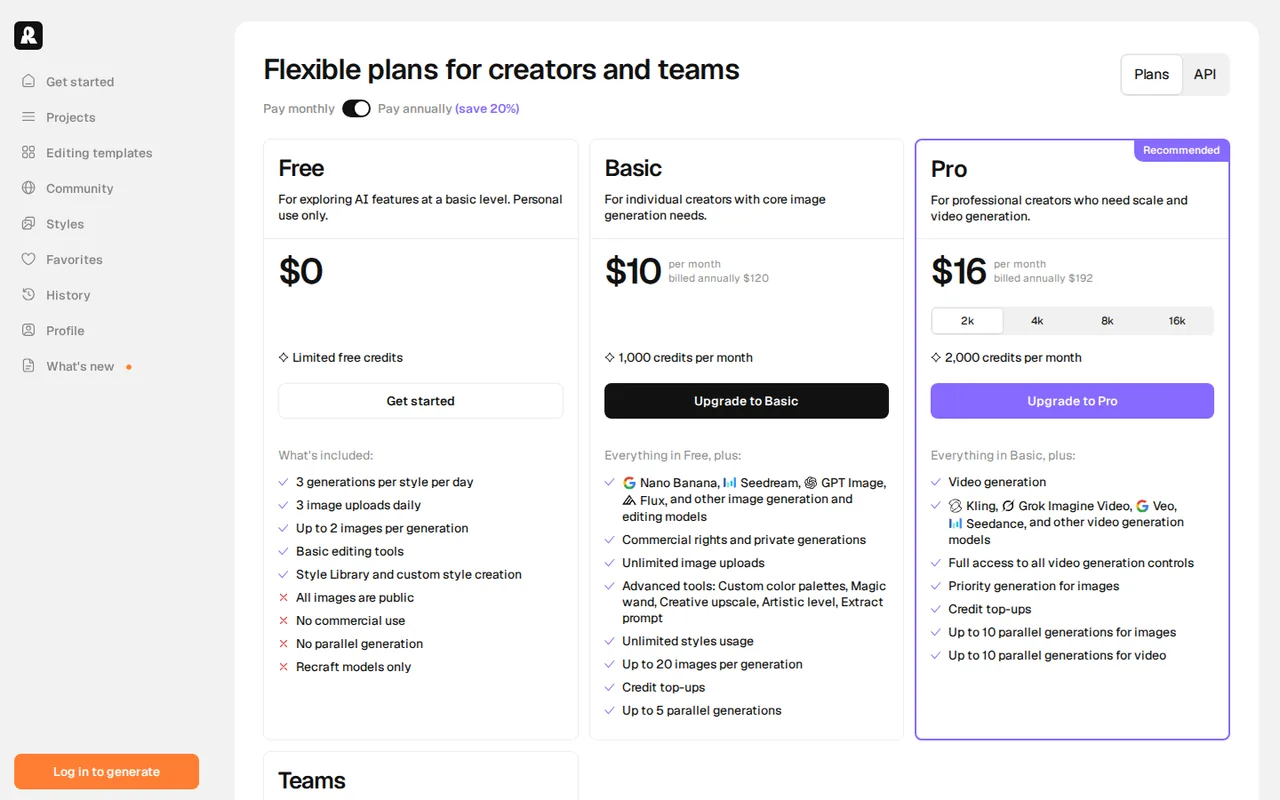
- Recraft: USD 10 per month
- Plans listed
- ComicInk: 7
- Recraft: 5
- Public API
- ComicInk: Not confirmed
- Recraft: Not confirmed
Where ComicInk and Recraft differ
- PlansComicInk lists 7 plans and Recraft lists 5.
Head to head
Each value from the tool’s profile and the vendor’s own pages
| ComicInk | Fact | Recraft |
|---|---|---|
| Access and price | ||
| Free access availableFree credits · USD 0 | Free accessSame | Free access availableRecraft Free · USD 0 |
| USD 9.99 per monthComicInk Basic | Lowest listed paid plan | USD 10 per monthRecraft Basic · billed annually · $12 billed monthly |
| 100 free credits to start; Basic $9.99 a month; Plus $19.99 a month; credit packs $9.99 to $109.99 | Pricing model | Free $0; Basic $10 a month, billed annually |
| 7 | Plans listedDiffers | 5 |
| Not confirmed | Public API | Not confirmed |
| Not confirmed | Card to start | Not confirmed |
| Not confirmed | Open source | Not confirmed |
| What it is for | ||
| Turning a written story into a character-consistent comic series, and optionally a short film | Built for | Designers and sellers who need editable vector or brand-style image output |
| Images & design | CategorySame | Images & design |
| Platforms |
|
| Works with |
|
| How current | ||
| Profile sources checked | ||
| Prices confirmed · Oct 21, 2026 | Pricing checkSame | Prices confirmed · Oct 4, 2026 |
Official source check for both tools. No hands-on testing and no score: “Differs” marks a documented difference, not a better tool.
Plans and prices
ComicInk
Prices confirmed · Oct 21, 2026- Free creditsUSD 0
- ComicInk BasicUSD 9.99 per month
- ComicInk PlusUSD 19.99 per month
- Lite credit packUSD 9.99 one-time
- Starter credit packUSD 24.99 one-time
Show 2 more plans
- Creator credit packUSD 54.99 one-time
- Video credit packUSD 109.99 one-time
Recraft
Prices confirmed · Oct 4, 2026- Recraft FreeUSD 0
- Recraft BasicUSD 10 per monthbilled annually · $12 billed monthly
- Recraft ProUSD 16 per monthbilled annually · $20 billed monthly
- Recraft TeamsUSD 18 per seat a monthannual figure $211
- Recraft APIUSD 1.00 per 1,000 API Unitsprepaid
Strengths and limits
ComicInk
Strengths
- Costs shown in credits: Pages, covers, characters and settings have fixed credit rates, and video shows an estimate before rendering.
- Credits do not expire: Credit packs never expire, and the homepage says subscription credits stay even after cancelling.
- Output ownership: The terms give users ownership of generated work, commercial use included, with no royalty owed to ComicInk.
Limits to plan around
- Free start is unclear: The homepage promises 100 free credits, but the pricing FAQ says a plan unlocks the studio.
- Video is expensive: About 1,500 credits per ten-second scene means a 30-second film uses a whole Plus month.
- Credits spent on bad results: Failed output that is not a system error is not refunded, including imperfect lip-sync.
Recraft
Strengths
- Editable vector output: Vector models write SVG directly, which suits logos, icons and illustrations that need editing after generation.
- Clear ownership split: Paid plans give commercial rights and private images that stay owned after cancellation, and the Free plan states its public, non-commercial terms.
- Itemised API prices: The API price table lists a cost per image and per request, with Flash raster at $0.007.
Limits to plan around
- Free images are public: Free-plan images are owned by Recraft, appear in the community gallery and are not licensed for commercial use.
- Two separate balances: Subscription credits reset monthly and the API uses prepaid units that do not convert, so budget each separately.
- Studio-only external models: Third-party models are not available through the API, and their credit cost varies from 1 to 40 per generation.
See both products

Start from your task, not from a winner.
Run both tools on the same real task, then compare the result, how much editing it needs and how fast it uses your plan’s allowance.
How we reviewChange this pair
Choose tools
Choose two tools below. You can replace either selection at any time.
Audio & voice
Automation
Coding
Data & spreadsheets
Images & design
Presentations
Research & sources
Video & editing
Website builders
Writing & content
Comparing tools from different categories is fine, and often useful — a writing assistant and a research tool solve different halves of the same job. The table will show you exactly where they diverge.
Questions about comparing tools
How does the comparison work?
Add two tools to the comparison tray from any tool card, then open this page. The table pulls each tool's verified plan details, platforms, strengths and limits from its profile, so both columns carry the same kind of evidence, with a separate source-check date for each tool.
Do you declare a winner?
No. The table sets two tools against each other on documented facts, not on a score. Which one wins depends on your task, your budget and your usage volume — three things we cannot see from here.
Why are some cells empty or marked unverified?
Because we could not confirm that detail on the vendor's own pages. Rather than filling the gap with a figure from elsewhere, we mark it and say why on the tool's profile.
Can I compare more than two tools?
Not at once. Two columns keep the differences readable and force a real decision. Remove either selected tool to replace it, or clear both to start a new pair.
Every figure in the table above comes from the linked profile, where the source and the verification date are listed. Browse all tools or read the editorial policy.