Recraft: editable SVG vectors from prompts, but Free images are public and non-commercial; Basic starts at $10
Updated October 4, 2026 · By Elias Brandt · Documentation review, not tested hands-on
Pros
- Editable vector output
- Clear ownership split
- Itemised API prices
Cons
- Free images are public
- Two separate balances
- Studio-only external models
Bottom line
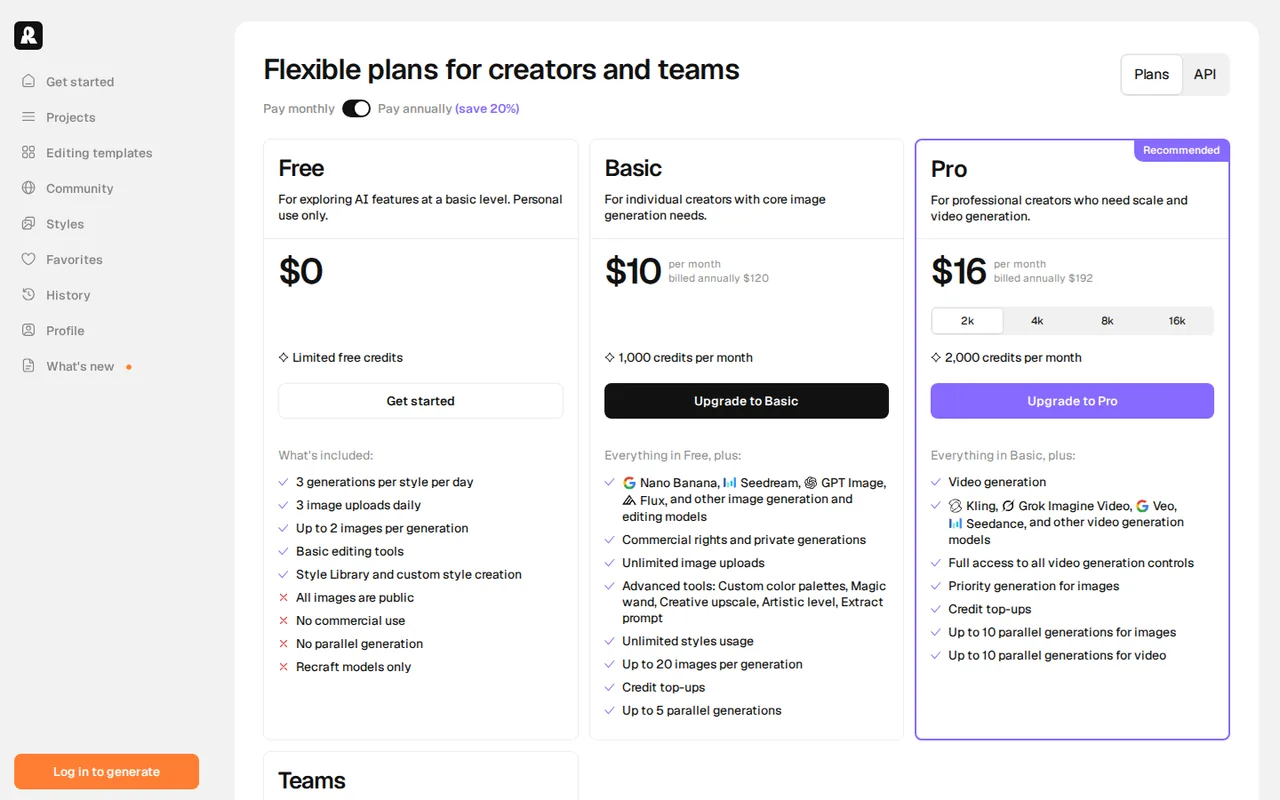
Limited free credits, 3 generations per style per day, 3 uploads a day, up to 2 images per generation, basic editing, Recraft models only. Images are public, owned by Recraft and not licensed for commercial use.
You hand off logos, icons or illustrations that someone must edit later: the Vector models write SVG files directly instead of tracing a raster image.
You need commercially usable images without paying: everything made on Free is public, owned by Recraft and off-limits for commercial use.
Best forDesigners needing editable vectorsSellers and marketersDevelopersTeams
Strengths, limits and who it suits, in full
Strengths
- Editable vector output Vector models write SVG directly, which suits logos, icons and illustrations that need editing after generation.
- Clear ownership split Paid plans give commercial rights and private images that stay owned after cancellation, and the Free plan states its public, non-commercial terms.
- Itemised API prices The API price table lists a cost per image and per request, with Flash raster at $0.007.
Limits
- Free images are public Free-plan images are owned by Recraft, appear in the community gallery and are not licensed for commercial use.
- Two separate balances Subscription credits reset monthly and the API uses prepaid units that do not convert, so budget each separately.
- Studio-only external models Third-party models are not available through the API, and their credit cost varies from 1 to 40 per generation.
Who it suits
- Designers needing editable vectors test whether the SVG output opens and edits cleanly in your own design tool before paying for Basic.
- Sellers and marketers private images with commercial rights start on Basic, which matters for packaging and stock listings.
- Developers price a real batch with the API table; $0.08 per vector image adds up differently from a subscription.
- Teams Teams adds a shared workspace and shared styles, but the monthly seat price was not read, so check it live.
How much does Recraft cost?
Prices confirmed · checked
- $12Recraft Basic
- $20Recraft Pro
Regional prices: Free costs $0.
Basic shows $10 a month billed annually or $12 billed monthly, Pro $16 billed annually or $20 billed monthly for 2,000 credits, and Teams $18 per seat a month with an annual figure of $211. Pro also lists 4,000, 8,000 and 16,000 credit tiers, read here at $40, $80 and $160 billed monthly. Prices exclude VAT. Subscription credits reset each cycle and do not roll over; top-ups never expire. The API is a separate prepaid balance at $1.00 per 1,000 API Units. Payments run through Stripe by card or bank transfer, and refunds are discretionary. The monthly Teams price and annual prices for the larger Pro tiers were not read.
| Plan | Price | What you get |
|---|---|---|
| Recraft Free | $0 sourceFrom recraft.ai/pricing, checked Oct 4, 2026 (opens in a new tab) | Limited free credits, 3 generations per style per day, 3 uploads a day, up to 2 images per generation, basic editing, Recraft models only. Images are public, owned by Recraft and not licensed for commercial use. |
| Recraft Basic | $10 per monthbilled annually · $12 billed monthly sourceFrom recraft.ai/pricing, checked Oct 4, 2026 (opens in a new tab) | 1,000 credits a month, external image models, commercial rights and private generations, unlimited uploads, advanced tools, up to 20 images per generation, credit top-ups, up to 5 parallel generations. |
| Recraft Pro | $16 per monthbilled annually · $20 billed monthly sourceFrom recraft.ai/pricing, checked Oct 4, 2026 (opens in a new tab) | 2,000 credits a month, with 4,000, 8,000 and 16,000 credit tiers (billed monthly $40, $80 and $160). Everything in Basic plus video generation, priority image generation and up to 10 parallel generations. |
| Recraft Teams | $18 per seat a monthannual figure $211 sourceFrom recraft.ai/pricing, checked Oct 4, 2026 (opens in a new tab) | 2,000 credits a month per seat. Everything in Pro plus a shared workspace, shared styles, central billing and account management, SSO and 24/7 support. |
| Recraft API | $1.00 per 1,000 API Unitsprepaid sourceFrom recraft.ai/pricing, checked Oct 4, 2026 (opens in a new tab) | Separate from subscription credits. Units do not expire and packages are non-refundable. Recraft models only; external models are not offered in the API. |
Which plan fits?
Smallest plan whose monthly credits cover your number with 15% spare for regenerations. Arithmetic from the plan table above, not a usage test.
How far does it go?
- What the credits and API units buyBasic's 1,000 credits cover 500 generations at the lowest listed OpenAI cost (2 credits) or about 41 at the highest (24 credits); Google models at 5 to 40 credits give 200 down to 25. The pricing page does not state credits per Recraft-model image, so no figure is given for those. On the API, $10 buys 10,000 units: about 1,428 V4.1 Flash raster images at 7 units, 285 V4.1 raster images at 35, 125 V4.1 Vector images at 80 or 33 V4.1 Pro Vector images at 300. Arithmetic from listed figures; credits and API units are separate balances and are not converted.
Arithmetic from the published allowances above, not a usage test.
Taxes, currency and promotions can change the price you see at checkout.
Try Recraft free (opens in a new tab)
Key features
| Feature | What it does | Watch out |
|---|---|---|
| Generates raster images and editable SVG vectors directly with Recraft's own models | — | |
| Standard, Pro, Vector, Utility and Flash variants across V2 to V4.1 | — | |
| Custom styles created from your own reference images | — | |
| Editing tools including upscaling, background removal, inpainting and outpainting | — | |
| Third-party image and video models inside Studio on paid plans | — | |
| API for generation, vectorization and background removal | — | |
| Vector output | The documentation says Vector models generate editable SVG files directly rather than converting a raster image, and the API also offers a separate vectorize request for existing images. | The pages we read do not say which subscription plan includes vector generation or export, so confirm it on Free before relying on it. |
| Credits, top-ups and external models | Subscription credits reset monthly with no rollover, top-up credits never expire, and Basic and above can use models from OpenAI, Google, Black Forest Labs and others inside Studio. | Each external generation costs between 1 and 40 credits depending on the model, so the same 1,000 credits stretch very differently. |
| API units | The API is prepaid at $1.00 per 1,000 units, with raster V4.1 Flash at $0.007 an image and V4.1 Vector at $0.08. | Units are separate from subscription credits, non-refundable and exclude external models, so a subscription does not fund API use. |
Define what “editable SVG” must mean for your handoff
An SVG extension alone does not tell a designer how much cleanup remains. Before generating, specify whether the recipient needs independent shapes, consistent stroke widths, live text or merely scalable outlines. Recraft documents direct vector output, but the sources checked do not establish every subscription plan’s access to generation and export. Confirm access in the selected account before committing to a delivery date.
Keep the rights history with the asset
The pricing FAQ distinguishes public, non-commercial Free output from images generated during a paid subscription. Keep the generation date and applicable plan with a client handoff. Do not assume upgrading later changes the rights attached to an older Free image. For an automated workflow, consult the separate API unit table; a Studio credit balance does not pay API charges.
Inspect a small vector fixture
Proposed evaluation · not performed yet
Use a fictional brief for three single-colour navigation icons—a cup, a book and a bicycle—with no logos or private reference material. Start with a Free account only to check whether vector generation and SVG export are available. Stop and record the missing entitlement if either is blocked.
- Use one consistent style for the three icons, recording the model and displayed credit cost for each attempt.
- Open each exported SVG in your own vector editor. Select and recolour one intended component without changing the rest.
- Inspect at small and large sizes for missing shapes, stray paths and inconsistent strokes. Outline text is not the same as editable text.
- Record cleanup time and unusable attempts separately. Price that observed workflow against the intended paid plan or API route.
Accept only files that meet the recipient’s editing requirements. Free evaluation output stays outside a commercial handoff, and no generation or quality test has been performed for this page.
Price the route you will actually use
Studio and the API draw on different balances, so estimate each against the work it will carry. In Studio, a third-party model shows its credit cost when you select it, and that cost ranges widely by provider, so a fixed image count per plan is unreliable. On the API, each Recraft model has a listed charge per image or per request, which lets you price a batch before buying units.
Is Recraft worth it?
Documentation review plus dated public user reports. Documentation review, not tested hands-on. Not scored.
Worth it if
- You hand off logos, icons or illustrations that someone must edit later: the Vector models write SVG files directly instead of tracing a raster image.
- You sell or publish what you generate: from Basic up, images are private with commercial rights, and they stay yours after you cancel.
- You automate image work in code: the API charges per image or request from a prepaid unit balance that does not expire.
Probably not if
- You need commercially usable images without paying: everything made on Free is public, owned by Recraft and off-limits for commercial use.
- You want OpenAI or Google models through the API: those external models run only inside Studio, and subscription credits cannot pay for API calls.
- You need a firm team quote before buying: the monthly-billing Teams seat price was not shown on the pricing page.
Recraft alternatives
Other images & design tools checked with the same method. Pick by the job, not by a score.

AI images, video and audio inside an Adobe workflow

Rigged 3D avatars from a selfie for games and apps

AI images placed straight into templated designs

Turning a written story into a character-consistent comic series, and optionally a short film

Small businesses making on-brand product photos and social posts

Turning photos or video of a real scene into a 3D splat

Finding prompts for a specific image model before generating

One-off lettering for posters, cards and social graphics
Used Recraft? Write the first review. Visitor opinions are moderated and kept separate from our source checks.
Frequently asked questions
Can I use Recraft free images commercially?
No. Images generated on the Free plan are owned by Recraft, shown publicly in the community gallery and not licensed for commercial use. Commercial rights and private images begin on Basic at $10 a month billed annually or $12 billed monthly, and they cover images created while you are subscribed, including after you cancel.
How much does Recraft cost per month?
Basic is $10 a month billed annually ($120 a year) or $12 billed monthly with 1,000 credits. Pro is $16 billed annually or $20 monthly for 2,000 credits, with larger credit tiers at $40, $80 and $160 billed monthly. Teams is $18 per seat a month. All listed prices are exclusive of VAT.
Do Recraft credits roll over?
No. Subscription credits reset at each billing cycle, so unused ones are lost. Top-up credits, sold separately on Basic, Pro and Teams, never expire and are spent only after the monthly allowance runs out. API units are a third balance: prepaid, non-expiring and unable to pay for Studio generations.
Can I use OpenAI or Google models through the Recraft API?
No. Third-party models from OpenAI, Google, Black Forest Labs, ByteDance and others run only inside Recraft Studio on paid plans. The API supports Recraft's own V2, V3, V4 and V4.1 models, priced per image, for example $0.08 for a V4.1 Vector image and $0.007 for a V4.1 Flash raster image.
Is Recraft AI free or paid?
Both. The Free plan costs $0 with limited free credits and 3 generations per style per day, but its images are public, owned by Recraft and not licensed for commercial use. Paid plans start with Basic at $10 a month billed annually ($12 billed monthly), adding 1,000 credits, private images and commercial rights. The API is a separate prepaid balance at $1.00 per 1,000 units.
What is Recraft used for?
Recraft generates raster images and editable SVG vectors from text prompts. Its Vector models write SVG files directly, which suits logos, icons and illustrations that someone must edit later. It also offers upscaling, background removal, inpainting, outpainting and custom styles built from your own reference images, and an API for generation, vectorization and background removal.
Sources and method6 official sources · 17 details checked · Oct 4, 2026
How we checked this profile
17 details on this page were checked against Recraft's own pages and help documentation (Oct 4, 2026).
See the checks by section17 documented
| Section | Checks | Last checked | Sources |
|---|---|---|---|
| Plans and prices | 10 documented | recraft.ai/pricingrecraft.ai/pricingrecraft.ai/external-models | |
| Strengths and limits | 3 documented | recraft.ai/pricingrecraft.ai/external-models | |
| Features | 3 documented | recraft.ai/docsrecraft.ai/getting-startedrecraft.ai | |
| Platforms and integrations | 1 documented | recraft.ai/pricing |
Sources for this profile
- Recraft pricing page, read in a browser with the plan cards renderedrecraft.ai
- Recraft API pricing documentationrecraft.ai
- Recraft documentation: external modelsrecraft.ai
- Recraft documentation: introduction and model variantsrecraft.ai
Plan cards and features come from the Recraft pricing page rendered in a browser on 2026-10-04, because the page's static text lists only the FAQ. API prices and the model list come from the API pricing and external-models documentation, and vector variants from the introduction page, all read on the same date. The monthly Teams price, annual prices for the larger Pro tiers and credits per Recraft-model image were not shown, so none is stated. Which plans include vector generation and SVG export is not stated in the pages read. We did not run a Recraft generation, and third-party reviews were not used.
Sources checked Oct 4, 2026. Found something out of date? See how we correct profiles.