
Activepieces vs Make
Plans, free access, limits and intended use side by side, taken from each vendor’s own pages. No score and no winner: the facts show where the two differ.
Change tools
Open source workflow automation with AI agents, priced per run in credits, on its cloud or your own servers

Connect app modules in visual automation scenarios.
- Free access
- Activepieces: Free access
- Make: Free access
- Paid from
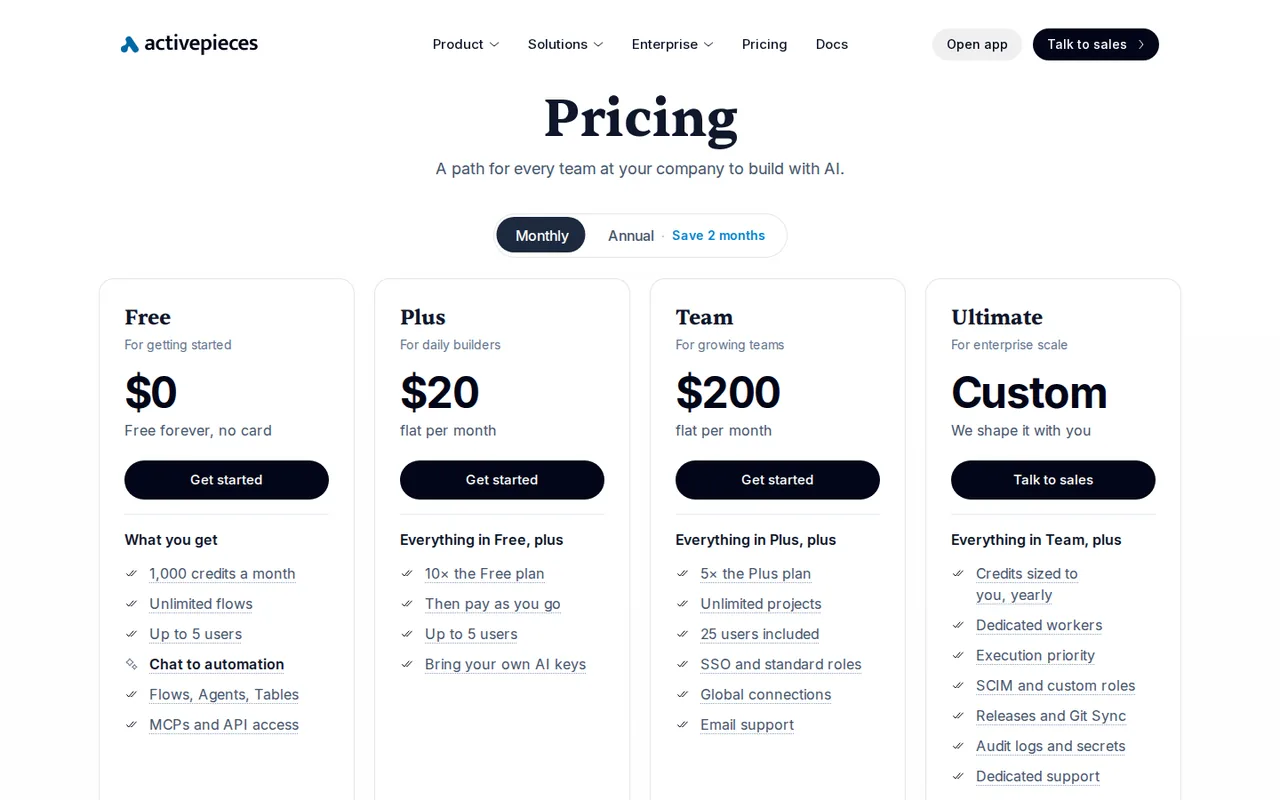
- Activepieces: USD 20 per month
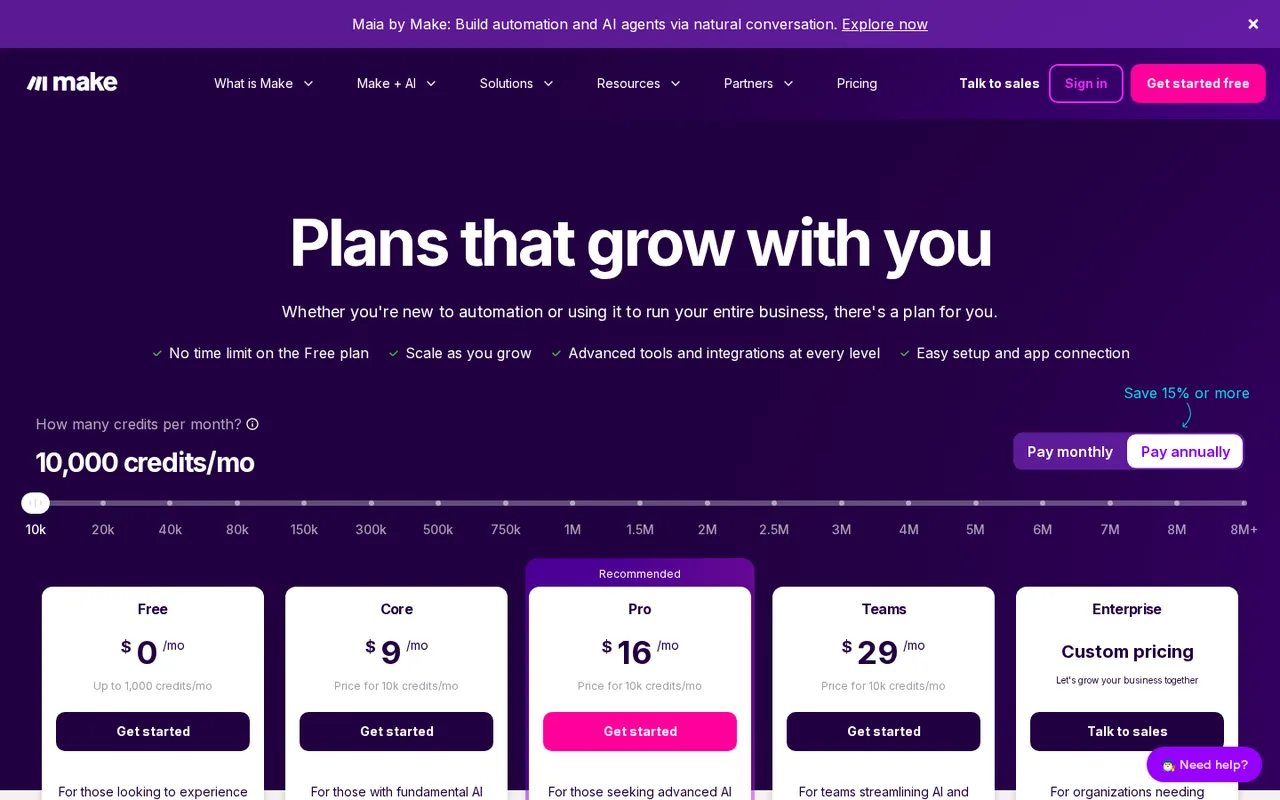
- Make: No fixed price listed
- Plans listed
- Activepieces: 6
- Make: 3
- Public API
- Activepieces: Yes
- Make: Yes
Where Activepieces and Make differ
- Open sourceOnly Activepieces is open source.
- Pricing checkPrices confirmed for Activepieces; pricing review due for Make.
- PlansActivepieces lists 6 plans and Make lists 3.
Head to head
Each value from the tool’s profile and the vendor’s own pages
| Activepieces | Fact | Make |
|---|---|---|
| Access and price | ||
| Free access availableFree · USD 0 | Free accessSame | Free access availableFree · USD 0 |
| USD 20 per monthPlus · $16/month billed yearly | Lowest listed paid plan | No fixed price listed |
| Free cloud plan (1,000 credits/month); Plus $20/month, Team $200/month; Ultimate and Embed custom; Community Edition self-hosts free | Pricing model | Free + paid; quote varies |
| 6 | Plans listedDiffers | 3 |
| Yes | Public APISame | Yes |
| Not required | Card to startSame | Not required |
| Yes | Open sourceDiffers | No |
| What it is for | ||
| Teams that want Zapier-style flows and AI agents with the option to self-host the open source core | Built for | Visual automation for app workflows |
| Automation | CategorySame | Automation |
| Platforms |
|
| Works with | Not listed |
| How current | ||
| Profile sources checked | ||
| Prices confirmed · Oct 24, 2026 | Pricing checkDiffers | Pricing review due · Sep 25, 2026 |
Official source check for both tools. No hands-on testing and no score: “Differs” marks a documented difference, not a better tool.
Plans and prices
Activepieces
Prices confirmed · Oct 24, 2026- FreeUSD 0
- PlusUSD 20 per monthUSD 16 per month billed yearly
- TeamUSD 200 per monthUSD 166 per month billed yearly
- UltimateCustom quote
- EmbedFrom USD 36k a year
Show 1 more plan
- Community Edition (self-hosted)FreeMIT licence
Make
Pricing review due · Sep 25, 2026- FreeUSD 0
- Paid automationConfirm current quote
- EnterpriseCustom pricing
Strengths and limits
Activepieces
Strengths
- Steps are not metered: A run costs one credit whether it has two steps or twenty, so long non-AI flows do not multiply the bill.
- Open source core: The repository is MIT-licensed outside its enterprise directories, so the core can be read, forked and run on your own hardware.
- Self-hosting on every plan: The pricing table lists cloud or on-prem hosting for Free, Plus, Team and Ultimate, and paid plans apply in-app without a license key.
Limits to plan around
- Free reset is inconsistent: The pricing table says Free credits reset daily and runs over quota wait for tomorrow, while the FAQ says 1,000 credits a month and to wait until next month.
- Short cloud run limits: On Activepieces Cloud a flow run times out after 10 minutes of active time, a worker gets 1 GB of memory and run data is deleted after 30 days.
- No SOC 2 report yet: The pricing FAQ says the SOC 2 programme is in progress; a penetration test summary, DPA and sub-processor list are available on request.
Make
Strengths
- Visual scenario builder: Routers, filters and fallback routes are drawn as a diagram, so the path each record takes is visible before anything runs.
- Free plan with no time limit: Free does not expire, so a small scenario can keep running without a subscription as long as it stays within the Free limits.
- Countable billing unit: An ordinary non-AI module run normally uses one credit, so cost can be estimated by counting modules and bundles.
Limits to plan around
- Free scheduling floor: On Free, scheduled scenarios run at most every 15 minutes and only two scenarios can be active at once.
- Empty checks still count: A scheduled trigger uses an operation each time it looks for data, even when it finds nothing; budget for checks as well as records.
- Separate AI-provider charges: With an eligible custom AI-provider connection, the provider bills its tokens on top of the operation credits Make charges.
See both products
Start from your task, not from a winner.
Run both tools on the same real task, then compare the result, how much editing it needs and how fast it uses your plan’s allowance.
How we reviewChange this pair
Choose tools
Choose two tools below. You can replace either selection at any time.
Audio & voice
Automation
Coding
Data & spreadsheets
Images & design
Presentations
Research & sources
Video & editing
Website builders
Writing & content
Comparing tools from different categories is fine, and often useful — a writing assistant and a research tool solve different halves of the same job. The table will show you exactly where they diverge.
Questions about comparing tools
How does the comparison work?
Add two tools to the comparison tray from any tool card, then open this page. The table pulls each tool's verified plan details, platforms, strengths and limits from its profile, so both columns carry the same kind of evidence, with a separate source-check date for each tool.
Do you declare a winner?
No. The table sets two tools against each other on documented facts, not on a score. Which one wins depends on your task, your budget and your usage volume — three things we cannot see from here.
Why are some cells empty or marked unverified?
Because we could not confirm that detail on the vendor's own pages. Rather than filling the gap with a figure from elsewhere, we mark it and say why on the tool's profile.
Can I compare more than two tools?
Not at once. Two columns keep the differences readable and force a real decision. Remove either selected tool to replace it, or clear both to start a new pair.
Every figure in the table above comes from the linked profile, where the source and the verification date are listed. Browse all tools or read the editorial policy.