
Storydoc vs Beautiful.ai
Plans, free access, limits and intended use side by side, taken from each vendor’s own pages. No score and no winner: the facts show where the two differ.
Change tools
Interactive web presentations and proposals with personalized versions, reader analytics and PDF export

Slides that lay themselves out.
- Free access
- Storydoc: Free trial only
- Beautiful.ai: Free trial only
- Paid from
- Storydoc: USD 33 per month billed monthly
- Beautiful.ai: USD 45 per month
- Plans listed
- Storydoc: 3
- Beautiful.ai: 4
- Public API
- Storydoc: Yes
- Beautiful.ai: Yes
Where Storydoc and Beautiful.ai differ
- CardBeautiful.ai needs a card to start; Storydoc does not.
- Pricing checkPrices confirmed for Storydoc; some prices or terms not confirmed for Beautiful.ai.
- PlansStorydoc lists 3 plans and Beautiful.ai lists 4.
Head to head
Each value from the tool’s profile and the vendor’s own pages
| Storydoc | Fact | Beautiful.ai |
|---|---|---|
| Access and price | ||
| Free trial only | Free accessSame | Free trial only |
| USD 33 per month billed monthlyStarter · or $19.80 per month billed annually · $237.60 a year | Lowest listed paid plan | USD 45 per monthMonthly Pro option |
| 14-day free trial; Starter from $19.80 a month billed annually ($237.60 a year), or $33 monthly | Pricing model | Paid only; card-required trial |
| 3 | Plans listedDiffers | 4 |
| Yes | Public APISame | Yes |
| Not required | Card to startDiffers | Required |
| Not confirmed | Open source | No |
| What it is for | ||
| Sending personalized sales decks as tracked web links instead of PowerPoint files | Built for | Recurring decks and fast drafts |
| Presentations | CategorySame | Presentations |
| Platforms |
|
| Works with | Not listed |
| How current | ||
| Profile sources checked | ||
| Prices confirmed · Oct 24, 2026 | Pricing checkDiffers | Some prices or terms not confirmed · Oct 24, 2026 |
Official source check for both tools. No hands-on testing and no score: “Differs” marks a documented difference, not a better tool.
Plans and prices
Storydoc
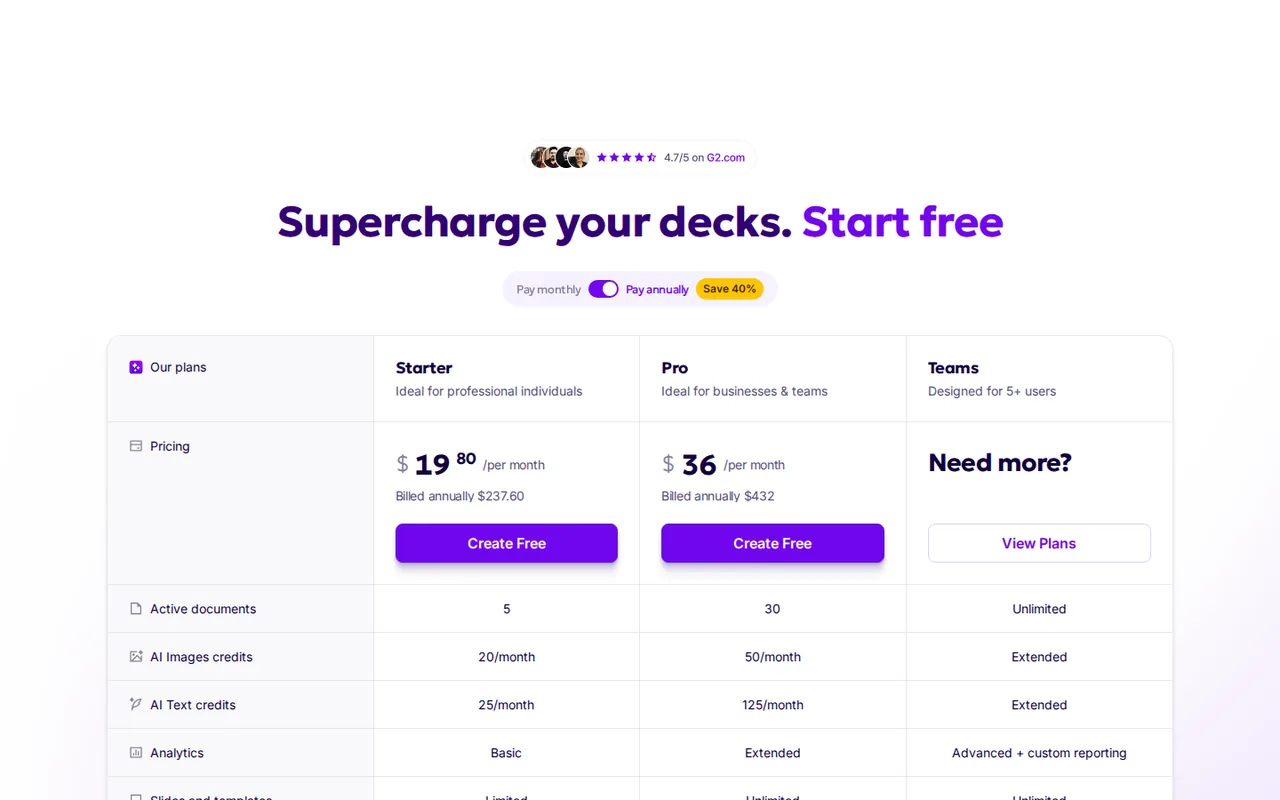
Prices confirmed · Oct 24, 2026- StarterUSD 33 per month billed monthlyor $19.80 per month billed annually · $237.60 a year
- ProUSD 60 per month billed monthlyor $36 per month billed annually · $432 a year
- TeamsCustom quote
Beautiful.ai
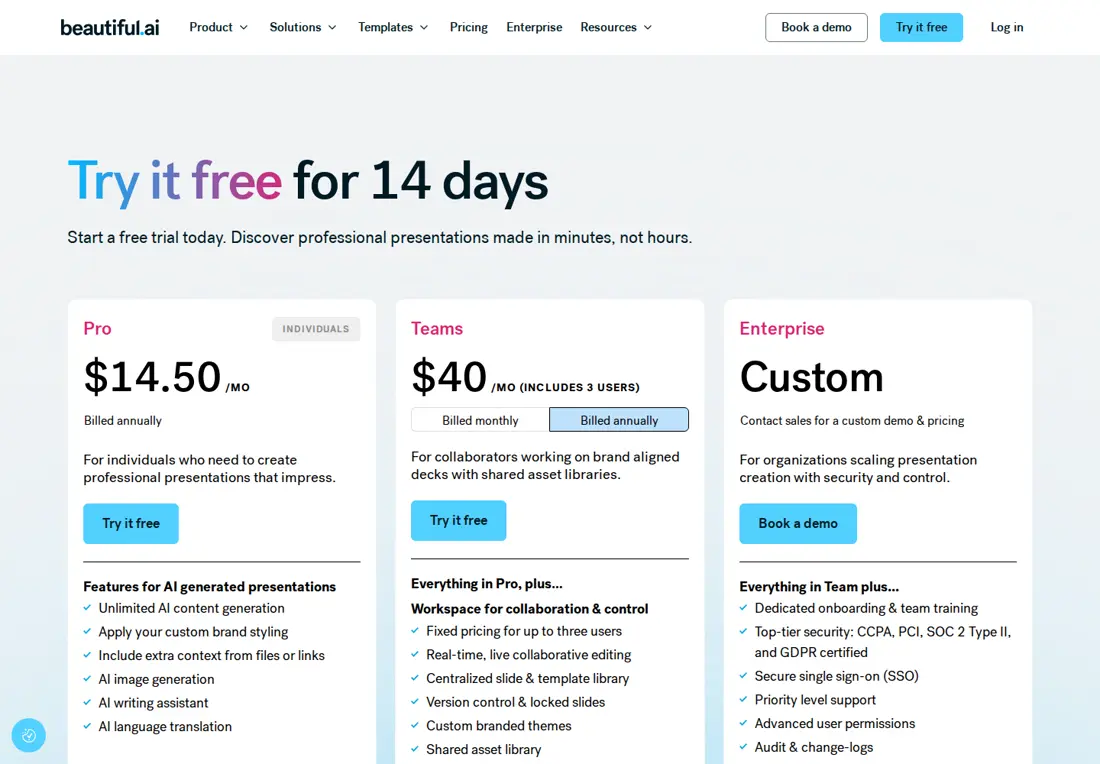
Some prices or terms not confirmed · Oct 24, 2026- ProQuote needs confirmation
- TeamQuote needs confirmation
- Monthly Pro optionUSD 45 per month
- EnterpriseCustom
Strengths and limits
Storydoc
Strengths
- Trial without a card: Storydoc does not collect payment details for the 14-day trial and does not charge automatically when it ends.
- Links outlive the subscription: Hosted links stay live after a trial or a cancelled plan, although editing stops.
- Per-recipient tracking: Each personalized version has its own URL and reader analytics.
Limits to plan around
- No PowerPoint export: Decks cannot be downloaded as PPTX; a PDF opened in PowerPoint becomes static, uneditable slides.
- No permanent free plan: After the 14-day trial you cannot edit or create stories without paying.
- Small allowances on Starter: Starter has 5 active documents, 10 links and versions and 25 AI text credits a month.
Beautiful.ai
Strengths
- Smart Slides automate layout decisions: Content is rearranged as you add it, across more than 300 layouts.
- Paid plans offer editable PowerPoint export: Colleagues can keep editing individual elements outside the tool.
- Unlimited AI drafting: Pro lists unlimited AI content generation, with no credit balance to track.
Limits to plan around
- The trial requires a card and bills unless cancelled: The plan is charged in full when the 14 days end.
- Official price views disagree: Annual Pro rates vary by page and Team seat units conflict; obtain the applicable total before paying.
- External exports lose animations and transitions: Motion built in the tool stays behind in PowerPoint and other formats.
See both products

Start from your task, not from a winner.
Run both tools on the same real task, then compare the result, how much editing it needs and how fast it uses your plan’s allowance.
How we reviewChange this pair
Choose tools
Choose two tools below. You can replace either selection at any time.
Audio & voice
Automation
Coding
Data & spreadsheets
Images & design
Presentations
Research & sources
Video & editing
Website builders
Writing & content
Comparing tools from different categories is fine, and often useful — a writing assistant and a research tool solve different halves of the same job. The table will show you exactly where they diverge.
Questions about comparing tools
How does the comparison work?
Add two tools to the comparison tray from any tool card, then open this page. The table pulls each tool's verified plan details, platforms, strengths and limits from its profile, so both columns carry the same kind of evidence, with a separate source-check date for each tool.
Do you declare a winner?
No. The table sets two tools against each other on documented facts, not on a score. Which one wins depends on your task, your budget and your usage volume — three things we cannot see from here.
Why are some cells empty or marked unverified?
Because we could not confirm that detail on the vendor's own pages. Rather than filling the gap with a figure from elsewhere, we mark it and say why on the tool's profile.
Can I compare more than two tools?
Not at once. Two columns keep the differences readable and force a real decision. Remove either selected tool to replace it, or clear both to start a new pair.
Every figure in the table above comes from the linked profile, where the source and the verification date are listed. Browse all tools or read the editorial policy.