

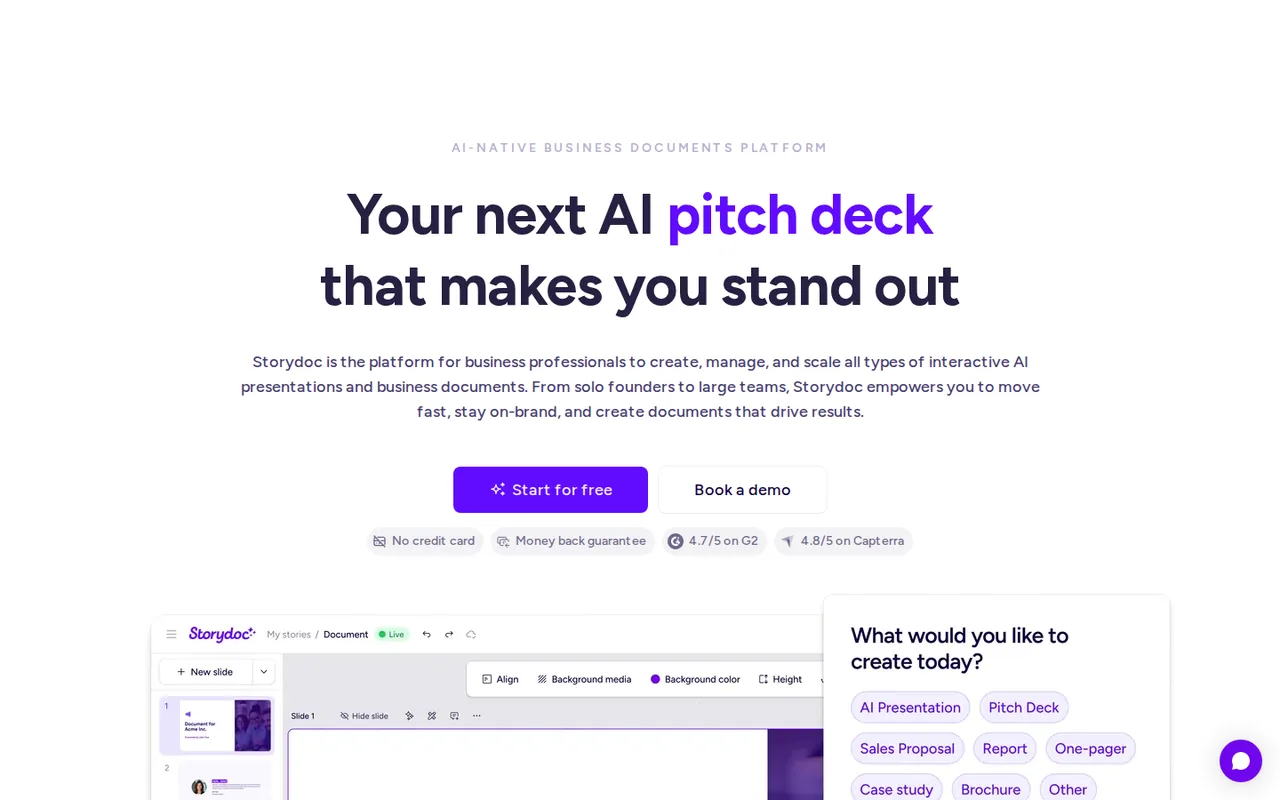
What is Storydoc, in short?
Updated October 24, 2026 · By Elias Brandt · Documentation review, not tested hands-on
Pros
- Trial without a card
- Links outlive the subscription
- Per-recipient tracking
- Annual price printed in full
Cons
- No PowerPoint export
- No permanent free plan
- Small allowances on Starter
- Plan pages disagree
- Branded domains need Team
Best forSales teams sending proposals to many prospectsMarketers who want reader dataTeams that need SSO or CRM syncNot for presenters who must hand over a PowerPoint fileNot for occasional single decks on a zero budget
Strengths, limits and who it suits, in full
Strengths
- Trial without a card Storydoc does not collect payment details for the 14-day trial and does not charge automatically when it ends.
- Links outlive the subscription Hosted links stay live after a trial or a cancelled plan, although editing stops.
- Per-recipient tracking Each personalized version has its own URL and reader analytics.
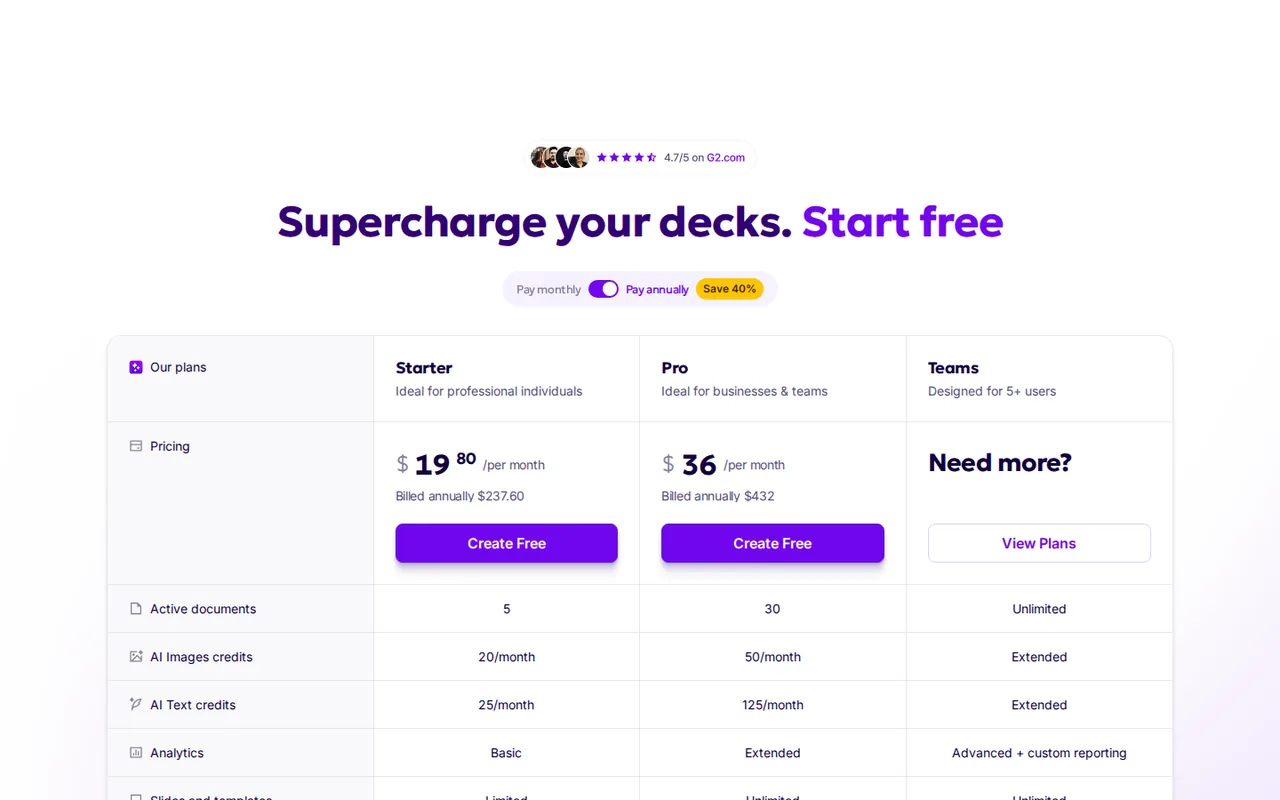
- Annual price printed in full The pricing page shows the actual yearly charge of $237.60 for Starter and $432 for Pro.
Limits
- No PowerPoint export Decks cannot be downloaded as PPTX; a PDF opened in PowerPoint becomes static, uneditable slides.
- No permanent free plan After the 14-day trial you cannot edit or create stories without paying.
- Small allowances on Starter Starter has 5 active documents, 10 links and versions and 25 AI text credits a month.
- Plan pages disagree The pricing page lists 125 AI text credits on Pro while the help center says 200, and the Starter card offers branding removal that the comparison table locks.
- Branded domains need Team Custom subdomains and whitelabel hosting are available only on Team plans.
Who it suits
- Sales teams sending proposals to many prospects On Pro and above, one master story with variables produces a tracked version for each recipient.
- Marketers who want reader data Analytics show who opened a deck, how far they scrolled and how long they read.
- Teams that need SSO or CRM sync Team plans add SAML SSO, CRM integrations, identified access and roles such as Creator Lite.
- Not for presenters who must hand over a PowerPoint file when the deliverable is an editable PPTX, a slide tool with PPTX export fits better.
- Not for occasional single decks on a zero budget Students with a .edu email get free access, but others pay once the trial ends.
How much does Storydoc cost?
Prices confirmed · checked
- $33Starter
- $60Pro
Regional prices: Prices are in US dollars, and billing runs through Paddle, which issues invoices and handles VAT IDs.
Annual billing is labelled a 40% saving and charges $237.60 for Starter or $432 for Pro once a year. Each added user seat requires its own subscription; upgrades are prorated, and downgrades are handled by support. Cancelling or pausing keeps the account active to the end of the paid period. The 14-day trial asks for no payment details. Students with a .edu email address get free access.
| Plan | Price | What you get |
|---|---|---|
| Starter | $33 per month billed monthlyor $19.80 per month billed annually · $237.60 a year sourceFrom storydoc.com/pricing, checked Oct 24, 2026 (opens in a new tab) | 5 active documents; 20 AI image and 25 AI text credits a month; limited analytics; limited slides and templates; PDF export; stock images, videos and icons; 10 links and versions; no variables; 10 version automations a month on the plan card. |
| Pro | $60 per month billed monthlyor $36 per month billed annually · $432 a year sourceFrom storydoc.com/pricing, checked Oct 24, 2026 (opens in a new tab) | 30 active documents; 50 AI image and 125 AI text credits a month; extended analytics; unlimited slides and templates; collaboration, variables, workspace and marketing integrations; unlimited links and versions; limited bulk version creation; branded favicon and badge removal; 25 version automations a month. |
| Teams | Custom quote | Designed for 5 or more users; unlimited active documents; extended AI credits; advanced analytics with custom reporting; CRM integrations, deck automation and API access; SAML SSO; identified access; 100 version automations a month; branded or whitelabel subdomain; designated storytelling expert. |
How far does it go?
- One rep sending 30 personalized proposals a month from a single master storyStarter locks text variables and allows 10 links and versions, so it does not fit. Pro adds variables and unlimited links and versions, with 25 version automations a month on the plan card, so at least 5 of the 30 would be made by hand. Pro costs $432 a year on annual billing or 12 x $60 = $720 on monthly billing, a difference of $288, which matches the 40% saving label. Arithmetic on published prices and plan limits, not a statement by Storydoc.
Arithmetic from the published allowances above, not a usage test.
Taxes, currency and promotions can change the price you see at checkout.
Visit Storydoc (opens in a new tab)
Key features
| Feature | What it does | Watch out |
|---|---|---|
| AI deck generation from a prompt, pasted text, website URL, document or file, with a context library (Storydoc Brain) that feeds your own materials to the AI (help center) | — | |
| Scroll-based interactive slides with timelines, tabs, carousels, live charts, calculators, embedded video, forms and calendars (help center) | — | |
| Personalized versions of a master story through variables such as {{company_name}}, each with its own tracked URL; variables start on Pro (help center, pricing table) | — | |
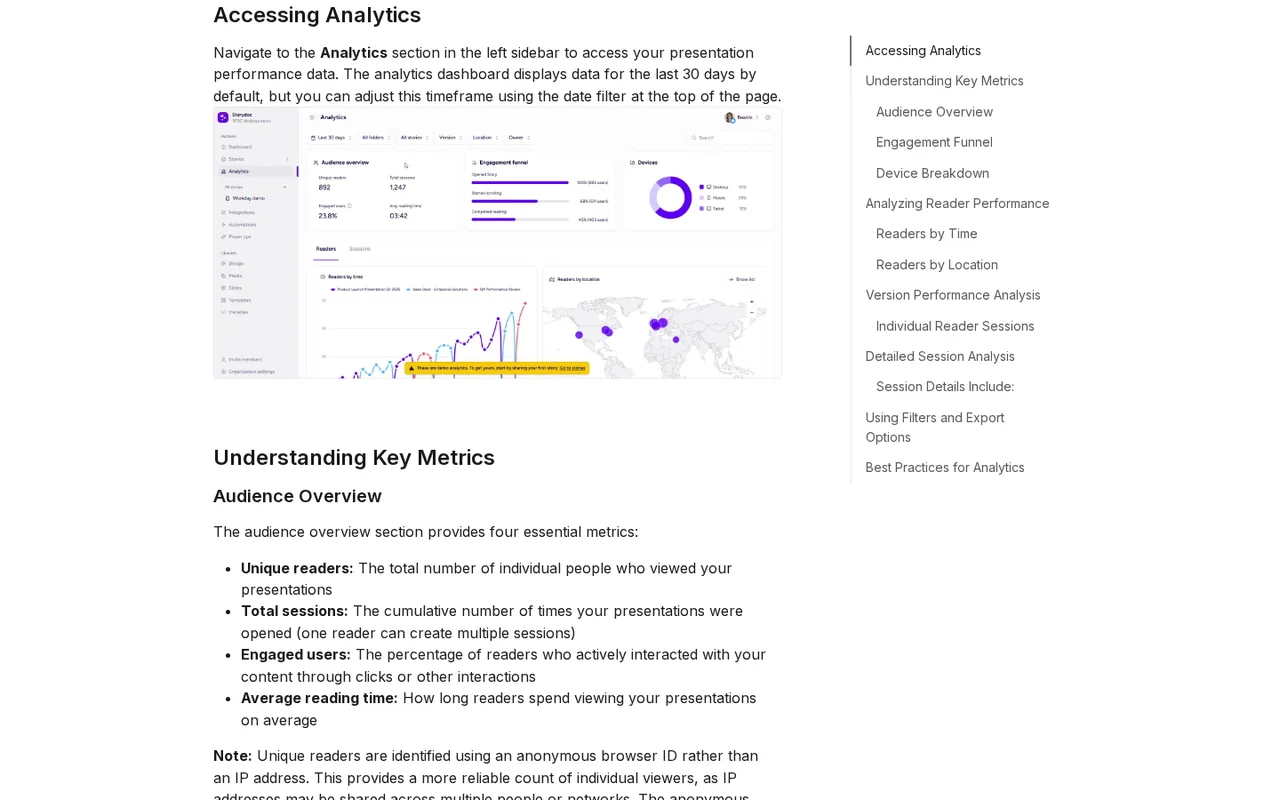
| Reader analytics: unique readers, sessions, engaged users, average reading time and an opened-scrolled-completed funnel (help center) | — | |
| Static PDF export in multi-slide, one-page or A4/Letter layout on paid plans; no PowerPoint export (help center) | — | |
| API, Zapier, Make.com and CRM integrations such as HubSpot, Salesforce and Pipedrive that create versions automatically; the comparison table puts CRM sync and API access on Team (help center, pricing page) | — | |
| Stories and versions | A story is the master document; a version is a copy with its variables filled in for one recipient, keeping its own link and reader data, and editing a version leaves the master unchanged. | The comparison table locks text and custom variables on Starter, so personalized versions start on Pro. |
| Live stories limit | Only shared stories count against the active-document limit of 5 on Starter and 30 on Pro; drafts and archived stories do not. | Once the limit is reached a new story cannot be published until another is archived or deleted, or the plan is upgraded. |
| Custom domain | Team plans can host links on a branded yourcompany.storydoc.com subdomain or a whitelabel domain via a CNAME record. | Starter and Pro links stay on the storydoc.com domain. |
What does the 14-day trial let you keep?
The trial is for building and sharing, not for taking files away. The billing article says the trial includes limited features, collects no payment details and does not convert into a charge on its own. Removing the Storydoc logo from the engagement bar is a paid feature from Starter, per the branding article, although the comparison table marks badge removal from Pro. PDF export is listed for paid plans.
What survives the trial is the link. According to the trial-end article, shared stories stay live and viewable after the trial expires, but you can no longer edit, duplicate or create stories until you subscribe. The same applies after cancelling a paid plan.
Can a Storydoc deck leave the browser?
Only as a PDF. The PowerPoint article states that direct PPTX export is not supported; opening an exported PDF in PowerPoint gives static slides with no editable content. If the recipient needs a PowerPoint file to edit, Gamma lists PPTX export even on its free plan.
The PDF export offers multi-slide, one-page and A4 or Letter layouts, a slide selector, a high-quality option and a switch to remove the tracking QR code from the last page. Animations and embedded videos do not carry over. For a room with poor internet, the offline article suggests opening every slide while connected so the browser caches it; YouTube or Vimeo embeds still need a connection.
How do stories, versions and plan limits interact?
Storydoc separates the master from the copies. The stories and versions article describes a story as the template, with variables such as {{company_name}} or {{date}}, and a version as a copy with those fields filled in for one recipient and its own URL. The live stories article counts only shared stories toward the active-document limit, so drafts and archived stories are free.
The comparison table adds tighter caps on Starter: no text or custom variables, 10 links and versions, 3 live deck templates, 20 slides per template and 2 workspace folders. Pro adds variables, lifts links, templates and slides to unlimited and allows 10 folders, but bulk version creation is marked limited until Team.
What do the AI credits cover?
Generating a whole deck with the AI assistant and redesigning slide layouts are marked unlimited on every plan. Credits apply to smaller edits: the AI tokens article lists translation, spelling and grammar fixes, expanding, shortening and changing the tone of text. It gives 25 tokens a month on Starter, 200 on Pro and unlimited on Team, resetting each billing month. The pricing page lists 125 AI text credits for Pro and adds separate image credits: 20 a month on Starter and 50 on Pro.
What does a reader’s visit record?
The analytics guide reports unique readers, total sessions, the share of engaged readers and average reading time, plus a funnel from opened to started scrolling to completed. Readers are counted by an anonymous browser ID, so the same person on a phone and a laptop counts twice. The hosting article adds that stories are blocked from search engine indexing by default. Identified access, which asks readers for a name or email before viewing, is a Team feature in the comparison table.
How could you check Storydoc before paying?
Proposed evaluation · not performed yet
Check during the trial whether an AI-generated story keeps the facts of a brief and whether the analytics tell two readers apart.
- Start the 14-day trial and create a story with AI from a one-page product brief with five specific figures.
- Compare every figure on the generated slides with the brief.
- Share the story and open the link in a private window on a laptop and on a phone.
- Scroll to the end on one device and leave after the first slide on the other.
- Check that analytics show two unique readers, one completed and one opened only, and note whether PDF export is offered.
Accept if all five figures match and the funnel records the two visits differently. Reject if slides add numbers the brief does not contain. No result is recorded here.
Storydoc alternatives
Other presentations tools checked with the same method. Pick by the job, not by a score.

Recurring decks and fast drafts

Generating an on-brand deck from a prompt and rehearsing it before you present

Turning notes and reports into diagrams inside one document

Turning existing documents into editable PowerPoint decks

Sales and client-facing decks

Drafting and reformatting slides without leaving Google Slides or PowerPoint

Turning a PDF, Word or Excel document into an editable PowerPoint deck

AI first drafts of decks, documents and simple websites
Used Storydoc? Write the first review. Visitor opinions are moderated and kept separate from our source checks.
Frequently asked questions
Can I get a refund from Storydoc?
Only for a first purchase. The terms allow cancelling the initial purchase in writing within 14 days and refund the pro rata share of unused prepaid fees. Renewals, upgrades, add-ons and later purchases are not refundable, and design studio or integration services can be marked non-refundable. Requests go to support@storydoc.com.
Is Storydoc free for students?
Yes, with a .edu email address. The student article says signing up through the Storydoc Education page with a .edu address gives free access, including templates, AI generation and sharing by link or PDF. Students whose school has no .edu domain are asked to request an official address from their faculty.
Who operates Storydoc?
Storydoc Technologies Ltd of Herzliya, Israel. Its terms are governed by Israeli law, with courts in Tel Aviv and arbitration under International Chamber of Commerce rules in Tel Aviv. Fees are stated in US dollars, and payments and invoices are handled by Paddle as the payment provider.
Can Storydoc links use my own domain?
Only on Team plans. Support sets up either a branded subdomain such as yourcompany.storydoc.com or a whitelabel domain such as docs.yourcompany.com, for which your team creates a CNAME record pointing to cname.short.io. After setup, new stories you share use the custom domain; Starter and Pro stay on storydoc.com.
Can Storydoc create decks from my CRM automatically?
On the Team plan. The comparison table lists CRM integrations, access from the CRM and deck automation with API access for Teams only. The API creates and updates personalized versions from a template and returns each version URL. The Starter and Pro cards still show 10 and 25 version automations a month, a point to confirm with sales.
Sources and method24 official sources · 31 details checked · Oct 24, 2026
How we checked this profile
31 details on this page were checked against Storydoc's own pages and help documentation (Oct 24, 2026). 2 are still open and listed below.
See the checks by section28 documented1 editorial assessment2 open
Still open
- AI tokens cover translation, spelling and grammar, expanding, shortening and tone changes; Starter 25, Pro 200 and Team unlimited per month; balance resets each billing month.Not confirmed · checked · Source (opens in a new tab)
- The Starter plan card lists Remove Storydoc branding, while the comparison table locks Removing the Storydoc badge on Starter.Not confirmed · checked · Source (opens in a new tab)
Sources for this profile
- Pricing page with annual and monthly views, plan comparison and FAQstorydoc.com
- Homepagestorydoc.com
- Terms and Conditionsstorydoc.com
- FAQ pagestorydoc.com
All 24 sources
- Help center: Will I be charged after the trial?help.storydoc.com
- Help center: Will my Storydoc stay live after the trial ends?help.storydoc.com
- Help center: Can I download my story to PowerPoint?help.storydoc.com
- Help center: How to export your story as PDFhelp.storydoc.com
- Help center: AI Tokenshelp.storydoc.com
- Help center: What if I reach the live stories limit?help.storydoc.com
- Help center: How to remove Storydoc brandinghelp.storydoc.com
- Help center: Storydoc for studentshelp.storydoc.com
- Help center: Do I need internet to present?help.storydoc.com
- Help center: Payment and proration FAQhelp.storydoc.com
- Help center: Invoice and receipts guidehelp.storydoc.com
- Help center: How to cancel your account and subscriptionhelp.storydoc.com
- Help center: Where are my pages hosted?help.storydoc.com
- Help center: Compliance detailshelp.storydoc.com
- Help center: How to use AI in Storydochelp.storydoc.com
- Help center: Stories vs Versionshelp.storydoc.com
- Help center: Storydoc APIhelp.storydoc.com
- Help center: How to use Storydoc analyticshelp.storydoc.com
- Help center: Permissions by rolehelp.storydoc.com
- Help center: Custom subdomain setuphelp.storydoc.com
Official pages read on 24 Oct 2026 with plain HTTP requests; the monthly price toggle was read in a local browser: homepage, pricing page with plan comparison and FAQ, FAQ page, Terms and Conditions, and help center articles on the trial, PowerPoint and PDF export, AI tokens, live stories limit, branding, student access, offline presenting, proration, invoices, cancellation, hosting, compliance, AI features, stories and versions, the API, analytics, roles and custom subdomains. We did not create an account or build a deck. The G2 score, customer logos and testimonials were not used, and neither were third-party directory prices.
Sources checked Oct 24, 2026. Found something out of date? See how we correct profiles.