What is Beautiful.ai, in short?
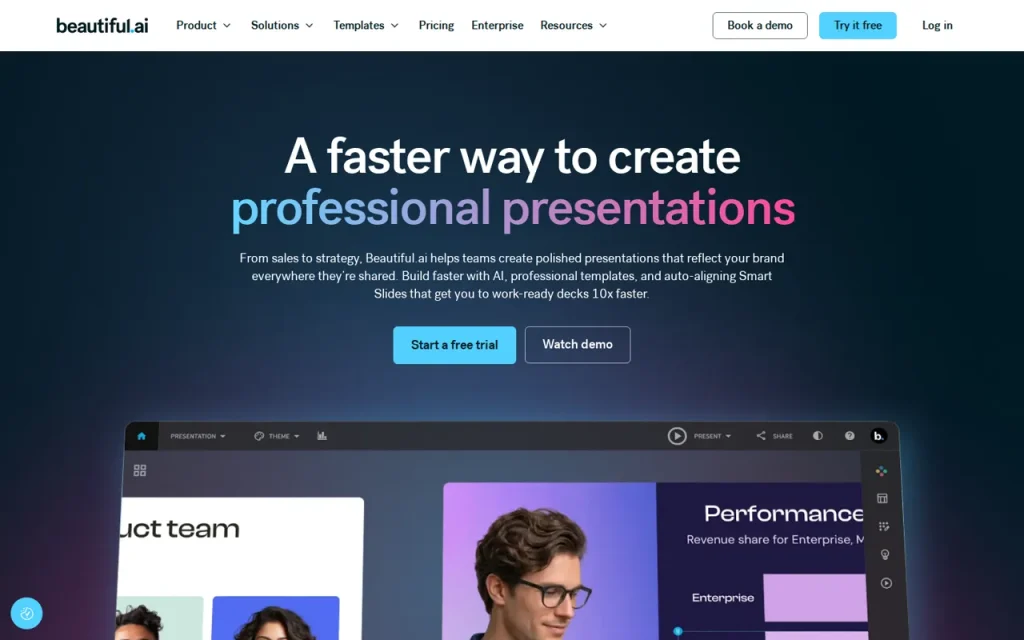
Beautiful.ai helps create presentations with automatic slide layouts. Its advertised Pro and Team trial lasts 14 days and requires a card. Pro is listed at $14.50 per month on annual billing; Team pricing needs confirmation because the provider page gives conflicting billing units.
Key features
- Smart Slide layouts that arrange themselves
- 300+ slide layout library
- Unlimited AI content generation
- PowerPoint import and export
- Custom branding and branded themes
- Viewer and engagement analytics
Feature list taken from the sources listed at the foot of this profile, not from our testing.
What can you actually do with Beautiful.ai?
Editable PowerPoint
Paid plans list an editable export distinct from static slide images.
Where it falls short: Fonts and external-format support affect the exported deck.
PowerPoint images
The image-based option preserves slides as static images.
Where it falls short: Individual slide elements are not editable in that output.
Trial and Team pricing
Pro and Team advertise a 14-day card-required trial.
Where it falls short: Confirm cancellation and Team billing units before subscribing.
Feature descriptions follow the sources listed at the foot of this profile; the limits are our editorial reading of what those sources do and do not promise.
Strengths and limits
Strengths
- Smart Slides automate layout decisions
- Paid plans offer editable PowerPoint export
- A trial is advertised for Pro and Team
Limits to plan around
- The advertised trial requires a card and auto-bills unless cancelled
- Team billing units conflict within the pricing page
- External exports lose animations and transitions
- Automatic layout does not validate the argument on a slide
Derived from documented behaviour and published limits, not from a scored review.
Who is it for?
- Recurring reportersStatus decks where consistency matters more than bespoke design.
- Small teamsShared templates that keep branding intact across non-designers.
- ConsultantsFast first drafts from rough notes before refining the argument.
- Sales teamsBranded decks assembled from a central slide library.
Our editorial judgement about fit, based on what the documented features support. The vendor makes no such claim about these groups.
How much does Beautiful.ai cost?
Pricing check: Unresolved details. Check the current provider terms before subscribing.
| Plan | Price | What it covers |
|---|---|---|
| Pro | $14.50/mo billed annually | Individual plan. |
| Team | Confirm billing unit with provider | The pricing card and FAQ conflict on included seats versus per-user billing. |
| Monthly Pro option | $45/mo | Cancel anytime; confirm checkout conditions. |
| Enterprise | Custom | Contact provider. |
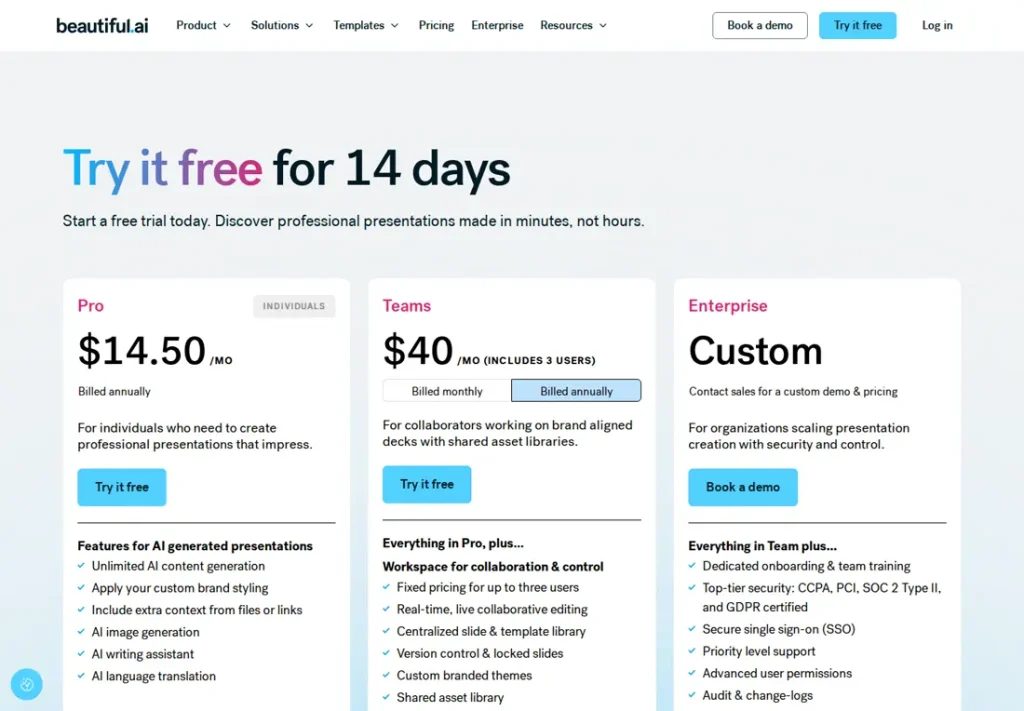
No comparable numeric price range is confirmed here. Individual plan notes may include documented amounts, but unknown billing units, unavailable figures or inconsistent terms are not converted into a single price range. See the evidence checks and original pricing source below.
What is Beautiful.ai used for?
Beautiful.ai is a presentation tool whose slides adjust their own layout as you add content. Instead of positioning each element, you pick a slide type and the arrangement follows a set of rules. It is aimed at people who present regularly but do not want to spend the evening aligning boxes. The scope is described on the official site.
The trade-off is the point of the product: the same rules that keep slides tidy also limit how far you can deviate from them. If your work depends on exact custom layouts, test that constraint before you commit — it is a design decision, not a missing feature.
Where it fits in a workflow
- Recurring internal decks: status updates and reports where consistency matters more than bespoke design.
- Fast first drafts: getting a structured deck out of rough notes, then refining the argument rather than the alignment.
- Shared team templates: keeping branding consistent across people who are not designers.
A tidy deck is not a clear argument. Automatic layout fixes the visual problem and leaves the harder one — whether each slide earns its place — entirely to you.
Plans and limits
Team pricing needs confirmation before budgeting seats: the pricing card and FAQ give conflicting billing units. We do not treat either reading as a confirmed team total.
The advertised Pro and Team trial requires a card and lasts 14 days. Cancel before it ends to avoid billing. This describes the current advertised trial; it does not establish whether an older Basic account or an education arrangement is available to you.
Use the advertised trial on a representative deck and inspect the exported file. Do not infer that its terms cover every legacy, education or negotiated account.
A first task to try
The test below targets the exact thing automatic layout is supposed to solve. No test result is being reported here.
Take one existing slide of yours that is overcrowded — a table with nine rows, a paragraph of text and a chart — and rebuild it. Then export the result to PowerPoint and open it somewhere else.
Check three things: what the layout rules do when the content is genuinely too much, whether you could still say what you needed to say, and how the export survives outside the tool. Export fidelity is where presentation tools most often disappoint people who have to hand files to someone else.
Should you choose Beautiful.ai?
Choose it when you build the same kind of deck repeatedly and consistency matters more than bespoke design — status reports, recurring updates, branded decks assembled by people who are not designers. The layout rules do the alignment work you would otherwise repeat every week.
Choose something else when your decks demand exact custom layouts, because the same rules that keep slides tidy constrain how far you can deviate. Review the words and factual claims on the slides; if drafting is the harder half, the Claude profile covers that. Check the current trial and any account-specific eligibility before subscribing. See the presentations category for alternatives and the comparison table for a direct match-up.
Before you commit
Run the trial against a real deadline, and confirm the PowerPoint round-trip if colleagues will edit your files. If the words on the slides still need drafting, the Claude profile covers that part, and you can review two options side by side.
Everything above is traceable to the links in the sources section, with the date we checked them, and the editorial policy explains how we check and correct profiles.
Source check: September 22, 2026. This profile is based on the vendor’s official product and pricing pages. It contains no hands-on test, no sponsored review and no user ratings.
What survives a PowerPoint export?
Choose the editable export when colleagues need to change individual elements. The image-based PowerPoint option creates static slides. Animations and transitions do not survive external export, and fonts can change if they are missing on the receiving computer. Open the exported file in the destination application before delivery.
Watch Beautiful.ai in the vendor's own words
Published by Beautiful.AI on their official YouTube channel, August 19, 2026. Nothing loads from YouTube until you press play — the preview image is served from this site. We did not produce this video and do not endorse its claims.
Official Beautiful.ai channels
Collected from links published on the vendor's own website, checked September 22, 2026. Use these to verify announcements and current pricing at the source.
Frequently asked questions
Is Beautiful.ai free?
The current pricing page advertises a 14-day trial for Pro and Team, requiring a payment card. It bills unless cancelled. This describes the advertised offer rather than every possible legacy Basic account or education arrangement.
How much does Beautiful.ai cost?
The Pro card shows $14.50 per month billed annually. Team billing is unclear: its card refers to included users while the FAQ quotes per-user charges. Confirm the applicable billing unit with the provider before estimating a team total.
Can I export to PowerPoint?
Yes. Paid plans support an editable PowerPoint export, distinct from an export where each slide is an image. Missing fonts can affect appearance, and external exports lose animations and transitions. Inspect the file in the receiving application.
What are Smart Slides?
Slide types that arrange their own layout as you add content, drawn from a library of more than 300 layouts. Instead of positioning each element by hand, you choose a structure and the tool applies its rules. That is the core of the product rather than one feature among many.
What is the catch with automatic layout?
Smart Slides apply layout rules, which may or may not suit your intended design. The provider also describes Classic Slides for more manual control. Test your own dense or unusual slide; we have not measured layout quality or export fidelity.
Is there a free trial?
Pro and Team advertise a 14-day trial requiring a payment card. Cancel before the trial ends to avoid billing. Review the current checkout terms; do not assume every enterprise or education arrangement has identical conditions.
Evidence for key details
These checks apply to the individual details below. A recent check of one detail does not mean every section was reviewed again.
- The advertised Pro and Team trial lasts 14 days and requires a card; billing starts unless cancelled.Documented · Provider documentation · Checked . Read the source (opens in a new tab)
- The Pro card shows $14.50 per month billed annually for an individual.Documented · Provider documentation · Checked . Read the source (opens in a new tab)
- Team billing units are inconsistent within the pricing page.Unresolved · Provider documentation · Checked . Card: $40/month includes 3 users; FAQ: $40/user/month annual, $50 monthly. Do not resolve this by guessing or publish a Team aggregate price. Read the source (opens in a new tab)
- Editable PowerPoint export is available on Pro, Team and Enterprise; fonts must be available on the destination device.Documented · Provider documentation · Checked . Read the source (opens in a new tab)
- Image-based PowerPoint export produces static slides; external exports lose animations and transitions.Documented · Provider documentation · Checked . Read the source (opens in a new tab)
Sources for this profile
Provider documentation reviewed; no export test. Team pricing contains conflicting billing units and is not treated as a confirmed price. Checked September 22, 2026. Found something out of date? The editorial policy explains how we correct profiles.