
Parasail vs Devin Desktop
Plans, free access, limits and intended use side by side, taken from each vendor’s own pages. No score and no winner: the facts show where the two differ.
Change tools
Inference cloud that runs open AI models behind one OpenAI-compatible API, billed per token

IDE with local agent execution
- Free access
- Parasail: No free tier
- Devin Desktop: Free access
- Paid from
- Parasail: Pay per 1M tokens; from $0.04 input and $0.20 output
- Devin Desktop: USD 20 per month
- Plans listed
- Parasail: 5
- Devin Desktop: 5
- Public API
- Parasail: Not confirmed
- Devin Desktop: Not confirmed
Where Parasail and Devin Desktop differ
- AccessParasail has no free tier, while Devin Desktop offers free access.
- Pricing checkSome prices or terms not confirmed for Parasail; pricing review due for Devin Desktop.
Head to head
Each value from the tool’s profile and the vendor’s own pages
| Parasail | Fact | Devin Desktop |
|---|---|---|
| Access and price | ||
| No free tier | Free accessDiffers | Free access availableFree · USD 0 |
| Pay per 1M tokens; from $0.04 input and $0.20 outputServerless · gpt-oss-20b | Lowest listed paid plan | USD 20 per monthPro |
| No free plan; new accounts prepay $25; Serverless from $0.04 per 1M input tokens; Elastic is Serverless + 25%; Dedicated per GPU-hour | Pricing model | Free plan; Pro $20/month |
| 5 | Plans listedSame | 5 |
| Not confirmed | Public API | Not confirmed |
| Not confirmed | Card to start | Not confirmed |
| Not confirmed | Open source | Not confirmed |
| What it is for | ||
| Developers and teams that call open-weight models such as Qwen, DeepSeek, GLM, Kimi or gpt-oss by API and want per-token billing with no GPU commitment | Built for | Developers reviewing small repository changes |
| Coding | CategorySame | Coding |
| Platforms |
|
| Works with | Not listed |
| How current | ||
| Profile sources checked | ||
| Some prices or terms not confirmed · Nov 1, 2026 | Pricing checkDiffers | Pricing review due · Oct 4, 2026 |
Official source check for both tools. No hands-on testing and no score: “Differs” marks a documented difference, not a better tool.
Plans and prices
Parasail
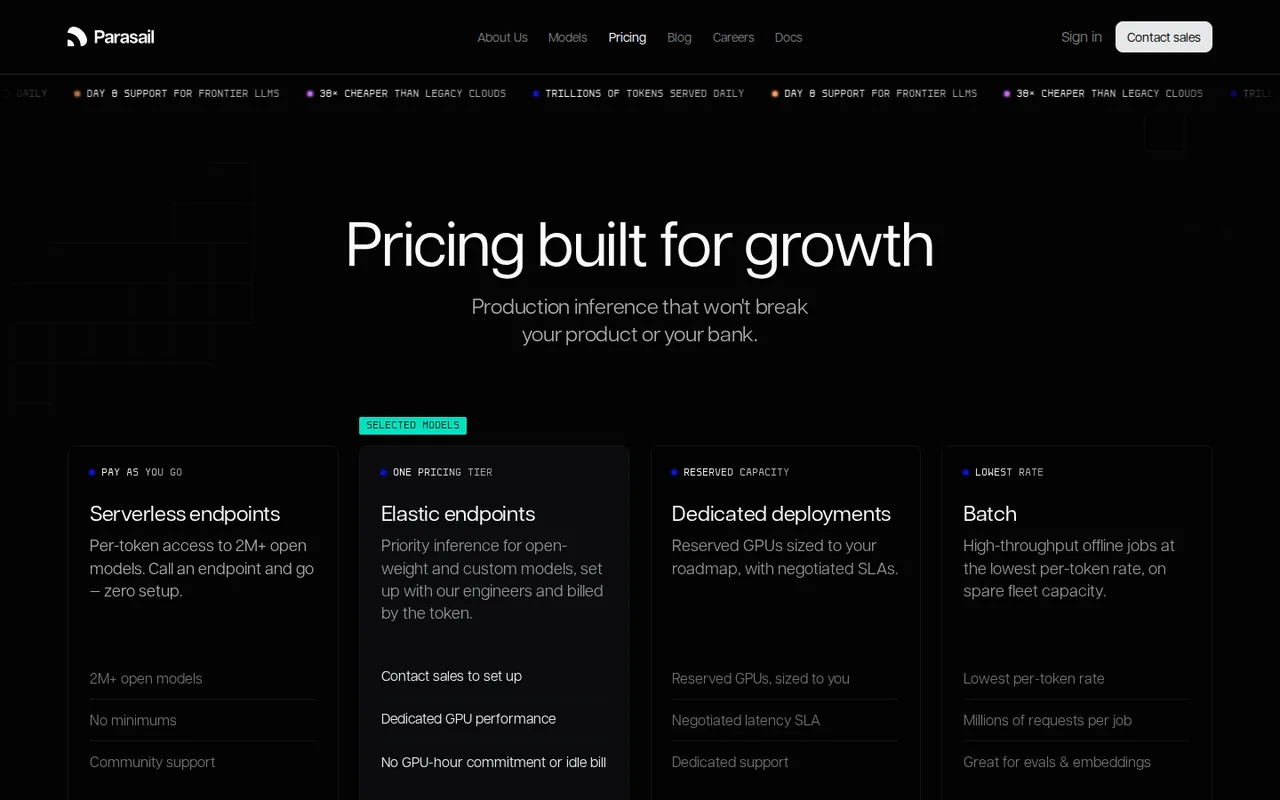
Some prices or terms not confirmed · Nov 1, 2026- ServerlessPay per 1M tokens; from $0.04 input and $0.20 outputgpt-oss-20b
- Elastic EndpointsServerless rate + 25%
- Dedicated InstancesPer GPU-hourshown at deploy
- BatchLowest per-token ratenot listed
- EnterpriseContract
Devin Desktop
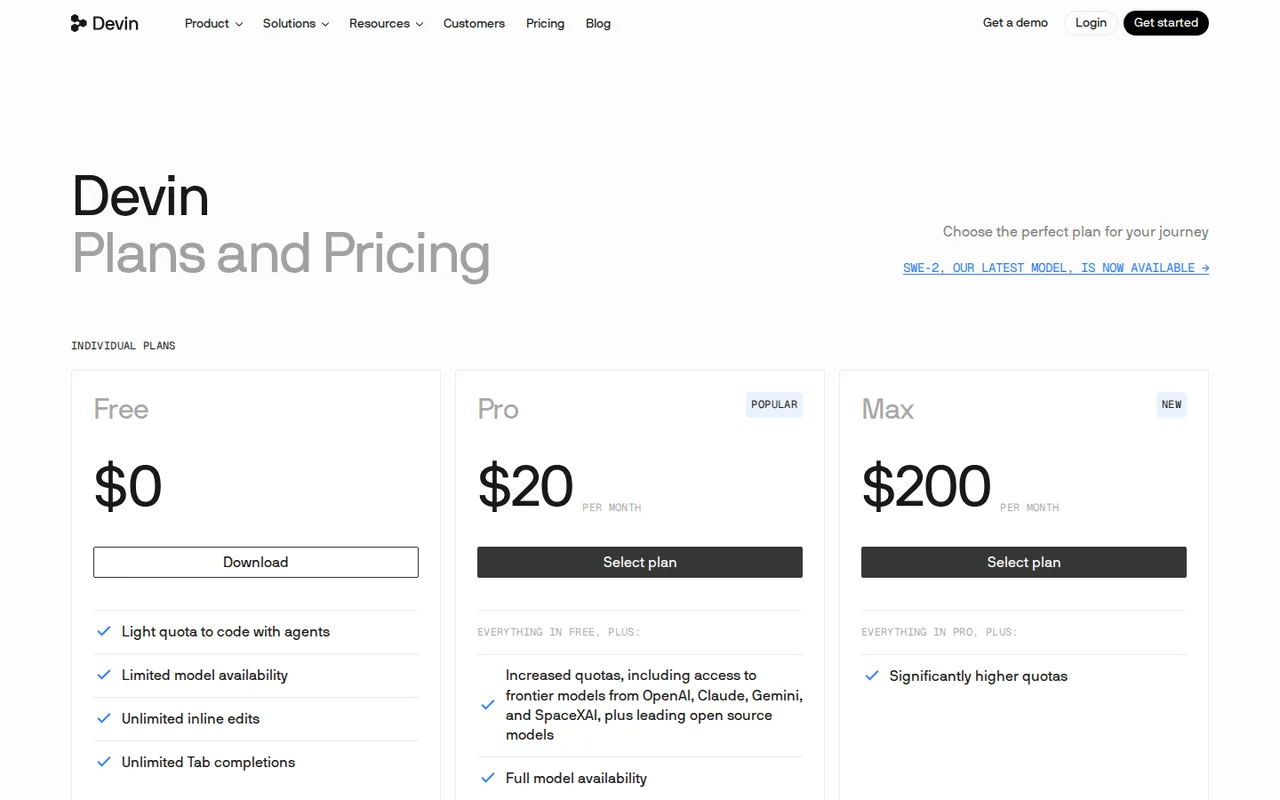
Pricing review due · Oct 4, 2026- FreeUSD 0
- ProUSD 20 per month
- MaxUSD 200 per month
- TeamsUSD 80 per month base plus $40 per month per full developer seat
- EnterpriseCustom quote
Strengths and limits
Parasail
Strengths
- Per-token billing with no minimum usage: The pricing page says pay only for what you use with no minimums on Serverless, and Elastic Endpoints carry no GPU-hour commitment or idle-GPU bill.
- Prices are public for 41 models: The serverless table lists input, output and cache-read rates per 1M tokens.
- Drop-in API: The docs say any OpenAI SDK works by changing the base URL and key.
Limits to plan around
- No free plan: The billing docs charge $25 starting credit when a card is added, and models and API keys do not work without a card.
- Billing pages disagree: The docs describe prepaid billing for new accounts, while the Terms describe monthly billing in arrears and non-refundable fees.
- Key prices are not public: Batch rates, Dedicated per-GPU-hour rates and Elastic availability need sales or a deploy screen.
Devin Desktop
Strengths
- Local project context: An agent can work with actual project files and tools.
- Migration continuity: Existing Windsurf configuration has a documented migration path.
- Fine-grained permissions: Deny, ask and allow rules can be scoped to file reads, writes, commands, HTTP fetches and MCP tools.
Limits to plan around
- Local execution has consequences: Commands operate in the developer environment within the configured permissions.
- Legacy access needs checking: The migration FAQ and new-sale plan cards address different account situations.
- Paid cost follows quotas: Plans differ by models and usage limits, and extra usage is separate from the subscription.
See both products
Start from your task, not from a winner.
Run both tools on the same real task, then compare the result, how much editing it needs and how fast it uses your plan’s allowance.
How we reviewChange this pair
Choose tools
Choose two tools below. You can replace either selection at any time.
Audio & voice
Automation
Coding
Data & spreadsheets
Images & design
Presentations
Research & sources
Video & editing
Website builders
Writing & content
Comparing tools from different categories is fine, and often useful — a writing assistant and a research tool solve different halves of the same job. The table will show you exactly where they diverge.
Questions about comparing tools
How does the comparison work?
Add two tools to the comparison tray from any tool card, then open this page. The table pulls each tool's verified plan details, platforms, strengths and limits from its profile, so both columns carry the same kind of evidence, with a separate source-check date for each tool.
Do you declare a winner?
No. The table sets two tools against each other on documented facts, not on a score. Which one wins depends on your task, your budget and your usage volume — three things we cannot see from here.
Why are some cells empty or marked unverified?
Because we could not confirm that detail on the vendor's own pages. Rather than filling the gap with a figure from elsewhere, we mark it and say why on the tool's profile.
Can I compare more than two tools?
Not at once. Two columns keep the differences readable and force a real decision. Remove either selected tool to replace it, or clear both to start a new pair.
Every figure in the table above comes from the linked profile, where the source and the verification date are listed. Browse all tools or read the editorial policy.