

Devin Desktop: local agent IDE with a free plan, but paid quotas and legacy Windsurf entitlements shape the real cost
Updated October 4, 2026 · By Elias Brandt · Documentation review, not tested hands-on
Pros
- Local project context
- Migration continuity
- Fine-grained permissions
Cons
- Local execution has consequences
- Legacy access needs checking
- Paid cost follows quotas
Bottom line
Light agent quota with limited models; Tab completions and inline edits.
You want a local coding agent that edits real project files and can work inside a git worktree, so changes are merged back only after you review them.
You expect unlimited premium-model work from one subscription, since paid plans run on quotas with extra usage on top.
Best forDevelopers who review diffs before mergingTeams expecting unlimited premium-model workExisting Windsurf users
Strengths, limits and who it suits, in full
Strengths
- Local project context An agent can work with actual project files and tools.
- Migration continuity Existing Windsurf configuration has a documented migration path.
- Fine-grained permissions Deny, ask and allow rules can be scoped to file reads, writes, commands, HTTP fetches and MCP tools.
Limits
- Local execution has consequences Commands operate in the developer environment within the configured permissions.
- Legacy access needs checking The migration FAQ and new-sale plan cards address different account situations.
- Paid cost follows quotas Plans differ by models and usage limits, and extra usage is separate from the subscription.
Who it suits
- Developers who review diffs before merging Useful when a clear diff and repeatable tests define completion.
- Teams expecting unlimited premium-model work Paid quotas and extra usage remain part of the cost decision.
- Existing Windsurf users Rules, settings and extensions carry over, so the change is mostly a new name and a new agent harness.
How much does Devin Desktop cost?
Prices confirmed · checked
Regional prices: USD prices from current new-sale cards.
Team cost includes the base fee and full seats: two full seats total $160/month before extras. Legacy accounts may have different entitlements. Daily/weekly paid quotas are not a published fixed number of completed tasks; tax and region were not specified.
| Plan | Price | What you get |
|---|---|---|
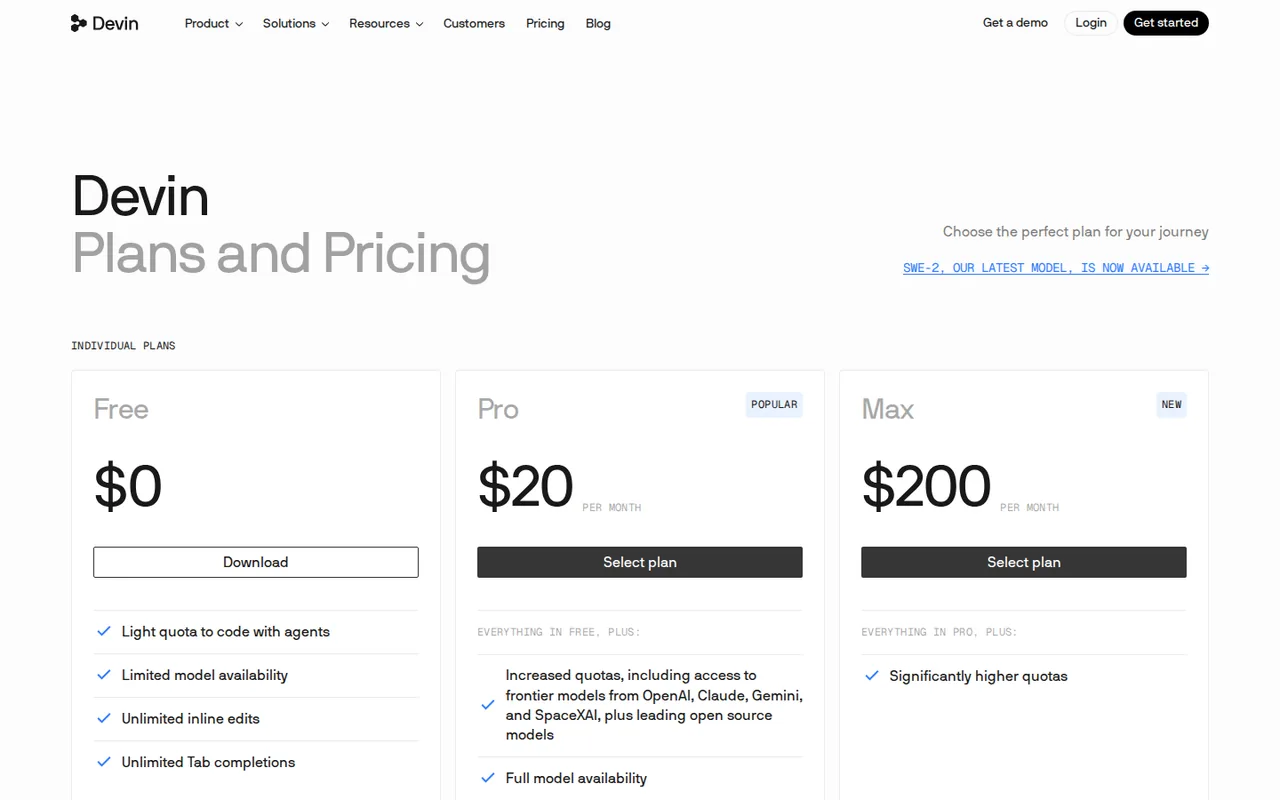
| Free | $0 sourceFrom devin.ai/pricing, checked Oct 4, 2026 (opens in a new tab) | Light agent quota with limited models; Tab completions and inline edits. |
| Pro | $20/month sourceFrom devin.ai/pricing, checked Oct 4, 2026 (opens in a new tab) | Higher agent quotas; current plan card includes Cloud access. |
| Max | $200/month sourceFrom devin.ai/pricing, checked Oct 4, 2026 (opens in a new tab) | Higher usage allowances than Pro. |
| Teams | $80/month base plus $40/month per full developer seat sourceFrom devin.ai/pricing, checked Oct 4, 2026 (opens in a new tab) | Full-seat Desktop access; team administration. |
| Enterprise | Custom quote | Contracted deployment and organization controls. |
Taxes, currency and promotions can change the price you see at checkout.
Try Devin Desktop free (opens in a new tab)
Key features
| Feature | What it does | Watch out |
|---|---|---|
| IDE with local agent execution | — | |
| Worktrees and change review | — | |
| Configurable tool permissions and sandboxing | — | |
| Subagents and read-only plan mode in the Devin Local agent | — | |
| Rules read from .devin/, .windsurf/ and AGENTS.md files | — | |
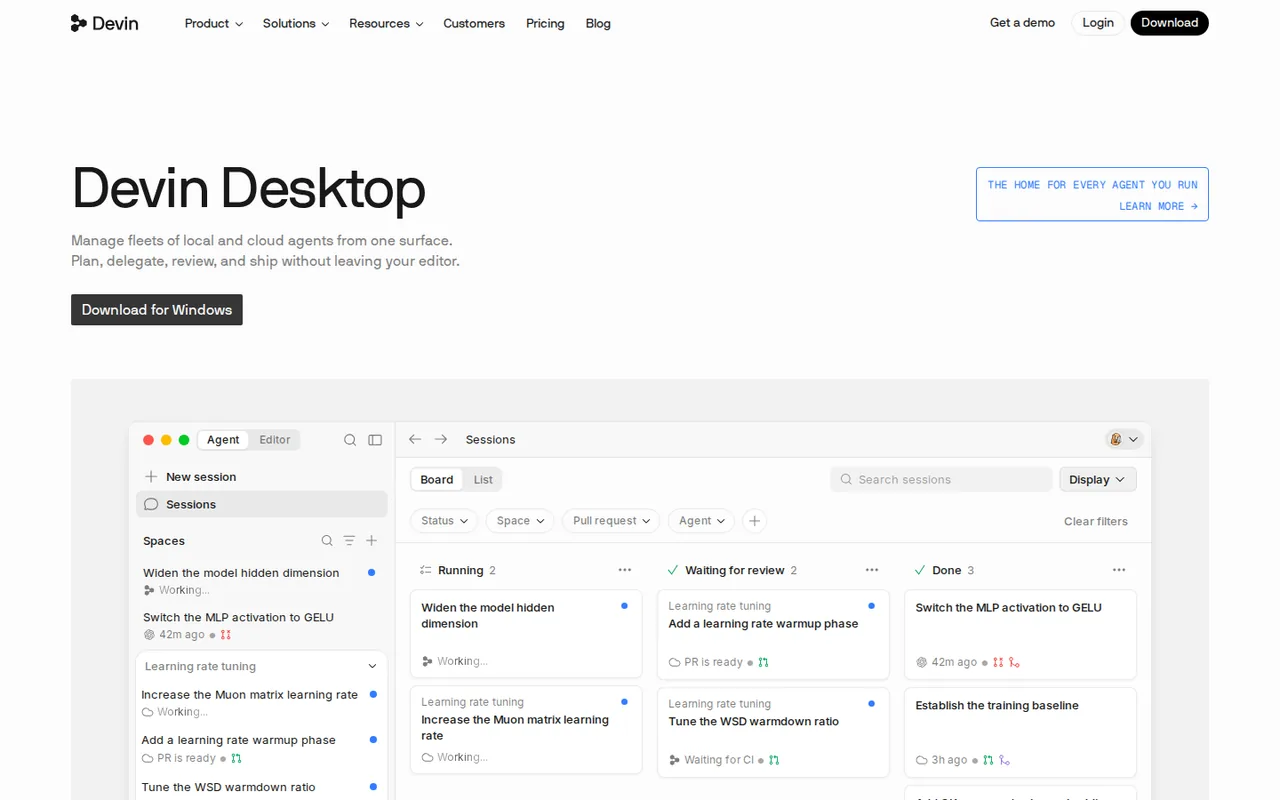
| Agent Command Center with Spaces for managing several agents | — |
Which account is actually being upgraded?
The migration FAQ preserves existing Windsurf plans and discusses Cloud as a separate SKU for those accounts. The current new-plan card includes Cloud access in Pro. These statements should not be flattened into either “everyone already has Cloud” or “everyone must buy it separately”. Check the entitlement attached to the account being used.
The pricing page also advertises a time-limited SWE-2 offer ending October 16, 2026. That is not a permanent unlimited allowance and is excluded from the recurring capacity estimate here.
What is a safe boundary for a local coding task?
The Local agent documentation describes access to local files, tools and the environment, with configurable sandbox and permission controls. Give the first task a small file boundary, a clear stop condition and no production credentials. A clean diff is easier to inspect than a broad request to improve an entire codebase.
What does a Teams seat cost?
Teams combines a base fee with full seats, and Desktop access is tied to full seats. With the $80/month base and $40/month per full developer seat, two seats come to $160/month and five seats to $280/month before any extra usage. Tax and region were not specified, so treat these as list prices.
Evaluate a parser correction
Proposed evaluation, not performed: use Free with available agent quota in a disposable local repository. No account integration, deployment or network-dependent package installation is part of this exercise.
- Create a tiny function that parses a fictional reservation line into room and duration. Add examples for a normal input, an empty field and a duration that is not a number.
- Ask the agent to reject invalid inputs while preserving the existing valid format. Limit edits to that function and its tests.
- Review requested commands before execution. Decline any operation outside the stated repository or task boundary.
- Run the tests and inspect the diff yourself. Check that tests were not weakened merely to produce a green result.
- Compare the final files with the starting commit and record the quota used, unexpected edits and unresolved cases.
Keep the result unmerged until the behavior and scope are understood. The exercise covers one bounded workflow only.
Is Devin Desktop worth it?
Documentation review plus dated public user reports. Documentation review, not tested hands-on. Not scored.
Worth it if
- You want a local coding agent that edits real project files and can work inside a git worktree, so changes are merged back only after you review them.
- Your team already uses Windsurf and wants the same editor, rules and settings under the new name, since the migration FAQ says settings are ported automatically.
- You need to limit what an agent may do, because permission rules can deny, ask or allow file, command, fetch and MCP actions.
Probably not if
- You expect unlimited premium-model work from one subscription, since paid plans run on quotas with extra usage on top.
- You need guaranteed Cloud access on a legacy Windsurf account, because Devin Cloud is described as a separate SKU for those accounts.
Devin Desktop alternatives
Other coding tools checked with the same method. Pick by the job, not by a score.

Developers who want an approval-based coding agent and choose and pay for their own models

Developers evaluating controlled repository edits with their own test suite

Running an open model locally for code and text work

Reviewing small code changes in an existing editor

Developers who want spec-driven agent work in a VS Code-style IDE with a fixed monthly credit cap

Agent-driven coding with a monthly credit budget

Builders evaluating a small operational app

Agentic coding in a desktop IDE on a metered budget
Used Devin Desktop? Write the first review. Visitor opinions are moderated and kept separate from our source checks.
Frequently asked questions
Is Devin Desktop the same as Windsurf?
Yes. Devin Desktop is the new name for the Windsurf IDE. The provider's migration FAQ describes the same editor and features under the Devin brand, with existing settings, extensions and workflows carried over. The Agent Command Center is now the primary view, while the classic editor stays available. Plan, pricing and access for existing accounts are described as unchanged.
Does Devin Desktop have a free plan?
Yes. The Free plan costs $0 and includes a light agent quota with limited models, plus Tab completions and inline edits. Paid plans raise the quotas: Pro is $20/month and Max is $200/month. Paid quotas are not published as a fixed number of completed tasks, so the free allowance is the practical way to judge fit.
Do I need Devin Cloud to use Devin Desktop?
No. The migration FAQ says you can keep using Devin Desktop with local-only agents. Cloud is optional: the current Pro plan card includes Cloud access, while the FAQ describes Devin Cloud as a separate SKU for existing Windsurf accounts. Check which entitlement your own account carries before relying on cloud workflows.
What can the local agent access on my machine?
The Devin Local agent works with your local files, tools and environment. Permission rules can deny, ask or auto-approve actions scoped to file reads, file writes, commands, HTTP fetches and MCP tools, and an OS-level sandbox can limit filesystem and network access. Start with a narrow repository and no production credentials.
How do I get Devin Desktop on the Teams plan?
Add a full seat. Devin Desktop is available to Teams users with full seats, which cost $40/month each on top of the $80/month base. The migration FAQ says each full seat also carries $40/month of usage that works across Devin Desktop, Cloud, CLI and Review.
Sources and method5 official sources · Oct 4, 2026
Sources for this profile
- Current new-plan offersdevin.ai
- Devin Desktop identity and productdevin.ai
- Windsurf migration and legacy entitlementsdocs.devin.ai
- Local agent permissionsdocs.devin.ai
All 5 sources
Sources are the provider's product, pricing and documentation pages listed above; prices come from the new-sale plan cards. Provider demonstrations are not our test results.
Sources checked Oct 4, 2026. Found something out of date? See how we correct profiles.