
Dokie AI vs SlideSpeak
Plans, free access, limits and intended use side by side, taken from each vendor’s own pages. No score and no winner: the facts show where the two differ.
Change tools
Turn files and prompts into editable slides

AI presentation maker that turns documents and prompts into editable PowerPoint decks, narrated videos and quizzes
- Free access
- Dokie AI: Free access
- SlideSpeak: Free access
- Paid from
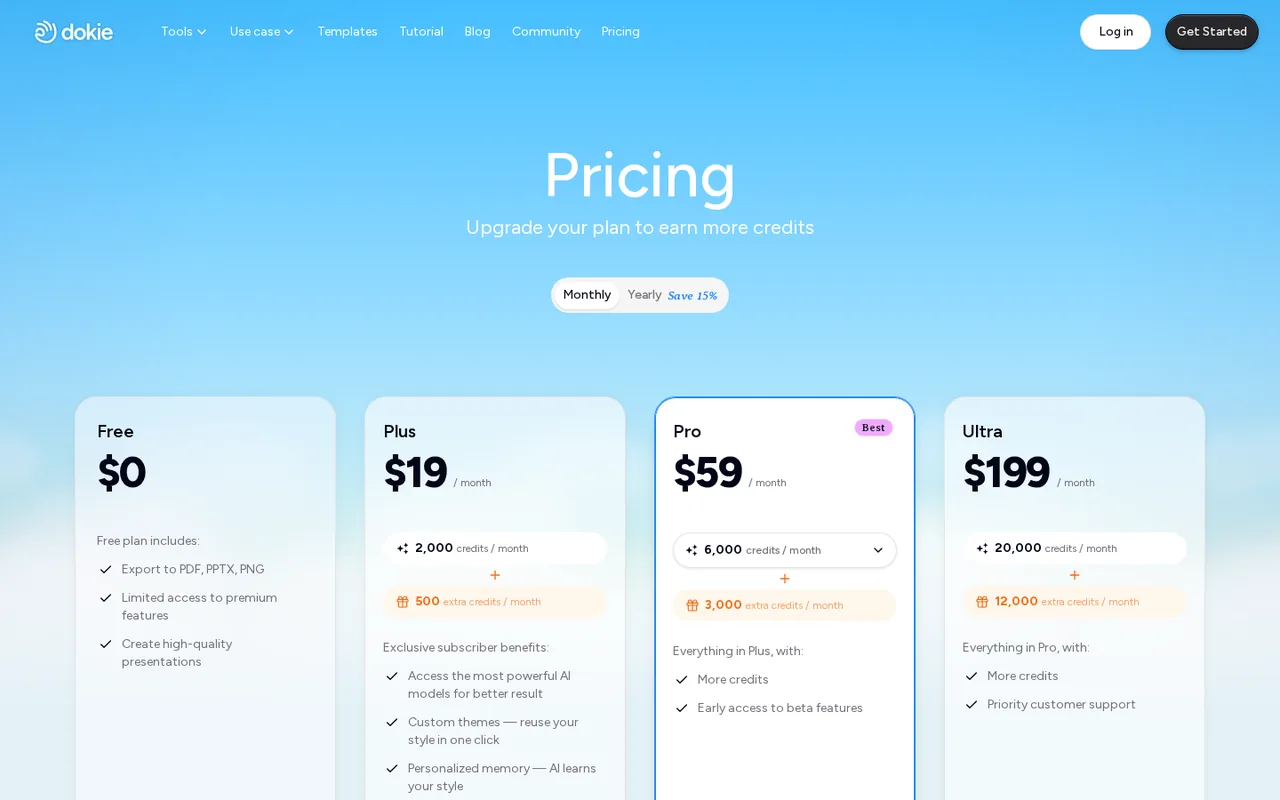
- Dokie AI: USD 19 per month billed monthly
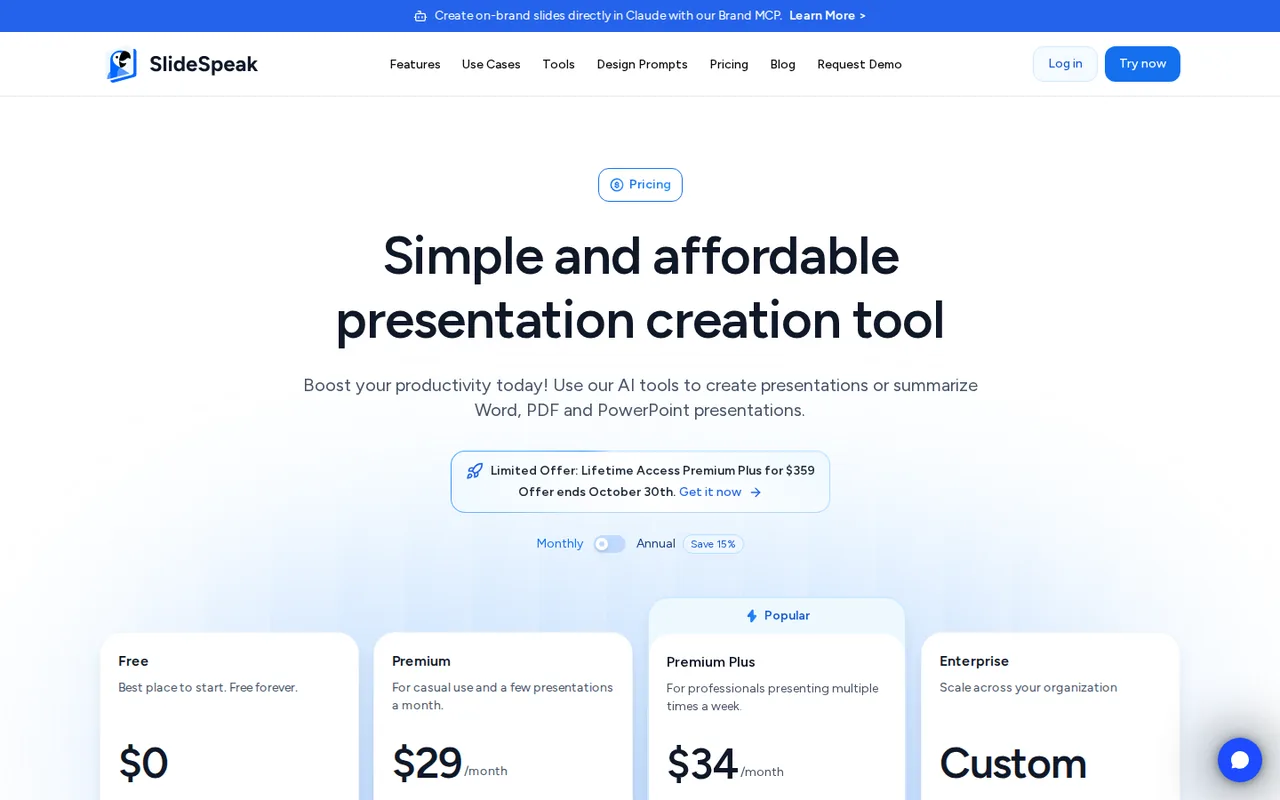
- SlideSpeak: USD 29 per month billed monthly
- Plans listed
- Dokie AI: 5
- SlideSpeak: 4
- Public API
- Dokie AI: Not confirmed
- SlideSpeak: Yes
Where Dokie AI and SlideSpeak differ
- PlansDokie AI lists 5 plans and SlideSpeak lists 4.
Head to head
Each value from the tool’s profile and the vendor’s own pages
| Dokie AI | Fact | SlideSpeak |
|---|---|---|
| Access and price | ||
| Free access availableFree · USD 0 | Free accessSame | Free access availableFree · USD 0 |
| USD 19 per month billed monthlyPlus · or $17 per month billed yearly | Lowest listed paid plan | USD 29 per month billed monthlyPremium · or $24.65 per month on annual billing |
| Free daily credits; Plus from $19/month | Pricing model | Free plan without downloads; Premium from $29 a month, or $24.65 a month on annual billing |
| 5 | Plans listedDiffers | 4 |
| Not confirmed | Public API | Yes |
| Not confirmed | Card to start | Not confirmed |
| No | Open sourceSame | No |
| What it is for | ||
| Turning existing documents into editable PowerPoint decks | Built for | Turning a PDF, Word or Excel document into an editable PowerPoint deck |
| Presentations | CategorySame | Presentations |
| Platforms |
|
| Works with |
|
| How current | ||
| Profile sources checked | ||
| Prices confirmed · Sep 28, 2026 | Pricing checkSame | Prices confirmed · Oct 24, 2026 |
Official source check for both tools. No hands-on testing and no score: “Differs” marks a documented difference, not a better tool.
Plans and prices
Dokie AI
Prices confirmed · Sep 28, 2026- FreeUSD 0
- PlusUSD 19 per month billed monthlyor $17 per month billed yearly
- ProUSD 59 per month billed monthlyor $51 per month billed yearly
- UltraUSD 199 per month billed monthlyor $170 per month billed yearly
- EnterpriseCustom quote
SlideSpeak
Prices confirmed · Oct 24, 2026- FreeUSD 0
- PremiumUSD 29 per month billed monthlyor $24.65 per month on annual billing
- Premium PlusUSD 34 per month billed monthlyor $28.90 per month on annual billing
- EnterpriseCustom quote
Strengths and limits
Dokie AI
Strengths
- Daily free allowance: 200 credits on each visit day plus 300 welcome credits, rather than only a one-time balance.
- Standard files on Free: PPTX, PDF and PNG export are listed on the Free plan card.
- User ownership in the terms: Inputs stay yours, and outputs belong to you to the extent the law allows.
Limits to plan around
- Daily credits do not accumulate: Each 200-credit daily bonus is valid for one day only.
- Credit costs are estimates: About 100 per new deck and 20 per slide edit, varying with complexity.
- Narrow refund terms: Refunds cover duplicate payments or outages longer than seven consecutive days.
SlideSpeak
Strengths
- Real PowerPoint file: The PPTX download keeps editable text, shapes, images, tables, charts, speaker notes and transition timing.
- Downloads cost nothing extra: PowerPoint, PDF and Google Slides downloads use no credits once you are on a paid plan.
- Share links on every plan: Viewers open a shared deck in the browser without a SlideSpeak account, including decks made on Free.
Limits to plan around
- Free cannot download: Free decks can be shared as links, but PowerPoint, PDF and Google Slides downloads need a paid plan; only translated decks are an exception.
- Small one-time free allowance: Free credits are 100 at sign-up and do not refresh, and the AI 5.0 engine is not included.
- Credits expire monthly: Unused plan credits do not roll over, and each team member needs a separate paid plan with separate credits.
See both products
Start from your task, not from a winner.
Run both tools on the same real task, then compare the result, how much editing it needs and how fast it uses your plan’s allowance.
How we reviewChange this pair
Choose tools
Choose two tools below. You can replace either selection at any time.
Audio & voice
Automation
Coding
Data & spreadsheets
Images & design
Presentations
Research & sources
Video & editing
Website builders
Writing & content
Comparing tools from different categories is fine, and often useful — a writing assistant and a research tool solve different halves of the same job. The table will show you exactly where they diverge.
Questions about comparing tools
How does the comparison work?
Add two tools to the comparison tray from any tool card, then open this page. The table pulls each tool's verified plan details, platforms, strengths and limits from its profile, so both columns carry the same kind of evidence, with a separate source-check date for each tool.
Do you declare a winner?
No. The table sets two tools against each other on documented facts, not on a score. Which one wins depends on your task, your budget and your usage volume — three things we cannot see from here.
Why are some cells empty or marked unverified?
Because we could not confirm that detail on the vendor's own pages. Rather than filling the gap with a figure from elsewhere, we mark it and say why on the tool's profile.
Can I compare more than two tools?
Not at once. Two columns keep the differences readable and force a real decision. Remove either selected tool to replace it, or clear both to start a new pair.
Every figure in the table above comes from the linked profile, where the source and the verification date are listed. Browse all tools or read the editorial policy.