

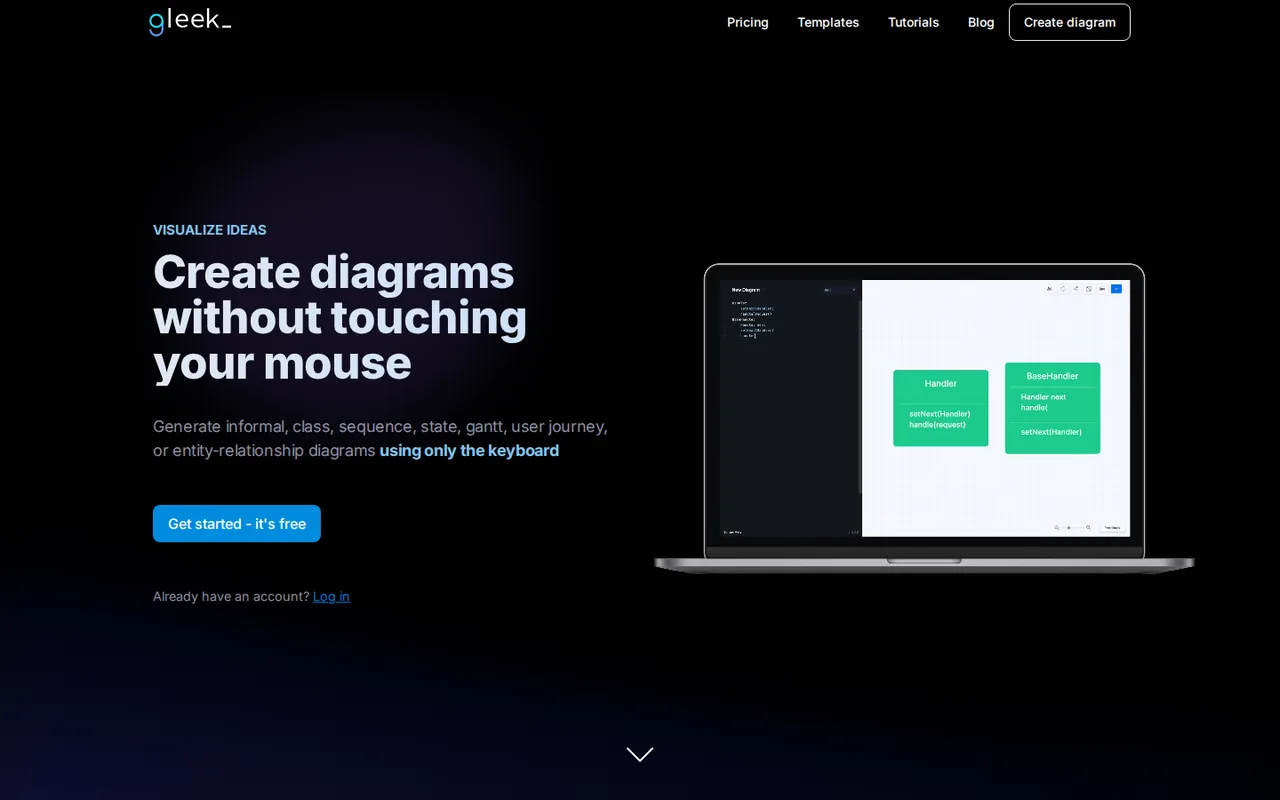
What is Gleek, in short?
Updated October 24, 2026 · By Elias Brandt · Documentation review, not tested hands-on
Pros
- Diagrams from the keyboard
- Usable free tier
- Pay only in active months
- Diagrams beside your code
Cons
- AI chat is paid only
- Free files stay in one browser
- Small free canvas
- No trial or refunds
- Slow update cadence
Best forDevelopers documenting systemsTeams on Confluence or Azure DevOpsStudents and teachersNot for free-form visual designNot for teams needing an audit trail of AI use
Strengths, limits and who it suits, in full
Strengths
- Diagrams from the keyboard Shapes, arrows and labels come from short typed lines, so a diagram can be changed by editing text.
- Usable free tier The core diagram types work on Free, without a card or a time limit.
- Pay only in active months Per Activity billing pauses after a month without use, for people who diagram occasionally.
- Diagrams beside your code Paid plans can push diagrams to your own Git repository with version history.
Limits
- AI chat is paid only The prompt-to-diagram chat is not available on Free.
- Free files stay in one browser Free diagrams are stored only in the browser's IndexedDB database and export only as PNG.
- Small free canvas Free allows 5 diagram files and 40 objects per diagram, with ads and no support.
- No trial or refunds Gleek offers no free trial, and the terms say payments are non-refundable unless agreed in writing.
- Slow update cadence The newest post on the official blog is dated April 29, 2025, and the site footer still reads 2025.
Who it suits
- Developers documenting systems Class, sequence, state and ER diagrams can live as text next to the code they describe.
- Teams on Confluence or Azure DevOps Free integrations place a diagram inside a wiki page or a work item description.
- Students and teachers Gleek lists a 50% discount for students and teachers, arranged by contacting the company.
- Not for free-form visual design people who want to place and style shapes by hand will find a typed syntax slower than a canvas tool.
- Not for teams needing an audit trail of AI use The privacy policy does not name the AI provider behind Gleek AI chat or describe how prompts are processed.
How much does Gleek cost?
Prices confirmed · checked
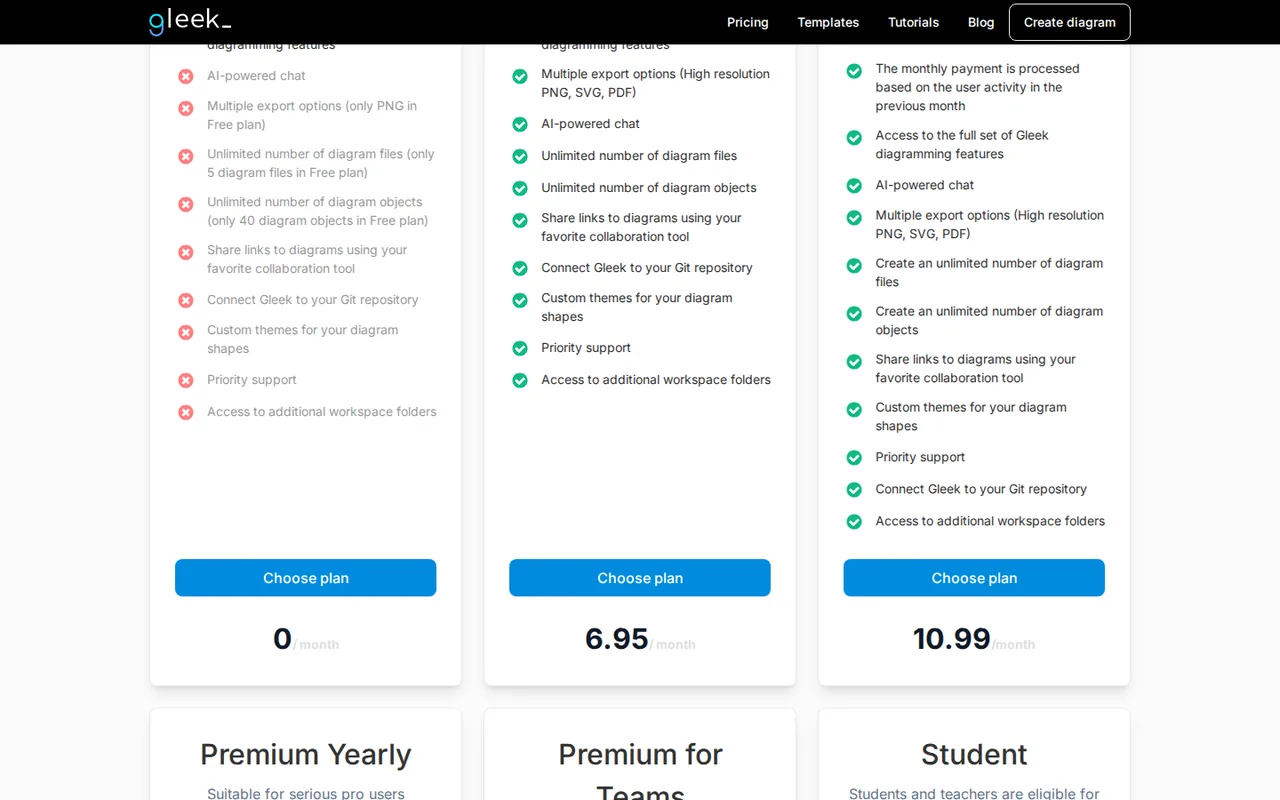
Regional prices: The plan cards print amounts without a currency sign; the pricing FAQ and the Per Activity announcement state them in euros (€6.95 and €10.99).
The cards do not say whether the Team price is per member. Students and teachers can ask for a 50% discount through the contact form. There is no free trial. Payment is by Visa, Mastercard or Maestro through Braintree. A monthly plan can be cancelled any time before the billing date and stays active to the end of the period; the terms say payments are non-refundable unless agreed otherwise in writing.
| Plan | Price | What you get |
|---|---|---|
| Free | €0 sourceFrom gleek.io/pricing, checked Oct 24, 2026 (opens in a new tab) | 5 diagram files and 40 objects per diagram; PNG export only; diagrams stored only in your browser's IndexedDB; no AI chat, no styling changes, no support; ads shown. |
| Premium Monthly | €6.95 per month sourceFrom gleek.io/pricing, checked Oct 24, 2026 (opens in a new tab) | AI chat; unlimited diagram files and objects; high-resolution PNG, SVG and PDF export; diagrams on Gleek servers; Git repository connection; custom themes; priority support; no ads. |
| Premium Per Activity | €10.99 per active month sourceFrom gleek.io/pricing, checked Oct 24, 2026 (opens in a new tab) | Same features as Premium Monthly; charged up front for each month you use Gleek, with later charges paused after a month without activity. |
| Premium Yearly | €58.40 per year sourceFrom gleek.io/pricing, checked Oct 24, 2026 (opens in a new tab) | Same features as Premium Monthly, billed once a year. |
| Premium for Teams | €6.95 per month sourceFrom gleek.io/pricing, checked Oct 24, 2026 (opens in a new tab) | For teams of 2 or more; the plan owner invites and removes members, manages seats and receives a single invoice. |
How far does it go?
- A year of occasional diagrammingPremium Yearly costs €58.40. Premium Monthly costs €6.95 per billed month, so 8 billed months come to €55.60 and 9 to €62.55; from 9 months a year, Yearly is cheaper. Per Activity costs €10.99 per billed month: 5 months come to €54.95 and 6 to €65.94, so it only beats Yearly when you are billed in 5 months or fewer. Because the month after your last active month is still charged, two separate active months usually mean four billed months, or €43.96. Arithmetic on published plan prices, not a statement by Gleek.
Arithmetic from the published allowances above, not a usage test.
Taxes, currency and promotions can change the price you see at checkout.
Try Gleek free (opens in a new tab)
Key features
| Feature | What it does | Watch out |
|---|---|---|
| Typed syntax instead of drag-and-drop: "user:actor" creates a shape, "User-->Social media" draws an arrow and "User-sign up->Social media" labels it, with autocomplete and a Syntax help popup (getting-started guide) | — | |
| Diagram types: flowcharts, entity-relationship diagrams in Chen or Crow's Foot notation, UML class, object, sequence and state machine diagrams, Gantt charts and user journey maps (homepage) | — | |
| Gleek AI chat on paid plans drafts flowcharts, UML class and sequence diagrams, ER diagrams and, since April 2025, Gantt charts from a prompt; the result stays editable as code (blog) | — | |
| Iterative AI editing and a chat history saved with each diagram, added in the April 2025 update (blog) | — | |
| Paid plans store diagrams on Gleek servers or in your own Git repository with version control (pricing FAQ) | — | |
| Free integrations embed diagrams in Confluence pages and in Azure DevOps work item descriptions (pricing FAQ, Azure DevOps listing) | — | |
| Per Activity billing | The Per Activity plan charges up front at the start of each month you use Gleek, then pauses charges after a month with no activity until you log in again. | It costs €10.99 instead of €6.95, and the month right after your last active month is still charged. |
| Git storage | Paid users can connect a repository and push diagrams as .gl files in a gleeks folder, with metadata and images in a bin folder; merge conflicts are resolved in the editor. | The 2019 announcement says GitHub, GitLab and Bitbucket traffic passes through a Gleek proxy that does not store repository details; Azure DevOps, Gitea and Gogs connect directly. |
| Team ownership | The person who buys a Team plan manages seats, removes users and receives one invoice for the company. | The owner's own account stays free until they invite themselves to the plan, and members cannot manage their subscriptions. |
What does the Free plan let you keep?
Free covers the whole diagram syntax but caps the output. The pricing FAQ limits it to 5 diagram files and 40 objects in each, one export format (PNG), no styling changes, no support and ads. The bigger catch is storage: Free diagrams live only in the browser’s IndexedDB database. Editorial assessment: that makes a Free diagram tied to one browser profile, so clearing site data or switching computers can leave it behind; export the PNG and keep the source text somewhere safe.
An older getting-started guide from 2020 still describes an SVG download button. The current pricing page lists SVG and PDF only on paid plans, and that is the condition to plan around.
How does the Gleek syntax turn text into a diagram?
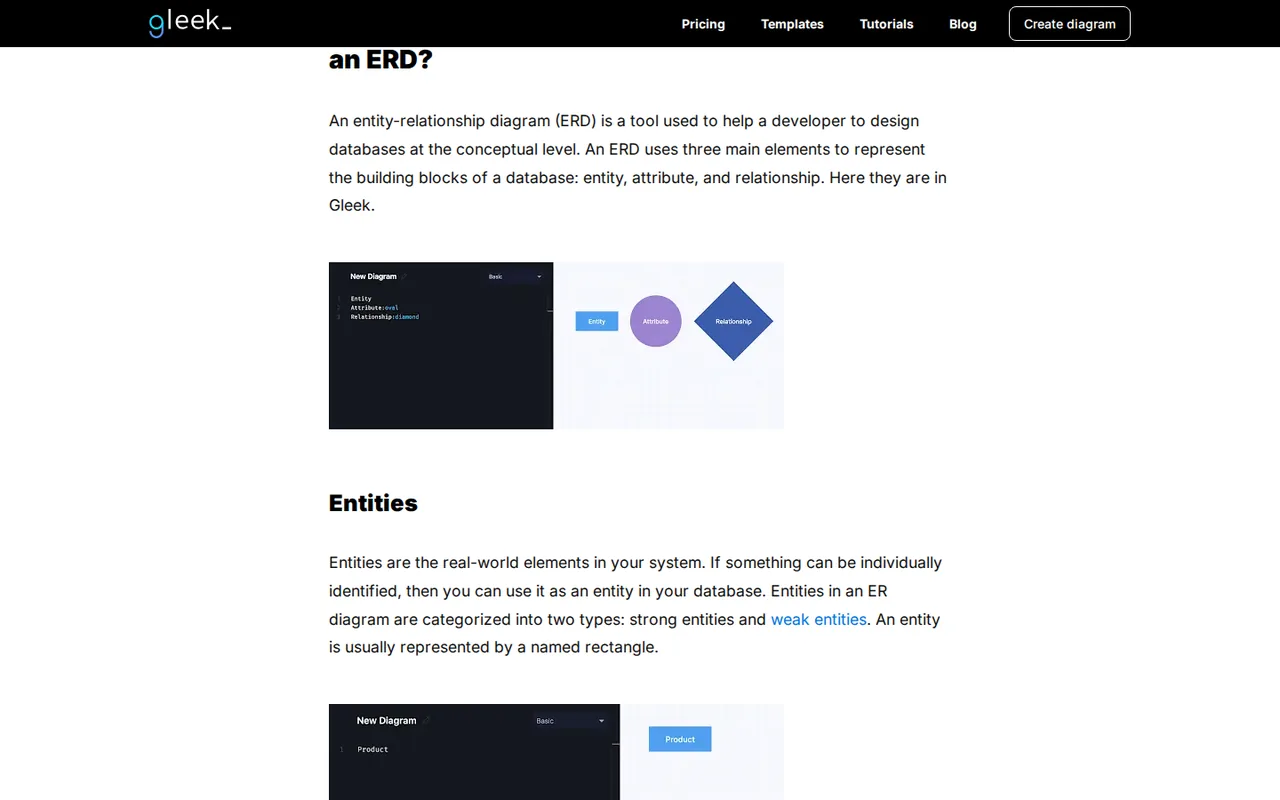
Each line of text becomes part of the drawing. Typing a name and a colon opens autocomplete for shape types such as actor, class, db, diamond, note, oval, queue and service; any other word becomes a plain rectangle. An arrow is typed as two names joined by an arrow, and a label sits inside the arrow. Pressing Tab nests attributes inside a class or entity, which is how class and ER diagrams list their fields. Templates fill the code field with a starter diagram from a right-click menu.
Gleek moved to a layout engine based on Mermaid in a 2020 update, so the program places shapes for you and you do not drag them. For databases, the ER diagram page covers both Chen and Crow’s Foot notation. If your starting point is ordinary prose rather than syntax, Napkin AI builds diagrams from pasted text on its free plan.
What does the AI chat add, and where does it stop?
The AI chat launched in August 2023 and is limited to paid plans. You describe a diagram, from a simple “ER diagram with three entities” to a prompt that names every entity and its one-to-many relationships, and the chat writes the Gleek code. The result opens in code mode, so you can add details or change the diagram type by editing text.
The April 2025 update added Gantt charts to the AI, a chat history saved with each diagram and iterative edits where you ask the AI to extend an existing diagram. Neither the terms nor the privacy policy name the AI model or provider, so anyone who must not send system designs to an outside service should ask before typing them in.
Which paid plan fits how often you diagram?
All four paid options unlock the same features. Premium Monthly is the flat €6.95. Premium Yearly is one €58.40 charge. Per Activity costs more per month, €10.99, but pauses billing after a month in which you did not use Gleek, according to the Per Activity announcement. The pause is not instant: a month you were active triggers a charge for the following month, and only after that idle month do charges stop until you log in again.
- Steady weekly use: Yearly.
- A few projects a year with gaps of several months: Per Activity.
- A single short project: Monthly, cancelled before the next billing date.
How do Git sync and team seats work?
Paid diagrams are stored on Gleek servers, or in your own repository once you connect it. The Git announcement from 2019 describes .gl files in a gleeks folder, a Push button in the editor, a pull every 5 minutes to pick up changes and conflict resolution inside the editor. It also says requests to GitHub, GitLab and Bitbucket go through a passthrough proxy, while Azure DevOps, Gitea and Gogs connect directly.
On the Team plan, whoever pays becomes the owner. The owner invites members by email, can change the number of seats or cancel, and gets one invoice. The owner’s own account stays on Free unless they invite themselves too.
How could you check Gleek before paying?
Proposed evaluation · not performed yet
Check whether the Free plan can hold a small real diagram and what happens to it outside the browser where it was made.
- Open app.gleek.io and write an ER diagram with 5 entities and 4 attributes each, in Crow’s Foot notation.
- Note whether the editor warns as the diagram approaches 40 objects.
- Export a PNG and check that every label is readable at full size.
- Open the same account in a second browser and see whether the diagram appears.
Accept if the diagram fits under the object limit and the PNG is legible. Reject if attributes count toward the 40 objects so the diagram cannot be finished on Free. No result is recorded here.
Used Gleek? Write the first review. Visitor opinions are moderated and kept separate from our source checks.
Frequently asked questions
Does Gleek offer a free trial?
No. The pricing FAQ says Gleek does not offer a free trial; the Free plan is the way to try it, without AI chat. Paid plans are charged by card through Braintree, and the terms say payments are non-refundable unless agreed in writing, so choosing Monthly for a first month limits the commitment to €6.95.
Is Gleek cheaper for students?
Gleek lists a 50% discount for students and teachers. It is not a self-service checkout: the Student card on the pricing page uses a Contact us button. The card describes diagrams stored on Gleek servers and priority support on Slack, which suggests the discount applies to a paid plan rather than to Free.
Can I use Gleek inside Confluence or Azure DevOps?
Yes, both integrations are free according to the pricing FAQ. In Azure DevOps, the Blocshop extension adds an option to a task, issue or story that opens Gleek in a new window, and saving embeds the diagram image in the work item description. The Confluence app embeds a diagram on a page.
Who operates Gleek?
Gleek is run by Blocshop s.r.o., Revolucni 1, 110 00 Prague, Czech Republic, VAT number CZ24253031, according to the Impressum. The terms fall under Czech law. The privacy policy says account data is limited to username, email and password, and deletion requests go to help@blocshop.cz.
What currency does Gleek charge in?
Euros. The plan cards show only numbers, but the pricing FAQ and the Per Activity announcement give the prices as €6.95 and €10.99 a month. The pages do not say whether VAT is added at checkout or whether prices change by country, so confirm the final amount on the payment screen.
Sources and method15 official sources · 26 details checked · Oct 24, 2026
How we checked this profile
26 details on this page were checked against Gleek's own pages and help documentation (Oct 24, 2026). 1 is still open and listed below.
See the checks by section24 documented1 editorial assessment1 open
| Section | Checks | Last checked | Sources |
|---|---|---|---|
| Plans and prices | 5 documented 1 editorial 1 open | gleek.io/pricing | |
| Features | 8 documented | gleek.io/pricinggleek.iogleek.io/ai-chat-introductiongleek.io/gleek-2025-update-smarter-…gleek.io/per-activity-plangleek.io/gleek-team-plangleek.io/gleek-git | |
| Questions | 5 documented | gleek.io/pricingmarketplace.visualstudio.com/itemsgleek.io/impressumgleek.io/privacy-policy | |
| Strengths and limits | 2 documented | gleek.io/terms-and-conditionsgleek.io/blog | |
| Article text | 2 documented | gleek.io/getting-started-gleek.htmlgleek.io/gleek-update | |
| Who it suits | 1 documented | gleek.io/privacy-policy | |
| Official channels and media | 1 documented | gleek.io |
Still open
- The plan cards do not state whether the Team price is per member.Not confirmed · checked · Source (opens in a new tab)
Sources for this profile
- Pricing page with plan cards and FAQgleek.io
- Homepage (diagram types)gleek.io
- Blog: Gleek AI chat introduction (Aug 29, 2023)gleek.io
- Blog: 2025 update, AI Gantt charts, chat history and iterative editing (Apr 29, 2025)gleek.io
All 15 sources
- Blog: Per Activity Premium plan (Aug 29, 2023)gleek.io
- Blog: Gleek Team Plan (Aug 29, 2023)gleek.io
- Blog: Gleek Git integration (Sep 5, 2019)gleek.io
- Blog: getting started with Gleek syntax (Dec 10, 2020)gleek.io
- Blog: layout engine update based on Mermaid (Oct 24, 2020)gleek.io
- ER diagram page (Chen and Crow's Foot notation)gleek.io
- Blog index (latest post dates)gleek.io
- Azure DevOps extension listing by Blocshopmarketplace.visualstudio.com
- Terms and Conditions (effective September 2023)gleek.io
- Privacy Policy (effective September 1, 2023)gleek.io
- Impressum (operator details)gleek.io
Official pages read on 24 Oct 2026 with plain HTTP requests, and the pricing cards in a local browser: homepage, pricing page and FAQ, ER diagram page, blog index and posts on AI chat, the April 2025 update, Per Activity billing, the Team plan, Git integration, the getting-started guide and the 2020 layout engine update, the Azure DevOps extension listing, Terms and Conditions, Privacy Policy and Impressum. We did not create an account or generate a diagram. Install counts and ratings on marketplace pages and third-party directory prices were not used.
Sources checked Oct 24, 2026. Found something out of date? See how we correct profiles.