What is Make, in short?
Make connects app actions in visual workflows called scenarios. It is a candidate for teams that want to inspect the path from an incoming event to an action. Its free plan is ongoing, but credit and scheduling limits matter. Estimate a whole scenario, including AI usage and failed runs, before choosing a plan.
Key features
- Visual scenario builder — Connect app modules in a visual workflow.
- Conditional routing — Branch a scenario using routers and filters, with a fallback route for unmatched data.
- Scheduled workflows — Choose when scenarios check for data; minimum scheduled intervals depend on the plan.
- AI connections — Use Make-managed AI or eligible custom provider connections, with different credit and token billing.
- Execution history — Inspect run status, module output bundles and credit use; history retention depends on the plan.
Feature list taken from the sources listed at the foot of this profile, not from our testing.
Strengths and limits
Strengths
- Visual scenario builder: Connect app modules with documented routing and filters in a visual workflow.
- Ongoing Free plan: The Free plan has no time limit and includes 1,000 credits per month, subject to its other limits.
- Documented non-AI billing unit: Ordinary non-AI operations normally consume one credit each, providing a starting point for a scenario estimate.
Limits to plan around
- Free scheduling floor: Scheduled scenarios on Free have a documented 15-minute minimum interval.
- Scheduled checks consume usage: Budget for trigger checks as well as records processed; inspect operations and credits in run history.
- Separate AI-provider charges: With an eligible custom AI-provider connection, provider token charges are separate from Make operation credits.
Derived from documented behaviour and published limits, not from a scored review.
Who is it for?
- Operations teams with a defined processEditorial assessment: consider it when the incoming event, data shape and destination are clearly specified.
- Teams planning branching workflowsEditorial assessment: consider the visual routing and filter model for discussing which records should follow each path; verify behavior with synthetic inputs.
- Workflow owners estimating usageEditorial assessment: consider it if someone can inspect module operations and bundle counts and investigate unexpected credit consumption.
Our editorial judgement about fit, based on what the documented features support. The vendor makes no such claim about these groups.
How much does Make cost?
Pricing check: Unresolved details. Check the current provider terms before subscribing.
| Plan | Price | What it covers |
|---|---|---|
| Free | Free | 1,000 credits/month; two active scenarios; minimum 15-minute scheduled interval. |
| Core / Pro / Teams | Not confirmed | Check billing term, currency and credit allowance before subscribing. |
| Enterprise | Contact provider | Custom pricing and terms. |
No comparable numeric price range is confirmed here. Individual plan notes may include documented amounts, but unknown billing units, unavailable figures or inconsistent terms are not converted into a single price range. See the evidence checks and original pricing source below.
This profile is based on provider documentation. No hands-on product test has been performed.
What can Make automate?
The visual builder connects app modules with routing and filters. Free access includes 1,000 monthly credits, two active scenarios and a 15-minute minimum scheduled interval. Core, Pro, Teams and Enterprise expand the service. Paid prices are withheld here until billing-selector context is confirmed. Sources: Make pricing and plan limits.
Why are credits different from finished tasks?
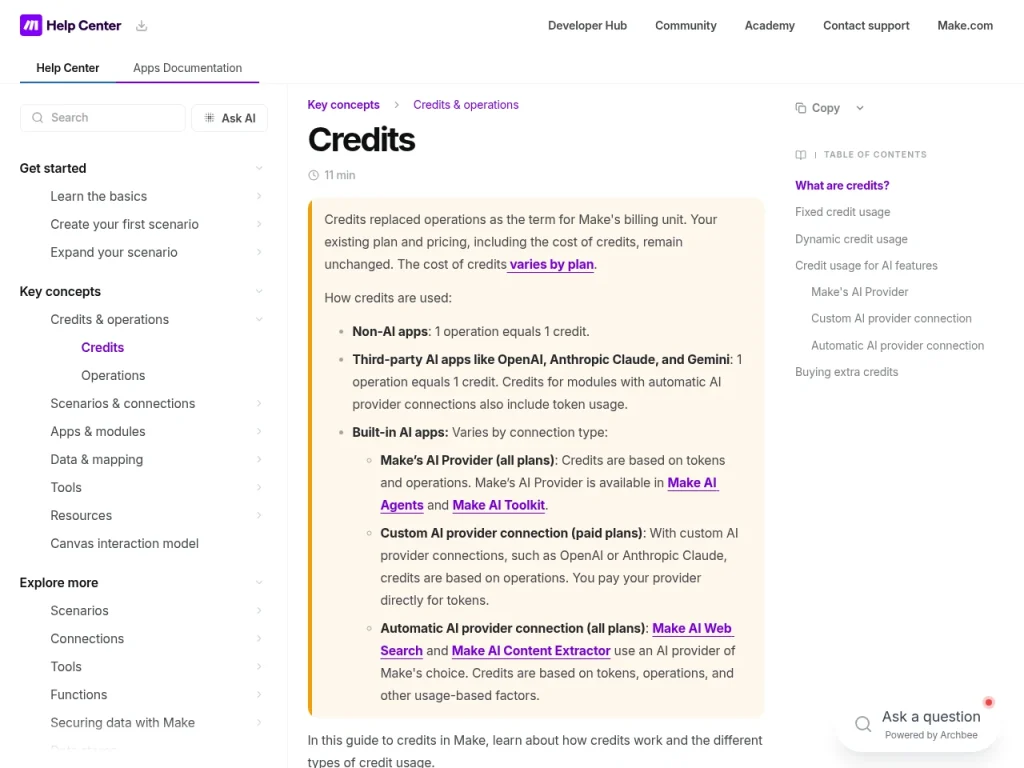
For ordinary non-AI apps, an operation normally consumes one credit. Built-in AI can also consume credits according to token or other usage. With an eligible custom AI-provider connection, the provider bills tokens separately. A subscription to Make does not by itself settle every external service cost. Sources: Make credits.
Where can a cost estimate go wrong?
Scheduled checks consume operations even when the workload produces few records. Ordinary non-AI operations normally use one credit; action modules can run once per incoming bundle. Inspect the module sequence and run history when estimating usage. Sources: Operations and bundles; Scheduled trigger usage; Make credits.
Who should consider it?
Editorial assessment: operations teams with a defined event, a stable data shape and a small set of connected apps are sensible candidates. A diagram can make branching and ownership easier to discuss. Assign a person to investigate errors before making the workflow operational.
When is it a poor fit?
Editorial assessment: pause if nobody can specify what happens after duplicate events, expired credentials or an unavailable destination. Automating a process with unclear permissions does not resolve that uncertainty. If controlling the hosting environment is central, include a self-hosted candidate in your evaluation.
A safe task to evaluate
Proposed evaluation, not performed: use ten synthetic records with a unique ID, one missing field and one duplicate. Route valid records to a test destination. Repeat the same input and simulate a destination failure. Record created records, duplicates, retries, credits and cleanup time. Keep credentials and real customer data out of the sample.
What should you know about branching?
A router processes its routes in sequence rather than in parallel. Set route order and fallback behavior to match the task. The pricing FAQ also lists router and error-handler modules as credit exceptions, so counting every box as one credit can overstate usage. These are documented behaviors, not results from our own workflow test. Sources: Official documentation; Pricing exceptions.
Explore the wider workflow
For related choices and our review method, see AI automation tools, Zapier, our editorial policy.
Frequently asked questions
Is Make Free a permanent plan?
The pricing page describes Free as having no time limit. It includes 1,000 credits per month, two active scenarios and a minimum 15-minute interval for scheduled runs. Those limits do not describe every trigger type. Compare your required schedule and scenario count before assuming the free allowance covers an ongoing process.
Does one automation equal one credit?
No. A scenario can execute several modules, and modules may run repeatedly as they process bundles. Ordinary non-AI operations normally use one credit each, while some AI features add token-based or other usage. Estimate the complete path through your scenario, then inspect actual run history before treating that estimate as an operating budget.
Do checks with no new data consume credits?
Budget for scheduled checks as well as records processed. Make defines an operation as a module run that processes or checks data, and its scheduling guide counts trigger checks in usage estimates. Our editorial advice is to inspect empty runs in history; absence of a new record should not be assumed to mean no consumption.
Can ten records create ten downstream operations?
Yes. Make documents that an action module processes incoming bundles separately, so ten bundles can cause ten runs of that action. Later modules can multiply the total again. Inspect the actual bundles and module behavior in a representative run rather than counting only the number of boxes drawn in the scenario.
Does Make include every AI model cost?
There is no single rule for every connection. Eligible custom AI-provider connections use Make credits for operations while the provider bills tokens separately. Make-managed AI can consume credits according to tokens and other usage. Identify the connection type and model before estimating costs, and include any external service charges that apply.
Evidence for key details
These checks apply to the individual details below. A recent check of one detail does not mean every section was reviewed again.
- Make connects app actions in visual workflows called scenarios. It is a candidate for teams that want to inspect the path from an incoming event to an action. Its free plan is ongoing, but credit and scheduling limits matter. Estimate a whole scenario, including AI usage and failed runs, before choosing a plan.Unresolved · Editorial assessment · Checked . Quick answer combines documented capabilities and editorial fit; see individual source checks. This paragraph combines sources; claim-level editorial review is pending. Additional source URLs: https://help.make.com/credits Paid price selector context not independently confirmed. Editorial assessment, not measured product performance. Read the source (opens in a new tab)
- The visual builder connects app modules with routing and filters. Free access includes 1,000 monthly credits, two active scenarios and a 15-minute minimum scheduled interval. Core, Pro, Teams and Enterprise expand the service. Paid prices are withheld here until billing-selector context is confirmed.Unresolved · Provider documentation · Checked . Paid price selector context not independently confirmed. Read the source (opens in a new tab)
- For ordinary non-AI apps, an operation normally consumes one credit. Built-in AI can also consume credits according to token or other usage. With an eligible custom AI-provider connection, the provider bills tokens separately. A subscription to Make does not by itself settle every external service cost.Documented · Provider documentation · Checked . Read the source (opens in a new tab)
- Editorial assessment: operations teams with a defined event, a stable data shape and a small set of connected apps are sensible candidates. A diagram can make branching and ownership easier to discuss. Assign a person to investigate errors before making the workflow operational.Documented · Editorial assessment · Checked . Editorial assessment, not measured product performance.
- Editorial assessment: pause if nobody can specify what happens after duplicate events, expired credentials or an unavailable destination. Automating a process with unclear permissions does not resolve that uncertainty. If controlling the hosting environment is central, include a self-hosted candidate in your evaluation.Documented · Editorial assessment · Checked . Editorial assessment, not measured product performance.
- Proposed evaluation, not performed: use ten synthetic records with a unique ID, one missing field and one duplicate. Route valid records to a test destination. Repeat the same input and simulate a destination failure. Record created records, duplicates, retries, credits and cleanup time. Keep credentials and real customer data out of the sample.Unresolved · Editorial assessment · Checked . Proposed evaluation only; no product test was performed. Editorial assessment, not measured product performance.
- Free credits: 1000 per monthUnresolved · Provider documentation · Checked . Paid price selector context not independently confirmed. Read the source (opens in a new tab)
- Free active scenarios: 2 scenariosUnresolved · Provider documentation · Checked . Paid price selector context not independently confirmed. Read the source (opens in a new tab)
- Free scheduled interval: 15 minutes minimumUnresolved · Provider documentation · Checked . Paid price selector context not independently confirmed. Read the source (opens in a new tab)
- The Free plan has no time limit; credit, scenario and scheduling limits still apply.Documented · Provider documentation · Checked . Free access scope only; this does not verify every paid amount or quota. Paid price selector context not independently confirmed. Read the source (opens in a new tab)
- Browser-based cloud serviceUnresolved · Provider documentation · Checked . Availability summarized from public documentation; platform parity and account availability were not tested. Paid price selector context not independently confirmed. Read the source (opens in a new tab)
- The Free plan has no time limit. Paid-plan billing-selector context and ISO currency were not independently confirmed. AI credits and external provider token charges may differ by connection type.Unresolved · Provider documentation · Checked . No comparable numeric offer range is imported. Review each visible plan and source. Paid price selector context not independently confirmed. Read the source (opens in a new tab)
- Visual scenario builder: Connect app modules with documented routing and filters in a visual workflow.Documented · Provider documentation · Checked . Documented workflow features are readable even though paid billing-selector context remains unresolved. Paid price selector context not independently confirmed. Read the source (opens in a new tab)
- Ongoing Free plan: The Free plan has no time limit and includes 1,000 credits per month, subject to its other limits.Documented · Provider documentation · Checked . Support applies to the Free plan; no paid amount is inferred. Paid price selector context not independently confirmed. Read the source (opens in a new tab)
- Documented non-AI billing unit: Ordinary non-AI operations normally consume one credit each, providing a starting point for a scenario estimate.Documented · Provider documentation · Checked . Read the source (opens in a new tab)
- Free scheduling floor: Scheduled scenarios on Free have a documented 15-minute minimum interval.Documented · Provider documentation · Checked . This is a scheduled-run limit, not a claim about every trigger type. Paid price selector context not independently confirmed. Read the source (opens in a new tab)
- Separate AI-provider charges: With an eligible custom AI-provider connection, provider token charges are separate from Make operation credits.Documented · Provider documentation · Checked . Read the source (opens in a new tab)
- Operations teams with a defined process: Editorial assessment: consider it when the incoming event, data shape and destination are clearly specified.Unresolved · Editorial assessment · Checked . Suitability inference only; no hands-on result or provider recommendation is asserted. Paid price selector context not independently confirmed. Editorial assessment, not measured product performance. Read the source (opens in a new tab)
- Teams planning branching workflows: Editorial assessment: consider the visual routing and filter model for discussing which records should follow each path; verify behavior with synthetic inputs.Unresolved · Editorial assessment · Checked . Suitability inference only; no hands-on result or provider recommendation is asserted. Paid price selector context not independently confirmed. Editorial assessment, not measured product performance. Read the source (opens in a new tab)
- Workflow owners estimating usage: Editorial assessment: consider it if someone can inspect module operations and bundle counts and investigate unexpected credit consumption.Unresolved · Editorial assessment · Checked . Editorial suitability assessment based on the operations and bundle model; no workflow was tested. Read the source (opens in a new tab)
- Connect app modules in a visual workflow.Documented · Provider documentation · Checked . Read the source (opens in a new tab)
- Branch a scenario using routers and filters, with a fallback route for unmatched data.Documented · Provider documentation · Checked . Read the source (opens in a new tab)
- Scenarios can be scheduled to check for new data at chosen intervals.Documented · Provider documentation · Checked . Read the source (opens in a new tab)
- The minimum scheduled interval depends on the plan.Documented · Provider documentation · Checked . Read the source (opens in a new tab)
- Use Make-managed AI or eligible custom provider connections, with different credit and token billing.Documented · Provider documentation · Checked . Read the source (opens in a new tab)
- Inspect run status, module output bundles and credit use; history retention depends on the plan.Documented · Provider documentation · Checked . Read the source (opens in a new tab)
- Free has no time limit and includes 1,000 credits monthly, two active scenarios and a 15-minute minimum scheduled interval.Documented · Provider documentation · Checked . Read the source (opens in a new tab)
- Scenarios execute modules and action-module runs can multiply with incoming bundles.Documented · Provider documentation · Checked . Read the source (opens in a new tab)
- Ordinary non-AI operations normally use one credit, while some AI features use dynamic token or other usage.Documented · Provider documentation · Checked . Read the source (opens in a new tab)
- Scenario history records operations and credits consumed.Documented · Provider documentation · Checked . Read the source (opens in a new tab)
- An operation is a module run that processes data or checks for new data.Documented · Provider documentation · Checked . Read the source (opens in a new tab)
- The scheduling guide includes trigger checks when calculating usage.Documented · Provider documentation · Checked . Read the source (opens in a new tab)
- Scenario history includes check runs that return no data.Documented · Provider documentation · Checked . Read the source (opens in a new tab)
- Action modules process bundles separately; ten incoming bundles can cause ten action runs.Documented · Provider documentation · Checked . Read the source (opens in a new tab)
- Eligible custom AI-provider connections incur separate provider token charges; Make-managed AI can charge credits based on operations, tokens and other usage.Documented · Provider documentation · Checked . Read the source (opens in a new tab)
- The scheduling guide includes trigger checks when calculating usage.Documented · Provider documentation · Checked . Read the source (opens in a new tab)
- Scenario history records operations and credits consumed.Documented · Provider documentation · Checked . Read the source (opens in a new tab)
- A router processes its routes in sequence rather than in parallel. Set route order and fallback behavior to match the task. The pricing FAQ also lists router and error-handler modules as credit exceptions, so counting every box as one credit can overstate usage. These are documented behaviors, not results from our own workflow test.Documented · Provider documentation · Checked . Documentation review only; no workflow or script was run. Additional source: https://www.make.com/en/pricing Read the source (opens in a new tab)
Sources for this profile
- Make pricing and plan limits (checked 2026-09-23)
- Make credits (checked 2026-09-23)
- Official product landing page (checked 2026-09-23)
- Router and conditional branches (checked 2026-09-23)
- Scheduled trigger usage (checked 2026-09-23)
- Scenario history (checked 2026-09-23)
- Operations and bundles (checked 2026-09-23)
- Official scenario example and bundle accounting (checked 2026-09-23)
Public profile text, plan presentation, sources and media were reviewed on September 23, 2026 using provider documentation. No hands-on product test was performed. The general review date is separate from a complete pricing review; checkout, taxes, account-specific offers and operational results were not verified. Remaining uncertainties are stated in the profile. Checked September 23, 2026. Found something out of date? The editorial policy explains how we correct profiles.