

What is TurboScribe, in short?
Updated October 10, 2026 · By Elias Brandt · Documentation review, not tested hands-on
Pros
- Usable free plan
- Flat price for volume
- Plain statement on training
- Wide export choice
Cons
- No refunds
- Uploads only
- Short free files
- Old legal pages
- Slower at extreme volume
Best forPeople transcribing interviews, lectures or podcasts in volumeOccasional short recordingsNot for live meeting captureNot for developers who need an APITeams of several people
Strengths, limits and who it suits, in full
Strengths
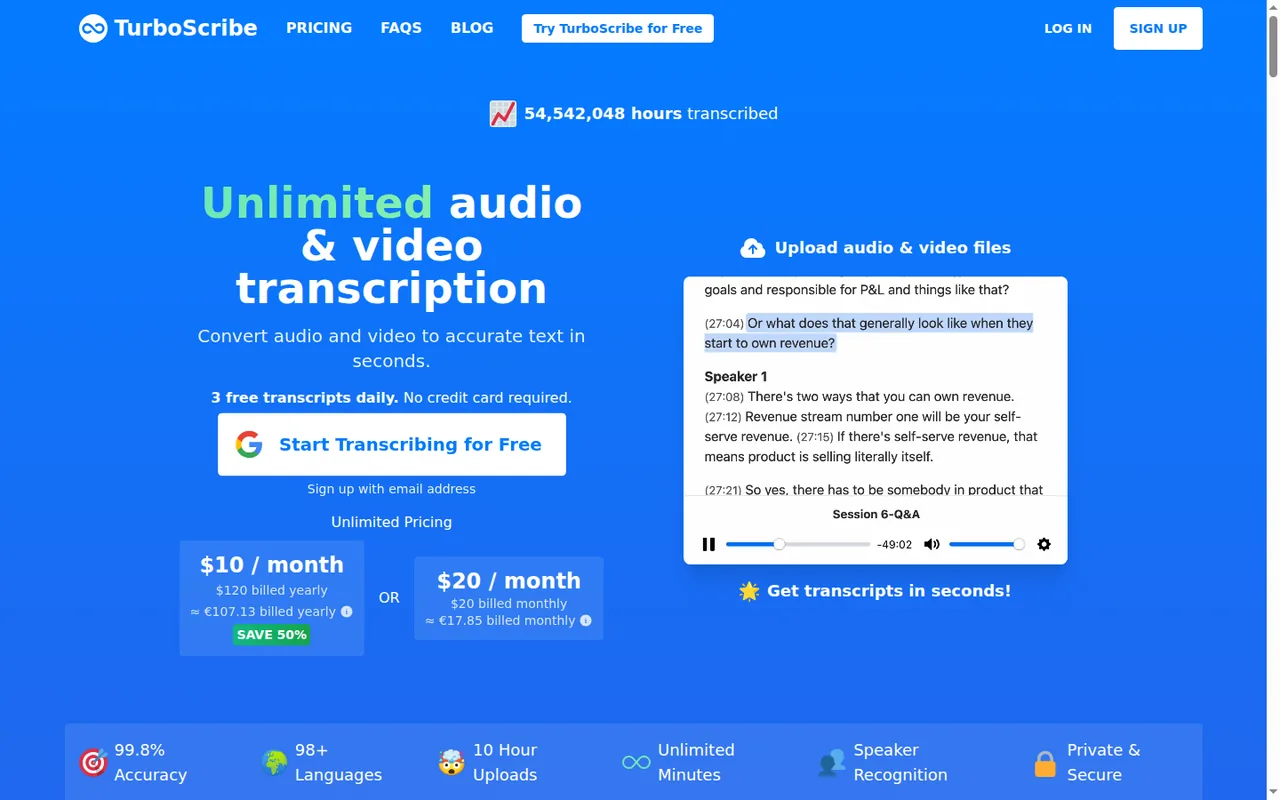
- Usable free plan Three files a day of up to 30 minutes each, and the homepage says no credit card is required.
- Flat price for volume Unlimited has no overall usage cap at $20 a month or $120 a year.
- Plain statement on training The security FAQ says media files and transcripts are not used to train AI models and transcription runs in-house.
- Wide export choice PDF, DOCX, TXT, CSV and SRT or VTT, plus bulk export of whole folders.
Limits
- No refunds The terms say all purchases are non-refundable and unused time is not prorated.
- Uploads only The help center says there is no API or automated access; files go through the web interface.
- Short free files Free files are capped at 30 minutes, one upload at a time, with lower priority.
- Old legal pages The terms date from September 2022 and the privacy policy from August 2022; neither mentions AI training.
- Slower at extreme volume Above about 24 hours of audio a day, uploads move to one file at a time.
Who it suits
- People transcribing interviews, lectures or podcasts in volume a flat price with 10-hour, 5 GB files fits a steady stream of uploaded recordings.
- Occasional short recordings The free plan handles up to three files a day of 30 minutes or less.
- Not for live meeting capture No page checked describes a bot that joins calls or live transcription; recordings are uploaded afterwards.
- Not for developers who need an API The help center says TurboScribe offers no API or automated access.
- Teams of several people each person needs their own Unlimited licence, since one login may not be shared.
How much does TurboScribe cost?
Prices confirmed · checked
Regional prices: Prices are in USD.
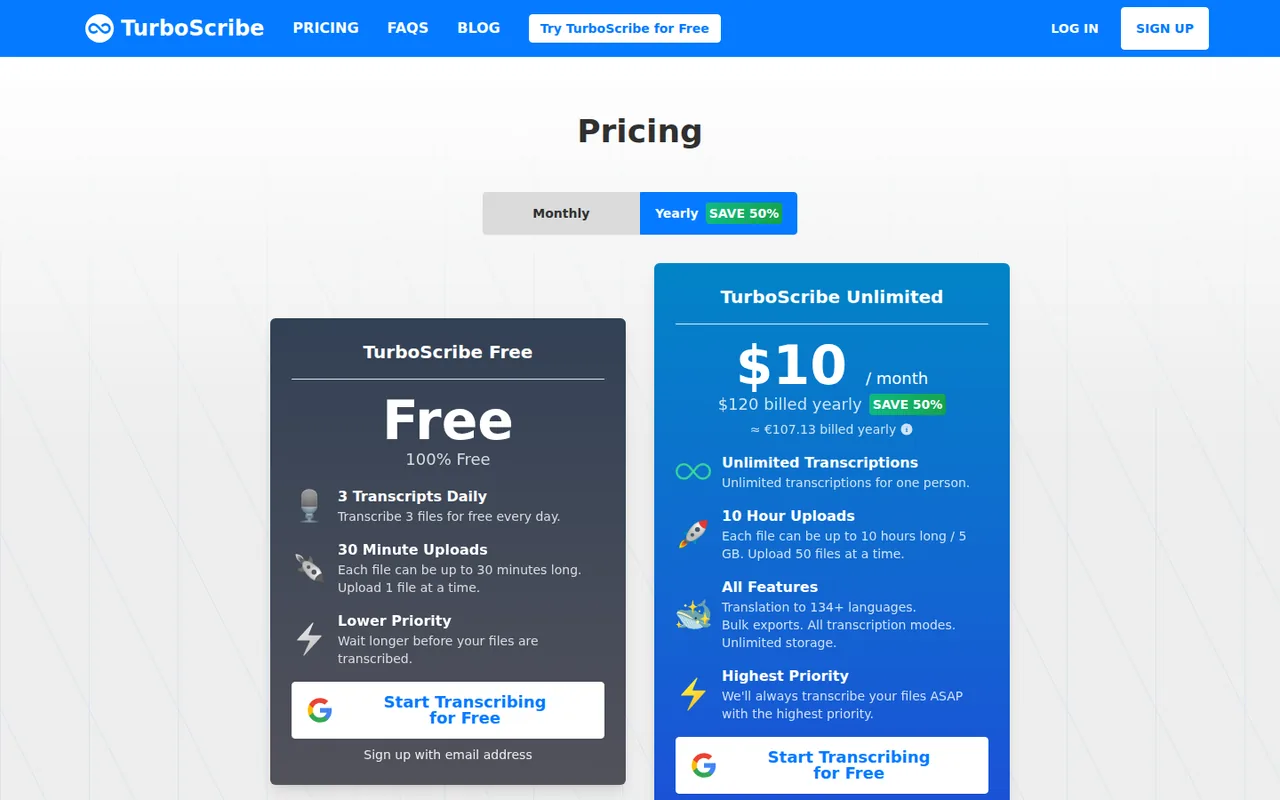
Read from a Germany-based server, the pricing page also showed approximate euro amounts (about EUR 17.85 a month or EUR 107.13 a year); the terms say fees exclude taxes. The yearly Unlimited plan is charged up front at $120, which the page shows as $10 a month and labels a 50% saving against $20 monthly. Upgrading from Free charges the card at once and starts the billing cycle that day; switching from monthly to yearly credits unused time. The terms say all purchases are non-refundable and unused time is not prorated. Teams and Unlimited Max appear only in a blog post and a help article, not on the public pricing page; the Max article says yearly billing saves 20%, while $2,000 against 12 months at $200 ($2,400) works out to about 17%. The pricing page lists translation, bulk exports, all transcription modes and unlimited storage under Unlimited but does not say which of these a free account lacks or when the daily free count resets.
| Plan | Price | What you get |
|---|---|---|
| Free | $0 sourceFrom turboscribe.ai/pricing, checked Oct 10, 2026 (opens in a new tab) | 3 files a day, each up to 30 minutes, one upload at a time, lower priority; no credit card required. |
| Unlimited | $20 per monthor $120 billed yearly sourceFrom turboscribe.ai/pricing, checked Oct 10, 2026 (opens in a new tab) | One person; no overall usage cap; files up to 10 hours / 5 GB, 50 uploads at a time; translation, bulk exports, all transcription modes, unlimited storage, highest priority. |
| Teams | $120 per user per year sourceFrom turboscribe.ai/pricing, checked Oct 10, 2026 (opens in a new tab) | Several Unlimited licences under one account on one annual payment; users can be added or removed (Teams blog post; not on the public pricing page). |
| Unlimited Max | $200 per monthor $2,000 billed yearly sourceFrom turboscribe.ai/pricing, checked Oct 10, 2026 (opens in a new tab) | Unlimited features plus 10x dedicated GPU capacity and no upload limits, for very large volumes (help article; not on the public pricing page). |
How far does it go?
- Fitting a recording into the free planFree allows 3 files a day of up to 30 minutes, so at most 90 minutes a day. A 60-minute meeting recording has to be split into two files and uses two of the three daily transcripts; a 2-hour recording cannot be finished in one day. On Unlimited, yearly billing ($120) costs the same as six months of monthly billing (6 x $20), and it cannot be refunded. Arithmetic on published figures, not a statement by TurboScribe.
Arithmetic from the published allowances above, not a usage test.
Taxes, currency and promotions can change the price you see at checkout.
Try TurboScribe free (opens in a new tab)
Key features
| Feature | What it does | Watch out |
|---|---|---|
| Transcribes uploaded audio and video files, including MP3, MP4, M4A, MOV, WAV and FLAC, in 98+ languages (homepage) | — | |
| Three transcription modes: Cheetah (fastest), Dolphin (balanced) and Whale (highest accuracy, the default) (homepage, getting-started guide) | — | |
| Speaker recognition with a set number of speakers or automatic detection (help center) | Each section of the transcript is labelled by speaker, adding a minute or two per hour of audio. | Automatic detection can overestimate the number of speakers, and labelled transcripts must be resegmented before custom subtitle settings apply. |
| Translation of finished transcripts or subtitles into 134+ languages, or direct transcription to English (homepage FAQ) | — | |
| Exports to PDF, DOCX, TXT, CSV and SRT or VTT subtitles, with folder exports of up to 1,000 transcripts (homepage FAQ, help center) | — | |
| Restore Audio option that reduces background noise before transcription (homepage FAQ) | An AI noise-reduction pass for poor recordings that adds 2 to 3 minutes per hour of audio. | The homepage recommends it only as a last resort for files with poor audio. |
| Fair use behind Unlimited | There is no overall usage cap; the provider says accounts are sized for at least 720 hours of audio a month. | Above about 24 hours a day on average, High Volume Mode handles one file at a time and uploads can return "Try again later". |
What does the free plan limit?
Three things: the number of files, their length and their place in the queue. The pricing page lists TurboScribe Free as 3 transcripts a day, each file up to 30 minutes long, one upload at a time, with lower priority, so free files wait longer before transcription starts. The homepage adds that no credit card is required, and the getting-started guide walks through a first transcript on a free account.
Some features are listed only on the paid card: translation, bulk exports, all transcription modes and unlimited storage. The page does not say which modes, export formats or how much storage a free account gets, nor when the daily count resets. In practice the 30-minute cap matters more than the daily count for meetings: an hour-long call must be cut into two files before upload.
How unlimited is Unlimited?
The homepage FAQ says there are no caps on overall usage and that the only rule is not sharing a login. The high-volume guide sets out what happens at the top end: accounts are sized for at least 720 hours of audio a month, and above roughly 24 hours a day on average an account moves to High Volume Mode. There, files are usually transcribed one at a time, turnaround is no longer the priority, and uploads may be refused with “Try again later” until capacity frees up. The Terms of Service also allow the company to disable an account temporarily if usage significantly exceeds that of other customers.
For more than that, an Unlimited Max article from December 2025 describes a $200 a month plan with dedicated GPU capacity and no upload limits. Organisations can buy one Unlimited licence per user at $120 a year under a single account, according to the Teams post. Neither option appears on the public pricing page.
Can TurboScribe handle meeting recordings?
Yes, if the meeting has already been recorded. TurboScribe works on files you upload through the web interface, and the help center states that there is no API or automated access. No page checked describes joining Zoom, Teams or Google Meet calls, live transcription or automatic meeting summaries. If a notetaker that joins calls is the requirement, that is the job covered on the Otter.ai and Fireflies.ai profiles.
For a recorded call, the relevant settings sit under “Speaker Recognition & More Settings” at upload. You can enter the number of speakers or choose automatic detection, which the help center says can overestimate how many people spoke. Restore Audio is meant for poor recordings and adds 2 to 3 minutes per hour of audio. The homepage says the service is powered by Whisper and offers three modes, with Whale, the most accurate, as the default; it does not name a model version, and its 99.8% accuracy figure comes without a published method. Results can be downloaded as DOCX, PDF, TXT, CSV or SRT and VTT subtitles.
What happens to your recordings and transcripts?
The Security and Privacy FAQ, published March 18, 2025, makes four commitments: files and transcripts are encrypted at rest with algorithms such as AES-256, only the account holder can see them unless shared, transcription runs in-house rather than through third-party transcription APIs, and media files and transcripts are not used to train AI or machine learning models. The primary data infrastructure is in the United States.
Retention depends on what you delete. The Privacy Policy, last updated August 23, 2022, says content is kept while the account is active, and deleted content becomes inaccessible at once and is purged from backups within 90 days. The terms say that after account cancellation content is removed from active systems within 7 days and from backups within 90 days. The policy predates the training statement, and none of the pages checked mentions HIPAA, a data processing agreement or a security certification, so law and health users should ask before uploading client recordings.
Who runs TurboScribe, and who owns the transcripts?
The terms and privacy policy name Leif Erikson Ventures, LLC, a U.S. company, but give no postal address. The homepage FAQ introduces the founder as Leif, who says he spent almost a decade building AI systems at companies such as Meta; support runs through support@turboscribe.ai.
On content, the terms say the company claims no intellectual property rights over the material you provide and that uploaded materials remain yours. They do not address commercial use of transcripts separately. The limits are on the service itself: uploads must comply with U.S. copyright law, accounts must belong to a human, access may not be resold, and the service is provided as is, with no service-level agreement for most products.
How do cancellation and refunds work?
Cancel from Account Settings, then Manage Subscription and Cancel Plan, or through the payment portal. The homepage FAQ says access continues until the end of the current billing period. The terms add that cancellation takes effect at the end of the paid term unless stated otherwise, that deleting your account typically cancels all subscriptions immediately, and that an email or phone request does not count as cancellation.
Money already paid stays paid. The terms state that all purchases are non-refundable and that unused time in the last billing cycle is not prorated; they mention no exception for local consumer law. That makes the yearly plan a twelve-month commitment from the day of upgrade, so the free plan is the place to check results first.
How could you check TurboScribe before paying?
Proposed evaluation · not performed yet
Check speaker labels, export and deletion on the free plan with a short, invented two-person recording.
- Write a fictional dialogue of about two minutes between two invented people planning a neighbourhood book swap, with no real names, addresses or other personal details, and record it with two voices.
- Upload it on a free account with the audio language set to English, Speaker Recognition set to 2 speakers, and the default Whale mode.
- Note how long the file waits before transcription starts and whether the two speakers are labelled correctly.
- Download the transcript as DOCX and SRT, and note whether translation is offered on the free account.
- Delete the file and confirm it no longer appears in the dashboard.
Accept if both speakers are separated and both exports open cleanly. Reject if speaker turns are merged or the file stays visible after deletion. No result is recorded here.
Used TurboScribe? Write the first review. Visitor opinions are moderated and kept separate from our source checks.
Frequently asked questions
Is TurboScribe free?
Yes, with daily limits. TurboScribe Free transcribes 3 files a day, each up to 30 minutes, one upload at a time and at lower priority, and the homepage says no credit card is needed. Longer files, batch uploads and translation sit on Unlimited, which costs $20 billed monthly or $120 billed yearly.
What is the maximum file size?
On Unlimited, each file can be up to 10 hours long and 5 GB, and up to 50 files can be uploaded at once; free files stop at 30 minutes. The help center says anything over 5 GB returns "File size too large", and suggests converting large video to an audio-only format such as MP3, which also uploads faster.
How many languages does TurboScribe support?
The homepage gives 98+ spoken languages for transcription, and its FAQ says accuracy varies by language, naming 22 with the best results, including English, Spanish, Japanese, Arabic, Hindi and Turkish. Translation of finished transcripts covers 134+ languages, and any audio can be transcribed straight into English.
Does TurboScribe train AI on my files?
No, according to its Security and Privacy FAQ from March 2025: media files and transcripts are not used to train AI or machine learning models, and no third-party transcription API is used. The older privacy policy does not mention training. Individual files can be deleted at any time and cannot be restored afterwards.
How do I cancel, and can I get a refund?
Open Account Settings, choose Manage Subscription, then Cancel Plan; paid access lasts until the billing period ends. Refunds are not offered: the terms call every purchase non-refundable and do not prorate unused time. Deleting the account instead ends any subscription at once and removes your files.
Does TurboScribe have an API or an app?
No API: the help center says there is no automated access and every file goes through the web interface. No mobile app is described on the pages checked. The site footer links a TurboScribe GPT inside ChatGPT and a WhatsApp contact, which were not reviewed for this profile.
Sources and method10 official sources · 26 details checked · Oct 10, 2026
How we checked this profile
26 details on this page were checked against TurboScribe's own pages and help documentation (Oct 10, 2026). 2 are still open and listed below.
See the checks by section23 documented1 editorial assessment2 open
| Section | Checks | Last checked | Sources |
|---|---|---|---|
| Plans and prices | 6 documented 1 editorial 1 open | turboscribe.ai/pricingturboscribe.aiturboscribe.ai/turboscribe-for-teamsturboscribe.ai/turboscribe-unlimited-maxturboscribe.ai/support | |
| Article text | 8 documented 1 open | turboscribe.aiturboscribe.ai/termsturboscribe.ai/security-and-privacy-faqturboscribe.ai/privacyturboscribe.ai/support | |
| Features | 6 documented | turboscribe.ai/tips-for-transcribing-extr…turboscribe.aiturboscribe.ai/support | |
| Strengths and limits | 2 documented | turboscribe.ai/supportturboscribe.ai/terms | |
| Questions | 1 documented | turboscribe.ai/support |
Still open
- The pricing page does not state which transcription modes, export formats or storage a free account lacks, nor when the daily free count resets.Not confirmed · checked · Source (opens in a new tab)
- No page checked describes joining meeting calls, live transcription or automatic summaries.Not confirmed · checked · Source (opens in a new tab)
Sources for this profile
- Pricing page (monthly and yearly views)turboscribe.ai
- TurboScribe homepage, plan cards and FAQturboscribe.ai
- Help and Support Centerturboscribe.ai
- Security and Privacy FAQ, published 2025-03-18turboscribe.ai
All 10 sources
- Getting Started with TurboScribe, published 2026-01-30turboscribe.ai
- TurboScribe for Teams, published 2024-06-29turboscribe.ai
- Tips for Transcribing Extremely Large Volumes, published 2023-11-16turboscribe.ai
- Introducing TurboScribe Unlimited Max, published 2025-12-02turboscribe.ai
- Terms of Service, last updated September 21, 2022turboscribe.ai
- Privacy Policy, last updated August 23, 2022turboscribe.ai
Official pages read on 10 Oct 2026: homepage with plan cards and FAQ, pricing page in monthly and yearly views, Help and Support Center, Security and Privacy FAQ, getting-started guide, Teams post, high-volume guide, Unlimited Max article, Terms of Service and Privacy Policy. The site sits behind a browser check, so pages were read with a headless browser. We did not create an account or transcribe a file. Official pages disagree in places: the homepage says 98+ languages while its structured data says 100+; translation is given as 134+, more than 130 and hundreds of languages; the Teams post says to upgrade from the pricing page, which shows no Teams option; and the terms give account deletion different timings (7 days for active systems, 90 days for backups) from the security FAQ (immediate and permanent). The homepage says the service is powered by Whisper but names no model version; the 99.8% accuracy figure is the provider's, with no method published. Footer links to a ChatGPT GPT and a WhatsApp contact were not reviewed. Third-party reviews, prices and limits were not used.
Sources checked Oct 10, 2026. Found something out of date? See how we correct profiles.