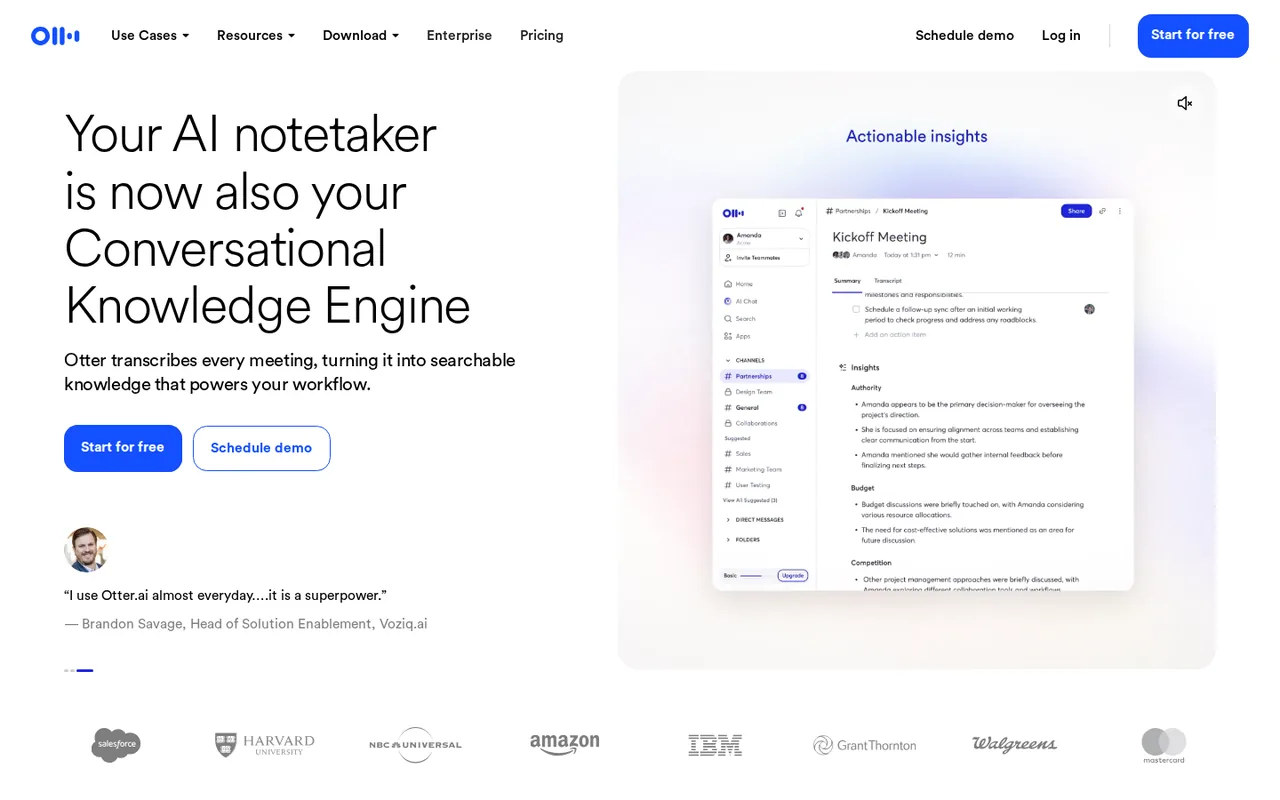
Otter.ai: free notes cap at 300 minutes a month and 30 per conversation; Pro adds 1,200 minutes from USD 8.33 a user
Updated September 26, 2026 · By Elias Brandt · Documentation review, not tested hands-on
Pros
- Free plan without an end date
- Works on the main meeting platforms
- Downgrades archive rather than delete
- Meeting data reachable from AI assistants
Cons
- 30-minute cap on the free plan
- Six transcription languages
- Subscriptions are non-refundable
- Transcripts can train Otter's AI
- API only on Enterprise
Bottom line
300 transcription minutes a month, 30 minutes per conversation, 3 lifetime file imports, 25 most recent conversations, 20 AI Chat queries a month, TXT export.
You sit in a few Zoom, Teams or Google Meet calls a month and want a transcript, summary and action items without paying, since the free Basic plan has no end date.
You routinely run meetings longer than 30 minutes and stay on Basic, because only the first 30 minutes of each conversation are shown until you upgrade.
Best forIndividuals with a few short meetingsSales teams working in a CRMResearchers and journalists with recordingsRegulated or large organizationsStudents and teachers
Strengths, limits and who it suits, in full
Strengths
- Free plan without an end date Basic costs nothing, has no time limit and still includes the meeting notetaker, live transcription and 300 minutes a month.
- Works on the main meeting platforms The notetaker joins Zoom, Microsoft Teams and Google Meet, and the desktop app records calls without a bot joining.
- Downgrades archive rather than delete Cancelling or downgrading archives older conversations instead of removing them, and archived conversations can still be exported.
- Meeting data reachable from AI assistants The MCP server lets ChatGPT, Claude and other assistants search your transcripts under OAuth permissions you grant.
Limits
- 30-minute cap on the free plan Basic shows only the first 30 minutes of each conversation or import until you upgrade to a paid plan.
- Six transcription languages Only English, Spanish, French, German, Japanese and Chinese (Simplified) are transcribed.
- Subscriptions are non-refundable Cancellation stops the next renewal only, and Otter asks for it at least 24 hours before the billing date.
- Transcripts can train Otter's AI The privacy policy says Otter trains its own AI on de-identified audio and on transcriptions that may contain personal information.
- API only on Enterprise The public API and webhooks are available to Enterprise workspaces, not to Pro or Business.
Who it suits
- Individuals with a few short meetings Basic covers a handful of half-hour calls a month; its 25-conversation history and TXT-only export are the first limits you meet.
- Sales teams working in a CRM consider Business when meeting notes must sync to Salesforce or HubSpot for up to 5 users, and Enterprise beyond that.
- Researchers and journalists with recordings consider Business when you import many interviews, since it lifts the import count and allows long files up to 4 hours.
- Regulated or large organizations consider Enterprise when SSO, SCIM, custom data retention or the HIPAA add-on are requirements; SSO needs at least 100 licenses.
- Students and teachers Pro with the education discount suits recorded lectures, provided they are in one of the six supported languages.
How much does Otter.ai cost?
Prices confirmed · checked
Regional prices: The pricing page showed USD per user from a server in Germany; the annual toggle is labeled save 51% for Pro and save 33% for Business.
On monthly billing Business displayed an introductory USD 24 for the first 3 months for first-time subscribers. Sales tax is added where local law requires it. Students and teachers with a .edu address get 20% off Pro: USD 6.67 per month billed USD 79.99 annually, or USD 13.59 monthly.
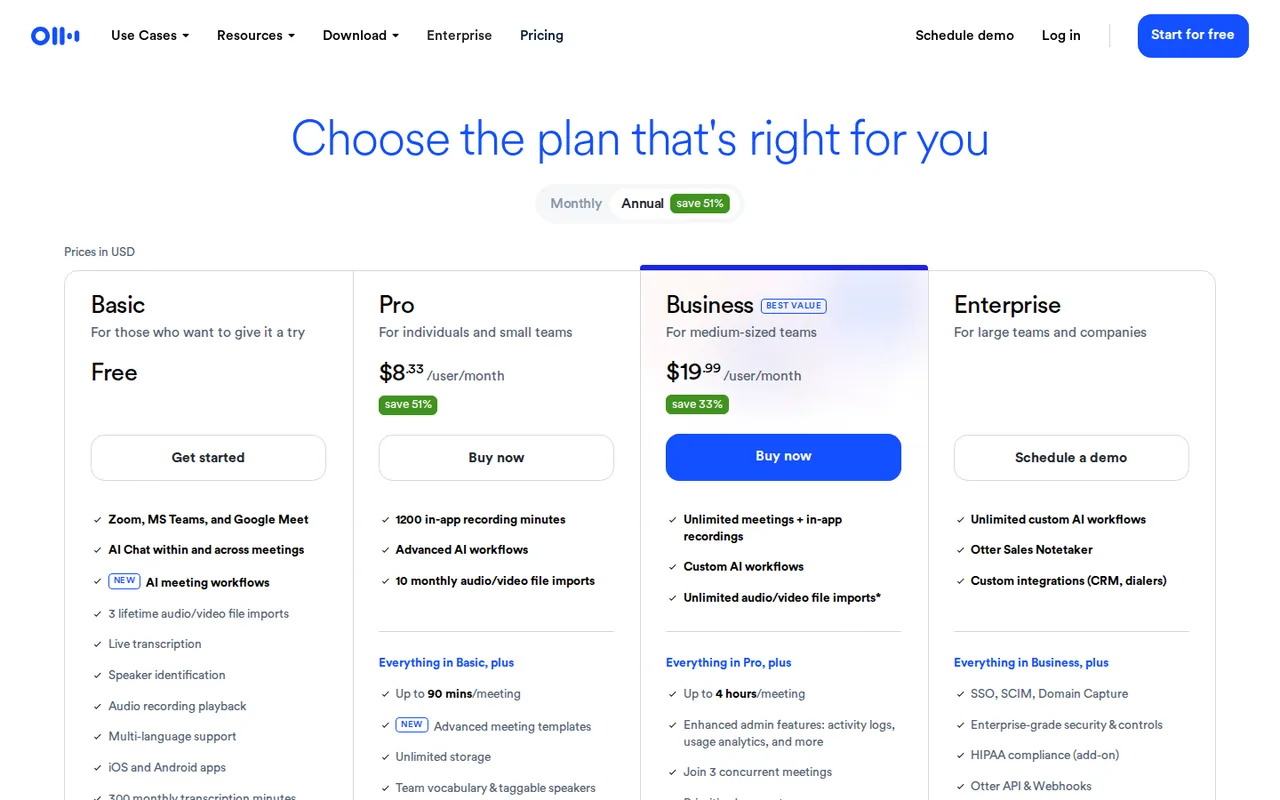
| Plan | Price | What you get |
|---|---|---|
| Basic | USD 0free with no end date sourceFrom otter.ai/pricing, checked Sep 26, 2026 (opens in a new tab) | 300 transcription minutes a month, 30 minutes per conversation, 3 lifetime file imports, 25 most recent conversations, 20 AI Chat queries a month, TXT export. |
| Pro | USD 8.33 per user per monthbilled annually · USD 16.99 billed monthly sourceFrom otter.ai/pricing, checked Sep 26, 2026 (opens in a new tab) | 1,200 minutes a month shared by meetings and imports, 90 minutes per conversation, 10 imports a month, up to 5 billed users, 50 AI Chat queries. |
| Business | USD 19.99 per user per monthbilled annually · USD 30 billed monthly sourceFrom otter.ai/pricing, checked Sep 26, 2026 (opens in a new tab) | Unlimited meetings and in-app recordings, 6,000 imported minutes a month, 4 hours per conversation, 3 concurrent meetings, up to 25 billed users, bulk export. |
| Enterprise | Contact sales | SSO and SCIM (100-user minimum), domain capture, public API and webhooks, custom data retention, HIPAA add-on, unlimited custom AI workflows. |
How far does it go?
- Basic in half-hour meetings300 free minutes a month divided by the 30-minute cap per conversation is 10 fully transcribed half-hour meetings (300 / 30), fewer if imports use the same pool.
- Pro in one-hour callsPro's 1,200 shared minutes cover about 20 one-hour meetings a month (1,200 / 60), roughly 5 a week, with every imported file drawing on the same pool.
- Business imports in hoursBusiness allows 6,000 imported minutes per user a month, which is 100 hours of recorded interviews or lectures (6,000 / 60), on top of unlimited live meetings.
Arithmetic from the published allowances above, not a usage test.
Taxes, currency and promotions can change the price you see at checkout.
Try Otter.ai free (opens in a new tab)
Key features
| Feature | What it does | Watch out |
|---|---|---|
| Otter Notetaker | Connect a Google or Microsoft calendar and the notetaker joins Zoom, Microsoft Teams and Google Meet calls to record and transcribe them. | — |
| Live transcription | Text appears as people speak, with speaker identification, keywords and word highlighting synced to audio playback. | — |
| Summaries and action items | Each conversation gets an automated summary, outline and action items, shaped by standard or custom meeting templates. | — |
| Otter AI Chat | Ask questions within one meeting or across many, and draft follow-ups, reports and other content from what was said. | — |
| Audio and video import | Upload recordings such as MP3, WAV, M4A, MP4 or MOV files of up to 5 GB and get the same transcript and summary. | — |
| Desktop app and MCP server | Record bot-free on Mac or Windows, and let ChatGPT, Claude and other assistants search your meetings through MCP. | — |
| CRM and workflow integrations | Sync meeting notes to Salesforce or HubSpot, and connect Zapier, Slack, Dropbox, Google Drive and Notion. | — |
| Transcription minutes | Meetings, in-app recordings and imports draw on a monthly per-user minute pool that resets on the billing date. | Unused minutes do not roll over, deleted conversations still count, and extra minutes cannot be bought separately. |
| File import | Imports accept common audio and video formats up to 5 GB each and get the same summary and action items as live meetings. | Basic allows 3 imports per account for life and Pro 10 a month; unlimited imports start on Business, within 6,000 minutes a month. |
| Exports | Paid plans export transcripts as TXT, DOCX, PDF or SRT with optional speaker names and timestamps, and audio as MP3. | Basic exports TXT only, bulk export needs Business, and the outline and action items cannot be exported as files. |
| Languages | Transcription covers English, Spanish, French, German, Japanese and Chinese (Simplified), and AI Chat can translate the result. | Other spoken languages, such as Portuguese, are not transcribed. |
Which Otter.ai plan fits your meeting load?
Editorial assessment
Size Otter by two numbers, your longest regular meeting and your total recorded minutes per person each month, because every plan caps both. The six supported languages come first; if your meetings run in another language, no plan helps.
- BasicUSD 0
if your calls stay under 30 minutes, you record fewer than about ten a month and a plain-text export is enough.
- ProUSD 8.33 per user per month
once meetings run up to 90 minutes or you need about 20 hours a month, plus DOCX, PDF or SRT files and Salesforce or HubSpot sync for one user.
- BusinessUSD 19.99 per user per month
when meetings exceed 90 minutes, the notetaker must cover overlapping calls, or you import long recordings; it removes the meeting-minute cap and allows up to 25 billed users.
- EnterpriseContact sales
for SSO, SCIM, the public API, custom retention or HIPAA.
If you mostly edit recorded audio or video rather than capture live meetings, the Descript profile is the closer match, and Auphonic covers cleaning and leveling recordings before transcription. Both sit with Otter in the audio tools category.
How do Otter’s minutes and per-conversation caps work?
Minutes are used every time Otter transcribes, whether from the notetaker, an in-app recording, an integration or an imported file. On Basic and Pro these sources share one monthly pool per user; Business makes meetings and in-app recordings unlimited and meters only imports. The pool resets each month at the date and time your billing cycle started, and leftover minutes are lost.
The per-conversation cap matters as much as the pool. On Basic a recording keeps running past 30 minutes, but only the first 30 minutes of transcript are visible until you upgrade and unlock the rest. Pro raises the cap to 90 minutes and Business to 4 hours. Deleting a conversation does not give its minutes back. Overlapping calls are a separate limit: the notetaker can sit in 1 meeting at a time on Basic, 2 on Pro and 3 on Business.
What happens to your conversations on Basic or after you cancel?
Basic shows only your 25 most recent conversations; older ones are archived, not deleted, and stay in the account indefinitely. You can still export an archived conversation, or delete recent ones so that older items move back into the visible 25. Sharing does not bypass this: if the owner is on Basic, a paid user they shared with also loses access once it is archived.
A cancelled Pro or Business plan stays active to the end of the paid period and then drops to Basic, where the 25-conversation view applies. Subscriptions renew automatically, cancellation should be made at least 24 hours before the billing date, and payments are not refunded. Subscriptions bought through the App Store or Google Play are cancelled there.
Which exports and integrations come with each plan?
Basic exports transcripts as TXT and audio as MP3. Paid plans add DOCX, PDF and SRT, with options for speaker names, timestamps, highlights and removing Otter branding from text exports. Bulk export of many conversations as a ZIP file is limited to Business and Enterprise, and the outline and action items can only be copied, not exported as files.
Integrations grow with the plan:
- The MCP server for ChatGPT, Claude and other assistants is listed on every plan, including Basic; Zapier starts on Pro.
- Salesforce and HubSpot note sync covers 1 user on Pro, 5 on Business and unlimited users on Enterprise.
- Dropbox auto-import starts on Business.
- The public API, limited to 10 requests per second, and workspace webhooks are Enterprise features.
How does Otter handle recording consent and your data?
Recording laws differ: states such as California, Illinois and Florida require every participant to be told and to agree. Otter can email all calendar guests before the notetaker joins, and during the call the notetaker appears as a named participant. On Enterprise, Microsoft Teams users can require each participant to accept recording through an Outlook link before joining.
Otter stores data on AWS in the US West region with AES-256 server-side encryption. Its privacy policy says it trains its own AI on de-identified audio and on transcriptions, which may contain personal information, and shares data with labeling providers that create training data. Enterprise adds custom data retention and a HIPAA add-on.
What should you test before choosing Otter.ai?
Proposed evaluation · not performed yet
On a Basic account, connect a work calendar and let the notetaker join two real internal calls of about 45 minutes, with every participant told in advance. Tag each speaker in the first few paragraphs, then check the transcript for names, jargon and action items against what was agreed. Accept Otter if speakers are labeled correctly and the action items need only light edits; reject it if the summary misses decisions. Note that only the first 30 minutes of each call will be visible, then use the minutes shown in Account Settings to judge whether Pro’s 1,200-minute pool covers a normal month.
Is Otter.ai worth it?
Documentation review plus dated public user reports. Documentation review, not tested hands-on. Not scored.
Worth it if
- You sit in a few Zoom, Teams or Google Meet calls a month and want a transcript, summary and action items without paying, since the free Basic plan has no end date.
- You want to record calls without a bot joining, because the desktop app captures the call from your own computer.
- You work in a team of up to 25 and need longer sessions, since Business allows 4 hours per conversation and bulk export.
Probably not if
- You routinely run meetings longer than 30 minutes and stay on Basic, because only the first 30 minutes of each conversation are shown until you upgrade.
- You transcribe languages beyond English, Spanish, French, German, Japanese and Chinese (Simplified), which are the only six supported.
- You need API access or have strict data-training limits, because the public API is Enterprise only and Otter trains its own AI on de-identified audio and transcriptions.
Otter.ai alternatives
Other audio & voice tools checked with the same method. Pick by the job, not by a score.

Individuals and teams who want searchable meeting transcripts and action items

Noise-free calls and bot-free notes for meetings

Browser cleanup and text editing of speech

Turning instrumental recordings into editable sheet music or MIDI

Narration and voice work

Quick AI masters for independent releases and demos

Separating vocals, drums, bass and melodies from songs you may use

Prompted songs you edit section by section
Used Otter.ai? Write the first review. Visitor opinions are moderated and kept separate from our source checks.
Frequently asked questions
Is there a free trial of Otter Business?
Yes. You start it from Otter's sign-up page and must enter a credit card, but nothing is charged during the trial. When it ends, the card is billed for every seat in the workspace at the Business monthly rate unless an admin cancels first; the end date is shown under Account Settings, Plan.
Can I pay for Otter with PayPal or through the app stores?
Otter takes credit and debit cards on its website, plus in-app purchases through the Apple App Store and Google Play, but not PayPal. Subscriptions bought in an app store are billed, changed and refunded by that store, which is why Otter recommends buying directly on the web.
Can Otter record a meeting without a bot joining the call?
Yes. The desktop app for macOS 12.3 or later and Windows 10 or later records the call from your own computer, and can capture system audio while you wear headphones. The Chrome extension and the mobile apps also record in person or from a device, while Otter Notetaker is the option that joins as a participant.
How accurate are Otter transcripts?
Otter says accuracy is generally higher when Otter Notetaker records the meeting's internal audio stream than when a device microphone picks up the room. Background noise, accents and complex discussion lower it. Filler words such as um and ah are left out, and custom vocabulary lists help with names and jargon.
Does Otter AI Chat send transcripts to other AI companies?
AI Chat combines Otter's own models with those of outside providers. Nothing is sent until you ask a question; then the prompt and transcript go to the provider, which Otter says does not store them. Chat conversations are private to you, and users can opt out of AI Chat.
Does Otter offer a nonprofit discount?
Yes, on the Business plan. Organizations with charitable status from the IRS under section 501(c)(3) or a local charity regulator can get a discount, but only after TechSoup has validated that status. Otter offers no other route to the nonprofit price, so a charity TechSoup cannot validate pays the standard Business rate.
Sources and method21 official sources · 33 details checked · Sep 26, 2026
How we checked this profile
33 details on this page were checked against Otter.ai's own pages and help documentation (Sep 26, 2026).
See the checks by section31 documented2 editorial assessment
Sources for this profile
- Otter pricingotter.ai
- Basic free plan limitshelp.otter.ai
- When monthly minutes resethelp.otter.ai
- Export conversationshelp.otter.ai
All 21 sources
- Supported languageshelp.otter.ai
- Conversations after cancel or downgradehelp.otter.ai
- Otter privacy policyotter.ai
- Recording permissions with Otterhelp.otter.ai
- Otter MCP serverhelp.otter.ai
- Otter public APIhelp.otter.ai
- Import an audio or video filehelp.otter.ai
- Cancel your Otter Pro subscriptionhelp.otter.ai
- Otter Business free trialhelp.otter.ai
- Otter desktop apphelp.otter.ai
- Otter AI Chat FAQshelp.otter.ai
- Speech and transcription accuracy FAQhelp.otter.ai
- Data security and privacy policieshelp.otter.ai
- Bulk exporthelp.otter.ai
- Otter nonprofit discounthelp.otter.ai
- Otter Notetaker overviewhelp.otter.ai
- Sales tax FAQhelp.otter.ai
Otter's pricing page (monthly and annual views, plan comparison table and FAQ), its privacy policy and help center articles on plan limits, minutes, imports, exports, languages, cancellation, recording consent, AI Chat, the MCP server and the public API were read; no hands-on product test was performed. The help center describes the paid plans only by name and points to the pricing page for amounts, so all prices come from the pricing page.
Sources checked Sep 26, 2026. Found something out of date? See how we correct profiles.