Fireflies.ai: Free keeps only 400 minutes of storage, and downloads and video start on Pro at $10 per seat
Updated October 4, 2026 · By Elias Brandt · Documentation review, not tested hands-on
Pros
- Real free plan
- Plenty of capture routes
- Stated security programme
Cons
- Export and video sit behind Pro
- Small Free storage
- Open sharing by default
Bottom line
Unlimited transcription (asterisked), limited AI summaries, 400 minutes of storage, 20 AI credits, AskFred, uploads, desktop, mobile and Chrome apps, API access.
You want to judge transcripts and summaries on a handful of calls before paying, since Free costs $0 and includes the apps and meeting search.
You need to hand off transcript files or keep video, because downloads and video recording are not on Free.
Best forSolo professionalsSmall teamsSales and customer teamsAnyone recording clients or interviews
Strengths, limits and who it suits, in full
Strengths
- Real free plan Free costs $0 with transcription, limited AI summaries, 20 AI credits, meeting search and the apps, so you can test before paying.
- Plenty of capture routes Bot, Chrome extension, file upload, desktop and mobile apps cover live calls, recordings and in-person conversations.
- Stated security programme The provider lists SOC 2 Type II and GDPR and says meeting content is not used for AI training; HIPAA and private storage sit on Enterprise.
Limits
- Export and video sit behind Pro Video recording and downloading transcripts, summaries and recordings are listed under Pro, not Free.
- Small Free storage Free keeps 400 minutes, under seven one-hour meetings, and the pricing page and help center disagree on whether that is per team or per user.
- Open sharing by default New recap links default to teammates and anyone with the link, and meeting audio can include voice data some jurisdictions treat as biometric.
Who it suits
- Solo professionals Free is enough to judge transcript and summary quality on a few calls before paying for Pro.
- Small teams Pro adds download and larger per-seat storage, but check the 8,000-minute cap against your meeting load.
- Sales and customer teams Business lists conversation intelligence and analytics, worth testing against your CRM needs.
- Anyone recording clients or interviews settle consent and sharing defaults first, because the host is the contact for deletion requests.
How much does Fireflies.ai cost?
Some details not confirmed · checked
Regional prices: Free costs $0.
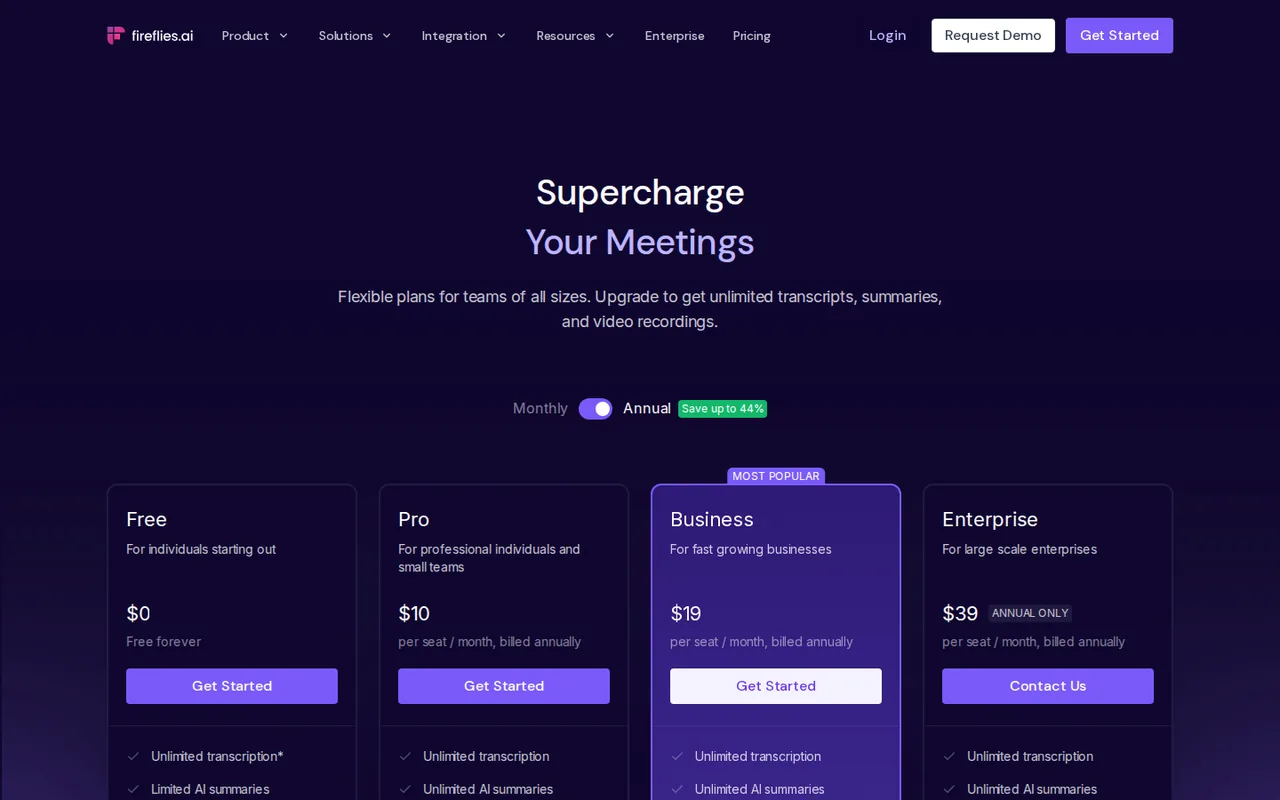
Pro shows $10 per seat a month billed annually, Business $19 per seat a month billed annually and Enterprise $39 per seat a month, annual only. Each paid card also shows a higher figure ($18 for Pro, $29 for Business) beside the annual price, but the page text does not label it, so no month-to-month price is stated here. Free storage is worded as 400 minutes per team on the pricing page and 400 minutes per user in the help center. Cancelling a paid plan downgrades the account to Free at the end of the billing cycle. The asterisk on Free unlimited transcription is not explained in the page text.
| Plan | Price | What you get |
|---|---|---|
| Fireflies Free | $0 sourceFrom fireflies.ai/pricing, checked Oct 4, 2026 (opens in a new tab) | Unlimited transcription (asterisked), limited AI summaries, 400 minutes of storage, 20 AI credits, AskFred, uploads, desktop, mobile and Chrome apps, API access. |
| Fireflies Pro | $10 per seat a monthbilled annually sourceFrom fireflies.ai/pricing, checked Oct 4, 2026 (opens in a new tab) | Unlimited transcription and AI summaries, 8,000 minutes of storage per seat, 20 AI credits, video recording, downloads, action items and task manager, unlimited integrations. |
| Fireflies Business | $19 per seat a monthbilled annually sourceFrom fireflies.ai/pricing, checked Oct 4, 2026 (opens in a new tab) | Everything in Pro, unlimited storage, 30 AI credits, multi-language mode, conversation intelligence, team analytics, public meeting access, user groups. |
| Fireflies Enterprise | $39 per seat a monthannual only sourceFrom fireflies.ai/pricing, checked Oct 4, 2026 (opens in a new tab) | Everything in Business, 50 AI credits, rules engine, SSO and SCIM, audit logs, HIPAA compliance, private storage, custom data retention, dedicated account manager. |
How far does it go?
- Plan the retained archiveFor a single-user illustrative workload, 400 minutes holds six complete 60-minute meetings plus 40 minutes; 8,000 holds 133 plus 20 minutes. Storage is cumulative, not a monthly refill. Free’s per-user versus per-team scope conflicts between help and pricing, so confirm it before sizing a team.
Arithmetic from the published allowances above, not a usage test.
Taxes, currency and promotions can change the price you see at checkout.
Try Fireflies.ai free (opens in a new tab)
Key features
| Feature | What it does | Watch out |
|---|---|---|
| Records Zoom, Google Meet and Microsoft Teams calls and transcribes in 100+ languages | — | |
| AI summaries, action items and a task manager | — | |
| AskFred assistant to search and ask questions across meetings | — | |
| Upload audio or video files for transcription | — | |
| Desktop, Android, iOS and Chrome extension apps | — | |
| Conversation intelligence and team analytics on Business | — | |
| API access listed on every plan | — | |
| Meeting capture | Joins live calls with a notetaker bot, takes uploads and imports, and lists a Chrome extension that records without the bot. | Uploads and imports are capped at 3,000 minutes per source per month for individuals, with overage at $0.01 a minute; live bot meetings are not capped. |
| AI summaries and credits | Free has limited AI summaries and 20 AI credits; Pro and above list unlimited summaries, with 20, 30 and 50 credits on Pro, Business and Enterprise. | The credits are a separate allowance from summaries, and what each credit buys is explained in a separate help article that we did not rely on. |
| Sharing and privacy controls | Each recap can be limited to participants, teammates or only the owner, and the guide describes owner-only access and specific-person invitations. | The default is teammates and anyone with the link, so the stricter setting has to be chosen. |
Check the archive requirement before the meeting
Storage is a cumulative archive allowance, not a fresh transcription budget each month. The storage guide labels Free’s 400 minutes per user, while the pricing card labels it per team. Confirm the scope before dividing a team workload among seats. A usable transcript and a downloadable handoff are also different requirements; the plan table places downloads on Pro.
Set recap visibility deliberately
The sharing guide describes a default that includes anyone holding the link. Choose the intended audience before recording and check the resulting recap itself. An email recipient list does not determine who can open the underlying notes. When changing defaults, the product offers a choice between future meetings and past meetings; choose that scope explicitly.
Evaluate a private ten-minute recap
Proposed evaluation · not performed yet
Use Free for a ten-minute fictional planning meeting, with all participants agreeing to recording. Use no client information. Prepare three reference facts: Maya owns a draft due Thursday; a Tuesday deadline is explicitly rejected; an unassigned idea remains optional.
- Limit recap visibility to the owner before the meeting and check available storage and summary access. Stop if the needed feature is unavailable.
- After processing, compare the summary and transcript with the three reference facts. Mark wrong owners, invented deadlines and missing qualifications.
- Inspect the recap’s access setting and test the link in a signed-out browser without sending it to anyone.
- If a downloadable transcript is required, record the paid-plan requirement instead of assuming Free delivers it.
Accept only if the recap preserves the decisions and the intended access restriction. No meeting was recorded, and no time-saving or accuracy result is claimed here.
Pick the capture route that fits the volume
The rate limit depends on how audio reaches Fireflies. Live meetings joined by the notetaker bot, Google Meet calls recorded through the Chrome extension and mobile recordings are not counted against the upload cap. Dashboard uploads, API calls, Zapier, cloud imports and dialer calls are, at 3,000 minutes per source per month for individuals.
- Recording calls as they happen: use the bot or the Chrome extension.
- Backfilling an archive of old recordings: spread the imports across months or budget $0.01 a minute for the overage.
- Either way, transcripts still count toward the storage allowance of your plan.
Is Fireflies.ai worth it?
Documentation review plus dated public user reports. Documentation review, not tested hands-on. Not scored.
Worth it if
- You want to judge transcripts and summaries on a handful of calls before paying, since Free costs $0 and includes the apps and meeting search.
- Your calls run on Zoom, Google Meet or Microsoft Teams and you want searchable notes with action items rather than raw recordings.
- You need SSO, audit logs or HIPAA compliance and can commit to the annual-only Enterprise plan, the only tier that lists them.
Probably not if
- You need to hand off transcript files or keep video, because downloads and video recording are not on Free.
- You expect to keep a long meeting archive at no cost, because 400 minutes is a cumulative allowance that fills after a few hours of calls.
- You record clients or interviewees but will not change sharing settings, because new recaps open to anyone with the link unless you restrict them.
Fireflies.ai alternatives
Other audio & voice tools checked with the same method. Pick by the job, not by a score.

Noise-free calls and bot-free notes for meetings

Meeting transcripts, summaries and action items

Browser cleanup and text editing of speech

Turning instrumental recordings into editable sheet music or MIDI

Listening to documents and scans for private study

People who want screen and call answers from their own AI keys

Screening audio, video and images for deepfakes through an API

Transcribing and editing multi-track podcast and video recordings
Used Fireflies.ai? Write the first review. Visitor opinions are moderated and kept separate from our source checks.
Frequently asked questions
Is Fireflies.ai free to use?
Yes. The Free plan costs $0 and lists unlimited transcription, though the pricing page marks it with an asterisk it does not explain. It also includes limited AI summaries, 20 AI credits, AskFred and the desktop, mobile and Chrome apps. Storage stops at 400 minutes, and downloading transcripts or recording video requires Pro or above.
What happens to my meetings if I cancel a paid plan?
The help center says a cancelled subscription drops the account to Free when the current billing cycle ends, and existing meetings stay in the account. Free then applies its own limits, including the 400-minute storage allowance and no downloads, so export anything you need to keep outside Fireflies before the paid period runs out.
Does Fireflies use meeting recordings to train its AI?
No, according to the privacy policy last updated September 28, 2026, which says Fireflies does not use personal information for AI model training. The same policy says meeting audio and visual files are collected and that service providers may extract voice data, which some jurisdictions treat as biometric, so recording consent still matters.
Can a meeting guest ask Fireflies to delete a recording?
The privacy policy directs people who joined a meeting without a Fireflies account to ask the meeting host to delete the recording, rather than handling the request directly. For account holders, it says account data is deleted within 30 days of closing the account. Hosts recording clients should agree on a deletion route before the call.
Sources and method8 official sources · 15 details checked · Oct 4, 2026
How we checked this profile
15 details on this page were checked against Fireflies.ai's own pages and help documentation (Oct 4, 2026).
See the checks by section15 documented
| Section | Checks | Last checked | Sources |
|---|---|---|---|
| Plans and prices | 6 documented | fireflies.ai/pricingguide.fireflies.ai/2631950139-learn-about-tra…guide.fireflies.ai/4475230290-manage-fireflie… | |
| Strengths and limits | 3 documented | fireflies.ai/pricingguide.fireflies.ai/2631950139-learn-about-tra…guide.fireflies.ai/5319481450-how-to-configur… | |
| Features | 1 documented | fireflies.ai/pricing | |
| Article text | 3 documented | fireflies.ai/privacy-policyguide.fireflies.ai/2154538358-policy-on-keepi… | |
| Other details | 1 documented | fireflies.ai/privacy-policy | |
| Platforms and integrations | 1 documented | fireflies.ai/pricing |
Sources for this profile
- Fireflies.ai pricing pagefireflies.ai
- Fireflies.ai home pagefireflies.ai
- Fireflies.ai privacy policy, last updated September 28, 2026fireflies.ai
- Fireflies help center: storage and rate limitsguide.fireflies.ai
All 8 sources
Plans and features come from the pricing page and the home page fetched through the site's official-page reader on 2026-10-04. Storage, upload limits, sharing defaults, security and cancellation come from Fireflies help-center articles, and data collection from the privacy policy last updated September 28, 2026. The terms page returned 404 at https://fireflies.ai/terms, so no claim relies on it. The pricing page shows two figures per paid card with only the annual price labelled. The privacy policy says the website's analytics and advertising partners may collect data that counts as targeted advertising under some state laws. No Fireflies meeting was recorded for this page, and third-party reviews were not used.
Sources checked Oct 4, 2026. Found something out of date? See how we correct profiles.