
How to Check AI Research Claims Against the Original Source
A cited AI research answer looks finished, but a link only shows where a sentence came from. Six steps take it from saved answer to corrected paragraph, with four real plan claims about Perplexity, Consensus, Elicit and Gemini Notebook (formerly NotebookLM) checked as the example.
By Elias Brandt · Updated 9 Oct 2026 · About 14 min read · Plan terms taken from each tool profile
The short answer
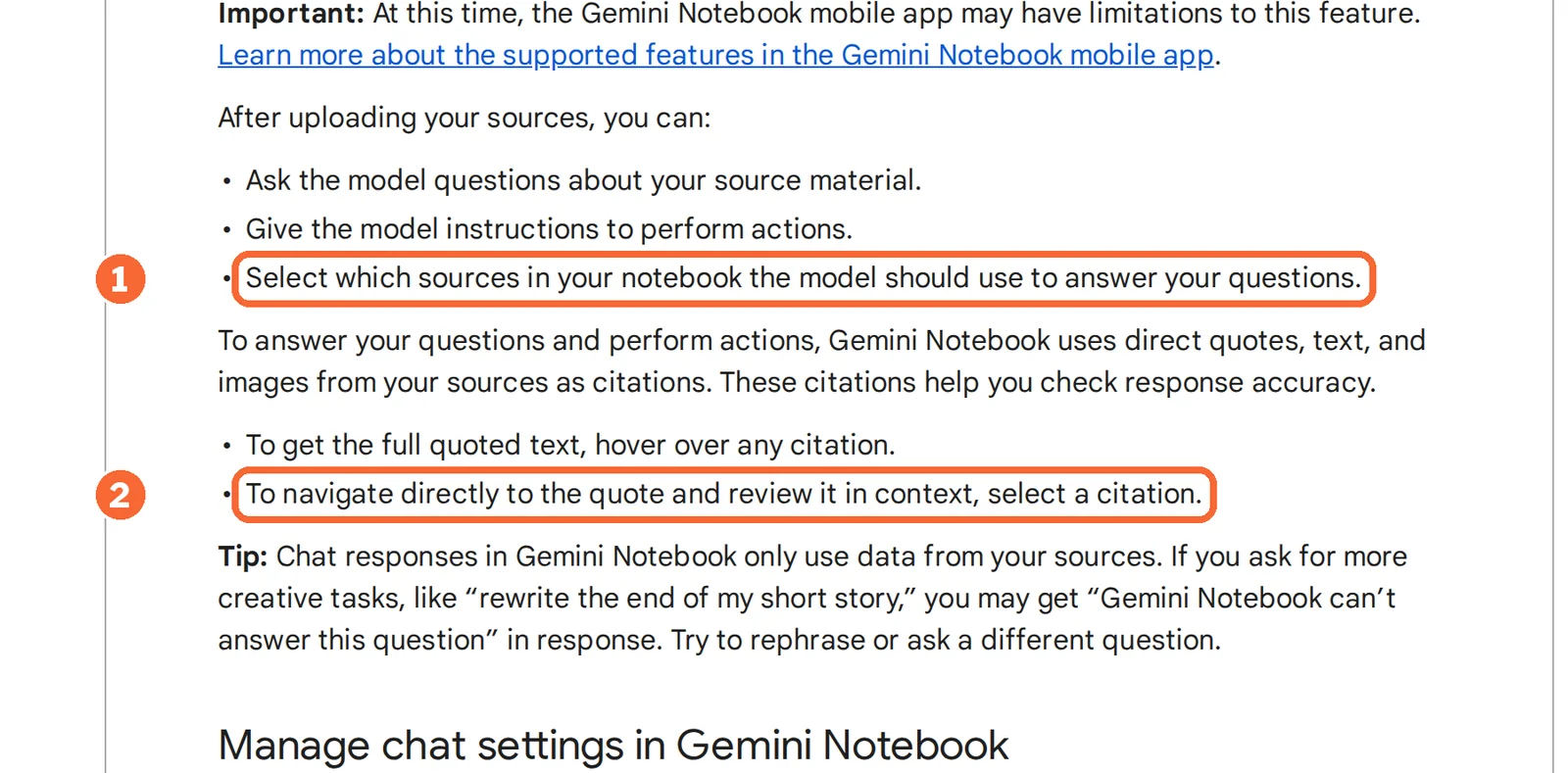
How do you check one claim? Open the source the answer cites, find the passage behind the sentence, and compare its wording, plan, date and population with the claim. In a Gemini Notebook chat, select the inline citation next to the sentence: it opens the cited passage in context.
What does a second answer prove? Nothing about the source. Refreshing the answer or pasting it into another AI tool produces another answer; only the original page settles the claim.
Which tool helps where? Perplexity finds the web page behind a claim, Consensus Deep reports mark whether a paper was read in full or from its abstract, Elicit ties report claims to passages, and Gemini Notebook answers from the sources you select.
How do you verify an AI research claim? Six steps
Step 1: Save the answer and name the decision it feeds
In shortFreeze the answer before you edit it, then decide how much checking each part deserves.
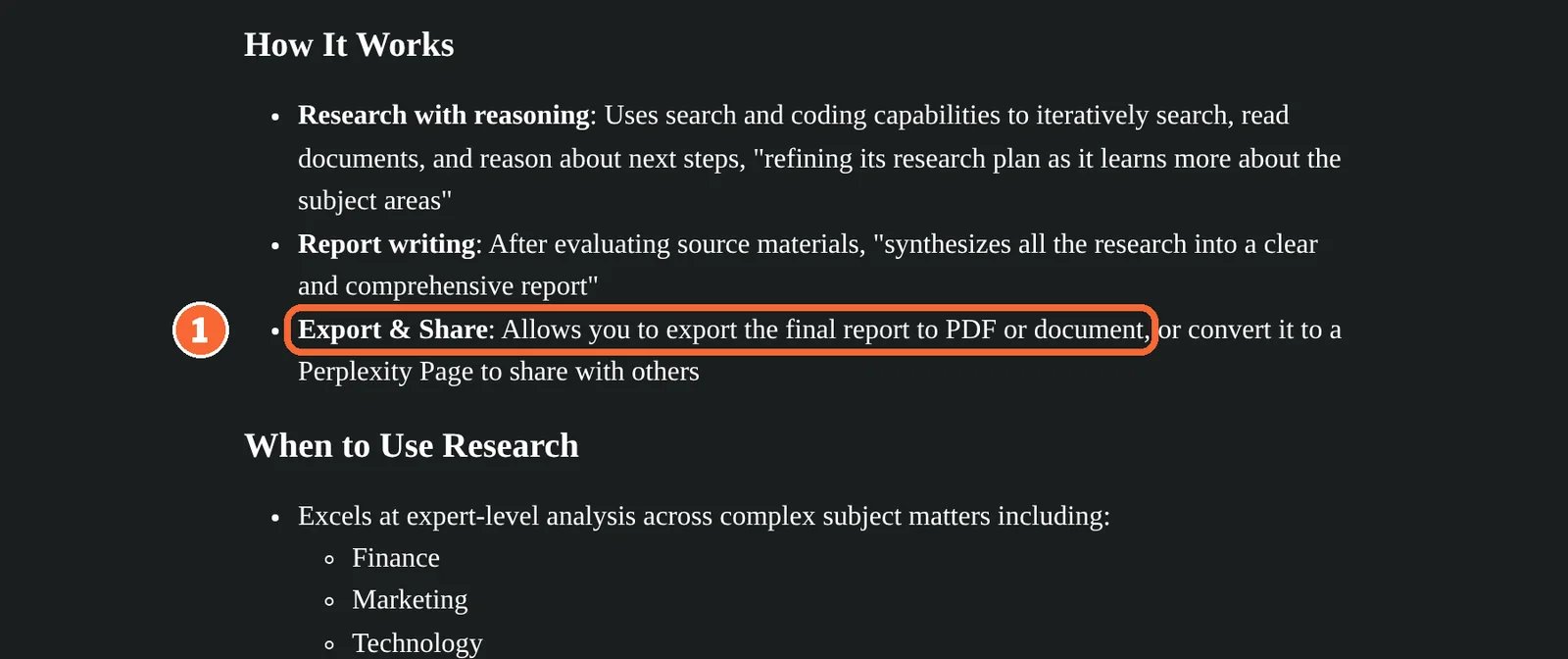
Start with four items: the question you asked, the full answer text, every link it cites, and the decision the answer will feed. Perplexity keeps threads in your history, and a Research mode report can be exported to PDF or a document, which gives you a fixed copy to check against.
| The claim feeds… | Check against | Enough when |
|---|---|---|
| A purchase or plan choice | The vendor’s pricing page and help center, then the checkout screen | The plan, billing period and region in the claim match the page |
| A published figure or quotation | The paper’s full text or the organisation that collected the data | You have read the passage, not only the abstract or a summary |
| Background context | The cited page itself | The page exists and says what the sentence says; otherwise cut the sentence |
Sources: Perplexity Research mode, What is Perplexity.
Step 2: Split the answer into single claims
Write one row per fact, with its condition attached. “Elicit and Consensus both let you export references on their free plans” holds two claims, one per tool, and each can fail on its own. Keep numbers, plan names, dates and qualifiers in the row they belong to; a figure separated from its plan is the most common way a true number turns into a false claim.
The worked example below splits a four-sentence answer into rows C1 to C4.
Step 3: Match each claim to its primary source
| Kind of claim | Primary source | Only a pointer |
|---|---|---|
| Software plan, limit or price | The vendor’s own pricing page and help center; two official pages can disagree | Reviews, AI summaries, older tutorials |
| Study finding | The paper, ideally its full text | The abstract, a press release, a summary of the paper |
| Statistic | The organisation that collected the data | An article repeating the number |
| Product name or feature | The vendor’s current help page and URL | Guides written before a rename |
Consensus’s filter guide makes the same point about papers: a high citation count is no sign of validity, so filters narrow results without appraising each study.
Sources: Consensus advanced filters.
Step 4: Open the citation and find the passage
In shortA citation tells you where to look. The check is reading the passage it points to and comparing it with the exact wording of the claim.
In a Gemini Notebook chat, the quickest route for one sentence is its inline citation: select it and the cited passage opens in context, and you can also choose which of the notebook’s sources the answer may use. The citation locates the evidence; the answer can still misread the passage, drop a qualification or miss context from sources you did not add. Its experimental agentic chat can also search the web, so record which mode produced the answer.
| Tool | What the citation opens | What it leaves to you |
|---|---|---|
 Perplexity Perplexity | A link to each web source the answer used | Finding the passage and its date on the page; long uploaded files are reduced to their most relevant parts |
 Consensus Consensus | Deep report citations; a checkmark means the full text was used | Opening papers cited without a checkmark, which were read from the abstract only |
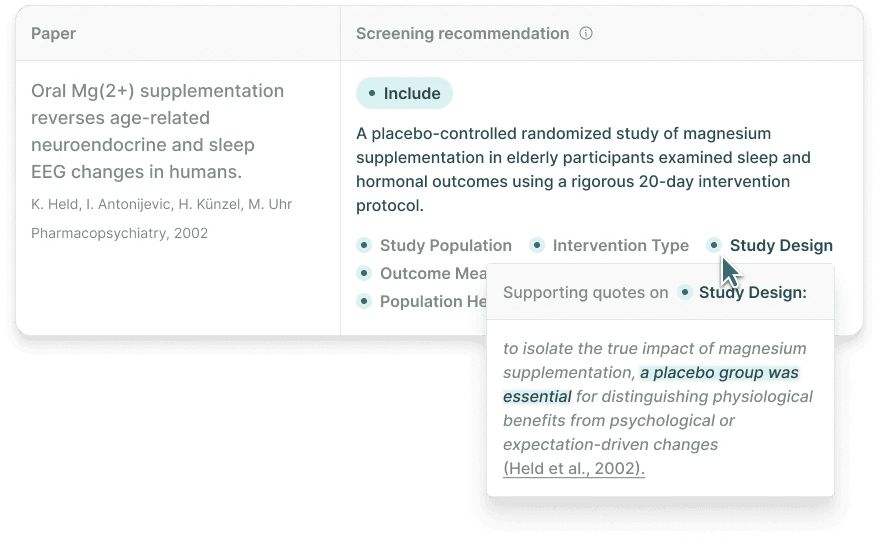
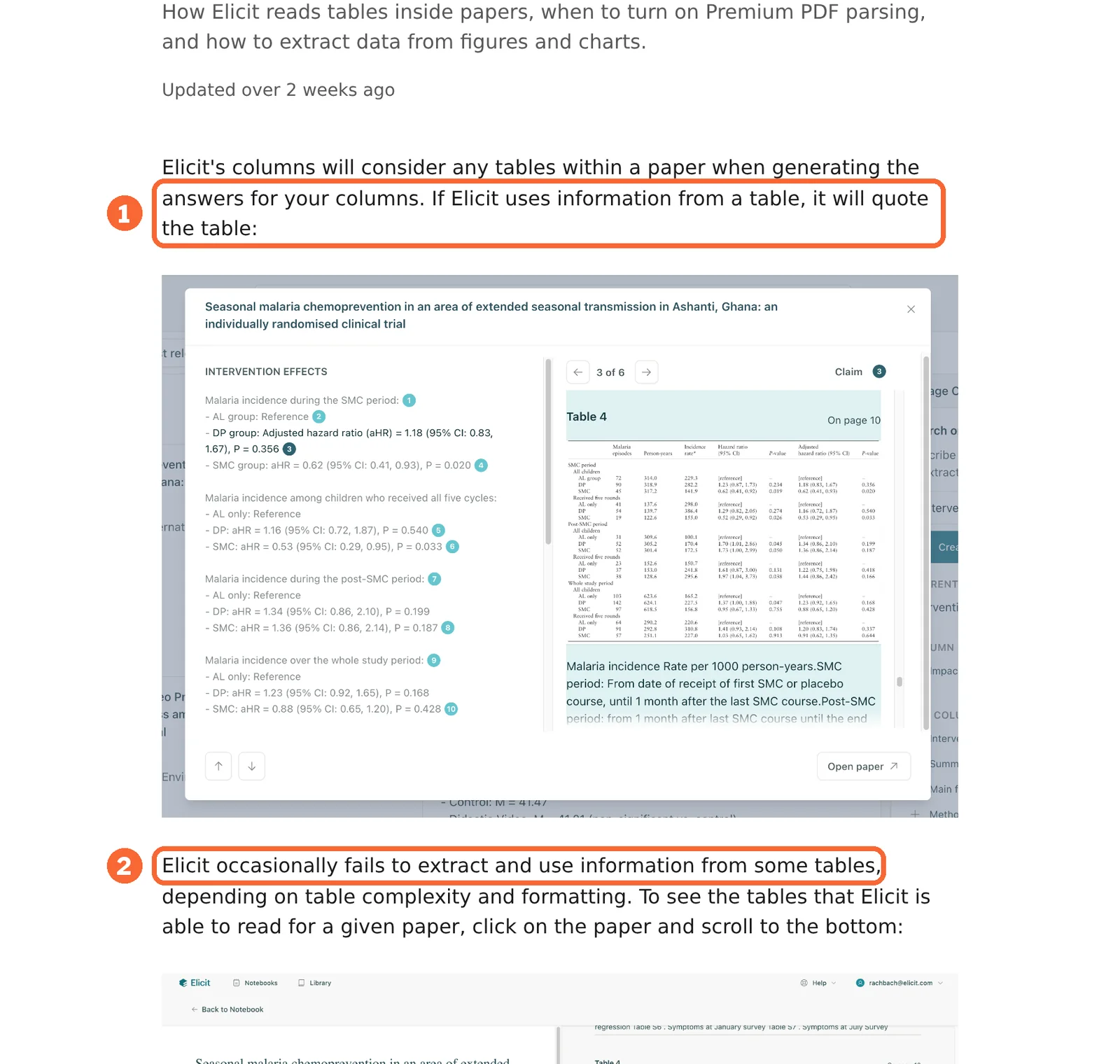
 Elicit Elicit | The source passage behind each report claim or extracted value | Tables in the paper: some layouts are missed or parsed incorrectly |
Sources: Gemini Notebook chat and citation modes, Gemini Notebook overview, Perplexity file uploads, Consensus Deep review guide, Elicit Reports.
Step 5: Check scope, date and name
In shortMost wrong claims cite the right page and widen it: a paid feature becomes free, a rounded figure becomes exact, an old name stays in use.
| Condition | Where it slips, in the four tools here | What to write |
|---|---|---|
| Plan | Elicit’s RIS, CSV and BIB citation files start at Plus, which is sold under Academic pricing only | The plan name next to the feature |
| Billing period | Perplexity Pro is USD 20 billed monthly; the USD 17 shown for annual billing is a rounded monthly equivalent | The checkout total for any exact saving |
| Where you buy | Perplexity subscriptions bought through app stores are billed by those stores and can differ; Google AI paid tiers are sold only in some regions | The channel or country the price applies to |
| Name | NotebookLM is now Gemini Notebook, and older tutorials still use the old name | The current name, with the old one in brackets |
| Change notice | Google marks its Gemini Notebook tier counts as subject to change | The date you read the page |
Sources: Perplexity plan comparison, Elicit pricing, Consensus Deep review guide, Gemini Notebook plan limits, Google rename announcement.
Step 6: Record a verdict and rewrite the sentence
In shortThe verdict is yours, written after reading the passage. Every corrected sentence must rest on a row in the ledger.
Download the blank claim ledger (CSV) and its instructions (Markdown). Each row keeps the claim, source URL, passage, scope, access status, decision and corrected wording together. The research task uses the same file with a fixed question about open-plan offices; for a software-plan check like the one below, use only its discovery rows. All observation cells are blank.
| Ledger decision | Use it when |
|---|---|
| supported | The passage says what the claim says, under the same conditions |
| partly_supported | The passage backs part of the claim, or backs it under a narrower condition |
| contradicted | The passage says something different |
| insufficient | No passage settles it, even though the page opens, or the source cannot be read |
| conflicting_sources | Two official sources disagree: copy the claim ID into a second row, one source each |
Record access as full_text, abstract_only, not_accessible or not_found. An inaccessible source cannot establish support, and two conflicting numbers are never averaged.
Worked example: four claims, four different verdicts
The sample answer
In shortWritten for this exercise, not quoted from any product. Each sentence is checked against the vendor’s own pages.
Question: “Which research assistants can I use for free to gather papers and references?” Answer: “Elicit’s free plan exports RIS files for Zotero. Consensus Free includes 3 Deep reviews and 10 Pro messages a month. NotebookLM lets free users add 50 sources per notebook. Perplexity Free includes unlimited Research reports.”
| Claim | What the original page says | Ledger decision |
|---|---|---|
| C1 Elicit Free exports RIS | Basic includes Zotero import; RIS, CSV and BIB citation files and table exports start at Plus, priced under Academic only | contradicted: import and export were swapped |
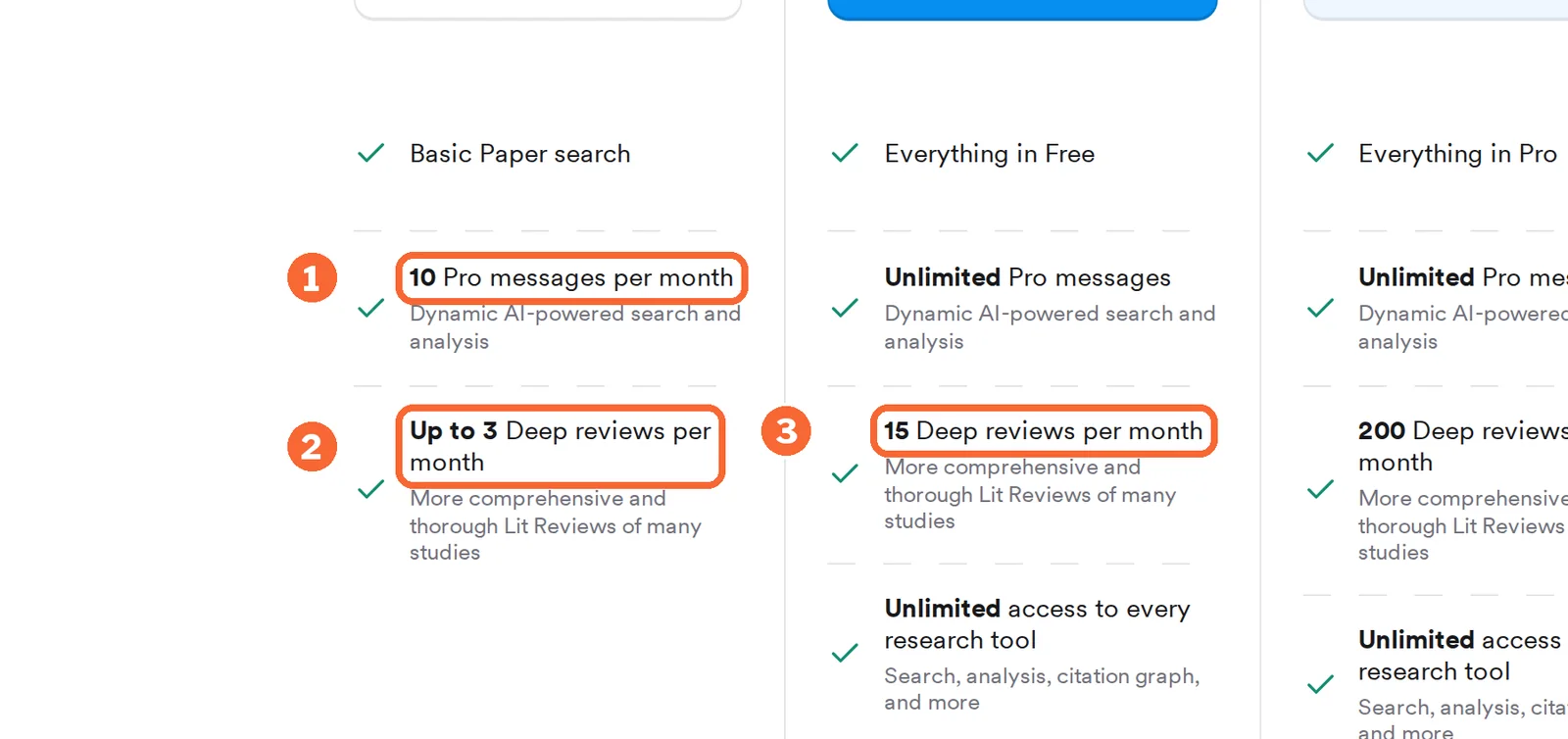
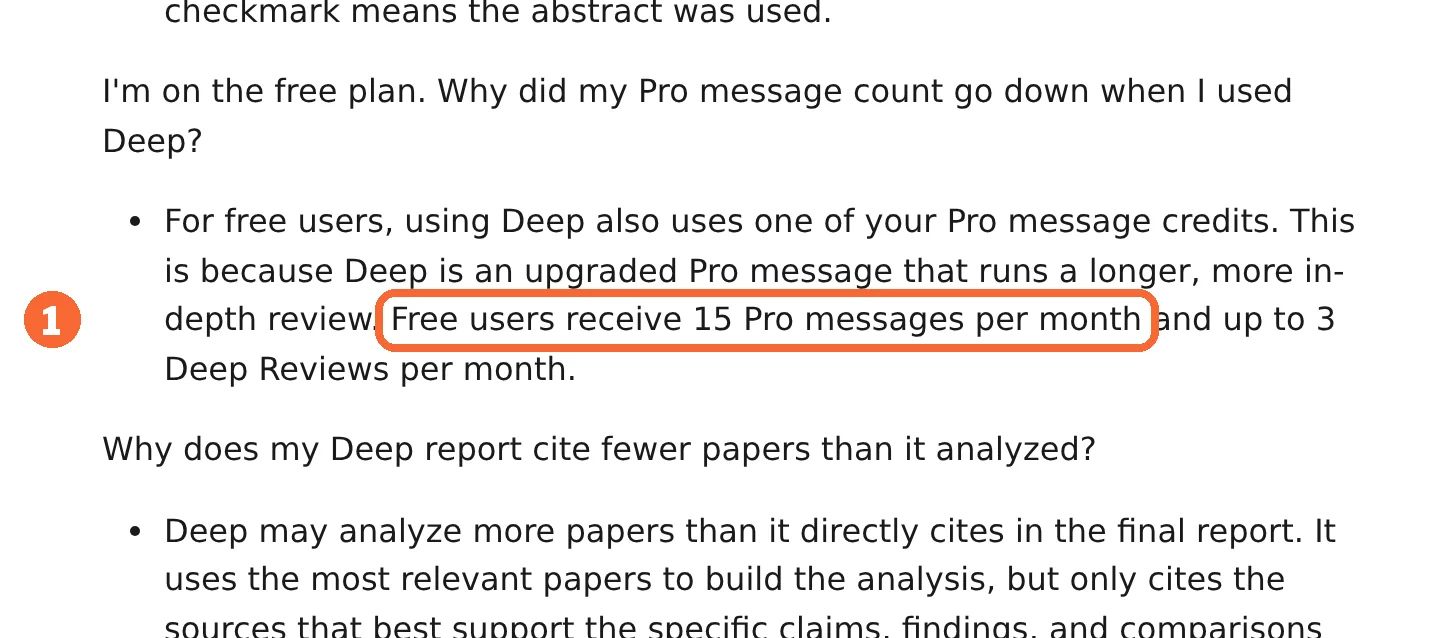
| C2 Consensus Free: 3 Deep reviews, 10 Pro messages | The pricing page lists 10 Pro messages and up to 3 Deep reviews; the Deep review guide gives 15 Pro messages and says each Free Deep review uses one | conflicting_sources: two rows, one per page |
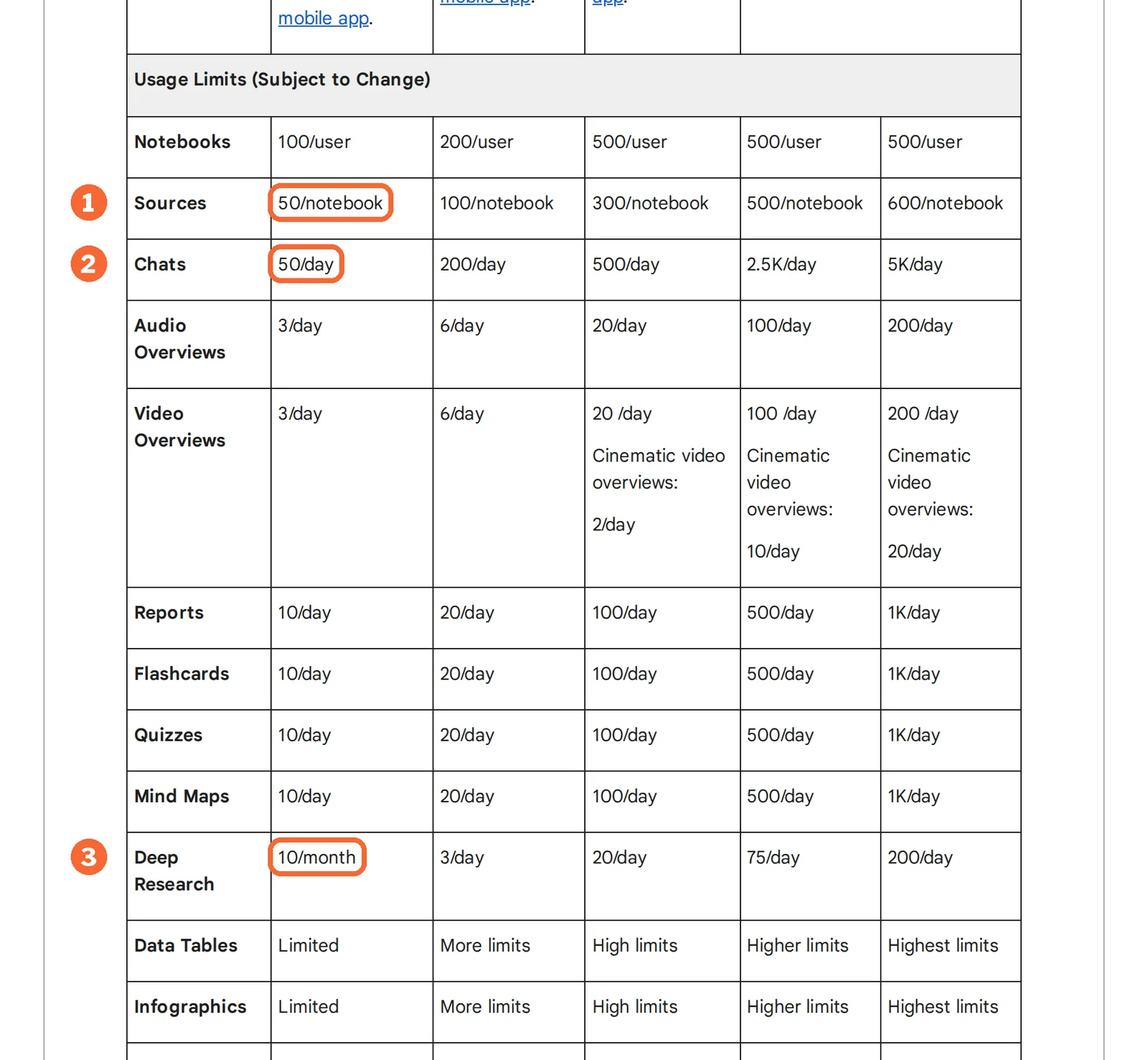
| C3 NotebookLM: 50 sources per notebook free | Standard lists 50 sources per notebook; the product is now Gemini Notebook, and Google marks the counts as subject to change | supported, with the name updated |
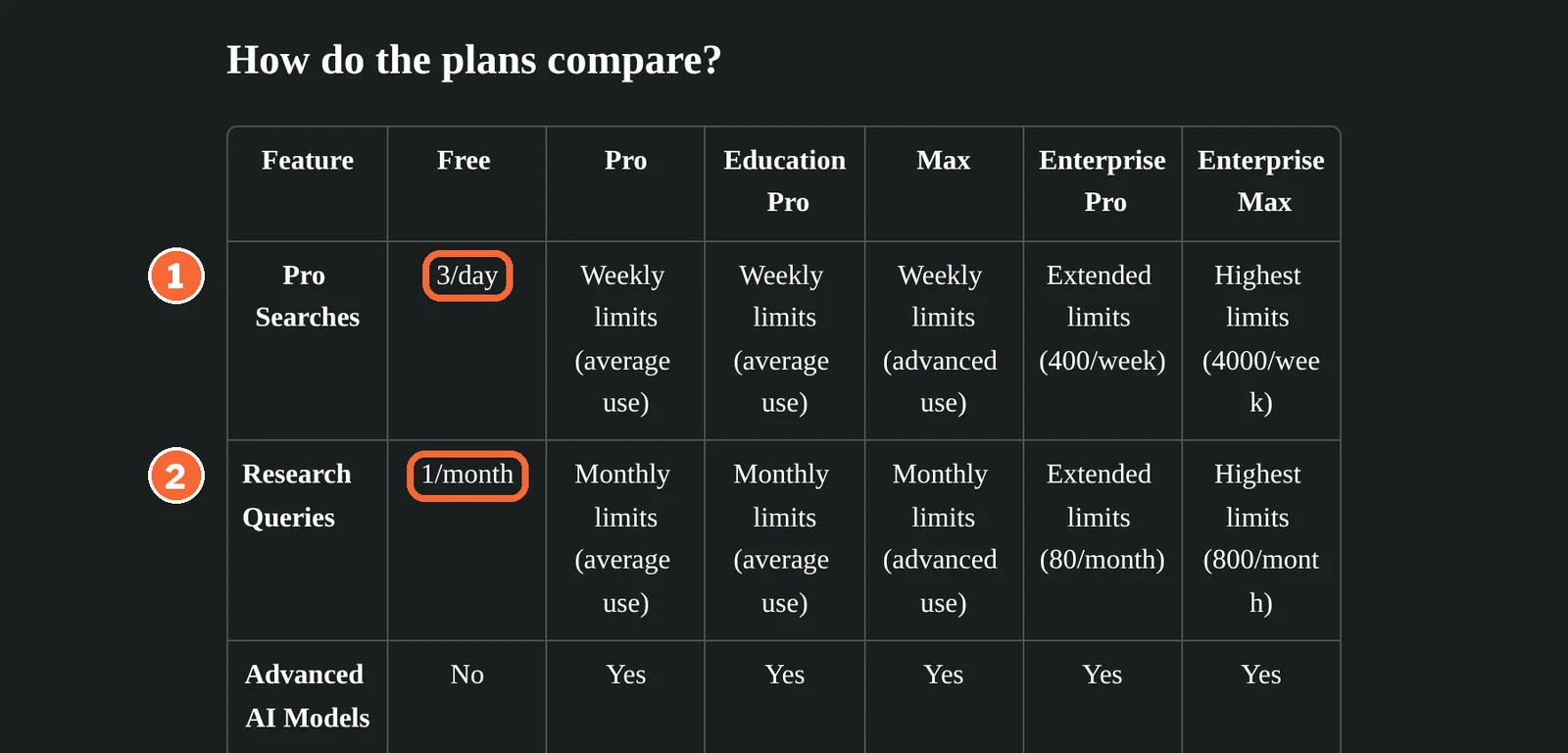
| C4 Perplexity Free: unlimited Research | The plan comparison table allows 1 Research query a month on Free, next to 3 Pro Searches a day | contradicted |
One claim of four survives as written, and none of the errors shows in the answer itself. C1 is the common type: the right product and the right feature family, in the wrong direction. C2 is why the ledger has room for two sources: both pages are official, and neither is obviously outdated.
Sources: Elicit pricing, Consensus pricing, Consensus Deep review guide, Gemini Notebook plan limits, Perplexity plan comparison.
The corrected paragraph
“Elicit’s free Basic plan imports references from Zotero; RIS, CSV and BIB citation files start at Plus, sold under Academic pricing. Consensus Free includes up to 3 Deep reviews a month; its pricing page lists 10 Pro messages and its Deep review guide 15, so check the account counter. Gemini Notebook, formerly NotebookLM, allows 50 sources per notebook on the free Standard tier. Perplexity Free allows 1 Research query a month.”
Which research tool helps at which step?
What each tool shows behind a sentence
| Capability | Perplexity | Consensus | Elicit |  Gemini Notebook Gemini Notebook |
|---|---|---|---|---|
| Finding the source | ||||
| Searches the open web | Offeredlive web sources | Not listedresearch papers | Not listedpapers and clinical trials | Partlysource discovery; agentic chat is experimental |
| Answers only from sources you choose | Partlyquestions about uploaded files | Not listednot covered in the sources checked | Partlychat with accessible full-text papers | Offeredselect sources for answers |
| Showing the evidence | ||||
| Links each sentence or claim to a source | Offeredlink per source used | OfferedDeep report citations | Offeredreport claims linked | Offeredinline citations |
| Opens the exact passage | Not listednot covered in the sources checked | Not listednot covered in the sources checked | Offeredsupporting passage | Offeredquote in context |
| Flags abstract-only evidence | Not listednot covered in the sources checked | Offeredcheckmark for full text | Not listednot covered in the sources checked | Not listednot covered in the sources checked |
| Keeping a record | ||||
| Report export | PartlyResearch report to PDF or document | OfferedDeep report as PDF | OfferedPDF or Word, every plan | Not listednot covered in the sources checked |
| Reference file (RIS or BIB) | Not listednot covered in the sources checked | Offeredsearch results as RIS | Partlyfrom Plus | Not listednot covered in the sources checked |
offered partly or with limits not listed on the profile.
Cells come from each tool’s profile on this site, which cites the vendor pages and the date they were checked.
A weekly check for a month on free plans
In shortFour checking rounds a month, counted in each tool’s own free allowance.
| Tool | Four rounds on the free plan | Runs out first |
|---|---|---|
| Perplexity | About 90 Pro Searches (3 a day × 30) cover the finding work; the 1 Research query a month covers 1 round of 4 | Research: a weekly report needs Pro, USD 20 billed monthly |
| Consensus | Up to 3 Deep reviews cover 3 rounds of 4; each uses one Pro message, leaving 10 − 3 = 7 by the pricing page or 15 − 3 = 12 by the Deep review guide | Deep reviews: Pro, USD 20 billed monthly, has 15 |
| Elicit | Search, summaries and paper chat are unlimited; the Research Report count cannot be worked out, because Elicit describes usage only in relative terms | Citation files: RIS, CSV and BIB need Plus, USD 19 billed monthly |
| Gemini Notebook | One notebook of up to 50 sources per round; 4 of the 10 monthly Deep Research runs, leaving 6 | Sources: a round over 50 pages needs a second notebook, or Google AI Plus at 100 per notebook for USD 4.99 per month |
Sources: Perplexity plan comparison, Consensus pricing, Consensus Deep review guide, Elicit pricing, Elicit usage limits, Gemini Notebook plan limits.
Find the page behind a web claim: Perplexity
Steps 1 and 3
Use it to locate the vendor page or report a claim came from, and to keep a fixed copy of a Research report.
- Free 3 Pro Searches a day
- Entry from USD 20 / month Pro, billed monthly; USD 17 billed annually
Perplexity answers from live web sources. Follow-up questions keep the thread’s context, so a broad answer can be narrowed to one product, date or number before you check it.
What it does in a check
- Research mode
- Many searches across many sources; the model cannot be chosen manually.
- File uploads
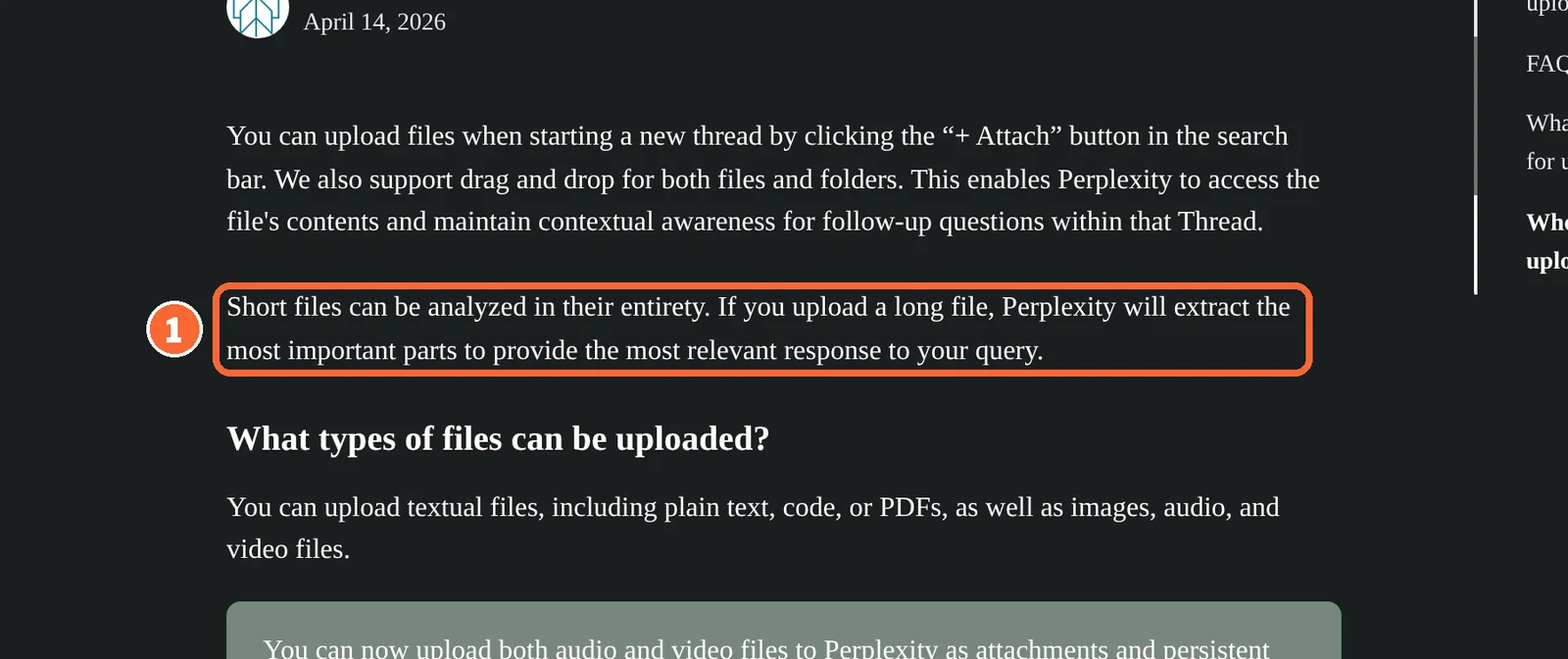
- Up to 50 MB a file; long files are reduced to their most relevant parts, so check a quoted figure in the original.
See the Perplexity profile for plans, limits and sources.
Visit Perplexity (opens in a new tab)
Sources: What is Perplexity, Perplexity Research mode, Perplexity file uploads.
Check a claim about published studies: Consensus
Steps 3 and 4
Use it when the claim rests on papers and you need to know whether the full text or only the abstract was read.
- Free Up to 3 Deep reviews a month
- Entry from USD 20 / month Pro, billed monthly; USD 12 billed annually
Consensus searches research papers and builds Deep reports that break a question into sub-questions. The Consensus Meter shows agreement in the literature for yes-or-no questions.
What it does in a check
- Deep report coverage
- Reports cite fewer papers than they analyse.
- Exports
- Search results as CSV, RIS or a formatted bibliography.
See the Consensus profile for plans, limits and sources.
Visit Consensus (opens in a new tab)
Sources: Consensus Deep review guide, Consensus advanced filters, Consensus pricing.
Read the passage behind a report claim: Elicit
Steps 4 and 6
Use it when you need the supporting passage for each claim, or values pulled out of many papers into one table.
- Free Unlimited paper search
- Entry from USD 19 / month Plus, billed monthly, Academic only; USD 11 per user billed annually
Elicit searches academic literature, chats with accessible full-text papers and extracts study details into table columns. Citation files and table exports start at Plus.
What it does in a check
- Column extraction
- Answers quote the table inside a paper when they use it; English-language research is the focus.
- Library
- Import references from Zotero, EndNote or Mendeley, with duplicates flagged.
See the Elicit profile for plans, limits and sources.
Visit Elicit (opens in a new tab)
Sources: Elicit Reports, Elicit table extraction, Elicit pricing.
Hold a fixed set of sources: Gemini Notebook
Steps 4 and 6
Use it for a reading round on pages you have already chosen, where every answer sentence should point back to one of them.
- Free Standard, with a Google account
- Entry from USD 4.99 / month Google AI Plus, where it is sold
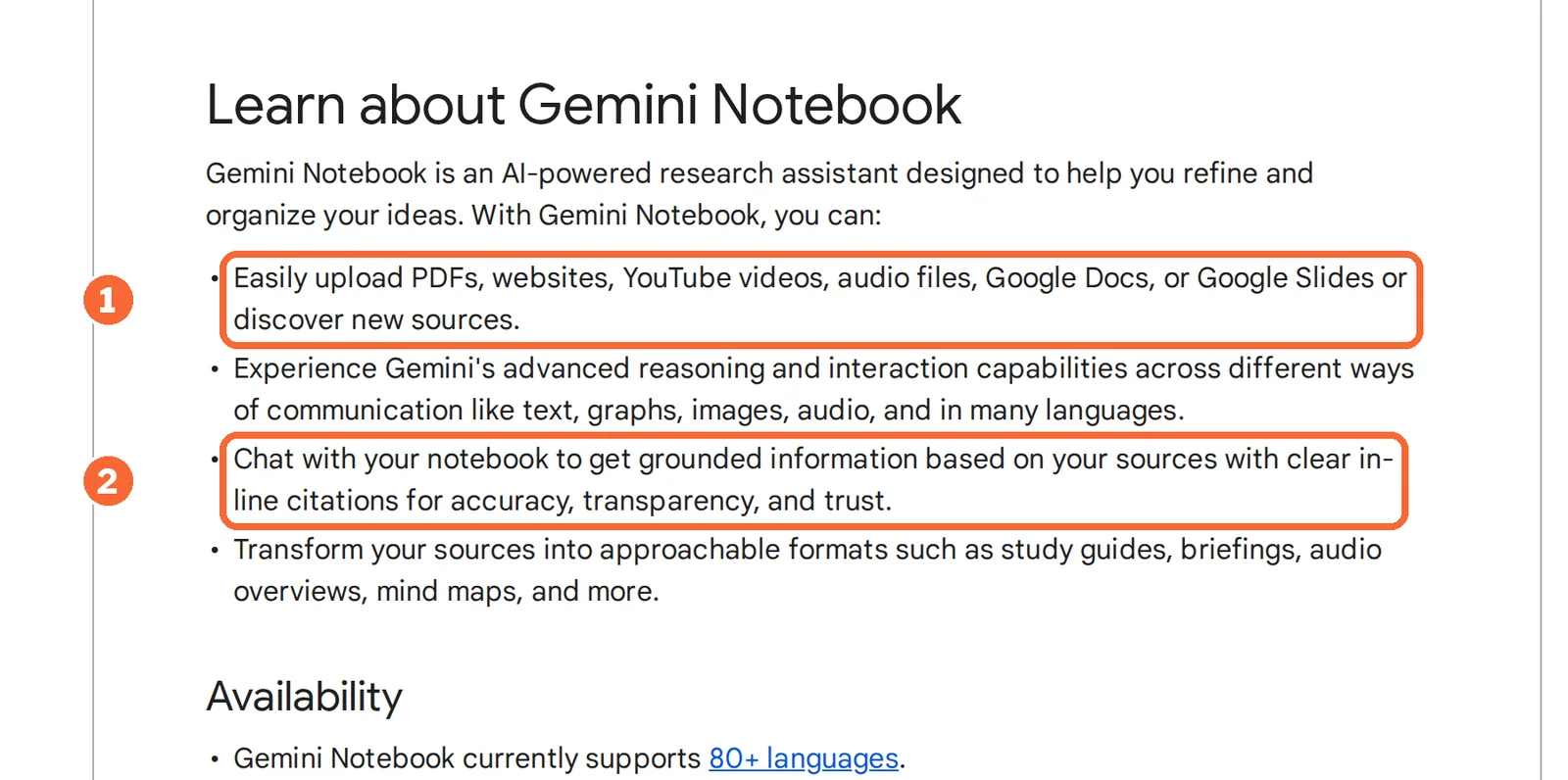
Gemini Notebook, formerly NotebookLM, answers questions about the PDFs, websites, videos and documents you add to a notebook. Standard is free and allows 100 notebooks of up to 50 sources each.
What it does in a check
- Re-import
- The sources checked do not say that a notebook refreshes a web page after import, so re-import before a later round.
- Source discovery
- Finds additional web sources to add to a notebook.
See the Gemini Notebook profile for plans, limits and sources.
Visit Gemini Notebook (opens in a new tab)
Sources: Gemini Notebook overview, Gemini Notebook chat and citation modes, Gemini Notebook plan limits.
What goes wrong most often, and what is the fix?
A second answer is not a second source
Refreshing the page, rerunning the question or asking another AI tool tests whether answers agree, not whether the source says it. Two assistants can repeat the same misreading, and one assistant can attach a real source to a sentence it has slightly overstated. A second route means a different kind of evidence: the vendor page itself, the paper’s full text, or the checkout screen. Asking the tool to quote the passage it relied on helps you find the spot faster; the comparison is still yours.
Failures that survive a quick look
| Failure | What it looks like | Fix |
|---|---|---|
| The link supports the neighbouring sentence | The page opens, but no passage matches the claim | Mark the row insufficient, even though a link exists |
| The scope is wider than the source | A Plus feature becomes “on the free plan”; a finding in adults becomes “in people” | Rewrite with the narrower condition from the page |
| Two official pages disagree | Consensus lists 10 and 15 free Pro messages on different pages | Record both URLs and state the narrower reading; never average |
What do you hand over when the check is done?
- The claim ledgerOne row per claim, with source URL, passage, scope, access status and decision.
- The corrected textEvery sentence matches a supported row, as in the corrected paragraph above.
- Open conflictsListed separately with both URLs, such as the two Consensus message counts, so the final text does not claim false certainty.
- A reference fileRIS or BIB when the claims rest on papers.
Keep the ledger with the published work. When a vendor changes a plan, recheck only the rows that cite that vendor. For which research assistant fits which kind of question, see Claude vs Perplexity and the research tools category.
Questions, and what this guide does not judge
Common questions
How do I verify AI-generated sources?
Open every cited link and confirm three things in order: the page exists, it contains a passage that says what the sentence says, and that passage carries the same plan, date or population. A real page that discusses something nearby does not count. Record each source in a ledger row, so a later check starts from the same page.
What is the quickest way to verify a claim in a Gemini Notebook chat answer?
Use the inline citation next to the sentence. Selecting it opens the cited passage in context, so you can compare wording and conditions in one view. Refreshing the page or pasting the answer into another AI tool only produces another answer. If the passage is missing or narrower than the sentence, record the claim as insufficient or partly supported.
Can I check if a document or research paper is AI-generated?
That is a different question from whether its claims hold. AI-text detectors estimate authorship, and this guide does not assess them. For a research paper, the useful check is the same either way: pick the claims your work depends on, open the sources the paper cites, and compare each passage with the sentence that relies on it.
What if the original source sits behind a paywall or login?
Mark the row as not accessible rather than trusting a summary of it. For papers, an abstract is a weaker basis than the full text, and Consensus flags citations read from the abstract only. For vendor terms behind a login, a screenshot of your own account screen, with the date you saw it, is the fallback record.
How often should a claim ledger be rechecked?
Recheck a row when the page it cites changes, and before the claim feeds a purchase. Vendor plan pages are the rows most likely to move; Google, for one, labels its Gemini Notebook tier counts as subject to change. Studies change less often, but corrections and retractions happen, so recheck paper-based rows before republishing a figure.
Checking claims is not AI detection
Many pages that show up for this search are AI-text detectors. A detector answers a different question: whether a text was machine-written, not whether its claims match their sources. A sentence written by a person can misquote a paper, and a machine-written one can be accurate, so the claim ledger is needed either way. Detectors and their accuracy are not covered by this guide.
What this guide does not judge
How often each tool cites the right passage, how accurate its answers are, how fast it works and how easy it feels are not documented by the vendor pages behind this guide, so none of them is judged here. The “30% rule” that appears in related searches is not covered either.
Ask Perplexity on a Free account the sample question above, then load the vendor pages it cites, plus the pricing pages in the worked example, into one Gemini Notebook on the Standard tier. Record each claim in the ledger with the passage that settles it. No paid Research run or export is needed.
How this guide was made
Plan limits, features and the four worked claims come from the Perplexity, Consensus, Elicit and Gemini Notebook profiles on this site and from the vendor help and pricing pages linked in each section, which carry their own check dates. Sections follow the steps and questions that pages ranking for this topic cover, limited to what the vendors document. No rating is given. See our editorial policy.


