Perplexity vs Gemini Notebook (NotebookLM): Open Web or Your Own Sources?
Both answer research questions with citations. The difference is who supplies the sources. Perplexity searches live web pages for each question and links the ones it used. Gemini Notebook, formerly NotebookLM, works from the files and pages you add to a notebook and turns them into study material. This page shows where the sources come from and counts what each plan holds.
By Elias Brandt · Updated 8 Oct 2026 · About 9 min read · Plan terms taken from each tool profile
The short answer
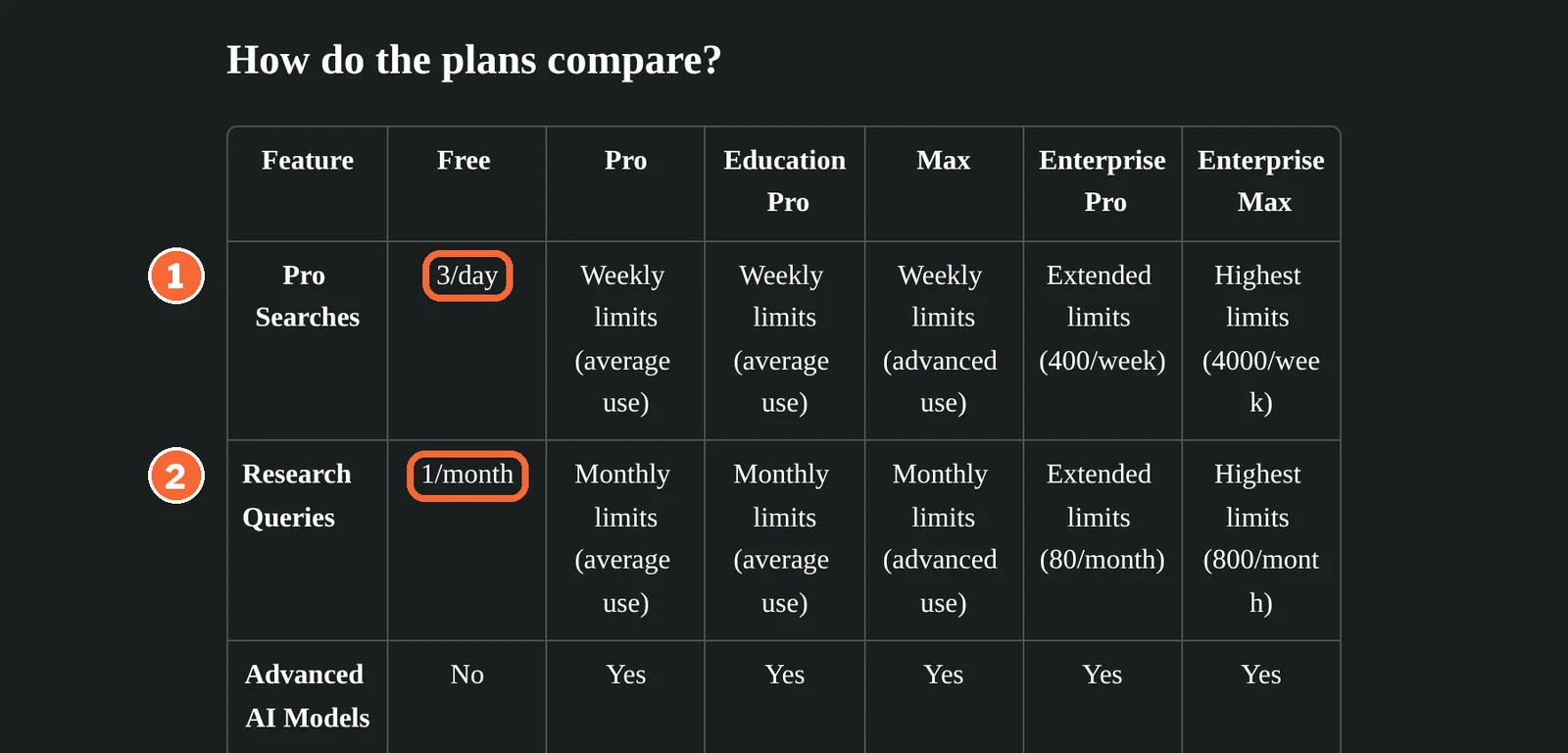
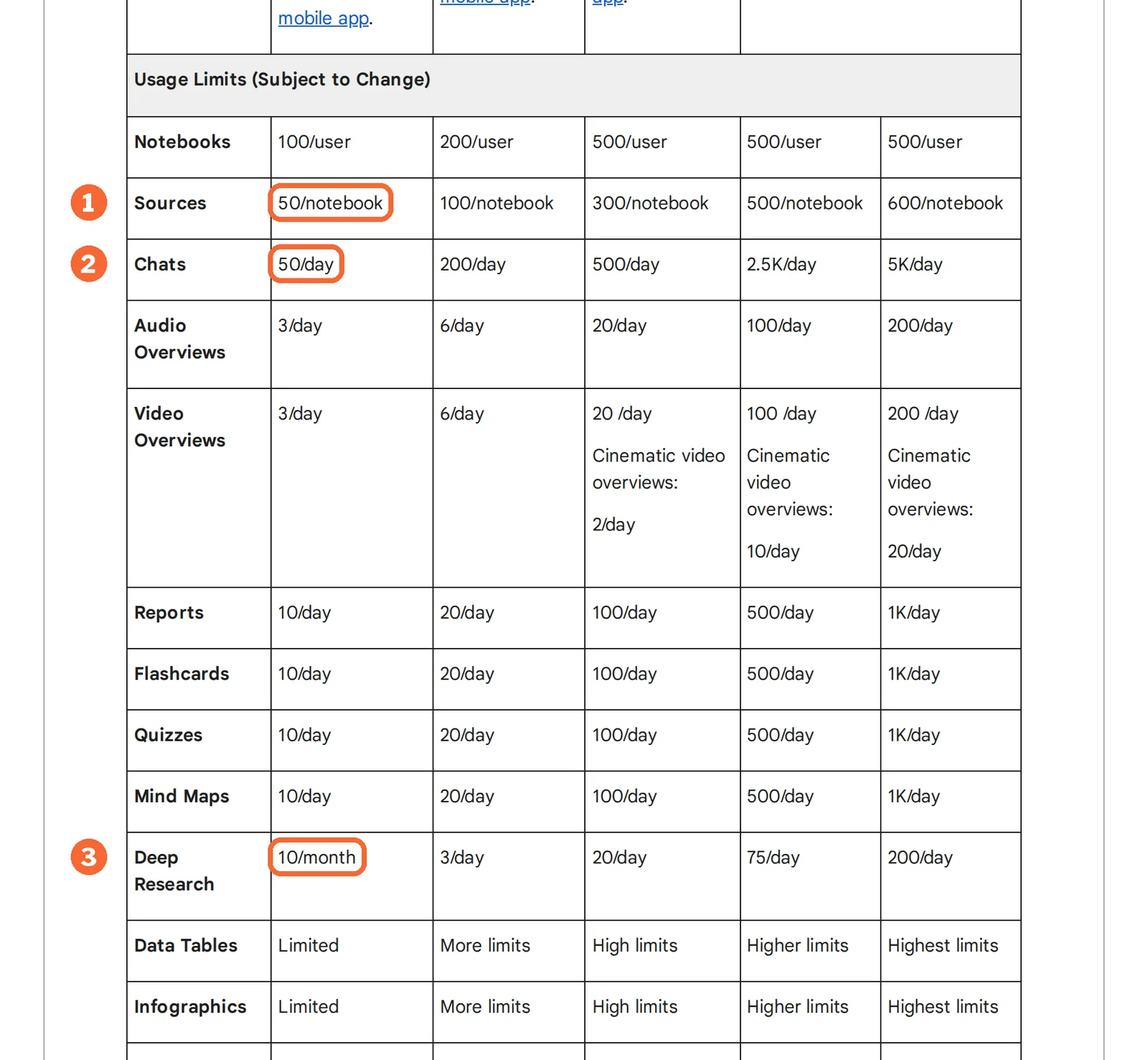
Choose Perplexity if your question starts on the open web, you need current pages found for you, or a report should rerun on a schedule; Free gives 3 Pro Searches a day and 1 Research query a month. Choose Gemini Notebook, formerly NotebookLM, if you already hold the documents: Standard is free for 50 sources per notebook, 50 chats a day and 10 Deep Research runs a month.
Perplexity or Gemini Notebook: which one, when?
Pick by whether you already hold the sources
In shortA question whose sources nobody has found yet points to Perplexity; a reading pack already on your desk points to Gemini Notebook.

Perplexity for questions whose sources you have not found yet
A thread keeps its context while follow-ups move from a broad topic to a specific product, date or figure, and Spaces keep a project's threads, files and instructions together for invited contributors.

Gemini Notebook for a fixed reading pack
Use selected-source chat for repeated questions about course readers, policies or interview transcripts; keep external discovery separate from this reading workflow.
Workspace teams should check Notebook first
An organization already paying for Google Workspace adds no new licence, while a Perplexity team adds a per-seat bill that buys seat management and the no-training terms.
Five everyday jobs, side by side
In shortRead across a row: the job, then what each tool does with it.
| If the job is… | Perplexity | Gemini Notebook |
|---|---|---|
| Find what changed on a topic this month | Web search with a link to every page used; a Research report for the deeper version | Discover web sources into a notebook, keep the ones you trust, then ask about them |
| Study a 40-file course pack | Upload files of up to 50 MB each; long files are cut to their most relevant parts | One Standard notebook holds all 40, with cited answers, flashcards and quizzes |
| Send yourself a weekly digest | A scheduled Task delivers each result by email or push; up to ten Tasks on Pro | Refresh the sources yourself, then generate a new report in Studio |
| Turn material into something to listen to | Export the Research report as PDF or a document for reading | Audio Overview as Deep Dive, Brief, Critique or Debate; 3 a day on Standard |
| Share a project with colleagues | A Space with shared instructions, pinned files and invited viewers or contributors | Share the notebook; each collaborator keeps the source limit of their own plan |
The basics
In shortRead live from each profile.
| What do you need? | Perplexity | Gemini Notebook |
|---|---|---|
| In short | From a question to sources you can open. | Cited answers and study material from your own sources. |
| Free access | Free access available | Free access available |
| Plans |
|
|
| Price check | Prices confirmed · Oct 8, 2026 | Pricing review due · Sep 24, 2026 |
| Full profile | Perplexity profile | Gemini Notebook profile |
Values come from each tool’s profile and update with it, in the currency each vendor shows.
Visit Perplexity (opens in a new tab) Visit Gemini Notebook (opens in a new tab)
Where do the sources behind each answer come from?
In shortPerplexity chooses web pages for every question. In Gemini Notebook you choose the sources first, and answers point to passages inside them.
Six differences that decide it
- Where answers come from
- Perplexity searches live web pages for each question and links every page it used. Notebook selected-source chat cites your materials; experimental agentic chat can also search the web. Source: support.google.com
- Free allowance
- Perplexity Free lists 3 Pro Searches a day and 1 Research query a month. Notebook Standard, free with a Google account, lists 100 notebooks of up to 50 sources, 50 chats a day and 10 Deep Research runs a month. Source: support.google.com
- Worked example
- Assuming a reading pack of 120 PDFs kept together, Notebook Standard needs three notebooks (50 + 50 + 20), Google AI Plus two (100 + 20) and Google AI Pro one of its 300-source notebooks. Perplexity documents an upload limit of 50 MB per file rather than a source count. Source: support.google.com
- Paid step
- Perplexity Pro costs USD 20 a month billed monthly, shown as USD 17 a month on annual billing. Google AI Plus costs USD 4.99 and Google AI Pro USD 19.99 a month, both sold only in specific regions. Source: perplexity.ai
- Output
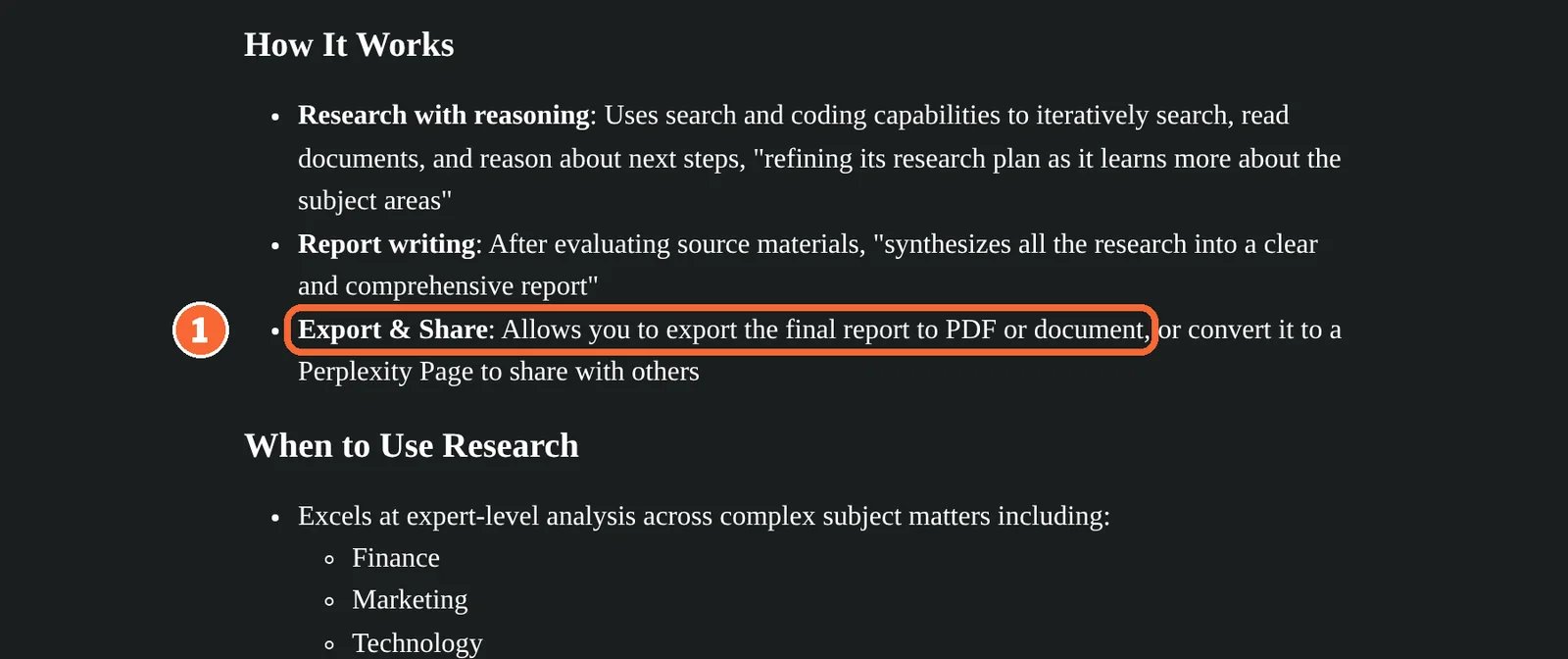
- Perplexity returns cited answers, Research reports that export to PDF or a document, and scheduled Task results. Notebook's Studio turns the same sources into Audio and Video Overviews, mind maps, flashcards, quizzes, reports and slide decks. Source: support.google.com
- Team access
- Perplexity Enterprise Pro costs USD 40 per seat billed monthly or USD 400 per seat a year, with SSO and a no-training promise. Gemini Notebook comes with every Google Workspace plan, with access managed by the admin. Source: workspace.google.com
Who supplies the sources, step by step
| Perplexity | Gemini Notebook | |
|---|---|---|
| Who picks the sources | Perplexity, for each question, from live web pages | You, by adding them to a notebook; source discovery can add more from the web |
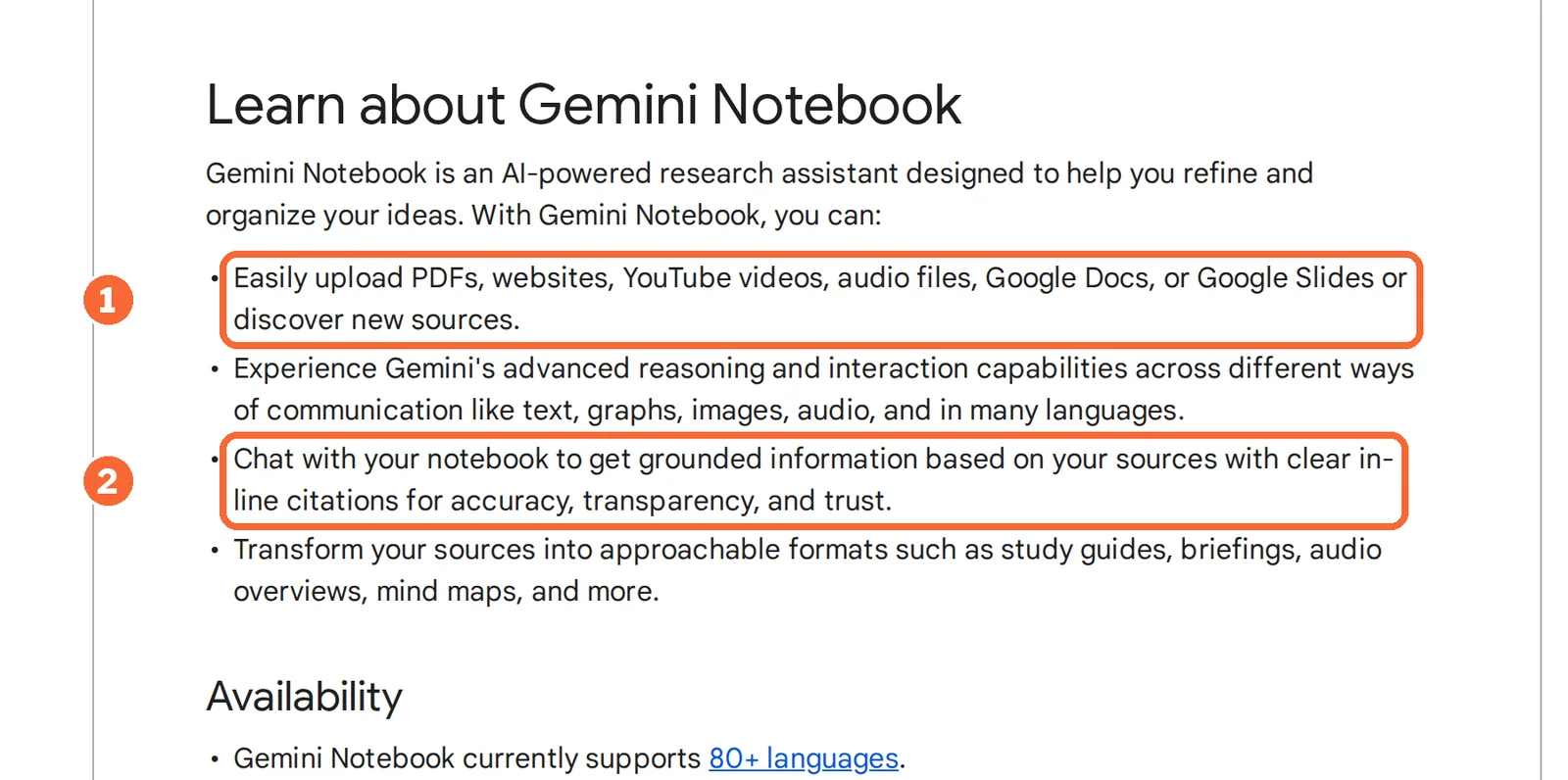
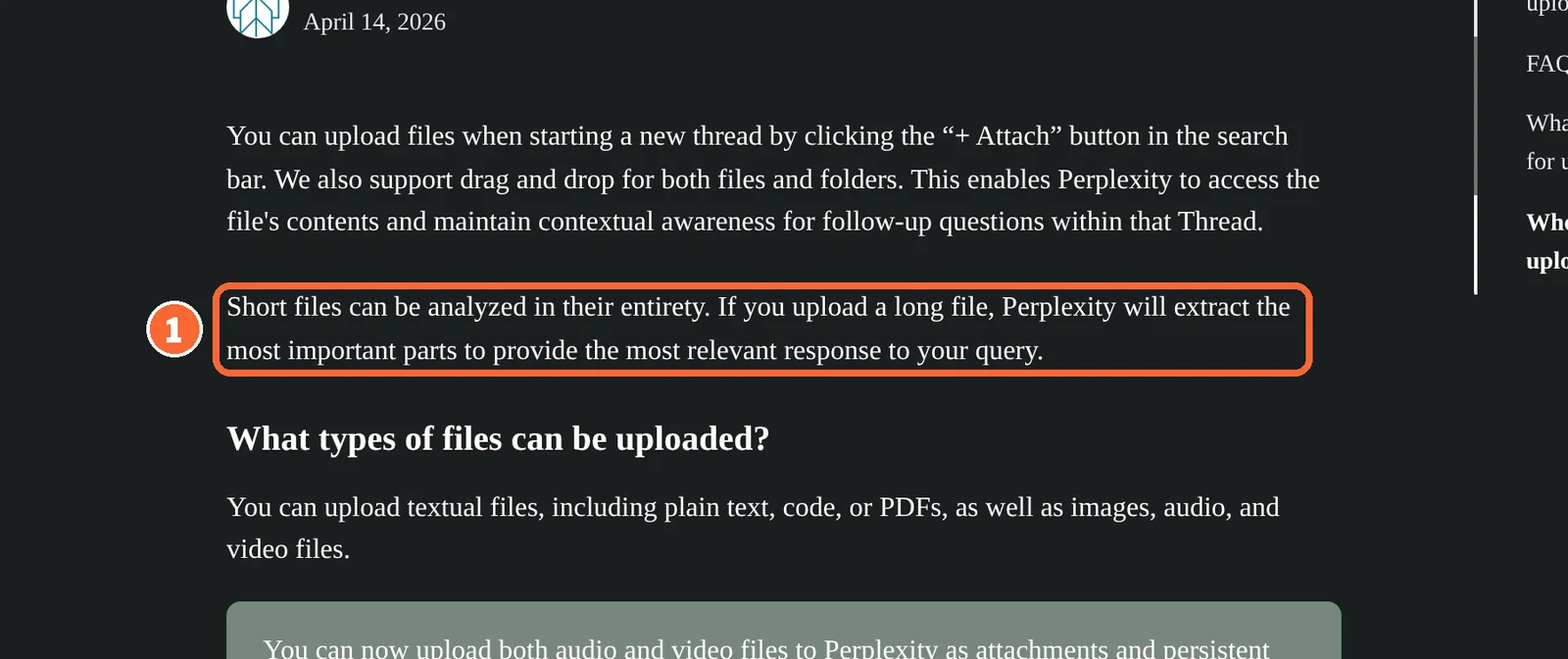
| What you can add yourself | Text, code, PDF, image, audio and video files | PDFs, websites, YouTube videos, audio files, Google Docs and Google Slides |
| Size of what you add | Up to 50 MB per file | 50 sources per notebook on Standard, 100 on Google AI Plus, 300 on Google AI Pro, up to 600 on Ultra |
| How a long file is read | Reduced to its most relevant parts; speech is transcribed, visual scenes in video are not indexed | not covered in the sources checked |
| What a citation points to | A link to each web page used | An inline citation to the passage in your source |
The table shows the main trade. Perplexity widens the search each time you ask, so an answer can rest on pages you have never opened. A notebook narrows it to what you loaded, so a gap in your sources stays a gap in the answer. Gemini Notebook’s profile advises against it when you still need to search for studies you have not collected.
Sources: What is Perplexity, Perplexity file uploads, Gemini Notebook overview.
NotebookLM and Gemini Notebook are one product
Gemini Notebook is the product Google launched as NotebookLM. It remains a standalone research product at notebook.google, and its help centre now sits under a gemininotebook address. Guides under either name describe the same notebook.
Sources: Google rename announcement.
Is a Perplexity Space the same as a notebook?
In shortBoth keep one project’s material together. They differ in what is capped and in what comes out.
| Perplexity Space | Gemini Notebook notebook | |
|---|---|---|
| What it holds | Threads, pinned files and custom AI instructions | Sources, chats and the items made from them in Studio |
| Who can work in it | Invited viewers, or contributors who can start threads and ask follow-ups | Anyone you share it with; advanced sharing is reserved for paid users |
| Cap on what goes in | 50 MB per file; a file count per Space is not covered in the sources checked | 50 to 600 sources per notebook, by plan |
Sources: What are Spaces, Gemini Notebook plan and usage limits.
Feature matrix
In shortFifteen capabilities marked from the two profiles. A dash means the profile does not cover it, not that the tool lacks it.
| Capability |  Perplexity Perplexity |  Gemini Notebook Gemini Notebook |
|---|---|---|
| Finding and answering | ||
| Search the live web for each question | Offeredlinks every page used | Partlydiscovers web sources into a notebook |
| Cited answers | Offereda link per web page | Offeredinline citation to the passage |
| Follow-up questions in one thread | Offeredthe thread keeps context | Not listednot covered in the sources checked |
| Answer only from sources you select | Not listednot covered in the sources checked | Offeredselected-source chat |
| Multi-step research report | OfferedResearch mode; 1 a month on Free | OfferedDeep Research; 10 a month on Standard |
| What comes out | ||
| Audio or video summary of your sources | Not listednot covered in the sources checked | OfferedAudio and Video Overviews |
| Flashcards and quizzes | PartlyEducation Pro lists study tools | Offeredthree difficulty levels, CSV download |
| Mind maps, slide decks and infographics | Not listednot covered in the sources checked | OfferedStudio panel; Mind Maps on the web |
| A report you can export | OfferedResearch report to PDF or a document | Partlyreports in Studio; export format not covered in the sources checked |
| Image generation | Offeredlisted on Pro | Not listednot covered in the sources checked |
| Scheduled searches | OfferedTasks: up to ten on Pro and Max | Not listednot covered in the sources checked |
| Plans and access | ||
| Choose the AI model | Offeredpaid plans; Research picks its own | Not listednot covered in the sources checked |
| Mobile app | Offeredweb and mobile | OfferedAndroid and iOS, where available |
| Single sign-on and admin control | OfferedEnterprise Pro | PartlyWorkspace admin manages access |
| Developer API | Partlyseparate product, billed per token | PartlyEnterprise edition on Google Cloud only |
offered partly or with limits not listed on the profile.
How much research fits in a month on each plan?
In shortPerplexity rations its deeper modes. Gemini Notebook rations room for sources and daily output. Count your month in those units before you compare prices.
Four research loads, counted
In shortAllowances from each profile, over a 30-day month.
| Load | Perplexity | Gemini Notebook |
|---|---|---|
| A deep report every week, about 4 a month | Free’s 1 Research query a month covers one; Pro includes Research under limits it describes rather than numbers | Standard’s 10 Deep Research runs a month cover all four with 6 to spare; Google AI Plus lists 3 a day |
| Five deeper questions a day, about 150 a month | Free’s 3 Pro Searches a day come to about 90 (3 × 30), 60 short; basic searches stay practically unlimited | Standard’s 50 chats a day come to about 1,500 (50 × 30), asked about your sources rather than the web |
| A 300-PDF thesis library on one topic | 50 MB per file; a count per Space or thread is not covered in the sources checked | Standard: 6 notebooks (300 / 50). Google AI Plus: 3 (300 / 100). Google AI Pro: one notebook, at its 300 cap |
| One Audio Overview for each of 15 lectures in a week | Audio summaries are not covered in the sources checked; a Research report exports to PDF or a document | Standard’s 3 a day take five days (15 / 3); Google AI Plus’s 6 a day take three (15 / 6, rounded up) |
Arithmetic on the allowances on each profile. Google marks its per-tier counts as subject to change, and long chats, complex prompts or heavy Studio use spend more of a compute quota that can end a day early.
The second and third rows settle most cases. Someone who asks many new questions a day reaches Perplexity Free’s cap first; someone with a large, fixed library reaches Notebook Standard’s source cap first.
Sources: Perplexity plan comparison, Gemini Notebook compute guide.
How much room each Notebook tier holds
In shortGoogle publishes a count for every tier; Perplexity describes Pro and Max limits as allowances, not numbers.
| Tier | Room for sources | Runs a day |
|---|---|---|
| Gemini Notebook Standard | 100 notebooks of 50 sources, about 5,000 in all (100 × 50) | 50 chats, 3 Audio and 3 Video Overviews; Deep Research 10 a month |
| Google AI Plus | 200 notebooks of 100 sources, about 20,000 (200 × 100) | 200 chats, 6 Audio Overviews, 3 Deep Research runs |
| Google AI Pro | 500 notebooks of 300 sources, about 150,000 (500 × 300) | 500 chats, 20 Audio Overviews, 20 Deep Research runs |
| Google AI Ultra | 500 sources per notebook on the 5x tier, 600 on 20x | 2,500 or 5,000 chats, 75 or 200 Deep Research runs |
Price per month on yearly billing, from the Perplexity profile. Bars compare plans of this tool only.
Price per month, as each plan is first listed, from the Gemini Notebook profile. Bars compare plans of this tool only.
Perplexity’s bars are monthly equivalents on annual billing; Pro is USD 20 and Max USD 200 when billed monthly. Google’s bars are the monthly US prices, with the Ultra bar showing its 5x tier. Google AI Plus, Pro and Ultra are sold only in some regions, and Google lists separate euro prices for Germany.
Sources: Perplexity pricing, Gemini subscriptions (US), Gemini Notebook plans.
Can you use both, and where does each run out?
In shortSeveral pages ranking for this search pair the two: Perplexity to find sources, Gemini Notebook to study them. Each step is documented; the pairing is a feature of neither.
Using both on one project
- Find. Ask Perplexity the broad question and narrow it with follow-ups; on a paid plan, run Research for a report.
- Hand over. Export the Research report to PDF or a document, or keep the addresses of the cited pages.
- Load. Add the PDF, the pages as website sources, or both, to one notebook.
- Study. Select the sources for each answer, then make flashcards, quizzes or an Audio Overview from the same set.
- Check. Open each cited passage or page before you quote a figure, date or condition.
Gemini Notebook can also discover web sources and run Deep Research by itself, so the first step can stay inside the notebook. What Perplexity adds is repetition: Tasks deliver alerts and reports on a schedule, which the Notebook sources checked do not cover.
Sources: Perplexity Research mode, Perplexity Tasks, Gemini Notebook chat modes.
Where each one runs out
| Perplexity | Gemini Notebook | |
|---|---|---|
| A citation and its claim | A link shows where a sentence came from, not that the page backs it or is still current | A citation shows the passage used; the summary can still misread it or drop a qualification |
| Usage caps | Pro and Max describe weekly and monthly allowances instead of numbers, so heavy users watch their account | Counts are published per tier, but long chats and heavy Studio use spend more of the compute quota, so the number of actions a day varies |
| Generated audio | Not covered in the sources checked | Voices and content are AI-generated and may contain errors; interactive mode is English only; public share links are off for Workspace Enterprise and Education accounts |
The first row applies to both tools: a citation tells you where to look, not whether the answer is right. Our guide to checking AI research claims against the original source walks through that last step.
Sources: Audio Overviews.
Questions and what this page does not judge
Common questions
Which is cheaper for one person?
For a single paid seat the list prices are almost level on monthly billing: Perplexity Pro at USD 20 and Google AI Pro at USD 19.99. Google AI Plus, at USD 4.99, is the cheapest paid route and already doubles Standard's notebook and source caps. Verified students can take Perplexity Education Pro for USD 10 a month; app-store purchases and local taxes can change every figure.
What happens when I reach the daily limit in Gemini Notebook?
The chat shows the time your allowance resets. In Studio, the web-only Generate later option queues an item, may take a couple of hours and sends a notification when it is ready. Items created automatically when sources are first added do not count against the limits, and an upgrade button in chat or Studio moves you to a higher Google AI plan.
Can Gemini Notebook search the web like Perplexity?
It supports source discovery and plan-limited Deep Research. Google also describes experimental agentic chat that searches the web with or without notebook sources. Check the mode and availability in your account. For a controlled reading task, use selected-source chat and inspect citations against the chosen material instead of mixing in outside results.
Which one works better on a phone?
Both have mobile apps. Notebook's Android and iOS app, where available, answers questions, reviews flashcards and downloads Audio Overviews for offline listening, though Mind Maps stay on the web. Perplexity runs on web and mobile, and a subscription bought through the iOS or Android store is billed by that store, so its price can differ from the website.
How do business privacy options differ?
Perplexity puts its promise that data is never used for training into Enterprise Pro, together with admin control over file uploads. Google's Cloud route, through Gemini Notebook for Enterprise or Gemini Enterprise, keeps files inside your GCP project with VPC-SC and IAM controls and honours data regionalization. On individual plans, read each provider's privacy terms before adding client files.
What this page does not judge
Answer accuracy, speed, ease of learning and rankings of alternatives are what many comparisons turn on, but neither profile documents them in a way we can check. We have not put the same question to both; the check below measures it on your own material.
Pick a public report under 50 MB and five questions whose answers sit on known pages in its last third. On Perplexity Free, attach the PDF and ask each question; on Gemini Notebook Standard, add the same PDF as the only source and ask the same five. Count the answers that cite the right passage and open every citation. A miss tells you to read that part yourself; it does not show why the passage was missed.
How this comparison was made
Plans, limits and features come from the Perplexity and Gemini Notebook profiles on this site, which cite the vendors’ pricing and help pages and carry their own check dates; tables marked as live are read from those profiles each time the page loads. Sections follow the topics the pages ranking for this search cover, limited to what the vendors document. No rating is given. For drafting text from web research, see Claude vs Perplexity; for more tools in this field, see AI research tools. See our editorial policy.