


Key features
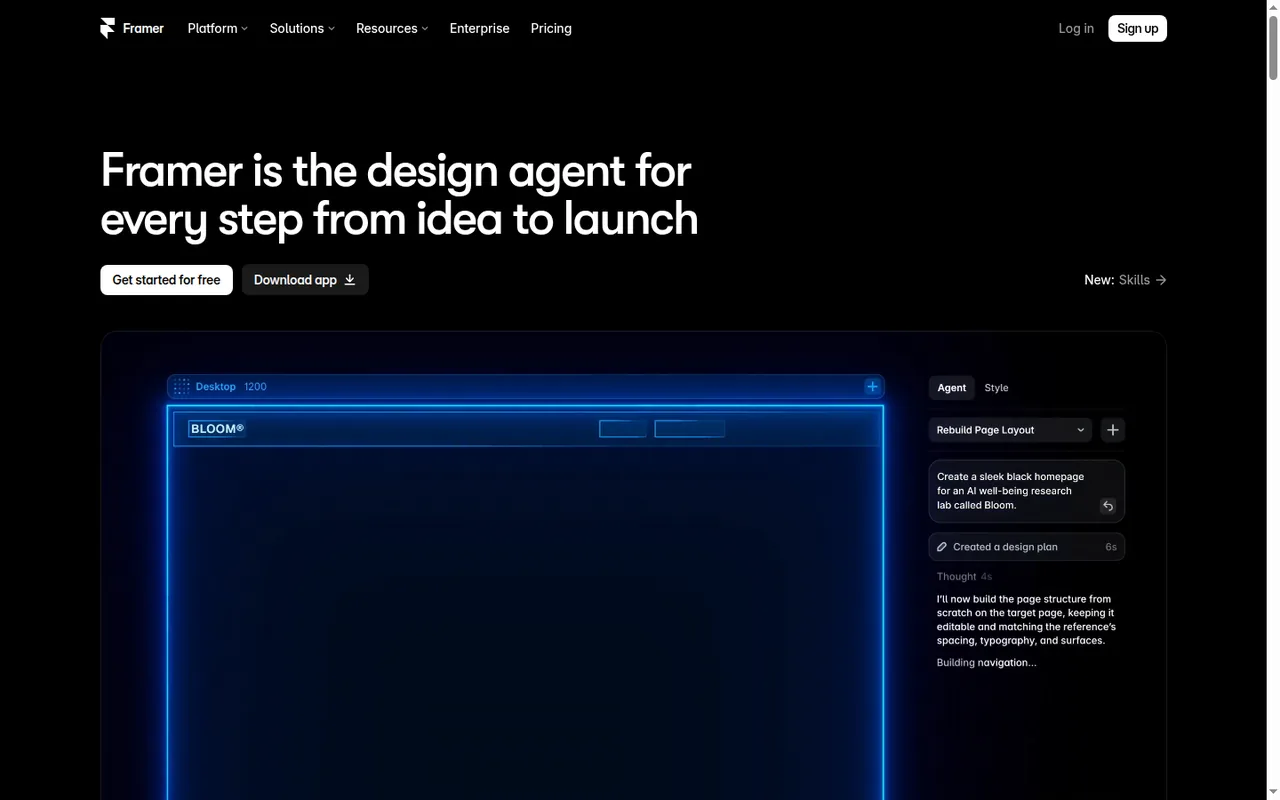
- Design agentPrompt the Agent on the canvas to generate or refine sections, layouts, styles and code while every change stays editable.
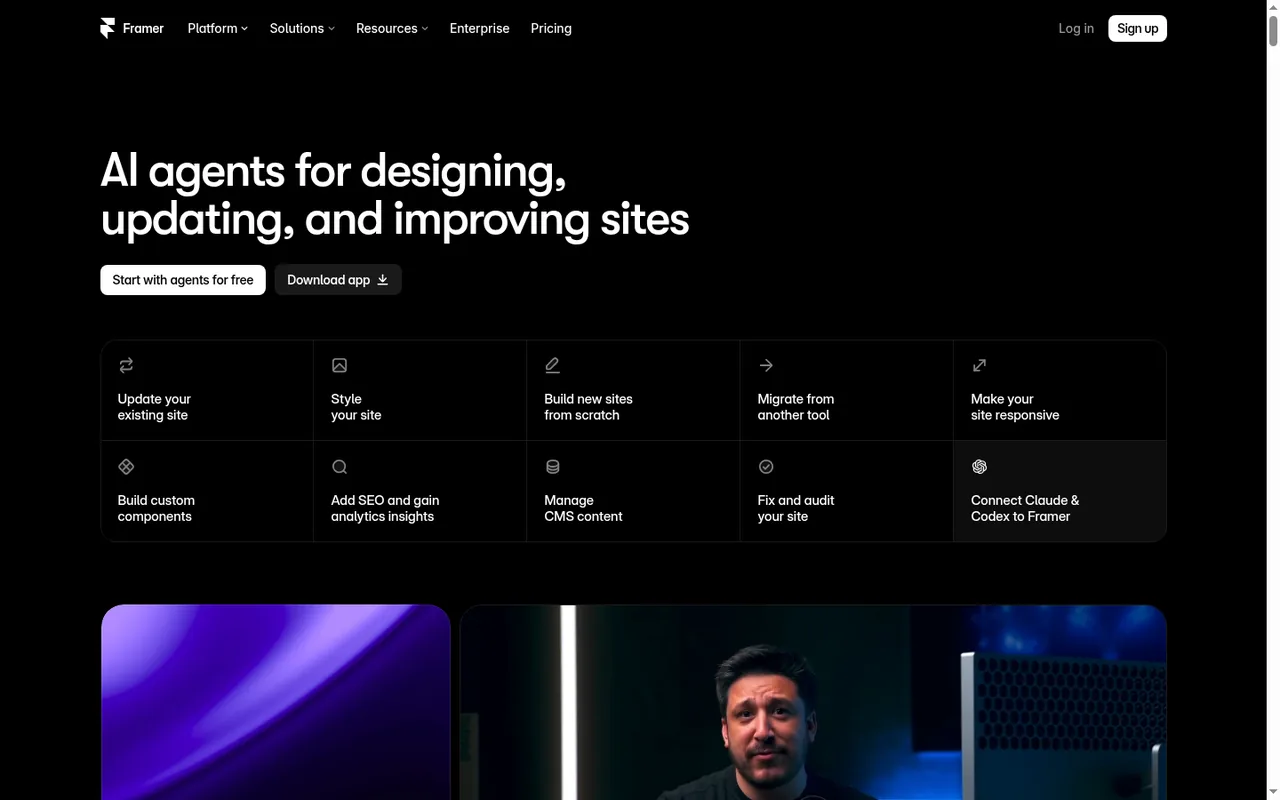
- External agentsConnect Claude Code, Codex in ChatGPT, Cursor, Gemini CLI or Windsurf to read and update CMS items, localizations and redirects.
They connect to one project at a time and are free during the preview on Basic and Pro.
Falls short They cannot yet change some settings such as domains, assign overrides or access analytics data.
- CMS collectionsStore site content in CMS collections, 2 on Basic and 10 on Pro, with Pro able to add more as paid add-ons up to 40.
- Hosting and publishingPublish to a free Framer subdomain or a custom domain, served from 20 locations on Basic and 300+ on Pro.
Paid plans include hosting with set page, CMS and bandwidth allowances that Pro can extend through paid add-ons.
Falls short Pro add-ons stop at 700 pages, 40 CMS collections, 40,000 CMS items and 2 TB of bandwidth.
- AI localizationTranslate a site into up to 20 locales with AI, each billed as a per-locale add-on on paid plans.
- Staging and branchingPro adds a staging environment, branching with previews and site redirects for teams shipping changes.
- Framer AgentAccepts reference images and your own assets, and selecting a section before prompting limits the change to that area.
Falls short Every Agent request draws on the workspace's monthly AI credits, and credit-using features pause at 100% until credits reset or more are bought.
- Data portabilityCMS content can be exported through plugins as CSV or JSON, according to Framer's data portability article.
Falls short CMS export runs through plugins rather than a built-in export, and it covers content, not the published pages.
Strengths and limits
Strengths
- Roomy free sandbox: Free includes 500 AI credits to try and a Framer domain, and the pricing FAQ gives free projects more page and CMS room than Basic for design work and templates.
- Editable agent output: Agent results land on the canvas as editable design, and prompts can be scoped to a single selected section.
- Warnings before cutoff: Workspace admins get in-product and email warnings at 80% of the monthly AI credit allowance.
- Add-ons instead of upgrades: Pro limits for pages, CMS, bandwidth and hosting can be raised with add-ons before an Enterprise contract is needed.
More limits to plan around
- Costs grow with editors: Each additional editor costs EUR 20 or EUR 30 a month depending on billing, on top of locale and add-on fees.
Who else is it for?
Editorial assessment, based on documented features
- Builders using coding agentsConsider it when you want Claude Code, Cursor or Codex to update CMS and localization data on a hosted site.
How much does Framer cost?
Prices confirmed · checked
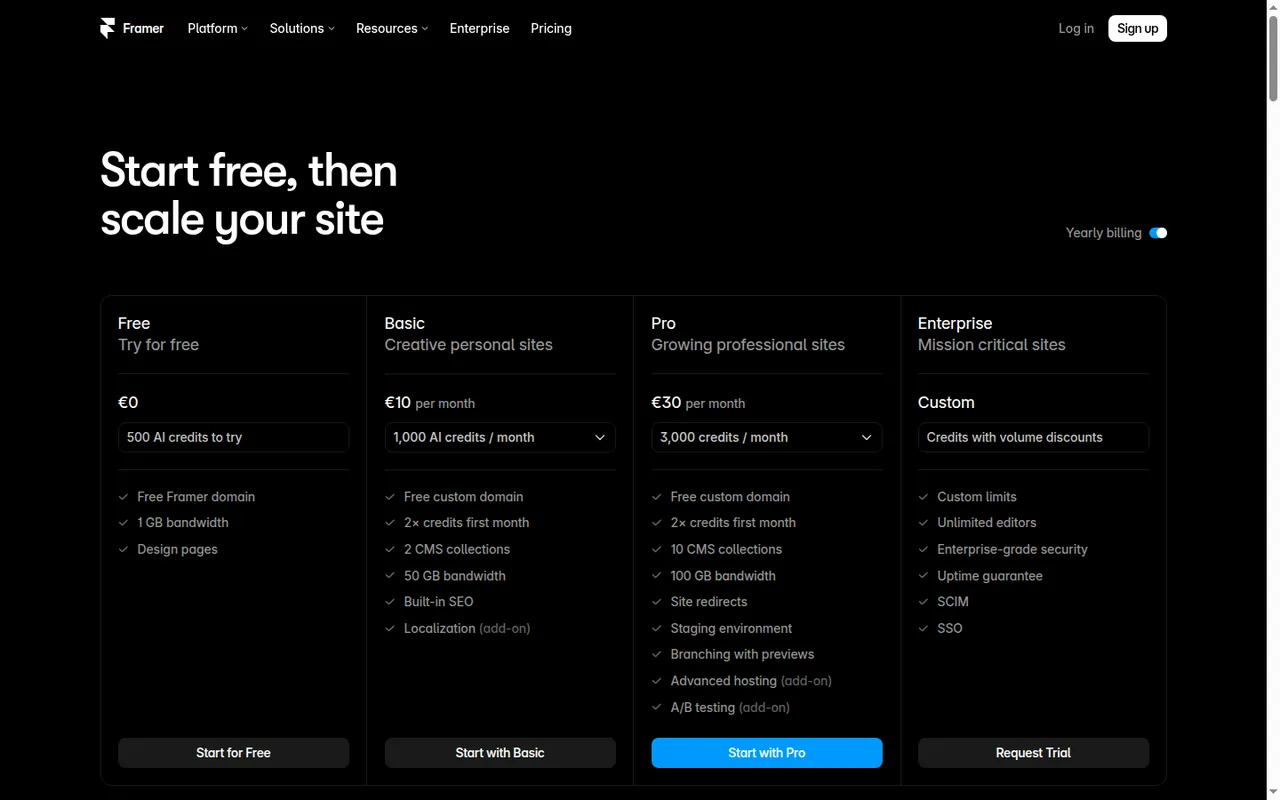
Basic is EUR 10 and Pro EUR 30 a month billed yearly (EUR 15 and EUR 45 billed monthly), plus sales tax at checkout. Credits are shared across the workspace, stack across site plans and do not roll over. Basic and Pro include double credits in the first month.
Free
EUR 0
500 AI credits to try (one-time); free Framer domain; 1 GB bandwidth; Made in Framer badge; no custom domain.
Basic
EUR 10 per monthbilled yearly · EUR 15 on monthly billing
1,000 AI credits a month; 30 pages, 2 CMS collections, 50 GB bandwidth; larger credit tiers up to EUR 150 yearly or EUR 225 monthly.
Pro
EUR 30 per monthbilled yearly · EUR 45 on monthly billing
3,000 credits a month; 150 pages, 10 CMS collections, 100 GB bandwidth, staging and redirects; credit tiers up to EUR 1,000 yearly or EUR 1,500 monthly.
Enterprise
Contact provider
Custom limits, credits with volume discounts, unlimited editors, SSO, SCIM and an uptime guarantee.
How far does it go?
- Bandwidth in visitsAssuming each visit transfers about 2 MB, Basic's 50 GB covers roughly 25,000 visits a month (50,000 MB ÷ 2 MB) and Pro's 100 GB roughly 50,000; the Free plan's 1 GB covers about 500.
- Credit tiers per 1,000 creditsOn yearly billing each listed tier works out to EUR 10 per 1,000 credits: Basic at EUR 10 for 1,000, Basic at EUR 150 for 15,000 and Pro at EUR 1,000 for 100,000 (1,000 ÷ 100).
- A Pro site with two extra editorsPro at EUR 30 plus two editors at EUR 20 each is EUR 70 a month on yearly billing, about EUR 840 a year (70 × 12); on monthly billing it is EUR 105 a month (45 + 2 × 30).
Arithmetic from the published allowances above, not a usage test.
Taxes, currency and promotions can change the price you see at checkout.
Which Framer plan fits your site?
Editorial assessment
Page count, CMS size and whether the site is commercial decide most Framer purchases, while AI credits can be bought in larger tiers on either paid plan. Count the pages and CMS items you expect in the first year before you pick a plan.
- Free is enough for a non-commercial or trial site that can stay on a Framer subdomain and carry the Made in Framer badge.
- Basic fits a portfolio or small business site of up to 30 pages with at most 2 CMS collections and 1,000 CMS items on your own domain.
- Pro fits once you need more than 30 pages, more than 1,000 CMS items, staging, branching or redirects, or analytics history longer than a month.
- Enterprise fits when more than 10 people need edit access or SSO and SCIM are requirements.
If code ownership or a prompt-first builder matters more than canvas design, read our Webflow profile and Durable profile and compare where each site is hosted and how AI usage is metered.
How do AI credits work in Framer?
Framer meters its Agents and other AI features, such as Agent chat, Workshop chat and AI translations, with AI credits drawn from one shared monthly allowance for the whole workspace. The number of credits a prompt uses depends on how complex the request is, so a quick edit costs less than a large multi-step task. Lightweight editor helpers such as layer auto-renaming do not use credits.
Allowances stack across projects: a workspace with two projects on Basic receives 2,000 credits a month. Paid credits renew on each plan’s billing date and unused credits do not roll over. At 80% of the allowance, admins get an in-product and an email warning; at 100%, credit-using features pause, although requests already running are allowed to finish. A recurring AI Credits add-on raises the allowance, and one-time top-ups, which require that add-on, expire at the end of the calendar month.
Continue reading · 6 more sectionsShow lessWhat does the free plan really include? · What do larger credit tiers and extra editors add to the price? · Can you export a Framer site or host it elsewhere? …
What does the free plan really include?
The pricing page lists the Free plan at EUR 0. It comes with 500 AI credits to try, a free Framer domain, 1 GB of bandwidth and page design. The help center describes those 500 credits as a one-time allowance, and the pricing page says they apply when the workspace has no active subscription. Its FAQ adds that free projects get 10 CMS collections, 1,000 pages, 5 MB file uploads and one free locale, and that such workspaces support up to three editors. Those page and CMS figures are higher than Basic’s 30 pages and 2 collections because Framer pitches Free for exploring, design work and templates, not for a published business site.
Framer positions the Free plan for non-commercial use. Connecting a custom domain requires a paid plan, and a free project with more than 30 pages would need Pro rather than Basic to go live on your own domain. The badge disappears once you upgrade the site or connect a custom domain and then republish.
What do larger credit tiers and extra editors add to the price?
All amounts are per site plan per month in EUR, and yearly billing costs less per month than monthly billing. Two things raise the bill beyond the plan price:
- Credit tiers: choosing more credits raises the price, up to EUR 150 yearly or EUR 225 monthly for 15,000 credits on Basic, and EUR 1,000 or EUR 1,500 for 100,000 credits on Pro.
- Editors: each additional editor costs EUR 20 a month billed yearly and EUR 30 billed monthly; content editors cost EUR 10 or EUR 15, and viewers are free.
Yearly plans include a complimentary domain claimed through Hover. The help center lists the terms: one redemption per subscription, yearly plans only, and automatic renewal at the standard rate.
Can you export a Framer site or host it elsewhere?
Not as a static site, according to Framer’s FAQ. It says Framer does not offer HTML export for self-hosting, because published sites depend on platform services such as pre-rendering, image resizing, font subsetting and server-side rendering. If you need complete control over hosting or need to export source code, the article says Framer may not be the right solution for that workflow.
A separate help article on data portability states that every Framer site is published as standard HTML, CSS, JavaScript and assets that can be downloaded, and that CMS content can be exported through plugins as CSV or JSON. The two articles conflict on site files, so confirm the current export path with Framer before relying on it.
How do custom domains, seats and analytics work?
Every site can publish to a Framer subdomain, and free named subdomains on framer.website, framer.photos, framer.media or framer.wiki are configured automatically. Connecting a domain you own means adding the A and CNAME records Framer provides, and DNS changes can take up to 48 hours to propagate.
Basic and Pro allow up to 10 seats with edit access. Analytics history runs 30 days on Basic and 90 days on Pro. Pages are served from 20 hosting locations on Basic and 300 or more on Pro, and Framer lets bandwidth exceed the plan limit for one month before asking for an upgrade.
What can Framer’s agents do, and where do they stop?
The Agent opens from the Properties panel, reads the current canvas and places generated design and code directly on the page. You can attach reference images or your own assets, and selecting a section before prompting scopes the change to that area. The help center recommends building one section at a time to avoid unintended changes elsewhere.
External agents such as Claude Code, Codex in ChatGPT, Cursor, Gemini CLI and Windsurf can connect to a project and read or write CMS items, localizations and redirects. The pricing page lists them as free during the preview on Basic and Pro. They cannot yet change some settings, such as project names and domains, assign overrides or access analytics data.
Can you revise one Framer section without disturbing the rest?
Proposed evaluation · not performed yet
Use a Free project and the preview; start with manual layout if Agent credits are unavailable. A custom domain and code export are outside this exercise.
Input: Build a fictional bicycle repair page with a heading, three service cards and a contact link. Use invented opening hours and no personal information.
- Preview the page at desktop and phone widths.
- Change only the middle card, using a selected-section Agent instruction when your account permits it.
- Check every contact link and compare the untouched cards before and after.
Accept: All three cards remain readable on a narrow screen and only the requested card changes. Stop or revise: Undo a change that alters neighbouring sections; record any paid-feature prompt instead of assuming it is included.
Compare these options
Read the documented differences, then follow the links to each profile for its sources and plan details.

Framer alternatives
Other website builders tools profiled with the same source-checked method. Pick by the job, not by a score.
| Tool | Free access | Paid plans from | Consider it for |
|---|---|---|---|
| FramerThis profile | Free access available | EUR 10 per month | Designer-led marketing sites and portfolios |
| Durable | Free access available | USD 22 per month | All-in-one AI websites for small service businesses |
| Webflow | Free access available | USD 15 per site per month | Visually designed marketing and content websites |

Framer user reviews
Visitor opinions, moderated before publishing. Separate from our source checks; we do not score tools.
Frequently asked questions
Can I get a refund on a Framer plan?
Framer's refund policy allows a refund within 7 days of the initial purchase worldwide, and within 14 days for residents of the EU and Turkey. Usage-based add-ons such as AI credits cannot be refunded once used. Redeeming the complimentary Hover domain that comes with yearly plans also gives up the option to request a refund, so claim it only once you are sure.
Is there a Framer desktop app?
Yes. Framer lists a desktop app for Mac and Windows on its downloads page, next to the browser version. The pricing page sells plans per site and AI credits per workspace, with no separate price for the desktop app. Publishing and hosting run on Framer's own platform whichever version you design in.
Can Framer translate my site into other languages?
Yes, with AI localization. Free projects include one free locale; on Basic and Pro, each additional locale is a paid add-on at EUR 20 a month billed yearly or EUR 25 billed monthly, up to 20 locales. AI translations also draw on the workspace's shared credits, so a large multilingual rollout affects both line items.
What if my site outgrows the Pro plan?
Pro limits can be raised with paid add-ons for pages, CMS and bandwidth up to 700 pages, 40 CMS collections, 40,000 CMS items and 2 TB. Beyond that, Enterprise is quoted on request with custom limits, credits at volume discounts, unlimited editors, SSO, SCIM and an uptime guarantee. Other limits prompt an upgrade rather than a temporary overage.
Which analytics and form tools work with Framer?
Framer's help center has integration guides for Google Analytics, Google Tag Manager, Hotjar and Meta Pixel on the tracking side, and for HubSpot and Mailchimp forms, Typeform embeds and Intercom chat. Form submissions can also be sent to Clay or to any service through webhooks, so a lead captured on a Framer form can reach another system without a separate form service.
How we checked this profile
35 details on this page were checked against Framer's own pages and help documentation (Sep 24–25, 2026). 1 is still open and listed below.
See the checks by section31 documented3 editorial assessment1 open
| Section | Checks | Last checked | Sources |
|---|---|---|---|
| Article text | 5 documented 2 editorial | framer.com/pricingframer.com/how-do-i-remove-the-made-i… | |
| Plans and prices | 11 documented 1 editorial | framer.com/pricingframer.com/how-ai-credits-and-agents-… | |
| Questions | 9 documented | framer.com/pricingframer.com/refund-policyframer.com/how-to-connect-a-custom-do…framer.com/can-i-export-my-website-to…framer.com/downloadsframer.com/integrations | |
| Strengths and limits | 3 documented | framer.com/pricingframer.com/how-ai-credits-and-agents-… | |
| Features | 3 documented 1 open | framer.com/porting-your-data-from-fra…framer.com/how-to-use-agentsframer.com/use-external-agents-with-f…framer.com/agents |
Still open
- Whether Framer site files can be downloaded is not confirmed.Not confirmed · checked · Source (opens in a new tab)
Sources for this profile
- Framer pricingframer.com
- How AI credits and Agent pricing workframer.com
- Can I export my website to HTML and self-host it?framer.com
- Porting your data from Framerframer.com
All 12 sources
Plan prices, credit tiers and limits come from Framer's pricing page for both billing periods; AI credits, Agents, external agents, export, data portability, custom domains, branding and refunds come from the Framer help center. Prices are listed in EUR. Two help articles disagree on whether site files can be downloaded.
Sources checked Sep 24–25, 2026. We read the vendor's documentation; we did not test the product or score it. Found something out of date? See how we correct profiles.


