

Key features
- AI site builderDescribe a site and generate a multi-page structure, content and theme, then refine it in Webflow without spending AI credits.
You can reorder or replace the proposed pages and sections before it builds full designs and a style guide page; with a paid plan it starts with up to five pages.
Falls short It only works on brand-new or AI-generated sites, and without a paid plan the generated site is limited to two pages.
- Webflow AI AssistantGenerate copy, CMS Collection items and new page sections, or get contextual help without leaving the Designer.
- Webflow CMSBuild blogs, portfolios and other dynamic pages; the Premium Site plan includes 20,000 CMS items.
- Managed hostingPaid Site plans publish to a custom domain, and Premium sites can add bandwidth in steps up to 2.5 TB.
- MCP serverConnect Claude, ChatGPT, Cursor, Codex and other MCP-compatible tools to design, edit and publish through prompts.
Every action runs within the connected user's existing role permissions, so an agent can change only what that person could change.
Falls short It cannot create new localized CMS items or control every element setting, and canvas-based actions need the MCP Bridge App.
- Code exportDownload a site's HTML, CSS, JavaScript and images as a ZIP file on paid Workspace plans.
Exports HTML, CSS, JavaScript and images for hosting elsewhere with no attribution required, optionally with minified HTML.
Falls short It needs a paid Workspace plan on top of any Site plan, and exported code cannot be imported back into Webflow.
- AI creditsCredits meter SEO and AEO audits, copy generation, CMS item generation, code components and AEO agents, pooled across every site in a Workspace.
Falls short Webflow publishes no rate card, unused credits do not roll over, and an overrun is deducted from the next allotment.
Strengths and limits
Strengths
- Free plan without a time limit: The pricing page says you can try Webflow for as long as you like on the free Starter plan.
- AI builder costs no credits: The AI site builder, contextual help and section design are listed as features that do not consume AI credits.
- Code can leave the platform: Paid Workspace plans export HTML, CSS, JavaScript and assets, with no attribution required on your own server.
- Open to outside AI tools: The MCP server is available on all Site plans, including the free Starter plan.
More limits to plan around
- Export is a static snapshot: Exported code keeps the design but not the dynamic parts of a site, so it suits archiving or static hosting.
Who else is it for?
Editorial assessment, based on documented features
- Teams working through AI agentsConsider it when you want Claude, Cursor or a similar tool to edit and publish pages through the MCP server.
How much does Webflow cost?
Prices confirmed · checked
Prices are in USD per site, with taxes added at checkout, and yearly billing is labelled as saving up to 40%. Workspace plans are billed separately from Site plans: Growth is USD 49 per month billed yearly (USD 60 monthly), the Freelancer and Agency Workspaces are USD 16 and USD 35 per month billed yearly, and Ecommerce Site plans start at USD 29 per month billed yearly. Extra AI credits cost USD 20 per month billed yearly or USD 25 monthly for 2,000 credits per month.
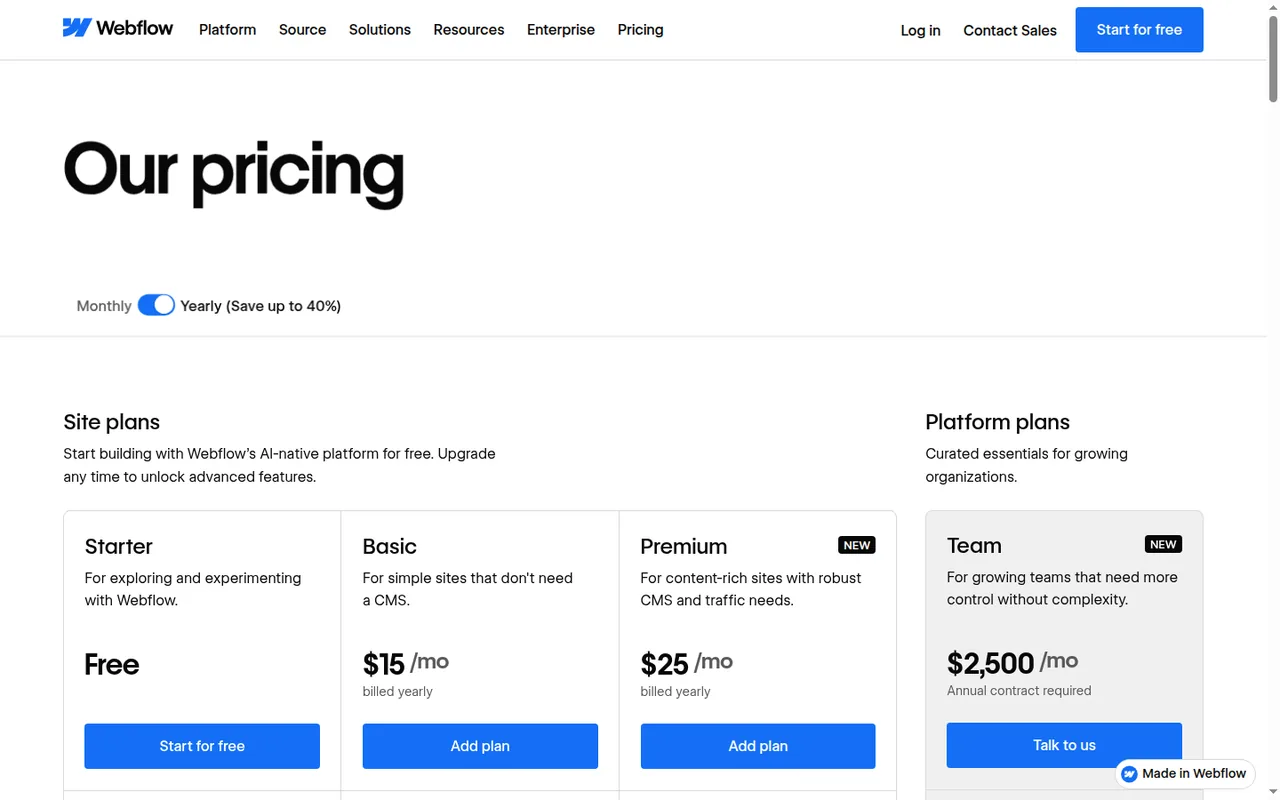
Starter
Free
webflow.io subdomain, 2 static pages, limited CMS, 1 GB bandwidth, 50 form submissions, Webflow AI and MCP server.
Basic
USD 15 per site per monthbilled yearly · USD 25 billed monthly
Custom domain, 300 static pages, 10 GB bandwidth, unlimited form submissions and password protection; no CMS.
Premium
USD 25 per site per monthbilled yearly · USD 39 billed monthly
Everything in Basic plus Webflow CMS, 50 GB bandwidth with add-ons, code components, site search and form file upload.
Team
USD 2,500 per monthannual contract required
Platform plan with Localize, AEO agents, publishing workflows and priority support; 100,000 AI credits per year.
Core Workspace
USD 19 per monthbilled yearly · USD 28 billed monthly
10 staging sites, 300 AI credits per month, custom code, code export and Shared Libraries.
How far does it go?
- Bandwidth in visitsAssuming each visit transfers about 2 MB, Basic's 10 GB covers roughly 5,000 visits a month (10,000 MB ÷ 2 MB) and Premium's 50 GB roughly 25,000; pages heavy with video or large images lower both figures.
- A blog site with code export, billed yearlyPremium at USD 25 plus a Core Workspace at USD 19 comes to USD 44 a month, about USD 528 a year (44 × 12); on monthly billing the same pair costs USD 67 a month (39 + 28).
- AI credit packs at scaleOne 2,000-credit pack takes a Core Workspace from 300 to 2,300 monthly credits for USD 20 a month billed yearly; the maximum of 15 packs adds 30,000 credits for USD 300 a month (15 × 20).
Arithmetic from the published allowances above, not a usage test.
Taxes, currency and promotions can change the price you see at checkout.
Which Webflow plans does your site actually need?
Editorial assessment
Most sites need one Site plan, and only some need a Workspace plan on top. Decide by page count, whether the site has a blog or other CMS content, and whether you must export code or stage many sites.
- Starter is enough for a prototype or a two-page placeholder that can live on a webflow.io address.
- Basic fits a brochure site on your own domain with up to 300 static pages and no blog, as long as traffic stays within 10 GB of bandwidth.
- Premium fits once you need a blog, resource library or other CMS content, site search or file uploads in forms.
- A Core or Growth Workspace is worth adding when you need code export, custom code, more than two staging sites or a larger monthly AI credit pool.
- Team is aimed at organizations that need Localize, AEO agents and publishing workflows and can sign an annual contract.
If you mainly want a prompt-first way to get a small business site online, read the Durable profile; if your team designs interactive marketing pages, compare the Framer profile.
What does the free Starter plan really include?
Every new site starts on the free Starter Site plan. The pricing page lists a webflow.io domain, limited CMS, 2 static pages, 1 GB bandwidth, 50 form submissions, Webflow AI, the MCP server and Webflow Cloud app hosting, and says you can try Webflow for as long as you like.
The help center describes the same plan as allowing up to 1,000 monthly visits and 50 CMS items, a slightly different set of limits from the pricing page, so check the figures in your own dashboard. A custom domain always needs a paid Site plan, and the free Starter Workspace includes 2 staging sites.
Continue reading · 6 more sectionsShow lessWhy are Site and Workspace plans billed separately, and what happens when you cancel? · How do Webflow AI credits work? · What does the AI site builder generate? …
Why are Site and Workspace plans billed separately, and what happens when you cancel?
A Site plan belongs to one site and unlocks publishing to a custom domain plus site features such as the CMS. A Workspace plan covers the space where sites are staged and shared with teammates, and it controls staging limits, collaboration tools, code export and the monthly AI credit allowance.
New Site and Workspace plan purchases can be refunded within 14 days. Renewals, add-ons, seats and AI credits are non-refundable. Cancelling a Site plan keeps it active until the end of the billing period, after which custom domains are removed and the site is unpublished; the project stays in the Workspace.
How do Webflow AI credits work?
AI credits are pooled at the Workspace level and can be spent on any site in it. The Starter Workspace includes 200 credits per month, Core 300 and Growth 400, while the Team plan receives 100,000 per year. On a fully free setup, the credit-free tools and the 200 Starter credits work, except generating and editing copy, which needs a paid Site or Workspace plan. Self-serve credits reset monthly, and unused credits expire rather than rolling over.
Only some features draw on credits: SEO and AEO improvements, copy generation, CMS item generation, code components and AEO agents. The AI site builder, contextual help, section design, app generation, Optimize and Localize do not. Webflow publishes no rate card, so the cost of a request varies with its complexity, and add-on packs are capped at 15 per Workspace.
What does the AI site builder generate?
You describe the purpose, pages, audience and style, and the builder proposes a structure of pages and sections that you can reorder or replace before it generates full page designs, content, a theme and a style guide page. It does not consume AI credits.
The documented limits matter. The builder only works on brand-new sites or sites it generated, and without a paid Site or Workspace plan the site is capped at two pages; with a paid plan it creates up to five pages at first.
What is left out when you export the code?
Paid Workspace plans can download a ZIP containing HTML, CSS, JavaScript and images, and the exported site can run on your own server without attribution or an active Webflow plan. Site plans alone do not include code export.
The export is a static snapshot. Dynamic content such as CMS items, Ecommerce, user accounts, localized pages and code components is not carried over, and forms, site search and password protection stop working. You cannot choose to export only part of a site.
Can AI tools outside Webflow edit your site?
The MCP server lets tools such as Claude, ChatGPT, Codex, Cursor, Postman and Slack create pages, manage styles and CMS items, work on SEO and publish, within each user’s existing role permissions. Current limits include creating new localized CMS items and some element and binding settings.
Can a Webflow draft survive a small content handoff?
Proposed evaluation · not performed yet
Use a Free Starter site and preview. Keep the exercise to two static pages; custom-domain hosting and downloaded site code are separate paid decisions.
Input: Create Home and Services pages for a fictional repair shop, with a link between them, two service prices and a contact email using example.com.
- Create the pages manually or use the AI builder on a new site if available.
- Change one price and one navigation label, then preview both pages on desktop and phone.
- Follow each internal link and record any overflow, stale price or inconsistent heading.
Accept: Both pages show the intended price and navigation, with no clipped text or broken internal path. Stop or revise: Fix inconsistent shared elements before adding CMS content or buying hosting; preview success alone is not a working exported site.
Compare these options
Read the documented differences, then follow the links to each profile for its sources and plan details.

Webflow alternatives
Other website builders tools profiled with the same source-checked method. Pick by the job, not by a score.
| Tool | Free access | Paid plans from | Consider it for |
|---|---|---|---|
| WebflowThis profile | Free access available | USD 15 per site per month | Visually designed marketing and content websites |
| Durable | Free access available | USD 22 per month | All-in-one AI websites for small service businesses |
| Framer | Free access available | EUR 10 per month | Designer-led marketing sites and portfolios |

Webflow user reviews
Visitor opinions, moderated before publishing. Separate from our source checks; we do not score tools.
Frequently asked questions
What changed in Webflow's May 2026 pricing?
From May 13, 2026, new purchases moved to the current Basic and Premium prices, and the former CMS and Business Site plans were combined into Premium. Webflow also added a monthly AI credit allowance to every Workspace plan at the same time. The merged Premium plan includes 20,000 CMS items and 50 GB of bandwidth, which add-ons can raise to 2.5 TB.
How much does a Webflow online store cost?
Ecommerce uses its own Site plans. Standard starts at USD 29 per month billed yearly or USD 42 billed monthly, Plus costs USD 74 or USD 84, and Advanced USD 212 or USD 235. Taxes are added at checkout, and a Workspace plan is still billed separately if you need staging, code export or a larger AI credit pool.
What do extra Webflow seats cost?
Seats are billed on the Workspace. A full seat costs USD 39 per month billed yearly or USD 45 monthly, a limited seat USD 15 or USD 19, and reviewer seats are free. Seats are among the purchases Webflow does not refund, so add them when a person actually needs to design or edit rather than in advance.
What happens if AI credits run out in the middle of a task?
Webflow lets a request finish as long as it started with a positive balance, even if it uses more than what was left. The shortfall is subtracted from the next monthly allotment. Running out does not upgrade the plan or add a charge automatically; buying an add-on pack or waiting for the reset restores access.
Can I take my CMS content with me?
Yes, separately from the code. Webflow lets you export each CMS Collection as a CSV file, which is how blog posts and other Collection items leave Webflow. The code export itself can also be downloaded with minified HTML, and it always covers the whole site rather than selected pages.
How we checked this profile
33 details on this page were checked against Webflow's own pages and help documentation (Sep 24, 2026). 1 is still open and listed below.
See the checks by section28 documented4 editorial assessment1 open
| Section | Checks | Last checked | Sources |
|---|---|---|---|
| Article text | 3 documented 2 editorial | webflow.com/pricinghelp.webflow.com/40102090399635-Webflow-Ref… | |
| Plans and prices | 10 documented 1 editorial 1 open | webflow.com/pricinghelp.webflow.com/33961232582419-Choose-a-Si…help.webflow.com/51060121155347-Webflow-AI-… | |
| Features | 3 documented | help.webflow.com/51059955082387-Updated-pri…help.webflow.com/51060121155347-Webflow-AI-…help.webflow.com/52536562285203-Webflow-MCP… | |
| Questions | 9 documented | webflow.com/pricinghelp.webflow.com/51060121155347-Webflow-AI-…help.webflow.com/38840145286035-Build-a-sit…help.webflow.com/33961386739347-How-do-I-ex…help.webflow.com/51059955082387-Updated-pri… | |
| Strengths and limits | 2 documented | help.webflow.com/38840145286035-Build-a-sit…help.webflow.com/33961386739347-How-do-I-ex… | |
| Platforms and integrations | 1 documented 1 editorial | help.webflow.com/52536562285203-Webflow-MCP…webflow.com/pricing |
Still open
- The free Starter limits differ between Webflow's help center and pricing page.Not confirmed · checked · Source (opens in a new tab)
Sources for this profile
- Webflow pricingwebflow.com
- Webflow AI creditshelp.webflow.com
- Updated pricing and simplified plans for May 2026help.webflow.com
- Choose a Site planhelp.webflow.com
All 8 sources
Plan names, prices and limits come from Webflow's pricing page in both billing views, across the Site, Ecommerce and Workspace tabs. AI credits, the May 2026 plan changes, Site plans, code export, the AI site builder, the MCP server and refunds come from the Webflow help center, which describes the free Starter limits differently from the pricing page.
Sources checked Sep 24, 2026. We read the vendor's documentation; we did not test the product or score it. Found something out of date? See how we correct profiles.


