Lindy vs Gumloop: A Seat per Person or One Plan for the Team?
Both run AI agents that read your tools, draft the work and can wait for a person before anything goes out. Lindy is one teammate your team mentions in Slack, billed per person, with every seat adding credits to a shared pool. Gumloop is an agent platform with one Pro plan for unlimited seats and 20,000 credits a month. This page prices four team sizes, counts a month of support triage in each tool’s credits and shows where each one asks before it writes.
By Elias Brandt · Updated 9 Oct 2026 · About 9 min read · Plan terms taken from each tool profile
The short answer
Choose Lindy if your team already works in Slack and wants one AI teammate that everyone mentions, with seats billed per person and write approvals inside shared threads. Choose Gumloop if you want configurable agents with unlimited seats on one Pro plan, per-connector approval rules and reports delivered as downloadable, versioned files. Neither has an ongoing free plan; both start with a trial.
Lindy or Gumloop: which one, when?
Pick by who asks and what has to come back
In shortIf requests already happen in shared Slack threads and each person who asks can be a paid seat, start with Lindy. If many people need access on one bill, or the result must leave as a file, start with Gumloop.

Lindy for a Slack-first team
Requests, approvals and replies stay in shared threads, routines react to email and calendar events, and every person who asks is a billed seat drawing on one pool.

Gumloop for configurable agents with file output
One organization plan covers any number of seats, each connector gets its own approval rule, and results arrive as files people can download and version.
Test before choosing on price
Seat cost is predictable on Lindy and usage cost moves on Gumloop, so run one week of real requests through each trial.
Five everyday jobs, side by side
In shortRead across a row: the job, then how each tool starts it, gates it or delivers it.
| If the job is… | Lindy | Gumloop |
|---|---|---|
| Triage a support inbox | Routine triggered by a received email; Lindy rates a day's queue at 250 to 1,000 credits | App trigger on new email; each Gmail read or draft is a 1-credit tool call plus model and compute |
| Send replies only after review | Require approval posts Approve and Deny buttons in a shared Slack thread | Ask for writes/deletes pauses sends in the chat, the Tasks page or Slack |
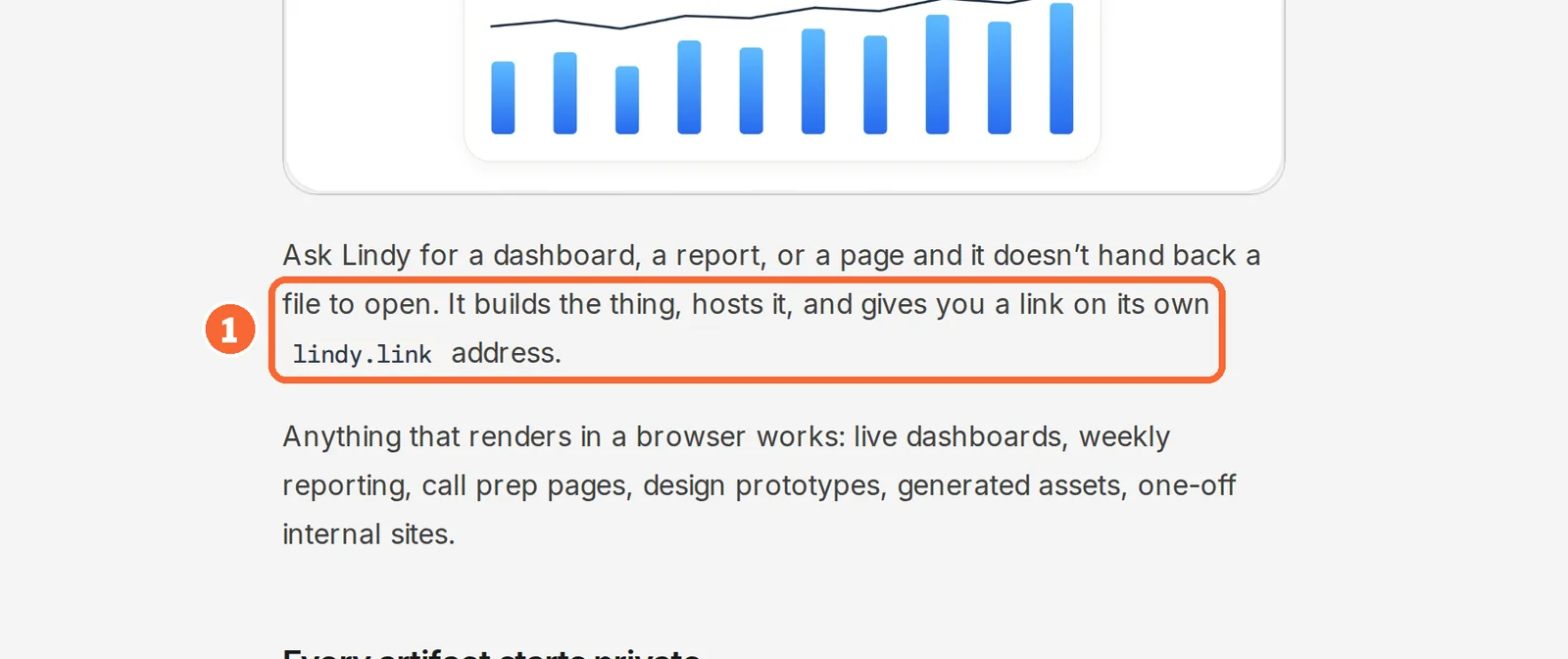
| Deliver a weekly report | Hosted live page on lindy.link, rebuilt on the same link when asked | Downloadable CSV, XLSX or PDF artifact with automatic versions |
| Let the whole team ask | Anyone who mentions Lindy takes a paid seat after any trial | Unlimited seats on Pro; Slack users without an account are asked to sign up |
| Control a heavy month | Per-member caps on the pool and paid top-ups | Email alerts at usage thresholds and a cap on paid overage |
The basics
In shortRead live from each profile.
| What do you need? | Lindy | Gumloop |
|---|---|---|
| In short | Delegate a task with a defined handoff | Inspect the file and the cost of the run |
| Free access | Free trial only | Free trial only |
| Plans |
|
|
| Price check | Prices confirmed · Oct 1, 2026 | Prices confirmed · Sep 27, 2026 |
| Full profile | Lindy profile | Gumloop profile |
Values come from each tool’s profile and update with it, in the currency each vendor shows.
Visit Lindy (opens in a new tab) Visit Gumloop (opens in a new tab)
What is each one today: a teammate or an agent platform?
In shortLindy is one shared teammate that people mention in Slack, with a private Lindy in each person’s direct messages. Gumloop lets you configure separate agents, each with its own connectors, triggers and approval rules.
Six differences that decide it
- Where work starts
- Lindy is a Slack-native teammate that also answers in its web app and over iMessage; Gumloop agents run in its web app, in Slack with one agent per channel, or from triggers. Source: docs.gumloop.com
- Billing unit
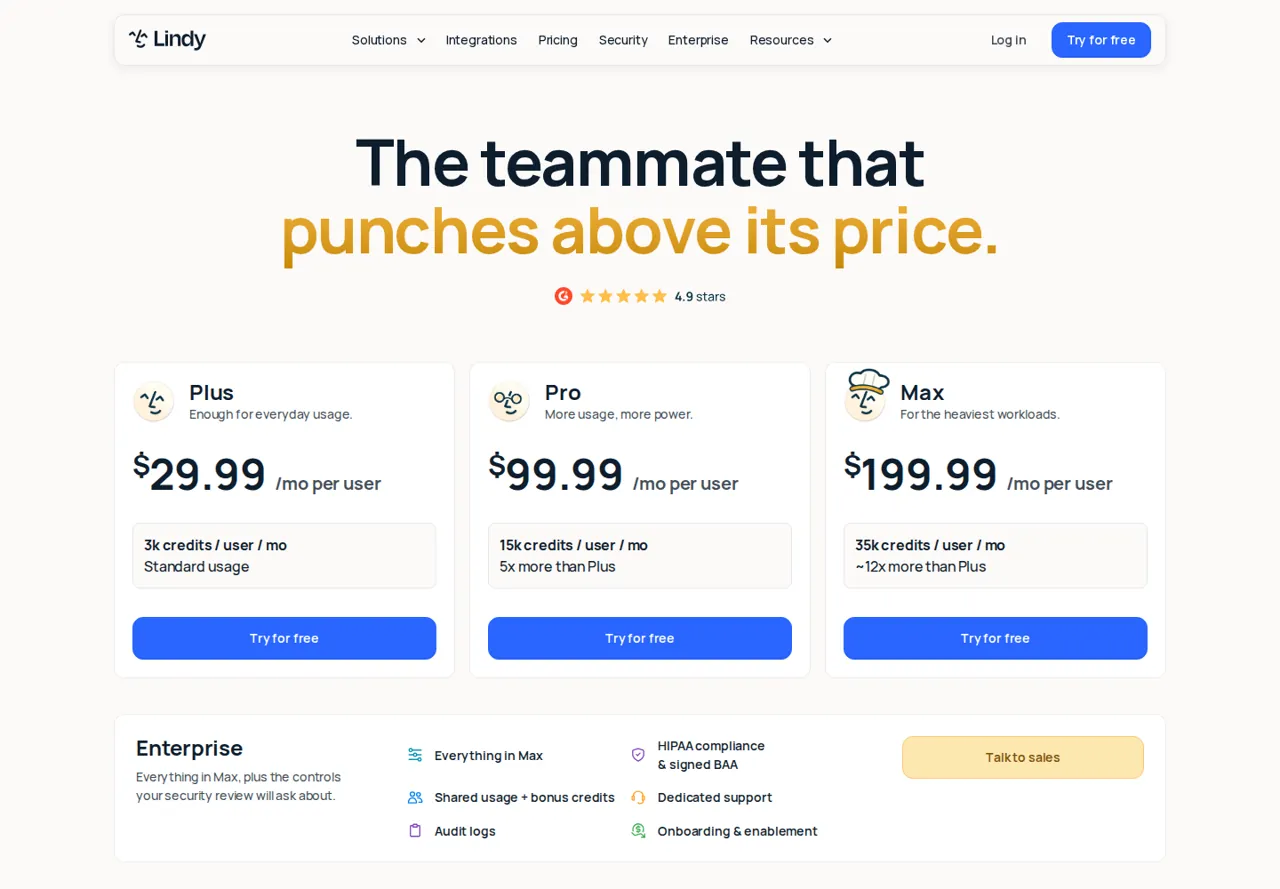
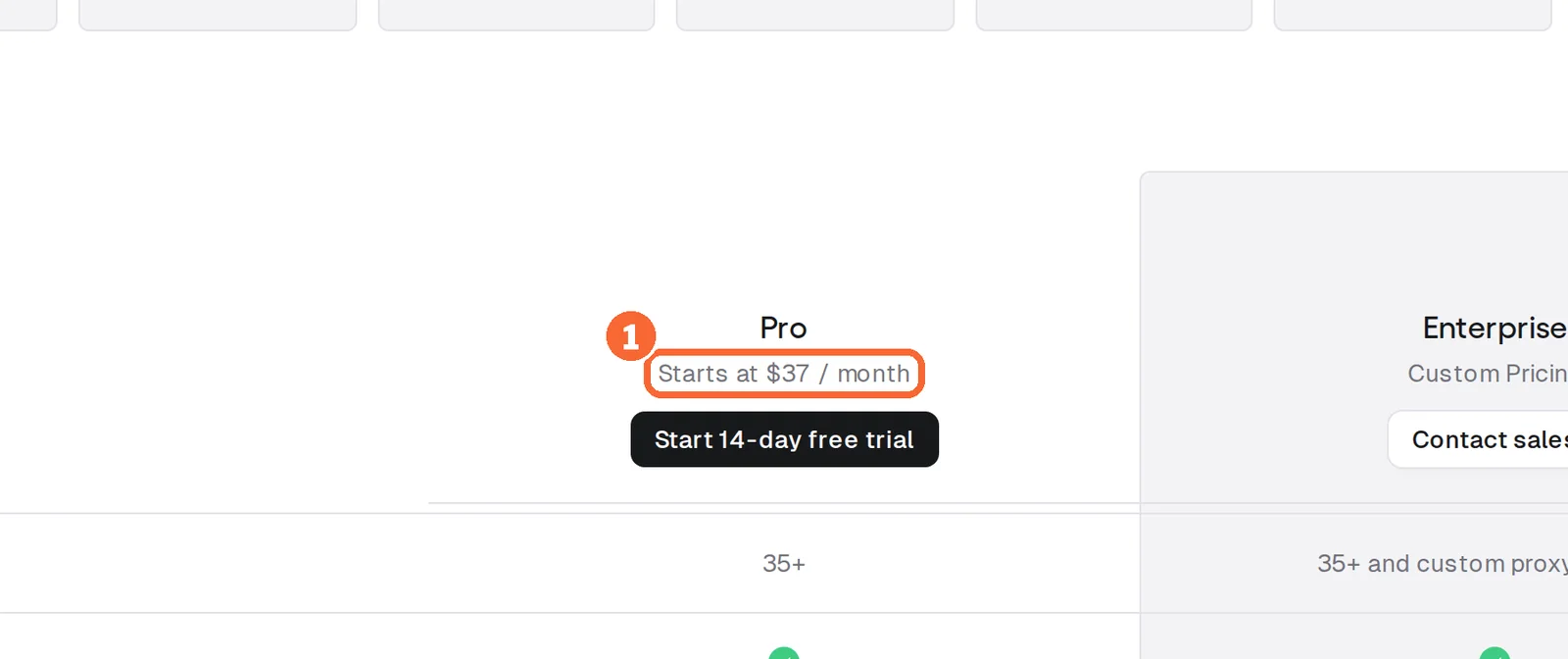
- Lindy Plus costs $29.99 per user per month and each seat adds 3,000 credits to a shared pool; Gumloop Pro starts at $37 a month for the organization, with unlimited seats and 20,000 credits. Source: lindy.ai
- Out of credits
- Lindy pauses credit-using work and sells top-ups at $10 per 1,000 credits; Gumloop can bill overage at $0.005 per credit, capped at 1,000,000 credits per period by default. Source: docs.gumloop.com
- Approval scope
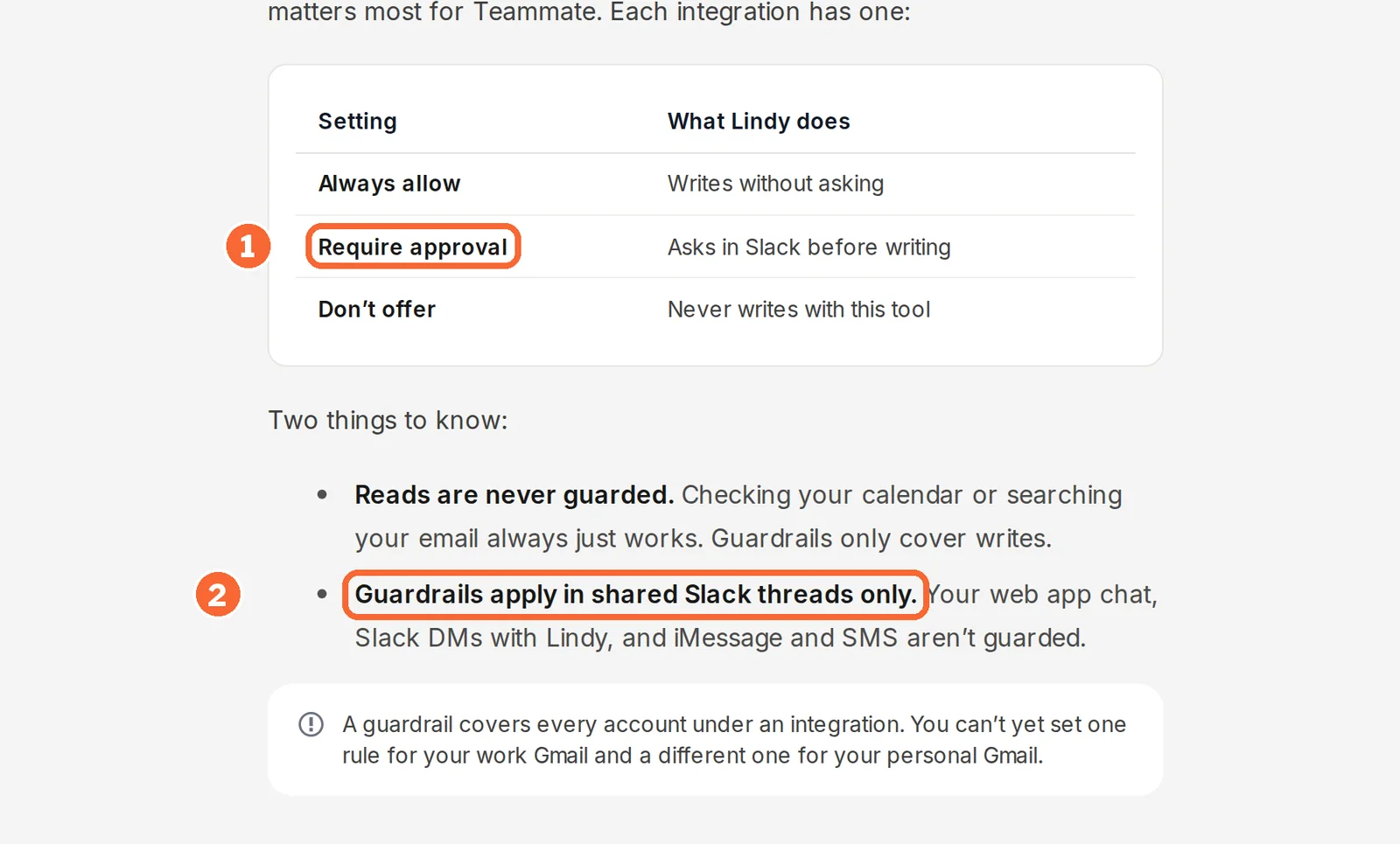
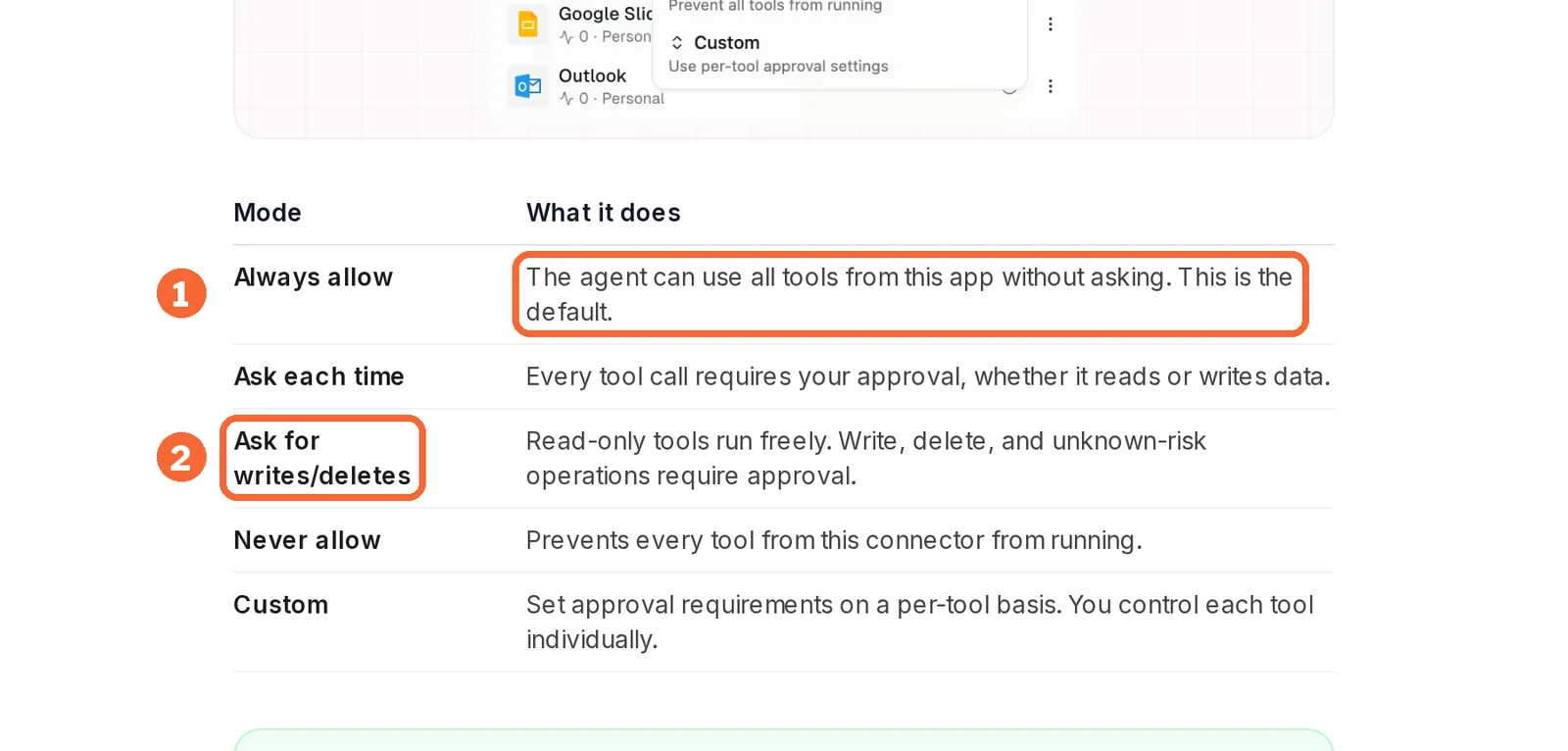
- Lindy guardrails are set per integration and apply in shared Slack threads, not web chat or direct messages; Gumloop approval modes are set per connector on the agent, with Always allow as the default. Source: docs.lindy.ai
- Deliverable
- Gumloop exports downloadable files that gain a new version under the same filename; Lindy hosts reports as live pages on lindy.link. Source: docs.lindy.ai
- Trial
- Lindy gives a 7-day free week only to a new teammate who joins through Slack, and direct signups pay at once; Gumloop offers a one-time 14-day Pro trial that requires a card. Source: docs.lindy.ai
Older comparisons describe a different Gumloop
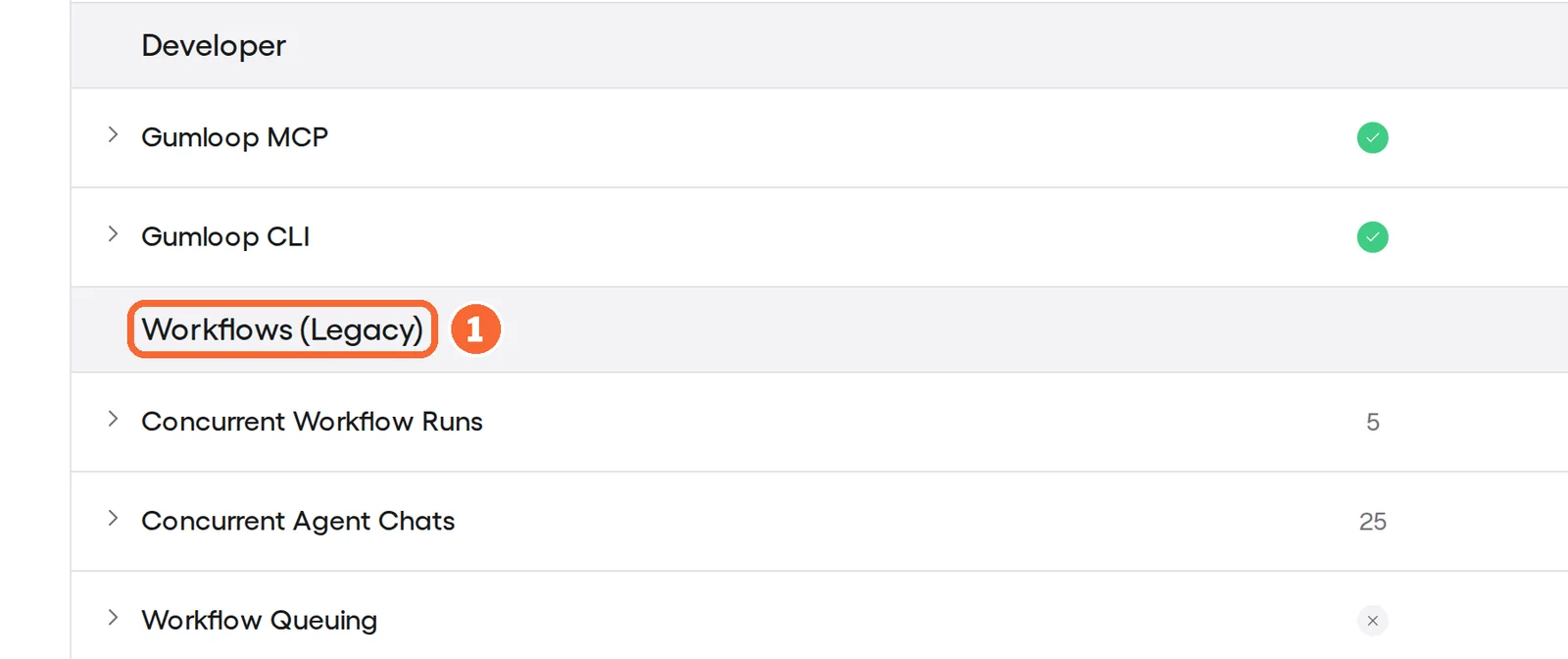
Several pages ranking for this search still set Lindy against a drag-and-drop node canvas. Gumloop’s pricing page now files Workflows under a Legacy heading below its agent features, and lists 5 concurrent workflow runs on Pro against 25 concurrent agent chats.
Sources: Gumloop pricing, Lindy plans and credits.
How work starts
| Starting point | Lindy | Gumloop |
|---|---|---|
| A mention in Slack | Mention it in a thread or channel; the private Lindy answers direct messages | Add an agent’s bot to a channel and @mention it; direct messages reach your personal agent, not a custom one |
| The web app | Chat in the web app | Chat with the agent in the web app |
| A schedule | Routines, most often daily, weekly or monthly; new ones default to 9:00 AM daily | Recurring or one-time scheduled triggers, at least 1 minute apart |
| An event in an app | Routines on an email received or sent, a Slack message, a calendar event about to start or a meeting ending | App triggers, for example a new email |
| A call from another system | Not covered in the sources checked | A webhook URL that any service able to send an HTTP POST can call |
| A phone | iMessage and SMS | Not covered in the sources checked |
Only Lindy admins create workspace routines, which post to a Slack thread or channel. A Gumloop agent can create and pause its own schedules when asked in chat.
Sources: Lindy routines, Gumloop agent triggers, Gumloop agents in Slack.
Feature matrix
In shortSeventeen capabilities marked from the two profiles and the vendor pages they cite. A dash means the sources do not cover it, not that the tool lacks it.
| Capability |  Lindy Lindy |  Gumloop Gumloop |
|---|---|---|
| Starting work | ||
| Mentions in shared Slack threads | Offeredevery plan | Offeredone agent per channel |
| Scheduled runs | Offeredroutines | Offeredscheduled triggers, 1-minute minimum |
| Start on a new email | Offeredevent routine | Offeredapp trigger |
| Webhook trigger | Not listednot covered in the sources checked | Offeredunique URL per trigger |
| Tools and models | ||
| Gmail, Slack and GitHub | Offered | Offered |
| HubSpot | Offeredlisted integration | Not listednot covered in the sources checked |
| MCP servers | Offeredany MCP server your team runs | OfferedMCP tools; Pro hosts 1 server |
| Choose the model | Offeredper task, or Lindy picks | Offered35+ models |
| Your own model API key | Not listednot covered in the sources checked | OfferedPro; model calls then cost 0 credits |
| Browser control without an integration | Partlycomputer use; the Plus plan table leaves it out | Not listednot covered in the sources checked |
| Control and output | ||
| Approval before a write | Partlyshared Slack threads only | Offeredper connector; default Always allow |
| Conditional approval rules | Not listednot covered in the sources checked | Offeredapp rules on a call’s arguments |
| Spend cap per person | Offeredadmins cap each member | Not listednot covered in the sources checked |
| Downloadable files with versions | Partlyversioned Files explorer; reports come back as links | OfferedCSV, XLSX, PDF and more |
| Hosted live page | Offeredlindy.link | OfferedHTML artifacts; optional gumloopartifacts.com subdomain |
| Single sign-on | PartlyEnterprise: SSO and SCIM | PartlyEnterprise features: SAML, OIDC, SCIM |
| API access | Not listednot covered in the sources checked | OfferedAPI keys on Pro and above |
offered partly or with limits not listed on the profile.
What does a team pay, and how far do the credits go?
In shortLindy adds a paid seat for each person who uses it, and each seat adds credits to one pool. Gumloop Pro is one organization plan with unlimited seats and 20,000 credits a month.
What each price list says
Price per month, as each plan is first listed, from the Lindy profile. Bars compare plans of this tool only.
Gumloop lists one self-serve plan, Pro, starting at $37 a month for the organization, and Enterprise by agreement, so it has no bar chart. Lindy’s documentation rounds its prices to $30, $100 and $200.
Monthly bills at four team sizes
In shortEveryone who uses Lindy, including someone who only mentions it in Slack, is a seat. Gumloop’s figure is a starting price for the whole organization.
| People using it | Lindy Plus | Lindy Pro | Gumloop Pro |
|---|---|---|---|
| 1 | $29.99 · 3,000 credits | $99.99 · 15,000 credits | From $37 · 20,000 credits |
| 3 | $89.97 · 9,000 credits | $299.97 · 45,000 credits | From $37 · 20,000 credits |
| 5 | $149.95 · 15,000 credits | $499.95 · 75,000 credits | From $37 · 20,000 credits |
| 10 | $299.90 · 30,000 credits | $999.90 · 150,000 credits | From $37 · 20,000 credits |
Arithmetic on the per-user prices and per-seat credits on the Lindy profile and the Pro listing on the Gumloop profile; monthly, before tax, as each vendor lists them.
Lindy Plus costs less than Gumloop’s starting price for one person and more from the second: 2 × $29.99 = $59.98. From there the Lindy bill rises with each person who asks, while Gumloop’s rises only with usage. The pool runs the other way: at seven Plus seats Lindy holds 21,000 credits, 1,000 more than Gumloop Pro, but the two credits measure different work.
A month of support triage, in each tool’s credits
In shortLindy puts a credit at about one cent and Gumloop at $0.005, and each counts its own kind of work. So count the same month on each vendor’s own figures instead of converting one credit into the other.
| Lindy | Gumloop | |
|---|---|---|
| The vendor’s own figure | Triaging a day’s support queue: 250 to 1,000 credits | No per-task range; the profile’s example run is 30 credits: 20 model, 2 tool, 5 compute, 3 fee |
| 20 working days | 5,000 to 20,000 credits (20 × 250 to 20 × 1,000) | 18,000 credits if each of 30 emails a day took one run of that size (20 × 30 × 30) |
| What holds it | Plus: the pool of 2 to 7 seats (5,000 ÷ 3,000 and 20,000 ÷ 3,000, rounded up); one Pro seat’s 15,000 covers 15 days at the top rate | Pro’s 20,000, with 2,000 to spare; 666 runs of that size fit in a month |
| Past the allowance | Pauses until the cycle resets; top-ups at $10 per 1,000 credits, or overages at 2x the regular credit cost if an admin turns them on | Stops at zero unless overage is on: $0.005 a credit, capped by default at 1,000,000 credits ($5,000) a period |
| Unused credits | Plan credits do not roll over; top-ups carry over | Do not roll over, except on Enterprise |
Arithmetic on the rates each profile and its cited credit pages give. The Gumloop run is the profile’s hypothetical example, not a measured triage.
A longer chat, a frontier model or an enrichment tool lifts a Gumloop run above 30 credits, and each minute of active work adds 5. Still, the counts settle one thing: a month of daily triage needs at least two Lindy Plus seats’ credits, so a one-seat pilot runs dry first.
Sources: Lindy plans and credits, Lindy usage and limits, Gumloop credits.
Approvals, output and security: what can leave the tool?
In shortLindy asks before a write only in shared Slack threads. Gumloop asks only where you change a connector away from its default.
Where each one asks before it writes
| Lindy | Gumloop | |
|---|---|---|
| Where the rule is set | One guardrail per integration, covering every account under it | Per connector on each agent, or tool by tool with Custom |
| Default | Not covered in the sources checked | Always allow |
| Choices | Always allow, Require approval, Don’t offer | Always allow, Ask each time, Ask for writes/deletes, Never allow, Custom |
| Reads | Never gated | Run freely unless the connector is set to Ask each time or a Custom rule gates them |
| Channels the rule covers | Shared Slack threads; web chat, Slack direct messages, iMessage and SMS are not guarded | The chat, the Slack thread with a direct message if you are away, and the Tasks page queue |
| Conditional rules | Not covered in the sources checked | App rules on a call’s arguments, such as only when an email leaves your domain |
| Who approves | The person who asked, or a workspace owner or admin | Not covered in the sources checked |
Lindy’s pricing FAQ says anything with outside impact waits for approval; its integration guide narrows that to shared threads, so test the channel your team will really use. Gumloop’s own guide calls Ask for writes/deletes a good default for most apps, yet ships Always allow. On both, set the rule before connecting an account that can send.
Sources: Lindy integrations and guardrails, Gumloop human in the loop, Lindy pricing.
What comes back: a file or a link
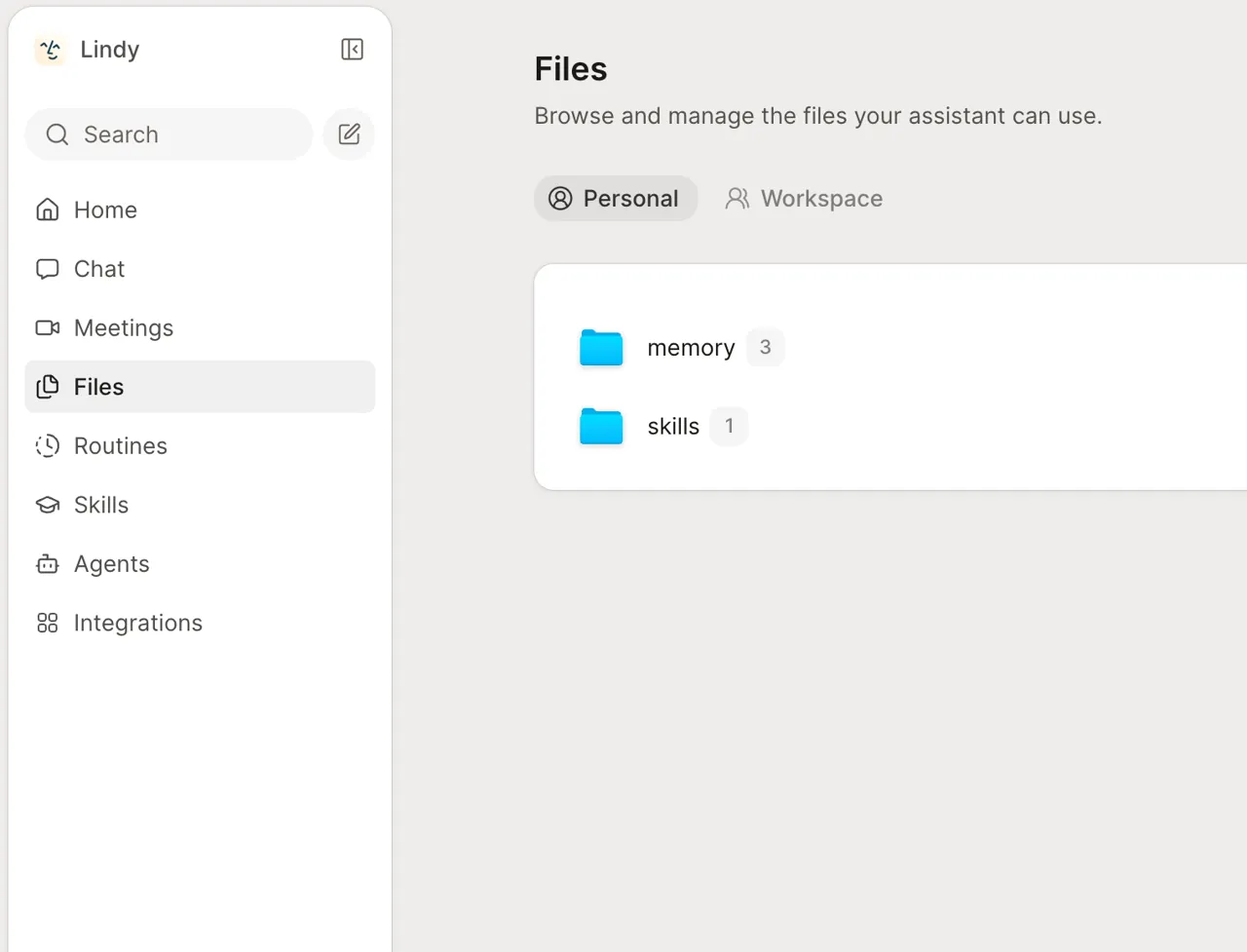
Both can return a live page. Gumloop’s HTML artifacts sit at their own address and can take a subdomain on gumloopartifacts.com, and every Gumloop artifact also has a Download action for the original file; files over 50 MB are download-only. Lindy’s artifacts come back as a lindy.link page rather than a file to open. Its Files explorer keeps saved versions in Personal, Team and System scopes, and only owners and admins edit Team files. If a spreadsheet has to leave the tool, check that step on Lindy during the trial.
Sources: Gumloop artifacts, Lindy artifacts, Lindy files.
Sign-in, audit and compliance
| Lindy | Gumloop | |
|---|---|---|
| Single sign-on | SSO and SCIM on Enterprise | SAML, OIDC and SCIM, filed under Enterprise features |
| Audit logs | Enterprise | Filed under Enterprise features |
| Compliance stated | SOC 2 and GDPR on the pricing page; HIPAA with a signed BAA on Enterprise | Not covered in the sources checked |
| Connector policies | Not covered in the sources checked | Scoped to each agent on Pro, organization-wide on Enterprise |
| Your own cloud | Not covered in the sources checked | Optional virtual private cloud on Enterprise, with no compute charge |
These are vendor statements; ask for the reports before an agent reads a shared mailbox.
Sources: Lindy pricing, Lindy plans and credits, Gumloop pricing, Gumloop credits.
Videos, questions and what this page does not judge
Official videos
In shortFrom each vendor’s YouTube channel. They load only when you press play.


Common questions
Can people outside our company open what the agent produced?
On Lindy an artifact starts private to signed-in workspace members, and making it public needs your approval; anyone with a public link can then open it without signing in. Gumloop sets access per file in a share dialog, can protect a link with a password, and lets each agent set a default sharing rule for new files.
Which credentials does the agent use when a colleague asks it something?
On Lindy a connection shared by an owner or admin acts with that account's permissions for everyone, while personal connections serve only their owner. On Gumloop a personal agent in Slack runs each request on the asking person's own credentials, so a colleague who never connected Gmail is sent to set it up first.
Can we bring our own model API key to cut costs?
Gumloop supports it on Pro: model calls then cost 0 credits and you pay the provider directly, but the orchestration fee on those chats rises from 8% to 16%. Lindy lets you pick the model for each task or leaves the choice to Lindy, and its pricing pages do not mention running models on your own provider key, so ask sales before planning around it.
What happens to our work if we cancel?
Lindy keeps the workspace active until the end of the paid cycle, without mid-cycle proration, and credit-using actions stop afterwards. On Gumloop, cancelling during the 14-day trial stops the card from being charged when the trial ends; the page to use is Manage Subscription under Settings, Organization, Usage and Limits.
Can either tool click through a website that has no integration?
Lindy says it can drive a browser like a person when no integration or MCP server exists, but its plan table leaves computer use out of Plus while the public page lists it for all plans, so confirm on Pro before relying on it. Gumloop agents act through connectors and MCP servers, and its current documentation index has no browser-control page.
What this page does not judge
Pages ranking for this search also rank reply quality, speed, ease of setup, support and Reddit opinion. Neither profile documents these in a way we can check, so none is ranked here.
Write three fictional support emails, one about a wrong invoice, one about a failed login and one feature request, each with an ID. Paste them into each product’s chat without connecting a mailbox, and ask for a table with the columns id, category and reply_draft, where category is limited to billing, access or feature. Use Lindy’s free week for a new teammate joining from Slack and Gumloop’s card-backed 14-day Pro trial, cancelled before it converts. Accept a result when all three IDs appear once, every category uses the allowed labels, no reply promises a refund or a date the email did not contain, and the table opens outside the product. Record the credits: the Credits column under Settings → Members on Lindy, the chat header and its breakdown on Gumloop.
How this comparison was made
Plans, credits, approvals and output terms come from the Lindy and Gumloop profiles on this site and the vendor pricing and documentation pages they cite, each with its own check date; tables marked as live are read from those profiles each time the page loads. Sections follow the topics pages ranking for this search cover, limited to what the vendors document. No rating is given and no price is converted. For more, read the Lindy profile, the Gumloop profile, our customer support tools page and the other tool comparisons. See our editorial policy.