Lindy: seats from USD 29.99 per user feed one shared credit pool, but write approvals cover only shared Slack threads
Updated October 1, 2026 · By Elias Brandt · Documentation review, not tested hands-on
Pros
- Shared allocation
- Visible revisions
- Approval choice in shared threads
Cons
- Seats can trigger billing
- Channel-specific guardrails
- Computer-use plan conflict
Bottom line
You run a small team that wants delegated drafts prepared from shared files, with a named person reviewing each result before anything is sent.
You expect approval prompts in web chats, Slack direct messages or mobile messages, because the integration guide excludes those channels from write guardrails.
Best forOperations leadsSlack-based teamsKnowledge maintainers
Strengths, limits and who it suits, in full
Strengths
- Shared allocation Seat allowances contribute to a pool that the workspace can distribute.
- Visible revisions Files can be inspected and earlier saved versions restored.
- Approval choice in shared threads Integration settings let a team gate writes in the documented Slack context.
Limits
- Seats can trigger billing Direct signups and returning teammates are outside the new-Slack-user trial rule.
- Channel-specific guardrails Do not carry a shared-thread approval assumption into private chat.
- Computer-use plan conflict The public pricing wording and detailed Plus feature table need confirmation before a browser-control task.
Who it suits
- Operations leads suitable for delegated drafts with a named owner and clear acceptance criteria.
- Slack-based teams inspect shared-thread guardrails before attaching accounts that can write.
- Knowledge maintainers file scopes and saved revisions can support controlled reference updates.
How much does Lindy cost?
Prices confirmed · checked
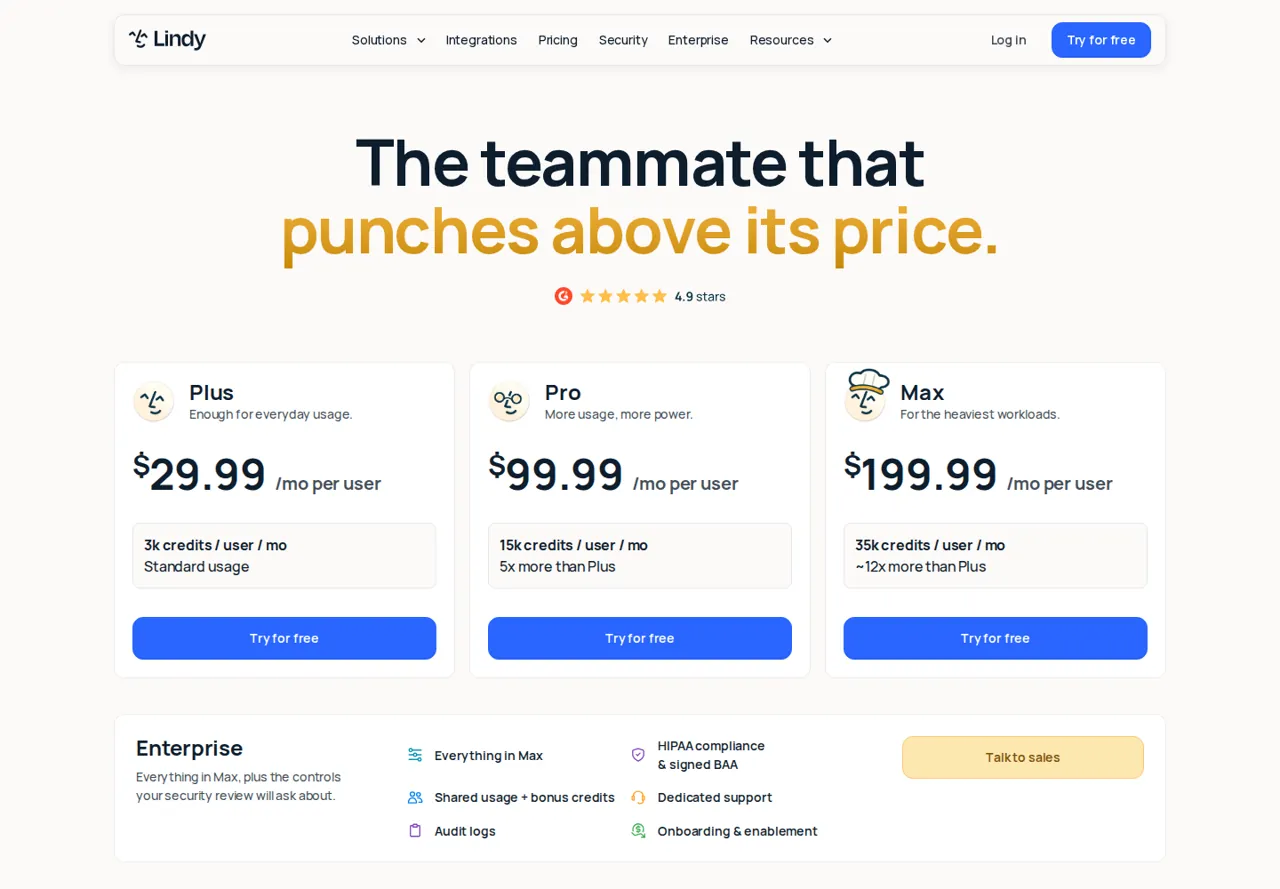
Regional prices: The public pricing page lists $29.99, $99.99 and $199.99 per user per month for Plus, Pro and Max in US dollars, while the documentation rounds these to $30, $100 and $200.
Neither page says whether tax is added, so confirm the checkout total. A new teammate joining through Slack gets a one-time seven-day trial; direct signups and returning users are billed immediately. The documentation excludes computer use from Plus despite broader inclusion language on the public pricing page.
| Plan | Price | What you get |
|---|---|---|
| Plus | USD 29.99 per user per month sourceFrom lindy.ai/pricing, checked Oct 1, 2026 (opens in a new tab) | 3,000 credits per user added to the shared workspace pool; confirm computer-use eligibility. |
| Pro | USD 99.99 per user per month sourceFrom lindy.ai/pricing, checked Oct 1, 2026 (opens in a new tab) | 15,000 credits per user; detailed documentation lists computer use. |
| Max | USD 199.99 per user per month sourceFrom lindy.ai/pricing, checked Oct 1, 2026 (opens in a new tab) | 35,000 credits per user for a larger pooled allocation. |
| Enterprise | Custom quote | Custom capacity and organization requirements. |
How far does it go?
- Shared allowance, not a task countTwo Plus seats contribute 2 × 3,000 = 6,000 workspace credits. This combines seat allowances only; task complexity, corrections and other teammates determine consumption. It is not a forecast of completed tickets.
Arithmetic from the published allowances above, not a usage test.
Taxes, currency and promotions can change the price you see at checkout.
Visit Lindy (opens in a new tab)
Key features
| Feature | What it does | Watch out |
|---|---|---|
| Team requests in Slack | — | |
| Shared workspace credit pool | — | |
| Personal, Team and System file scopes | — | |
| Editable files with explicit saving | — | |
| File version history | — | |
| Integration write guardrails in shared Slack threads | — | |
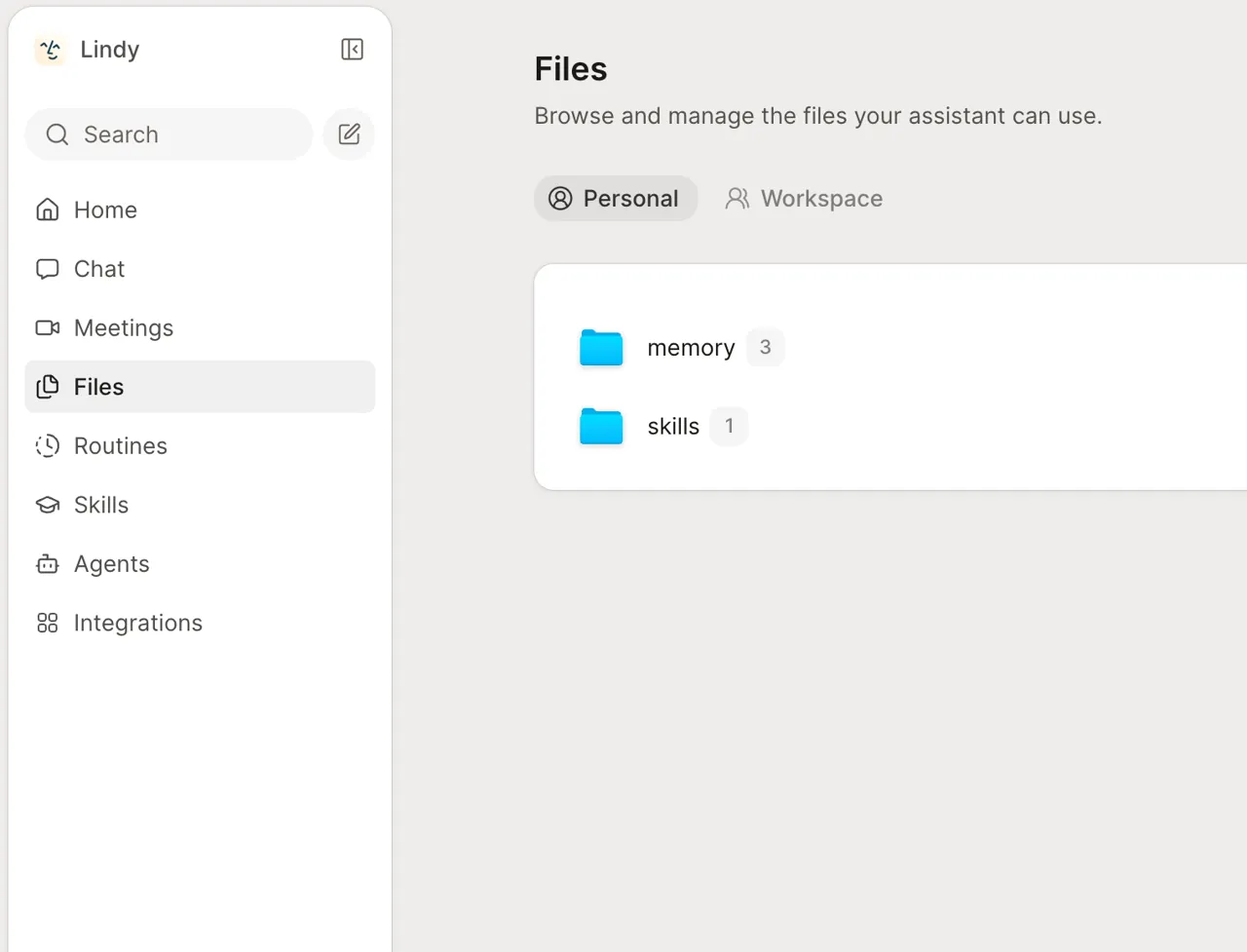
| Workspace files | Browse the material Lindy creates and uses, including saved revisions. | Team-file editing belongs to owners and admins; a regular member sees a read-only view. |
| Delegated work | Give the teammate a defined result to prepare using permitted context. | Separate preparing a response from sending it through a connected account. |
| Connection guardrails | Choose Always allow, Require approval or Don't offer for integration writes. | The integration guide excludes web chat, Slack DMs and mobile messages from these guardrails. |
What makes a delegated request ready to hand off?
Give Lindy a result to prepare, the material it may use and a clear stopping point. “Draft replies for these three messages” is easier to inspect than “handle support.” The first request has a countable output and leaves the external action with a person. Add the intended audience and any promises the draft must avoid, such as refunds or delivery dates absent from the supplied facts.
Keep the request channel in the work record. A team discussion in Slack, a direct message and a web conversation are not interchangeable for integration permissions. Before attaching a mailbox or ticket system, ask whether the exercise needs that connection at all. Pasted fictional messages can establish whether the response format is useful without accessing customer records or creating an outbound message.
When does another teammate become a paid seat?
The current pricing documentation treats people who use Lindy as seats, including people who mention it in Slack. Its seven-day trial is narrowly described for a person new to Lindy joining through Slack. Someone who signs up directly or returns with an existing account goes onto a billed seat immediately. A general invitation to try the product should therefore be checked against the actual entry route.
For a team rollout, list who needs to use the teammate and who only needs to read the resulting document. Review seat membership with the workspace administrator before inviting a whole channel. Removing a seat keeps it active through the already-paid cycle, with no mid-cycle proration described in the documentation. A smaller pilot gives you a clearer usage record before expanding the number of contributors.
Which file version should the team review?
Lindy separates Personal, Team and System files. Personal material belongs to the individual workspace context; Team files are visible across the workspace, with editing reserved for owners and admins. System files are built in. Put the approved support policy in the appropriate scope rather than assuming that a file in one person’s space is automatically the team’s current reference.
Text edits take effect after an explicit Save, and saved changes create versions. Ask the reviewer to identify the version being discussed so a correction is not judged against an older draft. A visible file in the explorer also needs a delivery check if the brief calls for a local CSV. Confirm the download control and reopen the delivered file; an answer printed in chat is a different result.
Where do approval guardrails actually apply?
The detailed integration guide lists Always allow, Require approval and Don’t offer for writes. It says reads are not guarded and that these write guardrails operate in shared Slack threads. Web app chats, Slack direct messages, iMessage and SMS are excluded. This is narrower than the pricing FAQ’s general statement about approval, so use the channel-specific rule when planning an actual workflow.
An owner can share a personal connection with the workspace, allowing work under that account’s permissions. Inspect the connected identity as well as the approval mode. In a shared Slack thread, approving one requested action differs from choosing Always allow for future work. For an initial draft-only exercise, leave external connections off and have a person review the response before any later delivery step.
How do pooled credits affect a small pilot?
Each seat adds its plan allocation to the same workspace balance. A heavy request by one person can therefore affect capacity available to others. Record the balance before and after a bounded task, including any correction turn, and check the administrator’s allocation controls. The count of requests alone misses differences between a brief summary, a long research job and a multi-step build.
Included credits reset by billing cycle without rollover, while purchased top-ups have different carryover terms in the pricing documentation. Keep those balances separate in the pilot log. Avoid converting another provider’s credit count into a Lindy cost comparison: the unit and the work charged against it differ. First establish a repeatable output and then compare observed consumption for that same result.
Can it prepare three support drafts without sending them?
Proposed evaluation · not performed yet
Use an authorized paid seat, or an eligible new teammate trial whose billing terms you have accepted. Paste three fictional messages: A01 asks why a bill contains a duplicate item; A02 says a login link has expired; A03 requests a dark theme. Ask for id, category and reply_draft, with categories limited to billing, access and feature. Do not connect an inbox.
- Record the plan, channel and starting credit balance.
- Ask for exactly one record per supplied ID and no invented account facts.
- Inspect each draft for an unsupported refund, fix date or promise to ship a feature.
- If the brief requires a file, save it and check its version and actual delivery format.
- Record the remaining balance after one controlled correction, if needed.
Accept a correctly mapped set of three drafts that asks for missing information without making commitments. Reject missing IDs, extra customers or an external send. Leave the observed result and credit usage blank until the exercise is completed.
For file-oriented agent delivery, see Gumloop. For a workflow built around explicit integration steps, inspect Zapier. These are different ways to organize work; match the output before comparing price.
Compare these options
Read the documented differences, then follow the links to each profile for its sources and plan details.

Is Lindy worth it?
Documentation review plus dated public user reports. Documentation review, not tested hands-on. Not scored.
Worth it if
- You run a small team that wants delegated drafts prepared from shared files, with a named person reviewing each result before anything is sent.
- Your requests already happen in shared Slack threads, where the documented Always allow, Require approval and Don't offer choices for integration writes apply.
- You can pilot with a few seats first, since each seat adds its credits to a workspace pool that an administrator can watch.
Probably not if
- You expect approval prompts in web chats, Slack direct messages or mobile messages, because the integration guide excludes those channels from write guardrails.
- You need browser control on the cheapest plan, because the Plus computer-use wording differs between the public pricing page and the detailed plan table.
- You plan to invite a whole channel on a free trial, since only a new teammate joining through Slack gets the seven-day trial and other routes are billed at once.
Lindy alternatives
Other automation tools checked with the same method. Pick by the job, not by a score.
Agent tasks that need an inspectable file handoff

Visual automation for app workflows

Self-hostable workflow and AI-agent automation

Browser tasks and research handed to an AI agent

Delegating multi-step research and file tasks to an AI agent

Live calls where AI help is permitted

Organisations on Microsoft 365 that want to automate Teams, SharePoint, Outlook and Excel work, with RPA for desktop apps

Sales, support and operations teams that want AI agents acting in their CRM and inbox with per-tool approvals
Used Lindy? Write the first review. Visitor opinions are moderated and kept separate from our source checks.
Frequently asked questions
Can a regular member edit a shared team reference?
The file documentation gives owners and administrators editing rights over Team files. Regular members can read those files but see a lock banner when editing is unavailable. Ask an authorized maintainer to save the correction, then identify the resulting revision so everyone evaluates the same reference rather than a private copy.
Does a shared mailbox connection run as each person separately?
A connection shared with the workspace operates with the permissions of the connected account described by Lindy. Do not assume that another member’s request changes the account identity used for the action. Check the connection owner and scope before letting the teammate access a team mailbox or another shared service.
Is the cheapest plan sufficient for browser control?
Confirm that specific capability before buying. The detailed plan comparison excludes computer use from Plus while general public pricing language suggests broader inclusion. A text-only drafting exercise can avoid that dependency. A browser task needs an explicit answer about the selected plan rather than an assumption based on the product headline.
Will another conversation change the context of my draft?
Lindy uses workspace material and saved files, so make the intended reference and output version explicit. Preserve the brief and the saved revision you approved. If someone updates a shared reference, review whether the next task should use that revision instead of assuming an earlier draft remains aligned with the current instructions.
What should I do when the credit pool runs low?
Check the administrator’s usage view and the next cycle date before starting another substantial request. The provider describes pausing credit-consuming actions when capacity is exhausted, with top-ups as a separate purchase. Decide whether the task can wait and who may authorize extra capacity rather than treating a larger balance as an automatic purchase.
Sources and method6 official sources · 6 details checked · Sep 27 – Oct 1, 2026
How we checked this profile
6 details on this page were checked against Lindy's own pages and help documentation (Sep 27 – Oct 1, 2026).
See the checks by section6 documented
| Section | Checks | Last checked | Sources |
|---|---|---|---|
| Plans and prices | 3 documented | docs.lindy.ai/pricinglindy.ai/pricing | |
| Features | 1 documented | docs.lindy.ai/files | |
| Article text | 1 documented | docs.lindy.ai/overview | |
| Strengths and limits | 1 documented | docs.lindy.ai/pricing |
Sources for this profile
- Public pricinglindy.ai
- Productlindy.ai
- Plan and seat rulesdocs.lindy.ai
- Files and versionsdocs.lindy.ai
Current teammate documentation describes files, shared credits and integrations. The detailed integration guide limits guardrails to shared Slack threads, despite a broader approval statement in the pricing FAQ. The Plus computer-use table also differs from general pricing language. Confirm those conditions for the intended channel and plan.
Sources checked Sep 27 – Oct 1, 2026. Found something out of date? See how we correct profiles.