Midjourney vs Leonardo.Ai: GPU Minutes, Tokens and Private Images
Both turn prompts into images and short clips, but they meter and expose the work differently. Midjourney charges GPU minutes, has no free plan and shows new work to other members until you reach Pro. Leonardo.Ai charges tokens per model, refills a small free allowance daily and makes work private from its first paid plan.
By Elias Brandt · Updated 8 Oct 2026 · About 9 min read · Plan terms taken from each tool profile
The short answer
Choose Midjourney if you work alone, want an always-available slow queue for images from USD 30 on Standard, and can accept public output or pay USD 60 for Stealth. Choose Leonardo.Ai if you need a free start, private images from USD 12 on Essential, trained style or character Elements, upscales beyond 2048 pixels, a team of three or more seats, or an API.
Midjourney or Leonardo.Ai: which one, when?
Pick by the job you repeat most
In shortEach card names a kind of work, the tool that fits it and the reason from its profile.

Midjourney for heavy solo image work
Relax jobs on Standard wait roughly 0 to 30 minutes but never run dry, so a month of daily iteration costs a flat USD 30.

Leonardo.Ai for a product or mascot that must recur
A trained Element carries the same subject into later prompts, which suits catalogues and game assets more than one-off concept art.
Midjourney when a clip has to loop as a GIF
Clips of 5 to 21 seconds download as MP4 or animated GIF, while Leonardo.Ai video comes as MP4 only.
Six everyday jobs, side by side
In shortRead across a row: the job, then how each tool handles it.
| If the job is… | Midjourney | Leonardo.Ai |
|---|---|---|
| Test prompts before paying | Not possible on the main service; a refund applies only below 20 lifetime GPU minutes | Free plan with 150 tokens a day, outputs public |
| Draft 20 poster concepts | About 5 image prompts of four, roughly 5 Fast minutes of Basic's 200 | Token cost depends on the chosen model and appears on the generate button |
| Fix one detail in an existing image | Edit Model with up to four references, inpainting in the Editor | Omni editing with up to six references, or masked regeneration in the Canvas editor |
| Enlarge an image for a large print | Upscale to 2048 x 2048; HD images cannot go further | Pro Upscaler up to 105 MP as JPEG, paid plans only |
| Place the image in a social layout | Download from the Organize page and lay out elsewhere | Edit in Canva sends one image at a time, on individual accounts, with no paid plan needed |
| Generate from inside your own app | Terms prohibit automated tools | Separate API, pay-as-you-go with up to 10 concurrent generations |
The basics
In shortRead live from each profile.
| What do you need? | Midjourney | Leonardo.Ai |
|---|---|---|
| In short | Generate and edit images and short videos from text and image prompts. | Generate, edit and upscale AI images and short videos from prompts or reference images. |
| Free access | No free tier | Free access available |
| Plans |
|
|
| Price check | Pricing review due · Sep 24, 2026 | Pricing review due · Sep 24, 2026 |
| Full profile | Midjourney profile | Leonardo.Ai profile |
Values come from each tool’s profile and update with it, in the currency each vendor shows.
Visit Midjourney (opens in a new tab) Visit Leonardo.Ai (opens in a new tab)
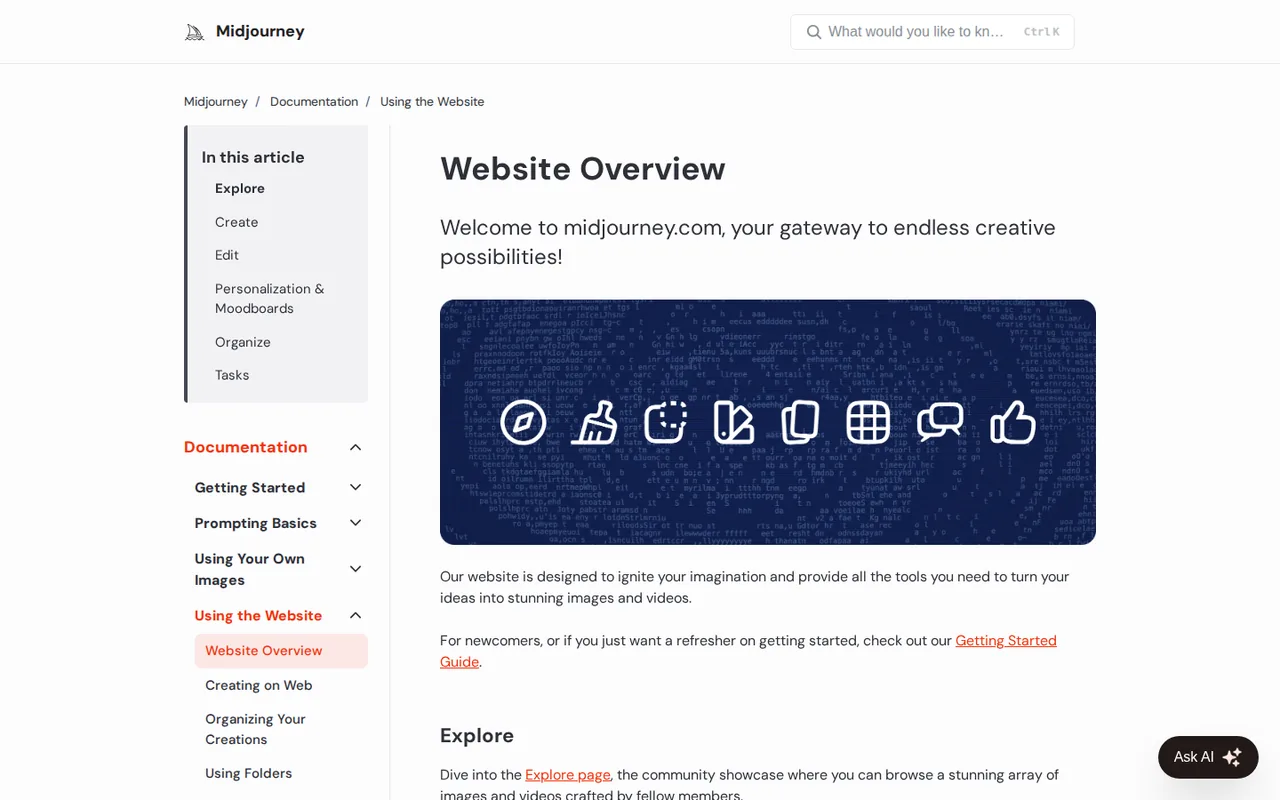
What does each one do with an image or a clip?
In shortBoth generate, edit, upscale and animate. They differ in how a look carries forward and how large a file gets.
Six differences that decide it
- Billing unit
- Midjourney meters GPU time: one image prompt of four pictures usually costs about one Fast minute. Leonardo.Ai charges tokens at a different rate for each model and setting, shown before you generate, so an allowance converts to images only once you pick a model. Source: intercom.help
- Worked example
- Assuming client work must stay private and you pay month to month, the cheapest route is Midjourney Pro at USD 60 with 30 Fast hours and Stealth, against Leonardo Essential at USD 12 with 8,500 tokens and Private Mode, a fifth of the price. On yearly billing the monthly figures are USD 48 and USD 10; Leonardo's exclude tax. Source: leonardo.ai
- Free access
- Midjourney has no free plan or trial on the website or in Discord. Leonardo Free gives 150 tokens a day that expire at the reset, with public images and watermarked video. Source: docs.midjourney.com
- Unused allowance
- Midjourney Fast time lapses at each renewal. Leonardo banks unused paid tokens up to three months' worth, 25,500 on Essential, but cancelling the plan wipes the bank. Source: intercom.help
- Output size
- Midjourney upscales V8.2 images to 2048 x 2048. Leonardo's Pro Upscaler reaches 105 megapixels on paid plans, as 8-bit JPEG, at 73 to 1,211 tokens per run. Source: intercom.help
- Teams and automation
- Midjourney allows one user per account with no seat management, and its terms forbid automated generation. Leonardo sells Teams from three seats at USD 24 each and a separate pay-as-you-go API. Source: leonardo.ai
Feature matrix
In shortSeventeen capabilities marked from the two profiles. A dash means the profile does not cover it, not that the tool lacks it.
| Capability |  Midjourney Midjourney |  Leonardo.Ai Leonardo.Ai |
|---|---|---|
| Images | ||
| Generate from a prompt | Offeredfour images per prompt | Offeredautomatic or chosen model |
| Edit by describing the change | OfferedEdit Model and web Editor | OfferedOmni editing |
| Remove a background | Not listednot covered in the sources checked | Offerednext to generation |
| Upscale | OfferedSubtle or Creative, to 2048 x 2048 | OfferedPro Upscaler to 105 MP, paid plans |
| Motion | ||
| Make a short clip | Partlyfrom a still image, 5 to 21 seconds | Offeredfrom a prompt or an image, several models |
| 720p HD video | PartlyStandard and up, Fast Mode only | Not listednot covered in the sources checked |
| Animated GIF download | OfferedMP4 as well | Not listedMP4 only, per the help center |
| Keeping a look | ||
| Steer with reference images | Offeredup to four per job | Offeredup to six, by model |
| Reuse a look without training | OfferedStyle References, style codes, Personalization | Not listednot covered in the sources checked |
| Train your own style or character model | Not listednot covered in the sources checked | OfferedElements: 10, 20 or 50 a month by plan |
| Ready-made workflows | Not listednot covered in the sources checked | OfferedBlueprints, each with its own token cost |
| Access and teams | ||
| Start without paying | Not listedno free plan or trial | Offered150 tokens a day |
| Discord | OfferedMidjourney Bot, same subscription | Not listednot covered in the sources checked |
| Phone apps | Not listednot covered in the sources checked | OfferediOS and Android |
| Developer API | Not listednot offered, rare granted exceptions aside | Offeredpay as you go, separate credits |
| Send to Canva | Not listednot covered in the sources checked | Partlyindividual accounts, one image at a time |
| Team seats and admin | Not listedone user per account, no SSO | OfferedTeams from 3 seats |
offered partly or with limits not listed on the profile.
How does each keep a character or style consistent?
In shortMidjourney steers by example images; Leonardo.Ai trains a small model on yours.
Midjourney carries a look forward from images you point it at. A Style Reference matches the look of an existing image, a style code applies a look by its code, and a Personalization profile grows from images you select. In V8.2 the Edit Model accepts up to four reference images in a single job and takes over from Omni Reference, Character Reference and Retexture.
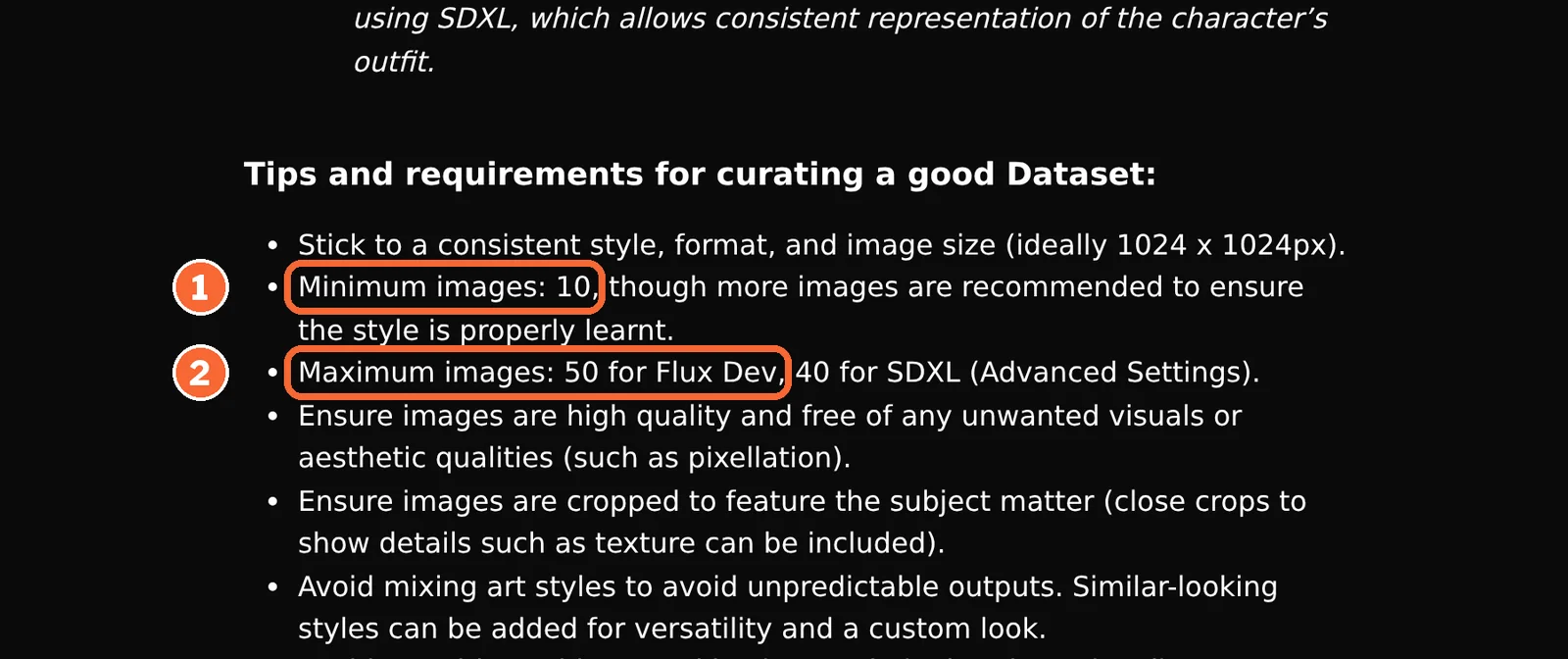
Leonardo.Ai trains an Element, a LoRA built from at least 10 of your own images: up to 50 on Flux Dev, the default base, or 40 on SDXL. A trained Element cannot be downloaded, so the look stays inside Leonardo.Ai. The practical gap is the starting point: an Element needs ten pictures of the subject before the first prompt, while a Midjourney reference works from one.
Sources: Midjourney Edit Model, Midjourney versions, Leonardo.Ai Elements and LoRAs, Leonardo.Ai Omni editing.
How large can the finished file be?
In shortFor print, the upscale ceiling matters more than the starting size.
| Midjourney | Leonardo.Ai | |
|---|---|---|
| Largest image | 2048 x 2048, upscaled or HD; beyond that the help center points to third-party tools | 105 MP with the Pro Upscaler, paid plans |
| Pixels | About 4.2 million | 105 million, about 25 times as many |
| Square print at 300 pixels per inch | About 6.8 inches, 17 cm, a side (2,048 ÷ 300) | About 34 inches, 87 cm, a side (√105,000,000 ≈ 10,247 pixels ÷ 300) |
| File type stated | Not covered in the sources checked | Pro Upscaler output: 8-bit JPEG only |
| Cost of the step | HD prompt: about 1.3 GPU minutes against 0.8 for SD | 73 to 1,211 tokens per upscale |
Arithmetic on the sizes on each profile, assuming a square image printed at 300 pixels per inch; other shapes split the same pixels differently.
Sources: Midjourney upscalers, Leonardo.Ai Pro Upscaler.
Do you still need Discord for Midjourney?
No. One Midjourney subscription covers midjourney.com and the Midjourney Bot in Discord, and speed and Stealth settings follow you between them. Leonardo.Ai runs in the browser and in iOS and Android apps; its interface is optimized for English, and support answers in English only.
Sources: Midjourney web vs Discord, Leonardo.Ai FAQ.
Who sees your images, and what may you do with them?
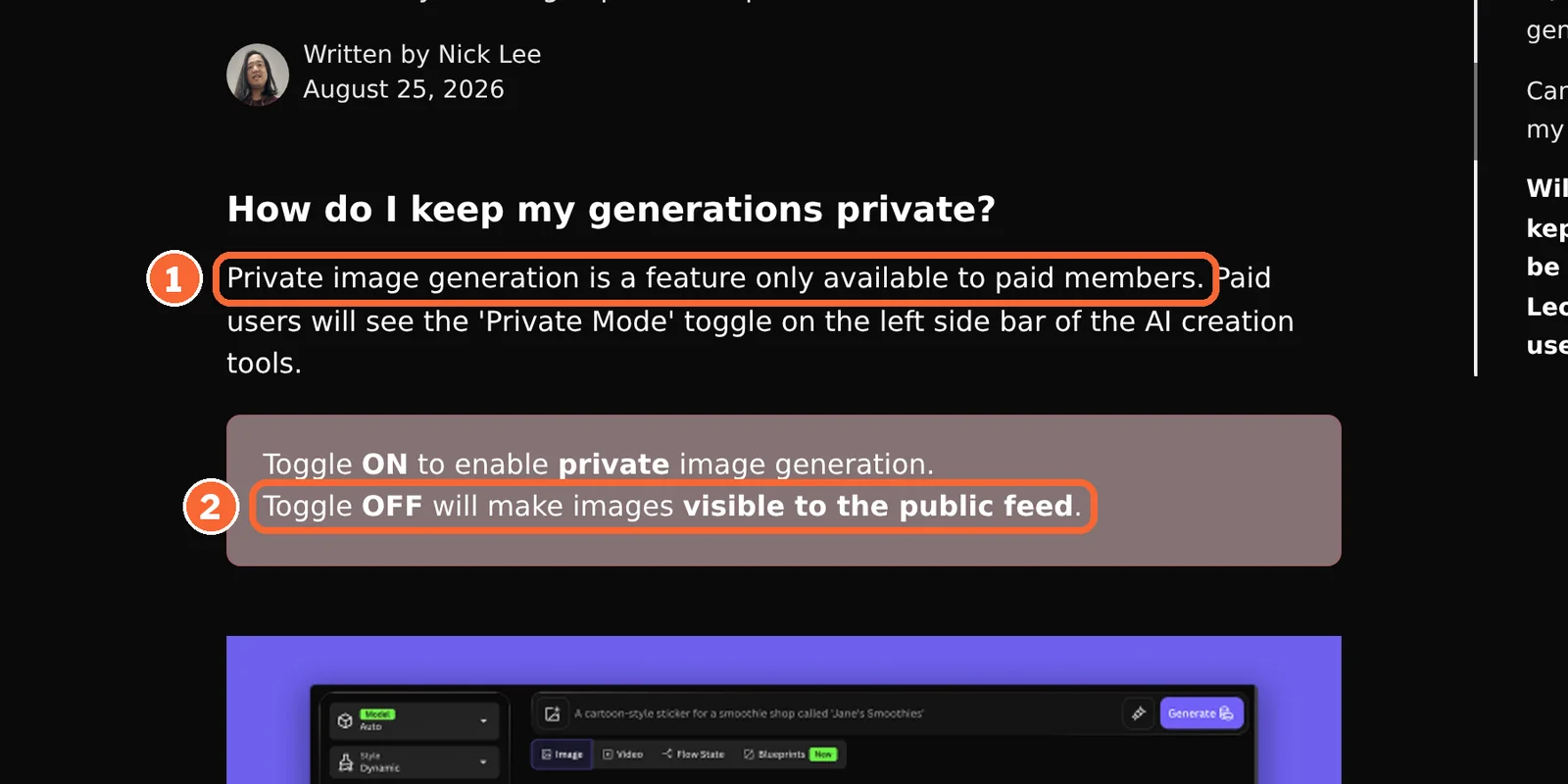
In shortLeonardo.Ai makes work private from its first paid step; on Midjourney privacy starts at Pro. Both allow commercial use, and Midjourney adds a revenue line for companies.
Visibility and rights at each price step
| Monthly price, billed monthly | Midjourney | Leonardo.Ai |
|---|---|---|
| USD 0 | No plan, and no trial on the website or in Discord | Free: public feed, open to remixing; commercial use allowed, as on every plan; stricter prompt filtering; no deleting |
| USD 10 and USD 12 | Basic: new work can appear on the public Explore page; a company grossing over USD 1,000,000 a year needs Pro or Mega | Essential: Private Mode; paid members can delete images |
| USD 30 | Standard: new work can still appear on Explore | Premium: private, as on Essential |
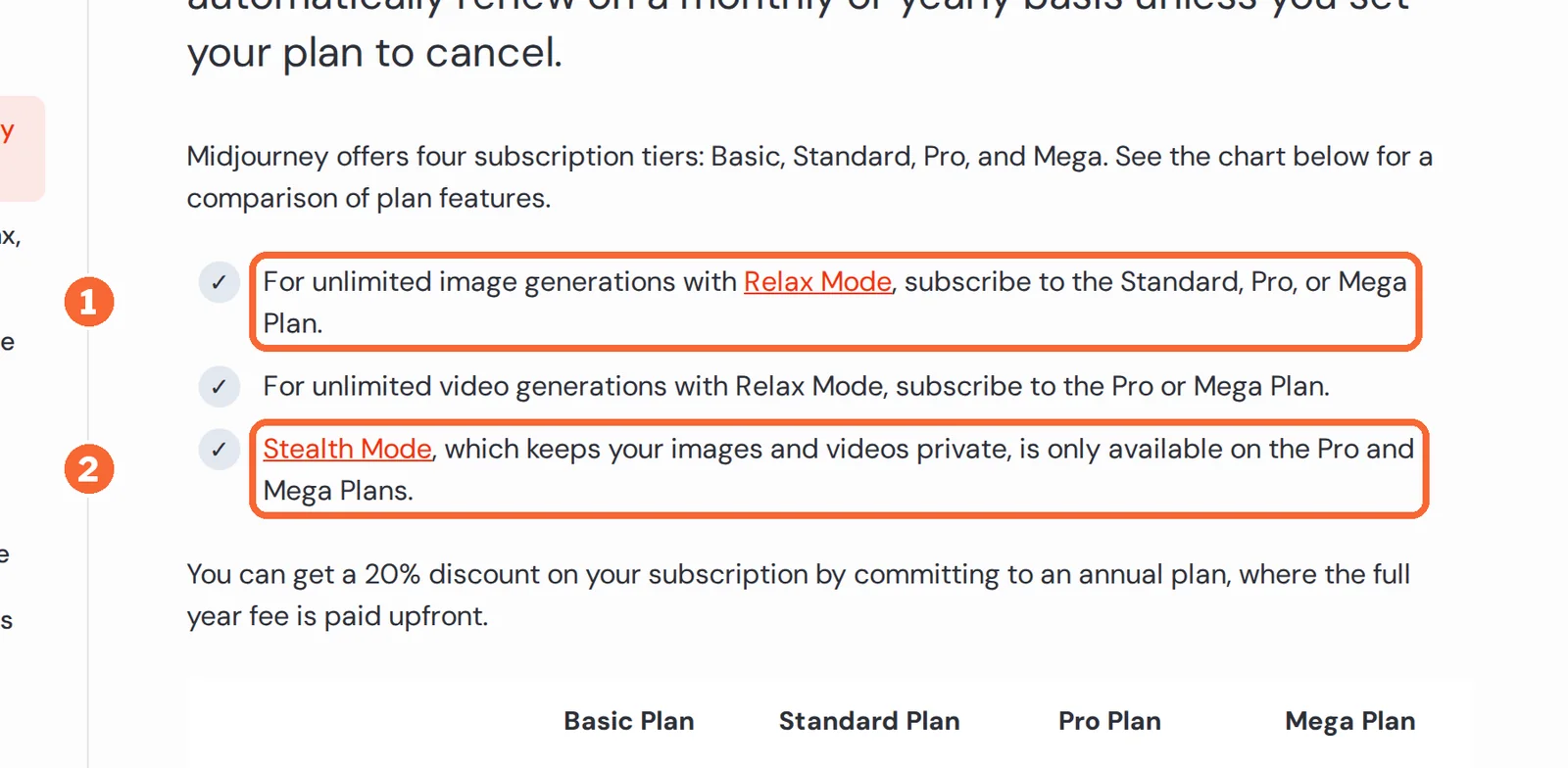
| USD 60 | Pro, and Mega at USD 120: Stealth hides new work on the website; public Discord channels still show it | Ultimate: private, as on Essential |
| USD 72 for three seats | No team plan: one user per account | Teams Starter: work visible to the team only |
Monthly prices on monthly billing, in US dollars as both vendors list them; Leonardo.Ai’s prices exclude tax.
Sources: Midjourney plan comparison, Midjourney commercial use, Leonardo.Ai private and public images, Leonardo.Ai commercial usage, Leonardo for Teams.
Hiding or removing what you already made
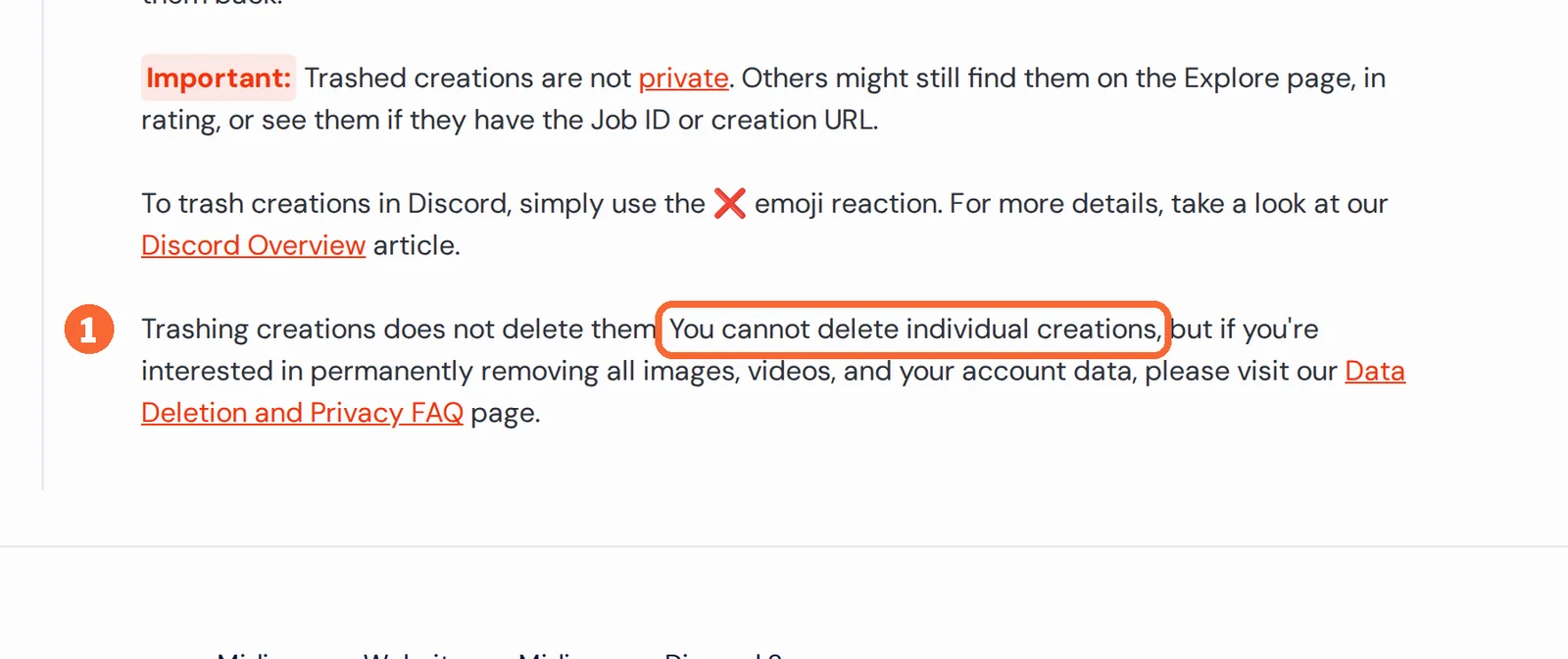
In shortMidjourney cannot delete single images; Leonardo.Ai deletes them only for paying members.
Stealth covers new work only: older public creations are switched to private one at a time, and trashing a creation does not hide it. Removing anything takes an account data deletion request, completed within 30 days.
On Leonardo.Ai, Free work stays in the public feed, and for public images Leonardo.Ai holds a worldwide, perpetual licence to use and distribute them. Weigh that before putting client subjects on the Free plan.
Sources: Midjourney Stealth Mode, Organizing Midjourney creations, Midjourney data deletion FAQ, Leonardo.Ai FAQ.
Is Leonardo.Ai really free, and what does a paid month buy?
In shortLeonardo.Ai has a real free plan with a daily cap; Midjourney has none. The paid plans sit on the same price steps but buy different units.
What the free plan covers
Yes, within limits. Leonardo Free refills 150 fast tokens every 24 hours and drops what is unused, so a 30-day month yields at most about 4,500, roughly half of Essential’s 8,500. Free videos carry a watermark, you cannot animate your own uploaded image, and Elements and Blueprints are limited. Midjourney’s help center points only to the separate niji journey app for a limited trial.
Sources: Leonardo.Ai pricing, Leonardo.Ai tokens FAQ, Generating video on Leonardo.Ai, Midjourney free trials.
The two price ladders
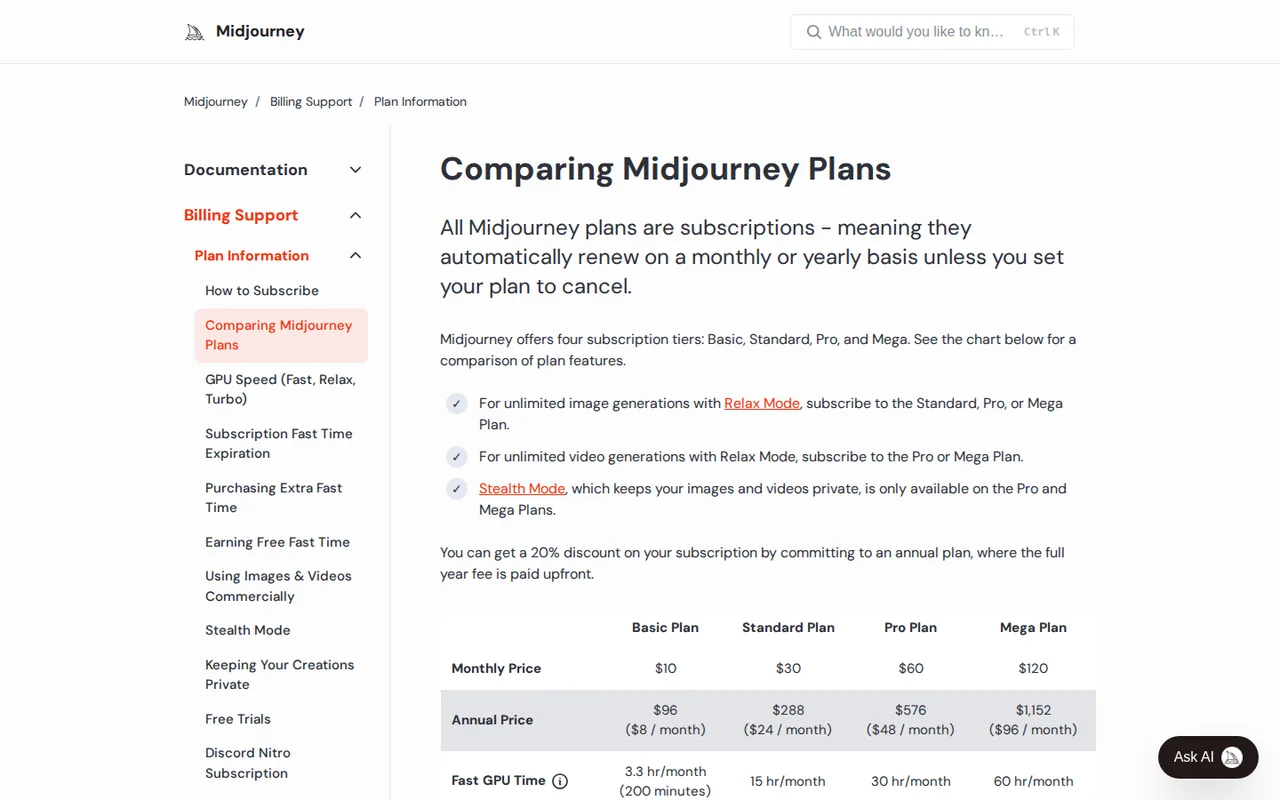
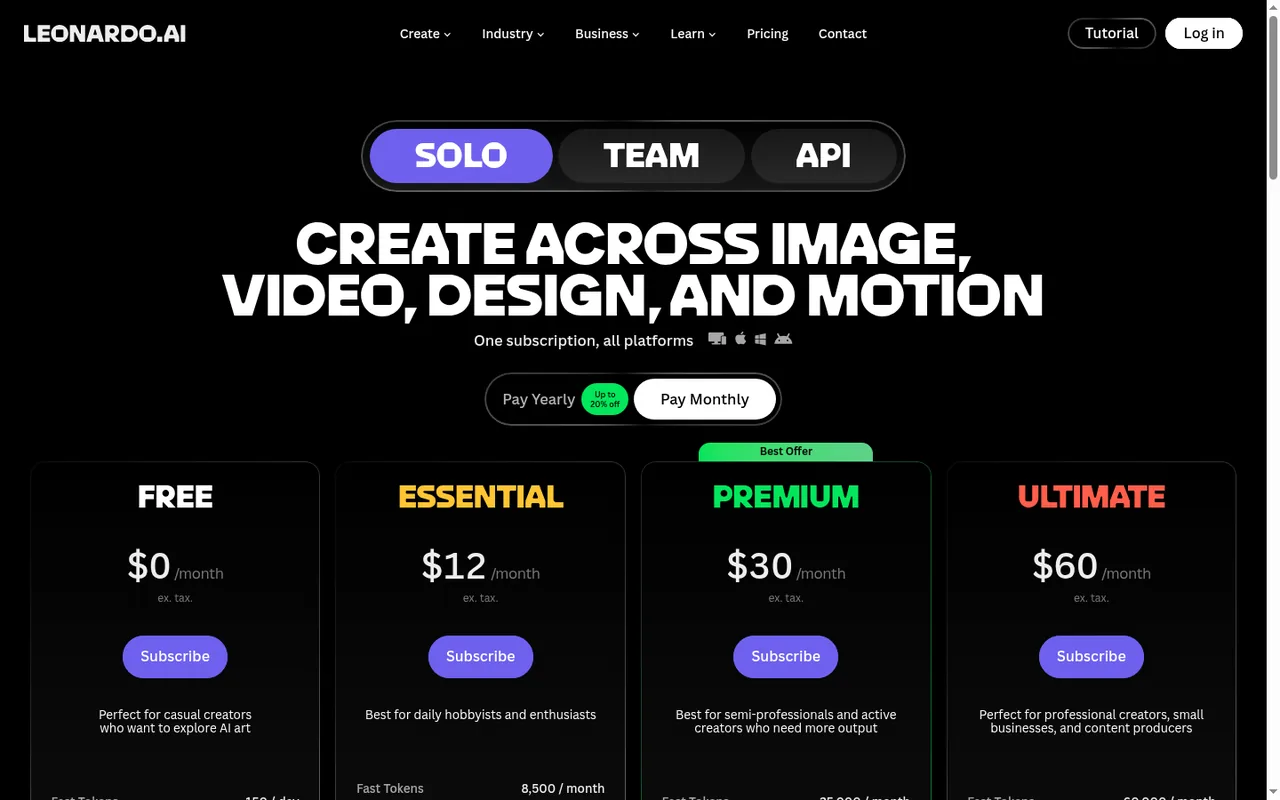
In shortBoth list US dollars, so the steps line up: USD 10 against 12, then 30 and 60 on both.
Price per month on monthly billing, from the Midjourney profile. Bars compare plans of this tool only.
Price per month on monthly billing, from the Leonardo.Ai profile. Bars compare plans of this tool only.
Yearly billing lowers both. Midjourney drops to USD 8, 24, 48 and 96 a month, paid upfront as one annual sum; Leonardo.Ai to USD 10, 24 and 48 a month, with no annual total listed. Leonardo.Ai Teams starts at USD 72 a month for three seats.
Three monthly loads, counted in each unit
In shortGPU minutes can be counted ahead. Leonardo.Ai prices each model on the generate button, so only its fixed-rate jobs can be counted here.
| Load | Midjourney GPU minutes | Leonardo.Ai tokens |
|---|---|---|
| 100 image prompts, four images each | SD 80 (100 × 0.8), HD 130 (100 × 1.3): both inside Basic’s 200 | Set by model and size; a per-image rate is not covered in the sources checked |
| 20 finished images upscaled for print | Upscale cost not covered in the sources checked | 1,460 to 24,220 (20 × 73 to 20 × 1,211): the low end fits Essential’s 8,500, the high end Premium’s 25,000; not on Free |
| Four batches of four HD clips a week, 16 in all | 416 (16 × 26): HD needs Standard, which leaves 484 of its 900 | Video token rate not covered in the sources checked; Ultimate adds relaxed video on selected models once tokens run out |
Arithmetic on the rates on each profile: about 0.8 GPU minutes per SD image prompt, 1.3 per HD prompt and 26 per batch of four HD clips; 73 to 1,211 tokens per Pro Upscaler run. Change the counts to yours.
When the monthly allowance is spent
| Price step | Midjourney | Leonardo.Ai |
|---|---|---|
| USD 10 and USD 12 | Basic: no Relax Mode; extra Fast hours at USD 4 expire after 60 days | Essential: top-up tokens, drawn last, need an active plan and do not expire |
| USD 30 | Standard: images continue in the slower Relax queue | Premium: relaxed images on selected models, only once every token is spent, not by choice |
| USD 60 | Pro: Relax covers images and SD video | Ultimate: relaxed images and video on the same terms; demand can slow them |
Sources: Midjourney GPU speed, Midjourney extra Fast time, Leonardo.Ai top-up tokens, Leonardo.Ai token rollover.
Videos, questions and what this page does not judge
Official videos
In shortFrom each vendor’s YouTube channel. They load only when you press play.

Common questions
Which is cheaper, Midjourney or Leonardo.Ai?
Leonardo.Ai at the bottom, because its Free plan costs nothing. Among paid entry plans, Midjourney Basic lists USD 10 a month billed monthly or USD 96 a year, and Leonardo Essential USD 12 monthly or USD 10 a month billed yearly, excluding tax. GPU minutes and tokens measure different things, so compare the output you need, not the allowance.
Can I get my money back if the tool does not suit me?
Midjourney refunds only accounts that have used less than 20 GPU minutes in total, Relax time included, and its checkout selects yearly billing by default. Leonardo.Ai offers no trial on consumer plans and suggests buying a month and cancelling; a Teams trial may be granted case by case.
How many images can run at the same time?
Midjourney runs up to 3 Fast image prompts at once on Basic and Standard and 12 on Pro and Mega. Leonardo.Ai lists 2 simultaneous generations on Essential, 3 on Premium and 6 on Ultimate, and its developer API allows up to 10 concurrent jobs, independent of any app plan.
What happens to my work and allowance when I stop paying?
Midjourney images and videos stay yours after cancelling, while unused Fast time and bought hours simply lapse. On Leonardo.Ai the rollover bank is cancelled with the plan and top-up tokens need an active subscription, but rights in images made privately stay with you after moving back to Free.
Does Leonardo.Ai connect to Canva?
Yes. Leonardo.Ai and remove.bg are both part of Canva, some Canva image tools run on a Leonardo.Ai model, and a Canva login opens Leonardo's Free plan. On the Midjourney side, generation happens on midjourney.com or through the Discord bot, and files reach other apps by download.
What this page does not judge
Image quality, art style, realism, prompt accuracy, speed and ease of learning are what most pages ranking for this search judge, usually from a few sample prompts. Neither profile documents them in a form we can check, so this page compares what each vendor states about units, visibility, rights and file size. The check below covers the rest on your own brief.
Write one brief for an image you would really publish. On Leonardo Free, generate it with the model the app picks, and note the token price on the generate button and whether the result appears in the public feed. On Midjourney Basic, run the same prompt once in SD and once in HD and note the Fast minutes each used. Download the largest file each plan allows and compare its pixel size and format with your print or web spec.
How this comparison was made
Plans, units, limits and rights come from the Midjourney and Leonardo.Ai profiles on this site, which cite the vendors’ pricing and help pages and carry their own check dates; live tables are read from those profiles each time the page loads. Sections follow the topics ranking pages cover, limited to what the vendors document. No rating is given. See our editorial policy.