

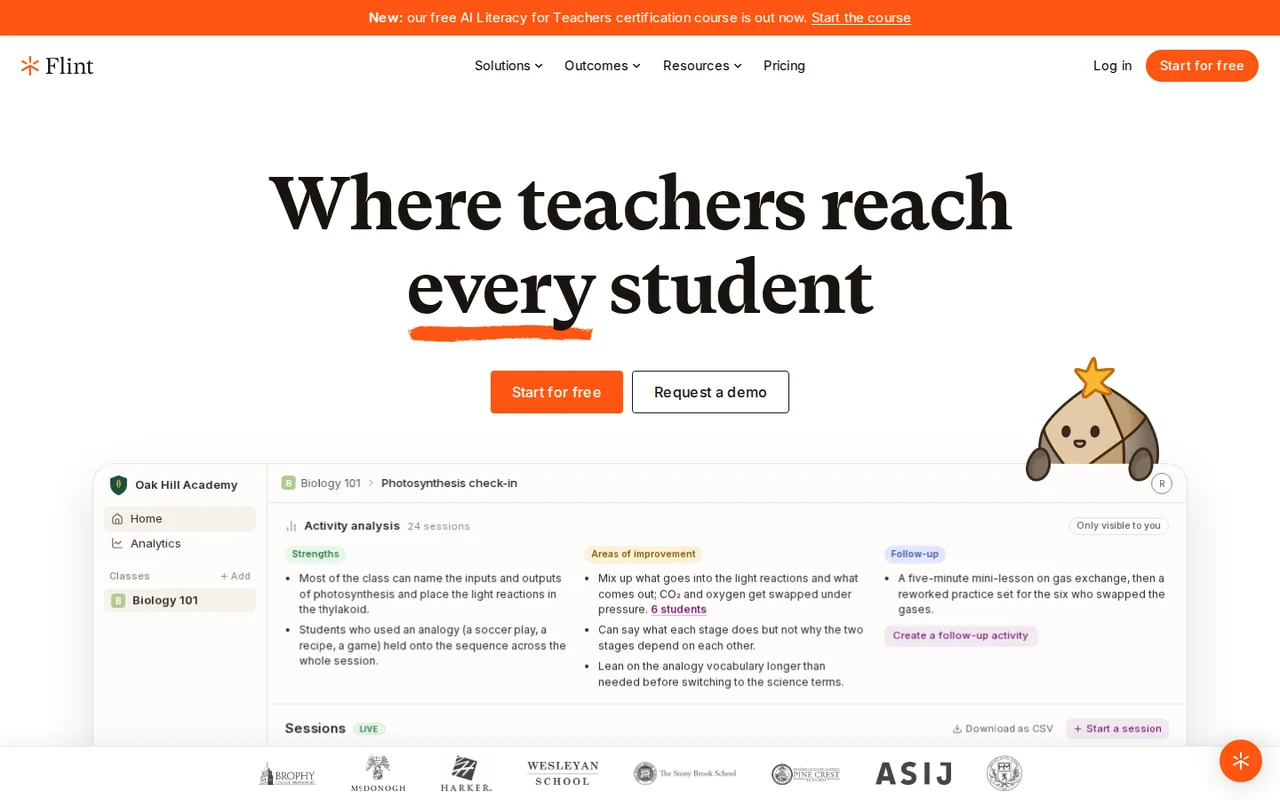
Flint: an AI tutor whose student chats teachers can read, free up to 80 users, with every larger tier sold through sales
Updated October 6, 2026 · By Elias Brandt · Documentation review, not tested hands-on
Pros
- Free pilot for a small group
- Teachers can see everything
- Built on the teacher's own materials
- No user-data training
Cons
- Sales-only above 80 users
- Free plan scope unclear
- Free plan gets the faster model
- Conflicting support and data statements
- Integrations lack grade passback
Bottom line
Up to 80 users (teachers, students or administrators); faster AI model than paid plans; whether it expires is not stated.
If your school wants a small AI pilot, the free plan for up to 80 users is enough to run a few classes before any sales conversation.
Not a fit for an individual teacher who wants to pay by card, because every paid tier goes through sales and no single-teacher price is published.
Best forSchools running a small AI pilotTeachers who want to see student AI useAdministrators comparing quotes
Strengths, limits and who it suits, in full
Strengths
- Free pilot for a small group The pricing page lists a free plan for up to 80 users, which covers a few classes.
- Teachers can see everything Live sessions, transcripts, alerts and summaries are listed for teachers and administrators.
- Built on the teacher's own materials Activities can draw on uploaded PDFs, slides and links, and the AI prioritises them, according to the FAQ.
- No user-data training The FAQ and security page say user data is not used to train or fine-tune models.
Limits
- Sales-only above 80 users Every paid tier says Contact sales; there is no self-serve checkout or published price for a single teacher.
- Free plan scope unclear The page calls it free, the pilot FAQ calls it a free trial, and no time limit is stated.
- Free plan gets the faster model Paid and trial schools get a more capable model than free-plan schools, according to the FAQ.
- Conflicting support and data statements The FAQs page gives both 9 AM to 9 PM ET and 24/7 chat, and the security page's no-third-party sharing line sits beside a list of infrastructure providers.
- Integrations lack grade passback The FAQ says SIS and LMS integrations do not yet support grade passback or assignments.
Who it suits
- Schools running a small AI pilot up to 80 users is enough for a few classes, so a school can test teacher monitoring before any purchase conversation.
- Teachers who want to see student AI use live sessions, transcripts and alerts suit teachers who will not allow unmonitored chatbots in class.
- Administrators comparing quotes the published tiers make a first budget estimate possible, but anything above 500 users is a custom quote.
How much does Flint cost?
Prices confirmed · checked
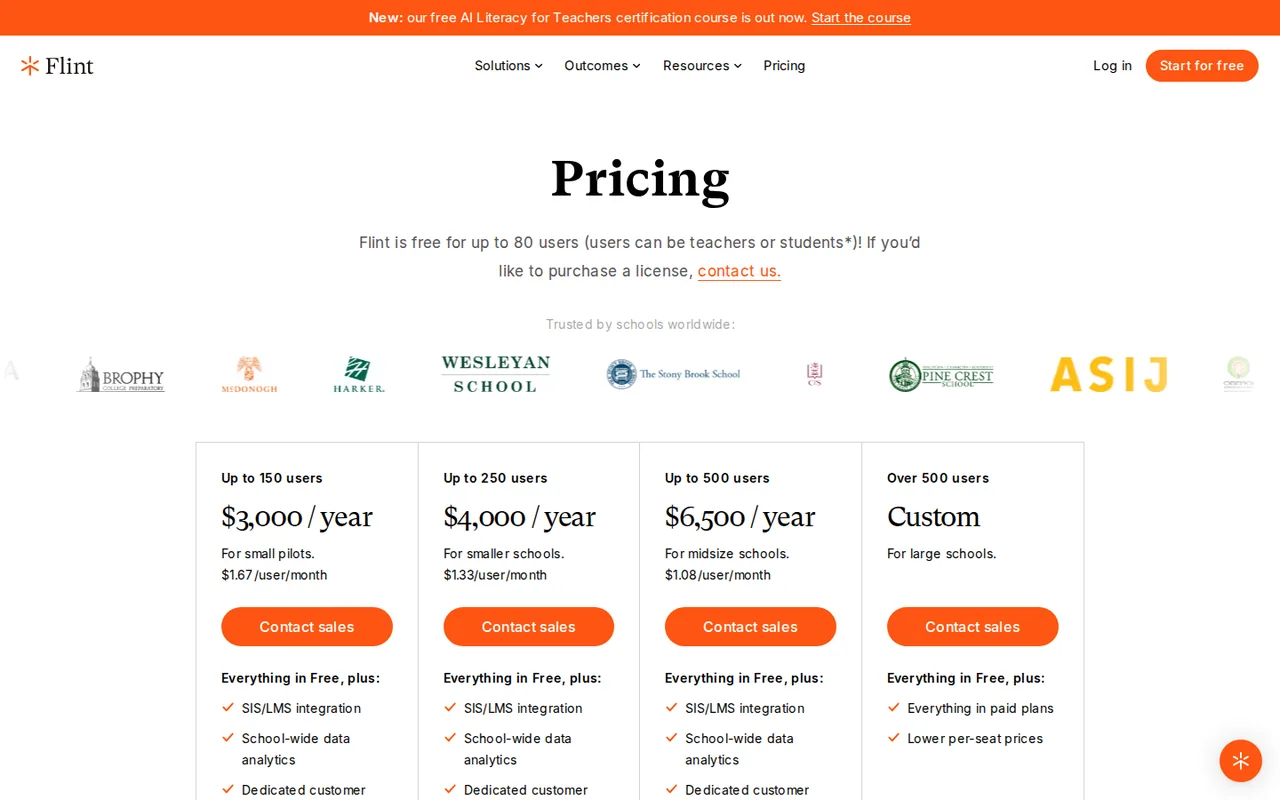
Regional prices: Prices are USD from the pricing page read on 6 Oct 2026: free up to 80 users, then $3,000 a year for up to 150 users, $4,000 for up to 250, $6,500 for up to 500, and custom above 500, each by contacting sales.
The per-user monthly figures on the page ($1.67, $1.33, $1.08) are the provider's division of the yearly price. The tiers are school licences counted by users (teachers, students or administrators); there is no individual or per-teacher price on the page. Plans can be annual or month to month and are prorated if user numbers change, according to the FAQ. The page calls the 80-user plan free but the pilot FAQ calls it a free trial, and no time limit is stated, so ask sales whether it expires. The free plan uses a faster AI model than paid and trial schools. Tax, regional pricing and Title IV funding eligibility were not checked.
| Plan | Price | What you get |
|---|---|---|
| Free | $0 sourceFrom flintk12.com/pricing, checked Oct 6, 2026 (opens in a new tab) | Up to 80 users (teachers, students or administrators); faster AI model than paid plans; whether it expires is not stated. |
| Small pilot | $3,000 per year sourceFrom flintk12.com/pricing, checked Oct 6, 2026 (opens in a new tab) | Up to 150 users; shown as $1.67 per user per month; adds SIS/LMS integration, school-wide analytics and a customer success manager; contact sales. |
| Smaller school | $4,000 per year sourceFrom flintk12.com/pricing, checked Oct 6, 2026 (opens in a new tab) | Up to 250 users; shown as $1.33 per user per month; same additions as the small pilot tier; contact sales. |
| Midsize school | $6,500 per year sourceFrom flintk12.com/pricing, checked Oct 6, 2026 (opens in a new tab) | Up to 500 users; shown as $1.08 per user per month; same additions; contact sales. |
| Large school | Custom | Over 500 users; lower per-seat prices; contact sales. |
How far does it go?
- What a school pays per userThe free plan covers 80 users. A school with 120 users pays the $3,000 tier, which is $3,000 / 120 = $25 per user per year; a school that fills the tier with 150 users pays $20. At 250 users the $4,000 tier is $16 per user per year, and at 500 users the $6,500 tier is $13. The page's $1.67, $1.33 and $1.08 monthly figures are these yearly amounts divided by 12 for a full tier. Because the tiers jump at 80, 150, 250 and 500 users, one user past a limit moves a school to the next price. Arithmetic on published prices; taxes and any month-to-month surcharge were not checked.
Arithmetic from the published allowances above, not a usage test.
Taxes, currency and promotions can change the price you see at checkout.
Try Flint free (opens in a new tab)
Key features
| Feature | What it does | Watch out |
|---|---|---|
| Teachers build activities from their own PDFs, slides, links or code, then assign them to a class (features page) | — | |
| Live sessions table and full transcripts of every student conversation with the AI (features page and FAQ) | — | |
| Grading with editable rubrics, written feedback, a gradebook and follow-up activities (features page and FAQ) | — | |
| Message alerts that flag violence, harassment, self-harm or sexual content for administrators (FAQ) | — | |
| Text-to-speech and speech-to-text across 50+ languages, plus a calculator, graphing and web search (FAQ) | — | |
| Rostering from SIS and LMS systems through Edlink, and Google or Microsoft sign-in (integrations page and FAQ) | — | |
| Teacher control and monitoring | Teachers see each student's chat with an AI activity, can read or export sessions, leave manual feedback and view a class summary; administrators can read all messages school-wide, according to the FAQ. | Full visibility of student chats is a policy choice for the school; the pages do not describe what students are told about it. |
| Which AI models run underneath | The FAQ says Flint uses Anthropic and OpenAI models, a more capable one for paid and trial schools and a faster one on the free plan, and that the model can change over time. | The exact models are not named, so output quality on the free plan cannot be judged from the pages. |
| Data handling | The security page says Flint does not train models on user data, keeps each school's data separate, is GDPR compliant and FERPA-aligned, and has signed state DPAs in seven states. | The same page says no user data is shared with third parties, yet the FAQ lists Anthropic, OpenAI, Vercel, Supabase, Mixpanel and Sentry as providers, so ask for the subprocessor list before signing. |
What Flint costs
Flint sells to schools, not to individual teachers. The pricing page says it is free for up to 80 users, who can be teachers, students or administrators. Above that it lists $3,000 a year for up to 150 users, $4,000 for up to 250 and $6,500 for up to 500, with custom pricing beyond 500. Every paid tier says Contact sales, so there is no self-serve checkout. The page’s $1.67, $1.33 and $1.08 per user per month are the provider’s division of those yearly prices for a full tier.
Two things on the same page need a question to sales. The headline calls the 80-user plan free, but the pilot FAQ calls it a free trial and gives no end date. And the FAQ says schools on the free plan get a faster AI model, while paid and trial schools get a more capable one.
What a school pays per user
Up to 80 users cost nothing. At 120 users a school is in the $3,000 tier, so each user costs $25 a year; fill the tier to 150 and it drops to $20. At 250 users the $4,000 tier is $16 and at 500 users the $6,500 tier is $13. Because the tiers step at 80, 150, 250 and 500 users, one extra user past a limit moves a school into the next price, so count teachers and administrators as well as students.
What teachers and administrators see
According to the features page and FAQ, teachers build activities from their own PDFs, slides or links, watch a live sessions table, read any student’s transcript, set rubrics and create follow-up activities. Administrators can read all messages school-wide, and Flint flags messages about violence, harassment, self-harm or sexual content for review. SIS and LMS rostering runs through Edlink and does not yet support grade passback, and sign-in works with Google or Microsoft accounts.
What to check before adopting it
The security page says Flint does not train models on user data, is GDPR compliant and FERPA-aligned, and has signed state data processing agreements in seven states. It also says no user data is shared with third parties, while the FAQ names Anthropic, OpenAI, Vercel, Supabase, Mixpanel and Sentry as providers, so ask for the subprocessor list. The FAQs page gives support chat hours as 9 AM to 9 PM US Eastern in one answer and 24/7 in another. The 200,000 teacher figure and 98.5% speech accuracy are the provider’s claims with no method shown.
How could you check Flint before buying?
Proposed evaluation · not performed yet
Run one small pilot on the free plan with one class and one teacher.
- Ask sales in writing whether the 80-user plan expires and which AI model the free plan uses.
- Have the teacher build one activity from a real handout and assign it to the class.
- Read three student transcripts and check whether the AI gives hints instead of answers.
- Check that the alerts and administrator views show what your school’s policy requires.
- Request the subprocessor list and your state’s data processing agreement.
Accept it if the transcripts show hints rather than finished answers and the data terms fit your policy. Reject it if the free plan expires without notice or the data answers conflict. No result is recorded here.
Is Flint worth it?
Documentation review plus dated public user reports. Documentation review, not tested hands-on. Not scored.
Worth it if
- If your school wants a small AI pilot, the free plan for up to 80 users is enough to run a few classes before any sales conversation.
- If teachers will only allow AI use they can supervise, the live session view and readable transcripts fit that policy.
- If you need a budget figure before talking to anyone, the published $3,000, $4,000 and $6,500 tiers give a first estimate up to 500 users.
Probably not if
- Not a fit for an individual teacher who wants to pay by card, because every paid tier goes through sales and no single-teacher price is published.
- Not a fit if your gradebook workflow depends on grade passback, because the rostering integrations do not yet support it.
- Not a fit if you must confirm data terms from the pages alone, because the privacy statements and provider list need a written answer from sales.
Flint alternatives
Other research & sources tools checked with the same method. Pick by the job, not by a score.

Comparing AI model answers by voting, without a paid plan

Finding and synthesizing published research

Extracting study data from research papers

Cited answers from your own documents

Web research with linked sources

Checking whether a startup idea has demand and room before building it

Widening a literature review from a few known papers through citations and co-authors

Students and researchers reading a small set of papers who will check every cited passage
Used Flint? Write the first review. Visitor opinions are moderated and kept separate from our source checks.
Frequently asked questions
Is Flint free?
For small groups, yes. The pricing page says Flint is free for up to 80 users, who can be teachers, students or administrators. It does not state whether the free plan expires, and the pilot FAQ calls the same size a free trial, so ask sales. Schools on the free plan get a faster AI model than paid schools, according to the FAQ.
How much does Flint cost for a school?
Paid tiers are $3,000 a year for up to 150 users, $4,000 for up to 250 and $6,500 for up to 500, with custom pricing above 500, all through sales. A full 150-user tier works out to $20 per user per year. Plans can be annual or month to month and are prorated if user numbers change.
Can students under 13 use Flint?
The FAQ says there is no minimum user age and that language level can be set as low as 1st grade, though most schools start in grade 3. It says COPPA compliance depends on the school having a technology waiver that parents sign, and offers to review the school's waiver language.
Does Flint train AI on student data?
No, according to the FAQ and security page, which say Flint does not use user data to train or fine-tune models and keeps each school's data separate. The same pages list infrastructure providers such as Anthropic, OpenAI and Supabase, so request the subprocessor list and your state's data agreement before signing.
Sources and method6 official sources · 12 details checked · Oct 6, 2026
How we checked this profile
12 details on this page were checked against Flint's own pages and help documentation (Oct 6, 2026).
See the checks by section12 documented
| Section | Checks | Last checked | Sources |
|---|---|---|---|
| Article text | 1 documented | flintk12.com | |
| Plans and prices | 3 documented | flintk12.com/pricing | |
| Features | 5 documented | flintk12.com/faqsflintk12.com/security | |
| Who it suits | 1 documented | flintk12.com/faqs | |
| Platforms and integrations | 1 documented | flintk12.com/faqs | |
| Strengths and limits | 1 documented | flintk12.com/faqs |
Sources for this profile
- Flint pricing page with plan tiers and pricing FAQflintk12.com
- Flint homepageflintk12.com
- Flint FAQs on models, privacy, support, rostering and teacher toolsflintk12.com
- Flint features pageflintk12.com
All 6 sources
Official pages read on 6 Oct 2026: homepage, pricing page with its FAQ, FAQs, features, integrations and security pages. We did not create an account, run an activity or test the AI. The pricing page gives free up to 80 users in the headline but calls the same size a free trial in the pilot FAQ; the FAQs page also lists 9 AM to 9 PM ET chat hours next to a 24/7 chat claim, and the security page says no data is shared with third parties while the FAQ names infrastructure providers. We report these conflicts instead of resolving them. The 200,000 teacher count, 98.5% speech accuracy and testimonials are provider claims; third-party reviews were not used. The proposed evaluation has not been performed.
Sources checked Oct 6, 2026. Found something out of date? See how we correct profiles.