


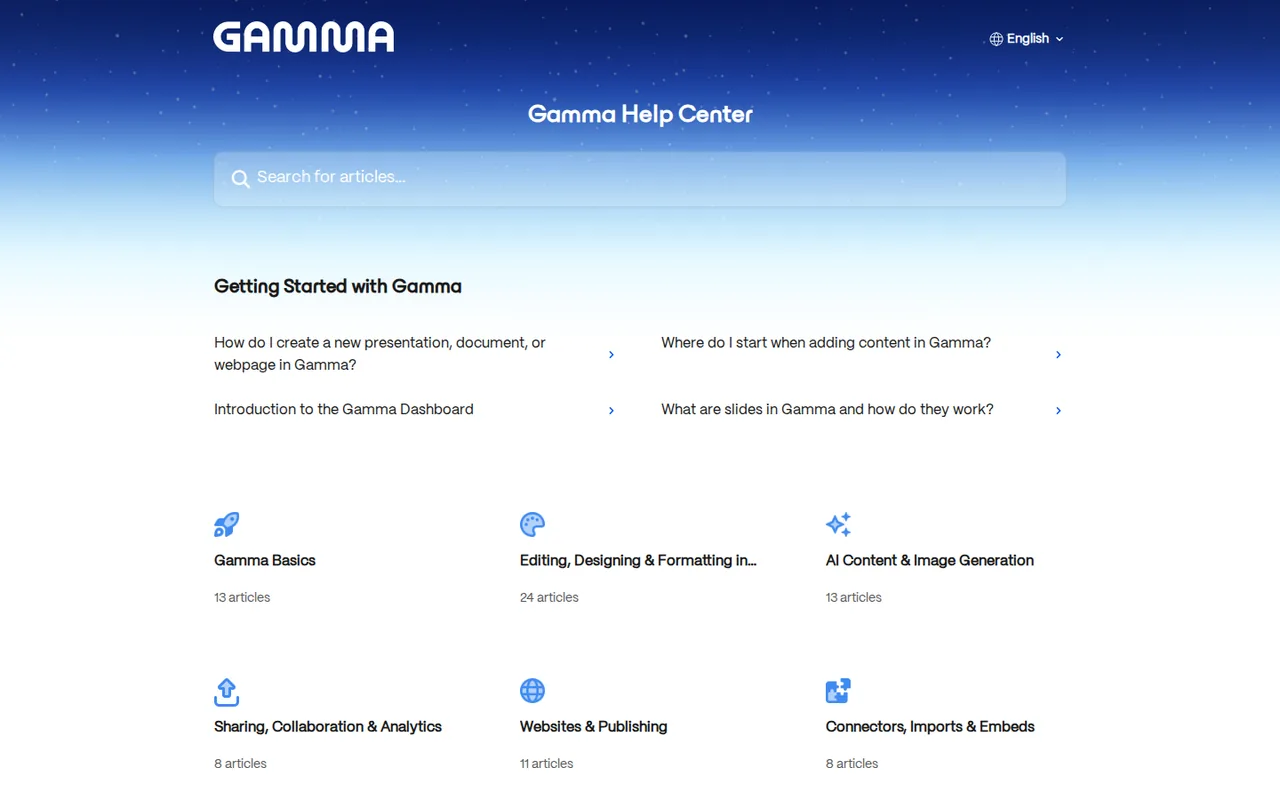
Key features
- AI agent creationDescribe a deck, answer the agent's clarifying questions, approve its plan and let it build slides, text and images.
- Import and pasteTurn existing PowerPoint files, documents, PDFs, web pages or pasted notes into editable gammas.
- Export optionsDownload a gamma as PDF, PNG or PowerPoint, or move it to Google Slides through a PPTX upload.
- Themes and brandingCustomize colors, fonts and logos in themes and save them to a workspace for the team.
- Sites and custom domainsPublish a gamma as a website on a gamma.site subdomain or, on Pro and above, a custom domain.
- API and connectorsGenerate content from Zapier, Make, n8n or MCP-capable AI tools; API access requires Pro or higher.
- AI generation limitsCreate with AI generates up to 10 slides per prompt on Free and up to 100 on paid workspaces, and more slides can be added afterward with Agent or by hand.
Falls short Every AI action spends credits, and Agent charges per slide it generates, so large decks draw down the monthly allowance quickly.
- PowerPoint and PDF exportExports cover PDF, PNG and PPTX, tables can export as editable PowerPoint tables, and fonts are embedded in the file.
Falls short Exports follow Present Mode, some effects such as gradient headings and frosted backgrounds fall back, and Word export is not supported.
- Integrations and APIConnectors and automation platforms can generate presentations, documents, webpages and social posts through the Gamma MCP server or API.
Falls short Integrations support content creation only; existing gammas must be edited in the Gamma app.
- Import of existing decksPowerPoint, Word and PDF files can be imported faithfully or restyled; imports are capped at 200 MB per file, and PDFs at 100 MB per file.
Falls short Some charts arrive as static images and Excel files cannot be imported directly.
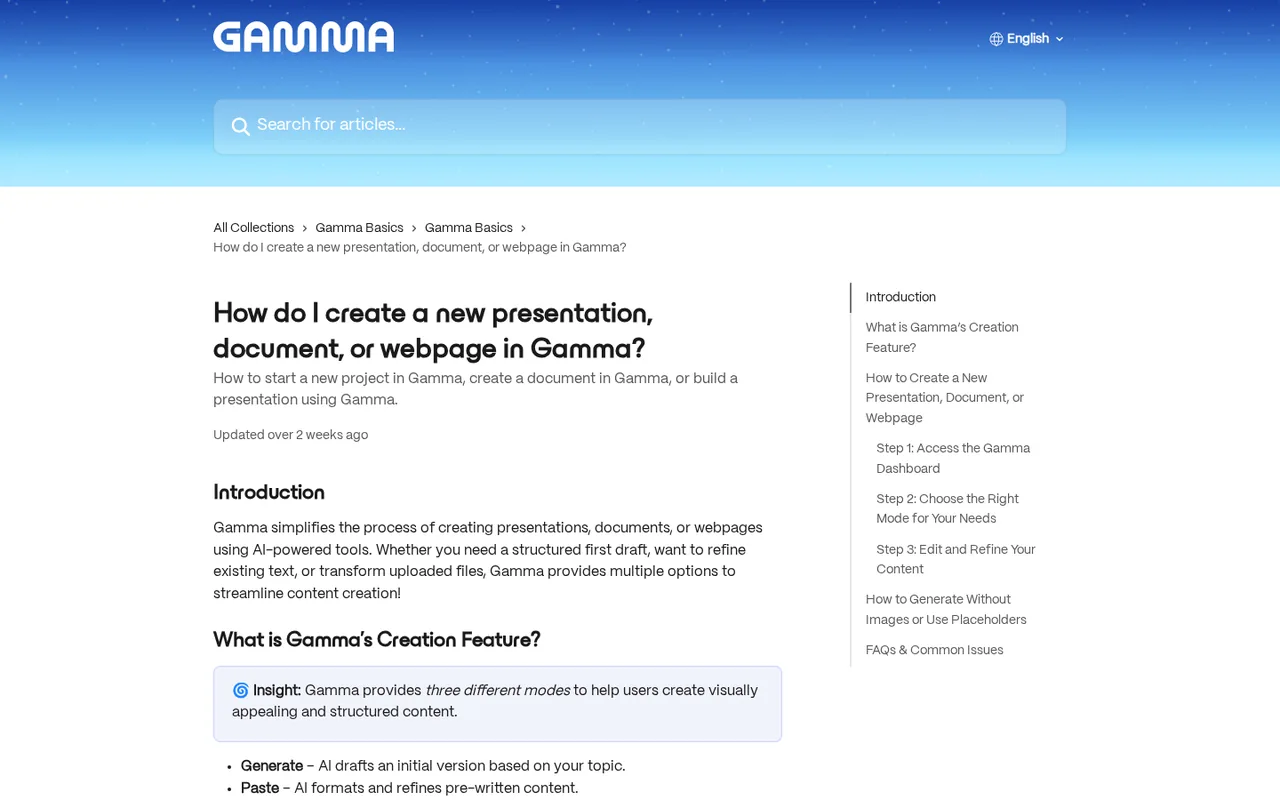
Strengths and limits
Strengths
- Usable free plan: The Free plan needs no credit card and includes AI creation, imports and PDF, PPTX and PNG export (Google Slides via PPTX upload).
- Credits roll over: Unused paid-plan credits carry into the next month instead of expiring.
- Several output types: The same tool produces presentations, documents, social formats and published websites.
- Editable PowerPoint output: PPTX exports embed theme fonts and can keep tables editable in PowerPoint.
More limits to plan around
- Per-seat billing: Every paid plan bills per workspace member, so each added collaborator increases the cost.
Who else is it for?
Editorial assessment, based on documented features
- Builders automating document creationConsider the API or connectors when decks are generated from data in other tools and later edited in the app.
How much does Gamma cost?
Some details not confirmed · checked
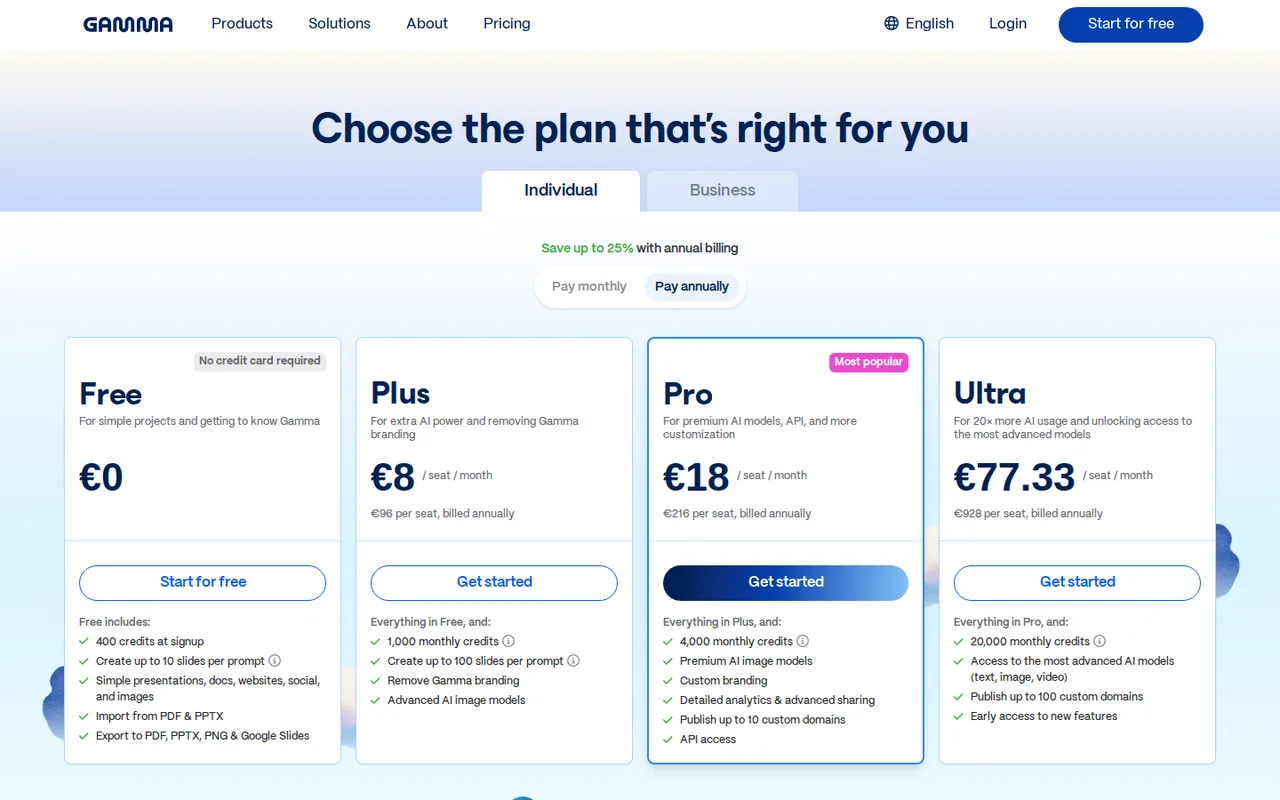
Prices shown are annual billing in EUR (Germany); check the monthly price at checkout. Business is listed in US dollars in the help center. Enterprise is quoted by sales.
Free
FreeEUR 0 shown
400 credits at signup, one-time; up to 10 slides per prompt; PDF, PPTX and PNG export with a Gamma badge on PDF and PPTX files.
Plus
EUR 8 per seat per monthbilled annually · EUR 96 per seat per year
1,000 monthly credits; up to 100 slides per prompt; removes Gamma branding.
Pro
EUR 18 per seat per monthbilled annually · EUR 216 per seat per year
4,000 monthly credits; custom branding, detailed analytics, up to 10 custom domains, API access.
Ultra
EUR 77.33 per seat per monthbilled annually · EUR 928 per seat per year
20,000 monthly credits; most advanced models; up to 100 custom domains.
Business
USD 40 per member per monthbilled annually · help center; not on the EUR pricing page
SSO, shared credit pool, 100 custom domains, locked training opt-out; monthly credit allowance stated two ways in the help center.
How far does it go?
- Five authors on annual PlusAssuming five paid seats at EUR 96 each per year, the team pays EUR 480 upfront (5 x 96), equivalent to EUR 40 per month. This is a seat-cost calculation, not a prediction of decks per AI credit.
Arithmetic from the published allowances above, not a usage test.
Taxes, currency and promotions can change the price you see at checkout.
Which Gamma plan fits how you work?
Editorial assessment
The plan choice turns on four documented thresholds, not on how good the drafts look. Deck length, whether files leave Gamma with a badge, whether you share online behind a password or on your own domain, and how many people need a seat decide it.
- Stay on Free if you try a few decks of 10 slides or fewer and a badge on exported PDF and PPTX files is acceptable.
- Move to Plus when a single prompt needs more than 10 slides, when client files must be unbranded, or when you need a credit balance that refills every month.
- Choose Pro when you need password-protected docs, viewer analytics, your own domain (up to 10) or API access for automated decks.
- Consider Ultra only if you need more than 10 custom domains, the most advanced models or 20,000 monthly credits; its annual price is more than four times Pro’s.
- Look at Business when SSO or a shared team credit pool is a requirement rather than a convenience.
How do AI credits work in Gamma?
Credits meter AI work. Create with AI is charged per slide and per image, and editing with the agent, adding cards with AI or trying new layouts also spend credits. The amount varies with the model and the length of the request, and Gamma states that rates can change. Errors and clarification requests are not charged.
Paid plans refill credits monthly, including annual subscriptions, which receive them month by month rather than upfront. Unused plan credits roll over up to twice the monthly allowance, so a Plus workspace with 1,000 monthly credits can hold 2,000 plan credits; purchased credits sit in a separate bucket without a cap. A separate token limit caps how much text one initial generation can process: 50,000 tokens on Free and 100,000 on Plus and Pro; the tokens guide gives no figure for Ultra.
Continue reading · 5 more sectionsShow lessWhat does the free plan really include? · What does a team actually pay? · Can you edit and export after generation? …
What does the free plan really include?
Free costs EUR 0 and needs no credit card. It covers presentations, docs, websites, social formats and images, import from PDF and PPTX, and export to PDF, PPTX and PNG (Google Slides via a PPTX upload).
The catch is that the 400 signup credits never refresh. After that you earn 200 credits per referral up to a 2,000-credit balance, or upgrade. Exported PDF and PPTX files show a Made by Gamma badge, and Pro-level sharing such as password protection is unavailable. The 10-slide cap applies to the initial generator only; slides can still be added with the agent or by hand.
What does a team actually pay?
Every paid plan bills per workspace member, so the seat count matters more than the plan price. On the annual EUR prices shown, a five-person team pays about EUR 480 a year on Plus (5 x EUR 96) and EUR 1,080 on Pro (5 x EUR 216). The pricing page says annual billing saves up to 25%.
Business is listed in the help center at $40 per member per month, billed annually, with SSO and a shared credit pool. Its credit allowance is stated two ways: the Business article gives 6,000 per member each month, while the refund policy table shows 10k, so check the figure at checkout. Enterprise is priced by sales.
Can you edit and export after generation?
Yes. The agent asks clarifying questions, proposes a plan and then builds the gamma; you can request changes in chat, restyle without regenerating the content, or edit by hand. Downloads come as PDF, PNG and PowerPoint, and Google Slides is reached by uploading the PPTX.
The limits matter for anyone who must hand off a file. Files are rendered from Present Mode rather than the editor, Google Slides ignores embedded fonts, and there is no Word export. Very long gammas of around 150 or more slides can fail to export, so split large decks before the deadline.
How do branding, sharing and custom domains work?
Anyone can share a gamma by link with view, comment or edit access. Hiding the badge requires Plus or higher; making a gamma discoverable on the web and password-protecting documents require Pro or higher, and Gamma sites cannot be password protected. Every user can publish a site to a gamma.site subdomain, while custom domains need Pro.
Themes control colors, fonts and logos. In the current version they live on each file, and a theme can be saved to the workspace for reuse. Viewer analytics such as time per slide require Pro.
What should a trial deck test?
Proposed evaluation · not performed yet
Take a real brief of 12 to 15 slides and generate it on Free, noting the credits used and where the 10-slide cap forces manual additions. Export the result to PPTX and PDF, open both in the application your audience uses, and record which fonts, charts or effects changed. Then compare the credits spent with the monthly allowance of the plan you are considering.
Gamma alternatives
Other presentations tools profiled with the same source-checked method. Pick by the job, not by a score.
| Tool | Free access | Paid plans from | Consider it for |
|---|---|---|---|
| GammaThis profile | Free access available | EUR 8 per seat per month | AI first drafts of decks, documents and simple websites |
| Pitch | Free access available | EUR 10 per month | Sales and client-facing decks |
| Beautiful.ai | Free trial only | $14.50 per month | Recurring decks and fast drafts |


Gamma user reviews
Visitor opinions, moderated before publishing. Separate from our source checks; we do not score tools.
Frequently asked questions
What happens if a paid plan runs out of credits?
You can keep using every non-AI feature and edit by hand. Paid workspaces can buy extra credits with no limit on how many you hold, and purchased credits do not expire while the plan stays active. Gamma spends plan credits first, then purchased credits, then any workspace pool.
Are Gamma credits shared across a team?
Not on most plans. On Free, Plus, Pro and Ultra, each member gets an individual allowance. Business and Enterprise add a workspace pool that members draw from once their own credits are used. Credits cannot be transferred between accounts, so an unused balance cannot be moved to a colleague.
Can I see what an AI image will cost before generating it?
Yes, for image generation and editing Gamma shows the credit cost of the chosen model before you generate, so you can pick a cheaper option. For text generation, longer and more complex requests generally use more credits, and more advanced models may use more than standard ones.
Can I upgrade, try a paid plan and get a refund?
A new subscription receives that plan's monthly credit allowance immediately. Refunds are offered only within the first 3 days of subscribing and only if credit usage stays below the plan's threshold, so a heavy trial month is not refundable. Plan the test before upgrading rather than after.
Can I edit an existing gamma through Zapier, Make or the API?
No. Zapier, Make, n8n and MCP connectors in tools such as ChatGPT or Claude can create presentations, documents, webpages and social posts, but changes to an existing gamma happen in the app. API access needs a Pro, Ultra or Business account.
Should I consider Pitch or Beautiful.ai instead?
Pitch has a free plan for up to five members and suits decks shared as tracked links with viewer analytics. Beautiful.ai has no free plan, only a 14-day trial, but lists unlimited AI generation and automatic layouts. Gamma is the better fit if the same tool must also produce documents and web pages.
How we checked this profile
37 details on this page were checked against Gamma's own pages and help documentation (Sep 24–25, 2026). 3 are still open and listed below.
See the checks by section30 documented4 editorial assessment3 open
| Section | Checks | Last checked | Sources |
|---|---|---|---|
| Article text | 6 documented 2 editorial | help.gamma.app/8077107-how-can-i-upgrade-…help.gamma.app/11047156-what-are-gamma-to…help.gamma.app/8022861-what-s-the-easiest…help.gamma.app/15939201-why-doesn-t-my-ex…gamma.app/pricing | |
| Plans and prices | 13 documented 3 open | gamma.app/pricinghelp.gamma.app/7834324-how-do-credits-wor…help.gamma.app/11016396-what-are-slides-i…help.gamma.app/11594955-what-options-does…help.gamma.app/16951482-what-is-gamma-ent…help.gamma.app/11048258-what-does-per-mem…help.gamma.app/11047840-how-can-i-import-… | |
| Features | 2 documented | help.gamma.app/11047226-how-do-collaborat…help.gamma.app/8429268-how-do-i-create-pu… | |
| Questions | 8 documented 1 editorial | help.gamma.app/11962420-does-gamma-have-a…help.gamma.app/13943863-how-do-i-use-gamm…help.gamma.app/11048496-what-is-gamma-s-r…help.gamma.app/7834324-how-do-credits-wor…gamma.app/pricing | |
| Platforms and integrations | 1 documented | gamma.app/pricing | |
| Other details | 1 editorial | gamma.app/pricing |
Still open
- Monthly-billing prices for Plus, Pro and Ultra are not confirmed.Not verified · checked · Source (opens in a new tab)
- The Business price is not shown on the pricing page.Not confirmed · checked · Source (opens in a new tab)
- Business monthly credits are stated two ways in the help center.Not confirmed · checked · Source (opens in a new tab)
Sources for this profile
- Gamma pricinggamma.app
- How do credits work in Gamma?help.gamma.app
- Gamma subscription plans and upgradeshelp.gamma.app
- Exporting a gammahelp.gamma.app
All 20 sources
- Gamma options for businesshelp.gamma.app
- Sharing and collaboration settingshelp.gamma.app
- Slides and generation limitshelp.gamma.app
- Outbound connectors and integrationshelp.gamma.app
- Gamma tokenshelp.gamma.app
- Export troubleshootinghelp.gamma.app
- Importing contenthelp.gamma.app
- Refund policyhelp.gamma.app
- Per-member billinghelp.gamma.app
- Gamma Enterprisehelp.gamma.app
- Gamma APIhelp.gamma.app
- Publishing a sitehelp.gamma.app
- Create with Agenthelp.gamma.app
- Themes guidehelp.gamma.app
- Analytics guidehelp.gamma.app
- Gamma for Slackhelp.gamma.app
Gamma's pricing page (annual EUR prices on the Individual tab) and help center articles on credits, plans, export, sharing, business options and integrations. Help articles state the Business credit allowance two ways.
Sources checked Sep 24–25, 2026. We read the vendor's documentation; we did not test the product or score it. Found something out of date? See how we correct profiles.


