

Key features
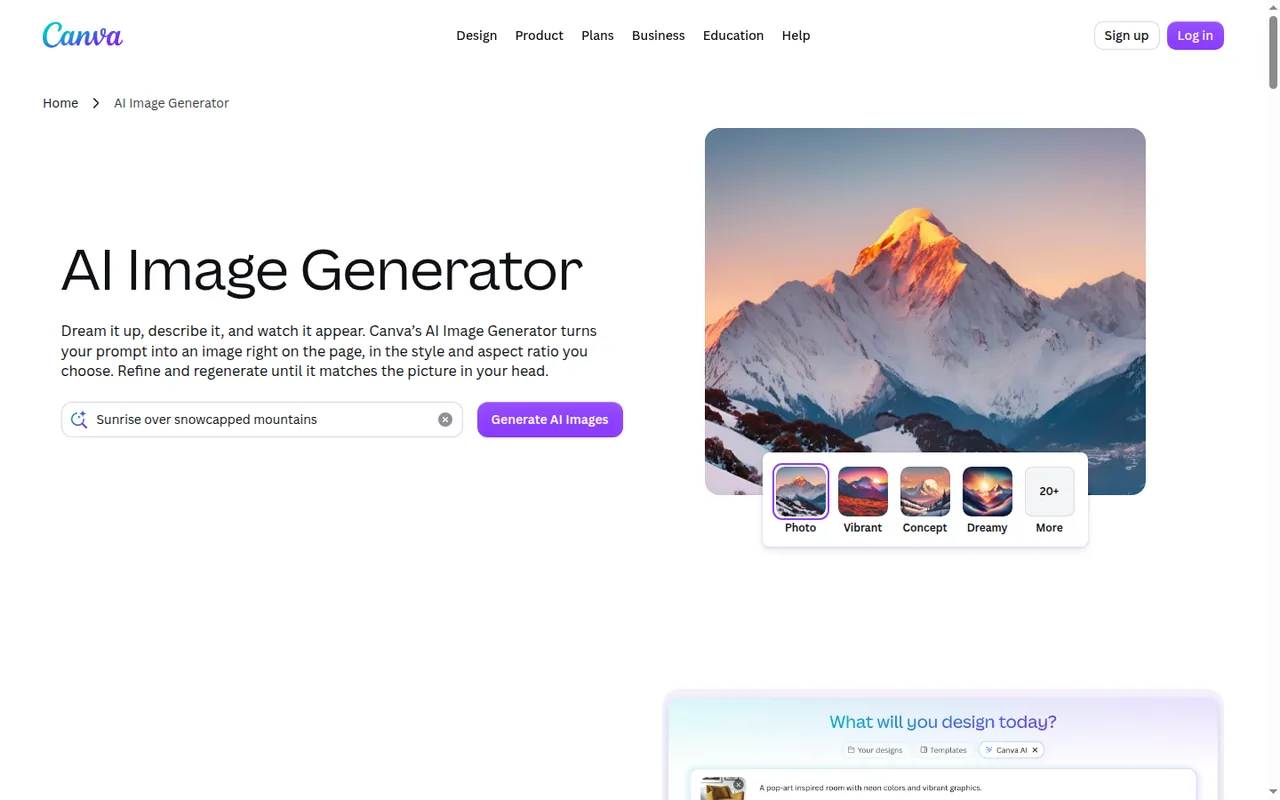
- AI Image GeneratorTurn a text prompt or reference photo into an image with 10+ preset styles and a chosen aspect ratio.
Results land inside a design, where Canva's photo tools and Brand Kit styling apply; the same page also offers Text to Graphic and Text to Video.
Falls short Premium and Ultra generations draw from a monthly allowance that starts at up to 20 uses on Free, and Ultra quality is limited to paid plans.
- Magic LayersSplit a flat or AI-generated design into editable layers so text, colours and elements can change without regenerating.
Works on uploaded flat images as well as AI-generated designs; Canva recommends JPEG or PNG input.
Falls short It is labelled beta and, as a Premium AI tool, uses the monthly allowance.
- Canva AI design generationDrafts presentations, social posts and flyers from a prompt that you edit like any template.
- AI quality tiersChoose Standard, Premium or Ultra quality for AI photos and videos; Ultra is limited to paid plans.
- Brand KitsStore logos, colours and fonts for reuse, with Brand Controls to restrict designs to Brand Kit colours and fonts.
- Multi-format exportDownload as JPG, PNG, SVG, PDF, PPTX, GIF or MP4, with some options reserved for paid plans.
- Shared AI allowancePremium and Ultra tools draw from one monthly allowance per member, and Ultra uses it faster than Premium.
Falls short The published use counts are estimates for simple tasks; complex prompts and mixed tools lower the real number.
- Export formatsDesigns download as JPG, PNG, SVG, PDF, PPTX, DOCX, GIF or MP4, and on paid plans bulk download handles up to 200 designs at once (25 for MP4 or GIF).
Falls short PPTX and DOCX files may look different in Microsoft apps.
Strengths and limits
Strengths
- AI inside a full editor: Generated images and designs land in the same editor used for templates, layouts, brand assets and exports.
- Working free plan: Free lists 1.6M+ templates, 5GB of storage and up to 20 Standard or Premium AI uses each month.
- Unmetered Standard AI on paid plans: On paid plans, Standard AI tools and design tools such as Magic Write do not draw from the monthly allowance, subject to fair use.
- Broad export options: Downloads include PNG, PDF Print, PPTX, GIF and MP4 (SVG and transparent PNG on paid plans).
More limits to plan around
- Uncertain copyright for AI output: Canva notes that many jurisdictions, including the US, do not give copyright protection to AI-created works.
Who else is it for?
Editorial assessment, based on documented features
- People comparing image generatorsConsider it when layout and export matter more than fine-grained model control, and compare a dedicated generator on the same prompt.
How much does Canva cost?
Prices confirmed · checked
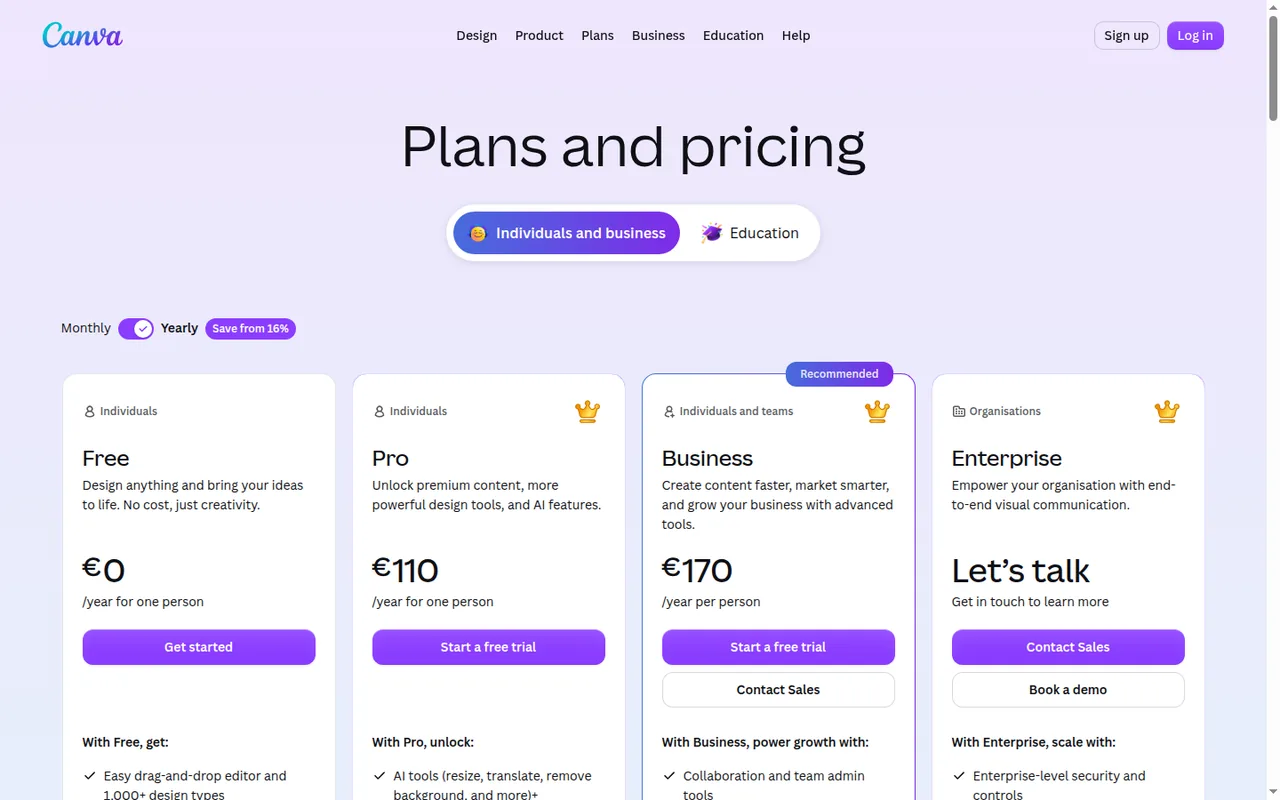
Prices are in EUR as shown on the en_gb pricing page to a visitor in Germany; taxes and checkout totals may differ by region. Yearly billing saves from 16%. Paid AI allowances reset monthly on the billing date even on yearly plans. The AI top-up price is not published.
Free
EUR 0for one person
Up to 20 Standard or Premium AI uses per month; 1.6M+ templates; one Brand Kit (3 colours only); 5GB storage.
Pro
EUR 12 per monthbilled monthly · EUR 110 per year billed yearly
One person; 10x Free AI allowance (up to 200 Premium or 20 Ultra uses); premium content; 5 Brand Kits; 100GB storage.
Business
EUR 17 per month per personbilled monthly · EUR 170 per year per person billed yearly
Team tools; 20x Free AI allowance (up to 400 Premium or 40 Ultra uses); 100 Brand Kits and approvals; Flourish; 500GB storage.
Enterprise
Contact provider
SSO and SCIM, custom apps, 1,000 Brand Kits, 1TB storage; priced by sales.
AI Pass add-on
USD 100 per person per monthhelp center; EUR price not shown
40x Pro or 20x Business AI allowance; web-managed Pro, Teams, Business and Nonprofits plans only.
How far does it go?
- Pro allowance per dayPro's estimate of up to 200 simple Premium uses a month is about 7 a day over a 30-day month (200 / 30); Ultra quality at up to 20 uses is fewer than one a day.
- AI Pass on a Pro seatAI Pass gives 40 times the Pro allowance, so on Canva's own estimate it reaches about 8,000 simple Premium uses a month (40 x 200) for an extra USD 100 per person, a price the help center gives only in US dollars.
- A five-person Business teamBusiness bills per person, so five members pay about EUR 85 a month on monthly billing (5 x EUR 17) or EUR 850 a year on yearly billing (5 x EUR 170), and each keeps a separate allowance.
Arithmetic from the published allowances above, not a usage test.
Taxes, currency and promotions can change the price you see at checkout.
Which Canva plan fits how much AI you use?
Editorial assessment
The choice turns on three documented limits: how many Premium or Ultra generations you need each month, whether files must leave Canva without watermarks or with transparent backgrounds, and how many people and Brand Kits you manage.
- Stay on Free if about 20 simple AI generations a month are enough, one Brand Kit with three colours covers your branding, and you can live without transparent PNG, SVG or CMYK exports.
- Move to Pro when you work alone and need Ultra quality, premium templates and assets, or five Brand Kits; only one person can use a Pro account.
- Choose Business when two or more people design together, need approvals or Flourish charts, or each need their own allowance of up to 400 Premium uses; Business bills on a pay-as-you-grow model for members who accept an invitation.
- Talk to sales about Enterprise when SSO, SCIM provisioning, 1,000 Brand Kits or 1TB of storage are requirements.
- Add AI Pass only when a web-managed Pro or Business seat keeps hitting its monthly cap.
How does Canva’s AI allowance work?
Canva splits its AI tools into two groups. AI design tools such as Magic Write, Translate and AI Voice, plus every Standard AI tool on paid plans, do not draw from the monthly allowance, subject to fair use limits. Premium and Ultra tools, such as Magic Layers, design generation and Canva AI image and video creation, share one allowance per person, and higher tiers use it faster.
The published use counts are estimates that assume one simple, low-consumption tool type at a time, so complex prompts and a mix of tools lower the real number. Paid allowances reset on the billing date every month, including on yearly plans, while Free resets at midnight UTC on the first of the month. Allowances belong to each member and are not pooled across a team.
Continue reading · 5 more sectionsShow lessWhat does the free plan leave out? · What do AI Pass and AI top-ups add? · Can you edit and export images after generation? …
What does the free plan leave out?
Free costs EUR 0 for one person and includes the drag-and-drop editor, 1.6M+ templates, 4.7M+ photos, videos, graphics and audio, and 5GB of cloud storage. Its AI covers Standard and Premium quality only; Ultra needs a paid plan.
The practical limits sit in downloads and licensing. Transparent PNG backgrounds, SVG export, compressed PDFs and CMYK options are reserved for paid plans. If a design contains premium elements, a Free user can buy a Pro Content License, upgrade, or download a watermarked draft, and changing MP4 quality from the default 1080p also triggers an upgrade prompt.
What do AI Pass and AI top-ups add?
AI Pass is listed at USD 100 per person per month and gives 40 times the Pro allowance or 20 times the Business allowance. It is unavailable on Free, Education and Enterprise, during trials, on prepaid plans and on subscriptions managed through the App Store or Google Play.
AI top-ups are one-time Business purchases equal to one month of Business allowance and stay valid for 30 days. The help article does not state a top-up price, so the cost appears only at checkout.
Can you edit and export images after generation?
Yes. The AI Image Generator offers text-to-image with more than ten preset styles such as Photo, Cinematic and Vector, a choice of aspect ratio, and editing with the regular photo tools. Magic Layers, labelled beta, splits a flat design into editable layers so text and colours can change without regenerating, and each use counts toward the AI allowance.
Exports cover JPG, PNG, SVG, PDF Standard, PDF Print, GIF and MP4, plus PPTX for presentations and DOCX for Canva Docs only. In Microsoft apps, animations and embedded videos from PPTX files may not play. A PDF made from a design with cropped images still contains the original, uncropped image.
Who owns AI images made in Canva, and can admins limit AI?
Canva states that, between the user and Canva and to the extent permitted by law, you own images you create with its AI image tools such as Magic Media. Its AI Product Terms add that you do not own output that edits content from Canva’s library, and many jurisdictions, including the US, do not give copyright protection to AI-created works. Commercial use is allowed, but output may not be unique and may resemble existing designs.
Canva AI cannot be fully turned off, but team and school admins can control who has access to AI features.
How should you trial Canva against a dedicated image generator?
Canva places image generation inside a template, layout and export workflow, and its help center says some of its image tools use a model from Leonardo.Ai; a Canva account can also sign in to Leonardo.Ai’s own Free plan. If image quality and model control matter more than layout, read the Midjourney, Adobe Firefly and Leonardo.Ai profiles.
Proposed evaluation · not performed yet
During a trial, generate ten images for a real campaign at Standard and Premium quality, then turn two of them into layered designs with Magic Layers. Watch the AI usage tracker after each step. Export the results as PNG, PDF Print and PPTX, open them where your audience works, and note any font or layout changes.
Canva alternatives
Other images & design tools profiled with the same source-checked method. Pick by the job, not by a score.
| Tool | Free access | Paid plans from | Consider it for |
|---|---|---|---|
| CanvaThis profile | Free access available | EUR 12 per month | AI images placed straight into templated designs |
| Leonardo.Ai | Free access available | USD 12 per month | AI images with a daily free allowance |
| Midjourney | No free tier | USD 10 per month | AI images and short image-to-video clips from text and image prompts |
| Adobe Firefly | Free access available | EUR 10.98 per month | AI images, video and audio inside an Adobe workflow |


Canva user reviews
Visitor opinions, moderated before publishing. Separate from our source checks; we do not score tools.
Frequently asked questions
Can two people share one Canva Pro account?
No. Canva's pricing page says a Pro account is for one person only. A shared login would also share a single AI allowance and one set of Brand Kits. For two or more designers, the Business plan bills per member and gives every member a separate AI allowance, plus team tools and approvals.
Can I try Pro or Business before paying?
Yes. Canva offers a free trial of Pro or Business, available once per account and once per payment method. The trial gives the same AI allowance as Canva Free, so it shows the editor and premium content but not the paid AI volume. AI Pass cannot be added during a trial, and the trial length is not stated in the help articles.
How much larger is the Pro content library?
The pricing page lists 3.6M+ templates and 141M+ premium assets on Pro, compared with 1.6M+ templates on Free. Pro also adds social content scheduling. On Free, a design that uses a premium element can still be finished, but downloading it without a watermark needs a license or an upgrade.
Can I export spreadsheets and download many designs at once?
Canva Sheets can be downloaded as CSV or XLSX. On paid plans, bulk download handles up to 200 designs in one go, or up to 25 when the files are MP4 or GIF. PPTX is limited to presentations and DOCX to Canva Docs, so check the design type before you export.
Is Canva AI 2.0 available on every plan?
Not yet. The pricing page lists Canva AI 2.0 as a new feature on Pro and Business and marks it Soon on Enterprise, while the Canva AI landing page still labels it Coming Soon. Free is not listed for it. Check the editor itself for the current state on your account.
Which devices can I use Canva on?
Canva runs in the browser and has a Windows desktop app for Windows 10 and later. Canva states that apps are also available for Mac, iOS, Android and Chromebook. Designs, Brand Kits and the AI allowance belong to the account, so the same monthly limit applies whichever device you use.
How we checked this profile
30 details on this page were checked against Canva's own pages and help documentation (Sep 24, 2026). 1 is still open and listed below.
See the checks by section27 documented2 editorial assessment1 open
| Section | Checks | Last checked | Sources |
|---|---|---|---|
| Article text | 3 documented 1 editorial | canva.com/pricingcanva.com/copyright-design-ownershipcanva.com/new-canva-ai-faqcanva.com/set-up-leonardo-with-canva | |
| Plans and prices | 15 documented 1 editorial | canva.com/pricingcanva.com/ai-accesscanva.com/canva-ai-quality-tiers-sta…canva.com/ai-passcanva.com/ai-top-upscanva.com/download-or-purchase | |
| Questions | 4 documented 1 open | canva.com/pricingcanva.com/upgrade-to-canva-pro-or-bu…canva.com/download-or-purchasecanva.com/windowscanva.com/canva-ai | |
| Features | 5 documented | canva.com/download-file-typescanva.com/magic-layerscanva.com/ai-image-generator |
Still open
- Canva AI 2.0 availability is not confirmed for every plan.Not confirmed · checked · Source (opens in a new tab)
Sources for this profile
- Canva plans and pricingcanva.com
- Understanding your AI usagecanva.com
- Understanding AI Passcanva.com
- Download file typescanva.com
All 20 sources
- Download or purchase designscanva.com
- Upgrading to Canva Pro or Businesscanva.com
- Copyright ownership of designscanva.com
- AI Image Generatorcanva.com
- AI quality tierscanva.com
- Transparent backgroundcanva.com
- About Canva Businesscanva.com
- Understanding AI top-upscanva.com
- Magic Layerscanva.com
- Canva AI FAQcanva.com
- Leonardo.Ai with Canvacanva.com
- Brand Kitscanva.com
- Canva for Windowscanva.com
- Create designs with Canva AIcanva.com
- AI Product Termscanva.com
- Canva AIcanva.com
Canva's pricing page (en_gb locale), AI Image Generator and Magic Layers pages, and help center articles on AI usage, AI Pass, AI top-ups, quality tiers, downloads, upgrades, Brand Kits, copyright and Leonardo.Ai. Prices were read in EUR from the en_gb pricing page. The free trial length and the AI top-up price are not stated in these pages.
Sources checked Sep 24, 2026. We read the vendor's documentation; we did not test the product or score it. Found something out of date? See how we correct profiles.


