

What is PhotoEditor.ai, in short?
Updated November 18, 2026 · By Elias Brandt · Documentation review, not tested hands-on
Pros
- Four tools are free without an account
- Credit cost is shown before each run
- Pro is the cheapest per credit of the first two plans
- One-time credit packs exist after cancelling
- The pricing FAQ describes a 14-day money-back guarantee
Cons
- Discounted prices are described as limited time
- Starter is personal use only
- Annual prices were not readable on the page text
- The API is not available yet
- Ratings and user counts on the site are marketing claims
Best forPeople fixing old or blurry photosSellers cleaning product imagesOccasional users who need a few editsNot for anyone who needs an API today
Strengths, limits and who it suits, in full
Strengths
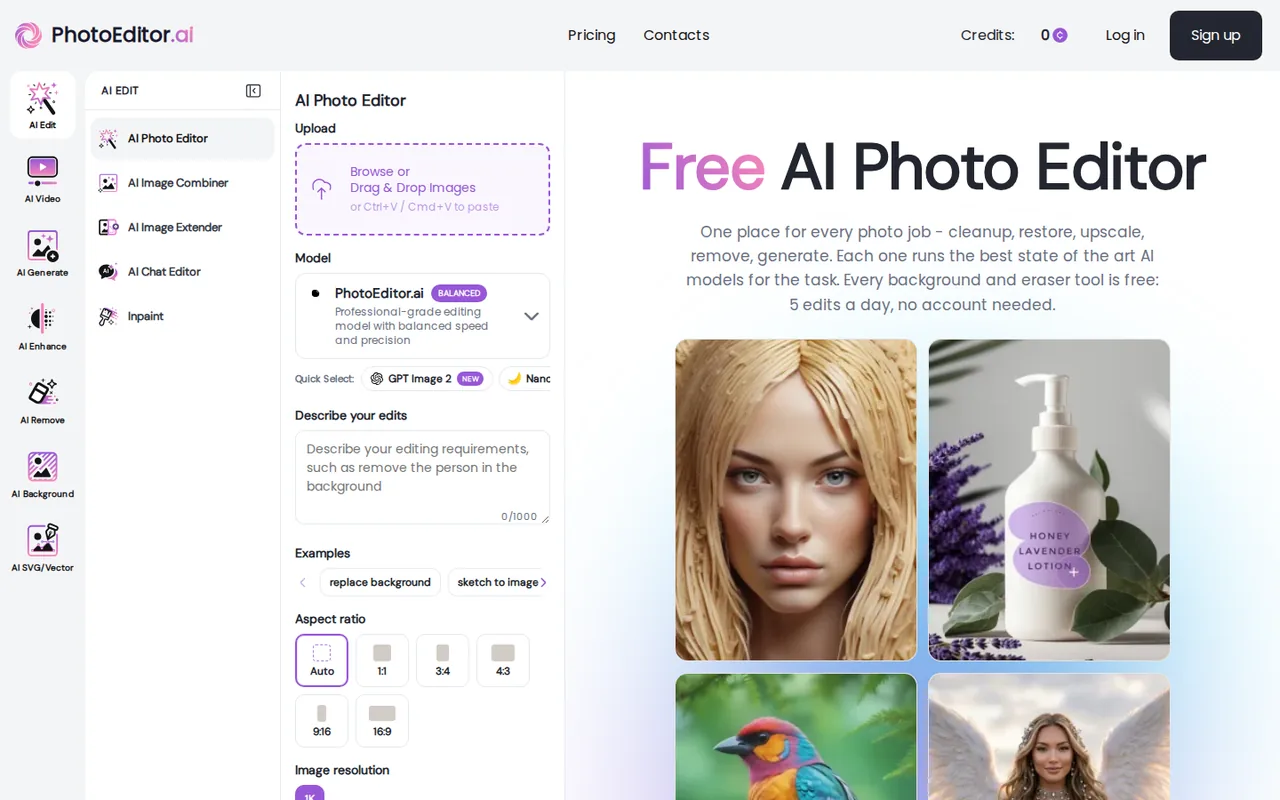
- Four tools are free without an account The homepage lists Magic Eraser, Background Remover, Logo Background Remover and Background Blur at 5 edits a day, resetting at midnight UTC.
- Credit cost is shown before each run The pricing FAQ says the exact cost appears on the button before you run a tool.
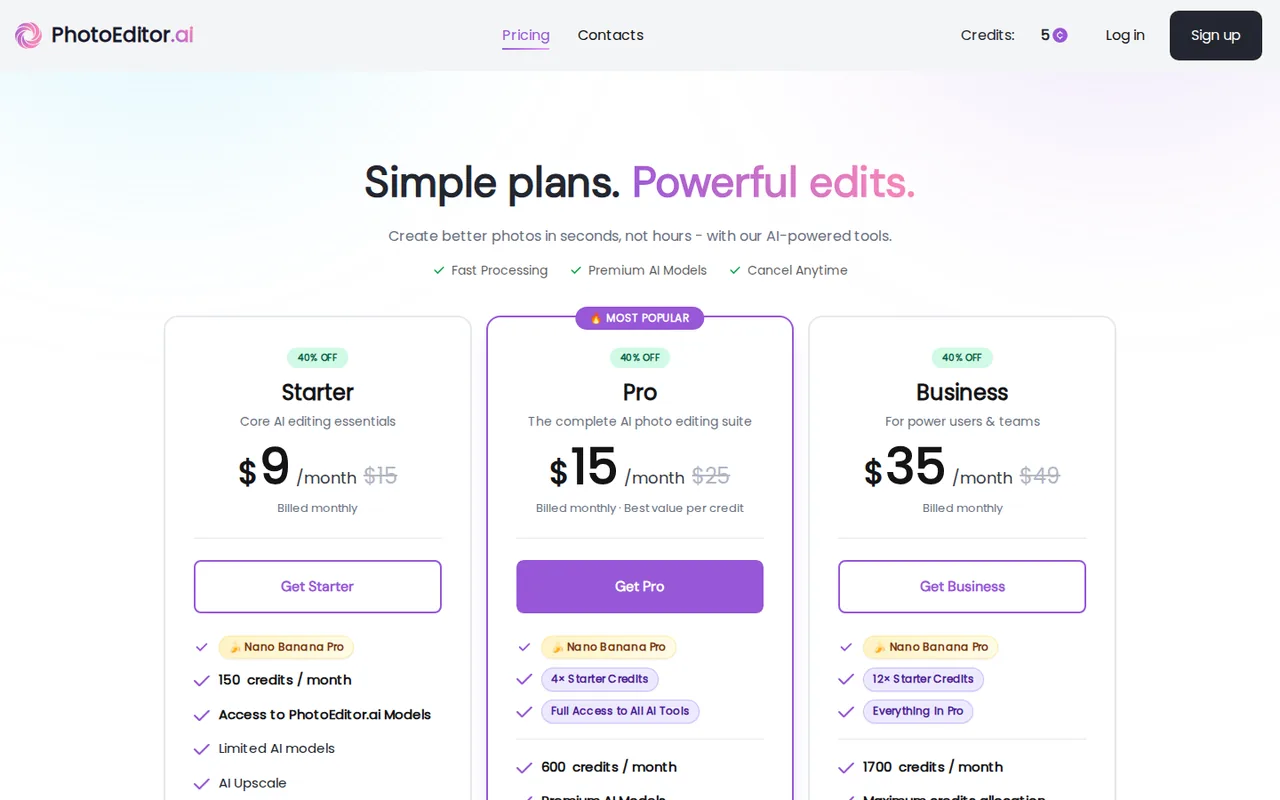
- Pro is the cheapest per credit of the first two plans Starter is $9 for 150 credits, about $0.06 a credit, and Pro is $15 for 600, about $0.025 a credit, by division of the listed monthly prices.
- One-time credit packs exist after cancelling The FAQ says that after a paid plan ends you can still buy one-time credit packs without resubscribing.
- The pricing FAQ describes a 14-day money-back guarantee It says to contact support within 14 days of the first payment for a full refund on new paid subscriptions.
Limits
- Discounted prices are described as limited time The plan cards show $9, $15 and $35 beside crossed-out $15, $25 and $49 under a 40% off label, and the page does not say when the discount ends.
- Starter is personal use only The Starter card says For Personal Use Only, which conflicts in tone with the homepage line that commercial use is allowed.
- Annual prices were not readable on the page text The FAQ says annual billing saves 41% against monthly, but annual amounts did not appear in the page content read, so this profile gives monthly prices only.
- The API is not available yet The API page says access is coming soon, with documentation provided on approval.
- Ratings and user counts on the site are marketing claims The pricing page shows 5M+ users and a 4.4 rating from 23,756 reviews without saying where the reviews come from, so this profile does not use them.
Who it suits
- People fixing old or blurry photos The homepage describes restoration, enhancement and upscaling to 4K and 8K as separate tools.
- Sellers cleaning product images Background removal, object removal and background change are separate tools, and the free ones need no account.
- Occasional users who need a few edits The FAQ points to a one-time credit pack as the cheapest start for a few edits, and four tools are free every day.
- Not for anyone who needs an API today The API page says access is coming soon.
How much does PhotoEditor.ai cost?
Prices confirmed · checked
- $9Starter
- $15Pro
- $35Business
Regional prices: Prices were read from the pricing page and its FAQ on 2026-11-18 in USD.
The page showed monthly billing: Starter $9, Pro $15 and Business $35, each beside a crossed-out higher price ($15, $25 and $49) with a 40% off label and a Limited time banner on the homepage; no end date was given. The FAQ says annual billing saves 41% against monthly with the same features, but annual amounts were not in the page text, so none are given here, and the page does not say whether taxes are added at checkout. The FAQ says credits cost depends on the tool and model, and that one-time credit packs can be bought, but pack prices and whether monthly credits roll over were not stated. The Starter card says personal use only, the Pro card lists a commercial use license, and the homepage says commercial use is allowed; the plan boundary is not spelled out. The FAQ says cancelling keeps the plan until the billing period ends with no refund for partial months, and also describes a 14-day money-back guarantee for new subscriptions; the Terms of Service do not mention refunds.
| Plan | Price | What you get |
|---|---|---|
| Free tools | $0 sourceFrom photoeditor.ai/pricing, checked Nov 18, 2026 (opens in a new tab) | Magic Eraser, Background Remover, Logo Background Remover and Background Blur: 5 edits a day, no account, resets at midnight UTC. |
| Starter | $9 per month billed monthlylist price $15 crossed out, labelled 40% off sourceFrom photoeditor.ai/pricing, checked Nov 18, 2026 (opens in a new tab) | 150 credits a month, limited AI models, upscale, inpaint, expand, object remover, photo enhancer and background remover, no watermarks. For personal use only. |
| Pro | $15 per month billed monthlylist price $25 crossed out, labelled 40% off sourceFrom photoeditor.ai/pricing, checked Nov 18, 2026 (opens in a new tab) | 600 credits a month, which the card calls 4x Starter credits. Full access to all AI tools, premium models, unlimited history storage, a commercial use license, early access to advanced features, chat-guided edits, portrait generator, logo maker and image generator. |
| Business | $35 per month billed monthlylist price $49 crossed out, labelled 40% off sourceFrom photoeditor.ai/pricing, checked Nov 18, 2026 (opens in a new tab) | 1,700 credits a month, the card says maximum allocation. Everything in Pro, all premium tools and models, and dedicated support. |
Which plan fits?
Smallest plan whose monthly credits cover your number with 15% spare for regenerations. Arithmetic from the plan table above, not a usage test.
How far does it go?
- Cost per credit at the discounted monthly pricesStarter is $9 for 150 credits, about $0.06 a credit; Pro is $15 for 600, about $0.025; Business is $35 for 1,700, about $0.021. At the crossed-out list prices the same plans would be $15, $25 and $49, or $0.10, about $0.042 and about $0.029 a credit. A 1-credit job such as background removal would then be 150 jobs on Starter, but premium models and large upscales cost more credits and no table was published. This is division on the listed prices, not a quote or a measured result.
Arithmetic from the published allowances above, not a usage test.
Taxes, currency and promotions can change the price you see at checkout.
Try PhotoEditor.ai free (opens in a new tab)
Key features
| Feature | What it does | Watch out |
|---|---|---|
| AI Photo Editor that changes a photo from a text prompt, a brush selection or a reference image, plus an image combiner, image extender, chat editor and inpaint tool | — | |
| Cleanup tools: Magic Eraser, text remover and AI cleanup to remove people, signs or other objects | — | |
| Enhancement: photo enhancer, upscale, creative upscale and old-photo restoration | — | |
| Background tools: background remover, logo background remover, background changer and background blur | — | |
| Generators: AI image generator, logo maker, portrait generator, SVG generator, dance generator and image to SVG | — | |
| A choice of image models per tool, with the default described as the best performer on the company's own benchmark | — | |
| Credits are shown per action before you run it | The pricing FAQ says every AI tool uses credits per image, with the cost shown on the button before you run it, and that simple jobs such as background removal or cleanup cost 1 credit while premium models and large upscales cost more. | Read the number on the button for the exact model and size you will use before you count how many jobs a plan covers; the pages do not publish a full credit table. |
| The free tools and the paid tools are separate pools | The homepage says Magic Eraser, Background Remover, Logo Background Remover and Background Blur are free at 5 edits a day with no account, resetting at midnight UTC, and every other tool runs on credits from a plan or a one-time pack. | If background removal and object cleanup are all you need, test the free daily allowance first; the credit plans matter for upscaling, generation and the editor. |
| Starter and Pro differ in licence, not only credits | The Starter card says For Personal Use Only and the Pro card lists a Commercial Use License, while the homepage says commercial use is allowed for client work, products, prints and ads without naming a plan. | For client or product work, treat Pro or Business as the plan the pricing page supports and ask support in writing whether Starter covers commercial use. |
What is free and what needs credits?
The homepage says four tools are free every day: Magic Eraser, Background Remover, Logo Background Remover and Background Blur, at 5 edits a day, no account, resetting at midnight UTC. Every other tool runs on credits from a plan or a one-time pack, and the pricing page FAQ says each tool shows its credit cost on the button before you run it. Simple jobs such as background removal or cleanup cost 1 credit, while premium models and large upscales cost more, and no full credit table was published.
Does Starter allow commercial work?
The pages are not clear. The Starter card on the pricing page says For Personal Use Only and the Pro card lists a Commercial Use License, while the homepage says commercial use is allowed for client work, products, prints and ads without naming a plan. The Terms of Service do not settle it: they put responsibility for rights to source images on you and say nothing about ownership of generated images. If you sell or publish the output, ask support in writing which plan covers it before paying.
Are the prices a limited-time discount?
Each plan card shows a crossed-out higher price beside the current one: $9 against $15 for Starter, $15 against $25 for Pro and $35 against $49 for Business, under a 40% off label, and the homepage calls it a limited-time offer. No end date appears on either page, so the list prices are what you may pay later. The FAQ also says annual billing saves 41% against monthly, but annual amounts were not in the page text read, so compare them in the checkout before committing to a year.
What do the refund and cancellation lines say?
The pricing FAQ describes a 14-day money-back guarantee for new paid subscriptions if you contact support within 14 days of the first payment, and says cancelling keeps the plan active until the billing period ends with no refunds for partial months. After cancelling you can still buy one-time credit packs, whose prices were not listed. The Terms of Service were updated March 26, 2026 and do not mention refunds, so the FAQ is the only source for these rules.
Is there an API?
Not yet, according to the API page: it says access is coming soon, documentation is provided on approval and early-access requests go by email. If you need to automate edits today, this is not a documented option.
How would you test it before paying?
Proposed evaluation · not performed yet
Use the free Background Remover and Magic Eraser on three of your own images, then check on the paid tools how many credits the button shows for an upscale and an AI edit at the model you would use. Compare that number with the 150 credits on Starter and 600 on Pro. We have not run this, so no result is claimed.
PhotoEditor.ai alternatives
Other images & design tools checked with the same method. Pick by the job, not by a score.

AI images, video and audio inside an Adobe workflow

Creators, brands and agencies that need the same character or product across many images and videos, and want several image and video models behind one credit balance

Rigged 3D avatars from a selfie for games and apps

AI images placed straight into templated designs

People who need a handful of one-off photo fixes, such as removing a person, swapping a background or restoring an old print, and prefer a prepaid pack to a subscription

Sellers cleaning backgrounds on photos they own

Testing FLUX prompts and edits before an API build

Designers revising campaign copy
Used PhotoEditor.ai? Write the first review. Visitor opinions are moderated and kept separate from our source checks.
Frequently asked questions
Do the free PhotoEditor.ai tools need an account?
No. The homepage says Magic Eraser, Background Remover, Logo Background Remover and Background Blur work without an account, at 5 edits a day that reset at midnight UTC. Other tools need credits from a paid plan or a one-time pack.
How much does PhotoEditor.ai cost per month?
On the pricing page, billed monthly, Starter is $9 with 150 credits, Pro is $15 with 600 credits and Business is $35 with 1,700 credits. Each shows a crossed-out higher price ($15, $25, $49) under a limited-time 40% off label, with no stated end date.
Can I use PhotoEditor.ai images commercially?
The homepage says commercial use is allowed for client work, products, prints and ads, and the Pro card lists a commercial use license, but the Starter card says for personal use only. Check with support before using Starter for paid work, and you remain responsible for rights to your source images.
How do PhotoEditor.ai credits work?
Every AI tool spends credits per image and shows the cost on the button before you run it. The FAQ says simple jobs such as background removal or object cleanup cost 1 credit, while premium models and large upscales cost more.
Which payment methods does PhotoEditor.ai accept?
The pricing FAQ lists Visa, Mastercard and American Express, processed by Stripe. It does not mention PayPal or other methods, and whether taxes are added at checkout is not stated.
Sources and method5 official sources · 9 details checked · Nov 18, 2026
How we checked this profile
9 details on this page were checked against PhotoEditor.ai's own pages and help documentation (Nov 18, 2026).
See the checks by section9 documented
| Section | Checks | Last checked | Sources |
|---|---|---|---|
| Article text | 1 documented | photoeditor.ai | |
| Plans and prices | 4 documented | photoeditor.aiphotoeditor.ai/pricing | |
| Features | 1 documented | photoeditor.ai/pricing | |
| Questions | 1 documented | photoeditor.ai/pricing | |
| Platforms and integrations | 1 documented | photoeditor.ai/api | |
| Other details | 1 documented | photoeditor.ai/tos |
Sources for this profile
- Pricing page and FAQphotoeditor.ai
- Homepagephotoeditor.ai
- API pagephotoeditor.ai
- Terms of Service, updated March 26, 2026photoeditor.ai
All 5 sources
Official pages read on 2026-11-18: homepage, pricing page and FAQ, API page, Terms of Service (updated March 26, 2026) and Privacy Policy (updated March 26, 2026), fetched as page text over HTTP, not in a logged-in browser. We did not create an account or run any tool, so output quality, speed, credit use per tool and the free daily limit were not observed. The Terms of Service were read for content rules and refunds; they say nothing about who owns generated images, and the Privacy Policy section on retention was not read in full, so the homepage claim that uploads are deleted within 1 hour and never used for training is the provider's statement, not checked. The 5M+ users, 4.4 rating, 23,756 reviews, speed claims and testimonials are marketing claims and are not used. The Google questions tool returned an authorization error on this run, so the questions below come from the provider's own pricing FAQ and pages, not search data.
Sources checked Nov 18, 2026. Found something out of date? See how we correct profiles.