

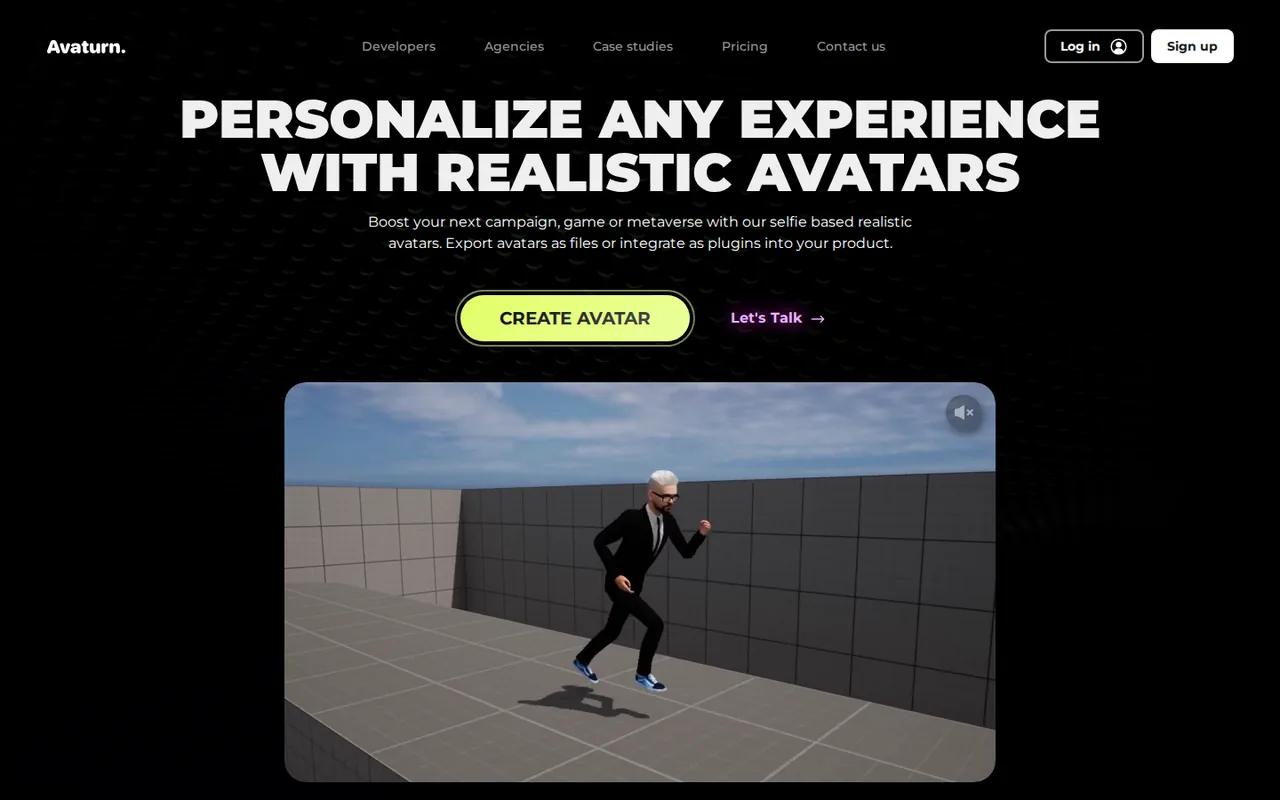
Avaturn: free selfie-to-3D avatar embed, but the API, web SDK and your own login start at $800 a month
Updated September 29, 2026 · By Elias Brandt · Documentation review, not tested hands-on
Pros
- Free embedding with no stated avatar cap
- Animation-ready output
- Wide engine coverage
Cons
- Steep step to paid
- Restrictive avatar license
- Dated legal pages
Bottom line
Embed the avatar creator via the web, Unity, Unreal, iOS or Android tutorials; users sign in to Avaturn; the docs state no limit on avatars or exports; no REST API or web SDK.
You are prototyping a game or app where players can sign in to Avaturn and you only need the exported GLB, because the free integration states no cap on avatars or exports.
You are building for a client or at $1 million revenue or more, because the terms point third-party integration to an Enterprise license with unpublished pricing.
Best forIndie game and app developersEarly-stage startups3D hobbyists and VTubersAgencies building brand activations
Strengths, limits and who it suits, in full
Strengths
- Free embedding with no stated avatar cap The docs say the free integration has no limit on avatars created or exports.
- Animation-ready output Avatars ship with a standard humanoid rig, ARKit blendshapes and visemes, and a Mixamo-tested FBX.
- Wide engine coverage Tutorials and SDKs cover web, Three.js, Unity, Unreal Engine, iOS and Android.
Limits
- Steep step to paid API, web SDK, own login and branding start at $800 a month; no smaller paid tier is listed.
- Restrictive avatar license The terms treat exported avatars as Goodsize content, require attribution and ask for notice before commercial use.
- Dated legal pages Both the terms and privacy policy were last updated January 26, 2023 and describe a mobile scanning app.
Who it suits
- Indie game and app developers the free embed suits prototypes where players can sign in to Avaturn and the game only needs the exported GLB.
- Early-stage startups Pro fits products that need their own login and branding, provided they meet the founded-after-2021, under $1 million revenue rule.
- 3D hobbyists and VTubers useful for a rigged likeness in Blender or VTubing software, within the attribution and commercial-notice rules.
- Agencies building brand activations work for a client falls under the Enterprise license in the terms, so budget a sales conversation.
How much does Avaturn cost?
Prices confirmed · checked
Regional prices: Prices are shown in USD.
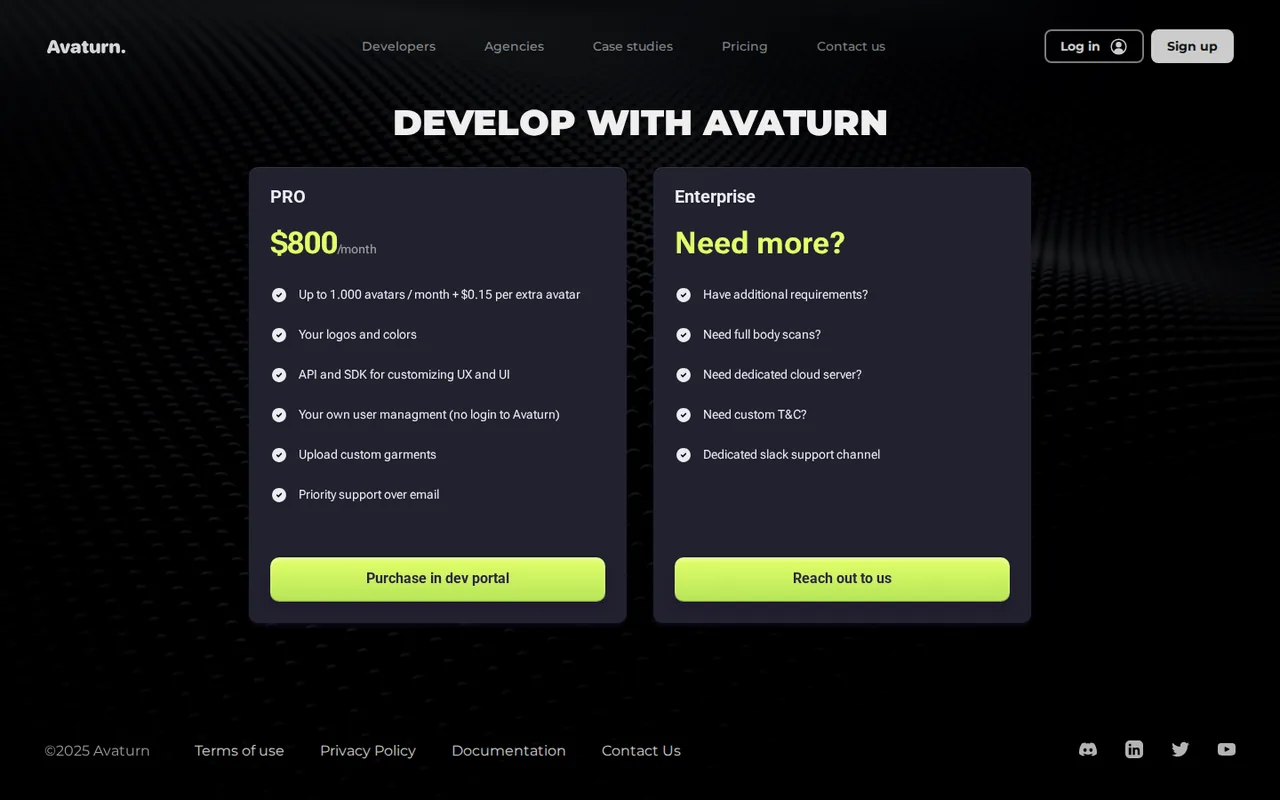
The pricing page shows only Pro and Enterprise; the page code contains a hidden Basic Free card, and the free route is described in the documentation instead. Under the terms, Pro is limited to startups founded after 2021 with annual revenue below $1 million that use Avaturn in their own product; integration for a third party or at higher revenue needs an Enterprise license.
| Plan | Price | What you get |
|---|---|---|
| Free integration | $0 sourceFrom avaturn.me/pricing, checked Sep 29, 2026 (opens in a new tab) | Embed the avatar creator via the web, Unity, Unreal, iOS or Android tutorials; users sign in to Avaturn; the docs state no limit on avatars or exports; no REST API or web SDK. |
| Pro | $800 per month sourceFrom avaturn.me/pricing, checked Sep 29, 2026 (opens in a new tab) | Up to 1,000 avatars a month plus $0.15 per extra avatar; your logos and colors; API and SDK for custom UX; your own user management; custom garment upload; priority email support; bought in the developer portal. |
| Enterprise | Custom pricing | Contact sales; listed options include full body scans, a dedicated cloud server, custom terms and a dedicated Slack support channel. |
How far does it go?
- Pro cost per avatarAt the full allowance: $800 / 1,000 avatars = $0.80 per avatar. At 1,500 avatars in a month: $800 + 500 x $0.15 = $875, or about $0.58 per avatar. The page does not say whether edits or re-exports of one avatar count again, so treat this as arithmetic on listed prices, not an observed bill.
Arithmetic from the published allowances above, not a usage test.
Taxes, currency and promotions can change the price you see at checkout.
Try Avaturn free (opens in a new tab)
Key features
| Feature | What it does | Watch out |
|---|---|---|
| 3D avatar from a single selfie | Generates a recognizable 3D head and body from one 2D photo, then lets the user pick body shape, clothes and hair. | Likeness depends on the photo; the privacy policy describes cloud processing of the images. |
| Body, hair, clothing and accessory customization | — | |
| GLB (glTF 2.0) export for Blender, Unity, Unreal, Maya and Cinema4D | — | |
| Humanoid rig with ARKit blendshapes and visemes | — | |
| Embeddable avatar creator for web, Unity, Unreal, iOS and Android | — | |
| REST API and web SDK for own login and custom UI (Pro) | Create anonymous users and short-lived sessions, skip the Avaturn sign-in, upload selfies directly and receive export callbacks. | Both are listed as paid-package features and are not available on the free plan. |
| Custom garment upload and branding (Pro) | — | |
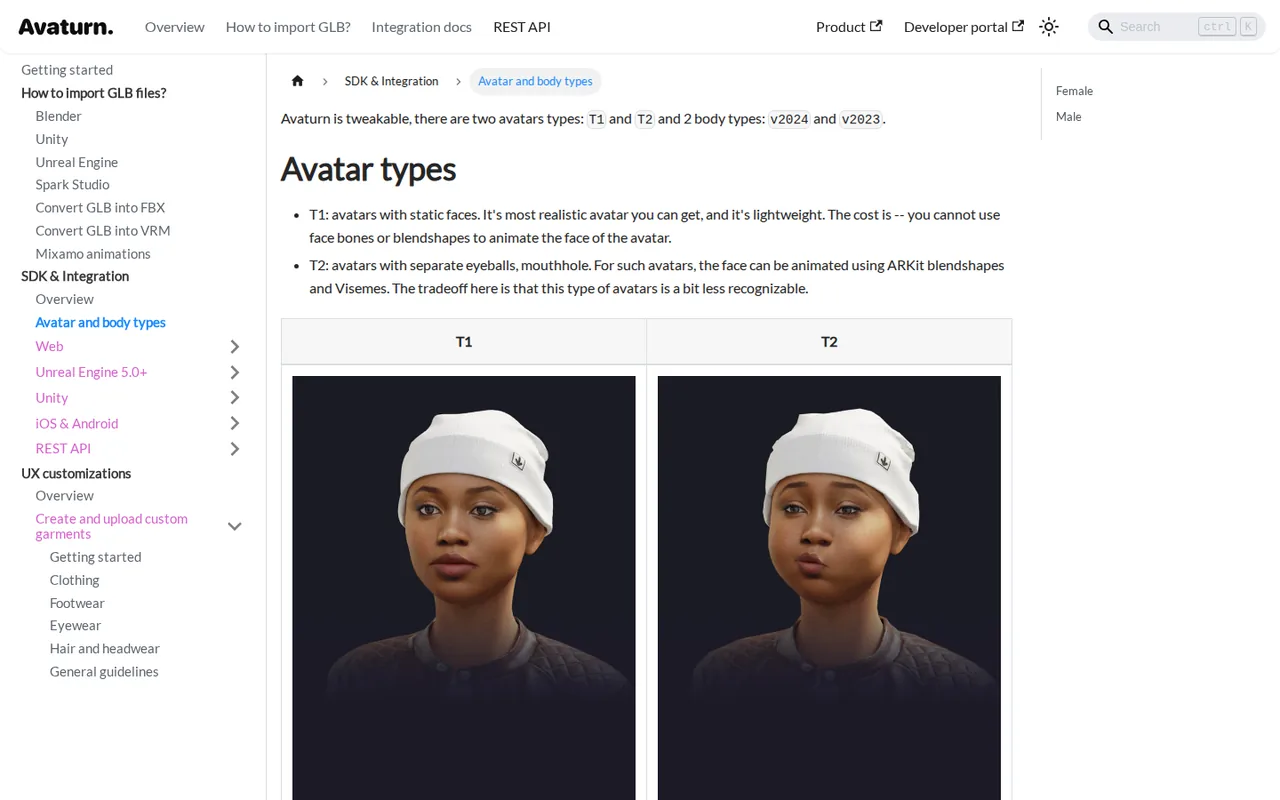
| T1 and T2 avatar types | T1 keeps a static, more realistic face; T2 adds separate eyeballs and a mouth so ARKit blendshapes and visemes can animate it. | T2 is described as a bit less recognizable, and T1 cannot animate the face at all. |
What is free, and what needs the $800 Pro plan?
The documentation says a developer can sign up at the developer portal and embed Avaturn free, with no limit on the number of avatars created or exported. In that route the avatar creator opens inside your app or page, the user signs in to Avaturn, and your code receives the finished GLB when the user clicks Next.
Everything that changes who owns the user flow is paid. The REST API, the web SDK for custom UI and callbacks, skipping the Avaturn sign-in page, uploading selfies directly and rendering an avatar as a profile image are listed as paid-package features. The pricing page shows one self-serve paid tier, Pro at $800 a month for up to 1,000 avatars.
Who owns an exported avatar, and when is commercial use allowed?
The terms separate your uploaded content from the 3D model. You keep rights in photos you submit, but user 3D models are listed as Goodsize content, owned by or licensed to the company. Using an avatar requires attribution with a link to Avaturn, and commercial use is allowed only after emailing the company a link to the project.
Pro carries its own eligibility rule: it is intended for startups founded after 2021 with annual revenue below $1 million that use Avaturn in their own product. Integration for the benefit of a third party, or at $1 million revenue or more, needs an Enterprise license. The company also reserves the right to ask you to stop using an avatar at its discretion.
What happens to the selfie and scan data?
The privacy policy says photos and videos recorded for scanning are uploaded to Google Cloud Platform and Amazon Web Services for processing. It says they are used only to provide the scanning feature, apart from anonymized data kept for technology improvement and data annotation by service providers, where data is not linked to the account.
An avatar built from a face is personal data about that person. Scan only yourself, or someone who has agreed in writing to the scan and to the planned use, and never a photo taken from social media or a stock site. The terms forbid content containing a third party’s private information without consent and set a minimum user age of 13.
Should you export a T1 or a T2 avatar?
Avaturn offers two avatar types. T1 has a static face: the docs call it the most realistic and lightweight option, but face bones and blendshapes cannot animate it. T2 adds separate eyeballs and a mouth, so the face can move with ARKit blendshapes and visemes, at the cost of being a bit less recognizable.
Choose by the job. For a still render, a profile picture or a character that is only seen from a distance, T1 keeps the likeness. For lip sync, VTubing or talking characters, T2 is the only type that can move its mouth. Body presets v2023 and v2024 also differ: v2024 skeletons are almost identical across shapes, which makes shared animations easier.
How does the file get into Blender, Unity or Mixamo?
Avaturn exports GLB, the binary form of glTF 2.0, which Blender and Unreal Engine can load; Unity needs the free glTFast package, and the docs advise against the FBX route there. Mixamo cannot read GLB, and the docs warn that converting GLB to FBX may still cause problems. Instead they provide a ready FBX avatar tested with Mixamo: animate that, export the animation, then apply it to your own avatar.
Downloads from the consumer hub are handled differently from app integrations. The hub sign-in page says GLB downloads are unlocked through a bot in the Avaturn Discord server, while an integrated app receives the file through the export callback. Plan for that extra step before promising a player a downloadable model.
What does a Pro API integration involve?
The API reference describes four objects: a project with its own subdomain and token, anonymous users created by your backend, avatars, and sessions. Your server creates a user, opens a short-lived session, and passes the session link to the web SDK or a webview. No real user details are needed on the Avaturn side.
You must store the mapping between your account IDs and Avaturn user IDs if people should return to an existing avatar, because sessions expire after each use. Exports come either as a base64 data URL built in the browser or as a permanent HTTP link for backend use, and the choice is set in the developer portal.
Can the free embed deliver an animated avatar into Blender?
Proposed evaluation · not performed yet
Use the free web integration with a new developer project and one selfie of a colleague who has agreed in writing to the scan. Create a T2 avatar and stop if any step asks for the paid API.
- Embed the creator on a local test page using the web quick-start code and your project subdomain.
- Complete the avatar, click Next and save the GLB from the export callback.
- Import the GLB into Blender and check the rig, the ARKit blendshapes and the viseme shapes.
- Apply one Mixamo animation using the provider’s tested FBX workflow.
- Record the steps, the file size and any sign-in or attribution prompts.
Accept a GLB that imports with a working humanoid rig, moving mouth shapes and a recognizable face. Reject a missing rig, broken textures or an export blocked behind a paid tier. No likeness or rig result is reported until the exercise is run.
For a talking 2D presenter rather than a 3D model, see HeyGen or Synthesia. To add depth motion to a flat photo instead of building a rigged character, compare Immersity AI.
Is Avaturn worth it?
Documentation review plus dated public user reports. Documentation review, not tested hands-on. Not scored.
Worth it if
- You are prototyping a game or app where players can sign in to Avaturn and you only need the exported GLB, because the free integration states no cap on avatars or exports.
- You need your own login, branding or API-driven avatar creation and your startup fits the Pro eligibility rule, since those features sit in the paid package.
- You want an animatable face for lip sync or VTubing and can choose the T2 avatar type, which supports ARKit blendshapes and visemes.
Probably not if
- You are building for a client or at $1 million revenue or more, because the terms point third-party integration to an Enterprise license with unpublished pricing.
- You need a cheap step between free and $800 a month, because the pricing page lists no smaller paid tier.
- You need unrestricted ownership of exported models, because the terms treat user 3D models as Goodsize content and ask for attribution and commercial-use notice.
Avaturn alternatives
Other images & design tools checked with the same method. Pick by the job, not by a score.

AI images, video and audio inside an Adobe workflow

AI images placed straight into templated designs

Turning a written story into a character-consistent comic series, and optionally a short film

Low-cost image generation paid per request, without a subscription

Creators who want one credit balance across several image and video models

Game-ready 3D assets from text or images

Enlarging small, sharp photos on your own computer for free

Sellers and creators who want product and portrait images from one credit pool
Used Avaturn? Write the first review. Visitor opinions are moderated and kept separate from our source checks.
Frequently asked questions
Is Avaturn free to use?
Partly. Developers can embed the Avaturn avatar creator free, and the documentation states no limit on avatars created or exports, though users sign in to Avaturn. The REST API, web SDK, own login and branding need Pro at $800 a month for up to 1,000 avatars, plus $0.15 per extra avatar. Pro is meant for startups founded after 2021 with revenue under $1 million.
Is Avaturn Live the same product as Avaturn?
No. Avaturn Live, at avaturn.live, builds real-time talking AI avatars and publishes the AVTR-1 model as open source. Its footer names the same operator, Goodsize Inc., but it is a separate product with its own pages. The pricing and file-export details on this page refer to the avaturn.me 3D avatar creator.
Can I try Avaturn without creating an account?
The hub sign-in page offers Google, email and a guest option. A guest session is fine for seeing how the scan and customization flow works, but keep in mind that the terms require users to be at least 13, and anyone under 18 needs a parent or guardian who accepts the agreement.
Can I convert the GLB into VRM or FBX?
Yes. The documentation links converter pages for GLB to FBX and GLB to VRM. VRM is the format most VTubing and VR applications expect; it is based on glTF 2.0, so glTF software can open VRM files, but not the other way round. Check the converted rig in your target app before recording.
Does an agency building a brand activation need Enterprise?
Yes, according to the terms, integration for the benefit of a third party requires an Enterprise license, and Pro is restricted to startups using Avaturn in their own product. Enterprise pricing is not published; the pricing page lists full body scans, a dedicated cloud server, custom terms and a Slack support channel as options.
How do I delete my scan and account data?
The privacy policy says the Delete your user button in the Legal Info section of the app settings removes your information, including videos, and that you can also email hello@avaturn.me. It also says anonymized video data may be kept for technology improvement, so deletion may not cover data that is no longer linked to you.
Sources and method8 official sources · 7 details checked · Sep 29, 2026
How we checked this profile
7 details on this page were checked against Avaturn's own pages and help documentation (Sep 29, 2026).
See the checks by section7 documented
| Section | Checks | Last checked | Sources |
|---|---|---|---|
| Plans and prices | 3 documented | docs.avaturn.me/what-is-avaturnavaturn.me/pricingdocs.google.com/pub | |
| Features | 3 documented | docs.avaturn.me/introductiondocs.avaturn.me/bodiesdocs.google.com/pub | |
| Strengths and limits | 1 documented | docs.google.com/pub |
Sources for this profile
- Developer pricing (Pro and Enterprise)avaturn.me
- Product overviewavaturn.me
- What is Avaturn (docs)docs.avaturn.me
- REST API introductiondocs.avaturn.me
All 8 sources
The terms and privacy policy name GOODSIZE INC., a Delaware corporation at 251 Little Falls Drive, Wilmington; both were last updated January 26, 2023 and the privacy policy still describes a mobile scanning app and the EU-U.S. Privacy Shield framework. The pricing page code includes a Basic Free card that is not displayed; the free route is taken from the documentation. Avaturn Live at avaturn.live is a separate real-time avatar product from the same company.
Sources checked Sep 29, 2026. Found something out of date? See how we correct profiles.


