

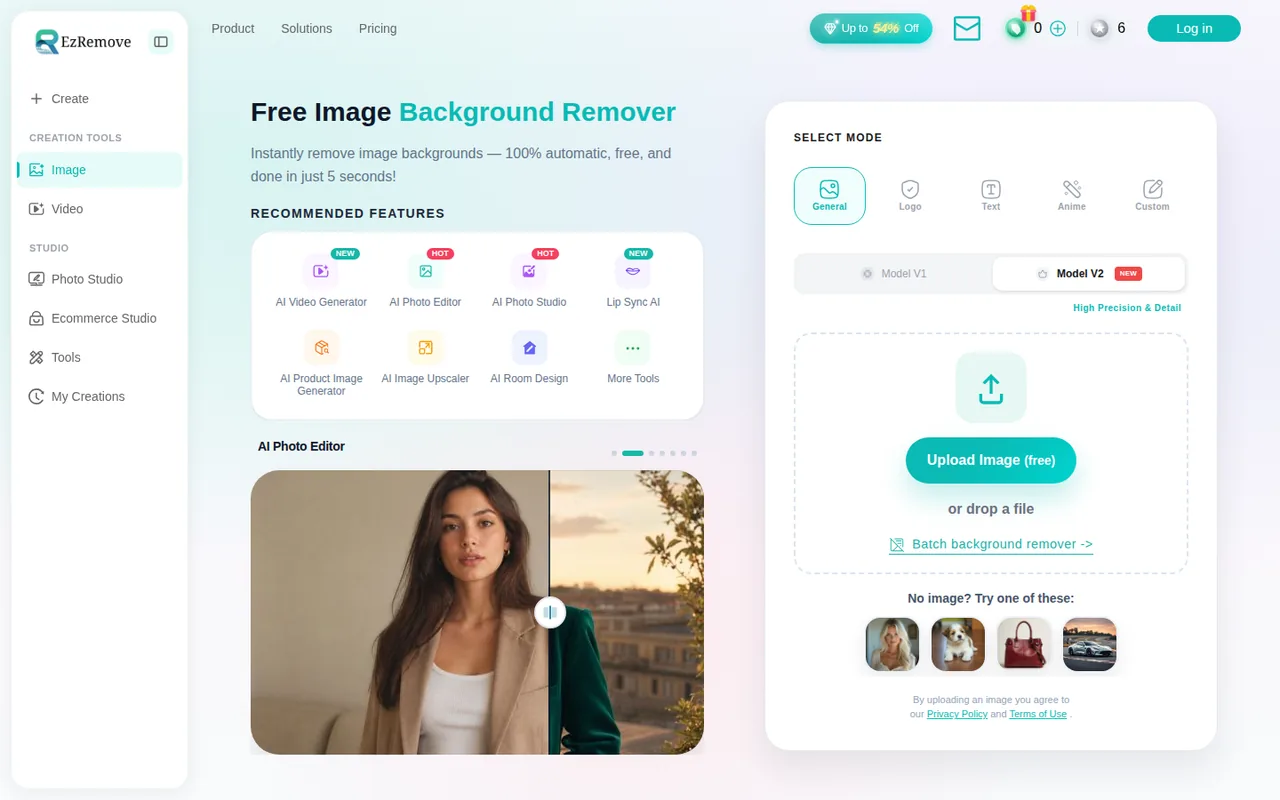
What is EzRemove, in short?
Updated October 5, 2026 · By Elias Brandt · Documentation review, not tested hands-on
Pros
- Clear credit table per tool
- Free daily trial across tools
- One-time credits do not expire
Cons
- Rights are your responsibility
- Retention period not stated
- Narrow refund window
Bottom line
10 credits a day after logging in; they reset at 00:00 UTC and do not carry over; background remover and changer are labelled free at standard resolution.
You sell products and need to budget a catalogue clean-up: the pricing table gives a per-tool credit rate, so you can work out the cost of a batch before buying.
You plan to reuse images that belong to someone else: the terms make you warrant rights to every upload and grant no permission to reuse watermarked pictures.
Best forOnline sellersCreators clearing their own marksAnyone wanting to reuse another party's watermarked images
Strengths, limits and who it suits, in full
Strengths
- Clear credit table per tool The pricing page lists uses per pack for each tool, so per-use cost can be worked out before buying.
- Free daily trial across tools Ten free credits a day after login, and the provider says they can try every tool.
- One-time credits do not expire The one-time packs are charged once and the credits do not expire, unlike monthly credits, which are cleared at month end.
Limits
- Rights are your responsibility The terms make you warrant ownership of uploads; watermark removal is not permission to reuse others' images.
- Retention period not stated The pricing FAQ says uploads are not kept longer than necessary but gives no period; the privacy policy does not mention uploaded files.
- Narrow refund window Refunds are limited to a first transaction, 50 or fewer credits used, within 3 days.
Who it suits
- Online sellers 1 credit per HD cutout makes catalogue clean-ups easy to budget.
- Creators clearing their own marks fits files you made or licensed, with proof of rights.
- Anyone wanting to reuse another party's watermarked images The terms put rights responsibility on the user and do not grant permission.
How much does EzRemove cost?
Some details not confirmed · checked
Regional prices: Prices are shown as $ with no currency code or tax statement; region and checkout tax were not established.
Crossed-out list prices on the page are not used. Yearly passes are charged once ($90 or $195), do not auto-renew, add a one-time bonus of 1,500 or 3,000 permanent credits and release credits monthly (500 or 1,250), and the 7.50 and 16.25 monthly figures are rounded equivalents, not invoices. Monthly credits that go unused are cleared at month end; yearly passes carry over at most 100 or 250 credits; one-time credits do not expire. A refund may be considered only for a first transaction, with 50 or fewer credits used, within 3 days; cancelling a monthly plan stops renewal without refunding past payments.
| Plan | Price | What you get |
|---|---|---|
| Free | $0 sourceFrom ezremove.ai/pricing, checked Oct 5, 2026 (opens in a new tab) | 10 credits a day after logging in; they reset at 00:00 UTC and do not carry over; background remover and changer are labelled free at standard resolution. |
| One-time credits | $7 for 70 credits; $15 for 300; $28.90 for 700; $58.90 for 2,000; $78.90 for 3,000; $100 for 5,000; $166 for 9,000 sourceFrom ezremove.ai/pricing, checked Oct 5, 2026 (opens in a new tab) | Charged once; credits do not expire. |
| Monthly | $7 per month for 100 creditsalso $15 for 500; $36 for 2,000; $80 for 5,000 sourceFrom ezremove.ai/pricing, checked Oct 5, 2026 (opens in a new tab) | Renews monthly; unused credits are cleared at month end; cancel before renewal. |
| Yearly | $90 billed yearly for 6,000 credits$7.50 per month equivalent; $195 billed yearly for 15,000 · $16.25 per month equivalent sourceFrom ezremove.ai/pricing, checked Oct 5, 2026 (opens in a new tab) | Credits are issued monthly (500 or 1,250), plus a one-time bonus of 1,500 or 3,000 permanent credits; cannot be cancelled after purchase; carry-over of at most 100 or 250 credits. |
How far does it go?
- Credits for a 40-image catalogueBackground removal costs 1 credit per HD download on the pricing table, so 40 cutouts need 40 credits. The $7 one-time pack holds 70, leaving 30; the $7 monthly plan holds 100 and clears what is left at month end; the 10 free daily credits would take four days because they do not carry over. This is arithmetic on published rates, not an observed yield; Quick modes, Pro models and larger outputs can cost more.
Arithmetic from the published allowances above, not a usage test.
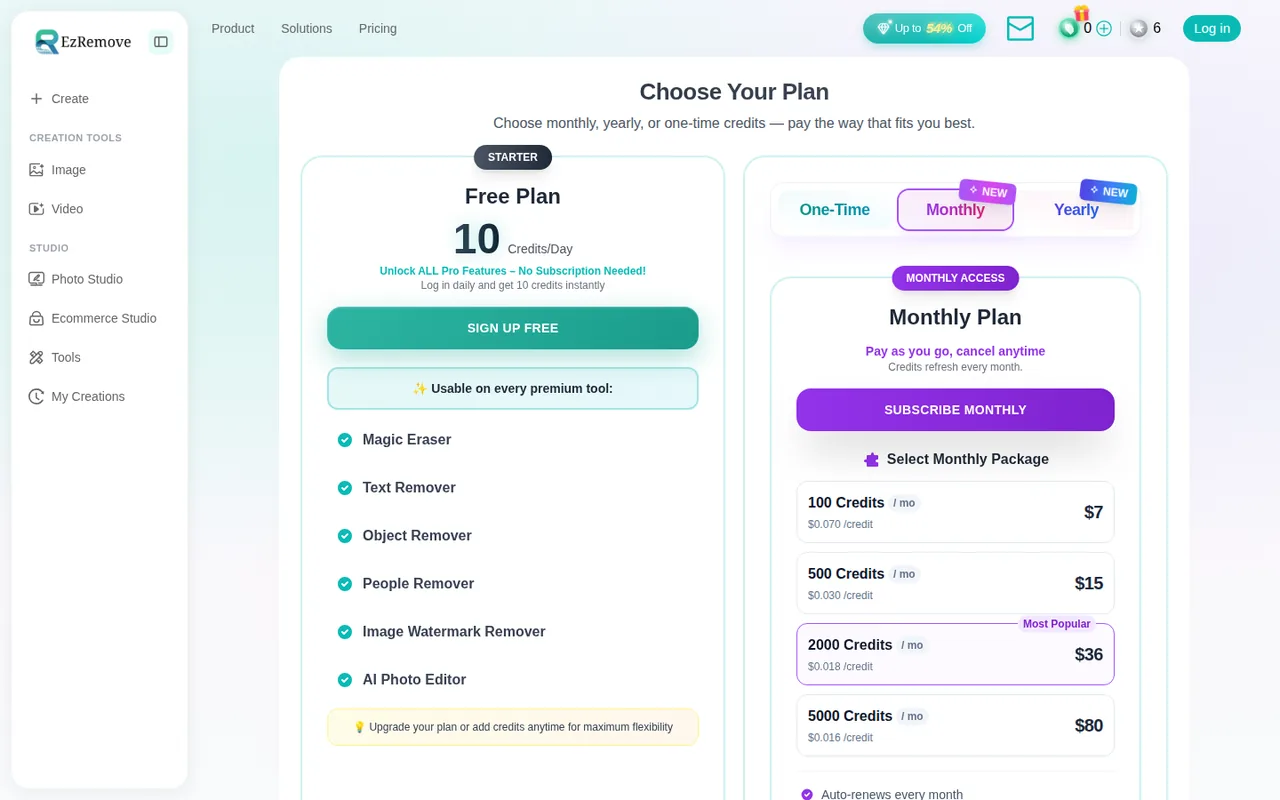
Taxes, currency and promotions can change the price you see at checkout.
Try EzRemove free (opens in a new tab)
Key features
| Feature | What it does | Watch out |
|---|---|---|
| Background remover with General, Logo, Text and Anime modes | — | |
| Object, people and text removal | — | |
| Image and video watermark removal | — | |
| Batch background and watermark tools | — | |
| AI image editing, upscaling and room design | — | |
| One credit balance across all tools | — |
What does one credit buy in each tool?
Every paid action draws on one credit balance, but the rate depends on the tool. The pricing page lists how many uses each pack gives at the lowest-credit option, which lets you work back to the per-use rate. It also warns that Quick modes, Pro or premium models, larger outputs, video and batch settings can cost more, and says to read the cost shown before each task.
| Tool | Rate implied by the pricing table |
|---|---|
| Background remover and background changer | 1 credit per HD download; standard resolution is labelled free |
| Object, people, cleanup and magic eraser | 1 credit per image |
| Image watermark remover | 1 credit per image |
| Text remover and batch watermark remover | 2 credits per image |
| AI image generator, image-to-image, photo editor | 2 credits per image |
| Video watermark remover | 1 credit per 2 seconds (70 credits cover 2 minutes 20 seconds) |
Rates are derived from the pack tables as of 2026-10-05; the table shows maximum uses, not what a given file will cost. Check the credit figure on screen before confirming an HD download or a video job.
Check your rights before removing a watermark
EzRemove markets an image and a video watermark remover for “reuse”. Its terms put the responsibility on you: you warrant that you own the content or hold the rights to process it, that it does not infringe third-party intellectual property, privacy or publicity rights, and that likenesses are not used without consent. Deepfakes are prohibited, and the provider reserves the right to suspend accounts for infringing use.
That makes the tool a fit for clearing a mark from a file you made or licensed, such as your own stock-photo preview or an old export. It is not a route to reusing someone else’s watermarked picture. The terms do not say who owns or may commercially use the processed output, so keep your own proof of rights for any file you publish.
What happens to uploaded files?
The privacy and cookies policy describes analytics services, cookies and advertising partners and says data may be stored on servers in the United States or other territories. It does not mention uploaded images, videos, retention or deletion. The pricing FAQ says uploaded files are used solely to provide the requested processing and are not retained longer than necessary, but it gives no retention period, and the terms add that automated checks screen inputs for illegal material. Until a period is stated, process only images you would accept sharing with a third-party service.
When is a different tool the better pick?
EzRemove is built around cutouts and clean-ups rather than layout work. If you also need templates and page layouts, Canva covers that; for generative fill and image generation inside a design workflow, see Adobe Firefly; and if resolution is the only job, Upscayl is a narrower option. Match the tool to the job before comparing credit prices.
How can you check a cutout before paying?
Proposed evaluation, not performed: use one product photo you own with a glossy edge and a thin strap or hair-like detail, plus one small test image with a visible watermark that you added yourself. Use only the 10 free daily credits, which need a logged-in account.
- Run the background remover in General mode at standard resolution and save the transparent PNG.
- Place it on white and on a dark colour and look at the edge on both.
- Note the credit cost shown before requesting the HD download, and whether the free balance covers it.
- Run the watermark remover on your self-watermarked copy and compare the area with the original.
Accept a clean edge on both backgrounds and a credit figure that matches the table above. Reject halo edges, clipped thin parts or leftover marks. Leave the observed result blank until the exercise is run.
Is EzRemove worth it?
Documentation review plus dated public user reports. Documentation review, not tested hands-on. Not scored.
Worth it if
- You sell products and need to budget a catalogue clean-up: the pricing table gives a per-tool credit rate, so you can work out the cost of a batch before buying.
- You want to try the tools before paying: the daily free credits need only a login and let you test a cutout on your own photos.
Probably not if
- You plan to reuse images that belong to someone else: the terms make you warrant rights to every upload and grant no permission to reuse watermarked pictures.
- You need a stated retention period for uploaded files or a clear statement of who may use the output commercially: the provider's pages give neither.
EzRemove alternatives
Other images & design tools checked with the same method. Pick by the job, not by a score.

AI images, video and audio inside an Adobe workflow

Rigged 3D avatars from a selfie for games and apps

AI images placed straight into templated designs

Turning a written story into a character-consistent comic series, and optionally a short film

Creators who want one credit balance across several image and video models

Game-ready 3D assets from text or images

Enlarging small, sharp photos on your own computer for free

Sellers and creators who want product and portrait images from one credit pool
Used EzRemove? Write the first review. Visitor opinions are moderated and kept separate from our source checks.
Frequently asked questions
Do unused EzRemove credits expire?
It depends on the source. Free credits reset daily at 00:00 UTC. Monthly plan credits are cleared at month end. Yearly passes release credits monthly, let at most 100 or 250 carry over, and add a bonus of 1,500 or 3,000 credits labelled permanent. One-time purchase credits never expire while the package rules shown at purchase apply. Check which pool a balance came from.
Can I get a refund on an EzRemove purchase?
The refund policy says a refund may be considered when the purchase is your first transaction, no more than 50 credits were used and you ask within 3 days. Cancelling a monthly plan stops future renewals but does not refund earlier payments, and yearly passes cannot be cancelled after purchase. Approved refunds return to the original payment method in about 5 to 10 business days.
Can I remove a watermark from any image with EzRemove?
The terms say you must own the content or hold the rights to process it, and that it must not infringe third-party intellectual property or publicity rights. Deepfakes and likenesses used without consent are prohibited, and accounts can be suspended for infringing use. The tool does not grant permission to reuse someone else's watermarked image, so keep proof of your rights.
How many credits does a background removal cost on EzRemove?
The pricing table implies 1 credit per HD download for the background remover and changer, while standard resolution is labelled free. So 40 HD cutouts need 40 credits, which fits inside the $7 one-time pack of 70. Quick modes, Pro models and larger outputs can cost more, so read the credit figure shown before confirming each task.
Sources and method6 official sources · 5 details checked · Oct 5, 2026
How we checked this profile
5 details on this page were checked against EzRemove's own pages and help documentation (Oct 5, 2026).
See the checks by section5 documented
| Section | Checks | Last checked | Sources |
|---|---|---|---|
| Article text | 1 documented | ezremove.ai/pricing | |
| Plans and prices | 2 documented | ezremove.ai/pricingezremove.ai/refund-policy | |
| Strengths and limits | 2 documented | ezremove.ai/terms-and-conditionsezremove.ai/pricing |
Sources for this profile
- Credit plans, uses per pack and credit FAQezremove.ai
- Product overview and toolsezremove.ai
- Tool listezremove.ai
- Terms and conditions of useezremove.ai
Official pages were read on October 5, 2026. The terms name REFAR HONGKONG LIMITED with a Hong Kong address and cite UK GDPR and English law, while the contact copy in the pricing script lists a London registered address; we did not resolve which entity operates the service. The pricing page is rendered by script; amounts were read from the rendered page in a browser on that date, where the 2,000-credit monthly plan shows $36 although the page's script data lists $39.90 for it. Google question research returned HTTP 403, so no search question data is claimed. Nothing here is our own test.
Sources checked Oct 5, 2026. Found something out of date? See how we correct profiles.