

What is FLUX Playground, in short?
Updated September 28, 2026 · By Elias Brandt · Documentation review, not tested hands-on
Pros
- Same rate in browser and API
- No subscription to cancel
- Provenance metadata
Cons
- No listed free allowance
- Sign-in wall
- Non-refundable credits
Bottom line
You are a developer who wants to settle prompts and parameters in the browser first, because the Playground bills at the same rates as the API and copies the exact settings as code.
You want a free daily allowance to experiment with, because the official pages we reviewed list no free Playground credits and generation stops at a zero balance.
Best forDevelopers evaluating FLUXDesigners producing product imagesTeams sharing one budgetOccasional hobby users
Strengths, limits and who it suits, in full
Strengths
- Same rate in browser and API A prompt refined in the Playground keeps its credit price when moved into code.
- No subscription to cancel Credits are bought as needed; help articles say they roll over and do not expire while the account exists.
- Provenance metadata Generated images carry C2PA Content Credentials identifying them as AI output.
Limits
- No listed free allowance Official pricing and help pages describe prepaid credits only; generation stops at a zero balance.
- Sign-in wall The public playground address redirects to an account login before any model is visible.
- Non-refundable credits The terms make remaining credits non-refundable and non-transferable, even on account closure.
Who it suits
- Developers evaluating FLUX useful for fixing prompts and parameters before writing integration code.
- Designers producing product images multi-reference editing suits consistent product shots when the inputs are owned.
- Teams sharing one budget organization-level credits and per-project usage views show who spent what.
- Occasional hobby users a prepaid, account-only setup is less convenient than tools with a free daily allowance.
How much does FLUX Playground cost?
Prices confirmed · checked
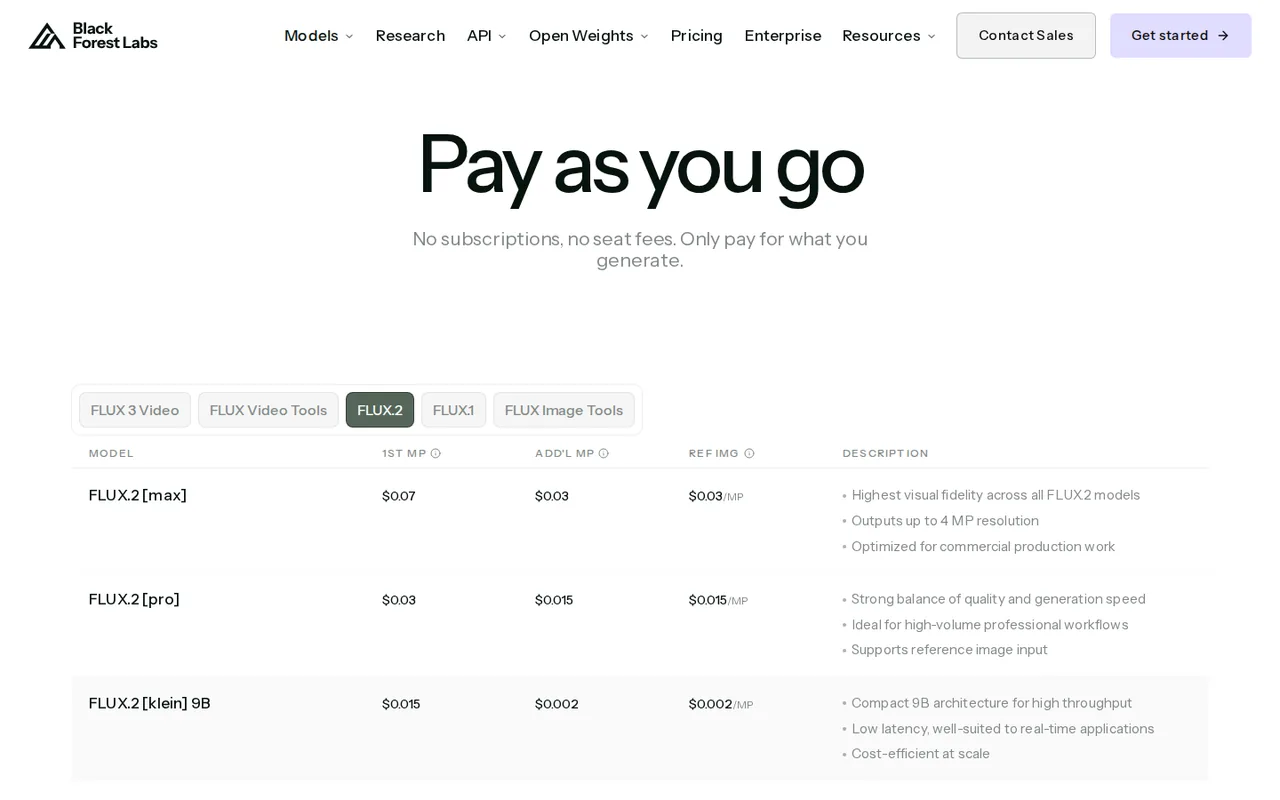
Regional prices: Black Forest Labs sells prepaid credits, 1 credit = $0.01 USD, through Stripe; Playground and API use have no seats or subscriptions.
Image prices are per megapixel: resolution is rounded up separately for the output and each reference image, and output is capped at 4 MP. Batch requests multiply the per-image price. Failed and moderated requests are not charged. Help-center tables list slightly different FLUX.2 [flex] and video-continuation rates than the pricing page; the pricing page figures are used here.
| Plan | Price | What you get |
|---|---|---|
| FLUX.2 [klein] 4B | $0.014 per imagefirst megapixel, prepaid credits sourceFrom bfl.ai/pricing, checked Sep 28, 2026 (opens in a new tab) | Fastest FLUX.2 tier; each additional megapixel adds $0.001. |
| FLUX.2 [pro] | $0.03 per imagefirst megapixel, prepaid credits sourceFrom bfl.ai/pricing, checked Sep 28, 2026 (opens in a new tab) | Each additional output megapixel and each reference image add $0.015. |
| FLUX.2 [max] | $0.07 per imagefirst megapixel, prepaid credits sourceFrom bfl.ai/pricing, checked Sep 28, 2026 (opens in a new tab) | Highest-fidelity FLUX.2 tier with grounding search; additional megapixels and references $0.03. |
| FLUX 3 Video | $0.17 per secondHD, prepaid credits sourceFrom bfl.ai/pricing, checked Sep 28, 2026 (opens in a new tab) | Text or image to video, 5 to 20 seconds, audio included; drafts $0.06 per second. |
| Enterprise | Custom quote | Volume discounts, service-level agreements and dedicated support through sales. |
How far does it go?
- Ten product edits with FLUX.2 [pro]One 2 MP output ($0.03 + $0.015) plus one 1 MP reference ($0.015) is $0.06, or 6 credits. Ten such edits use 60 credits ($0.60). Larger references, extra references or a batch change the total; this is arithmetic from the published rates, not a measured bill.
Arithmetic from the published allowances above, not a usage test.
Taxes, currency and promotions can change the price you see at checkout.
Visit FLUX Playground (opens in a new tab)
Key features
| Feature | What it does | Watch out |
|---|---|---|
| Text-to-image with FLUX.2 [max], [pro], [flex] and [klein] | — | |
| Image editing with up to 10 reference images | Combine several uploaded images to keep a product, character or style consistent. | Each additional reference image is billed as its own megapixel. |
| FLUX 3 video clips of 5 to 20 seconds with generated audio | — | |
| FLUX.1 Kontext [pro] and [max] for context-aware edits | — | |
| API Code button that copies the parameters of a generation | — | |
| C2PA Content Credentials embedded in generated images | — | |
| Model choice | Pick a FLUX.2 tier, FLUX.1 Kontext or FLUX 3 for each generation. | Each tier bills differently; [max] and [flex] cost more per megapixel than [pro] or [klein]. |
| Hand-off to the API | Copy Python, JavaScript or cURL code with the exact parameters of a successful generation. | API result URLs expire after 10 minutes, so an integration must download promptly. |
Where does playground.bfl.ai lead now?
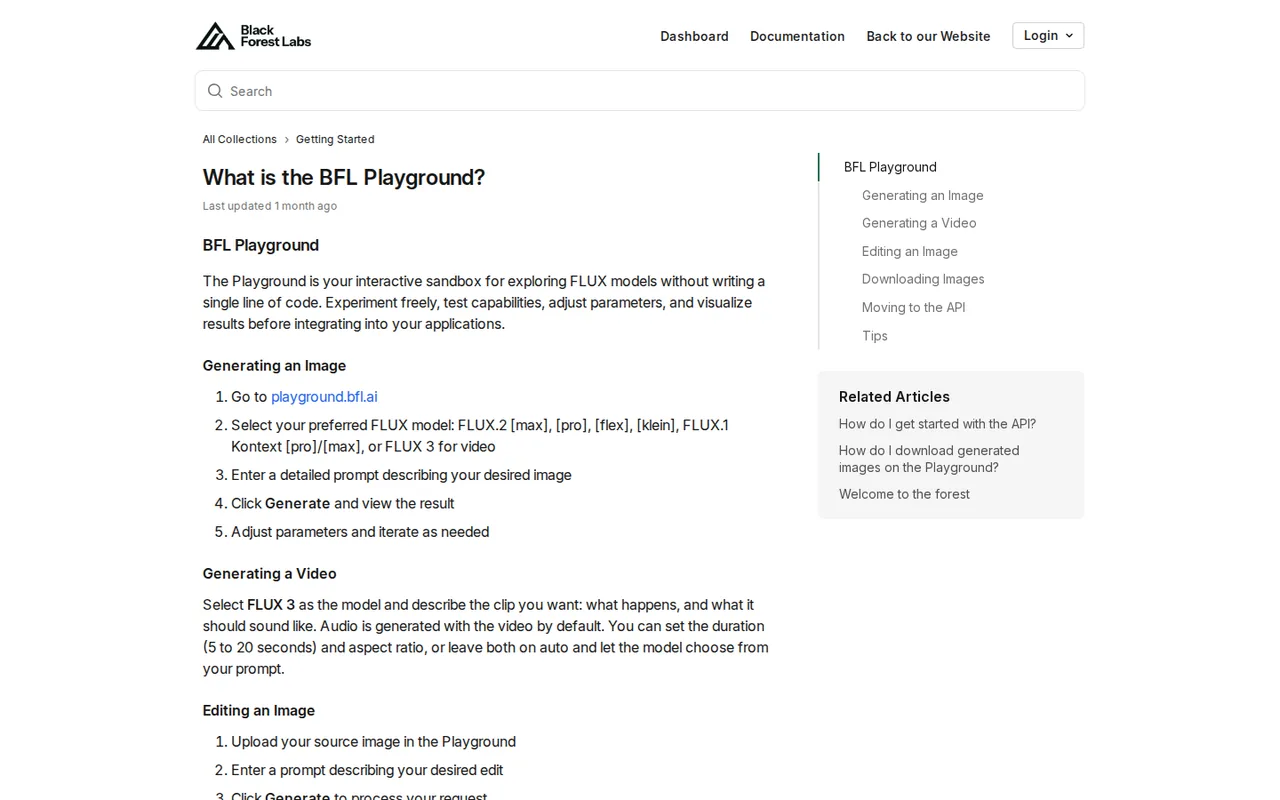
Opening playground.bfl.ai no longer shows a public generator. The address redirects to a Black Forest Labs sign-in page, and after login the Playground runs inside the BFL dashboard, the same account area that holds API keys, credits and usage reports. The terms of service cover the Playground, including the Dev Playground at dashboard.bfl.ai, under one agreement with a minimum age of 18.
The help center lists the selectable models: FLUX.2 [max], [pro], [flex] and [klein], FLUX.1 Kontext [pro] and [max], and FLUX 3 for video. The FLUX.2 overview page still describes [klein] as API-only, so check the model menu after signing in rather than relying on either page alone. New accounts start with a default organization and project, which matters once credits are shared.
How do credits become the price of one image?
One credit is worth $0.01, and the help center states that Playground and API generations cost the same. FLUX.2 pricing charges the first megapixel of output and then a rate for each further megapixel. For FLUX.2 [pro] that is $0.03 for the first megapixel and $0.015 for each additional one; [klein] 4B starts at $0.014 and [max] at $0.07. Resolution is rounded up to the next whole megapixel.
Editing adds input charges. Each reference image is billed at the reference rate of the chosen model, and when several references are supplied, each is downscaled to and charged as one megapixel. A batch of four costs four times the single price. The practical consequence: an edit with three references can cost more than the output image itself, so decide how many references the task really needs.
Which FLUX model fits a first comparison?
BFL positions [klein] for fast, high-volume work, [pro] for production at scale, [flex] for adjustable steps and typography, and [max] for the highest fidelity plus grounding search, where the model can search the web for current products or events. Multi-reference editing accepts up to 10 images in the Playground, against 8 through the API for [pro], [flex] and [max]; [klein] takes up to 4.
Hold the prompt, aspect ratio and output size constant and change only the model. Starting with [pro] gives a reference cost; move to [flex] when lettering matters and to [max] only when [pro] misses detail the brief actually needs. FLUX.1 Kontext is still selectable, but the documentation recommends FLUX.2 for new projects, so avoid building a new workflow around the older model.
What rights and duties come with Playground output?
The terms say Black Forest Labs claims no ownership of your inputs and outputs, and a help article states that Playground images carry the same commercial usage rights as API images, with no extra licence fee. That permission covers hosted generation. Running open weights such as FLUX.2 [klein] 9B or FLUX.2 [dev] on your own hardware falls under a non-commercial licence unless a separate commercial licence is bought; [klein] 4B is Apache 2.0.
The same terms set limits. You need consent before generating output that depicts a real, identifiable person, may not present output as human-made or as a photograph of a real event, and may not use output to train or fine-tune another AI model. BFL also receives a licence to use inputs and outputs to improve its models; opting out of training means emailing its legal address, and the opt-out does not reach content already used.
When should a project move from the Playground to the API?
Every successful generation has an API Code button that copies its exact parameters as Python, JavaScript or cURL. That is the natural exit once a prompt is stable and you need volume, automation or storage in your own system. API results arrive through polling, and the integration guide warns that generated images expire after 10 minutes, so an application must download each result promptly.
Credits sit at organization level and every member draws from the same pool, while usage is reported per project. Auto top-up can recharge a saved card when the balance falls below a threshold of at least $5, to a target at least $10 higher. Without it, API calls return a 402 error and Playground generation stops when the balance reaches zero.
How much should a first budget be?
The quick-start guide suggests adding $10 to $20 of credits to experiment. At FLUX.2 [pro] rates, $10 covers about 333 one-megapixel text-to-image generations, and fewer once edits add reference charges or outputs grow. Editorial assessment: a single designer comparing still images can start near the lower figure, while anyone testing FLUX 3 video should budget separately, because a five-second HD clip already costs $0.85.
Help articles say purchased credits roll over and do not expire while the account exists, but the terms make them non-refundable and non-transferable, including at account closure. Buy in small increments until monthly volume is clear, and switch on auto top-up only after deciding who may approve a card charge.
Can it produce a labelled product shot from two references?
Proposed evaluation · not performed yet
Sign in with an account holding at least $1 of credits. Upload two images you own, a product photo and a plain background, and ask FLUX.2 [pro] for a 2 MP square image that places the product on the background with the label text “Batch 07” and a #1F6FEB accent. By the published formula this run costs $0.075; the same request on [flex] costs $0.20.
- Record the model, output size and starting credit balance.
- Generate once with the prompt, both references and default settings.
- Download the image and inspect the label text at full size.
- Repeat once with FLUX.2 [flex] at the same size and references.
- Record the balance after each run and inspect the C2PA credential with a verifier.
Accept only a result whose label reads exactly as specified and whose product shape matches the reference. Reject altered text, a changed product or a deduction that differs from the formula. No output or credit figure is reported until the task is run.
For subscription-based image generation, compare Midjourney. Adobe Firefly works inside Adobe apps under its own terms, and Leonardo.Ai offers browser generation with its own plans. Match output size and editing needs before comparing price.
Is FLUX Playground worth it?
Documentation review plus dated public user reports. Documentation review, not tested hands-on. Not scored.
Worth it if
- You are a developer who wants to settle prompts and parameters in the browser first, because the Playground bills at the same rates as the API and copies the exact settings as code.
- You edit product shots with several reference images you own and want to see the per-image credit cost before building anything.
Probably not if
- You want a free daily allowance to experiment with, because the official pages we reviewed list no free Playground credits and generation stops at a zero balance.
- You need credits you can get back later, because the terms make purchased credits non-refundable and non-transferable even when the account is closed.
FLUX Playground alternatives
Other images & design tools checked with the same method. Pick by the job, not by a score.

AI images, video and audio inside an Adobe workflow

Rigged 3D avatars from a selfie for games and apps

AI images placed straight into templated designs

Turning a written story into a character-consistent comic series, and optionally a short film

Product-photo background replacement and batch exports

YouTube thumbnails and titles from prompts or references

Creators who want to compare many image and video models on one subscription instead of paying each model maker separately

Small businesses making on-brand product photos and social posts
Used FLUX Playground? Write the first review. Visitor opinions are moderated and kept separate from our source checks.
Frequently asked questions
Can I use FLUX Playground for free?
None of the official pricing, documentation or help pages we reviewed lists a free Playground allowance. They describe prepaid credits at $0.01 each and say generation stops when the balance reaches zero. Some third-party pages describe free evaluation; treat that as unconfirmed and check the balance in your own dashboard before planning a session.
How much does FLUX cost in USD?
FLUX Playground costs $0.01 per prepaid credit, with no subscription, at the same rates as the API. FLUX.2 [pro] images start at $0.03 for the first megapixel, [klein] 4B at $0.014 and [max] at $0.07. FLUX 3 video is $0.17 per second in HD. A 2 MP [pro] edit with one 1 MP reference comes to $0.06.
Am I charged when a prompt is blocked?
The help center says inputs flagged before processing return Request Moderated and are not charged, while outputs flagged afterwards return Content Moderated and cannot be delivered, also without a charge. Only generations with a Ready status consume credits, and API calls that end in an error status are likewise not billed.
How can someone verify that an image came from FLUX?
Black Forest Labs embeds C2PA Content Credentials in images from the API and the Playground. The signed manifest records that the media is AI-generated and names Black Forest Labs as the claim generator, and an invisible watermark can link a stripped file back to its credentials. Self-hosted open-weight outputs are not signed.
Can I make video in the Playground?
Yes. Selecting FLUX 3 generates a clip of 5 to 20 seconds with audio by default, and duration and aspect ratio can stay on auto. Video is billed per output second: $0.17 in HD and $0.06 for a draft, rising with resolution. Partial seconds are rounded up, so a 5.2-second clip bills as six seconds.
Is anything I make visible to other users?
The terms say some features, such as Prompt Party or other sharing functions, can make your content visible to others, and Black Forest Labs disclaims responsibility for how shared content is reused. Keep client material out of shared features, and remember that similar outputs created by other users remain theirs to use.
Sources and method8 official sources · 6 details checked · Sep 28, 2026
How we checked this profile
6 details on this page were checked against FLUX Playground's own pages and help documentation (Sep 28, 2026).
See the checks by section6 documented
| Section | Checks | Last checked | Sources |
|---|---|---|---|
| Plans and prices | 2 documented | help.bfl.ai/7986977817-what-are-the-co…bfl.ai/pricing | |
| Article text | 2 documented | playground.bfl.aihelp.bfl.ai/4375863104-can-i-use-the-a… | |
| Questions | 1 documented | help.bfl.ai/4212278032-my-prompt-is-ge… | |
| Strengths and limits | 1 documented | help.bfl.ai/3705384267-c2pa-in-flux-ge… |
Sources for this profile
- Public pricingbfl.ai
- Playground address (redirects to sign-in)playground.bfl.ai
- API and Playground pricing documentationdocs.bfl.ai
- What is the BFL Playground?help.bfl.ai
All 8 sources
Pricing comes from bfl.ai/pricing and the pricing documentation; Playground behaviour from help-center articles. The playground address redirected to a sign-in page, so the interface itself was not inspected. No free allowance appears on the official pages reviewed; third-party claims of free evaluation were not confirmed. Help articles say credits do not expire, while the terms only call them non-refundable and non-transferable.
Sources checked Sep 28, 2026. Found something out of date? See how we correct profiles.