


What is Relume, in short?
Updated October 24, 2026 · By Elias Brandt · Documentation review, not tested hands-on
Pros
- No seat fee on Publish
- Hosting priced by traffic
- Not locked to one host
- Refund window
Cons
- Two bills for one site
- Free AI limit is vague
- Generation stops at the cap
- Export pages capped on Starter
- Data may train models
Best forAgencies and freelancersWebflow buildersReact developersSmall businesses with a simple marketing siteNot for apps or online stores
Strengths, limits and who it suits, in full
Strengths
- No seat fee on Publish Anyone can be invited into the workspace as an editor without a per-seat charge.
- Hosting priced by traffic Each site picks its own page-view tier, from 6,000 to 900,000 a month.
- Not locked to one host The same project can be published on Relume or exported to Figma, Webflow or React.
- Refund window The Terms offer a refund if you email support within 10 days.
Limits
- Two bills for one site AI usage is a workspace plan and hosting a separate plan per site, so a live site on your domain can need both.
- Free AI limit is vague The pricing page calls the free allowance enough for one full website, a landing page and one small website in three places.
- Generation stops at the cap At 100% of monthly AI usage, generation pauses until the reset or an upgrade.
- Export pages capped on Starter Export Starter allows 1 project and 5 pages; unlimited pages start at Export Pro.
- Data may train models The Privacy Policy says Relume may use certain customer data for AI training, anonymised or aggregated where feasible.
Who it suits
- Agencies and freelancers Client briefs, unlimited editors and roles such as Viewer and Billing Contact suit client work.
- Webflow builders Export lands in Webflow with Client-First classes and structure intact.
- React developers Components export with Tailwind CSS and shadcn/ui, or arrive through the Library MCP as editable files.
- Small businesses with a simple marketing site Publish handles domain, SSL, forms and hosting in one place.
- Not for apps or online stores the pages describe marketing websites and list no checkout, logins or databases.
How much does Relume cost?
Prices confirmed · checked
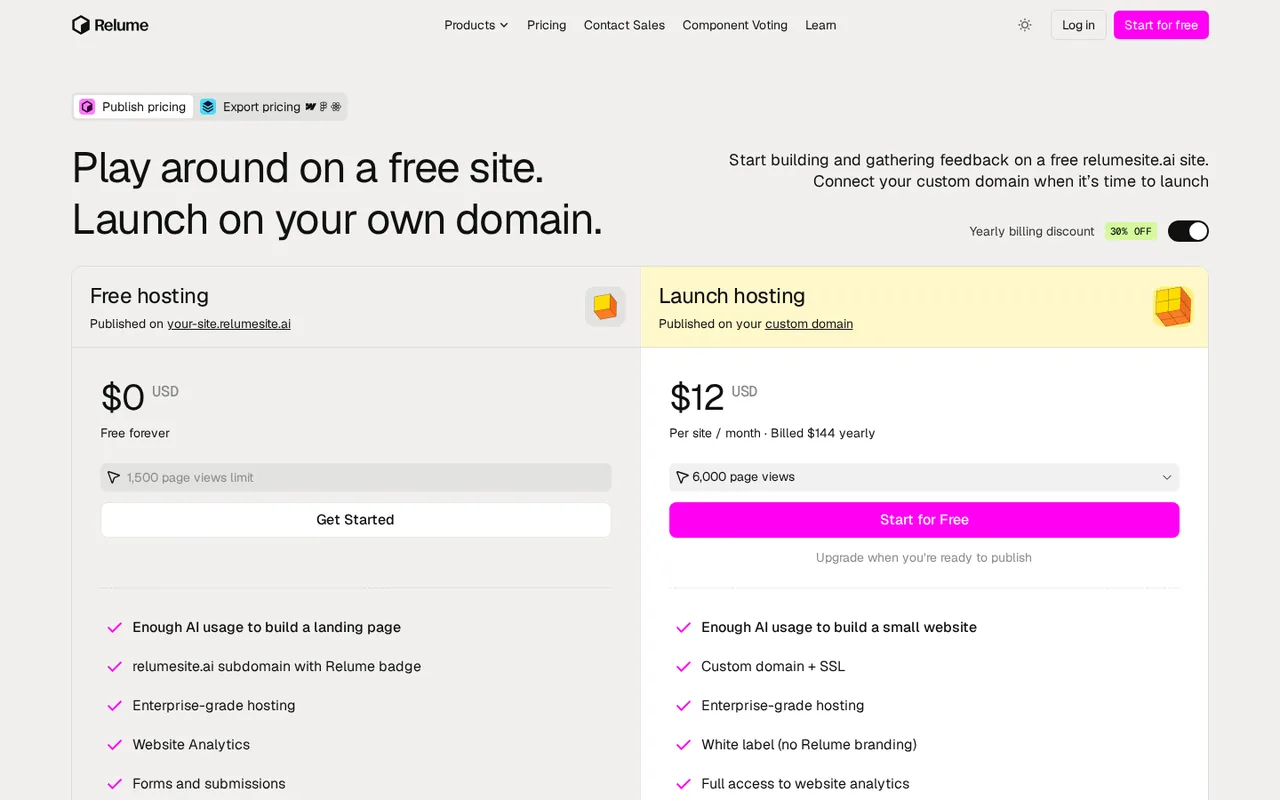
Regional prices: Publish has two plan types: a Workspace Plan for AI usage across all projects and a Website Plan for each site's hosting and traffic; upgrading one does not change the other.
The yearly discount is shown as 30% off. Launch tiers per site, billed yearly: 15,000 page views $22, 30,000 $38, 90,000 $78 and 300,000 $198 a month; billed monthly $28, $48, $98 and $248. Prices for the 5x and 20x Pro multipliers are not on the public page. The pricing FAQ says there is no 7-day Pro trial, while the Pro card offers one. Existing customers on older Library plans stay on their original pricing unless they cancel and rejoin.
| Plan | Price | What you get |
|---|---|---|
| Free | $0 sourceFrom relume.ai/pricing, checked Oct 24, 2026 (opens in a new tab) | Publish: limited monthly AI usage, hosting on a Relume address with the Relume badge, 1,500 page views, 20 form submissions a month and a 7-day analytics window. Export: 1 project, 1 page, Figma export only. |
| Launch hosting | $12 per site per month billed yearly$144, or $16 monthly, for 6,000 page views sourceFrom relume.ai/pricing, checked Oct 24, 2026 (opens in a new tab) | Custom domain with SSL, no badge, full analytics, unlimited forms, SEO and AI-crawler controls, custom code and 301 redirects; tiers up to 900,000 page views at $548 yearly or $685 monthly per site. |
| Pro (AI usage) | From $14 per month billed yearly$168, or $24 monthly sourceFrom relume.ai/pricing, checked Oct 24, 2026 (opens in a new tab) | More AI usage across all projects with 1x, 5x or 20x multipliers chosen in the account, premium AI models, higher limits per generation, priority access and usage insights. |
| Export Starter | $18 per user per month billed yearly$216, or $26 monthly sourceFrom relume.ai/pricing, checked Oct 24, 2026 (opens in a new tab) | 1 project and 5 pages; export to Figma, Webflow and React with 1,000+ components each; Library MCP; design system export to Claude; 7-day trial. |
| Export Pro | $40 per user per month billed yearly$480, or $58 monthly sourceFrom relume.ai/pricing, checked Oct 24, 2026 (opens in a new tab) | Unlimited projects and pages with the same exports, components and Library MCP. |
| Export Team | $36 per user per month billed yearly$1,296 for the 3-user minimum, or $52 monthly sourceFrom relume.ai/pricing, checked Oct 24, 2026 (opens in a new tab) | Pro features for each user, a team workspace and branded sharing. |
| Enterprise | Custom quote | Custom AI usage and volume pricing, white-glove onboarding, enterprise terms and done-for-you workspace setup. |
How far does it go?
- One three-page site, priced on Publish and on ExportAssume a three-page small-business site (home, services, contact), about 30 AI revisions in the first month, then 3,000 page views a month. On Publish, going live on your own domain needs Launch at its 6,000-view tier: $144 a year billed yearly, or $16 x 12 = $192 billed monthly. If the free AI allowance runs out, adding Pro brings the yearly total to $144 + $168 = $312, or $40 a month on monthly billing. On Export, three pages fit Export Starter's five-page cap at $216 a year or $26 a month per user; Free export stops at one page and Figma only, and the Webflow site plan is a separate bill. Editorial arithmetic on listed prices and an assumed workload, not a Relume figure.
Arithmetic from the published allowances above, not a usage test.
Taxes, currency and promotions can change the price you see at checkout.
Try Relume free (opens in a new tab)
Key features
| Feature | What it does | Watch out |
|---|---|---|
| Brief to site: drop in files, PDFs, brand guidelines, a call recording or a URL and Relume writes a structured Project Brief (Getting started guide) | — | |
| Sitemap, Wireframe and Design tabs: the AI plans pages, lays out each section with copy, then applies logo, colours, type and spacing | — | |
| Assembled from components: the AI picks from 1,000+ human-built components instead of writing raw code, and a component swaps in one click | — | |
| Relume Publish hosting: a free Relume address or your own domain with SSL, forms, analytics, robots.txt, sitemap and JSON-LD controls | — | |
| Export: Figma with auto-layout, Webflow with Client-First classes, or React with Tailwind CSS and shadcn/ui (Export page) | — | |
| Two MCP servers: build and publish a site from Claude or ChatGPT, or pull Relume components into Cursor and other AI editors | — | |
| AI chat edits | Open the Relume AI panel, describe a change and the edit lands on the relevant part of the site for you to accept, refine or undo. | The help guide advises page-, section- or component-level prompts over broad ones such as "make the pricing page better". |
| Site health before publishing | The publish flow checks security, responsiveness and accessibility, can hand flagged issues to the agent, and shows Lighthouse scores once live. | A low readiness score does not block publishing; it only lists suggested fixes. |
| Specialist agents | Strategist, copywriter, designer and analyst agents keep working on a published site and propose changes. | Nothing goes live until someone reviews and approves it. |
Publish or Export: which Relume do you need?
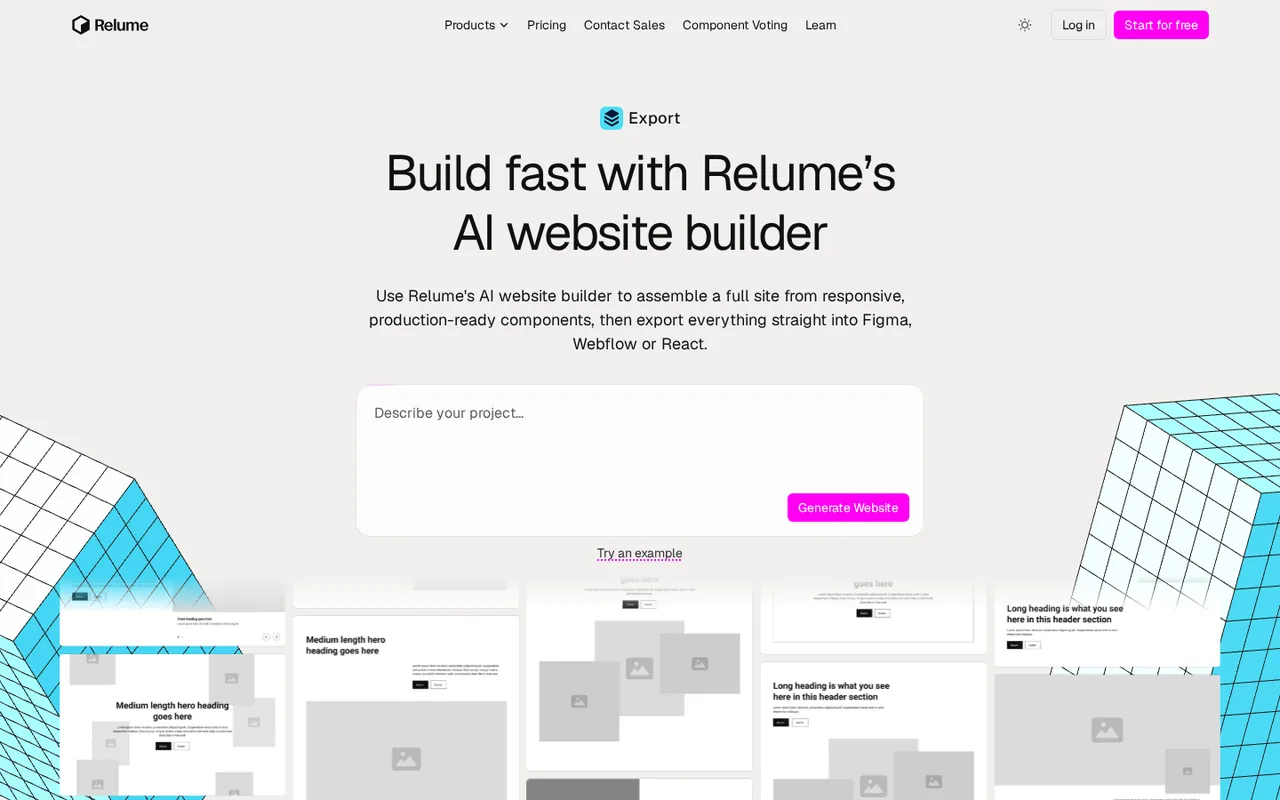
Relume now sells two products from one dashboard switcher, each with its own pricing tab. Publish builds the site and hosts it on Relume. Export builds the same kind of site from the same components and hands it to Figma, Webflow or React, where you host it yourself. A third mode, Library, is the component library Relume started with.
Publish then splits its bill in two, as the getting started guide explains: a Workspace Plan covers AI usage across all your projects, and a Website Plan covers each site’s hosting and traffic. Upgrading one leaves the other untouched. Export is priced per user instead and has no hosting at all. So the first question is not which tier, but where the finished site will live.
Where does the free plan stop?
On AI usage, the limit is a monthly share rather than a published number. The AI usage guide shows it as a percentage bar, broken down by site, on a rolling monthly cycle. At 100% AI generation pauses until the next reset unless you upgrade. The pricing page describes the free share three ways: enough for one full website, enough to build a landing page, and enough for one small website a month. Pro offers 1x, 5x or 20x multipliers in the account, but only the entry price is public.
On hosting, a free site stays on a Relume address with the badge always shown and stops at 1,500 page views a month. The address itself is named three ways across Relume’s pages: relumesite.ai, relume.live and relume-staging.io. On Export, Free allows one project of one page and exports to Figma only, so even a three-page Webflow handoff needs Export Starter.
How does Relume build a site from a brief?
It starts with a Project Brief. You can drop in files, PDFs, brand guidelines, a client call recording or just a URL, and Relume turns them into an overview, goals, audience and requirements. From the brief it generates a sitemap, then wireframes with copy for each page, then a design that applies the logo, colours, type and spacing. The Publish page says the AI does not write raw code: it selects components that Relume’s designers built and assembles them, and swapping a component takes a click with no prompt.
Before a site goes live, the publish flow walks through the domain, the favicon, social preview and search appearance, then a site health check. Once live, it reports Lighthouse scores for performance, accessibility, best practices and SEO. These are Relume’s checks on its own output, not a measured comparison with other builders.
What arrives when you export?
Each target gets its own format, according to the Export page. Figma receives a native file with auto-layout, variables, variants, mobile versions and the style guide. Webflow receives the whole project with Client-First classes and structure, ready to style. React receives components written with Tailwind CSS and shadcn/ui, or plain HTML. The Library MCP goes further for developers: an AI editor searches the library in plain language and drops the actual component into your project as editable files, with shared primitives, a Tailwind preset and icons.
Check the Licensing Agreement before handing work to a client. Components carry a non-exclusive licence for end products, may not be redistributed, and end products sold or given away should not include editable source files. If the export is headed for Webflow, the Webflow profile lists the site and workspace plans that hosting will need.
Who handles domains, people and payments?
Relume hosts the site but never registers domains. The domain guide says any domain bought through Relume is registered with IONOS, which owns its billing, renewals, cancellations and transfers. The free Relume address keeps working after you connect your own. Roles are set per site: Owner, Admin, Editor, Viewer, and a Billing Contact who manages payment with no control over the site, and editors carry no seat charge on Publish.
The Terms name Relume Tech Pty Ltd as the operator. Subscriptions renew automatically on the day you bought them, and a cancelled account is suspended once the paid period ends. Relume also warns that storing components you do not own in a shared folder, including ones copied from other Webflow libraries, can lead to a lifetime ban.
How could you check Relume before paying?
Proposed evaluation · not performed yet
Build one three-page site on Free and see where the AI share, the hosting cap and the export limit each stop it.
- In Publish, paste a short brief for a three-page site (home, services, contact) and generate the sitemap.
- Generate wireframes and the design, then make five scoped AI edits and note the AI usage percentage after each.
- Add a contact form, publish on the free Relume address and send one test submission.
- Switch to Export and try to copy all three pages to Webflow and to Figma.
- Write down every point where Relume asks you to upgrade.
Accept if the site publishes, the form submission reaches the dashboard and the AI share covers the build with room for edits. Reject if generation pauses before the design is done, or if your handoff needs Webflow or React export that Free does not include. No result is recorded here.
Relume alternatives
Other website builders tools checked with the same method. Pick by the job, not by a score.

Small businesses and agencies that want an AI-built site on WordPress with hosting, backups and a domain in one bill

Founders and product teams turning a prompt into a hosted web app

All-in-one AI websites for small service businesses

Non-developers and small teams who want to turn a described idea into a working web or mobile app prototype

AI-built web apps with synced code

Designing UI screens and prototypes with AI and coding agents

Product teams that want clickable prototypes in their own design system, then a hand-off to code or Figma

Non-developers and small teams who want a store-ready iOS and Android app built by chat, with the Flutter source code to keep
Used Relume? Write the first review. Visitor opinions are moderated and kept separate from our source checks.
Frequently asked questions
Can clients review a Relume project without paying?
Yes. On Publish you can invite anyone into the workspace as an editor with no per-seat charge, or give them the Viewer role, which allows viewing and comments but no edits or publishing. On the Export side, Free shares a read-only link, and privately shared components can be used by anyone on the Free plan once they sign up.
Does Relume work inside Claude or ChatGPT?
Yes, through two MCP servers. The Publish MCP builds a complete website in Relume from one prompt in Claude or ChatGPT, publishes it to your domain or hands it to Webflow. The Library MCP works in Claude, ChatGPT, Cursor and other MCP clients and is listed on Export Starter and above. Both sign in with your Relume account.
Can I get a refund from Relume?
The Terms say to email support@relume.io within 10 days if there is an issue, and Relume will issue a refund, though the full amount may vary with Stripe processing fees. The pricing FAQ describes it as a full refund within 10 days. Relume adds that it is not responsible for differences caused by currency conversion at payment.
What happened to older Relume Library plans?
Existing customers were moved to the current Starter plan and keep their original price. If you cancel and rejoin later, the new pricing applies. The pricing FAQ also notes that signing up for Free first removes the option of a 7-day Starter trial, so start the trial before creating a Free account if you want one.
Who makes Relume?
Relume Tech Pty Ltd operates the service, according to the Terms; its co-founders Dan Anisse and Adam Mura are listed on the site. Payments run through Stripe, invoices arrive by email on each renewal, and domains bought in the app are registered and billed by IONOS rather than by Relume itself.
Sources and method16 official sources · 22 details checked · Oct 24, 2026
How we checked this profile
22 details on this page were checked against Relume's own pages and help documentation (Oct 24, 2026).
See the checks by section21 documented1 editorial assessment
| Section | Checks | Last checked | Sources |
|---|---|---|---|
| Plans and prices | 5 documented 1 editorial | relume.ai/pricing | |
| Article text | 8 documented | relume.ai/managing-your-ai-usage-and…relume.ai/getting-started-with-relum…relume.ai/publishrelume.ai/connect-a-domain-to-your-s…relume.ai/exportrelume.ai/library-mcprelume.ai/licensing-agreement | |
| Strengths and limits | 2 documented | relume.ai/pricingrelume.ai/privacy-policy | |
| Features | 2 documented | relume.ai/publishing-and-hosting-you…relume.ai/how-to-make-edits-using-re… | |
| Questions | 3 documented | relume.ai/mcprelume.ai/termsrelume.ai/pricing | |
| Official channels and media | 1 documented | relume.ai |
Sources for this profile
- Pricing page (Publish and Export tabs, yearly and monthly views)relume.ai
- Relume homepage and FAQrelume.ai
- Relume Publish pagerelume.ai
- Relume Export pagerelume.ai
All 16 sources
- Relume MCP pagerelume.ai
- Relume Library MCP pagerelume.ai
- Help: Getting started with Relume Publishrelume.ai
- Help: Track and manage your AI usagerelume.ai
- Help: Publishing and hosting your siterelume.ai
- Help: Connect a domain to your siterelume.ai
- Help: Forms on Relume Publishrelume.ai
- Help: Edits using Relume AIrelume.ai
- Help: Switch between Publish, Export and Libraryrelume.ai
- Termsrelume.ai
- Privacy Policyrelume.ai
- Licensing Agreement, current as of 1 August 2022relume.ai
Official pages read on 24 Oct 2026: the pricing page in a local browser in four views (Publish and Export, with the yearly discount on and off, each Launch page-view tier selected in turn), the homepage and its FAQ, the Publish, Export and MCP pages, the Publish help articles on getting started, AI usage, publishing, domains, forms and AI edits, and the Terms, Privacy Policy and Licensing Agreement (current as of 1 August 2022). relume.io now redirects to relume.ai. We did not sign up or build a site. The free Relume address appears as relumesite.ai on the pricing card, relume.live in the comparison table and domain guide, and relume-staging.io in the publishing guide. A funding line in the site menu links to an unrelated page and was not used, nor were user counts, a country coupon or third-party prices and reviews.
Sources checked Oct 24, 2026. Found something out of date? See how we correct profiles.