

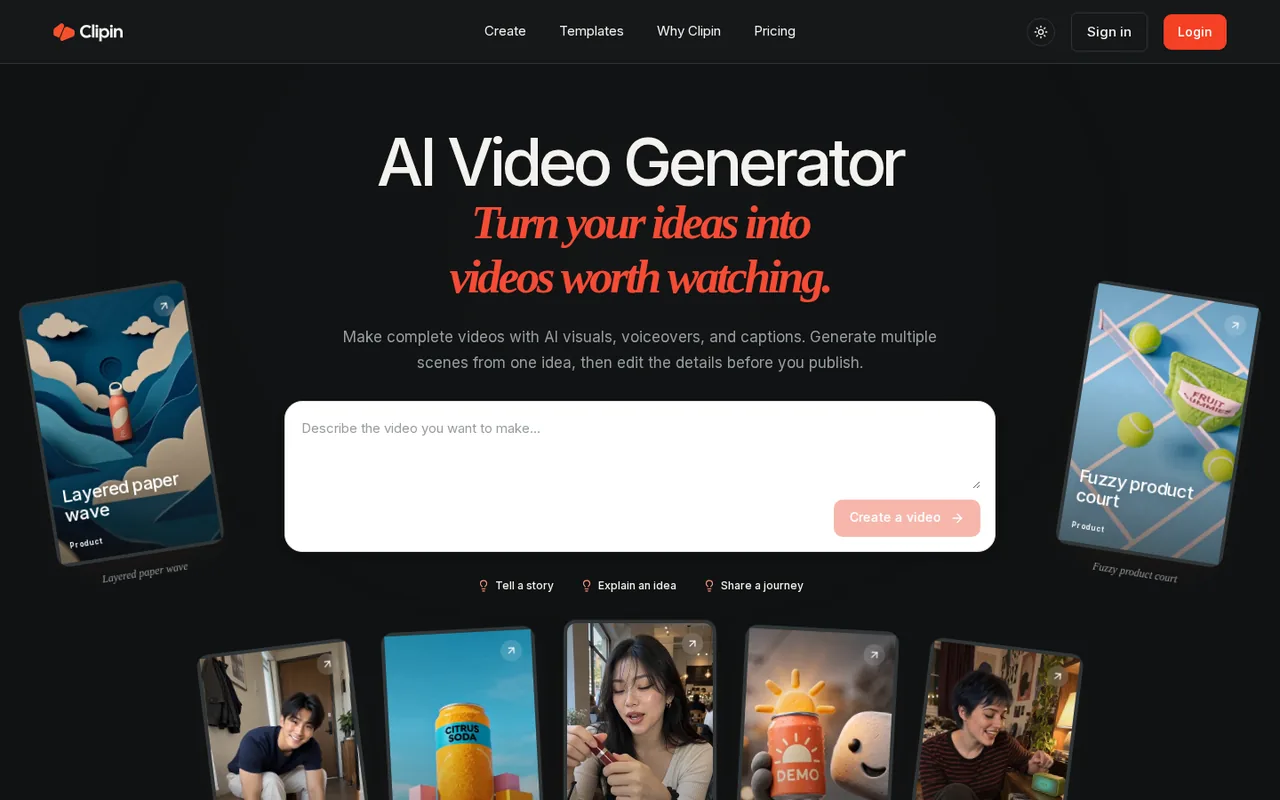
What is Clipin, in short?
Updated November 4, 2026 · By Elias Brandt · Documentation review, not tested hands-on
Pros
- Scene-level editing
- Several models in one balance
- Estimate before spending
- Small way in
Cons
- Free use is thin
- Credits do not roll over
- Commercial rights not stated plainly
- Refunds are narrow
- Company not named
Best forShort-form creatorsSmall brands testing product clipsNot for teams needing clear commercial terms or a named vendor
Strengths, limits and who it suits, in full
Strengths
- Scene-level editing You can change one scene instead of regenerating a whole video, which the homepage FAQ describes.
- Several models in one balance Video, image and voiceover models share credits, so you do not run separate subscriptions.
- Estimate before spending The FAQ says the credit estimate is shown before you submit a generation.
- Small way in A $4.99 one-time pack of 115 credits needs no subscription.
Limits
- Free use is thin 10 credits last 7 days, exports are watermarked and free library files are deleted after 3 days.
- Credits do not roll over Unused monthly credits are lost, and regeneration can use more.
- Commercial rights not stated plainly The Terms give no guarantee that outputs are unique or suited to commercial use and refer to underlying model providers' terms.
- Refunds are narrow Used credits and disliked results are not refundable; a first-payment refund needs 7 days and unused benefits.
- Company not named The pages read name no company or address, and the Terms are governed by United States law.
- Per-video cost unclear 'Fast video' is not defined, and the cost changes with model, length and options.
Who it suits
- Short-form creators Story videos from 15 seconds to 5 minutes in portrait, landscape or square, with YouTube Shorts publishing.
- Small brands testing product clips AI UGC templates make creator-style drafts; label them as AI-generated.
- Not for teams needing clear commercial terms or a named vendor The Terms do not state a plain commercial grant and no company is named.
How much does Clipin cost?
Prices confirmed · checked
Regional prices: Prices are the amounts on the pricing page on 2026-11-04, in US dollars as shown with a dollar sign; no region or tax note was found.
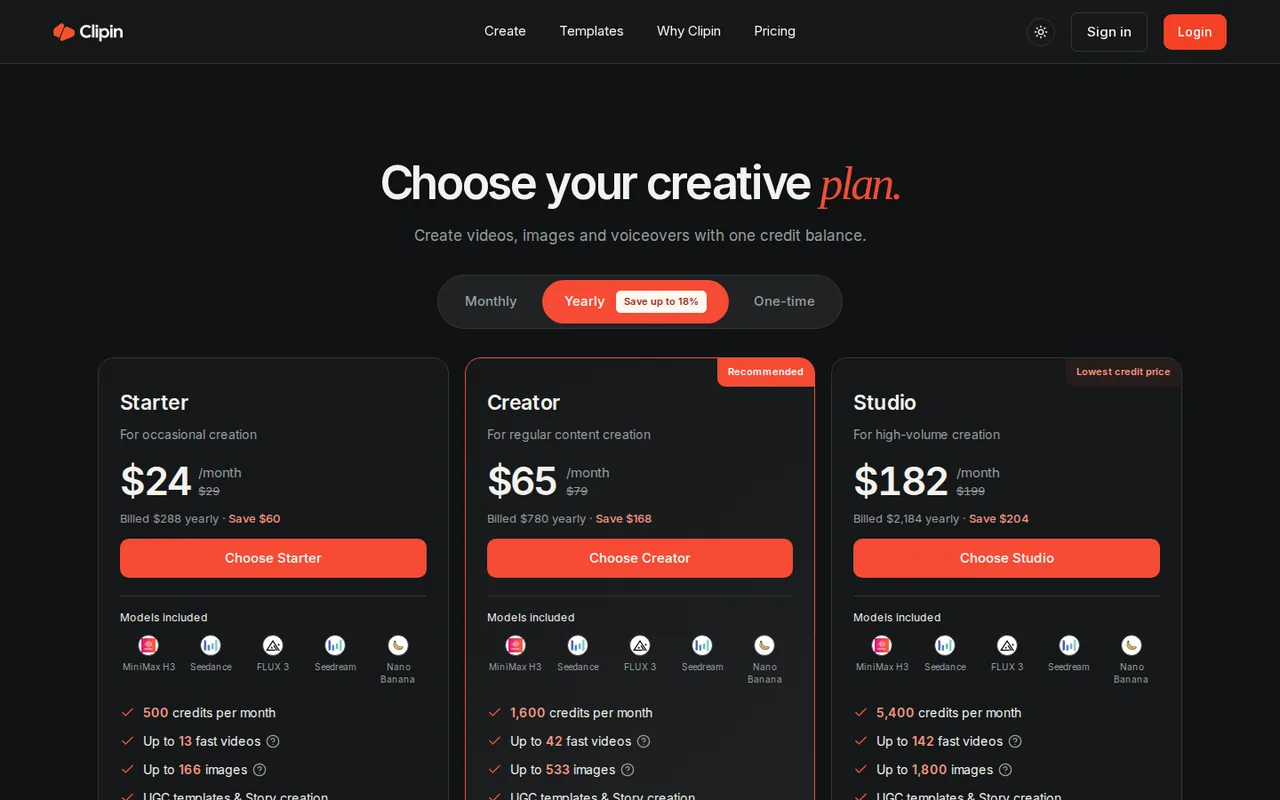
The $24, $65 and $182 figures are monthly equivalents of yearly billing ($288, $780 and $2,184 a year). The crossed-out $29, $79 and $199 equal the stated savings divided by 12, but the Monthly tab was not read separately, so month-to-month prices are not confirmed. Credits are shared across images, videos and voiceovers and monthly credits do not roll over. Subscriptions renew automatically unless canceled before the renewal date; cancellation stops renewal and does not refund past charges. Refunds are limited to duplicate charges, an unused credit pack or a first subscription payment within 7 days, and a confirmed outage of 72 hours or more.
| Plan | Price | What you get |
|---|---|---|
| Free trial | 10 credits once, 7 days sourceFrom clipin.ai/pricing, checked Nov 4, 2026 (opens in a new tab) | Plus 10 free chat messages a day; exports carry a watermark and free library files are deleted after 3 days. The available trial depends on the cost of the settings you pick. |
| Starter | $24 per monthbilled $288 yearly sourceFrom clipin.ai/pricing, checked Nov 4, 2026 (opens in a new tab) | 500 credits a month, up to 13 fast videos or 166 images. The page shows $29 crossed out; the Monthly tab was not read, so that is likely the month-to-month price. |
| Creator | $65 per monthbilled $780 yearly sourceFrom clipin.ai/pricing, checked Nov 4, 2026 (opens in a new tab) | 1,600 credits a month, up to 42 fast videos or 533 images. Marked recommended. The page shows $79 crossed out. |
| Studio | $182 per monthbilled $2,184 yearly sourceFrom clipin.ai/pricing, checked Nov 4, 2026 (opens in a new tab) | 5,400 credits a month, up to 142 fast videos or 1,800 images. The page shows $199 crossed out. |
| Experience Pack | $4.99 one-time sourceFrom clipin.ai/pricing, checked Nov 4, 2026 (opens in a new tab) | 115 credits valid for 30 days, up to 3 fast videos or 38 images, no subscription. |
Which plan fits?
Smallest plan whose monthly credits cover your number with 15% spare for regenerations. Arithmetic from the plan table above, not a usage test.
How far does it go?
- Five-second vertical Seedance clips on StarterThe AI UGC page showed 100 credits for one Seedance 2.5, 9:16, 5 s generation, so Starter's 500 monthly credits cover 5 such clips, Creator's 1,600 cover 16 and Studio's 5,400 cover 54. The pricing page's own 'up to 13, 42 and 142 fast videos' imply a cheaper model or shorter clip, so the figure depends on settings. At Starter's $288 a year, 5 clips a month is about $4.80 per clip on yearly billing before taxes, and regenerations use more credits. Arithmetic on published amounts, not a statement by Clipin.
Arithmetic from the published allowances above, not a usage test.
Taxes, currency and promotions can change the price you see at checkout.
Visit Clipin (opens in a new tab)
Key features
| Feature | What it does | Watch out |
|---|---|---|
| Story workflow that plans multiple scenes from one idea, with target lengths from 15 seconds to 5 minutes (homepage) | You write the idea, audience and story, choose length, format, visuals and sound, review the credit estimate, and the project opens in an editor where each scene can be changed or regenerated. | Regenerating a scene can use more credits, so editing is not free once you start. |
| Scene-by-scene editing of visuals, sound and captions before export (homepage FAQ) | — | |
| Several video and image models under one credit balance: MiniMax H3, Seedance, FLUX 3, Seedream and Nano Banana (pricing page) | — | |
| AI UGC templates for creator-style product clips such as unboxing, demo and lifestyle (AI UGC ads page) | Templates cover formats such as unboxing, product demo and lifestyle scenes, and the page calls the results creative assets, not customer testimonials. | The page warns that product details and movement may need another attempt; a generated face or voice is not proof of a customer experience. |
| AI voiceovers and a credit estimate shown before each generation (homepage FAQ) | — | |
| Publish or schedule exports to your own YouTube channel after you connect it (YouTube publishing page) | After you connect a channel, you pick a completed export, set title, description, tags, visibility and an optional time, and Clipin uploads it. | Only YouTube is described; the homepage mentions other social channels in an illustrative schedule with access that varies. |
| Credits and models | Images, video and voiceover draw from one balance, and the model you pick changes the cost. | The pricing page counts 'fast videos' without defining them, so use the estimate shown before generating rather than the headline count. |
Is Clipin free to try?
Only briefly. The homepage FAQ says new accounts get 10 free credits valid for 7 days plus 10 chat messages a day, free exports carry a watermark, and free library files are deleted after 3 days. How much video 10 credits buy depends on the model and length, because the page shows a credit estimate before each generation.
What does a month of Clipin cost?
On the pricing page, yearly billing shows Starter at $24 a month ($288 a year), Creator at $65 ($780) and Studio at $182 ($2,184). The page shows $29, $79 and $199 crossed out, which match its stated savings divided by 12 but were not confirmed on the Monthly tab. Credits are shared across video, images and voiceover and do not roll over, so a quiet month wastes the allowance. The $4.99 Experience Pack avoids a subscription: 115 credits valid for 30 days.
How far do the credits go?
One 5-second vertical Seedance 2.5 clip showed 100 credits on the AI UGC ads page, so Starter’s 500 credits cover about 5 such clips and Studio’s 5,400 about 54. The pricing page’s ‘up to 13 fast videos’ on Starter implies cheaper settings, and it does not define ‘fast’. Regenerating a scene uses more credits, so budget for retries.
Can you use the videos commercially?
The Terms let you use outputs subject to the law, third-party rights and the underlying model provider’s terms, and they do not guarantee an output is unique or suitable for a commercial purpose. They give no plain commercial-use grant. The AI UGC page also says its examples are not real customer testimonials, so label ads made this way as AI-generated.
How could you check Clipin before paying?
Proposed evaluation · not performed yet
Spend the free credits on one brief you already know how to judge.
- Sign up and write one 15-second idea with a product you can check against.
- Note the credit estimate, generate it, and record the credits actually used.
- Edit one scene and regenerate it; record the extra credits.
- Export and check the watermark and whether the product details stayed correct.
Accept if the credits per usable clip fit a plan’s monthly allowance with retries. Reject if most clips need several regenerations or the watermark blocks your use. No result is recorded here.
Clipin alternatives
Other video & editing tools checked with the same method. Pick by the job, not by a score.

Developers and small teams who want a conversational video avatar for support, sales or tutoring and need to budget by minutes

Short animated stories from a script or prompt

Teachers, students and math YouTubers who want 3Blue1Brown-style explainer clips from a description, with an editable Manim code playground when they want control

Creators and teams who make many AI videos and need the same characters, locations and look to carry across every one

Small teams and agencies that want ads, short videos and scheduled social posts from one credit-based tool and will check credit use before paying

Animators, game developers and 3D creators who want rough-to-usable character motion from phone footage and will clean it up in their own 3D tool

Generated video and footage editing

Faceless vertical shorts generated from a one-line idea
Used Clipin? Write the first review. Visitor opinions are moderated and kept separate from our source checks.
Frequently asked questions
Does Clipin have a free plan?
Not a plan, but a small trial: new accounts get 10 free credits valid for 7 days and 10 chat messages a day, and free exports carry a watermark. Free library files are removed after 3 days. Paid plans start at $24 a month billed yearly.
How much does Clipin cost?
Starter is $24 a month billed $288 yearly, Creator is $65 a month billed $780 yearly and Studio is $182 a month billed $2,184 yearly. The page shows $29, $79 and $199 crossed out, which look like month-to-month prices but were not read on the Monthly tab. A one-time Experience Pack is $4.99 for 115 credits valid 30 days.
How many videos do Clipin credits make?
The pricing page says up to 13 fast videos on Starter, 42 on Creator and 142 on Studio, and the cost of any video depends on the model, length and options, shown as an estimate before you generate. One 5-second Seedance 2.5 vertical clip showed 100 credits on the AI UGC page, which would be 5 such clips on Starter.
Do unused Clipin credits roll over?
No for subscriptions: the page says monthly credits do not roll over. Experience Pack credits are valid for 30 days.
Can I get a refund on Clipin?
Only in set cases: a duplicate charge, an unused credit pack within 7 days, a first subscription payment within 7 days if the credits and paid benefits are unused, or a confirmed outage of 72 hours or more. Used credits and disliked results are not refundable.
Can I use Clipin videos commercially?
The Terms let you use outputs subject to the law, third-party rights and the terms of the underlying model provider, and give no guarantee that an output is unique or suitable for a commercial purpose. They do not state a plain commercial grant, so ask support before running paid campaigns.
Sources and method7 official sources · 16 details checked · Nov 4, 2026
How we checked this profile
16 details on this page were checked against Clipin's own pages and help documentation (Nov 4, 2026).
See the checks by section16 documented
| Section | Checks | Last checked | Sources |
|---|---|---|---|
| Article text | 1 documented | clipin.ai | |
| Plans and prices | 7 documented | clipin.ai/pricingclipin.aiclipin.ai/terms-of-serviceclipin.ai/refund-policy | |
| Features | 4 documented | clipin.ai/pricingclipin.aiclipin.ai/ai-ugc-adsclipin.ai/youtube-publishing | |
| Strengths and limits | 3 documented | clipin.ai/terms-of-serviceclipin.ai/privacy-policy | |
| Official channels and media | 1 documented | x.com/clipin_ai |
Sources for this profile
- Pricing pageclipin.ai
- Homepage and FAQclipin.ai
- AI UGC ads pageclipin.ai
- YouTube publishing pageclipin.ai
Official pages read on 2026-11-04: homepage and FAQ, pricing page, AI UGC ads page, YouTube publishing page, Terms of Service and Refund Policy (effective September 12, 2026) and the Privacy Policy. We did not sign up, generate a video, edit a scene or export, so output quality, speed, watermark placement and the real credit cost per video were not observed. The 100-credit figure is a default shown on the AI UGC page. The Monthly pricing tab, the Why Clipin section and the company behind the service were not found. The Privacy Policy was read only for Google user data. Review sites and search-volume figures were not used.
Sources checked Nov 4, 2026. Found something out of date? See how we correct profiles.