What is Runway, in short?
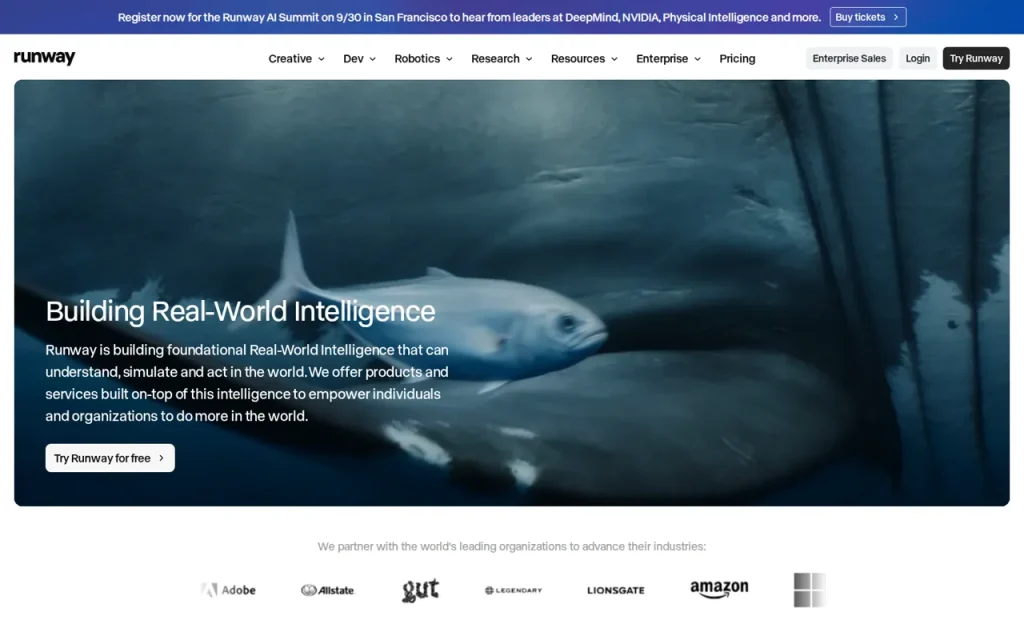
Runway is a video platform built around generative AI models: it generates clips from text or images, extends and alters existing footage, and handles editing tasks such as background removal and upscaling. The free tier gives 125 one-time credits with watermarked output; paid plans start at $12 per month billed annually ($15 monthly), checked on September 22, 2026.
Key features
- Video generation from text or image prompts
- Editing of footage you already own
- Background removal and cleanup tools
- 4K upscaling on paid plans
- Parallel generations (5 to 20 depending on plan)
- Project storage from 5GB to 500GB
Feature list taken from the sources listed at the foot of this profile, not from our testing.
What can you actually do with Runway?
Generation and upscaling
Gen-4.5 creates 720p output; upscaling is a separate operation.
Where it falls short: A plan offering 4K upscaling does not establish native 4K generation.
Generation budget
Gen-4.5 base usage is 12 credits per second.
Where it falls short: Model, duration and output options affect usage; retries consume additional credits.
Credit expiry
Standard and Pro monthly credits reset; Max can roll one month forward.
Where it falls short: Free credits do not expire but never refill.
Feature descriptions follow the sources listed at the foot of this profile; the limits are our editorial reading of what those sources do and do not promise.
Strengths and limits
Strengths
- Free allowance supports exploring selected models
- Paid plans remove the free video watermark
- Upscaling and higher-tier output options are documented separately
Limits to plan around
- Free credits never renew
- Model availability differs by plan
- Generation and optional output features use credits
- Standard and Pro monthly allocations do not roll over
Derived from documented behaviour and published limits, not from a scored review.
Who is it for?
- Concept and pitch workShowing an idea as moving footage before a production budget is committed.
- Social content teamsProducing variations of a scene without a reshoot.
- EditorsBackground removal, cleanup and upscaling of existing material.
- DesignersVisual tests that would be expensive to shoot.
Our editorial judgement about fit, based on what the documented features support. The vendor makes no such claim about these groups.
How much does Runway cost?
Pricing check: Individual details checked. Check the current provider terms before subscribing.
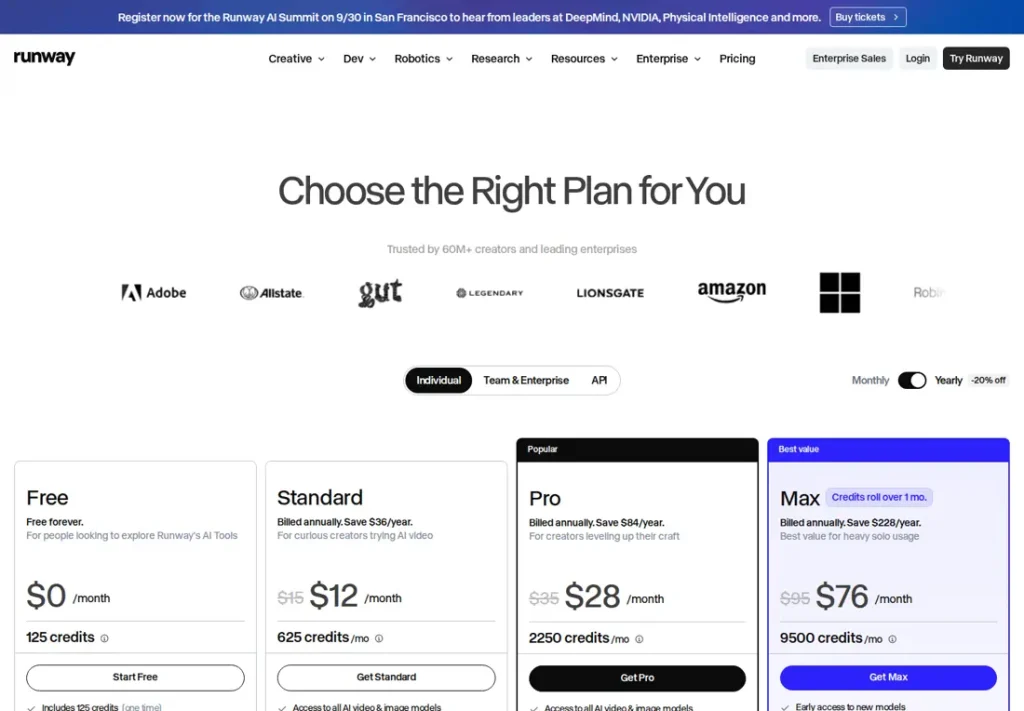
| Plan | Price | What it covers |
|---|---|---|
| Free | $0 | 125 one-time credits, 5GB storage, watermarked output. |
| Standard | $12/mo annual ($15 monthly) | 625 credits per month, 20GB storage, no watermarks, 4K upscaling, 5 parallel generations. |
| Pro | $28/mo annual ($35 monthly) | 2,250 credits, 100GB storage, unlimited 4K upscaling, 15 parallel generations. |
| Max | $76/mo annual ($95 monthly) | 9,500 credits, 500GB storage, 20 parallel generations. |
No comparable numeric price range is confirmed here. Individual plan notes may include documented amounts, but unknown billing units, unavailable figures or inconsistent terms are not converted into a single price range. See the evidence checks and original pricing source below.
What is Runway used for?
Runway is a video platform built around generative AI models. It is used to generate clips from text or images, to extend and alter existing footage, and to handle editing tasks such as removing backgrounds or upscaling. It appears most often in early-stage work: concept pieces, short social clips and visual tests that would be expensive to shoot. The current tool set is described on the official site.
Generated video is judged on more than whether a frame looks good. Shot-to-shot consistency, hands and text inside the image, and whether the result survives being cut into a longer edit all decide how usable it is. This profile assigns no quality score and reports no rendering test.
Where it fits in a workflow
- Concept and pitch material: showing an idea as moving footage before anyone commits a production budget.
- Short social clips: producing variations of a scene without a reshoot.
- Editing tasks on real footage: background removal, cleanup and upscaling of material you already own.
Rights matter here more than in most categories. Check what the plan permits commercially, and be careful with recognisable people, trademarks and other footage you did not create. A feature working technically does not make its output free to publish.
Plans and limits
On the official pricing page, checked on September 22, 2026, the individual plans are Free, Standard, Pro and Max. Free gives 125 one-time credits, 5GB of storage and watermarked output. Standard is $12 per month billed annually — $15 at the monthly rate — with 625 credits per month, 20GB, no watermarks and 4K upscaling. Pro is $28 per month billed annually, $35 monthly, with 2,250 credits and 100GB. Max is $76 per month billed annually, $95 monthly, with 9,500 credits and 500GB.
Credits are the real constraint, and a single generation can consume many of them depending on model, length and resolution. The free tier’s credits are a one-time allowance rather than a monthly refill, so repeated generation needs a separate credit budget. Estimate the number of takes your project actually needs — generative video rarely lands on the first attempt.
A first task to try
The prompt below is written so that the failure modes are easy to see. No test result is being reported here.
“A ceramic coffee cup on a wooden table by a window, morning light, static camera, four seconds. Steam rises continuously. Nothing else in the frame moves. No text or logos anywhere in the shot.”
Watch three things: does the cup keep its shape for the whole four seconds, does the “static camera” instruction hold, and did text appear despite the instruction not to. A deliberately simple shot tells you more about consistency than an elaborate one that hides its errors in motion.
Should you choose Runway?
Choose it when you need moving footage that does not exist yet: concept pieces, short social variations, visual tests that would be expensive to shoot. Also choose it when you already own footage and need background removal, cleanup or upscaling in the same place.
Choose something else when the video is fundamentally a talking script rather than a visual idea — narration is a different job, covered in the ElevenLabs profile. And be honest about budget before committing: both credits and plan-dependent capabilities matter, and generative video rarely lands on the first attempt. The video and editing category lists what else covers this work, while the comparison table sets two options against each other.
Before you commit
Work out credit needs and required output formats before choosing a plan. Plan differences include model access, storage, concurrency and export features as well as credit volume. For editing a recording through its transcript, see Descript; for a voice track, see ElevenLabs.
Everything above is traceable to the links in the sources section, with the date we checked them, and the editorial policy explains how we check and correct profiles.
Source check: September 22, 2026. This profile is based on the vendor’s official product and pricing pages. It contains no hands-on rendering test, no sponsored review and no user ratings.
How should you budget a generated shot?
Generation resolution and upscaling are separate. Gen-4.5 is documented at 720p, with 2–10-second durations and a base cost of 12 credits per second. A five-second generation therefore uses 60 base credits; repeated attempts cost more. ProRes or PNG sequence output, where the plan supports it, adds 5 credits per second.
Check remaining credits before iterating. Standard and Pro monthly allocations expire at renewal; Max can carry one month forward. Free credits never renew, and the free model selection may change.
Watch Runway in the vendor's own words
Published by Runway on their official YouTube channel, September 18, 2026. Nothing loads from YouTube until you press play — the preview image is served from this site. We did not produce this video and do not endorse its claims.
Official Runway channels
Collected from links published on the vendor's own website, checked September 22, 2026. Use these to verify announcements and current pricing at the source.
Frequently asked questions
Is Runway free?
Free includes 125 one-time credits that do not expire or renew, selected models and watermarked video. It is an ongoing free account with a finite generation allowance, not a timed trial. More generation may require a paid plan.
How much does Runway cost?
Standard is $12 per month billed annually, or $15 at the monthly rate. Pro is $28 billed annually and $35 monthly, while Max is $76 annually and $95 monthly. Each tier raises credits, storage and the number of parallel generations. Checked on the official pricing page on September 22, 2026.
Does Runway put a watermark on videos?
Free-generated videos carry a Runway watermark; Standard and higher plans remove it. Decide whether the watermark meets your delivery requirements. Its presence alone does not establish whether publication is permitted; commercial use is a separate terms question.
How many videos can I generate?
There is no video count; credits are the unit. A single generation consumes a variable number depending on the model, the clip length and the resolution you choose. Standard includes 625 credits per month, Pro 2,250 and Max 9,500. Estimate against a real project, since generative video rarely lands on the first attempt.
What is the difference between Standard and Pro?
The plans differ in credit allowance and capacity, while other plan-dependent output features must also be checked. Do not treat every tier as identical except for credits. Match your required storage, concurrency, export format and generation volume to the current plan table.
Can I publish what Runway generates?
Check what your plan permits commercially before you publish, and be careful with recognisable people, trademarks and footage you did not create. A feature working technically does not make its output free to use. Rights questions sit with you, not with the tool, and they matter more here than in most categories.
Evidence for key details
These checks apply to the individual details below. A recent check of one detail does not mean every section was reviewed again.
- Free provides 125 non-expiring, non-renewing credits; generated free-plan videos carry a watermark.Documented · Provider documentation · Checked . Read the source (opens in a new tab)
- Free model availability changes and free users cannot buy additional credits.Documented · Provider documentation · Checked . Read the source (opens in a new tab)
- Standard lists 625 monthly credits, no watermark and 4K upscaling at $12/month annual or $15 monthly.Documented · Provider documentation · Checked . Read the source (opens in a new tab)
- Standard and Pro monthly credits do not roll over; Max carries at most one month forward.Documented · Provider documentation · Checked . Read the source (opens in a new tab)
- Gen-4.5 supports 2–10-second text/image-to-video generations at 12 credits per second, with 720p output.Documented · Provider documentation · Checked . Read the source (opens in a new tab)
- Gen-4.5 ProRes/PNG output is restricted to listed higher plans and adds 5 credits per second.Documented · Provider documentation · Checked . The documentation lists Max, legacy Unlimited and Enterprise; do not imply this output format is included in Standard. Read the source (opens in a new tab)
Sources for this profile
Provider pricing, free-plan and Gen-4.5 documentation reviewed; no rendering test. Base generation resolution differs from upscaled output. Model availability and credit use depend on the selected mode. Checked September 22, 2026. Found something out of date? The editorial policy explains how we correct profiles.