

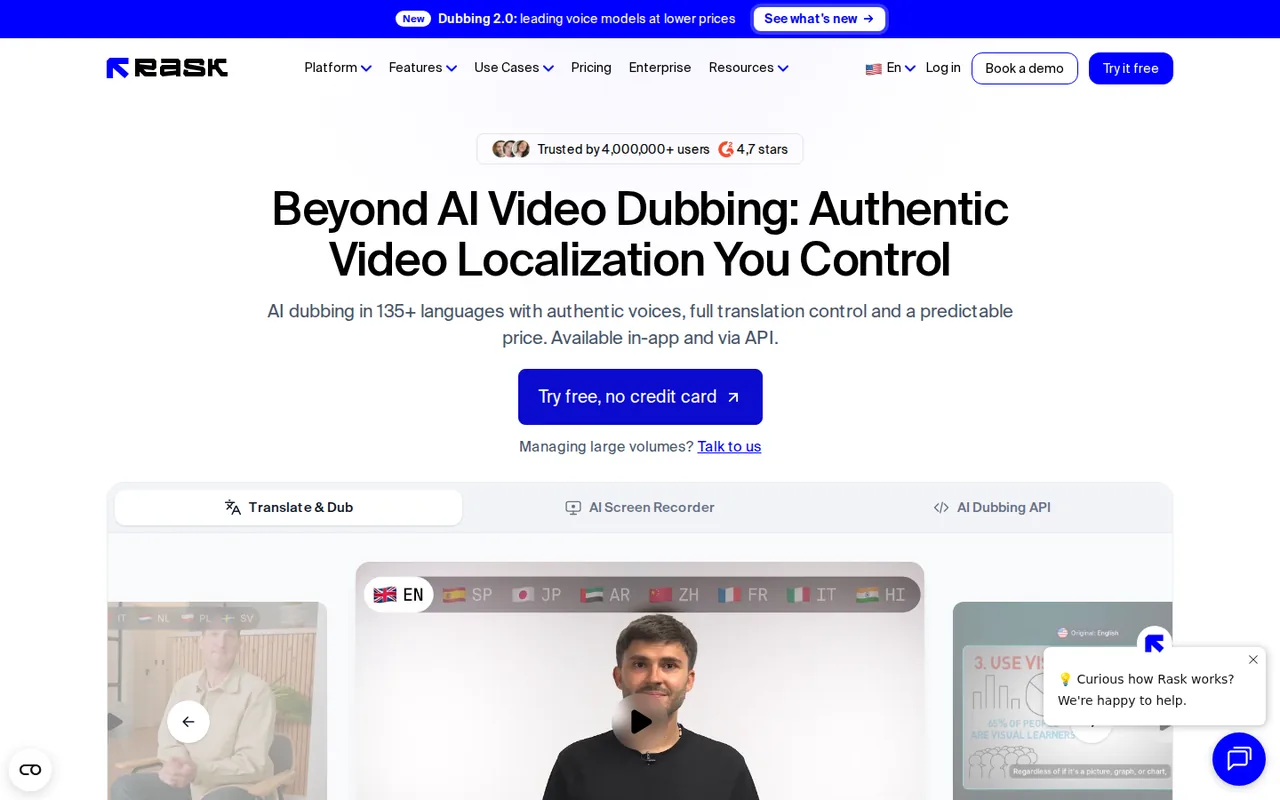
What is Rask AI, in short?
Updated November 16, 2026 · By Elias Brandt · Documentation review, not tested hands-on
Pros
- Translation is editable before export
- Pricing is counted in minutes of final video
- Annual plans keep unused minutes
- Voice cloning covers 57 languages
Cons
- Output rights are not clear for self-serve plans
- Lip-sync and on-screen text cost extra minutes
- Monthly minutes expire
- Free minutes may expire quickly
Best forCourse creators and YouTubers who dub finished videosSmall teams with recurring dubbing and lip-sync needsTeams that need shared terminology or batchesNot for anyone who needs a clear commercial-use grant in writing today
Strengths, limits and who it suits, in full
Strengths
- Translation is editable before export The homepage and pricing page describe a line-by-line editor for transcript, translation, timing, speed and voice settings, and the pricing FAQ says re-dubbing edited segments costs no extra minutes.
- Pricing is counted in minutes of final video The pricing FAQ defines one minute as 1 minute of final translated video or audio, so a 5-minute video in 2 languages uses 10 minutes.
- Annual plans keep unused minutes The pricing FAQ says unused minutes roll over on annual plans for as long as the subscription is active.
- Voice cloning covers 57 languages The FAQ says cloning is available from any source language into 57 listed target languages.
Limits
- Output rights are not clear for self-serve plans The Terms (effective August 24, 2026) say you may not resell or commercially use any part of the Service or its contents and materials. A later section says commercial customers under an Order Form own their Video Output, and the homepage says AI voices come with commercial usage rights. No page says which applies to a self-serve plan.
- Lip-sync and on-screen text cost extra minutes Enhanced lip-sync counts 4 minutes per video minute in total, the FAQ says its pricing is in beta and may change, and on-screen text translation counts 3 minutes per video minute.
- Monthly minutes expire The FAQ and Terms say unused minutes on monthly plans are removed at the end of the billing cycle, and canceling removes remaining minutes.
- Free minutes may expire quickly The Terms say trial minutes expire 7 days after account creation. The pricing card shows a Free trial with 3 minutes and does not say whether that rule applies to it.
Who it suits
- Course creators and YouTubers who dub finished videos Creator at $39 a month lists 25 minutes, and the editor lets you correct the translation before export.
- Small teams with recurring dubbing and lip-sync needs Creator Pro at $99 a month lists 100 minutes, lip-sync and control over translation and speech accuracy.
- Teams that need shared terminology or batches Business at $249 a month lists a shared brand glossary, batch upload and on-screen text translation.
- Not for anyone who needs a clear commercial-use grant in writing today The Terms and homepage give different statements, so ask the provider first.
How much does Rask AI cost?
Prices confirmed · checked
- $39Creator
- $99Creator Pro
- $249Business
Regional prices: Prices were read from the pricing page on 2026-11-16.
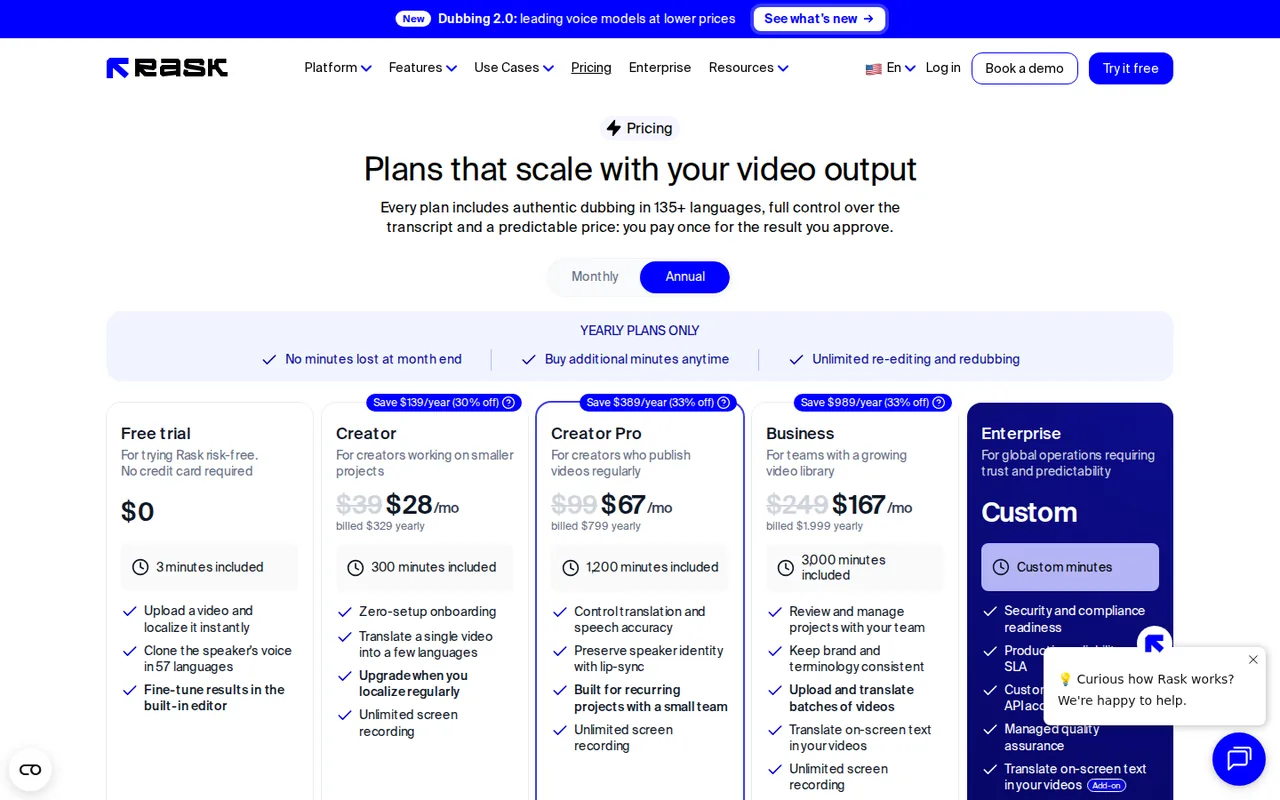
Monthly prices are the default view; the yearly prices ($329, $799 and $1,999) appear with the Annual toggle, which the page marks as saving $139, $389 and $989 a year and which also shows a per-month equivalent ($28, $67 and $167) that is not what is charged each month. The monthly cards list 25, 100 and 250 minutes a month; the yearly cards list 300, 1,200 and 3,000 minutes included for the year. The FAQ says extra minutes cost $3 each on Creator Pro and Business, while the comparison table says extra minutes can be bought on annual plans and a banner lists extra minutes under yearly plans only, so whether monthly subscribers can buy extra minutes is unclear. The Free trial card shows 3 minutes; the Terms say trial minutes expire 7 days after account creation and that trials are offered at the company's discretion. The page does not say whether free output carries a watermark. Enhanced lip-sync pricing is called beta and may change. The comparison table lists API access as limited on lower tiers without saying which plan gets it, so we do not state a plan for API access. Enterprise has no listed price.
| Plan | Price | What you get |
|---|---|---|
| Free trial | $0 sourceFrom rask.ai/pricing, checked Nov 16, 2026 (opens in a new tab) | 3 minutes included. The card lists uploading a video to localize, voice cloning in 57 languages and the built-in editor. The Terms say trial minutes expire 7 days after account creation. |
| Creator | $39 per month billed monthly$329 billed yearly, shown as $28 a month sourceFrom rask.ai/pricing, checked Nov 16, 2026 (opens in a new tab) | 25 minutes a month, or 300 minutes a year on the yearly plan. |
| Creator Pro | $99 per month billed monthly$799 billed yearly, shown as $67 a month sourceFrom rask.ai/pricing, checked Nov 16, 2026 (opens in a new tab) | 100 minutes a month, or 1,200 a year on the yearly plan. The card adds control over translation and speech accuracy and lip-sync to keep the speaker's identity. |
| Business | $249 per month billed monthly$1,999 billed yearly, shown as $167 a month sourceFrom rask.ai/pricing, checked Nov 16, 2026 (opens in a new tab) | 250 minutes a month, or 3,000 a year on the yearly plan. The card adds team review, consistent brand terminology, batch upload and on-screen text translation. |
| Enterprise | Custom | Custom minutes with security and compliance readiness, SLA, custom integrations and API access, and managed quality assurance; contact sales. |
How far does it go?
- Dubbing a 10-minute video into 3 languagesTranslation alone uses 10 x 3 = 30 minutes, which fits in Creator Pro's 100 monthly minutes ($99 a month) with 70 left, but not in Creator's 25 ($39 a month). Adding enhanced lip-sync counts 3 more minutes per video minute, so the same job uses 30 + 90 = 120 minutes, which is 20 over Creator Pro's monthly allowance. At the $3 per extra minute the FAQ lists, that overage would be $60 on top of $99, but the pages disagree on whether monthly subscribers can buy extra minutes, and enhanced lip-sync pricing is in beta. Billed yearly, Creator Pro is $799 for 1,200 minutes, about $0.67 a minute against $0.99 billed monthly. This is arithmetic on the listed prices, not a quote: it assumes the video is counted by its final length and ignores the free trial.
Arithmetic from the published allowances above, not a usage test.
Taxes, currency and promotions can change the price you see at checkout.
Try Rask AI free (opens in a new tab)
Key features
| Feature | What it does | Watch out |
|---|---|---|
| AI dubbing and video translation into 135+ languages, with auto transcription and YouTube video translation | — | |
| Voice cloning that keeps each speaker's voice in 57 languages, with controls for similarity, accent and expressiveness | — | |
| Line-by-line editor for the transcript, translation, timing and speed, with re-dubbing of edited segments | — | |
| Multispeaker lip-sync, a terminology dictionary, translation prompting and SRT import and export | — | |
| On-screen text translation for slides, captions and charts, listed on the Business plan and up | — | |
| A REST API and SDKs for dubbing, lip-sync, transcription and subtitles | — | |
| One minute is a shared credit | The FAQ says one minute can be spent on translation, lip-sync or on-screen text translation. Translating a 5-minute video into 2 languages uses 10 minutes. Enhanced lip-sync counts 3 extra minutes per video minute, and on-screen text translation counts 3 per video minute. | Multiply the length of your video by the number of target languages, then add 3 per minute for each lip-sync or on-screen text pass. |
| You edit before you pay again | The pricing FAQ says re-dubbing a segment after you review the translation and voice settings costs nothing extra; you pay once for the minutes of the final video. The comparison table lists the line-by-line editor on every plan. | Fix names and brand terms in the editor before the final render, and check how the provider counts a re-dub on your own project. |
| Terminology stays consistent | A personal glossary is listed on the lower plans and a shared brand glossary on Business. The homepage describes a dictionary that every new video follows automatically. | If your course or product has fixed terms, add them to the dictionary first and spot-check three translated lines. |
What does one minute of Rask AI buy?
The pricing page FAQ defines one minute as a credit spent on translation, lip-sync or on-screen text translation. A 5-minute video dubbed into 2 languages uses 10 minutes, and each lip-synced video minute adds 3 more, so the minutes you need grow with language count faster than with video count.
Is the free trial enough to judge it?
The Free trial card lists 3 minutes, which covers one 3-minute video in one language or a short clip in a few. The Terms of Service say trial minutes expire 7 days after account creation, so plan the test before you sign up.
Monthly or yearly billing?
Yearly billing lists more minutes per dollar and lets unused minutes roll over while the subscription is active; monthly minutes are removed each cycle. The yearly prices are charged once a year, so the per-month figures on the page are not what appears on a monthly invoice.
How to test it in a week
Proposed evaluation · not performed yet
Dub one 2-minute video of your own into one language on the free trial, edit three lines in the editor, re-dub them, and compare the minutes shown in the app with the 2 you expected.
Rask AI alternatives
Other video & editing tools checked with the same method. Pick by the job, not by a score.

Marketing and training teams that make avatar, translated or face-swapped video from content they own or have permission to use

Developers and small teams who want a conversational video avatar for support, sales or tutoring and need to budget by minutes

Short animated stories from a script or prompt

Teachers, students and math YouTubers who want 3Blue1Brown-style explainer clips from a description, with an editable Manim code playground when they want control

Short AI video and image variants across several models

Creators and small teams who want video, image and audio generation under one credit balance

Creators and marketers who want to make and edit short videos by chatting, and who accept paying yearly for credits

Small businesses that want social posts and clips generated and scheduled
Used Rask AI? Write the first review. Visitor opinions are moderated and kept separate from our source checks.
Frequently asked questions
Is Rask AI free?
Partly. The pricing page shows a Free trial at $0 with 3 minutes included, no credit card required, voice cloning in 57 languages and the editor. The Terms say trial minutes expire 7 days after account creation, and the page does not say whether free output carries a watermark.
How much does Rask AI cost?
Billed monthly, Creator is $39, Creator Pro is $99 and Business is $249. Billed yearly they are $329, $799 and $1,999. Enterprise is custom. Plans differ mainly in included minutes: 25, 100 and 250 a month, or 300, 1,200 and 3,000 a year.
What counts as a minute in Rask AI?
One minute of final translated video or audio per language, so a 5-minute video in 2 languages uses 10 minutes. Enhanced lip-sync counts 3 extra minutes per video minute and on-screen text translation 3 minutes per video minute.
Do unused Rask AI minutes roll over?
On annual plans, yes, while the subscription stays active. On monthly plans they are removed at the end of each billing cycle, and canceling removes remaining minutes; the FAQ says a pause, available once every 12 months for up to a month, keeps them.
Can I use Rask AI dubs commercially?
The pages disagree. The Terms say you may not resell or commercially use any part of the Service or its contents, a later section gives commercial customers under an Order Form ownership of Video Output, and the homepage says AI voices come with commercial usage rights. Ask the provider before client or monetized work.
Sources and method5 official sources · 12 details checked · Nov 16, 2026
How we checked this profile
12 details on this page were checked against Rask AI's own pages and help documentation (Nov 16, 2026).
See the checks by section12 documented
| Section | Checks | Last checked | Sources |
|---|---|---|---|
| Article text | 1 documented | rask.ai | |
| Plans and prices | 4 documented | rask.ai/pricing | |
| Features | 2 documented | rask.ai/pricing | |
| Strengths and limits | 3 documented | rask.ai/pricingrask.ai/terms-of-service | |
| Questions | 1 documented | rask.ai/pricing | |
| Platforms and integrations | 1 documented | rask.ai/api |
Sources for this profile
- Pricing page, monthly and annual plan cards, comparison table and FAQrask.ai
- Homepagerask.ai
- API pagerask.ai
- Terms of Service, effective August 24, 2026rask.ai
Official pages read on 2026-11-16: the homepage, the pricing page (monthly and annual cards, comparison table and FAQ), the API page, the Terms of Service effective August 24, 2026, and the opening of the Privacy Policy effective October 9, 2024, enough to see that the operator is Brask Inc. Data handling in the Privacy Policy was not assessed; the homepage states that videos are used only to create your dubs and stay out of model training, and we did not find that statement in the Privacy Policy. We did not create an account or run a dub, so translation accuracy, voice quality, lip-sync quality, speed, watermarks and the real minute cost of any job were not observed. The Google questions tool returned an authorization error on this run, so the questions below come from the provider's own pricing FAQ, not search data. The G2 and Product Hunt rating on the homepage and the user count are provider statements and were not used. Third-party reviews and listings were not used.
Sources checked Nov 16, 2026. Found something out of date? See how we correct profiles.