


What is ThumbnailCreator, in short?
Updated November 17, 2026 · By Elias Brandt · Documentation review, not tested hands-on
Pros
- Several steps cost no credits
- Annual billing is half the monthly price
- The Terms say you keep ownership of generated thumbnails
- Feedback and editing sit beside generation
- Face images can be deleted
Cons
- There is no ongoing free plan
- Every retry spends credits
- Refund wording differs between pages
- Saved faces are not on the cheapest plan
- Performance figures on the homepage are marketing claims
Best forYouTube creators who publish weeklyChannels that want one recognizable faceAgencies and multi-channel teamsNot for anyone who wants a free plan to keep
Strengths, limits and who it suits, in full
Strengths
- Several steps cost no credits The credits article says uploading, downloading, extracting a thumbnail from a YouTube URL, organizing collections and browsing trending thumbnails and templates are free.
- Annual billing is half the monthly price Starter is $174 a year against $348 over twelve monthly payments, Creator $294 against $588 and Teams $594 against $1,188, with the year's credits delivered up front.
- The Terms say you keep ownership of generated thumbnails The Terms of Use say you retain ownership of content you upload and of thumbnails you generate, and give ThumbnailCreator a limited licence to process uploads to provide the service.
- Feedback and editing sit beside generation The features overview lists an analyzer with a 1-100 score and heatmap, natural-language editing, layer editing, a background remover and a YouTube preview in the same product.
- Face images can be deleted The Terms say you can delete your face images at any time and that they are processed solely for thumbnail generation.
Limits
- There is no ongoing free plan Access without paying is the 7-day trial with 10 credits, so it is a short test, not a free tier to keep using.
- Every retry spends credits Generation, edits, variations, face swap, style cloning, analysis and auto-optimize cost 1 credit each, and Starter includes 50 credits a month.
- Refund wording differs between pages The pricing FAQ describes a 7-day money-back guarantee for subscribing immediately, while the Refund Policy says refunds are no longer available once payment is processed after the trial.
- Saved faces are not on the cheapest plan Starter has basic face features without saved trained faces; saving faces starts on Creator at $49 a month or $294 a year.
- Performance figures on the homepage are marketing claims The homepage cites 73% higher click-through and 40,000+ creators without a method or source, so this profile does not use them.
Who it suits
- YouTube creators who publish weekly Generation, editing, variations and extraction from a video link are built around the YouTube thumbnail, and Starter is described for one to two videos a week.
- Channels that want one recognizable face Creator and Teams save trained faces, and the face swap page describes a Face Model from 3-5 photos reused across thumbnails.
- Agencies and multi-channel teams Teams lists multiple face training, batch variations, API access and unlimited team members at $99 a month or $594 a year.
- Not for anyone who wants a free plan to keep The only no-cost access is a 7-day trial with 10 credits, and a general design suite is not what the product describes itself as.
How much does ThumbnailCreator cost?
Prices confirmed · checked
- $29Starter
- $49Creator
- $99Teams
Regional prices: Prices were read from the pricing page and its FAQ on 2026-11-17 in USD.
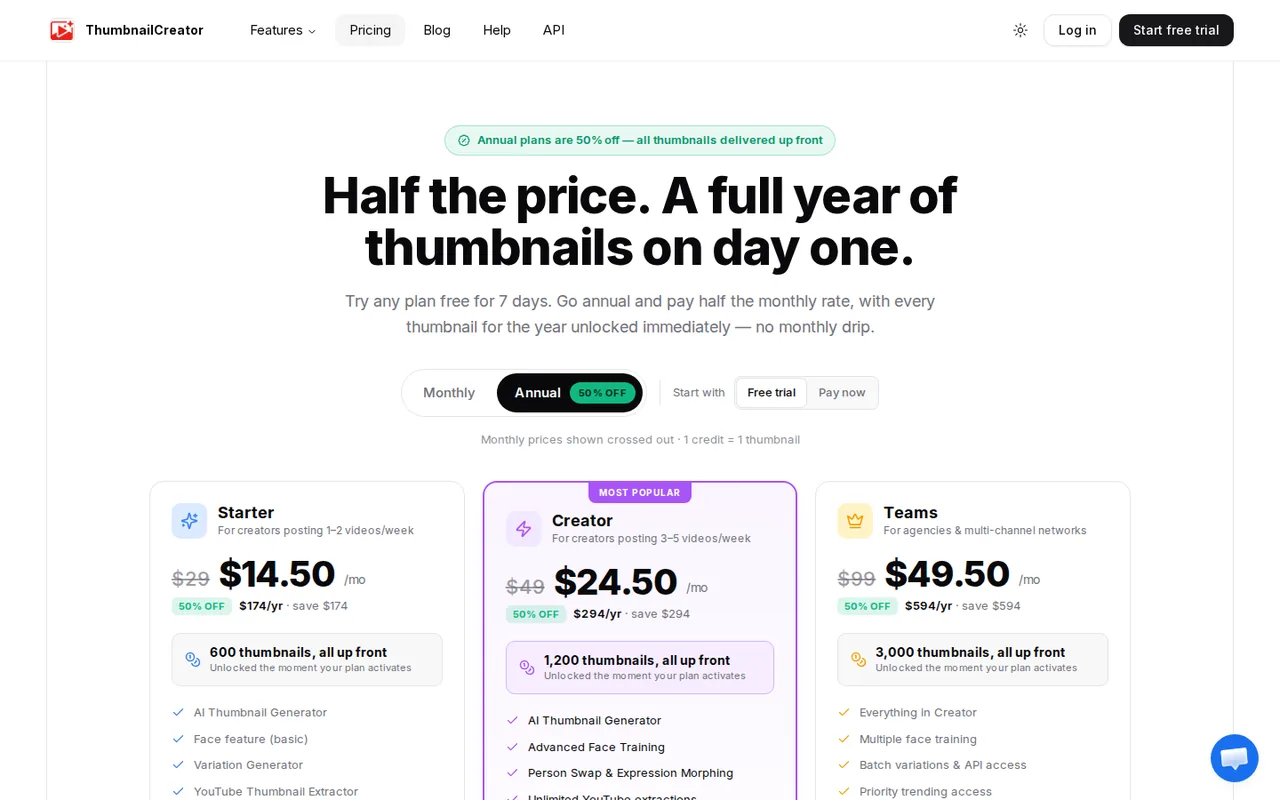
The page opens on its annual view, which shows $14.50, $24.50 and $49.50 a month with the monthly prices $29, $49 and $99 crossed out; the FAQ states $29, $49 and $99 a month and the annual totals $174, $294 and $594 a year, so the monthly figures shown for annual plans are equivalents, not monthly payments. The monthly toggle view itself was not clicked. Credits are 50, 100 and 250 a month and 600, 1,200 and 3,000 on the annual plan. The Terms say subscription credits reset with the billing cycle and purchased credits do not expire; they do not say whether the annual up-front credits expire before twelve months. Prices of extra credit packages were not read. Trial wording differs: the FAQ says no charge until day 8 and the cards say cancel before day 7. The page does not say whether taxes are added at checkout.
| Plan | Price | What you get |
|---|---|---|
| Free trial | $0 for 7 days sourceFrom thumbnailcreator.com/pricing, checked Nov 17, 2026 (opens in a new tab) | 10 credits. The pricing FAQ says the card is saved and not charged until day 8, while the plan cards say to cancel before day 7 to pay nothing. Full plan credits unlock after the trial. |
| Starter | $29 per month billed monthly$174 per year billed annually, shown as $14.50 a month sourceFrom thumbnailcreator.com/pricing, checked Nov 17, 2026 (opens in a new tab) | 50 credits a month, or 600 delivered up front on the annual plan. AI Thumbnail Generator, basic face features without saved faces, basic variation generator, YouTube thumbnail extractor and basic auto-optimize. |
| Creator | $49 per month billed monthly$294 per year billed annually, shown as $24.50 a month sourceFrom thumbnailcreator.com/pricing, checked Nov 17, 2026 (opens in a new tab) | 100 credits a month, or 1,200 up front on the annual plan. Adds Advanced Face Training with saved faces, person swap, expression morphing, advanced variations, unlimited YouTube extractions, the trending thumbnails database and AI auto-optimize. |
| Teams | $99 per month billed monthly$594 per year billed annually, shown as $49.50 a month sourceFrom thumbnailcreator.com/pricing, checked Nov 17, 2026 (opens in a new tab) | 250 credits a month, or 3,000 up front on the annual plan. Everything in Creator plus multiple face training, unlimited person swaps, batch variations, API access, priority trending access and unlimited team members. |
Which plan fits?
Smallest plan whose monthly credits cover your number with 15% spare for regenerations. Arithmetic from the plan table above, not a usage test.
How far does it go?
- Paying monthly or annually for a yearStarter costs $29 a month, or $348 over twelve monthly payments, against $174 billed annually, a $174 difference. Creator is $588 against $294, a $294 difference, and Teams $1,188 against $594, a $594 difference. The annual price is exactly half the monthly price, but the Refund Policy allows no refund once payment is processed, so it pays off only if you stay for the year. Dividing the plan fee by included credits gives about $0.58 a credit on Starter monthly and $0.29 annually, $0.49 and $0.245 on Creator, and $0.40 and $0.20 on Teams; at 5 credits per finished thumbnail, Starter's 50 credits cover 10 thumbnails a month. This is arithmetic on the listed prices before any extra credit purchase, not a quote.
Arithmetic from the published allowances above, not a usage test.
Taxes, currency and promotions can change the price you see at checkout.
Try ThumbnailCreator free (opens in a new tab)
Key features
| Feature | What it does | Watch out |
|---|---|---|
| AI Thumbnail Generator that builds thumbnails from a plain-English description, a pasted YouTube link or a template, with a choice of image models | — | |
| Face models created from 3-5 photos, face swap and expression changes, with saved faces on Creator and above | The face swap page says a Face Model is created from 3-5 photos. The pricing FAQ says Starter has basic face features without saved trained faces, while Creator adds Advanced Face Training with saved faces, person swap and expression morphing. | If a consistent personal face is why you want the tool, compare Creator, not Starter, and upload only photos of people who agreed to it, as the Terms require. |
| Style Cloning that extracts the colors, lighting, composition and mood of a reference thumbnail and applies it to new content | Style Cloning takes an uploaded thumbnail or a YouTube link and extracts its style; the analyzer scores an uploaded thumbnail and suggests changes, and each run costs 1 credit. | Use one reference of your own and one of a competitor, then compare what changes, rather than cloning a style blindly. |
| AI Editing in plain language, with inpainting, object insertion and layer-based editing | — | |
| Thumbnail Analyzer that returns an overall score from 1 to 100, seven dimension scores and an attention heatmap | — | |
| Variation generator, auto-optimize, a trending thumbnails database, brand kits, collections and a YouTube connection to apply thumbnails to videos | — | |
| Credits are charged per action, not per finished thumbnail | The Understanding Credits article lists 1 credit each for an AI generation, an AI edit, every variation, a face swap, a style clone, a thumbnail analysis and auto-optimize, while uploads, downloads, YouTube extraction and organizing are free. | Count a finished thumbnail as several credits: one generation plus three variations plus one edit is 5 credits, so a 50-credit month covers about ten finished thumbnails. |
Is there a free plan, or only a trial?
The pricing page offers a 7-day free trial with 10 credits and does not list a free tier to keep. Its FAQ says the card is saved and not charged until day 8, while the plan cards say to cancel before day 7 to pay nothing, so treat the trial end date shown in your account as the deadline, not either sentence. The FAQ also says the full plan credits unlock after the trial. Ten credits is enough to test a handful of generations and edits, not to produce a month of thumbnails.
What does a credit actually cover?
The Understanding Credits article gives every generation, AI edit, variation, face swap, style clone, analysis and auto-optimize a cost of 1 credit, and lists uploads, downloads and YouTube extraction as free. A single finished thumbnail usually takes more than one action, so the monthly credit count is a ceiling on attempts, not on videos. The FAQ says you can buy extra credits or upgrade when you run out; the prices of extra credit packages were not on the pages read.
What do the refund pages say?
They do not agree. The pricing FAQ says subscribing immediately includes a 7-day money-back guarantee, while the Refund Policy, updated March 2, 2026, says you must cancel within 7 days of signing up, including during the trial, and that refunds are no longer available once payment is processed. For an annual plan paid up front, that difference decides whether a $174, $294 or $594 payment can come back, so ask support in writing before paying if it matters.
Who owns the thumbnails and the face data?
The Terms of Use, updated August 7, 2026, say you retain ownership of what you upload, including face images, and of thumbnails you generate. They require consent for any face you upload, say you can delete your face images at any time, and name OpenAI, Google Generative AI and Replicate as the third-party AI services behind generation. The Terms also say you are responsible for reviewing generated content, and that the company is not responsible for how you use thumbnails containing likenesses of individuals. The terms of those model providers were not checked here.
What does saving a face require?
The face swap page describes a Face Model made from 3-5 photos. According to the pricing FAQ, Starter has only basic face features and cannot save trained faces, which start on Creator. If your thumbnails depend on the same face every week, that, not the credit count, is the reason to pay for Creator rather than Starter.
How would you test it before paying?
Proposed evaluation · not performed yet
During the trial, paste the link of one of your own videos, generate one thumbnail, make three variations and one AI edit, then run the analyzer on your current thumbnail and note how many of the 10 credits each step used. Repeat the same steps for a second video to see whether the result stays consistent. We have not run this, so no result is claimed.
ThumbnailCreator alternatives
Other images & design tools checked with the same method. Pick by the job, not by a score.

AI images, video and audio inside an Adobe workflow

Creators, brands and agencies that need the same character or product across many images and videos, and want several image and video models behind one credit balance

Rigged 3D avatars from a selfie for games and apps

AI images placed straight into templated designs

Small businesses making on-brand product photos and social posts

Turning photos or video of a real scene into a 3D splat

Finding prompts for a specific image model before generating

Designers and sellers who need editable vector or brand-style image output
Used ThumbnailCreator? Write the first review. Visitor opinions are moderated and kept separate from our source checks.
Frequently asked questions
Does ThumbnailCreator have a free plan?
No ongoing free plan was found. Access without paying is a 7-day free trial with 10 credits; the pricing FAQ says the card is saved and not charged until day 8, and the plan cards say to cancel before day 7.
How much does ThumbnailCreator cost per month and per year?
Starter is $29 a month or $174 billed annually ($14.50 a month), Creator $49 or $294 ($24.50 a month) and Teams $99 or $594 ($49.50 a month). Annual plans are billed once a year, so the monthly figures are equivalents.
What does one credit buy?
One credit covers one AI generation, one AI edit, one variation, one face swap, one style clone, one analysis or one auto-optimize. Uploads, downloads and extracting a thumbnail from a YouTube URL are free.
Can I get a refund?
The pages disagree. The pricing FAQ describes a 7-day money-back guarantee for subscribing immediately, while the Refund Policy says you must cancel within 7 days of signing up, including during the trial, and that refunds end once payment is processed.
Do I own the thumbnails I generate?
The Terms of Use say you retain ownership of content you upload and thumbnails you generate. They also name OpenAI, Google Generative AI and Replicate as the AI services used; the terms of those services were not checked.
Sources and method10 official sources · 10 details checked · Nov 17, 2026
How we checked this profile
10 details on this page were checked against ThumbnailCreator's own pages and help documentation (Nov 17, 2026).
See the checks by section10 documented
| Section | Checks | Last checked | Sources |
|---|---|---|---|
| Article text | 1 documented | thumbnailcreator.com/ai-thumbnail-generator | |
| Plans and prices | 3 documented | thumbnailcreator.com/pricing | |
| Features | 3 documented | thumbnailcreator.com/understanding-creditsthumbnailcreator.com/pricingthumbnailcreator.com/thumbnail-analyzer | |
| Strengths and limits | 2 documented | thumbnailcreator.com/refund-policythumbnailcreator.com/terms-of-use | |
| Platforms and integrations | 1 documented | thumbnailcreator.com/terms-of-use |
Sources for this profile
- Pricing page and FAQthumbnailcreator.com
- Homepagethumbnailcreator.com
- Features overviewthumbnailcreator.com
- AI Thumbnail Generator pagethumbnailcreator.com
All 10 sources
Official pages read on 2026-11-17: homepage, pricing page and FAQ, features overview, AI Thumbnail Generator, Face Swap, Style Cloning and Thumbnail Analyzer pages, Help Center article Understanding Credits, Refund Policy (updated March 2, 2026) and Terms of Use (updated August 7, 2026), fetched as page text over HTTP, not in a logged-in browser. We did not create an account or generate a thumbnail, so image quality, speed, face likeness, the analyzer's scores and credit use were not observed. The Privacy Policy and Cookie Policy were not read, so data handling beyond the Terms was not checked. Provider statements such as 73% higher click-through, 20x faster than Photoshop, 40,000+ creators and customer testimonials are marketing claims and are not used. The Google questions tool could not be queried on this run (it returned an authorization error), so the questions below come from the provider's own pricing FAQ and policy pages, not search data.
Sources checked Nov 17, 2026. Found something out of date? See how we correct profiles.