

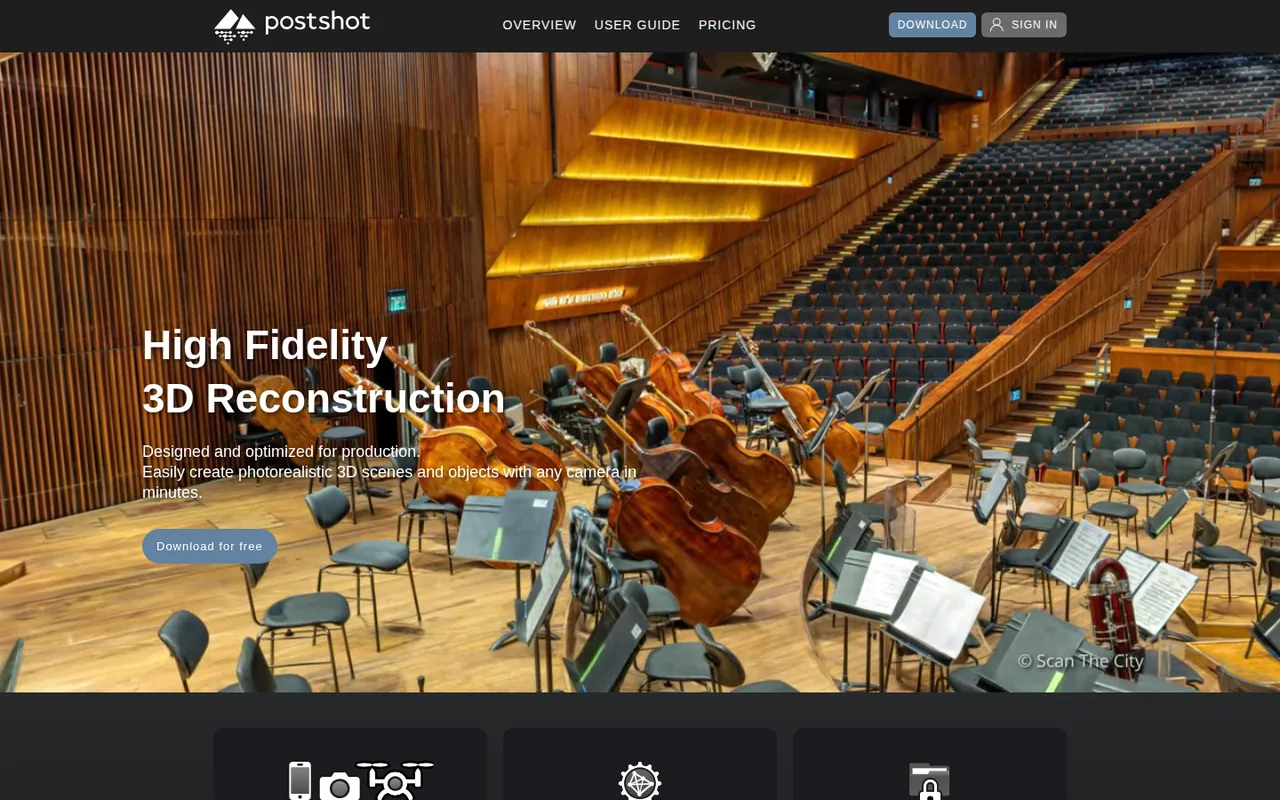
Postshot: splat training on your own NVIDIA GPU, but Free is non-commercial and Indie starts at 17 EUR a month
Updated October 24, 2026 · By Elias Brandt · Documentation review, not tested hands-on
Pros
- Content stays on your machine
- No caps on input size
- Clear operator details
Cons
- Windows and NVIDIA only
- Free is non-commercial
- Internet needed to run
Bottom line
Unlimited image count, video length and model size; training and rendering up to 4K in 8-bit SDR; camera pose and point export; COLMAP and RealityScan import; non-commercial use; saved files usable within Free only.
You have a Windows PC with a supported NVIDIA GPU and want to turn photos or video of a real scene into a 3D splat that stays on your own machine.
You work on a Mac, Linux or a non-NVIDIA graphics card, because the system requirements list only Windows with a supported NVIDIA GPU.
Best forVFX and motion designersFreelancers selling scansSurveyors and photogrammetry teamsMac users
Strengths, limits and who it suits, in full
Strengths
- Content stays on your machine The homepage says all processing and machine learning steps run on devices you control.
- No caps on input size Every plan lists unlimited image count, video length and model size.
- Clear operator details The imprint names Jawset Visual Computing in Munich with a VAT ID.
Limits
- Windows and NVIDIA only No macOS, Linux or non-NVIDIA option is listed.
- Free is non-commercial Commercial use, watermark-free renders and PLY export need Indie.
- Internet needed to run The EULA says an internet connection is required to use Postshot.
Who it suits
- VFX and motion designers fits location captures that become camera moves in After Effects or Unreal Engine.
- Freelancers selling scans Indie is the entry point, because Free forbids commercial use.
- Surveyors and photogrammetry teams Studio adds RAW and EXR input, HDR and Pix4D or BlocksExchange imports.
- Mac users not a fit; the system requirements list Windows and NVIDIA GPUs only.
How much does Postshot cost?
Prices confirmed · checked
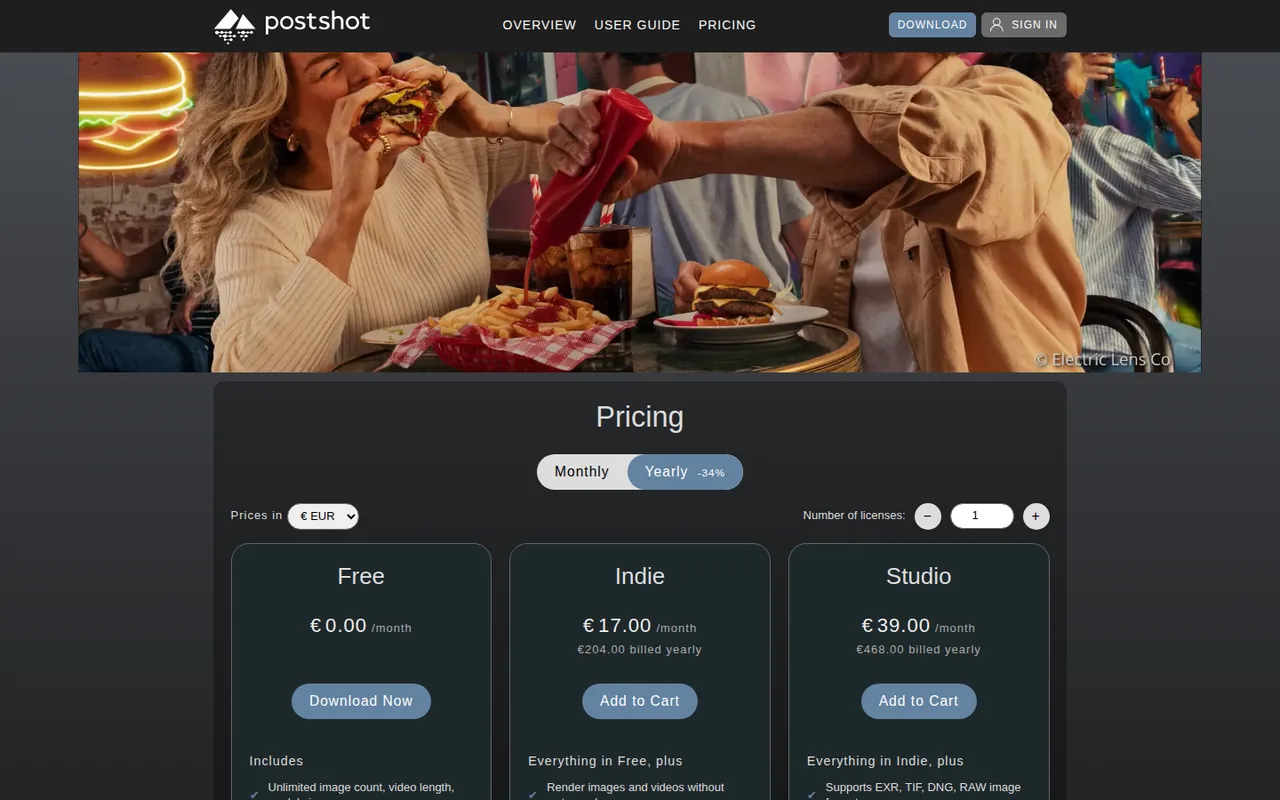
Regional prices: Prices are shown in EUR, excluding VAT; the total with VAT appears at checkout.
The page offers GBP, JPY and USD views, which are not used here. The yearly option is labelled -34%, and a number-of-licences selector sits above the plans. Subscriptions renew automatically until cancelled. The EULA lets Jawset end free licences at any time without notice.
| Plan | Price | What you get |
|---|---|---|
| Free | 0 EUR sourceFrom jawset.com/shop/pricing, checked Oct 24, 2026 (opens in a new tab) | Unlimited image count, video length and model size; training and rendering up to 4K in 8-bit SDR; camera pose and point export; COLMAP and RealityScan import; non-commercial use; saved files usable within Free only. |
| Indie | 26 EUR per monthbilled monthly · or 17 EUR per month, 204 EUR billed yearly sourceFrom jawset.com/shop/pricing, checked Oct 24, 2026 (opens in a new tab) | Everything in Free plus renders without watermark, a floating licence usable on any device, saved files usable on any plan, PLY and SPZ export, unlimited Unreal Engine and After Effects render nodes and commercial use. |
| Studio | 59 EUR per monthbilled monthly · or 39 EUR per month, 468 EUR billed yearly sourceFrom jawset.com/shop/pricing, checked Oct 24, 2026 (opens in a new tab) | Everything in Indie plus EXR, TIF, DNG and RAW input, training and rendering above 4K and in 16- or 32-bit HDR, a command-line interface, AprilTag scene alignment and BlocksExchange and Pix4D OPF import. |
How far does it go?
- Yearly versus monthly cost in EURIndie: 204 EUR billed yearly against 12 × 26 = 312 EUR on monthly billing, a difference of 108 EUR, or 108 ÷ 312 = about 35%. Studio: 468 EUR yearly against 12 × 59 = 708 EUR, a difference of 240 EUR, or about 34%. Figures exclude VAT and are not converted to other currencies.
Arithmetic from the published allowances above, not a usage test.
Taxes, currency and promotions can change the price you see at checkout.
Try Postshot free (opens in a new tab)
Key features
| Feature | What it does | Watch out |
|---|---|---|
| Radiance field and Gaussian splat training from photos or video | Exports trained splats as PLY or SPZ for other viewers and engines. | Export is an Indie feature, and PLY needs a scene trained with the Splat profile. |
| Local processing on your own NVIDIA GPU | — | |
| Live training preview with selection and editing | — | |
| Camera paths and movie rendering inside the app | — | |
| Unreal Engine and After Effects integrations | — | |
| PLY and SPZ export on paid plans | — | |
| Command-line interface and AprilTag alignment on Studio | — | |
| Local training | Tracks cameras and trains the 3D scene on your own computer from a video or image set. | Needs Windows 10 or later and an NVIDIA GPU with compute capability 7.5, from GeForce RTX 2060. |
| Render and integrations | Renders movies from animated cameras and loads scenes in After Effects and Unreal Engine. | Free renders carry a watermark, which Indie removes. |
Will Postshot run on your computer?
The download panel lists Windows 10 or later and an NVIDIA GPU with CUDA compute capability 7.5 or higher, naming the GeForce RTX 2060 and Quadro T400 or RTX 4000 as entry points. There is no macOS or Linux build, and no AMD or Intel graphics option is listed. Check your card against the NVIDIA table before planning a shoot.
Training runs locally, which is why the hardware matters so much. The EULA adds that an internet connection is required to use Postshot, so a fully offline workstation is not a supported setup even though your images never leave the machine.
What can the free plan do, and where does it stop?
Free does not cap image count, video length or model size, and it trains and renders up to 4K in 8-bit SDR. You can export camera poses and points and import cameras from COLMAP or RealityScan. That is enough to learn capture technique and judge whether splats suit your subject.
The limits are about use rather than size. Free is non-commercial, renders without the watermark need Indie, and saved files can be used within the Free plan only. The EULA also lets Jawset end free licences at any time without notice, so do not build client work on a Free scene.
When do you need Indie or Studio?
Indie is the practical threshold for paid work. It adds commercial use, watermark-free image and video renders, a floating licence you can move between devices, PLY and SPZ export, and unlimited render nodes for Unreal Engine and After Effects.
Studio is for capture pipelines rather than single projects. It accepts EXR, TIF, DNG and RAW images, trains and renders above 4K and in 16- or 32-bit HDR, adds a command-line interface for batch jobs, aligns scenes automatically with AprilTags and imports BlocksExchange and Pix4D OPF data.
How are prices charged?
Prices are listed in euros and exclude VAT, which is added at checkout. The page can switch to GBP, JPY or USD, but those figures are separate list prices, so budget in the currency you will actually pay and do not convert the euro figures yourself.
- Indie: 26 EUR a month on monthly billing, or 17 EUR a month as 204 EUR billed yearly.
- Studio: 59 EUR a month on monthly billing, or 39 EUR a month as 468 EUR billed yearly.
- Several licences can be bought at once with the licence counter on the pricing page.
How should you shoot for a clean scene?
The capturing guidelines treat input quality as the ceiling on results. Scenes must be static, since moving people, lights or shadows cause blur and ghosting. Avoid on-camera flash, and do not pan or tilt from a fixed position, because tracking needs the camera to move between shots.
For objects, the guide suggests two to five rings around the subject at different heights, with 30 to 50 percent overlap between images. Postshot typically uses only 2 to 3 frames per second of imported video, so walk slowly and keep shutter speeds short to avoid motion blur.
What stays on your machine, and what does Jawset collect?
The homepage says your content stays on your devices, with all processing and machine learning run on hardware you control. The EULA says Jawset may collect technical data about the device and system for licence management and support, and that this data does not include your content.
Content leaves your machine only if you send it, for example with a bug report. The EULA grants Jawset a perpetual licence to use content provided for testing, while promising not to publish it, so send only scenes you are allowed to share.
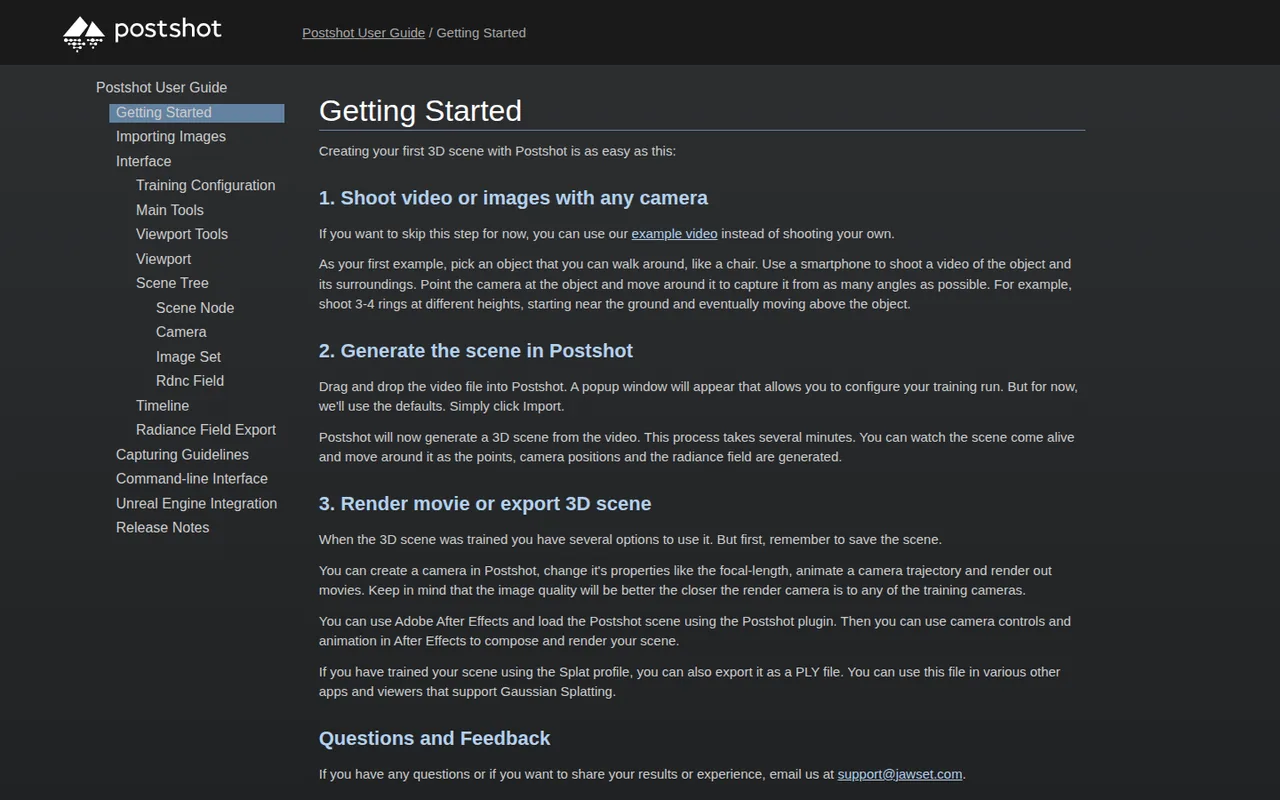
Can the free plan turn a phone video of a chair into a usable scene?
Proposed evaluation · not performed yet
Use Postshot Free on a supported NVIDIA GPU with a one-minute phone video of a chair you own, shot in three rings as the getting-started guide suggests. Exporting PLY is a separate Indie step and is not part of the free test.
- Record the Postshot version, GPU model and video length.
- Import the video with default training settings and note the training time.
- Orbit the trained scene and look for floaters, holes and blurred areas near the chair legs.
- Render a short camera move close to the capture path and check for the Free watermark.
- Save the scene and note that it can be reopened only on Free.
Accept a scene in which the chair keeps its shape from the capture angles and the render shows no large floating artefacts. Reject a scene with missing legs, heavy ghosting or tracking failure. Leave the observed result and timings blank until the exercise is run.
To add depth motion to a single photo instead of capturing a whole scene, see Immersity AI. For other work that runs on your own GPU, compare FramePack for video generation and Topaz Video for upscaling rendered footage.
Is Postshot worth it?
Documentation review plus dated public user reports. Documentation review, not tested hands-on. Not scored.
Worth it if
- You have a Windows PC with a supported NVIDIA GPU and want to turn photos or video of a real scene into a 3D splat that stays on your own machine.
- You mainly learn capture technique or explore splats, since Free has no cap on image count, video length or model size.
- You sell scans or client work, because Indie is the first plan that allows commercial use and watermark-free renders.
Probably not if
- You work on a Mac, Linux or a non-NVIDIA graphics card, because the system requirements list only Windows with a supported NVIDIA GPU.
- You plan to use Free for paid work or need PLY export, as Free is non-commercial and exports of that kind sit on Indie.
Postshot alternatives
Other images & design tools checked with the same method. Pick by the job, not by a score.

AI images, video and audio inside an Adobe workflow

Rigged 3D avatars from a selfie for games and apps

AI images placed straight into templated designs

Turning a written story into a character-consistent comic series, and optionally a short film

Game-ready 3D assets from text or images

Enlarging small, sharp photos on your own computer for free

Sellers and creators who want product and portrait images from one credit pool

Developers and creators who want to run many AI media models from one prepaid account without a subscription
Used Postshot? Write the first review. Visitor opinions are moderated and kept separate from our source checks.
Frequently asked questions
How much does Postshot cost?
Postshot costs 0 EUR on Free, 26 EUR a month on Indie billed monthly or 17 EUR a month (204 EUR) billed yearly, and 59 EUR a month on Studio billed monthly or 39 EUR a month (468 EUR) billed yearly. All of these figures are before VAT.
Is Postshot free?
Partly. The Free plan costs 0 EUR, with no cap on image count, video length or model size, and trains and renders up to 4K. It is for non-commercial use only, renders carry a watermark and saved files open only on Free. Indie is the first plan for paid work, and the EULA lets Jawset end free licences at any time.
Does Postshot use AI?
Yes. Postshot trains radiance fields and Gaussian splats from photos or video, and the homepage says all processing and machine learning steps run on devices you control. Training therefore runs on your own NVIDIA GPU rather than in a cloud service, although the EULA says an internet connection is required to use the app.
Is there a Mac or Linux version of Postshot?
No. The system requirements list Windows 10 or later with an NVIDIA GPU of compute capability 7.5 or higher, and the user guide gives only Windows log and crash-dump folders. Mac users would need a separate Windows machine with a supported NVIDIA card, since no Apple Silicon or AMD build is offered.
Can I return a Postshot subscription within 14 days?
The terms give consumers a 14-day cancellation right, but it expires for downloadable digital content once delivery starts, provided you gave express consent and acknowledged losing the right at checkout. Subscriptions renew automatically until cancelled, so test on Free first and cancel before renewal if you stop using it.
What are Postshot pre-release builds?
The user guide says release builds come from the main download and the Help menu, while pre-release builds at jawset.com/builds are updated more often, are less stable and may include undocumented features. Use release builds for client projects and pre-releases only on test scenes with backups.
Which file do other splat viewers open?
The getting-started guide says a scene trained with the Splat profile can be exported as a PLY file that other Gaussian splatting apps and viewers open. SPZ export is also listed. Both sit on Indie and Studio, while camera poses and points can be exported on Free for use in other tools.
Who operates Postshot, and how do I contact them?
Postshot is made by Jawset Visual Computing, run by Jascha Wetzel in Munich, Germany, with VAT ID DE815190486 in the imprint. Support questions go to support@jawset.com and sales questions to sales@jawset.com. German law applies to webshop contracts, with Munich as the venue for merchant customers.
Sources and method7 official sources · 6 details checked · Sep 29 – Oct 24, 2026
How we checked this profile
6 details on this page were checked against Postshot's own pages and help documentation (Sep 29 – Oct 24, 2026).
See the checks by section6 documented
| Section | Checks | Last checked | Sources |
|---|---|---|---|
| Article text | 1 documented | jawset.com | |
| Plans and prices | 2 documented | jawset.com/pricing | |
| Features | 1 documented | jawset.com/pricing | |
| Strengths and limits | 2 documented | jawset.com/eulajawset.com/about |
Sources for this profile
- Plans (monthly and yearly views, EUR)jawset.com
- Product overview and system requirementsjawset.com
- Imprintjawset.com
- Terms and conditionsjawset.com
All 7 sources
The pricing page fills its prices with JavaScript, so the static HTML shows 0.00 placeholders; the monthly and yearly EUR views were captured in a headless browser. The homepage lists TIF, EXR, DNG and RAW among inputs, while the pricing page ties those formats to Studio; the plan table is treated as the access rule. System requirements come from the download panel on the homepage.
Sources checked Sep 29 – Oct 24, 2026. Found something out of date? See how we correct profiles.