

What is Topview, in short?
Updated October 17, 2026 · By Elias Brandt · Documentation review, not tested hands-on
Pros
- Several models in one workspace
- Agent plans the whole video
- Extra credits last 24 months
- Output ownership is stated
Cons
- No free plan on the pricing page
- Annual prices were not stable
- Monthly credits do not roll over
- Your content can train models by default
Best forMarketers making ads from a product URLCreators of short films and micro-dramasTeams sharing credits and assetsNot for anyone who needs a free tier to testNot for fixed-budget video work without a clip estimate
Strengths, limits and who it suits, in full
Strengths
- Several models in one workspace The homepage and pricing page list Seedance, Wan, MiniMax, Kling and Veo models plus image and avatar models under one credit balance.
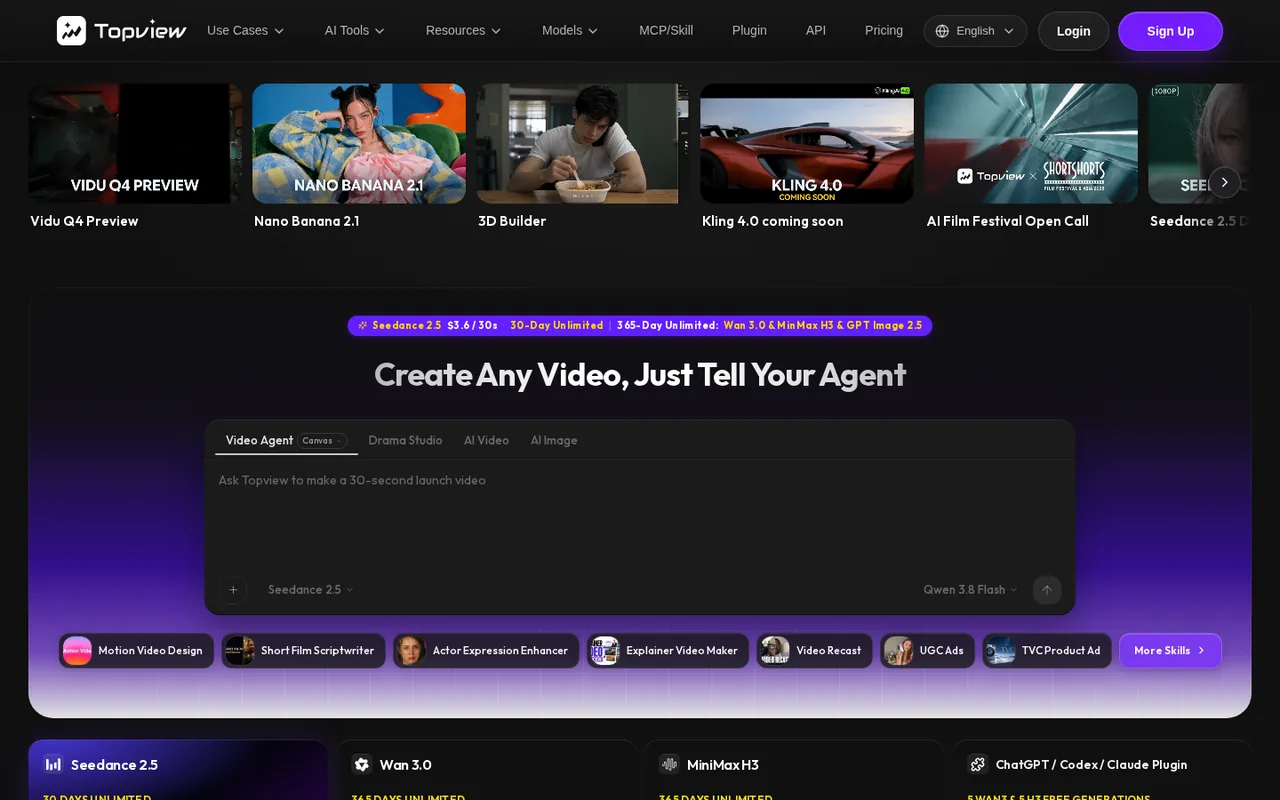
- Agent plans the whole video The homepage says Topview plans scenes, selects models and keeps shots editable on a canvas, which suits ad and short-film drafts.
- Extra credits last 24 months The pricing FAQ says top-up credits are valid for 24 months from purchase, unlike monthly plan credits.
- Output ownership is stated The Terms say Topview assigns to you its rights in generated output and that you may use it for any lawful purpose.
Limits
- No free plan on the pricing page The page lists paid individual plans, Team and Enterprise only; the Prohibited Use Policy refers to Free Users but the pricing page shows no free plan or free credit amount.
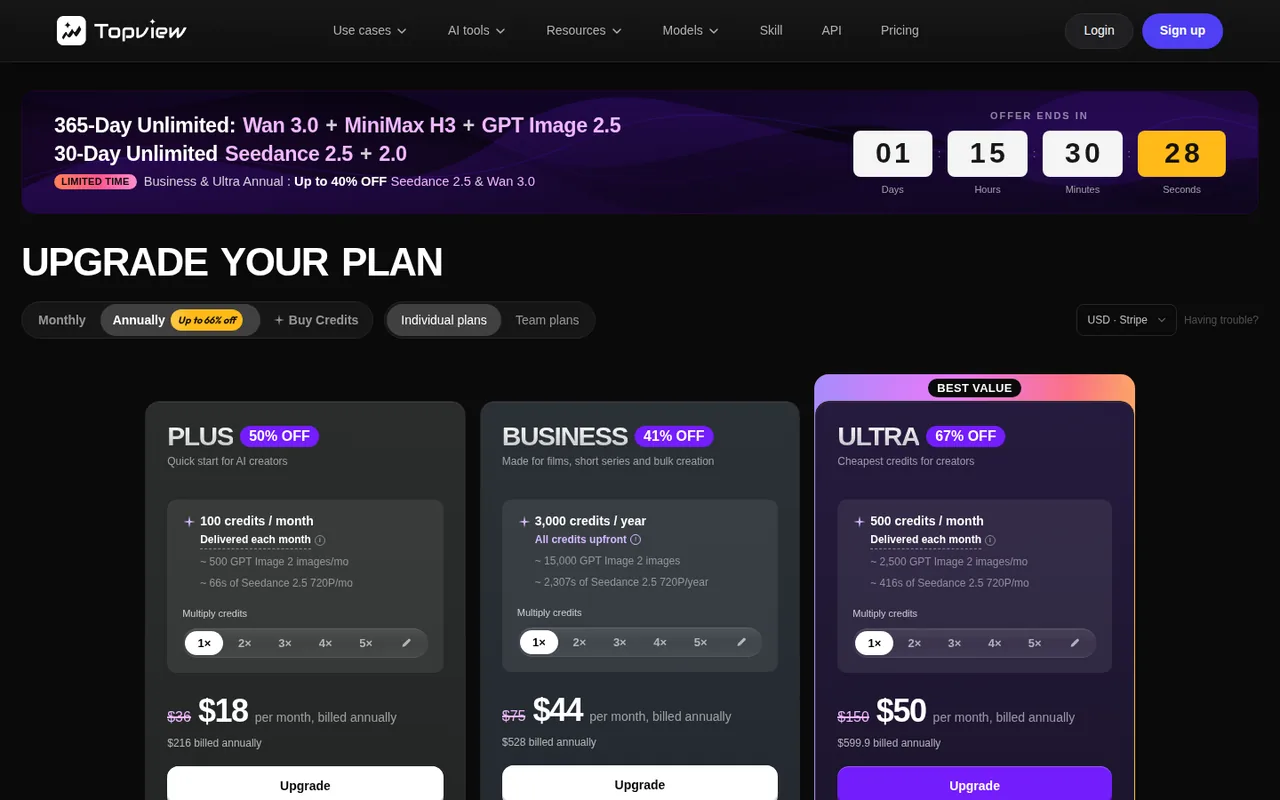
- Annual prices were not stable On 2026-10-17 one load showed Plus at $18 a month billed annually ($216) and another showed $36 a month billed annually ($432); monthly billing showed $24 on both.
- Monthly credits do not roll over The FAQ says unused credits on a monthly plan do not carry over, except when you upgrade or switch from monthly to annual.
- Your content can train models by default The Terms say that outside an Enterprise Agreement Topview may use your content and output to improve its models until you opt out by emailing support.
Who it suits
- Marketers making ads from a product URL The homepage describes UGC-style product ads, launch videos and URL-to-video, and the pricing page bills them in credits.
- Creators of short films and micro-dramas The homepage describes Canvas and Drama Studio for multi-shot videos with consistent characters.
- Teams sharing credits and assets The homepage and pricing page describe team workspaces, shared credit pools and seat management.
- Not for anyone who needs a free tier to test no free plan or free credit amount was found on the pages read, so some spend is needed to try it.
- Not for fixed-budget video work without a clip estimate cost depends on model, resolution and length in credits, so a monthly price alone does not tell you how many clips you get.
How much does Topview cost?
Some prices not published · checked
Regional prices: Prices are in USD as shown on the pricing page on 2026-10-17, excluding VAT and local taxes, which the page says are calculated at checkout.
The page offers Monthly and Annual billing; monthly prices were the same on every load, but annual prices were not: one load showed annual Plus at $18 a month ($216) and Business at $44 ($528), another showed Plus at $36 a month ($432). The annual view carried a countdown banner for a limited-time offer when captured, which may explain the changing annual prices; the page did not say so. Annual plans are paid in full upfront. Monthly credits reset each month and unused credits do not roll over, except when you upgrade or move from monthly to annual. Annual Business credits are delivered all at once. The pricing page shows no free plan; the Terms refer to a Free User, and whether any free credits exist after sign-up was not stated on the pages read. Commercial use is not allowed for Free Users under the Prohibited Use Policy; whether paid plans carry a separate commercial licence was not shown in the plan text read. The 'Team' per-seat monthly price was not captured.
| Plan | Price | What you get |
|---|---|---|
| Plus | $24 per month sourceFrom topview.ai/pricing, checked Oct 17, 2026 (opens in a new tab) | Monthly billing, list price shown as $36; 100 credits a month (about 66 seconds of Seedance 2.5 at 720p); 4 concurrent tasks; API and MCP access; unlimited access to several image models. Annual billing showed $18 per month ($216) on one load and $36 per month ($432) on another. |
| Business | $58 per month sourceFrom topview.ai/pricing, checked Oct 17, 2026 (opens in a new tab) | Monthly billing, list price shown as $75; 250 credits a month (about 166 seconds of Seedance 2.5 at 720p); 8 concurrent tasks; API and MCP access; unlimited access to several image models. Annual billing showed $44 per month ($528) with 3,000 credits delivered at once. |
| Ultra | $112 per month sourceFrom topview.ai/pricing, checked Oct 17, 2026 (opens in a new tab) | Monthly billing, list price shown as $150; 500 credits a month (about 333 seconds of Seedance 2.5 at 720p); 12 concurrent tasks; MCP access, and API access that cannot spend plan credits. Annual billing showed $50 per month (about $600 a year) with about 416 seconds and 30 days of unlimited Seedance 2.5 at 720p. |
| Team | Per seatfrom the pricing page | 500 credits per seat per month; seat management, shared assets, Brand Kit and credit usage controls; the monthly per-seat price was not read. |
| Enterprise | Custom | Contact sales; custom seats, credits and concurrency; SSO / SAML; priority queue; no training on your data. |
How far does it go?
- What a 30-second clip costs per planThe pricing page lists Seedance 2.5 at 720p as 6 credits per 4 seconds, so 30 seconds is about 45 credits. Plus includes 100 credits a month, which the page converts to about 66 seconds, or two 30-second clips. On monthly billing that is $24 for about 66 seconds, roughly $0.36 a second or $10.90 per 30 seconds. Business is $58 for about 166 seconds, roughly $0.35 a second, and Ultra is $112 for about 333 seconds, roughly $0.34 a second, so on monthly billing the per-second price barely falls with the tier. Annual Ultra is shown at about $600 for about 416 seconds a month, roughly $0.12 a second, but only if the annual price holds. These figures divide the plan price by the seconds the page lists; they ignore retries, other models and unlimited allowances.
Arithmetic from the published allowances above, not a usage test.
Taxes, currency and promotions can change the price you see at checkout.
Visit Topview (opens in a new tab)
Key features
| Feature | What it does | Watch out |
|---|---|---|
| AI Video Agent that plans scenes from an idea, script, reference video or product URL, selects models and generates assets, with every shot editable on a canvas (homepage) | — | |
| Drama Studio for micro-dramas and short series from a novel, script or plot, with consistent characters and scenes (homepage) | — | |
| One credit pool across video, image, audio and avatar models, including Seedance 2.5, Wan 3.0, MiniMax H3, Kling and Veo (homepage, pricing page) | — | |
| 3D Shot Composer to place characters and props, move a virtual camera and preview shots before spending credits (homepage) | — | |
| API and MCP access on plans, and team workspaces with shared credits and assets (pricing page, homepage) | The FAQ says Plus and Business include both API and MCP, while Ultra and Team support them but their plan credits cannot be used for API calls. | If you plan to automate generation, check which plan's credits the API can actually spend. |
| Credits are the unit, models set the price | The pricing FAQ says credits work like currency and each tool has its own cost, and that costs can change without notice. The comparison table lists Seedance 2.5 at 720p as 6 credits per 4 seconds on the base rate. | The same plan buys very different amounts of video depending on the model and resolution, so price a specific clip rather than the monthly credit number. |
| Unlimited is limited by model, time and queue | Plans list some models as unlimited for a set period, for example 365 days or 7 days. The FAQ says unlimited runs in the standard queue, works only on topview.ai (not API, MCP or scripts), and using Credit Mode raises the priority of later unlimited video tasks. | Unlimited access can be a real saving on listed models, but wait times vary and it does not cover every model you may want. |
Which price should you trust?
The pricing page changed between loads on the day we read it: monthly billing showed Plus at $24, Business at $58 and Ultra at $112 each time, but annual Plus appeared as $18 a month ($216) in one load and $36 a month ($432) in another. Treat monthly prices as the safer reference and read the total at checkout before paying for a year.
How many clips do credits buy?
Credits are spent per model, resolution and length. The page lists Seedance 2.5 at 720p as 6 credits per 4 seconds, so Plus’s 100 monthly credits cover about two 30-second clips, and the page notes it reserves the right to change credit costs without notice. Unlimited allowances apply only to listed models for a set number of days, run in the standard queue and work only on topview.ai.
What should you check about content and use?
The Terms of Service say you keep rights in what you upload and that Topview assigns you its rights in the output, and that outside an Enterprise Agreement your content and output may be used to train models until you opt out by contacting support. The Prohibited Use Policy bars commercial use, including advertising, for Free Users, and the Terms require that uploaded faces and likenesses be used with the right to do so.
How could you check Topview before paying?
Proposed evaluation · not performed yet
Price one real clip before choosing a plan.
- Pick one 15 to 30 second ad or scene you would actually publish, and note the model and resolution you want.
- Open the pricing page’s credit table and multiply the credits per 4 seconds by your clip length, then divide your plan’s monthly credits by that number.
- Decide whether you need the clip count monthly or yearly, and compare the checkout total for Monthly and Annual billing.
Topview alternatives
Other video & editing tools checked with the same method. Pick by the job, not by a score.

Developers and small teams who want a conversational video avatar for support, sales or tutoring and need to budget by minutes

Short animated stories from a script or prompt

Teachers, students and math YouTubers who want 3Blue1Brown-style explainer clips from a description, with an editable Manim code playground when they want control

Relighting or changing the background of short video clips

Publishers, marketers and faceless-channel creators who turn existing articles or product pages into vertical, square or wide videos, one at a time or through automation

Local image-to-video on an NVIDIA RTX GPU

Turning a finished track into a vertical or widescreen music video

Avatar-presented videos and lip-synced video translation
Used Topview? Write the first review. Visitor opinions are moderated and kept separate from our source checks.
Frequently asked questions
Is Topview AI free?
The pricing page lists no free plan; it shows paid Plus, Business and Ultra plans, Team and Enterprise. The Prohibited Use Policy mentions Free Users and says they may not use the service commercially, but we found no stated free credit amount, so check what your account receives at sign-up.
How much does Topview AI cost per month?
On monthly billing the pricing page showed Plus at $24, Business at $58 and Ultra at $112, with 100, 250 and 500 credits a month. Annual billing is shown cheaper, but its figures were not consistent between page loads, so confirm the checkout total.
Can I use Topview videos commercially?
The Terms say Topview assigns you its rights in the output and you may use it for any lawful purpose, while the Prohibited Use Policy bars commercial use, including advertising, for Free Users. The plan text we read did not show a separate commercial licence per paid plan, so confirm with support for your plan.
Sources and method3 official sources · 15 details checked · Oct 17, 2026
How we checked this profile
15 details on this page were checked against Topview's own pages and help documentation (Oct 17, 2026).
See the checks by section15 documented
| Section | Checks | Last checked | Sources |
|---|---|---|---|
| Article text | 1 documented | topview.ai | |
| Features | 4 documented | topview.aitopview.ai/pricing | |
| Platforms and integrations | 1 documented | topview.ai | |
| Plans and prices | 6 documented | topview.ai/pricing | |
| Strengths and limits | 2 documented | topview.ai/pricingtopview.ai/terms | |
| Questions | 1 documented | topview.ai/terms |
Sources for this profile
- Pricing page with plans, credits and FAQstopview.ai
- Homepagetopview.ai
- Terms of Service and Prohibited Use Policytopview.ai
Official pages read on 2026-10-17: homepage, pricing page (Monthly and Annual views, plan comparison and FAQs) and Terms of Service with the Prohibited Use Policy. We did not create an account or generate a video. Gaps: whether any free credits are given after sign-up, the monthly per-seat Team price, how the commercial licence applies to each paid plan, and which annual prices are current. The provider's plan-comparison table against other tools (dated 7 August 2026) and its quality claims about models were not used. Social links come from the homepage footer. Third-party reviews were not used.
Sources checked Oct 17, 2026. Found something out of date? See how we correct profiles.