


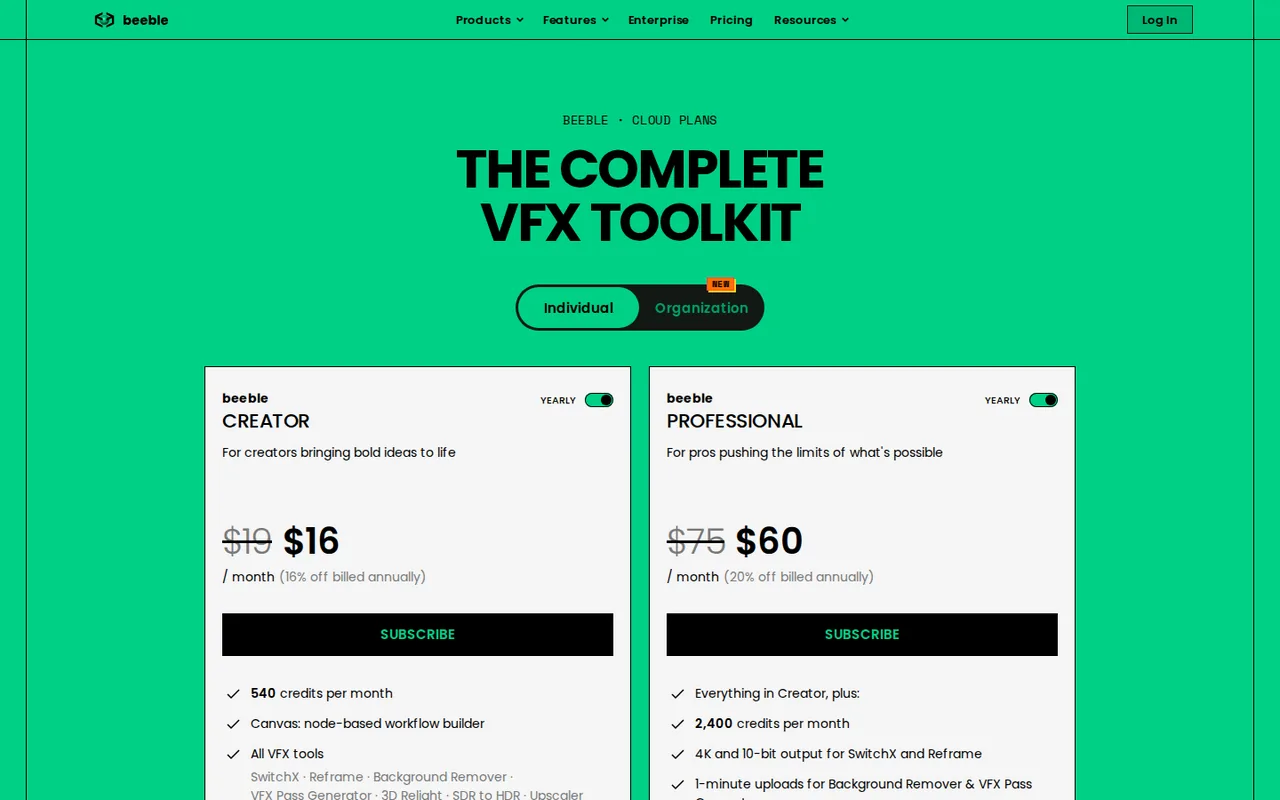
Beeble: free Starter limits are unpublished; Creator is $19 per month for 540 credits, and 4K needs Professional
Updated September 30, 2026 · By Elias Brandt · Documentation review, not tested hands-on
Pros
- Cost per second is published
- Full commercial license on every paid plan
- One credit balance across tools
Cons
- Credits reset and do not roll over
- 4K needs the higher plan
- Free Starter limits are not published
Bottom line
You relight or swap the background on a few short 1080p shots a month and deliver MP4, since Creator credits cover roughly six 4-second clips.
You want to try the tool for free first, because the plan pages publish no credits, resolution or feature limits for Starter.
Best forEditors fixing a single shotColorists and VFX artists needing mattesFilmmakers delivering in 4K or 10-bitStudios sharing a credit budget
Strengths, limits and who it suits, in full
Strengths
- Cost per second is published The pricing page and credit policy list credits per second for each resolution, so a clip can be priced before it is run.
- Full commercial license on every paid plan Creator, Professional and Team list a full commercial license, and Team and Enterprise state no training on your data.
- One credit balance across tools SwitchX, Reframe, Background Remover, VFX Pass Generator, upscalers and third-party generators all draw on the same monthly credits.
Limits
- Credits reset and do not roll over Unused subscription credits are lost at the start of each billing cycle; only one-time top-ups last 90 days.
- 4K needs the higher plan 2160p SwitchX and Reframe output and 10-bit MOV export are Professional features, and Creator has no 2160p row.
- Free Starter limits are not published The FAQ mentions a free Starter plan, but the plan pages list no credits or limits for it.
Who it suits
- Editors fixing a single shot a change of background or lighting on a few short clips fits Creator, which covers about six 1080p clips of 4 seconds a month.
- Colorists and VFX artists needing mattes Background Remover and VFX Pass Generator return mattes and passes for 2,400 seconds a month on Professional.
- Filmmakers delivering in 4K or 10-bit Professional is the entry point for 2160p SwitchX output and 10-bit MOV, at 7 clips of 4 seconds a month.
- Studios sharing a credit budget Team pools 3,000 credits per seat, up to 10 seats, with central billing and role management.
How much does Beeble cost?
Some prices not published · checked
Regional prices: Prices are in USD as shown on beeble.ai/pricing-cloud to a browser served from a Germany-based server on September 30, 2026.
The page opens on the yearly view, labelled 16% off for Creator and Team and 20% off for Professional; the monthly view shows $19 and $75. Yearly totals are not printed on the page and are not calculated here. The FAQ says switching between monthly and yearly billing is not supported: cancel and resubscribe. Beeble Studio, a separate desktop product with its own licence, and the developer API are outside these cloud plans.
| Plan | Price | What you get |
|---|---|---|
| Starter (free) | Price and limits not listed on the plan pages | The FAQ refers to a free Starter plan and to free-tier users, but no credit allowance or feature list is published. |
| Creator | $19 per monthor $16 per month billed yearly sourceFrom beeble.ai/pricing-cloud, checked Sep 30, 2026 (opens in a new tab) | 540 credits a month; Canvas; SwitchX, Reframe, Background Remover, VFX Pass Generator, 3D Relight, SDR to HDR and Upscaler; image and video generators; top-ups; full commercial license; MP4 export; 30-second uploads for Background Remover and VFX Pass Generator. |
| Professional | $75 per monthor $60 per month billed yearly sourceFrom beeble.ai/pricing-cloud, checked Sep 30, 2026 (opens in a new tab) | Everything in Creator plus 2,400 credits a month; 4K and 10-bit output for SwitchX and Reframe (MP4 or 10-bit MOV); 1-minute uploads and image-sequence uploads for Background Remover and VFX Pass Generator. |
| Team | $100 per seat per monthor $84 per seat billed yearly sourceFrom beeble.ai/pricing-cloud, checked Sep 30, 2026 (opens in a new tab) | 3,000 credits per seat a month in a shared pool; Canvas, SwitchX and core VFX tools; up to 10 seats; central billing; seat and role management; extra credits at 30 per $1 with 3-month rollover. |
| Enterprise | Contact salesyearly commitment only | Unlimited seats, custom credit allocation, AI model permission controls and a dedicated Slack channel; SOC 2 Type II listed as in progress. |
How far does it go?
- Credits per clip and cost per clipA 4-second clip at 30 fps is 120 frames, so 1080p SwitchX costs 4 x 20 = 80 credits and 720p costs 4 x 6 = 24. Creator: 540 / 80 = 6 clips (6.75 rounded down) at 1080p and 540 / 24 = 22 at 720p. Professional at 2160p: 4 x 80 = 320 credits, so 2,400 / 320 = 7 clips (7.5 rounded down). At 80 credits, one 1080p clip is about $2.81 on Creator monthly ($19 x 80 / 540), $2.37 yearly, $2.50 on Professional monthly and $2.00 yearly. Arithmetic on published rates, not measured usage.
Arithmetic from the published allowances above, not a usage test.
Taxes, currency and promotions can change the price you see at checkout.
Visit Beeble (opens in a new tab)
Key features
| Feature | What it does | Watch out |
|---|---|---|
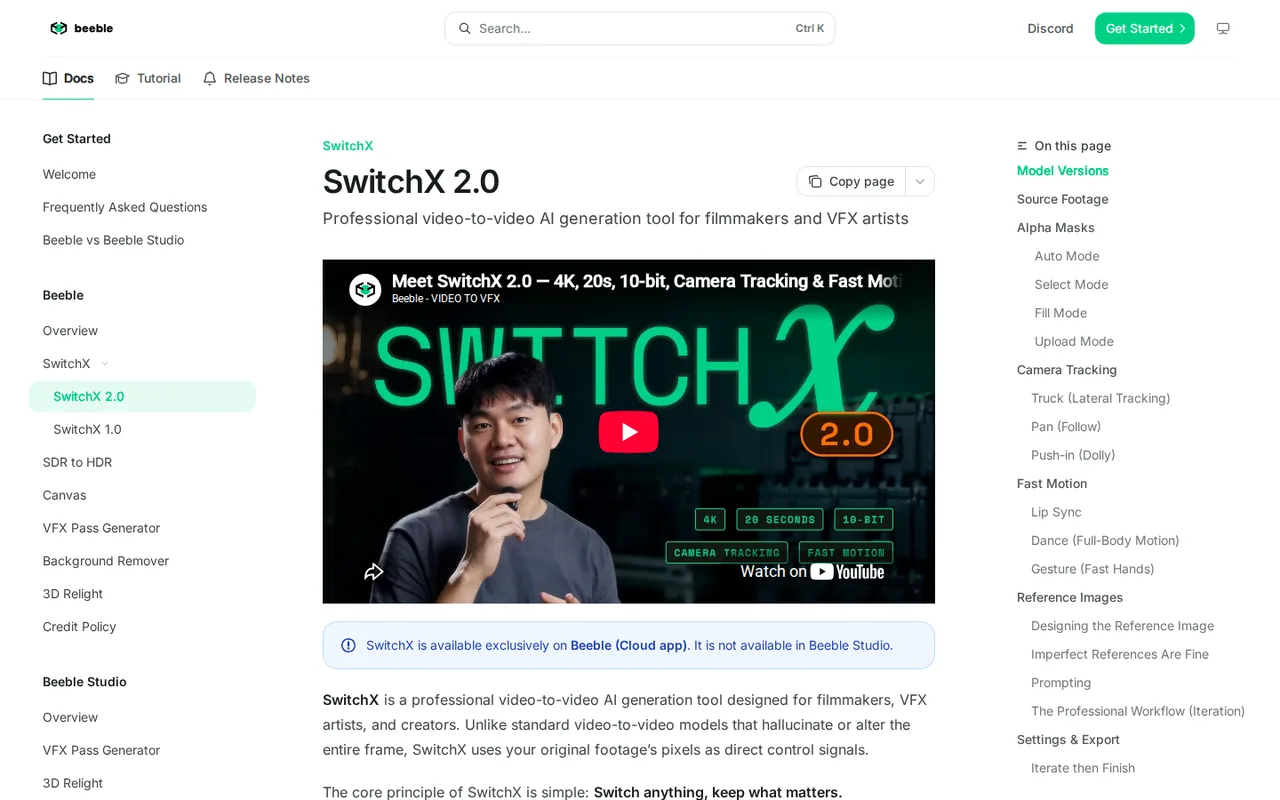
| SwitchX video relighting and background swap with mask control | Changes the background, lighting or style of a clip while keeping unmasked footage relit to match; four mask modes (Auto, Select, Fill, Upload), an optional reference image and camera tracking that follows the source by default. | Clips are capped at 480 frames, which is 20 seconds at 24 fps, and 2160p output and 10-bit MOV need Professional or Team. |
| Reframe to seven preset aspect ratios or a custom ratio | — | |
| Background Remover with MatAnyone and CorridorKey models | Rotoscopes footage into color with transparency or an alpha-only channel, using MatAnyone at 1 credit per second or CorridorKey at 2 credits per second on 30 fps footage. | Creator accepts clips up to 30 seconds and Professional up to one minute, with a 2048 x 2048 maximum resolution. |
| VFX Pass Generator for alpha, PBR passes and depth | Turns footage into alpha, PBR passes (Normal, Basecolor, Roughness, Metallic, Specular) and depth, with Blender, Unreal and Nuke plugins listed for relighting elsewhere. | It costs 3 credits per image or per second, so Creator covers 180 images or seconds a month before other tools draw on the same balance. |
| SDR to HDR recovery as 16-bit ACES EXR | — | |
| Canvas node-based workflow builder | — | |
| Built-in upscalers and third-party image and video generators | — | |
| Iterate in 720p, then Finish in 1080p or 4K | — |
How many seconds of video do Creator credits cover?
Beeble prices SwitchX and Reframe per second of footage. On the pricing page, a 720p second costs 6 credits, 1080p costs 20 and 2160p costs 80, and the tables are calculated for a 30 fps, 4-second clip. Creator includes 540 credits a month, which the page converts to 22 clips at 720p and 6 at 1080p. Creator has no 2160p row.
The credit policy states the rule in frames instead: cost is the number of 30-frame blocks, rounded up, times the rate. A 60 fps clip therefore costs twice as much as the same length at 30 fps. Check your source frame rate before estimating a month of work.
- 720p: 4 seconds x 6 = 24 credits, so 22 clips on Creator and 100 on Professional.
- 1080p: 4 x 20 = 80 credits, so 6 clips on Creator and 30 on Professional.
- 2160p: 4 x 80 = 320 credits, so 7 clips on Professional.
When do you need Professional instead of Creator?
Professional costs $75 a month, or $60 billed yearly, against $19 or $16 for Creator. The extra spend buys 2,400 credits instead of 540, 2160p SwitchX and Reframe output, 10-bit MOV export, uploads of up to one minute for Background Remover and VFX Pass Generator, and image-sequence uploads.
Editorial assessment
Stay on Creator while deliveries are 1080p MP4 and clips are short. Move up when a client requires 4K, 10-bit files or footage longer than 30 seconds, since those limits are tied to the plan rather than to credits.
What does SwitchX 2.0 accept and produce?
SwitchX is cloud-only. The documentation describes an alpha mask that decides what is generated, a reference image that sets the look, and four mask modes: Auto, Select, Fill and Upload. Unmasked areas keep the original footage but are relit to match the new scene. Camera tracking follows the source by default and can be set to ignore it.
Output is limited to 480 frames per video, or 20 seconds at 24 fps. Direct ProRes 422 uploads of up to 4.5 GB are accepted, while ProRes 4444 and variable frame rate files are rejected. Iterate then Finish lets you explore in 720p and finish the favorite at higher resolution, re-rendered from the source footage.
What do the other tools cost in credits?
The pricing page lists Background Remover with two models: MatAnyone at 1 credit per image or second and CorridorKey at 2, calculated on 30 fps footage. Creator therefore covers 540 seconds with MatAnyone or 270 with CorridorKey, and Professional covers 2,400 or 1,200. Exports are MOV or PNG sequence, with a 2048 x 2048 maximum resolution.
VFX Pass Generator costs 3 credits per image or per second, which is 180 on Creator and 800 on Professional, and returns alpha, PBR passes and depth. SDR to HDR costs 3 credits per second at 720p and 10 at 1080p, for up to 240 frames, and exports 16-bit ACES EXR or Rec.2020 HLG files.
What sits outside the cloud plans?
Beeble Studio is a separate desktop application for Windows and Rocky Linux that runs on a local NVIDIA GPU with 12 GB or more of VRAM. Its plans are priced separately, and the comparison page lists VFX Pass Generator and 3D Relight there, without SwitchX or Background Remover. Studio is licensed and priced separately from the cloud plans described above.
The pricing page FAQ says the plans do not include API access and that Beeble Studio is licensed separately, and the developer API has its own pricing page. Treat both as separate purchases. Team supports Canvas, SwitchX, Background Remover and VFX Passes, and 3D Relight is not available in an organization workspace.
How do credits behave when the month ends?
Subscription credits are consumed first and reset at the start of every billing cycle, with no carryover. One-time credits bought as a backup expire 90 days after purchase. Credits can be topped up at any time, and Team accounts can add auto-recharge; Team extra credits cost 30 per $1 and roll over for up to 3 months.
Upgrades take effect immediately with a prorated charge. Downgrading Professional to Creator takes effect at the end of the billing period without a refund for the remaining time. Cancelling keeps access until the cycle ends.
Who owns the footage, and is it used for training?
The FAQ says paid users keep uploaded and created content private and fully owned, with Beeble accessing it only as needed to provide the service. Free-tier users keep ownership too, but the terms let Beeble use their content for research and development. Team and Enterprise pages state that Beeble never trains on your data, and third-party model terms sit in the model list.
SwitchX can change clothing and surroundings, and the documentation describes masks that keep chosen subjects unchanged. The terms bar using pictures or video of another person without consent and any impersonation, so upload only footage you have the rights and releases to use.
Can a Creator plan relight a 4-second 1080p clip within the published cost?
Proposed evaluation · not performed yet
On a Creator account with a self-shot 4-second clip at 30 fps and 1080p, with releases for anyone shown, run SwitchX 2.0 once. The published rate predicts 80 credits.
- Record the credit balance and plan before starting.
- Upload the clip, use Auto masking on the main subject and describe the new lighting in a prompt.
- Run one 1080p generation and download the MP4.
- Compare the balance after the run with the 80-credit prediction.
- Play the result beside the source and check faces, hands, edges and camera motion.
Accept a run that deducts 80 credits and keeps the masked subject and camera path intact. Reject a run that charges a different amount, drops frames or alters the subject. No result is reported until the exercise is run.
For prompt-based generation with a different credit model, compare Runway. To upscale finished footage, see Topaz Video.
Is Beeble worth it?
Documentation review plus dated public user reports. Documentation review, not tested hands-on. Not scored.
Worth it if
- You relight or swap the background on a few short 1080p shots a month and deliver MP4, since Creator credits cover roughly six 4-second clips.
- You need mattes, depth or PBR passes to finish in Blender, Unreal or Nuke and want each second priced in credits before you run it.
- A small studio wants one shared credit budget, because Team pools credits across up to 10 seats with central billing and role management.
Probably not if
- You want to try the tool for free first, because the plan pages publish no credits, resolution or feature limits for Starter.
- Your shots run longer than 20 seconds at 24 fps, because SwitchX stops at 480 frames per video whatever plan you pay for.
- Your workload swings from month to month, because subscription credits vanish at each reset and one-time top-ups expire after 90 days.
Beeble alternatives
Other video & editing tools checked with the same method. Pick by the job, not by a score.

Developers and small teams who want a conversational video avatar for support, sales or tutoring and need to budget by minutes

Short animated stories from a script or prompt

Teachers, students and math YouTubers who want 3Blue1Brown-style explainer clips from a description, with an editable Manim code playground when they want control

Dubbing and subtitling existing videos into other languages

Avatar-presented videos and lip-synced video translation

Teams assembling short explainers

Short cinematic AI clips with audio

Creators who post faceless short-form video at volume and want a template, script, voiceover and render in one place
Used Beeble? Write the first review. Visitor opinions are moderated and kept separate from our source checks.
Frequently asked questions
Is there a free Beeble plan?
The FAQ refers to a free Starter plan and says moving to it means cancelling a paid subscription. It also describes free-tier users in its ownership answer. The public plan pages list no Starter credits, resolution or feature limits, so the allowance is not confirmed here. Check the signed-in plans page before planning any work on it.
What does an extra credit cost?
Individual plans show top-up credits without a published rate on the pricing page. Team shows extra credits at 30 credits per $1, paid by card and rolling over for up to 3 months. That works out to about $0.033 per credit, against about $0.035 per credit for Creator monthly at $19 for 540. Confirm top-up rates in the account.
Do Beeble plans include API access?
No. The pricing page FAQ says the API is separate from the plans and points to the developer page for details, where API pricing is listed on its own. Beeble Studio is also licensed separately. The cloud plans covered here are for the web app, Canvas and the tools inside it, so budget any API use on its own.
How is Team different from Creator?
Team is billed per seat at $100 a month, or $84 billed yearly, with 3,000 credits per seat pooled across up to 10 seats, central billing and admin roles. It supports Canvas, SwitchX, Background Remover and VFX Passes, but not 3D Relight, and projects stay private to the member who made them for now.
Can I switch between monthly and yearly billing?
Not directly. The FAQ says switching between monthly and yearly billing is not currently supported, and the Team answer says to cancel the current plan and resubscribe with the frequency you want. You keep access until the current cycle ends, so timing the switch near renewal avoids paying for overlapping periods.
Sources and method12 official sources · 11 details checked · Sep 30, 2026
How we checked this profile
11 details on this page were checked against Beeble's own pages and help documentation (Sep 30, 2026).
See the checks by section11 documented
| Section | Checks | Last checked | Sources |
|---|---|---|---|
| Plans and prices | 6 documented | beeble.ai/pricing-cloudbeeble.ai/organizationdocs.beeble.ai/faq | |
| Strengths and limits | 3 documented | docs.beeble.ai/switchxdocs.beeble.ai/faqbeeble.ai/organization | |
| Features | 1 documented | docs.beeble.ai/switchx | |
| Other details | 1 documented | docs.beeble.ai/terms-of-use |
Sources for this profile
- Cloud plans, individual and organization viewsbeeble.ai
- Homepagebeeble.ai
- Organization plans (Team and Enterprise)beeble.ai
- Credit policydocs.beeble.ai
All 12 sources
- Frequently asked questionsdocs.beeble.ai
- SwitchX documentationdocs.beeble.ai
- Background Remover documentationdocs.beeble.ai
- VFX Pass Generator documentationdocs.beeble.ai
- Beeble versus Beeble Studiodocs.beeble.ai
- Terms of use (last updated June 22, 2026)docs.beeble.ai
- Privacy policydocs.beeble.ai
- Beeble Studio product pagebeeble.ai
The terms of use, last updated June 22, 2026, are with Beeble AI Inc., at 1000 N West Street, Suite 1200, Wilmington, Delaware. The credit tables on the pricing page are calculated by Beeble for SwitchX 2.0 on a 30 fps, 4-second video, and Background Remover and VFX Pass Generator figures assume 30 fps footage. The Beeble versus Beeble Studio page and the FAQ table say the cloud handles up to 2K, while the SwitchX documentation and pricing page list 2160p and 10-bit output on Professional; the newer pricing and SwitchX pages were followed. The credit policy bills Background Remover per 30 frames, which equals one second at 30 fps. Free Starter limits and the yearly invoice total are not confirmed. The pricing page lists SOC 2 Type II as in progress, expected 2026.
Sources checked Sep 30, 2026. Found something out of date? See how we correct profiles.