


What is Decktopus, in short?
Updated October 24, 2026 · By Elias Brandt · Documentation review, not tested hands-on
Pros
- Brand from a URL
- Rehearsal included
- Long billing discounts are explicit
- Agent access
Cons
- No free plan
- Every edit costs credits
- No refunds
- Editability of exports is unclear
- Conflicting credit figures
Best forPresenters who rehearseMarketers who need brand-matched decks fastSales teams tracking shared decksNot for heavy manual editingNot for trying before paying with a file
Strengths, limits and who it suits, in full
Strengths
- Brand from a URL Colors, fonts and logo are pulled from your website during creation, with no manual brand setup.
- Rehearsal included Loop coaching with audience questions and a scored rehearsal is part of Pro, not a separate purchase.
- Long billing discounts are explicit The annual Pro charge of $119.88 is stated as a single amount, saving $180 against twelve monthly payments.
- Agent access Decks can be started from ChatGPT or Claude, with the live link opening the result in the Decktopus editor.
Limits
- No free plan The free first deck cannot be exported and carries a Decktopus watermark.
- Every edit costs credits Edit Text and Edit with AI both charge 5 credits per edit, so polishing a deck draws on the same allowance as generating it.
- No refunds The terms and help center say purchases are final, for monthly and annual plans alike.
- Editability of exports is unclear Nano generates slides as AI images, and the export pages do not say whether slide text stays editable text in the PPT file.
- Conflicting credit figures The pricing page shows 750 credits as about 150 slides, while its FAQ says about 50 new slides or 150 AI edits.
Who it suits
- Presenters who rehearse Loop turns the deck into speaking notes, simulated audience questions and a scored practice run.
- Marketers who need brand-matched decks fast Brand import from a URL and social carousels sit in the same editor as presentations.
- Sales teams tracking shared decks Business adds deck analytics, an email gate for lead capture and a custom domain for shared links.
- Not for heavy manual editing people who rework every slide by hand will spend credits on each edit, which suits a draft-and-tweak workflow better.
- Not for trying before paying with a file The free first deck is enough to view the output, but any PDF or PPT download needs Pro or Business.
How much does Decktopus cost?
Prices confirmed · checked
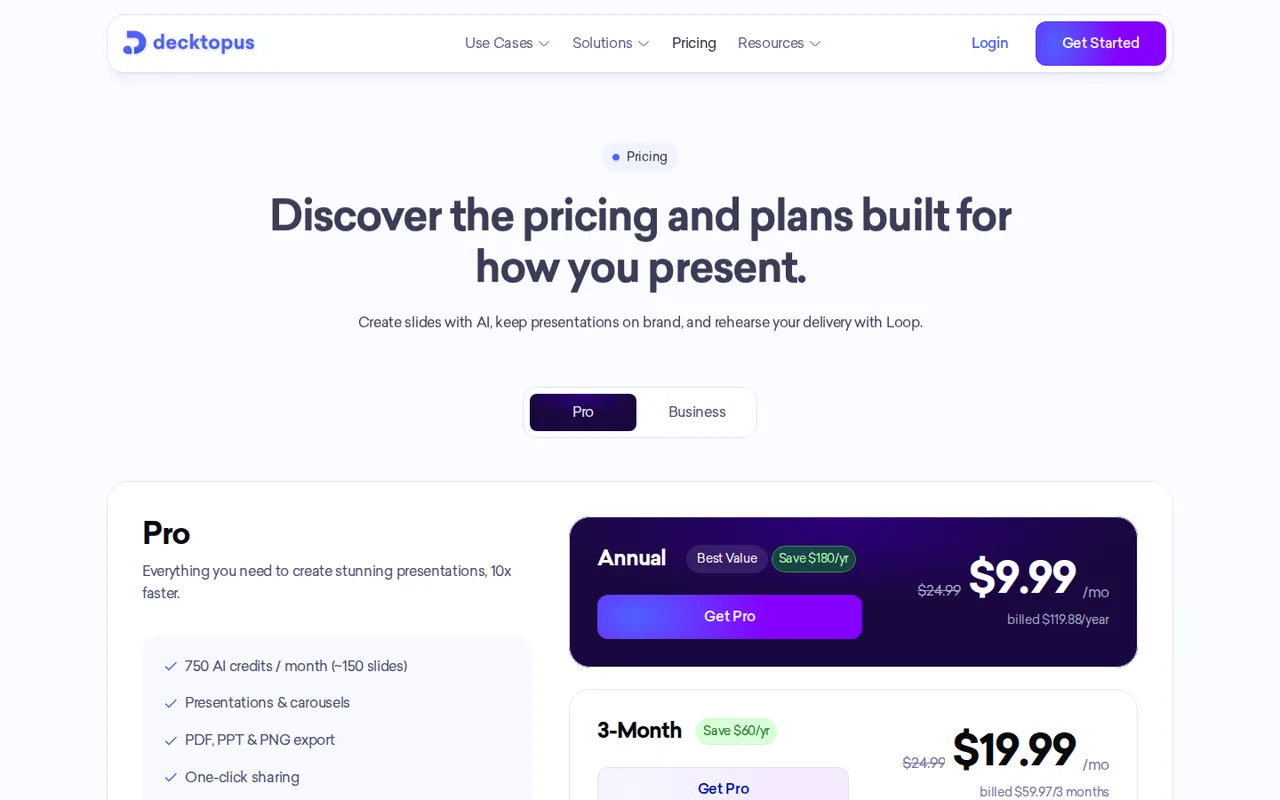
Regional prices: The pricing page shows the 3-month and annual options as $19.99 and $9.99 a month for Pro, and $39.99 and $19.99 a month for Business, next to the actual charges listed in the plan rows.
Credits renew monthly on every billing period and do not roll over. One-time credit packs run from 40 credits for $4.99 to 36,000 for $999 and never expire. Students get 50% off every plan with the code SUPPORTEDUCATION, without verification. Cancelling keeps access to the end of the paid period, and all purchases are non-refundable.
| Plan | Price | What you get |
|---|---|---|
| First deck | $0 sourceFrom decktopus.com/pricing, checked Oct 24, 2026 (opens in a new tab) | Free credits at sign-up for a 3-slide presentation; no export; Decktopus watermark on slides. |
| Pro | $24.99 per month$59.97 every 3 months or $119.88 per year sourceFrom decktopus.com/pricing, checked Oct 24, 2026 (opens in a new tab) | 750 AI credits a month; presentations and carousels; PDF, PPT and PNG export; sharing; Loop delivery coach; version history; mobile access. |
| Business | $44.99 per seat per month$119.97 per seat every 3 months or $239.88 per seat per year sourceFrom decktopus.com/pricing, checked Oct 24, 2026 (opens in a new tab) | 1,000 AI credits per seat a month; team workspace and collaboration; Brand Kit; custom domain; deck analytics and email gate; priority support. |
| Enterprise | Custom quote | Custom branding systems, role-based access control and dedicated support; a demo environment first, then about one week of setup. |
How far does it go?
- A 12-slide deck with two editing roundsGenerating 12 slides costs 12 x 5 = 60 credits; editing 4 slides twice costs 8 x 5 = 40, so the deck uses 100 credits. Pro: 750 credits cover 7 such decks a month (700 credits). Business: 1,000 credits cover 10 per seat. On annual Pro, $119.88 / 12 = $9.99 a month, or about $1.43 per deck at 7 decks. Billing period: twelve monthly Pro charges total 12 x $24.99 = $299.88, four 3-month charges $239.88, and one annual charge $119.88. Arithmetic on published prices and credit rates, not a statement by Decktopus.
Arithmetic from the published allowances above, not a usage test.
Taxes, currency and promotions can change the price you see at checkout.
Try Decktopus free (opens in a new tab)
Key features
| Feature | What it does | Watch out |
|---|---|---|
| Generates a deck or social carousel from a topic, audience and purpose, or from an uploaded file used as a resource or redesigned (pricing page, help center) | — | |
| Nano, the current editor, generates slides as AI images and edits them with natural-language prompts, with version history to restore any generation (help center) | — | |
| Imports brand colors, fonts and logo from a website URL during creation and reuses the saved style on later decks (homepage FAQ, help center) | — | |
| Paid plans export PDF, PPT or PNG in compressed or standard quality, from the editor or the dashboard (help center) | — | |
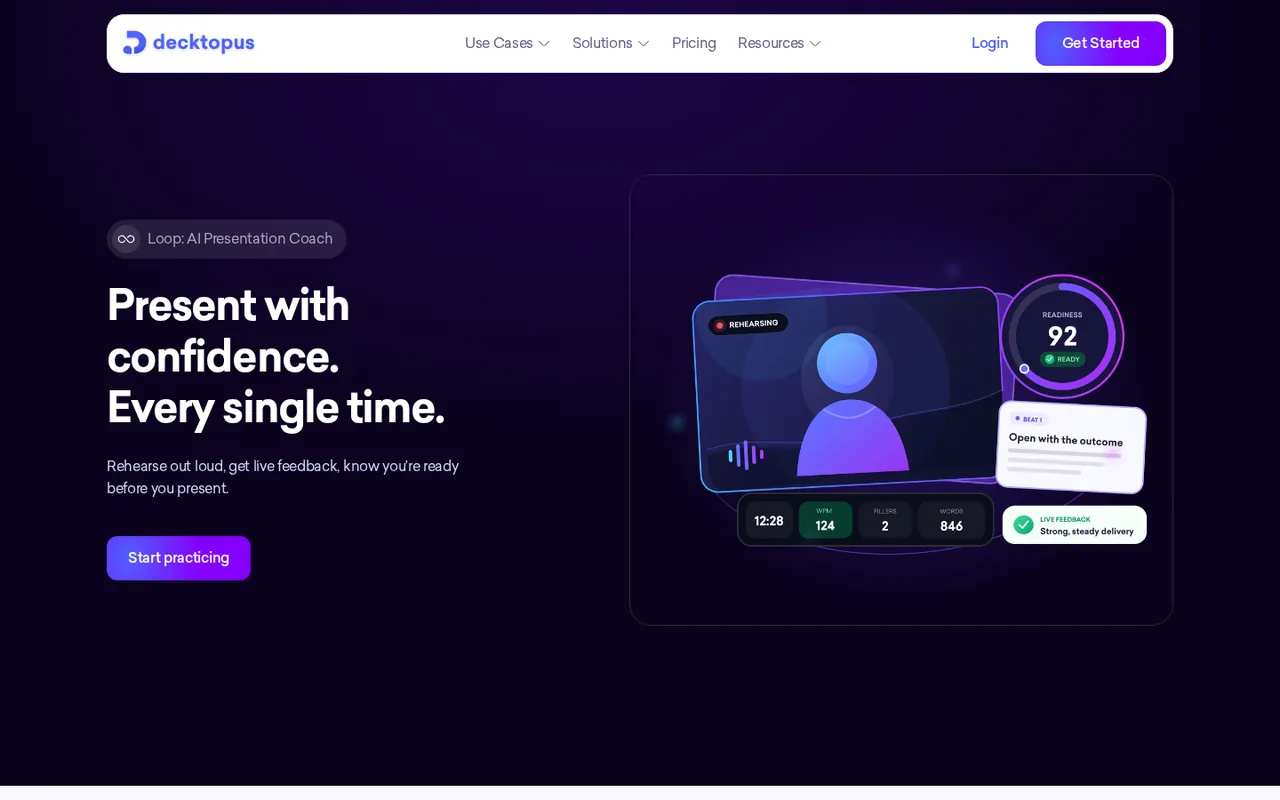
| Loop, included on Pro and above, runs four AI coaching stages: context profiling, story structure, audience questions and a scored rehearsal (pricing page, help center) | Stage tracks time, words per minute and filler words while you rehearse, then gives a Readiness Score from 0 to 100 across eight areas with a timestamped timeline. | The score is the tool's own feedback on delivery; it is not a measure of how an audience will respond. |
| Creates decks from ChatGPT through a Decktopus app, or from Claude and other clients through a remote MCP server with OAuth sign-in (help center) | — | |
| Credit costs | Generating one slide costs 5 credits and so does each edit made with Edit with AI or Edit Text; the cost is shown before a change is applied. | Plan credits renew monthly and do not roll over; top-up packs from 40 credits for $4.99 never expire. |
| Nano and the legacy editors | Nano is the recommended editor for new users and the one that receives new features; the template-based V2 and V3 editors can still be switched on in Profile Settings. | V2 and V3 are no longer actively developed, so templates, themes and drag-and-drop editing there will not gain new features. |
What does the free first deck include?
Decktopus no longer has a free plan. The homepage FAQ says new users get free credits at sign-up, enough for a 3-slide presentation, and the help center adds the two limits that matter: the first deck cannot be exported and its slides carry a Decktopus watermark. The trial article mentions a Refer and Earn feature worth 30 more credits before you subscribe.
That makes the free stage a preview, not a deliverable. If the job is a PPTX you can send without paying, Dokie AI lists PPTX export on its free plan with daily credits.
What changes when slides are AI images?
The editor comparison describes Nano, the current editor, as generating slides as AI images that you change with a prompt, with every generation saved in version history. The older V2 and V3 editors were template-based with drag-and-drop editing; they can still be selected in Profile Settings but are no longer actively developed.
The image approach shows up in the credit rules. The credits article charges 5 credits to generate a slide and 5 for each edit, whether you use Edit with AI or Edit Text. Fixing a typo therefore costs as much as a prompt-based redesign of that slide. Decktopus shows the cost before applying a change.
Will the PowerPoint file be editable?
Export needs Pro or Business. The export article offers PDF, PPT or PNG in compressed or standard quality from the editor or the dashboard, and describes the PPT as a fully editable file for PowerPoint, Keynote or Google Slides. It does not say how a slide generated as an AI image becomes editable text, so check one exported slide before you build a whole deck on that assumption.
- PDF: fixed layout for sharing and printing.
- PPT: described as editable in PowerPoint, Keynote or Google Slides.
- PNG: one image file per slide.
How do the billing periods compare?
Pro is $24.99 billed monthly, $59.97 every three months or $119.88 a year, and every option renews credits monthly. Business costs $44.99 per seat monthly, $119.97 per seat for three months or $239.88 per seat a year. Credits renew monthly and do not roll over. There is no refund on any plan under the refund policy; cancelling keeps access until the paid period ends and stops the next renewal. Students can take 50% off with a public code at checkout.
What does Business add for shared decks?
Business is priced per seat and gives each seat 1,000 credits, so a larger team gets a larger pool. The plan comparison article lists what Pro lacks: inviting teammates to a deck from the Share window, a custom subdomain for shared links, deck analytics showing who opened a deck, for how long and which slides held attention, and an email gate that asks viewers for an address before the deck opens. Shared team templates are not available yet; the homepage FAQ suggests duplicating a finished presentation instead, while a brand style imported from a URL is saved for reuse.
What does Loop add before a presentation?
Loop is a coaching workspace included on Pro and above. The Loop guide describes four stages: a profiler that collects your situation, audience, goals, format and place; a planner that suggests a storytelling framework, timing and speaking notes you can download as .md or .txt; a red team of simulated stakeholders asking hard questions; and a rehearsal stage that tracks words per minute and filler words and ends with a 0 to 100 Readiness Score.
How could you check Decktopus before paying?
Proposed evaluation · not performed yet
Check whether the free credits produce an accurate 3-slide draft, and treat the export check as a separate paid stage.
- Sign up and note the free credit balance.
- Ask for a 3-slide deck from a short brief that contains two exact figures.
- Compare both figures on the slides and note the credits used.
- Make one Edit Text change and confirm 5 credits are deducted.
- Paid stage, only if you subscribe: export the deck as PPT and click into a slide title in PowerPoint.
Accept if the figures match and, in the paid stage, slide titles open as editable text. Reject if figures change or the PPT contains only flat images. No result is recorded here.
Decktopus alternatives
Other presentations tools checked with the same method. Pick by the job, not by a score.

Recurring decks and fast drafts

Turning notes and reports into diagrams inside one document

Turning existing documents into editable PowerPoint decks

AI first drafts of decks, documents and simple websites

Sending personalized sales decks as tracked web links instead of PowerPoint files

Turning written text into editable business diagrams

Turning a topic or document into an interactive AI-taught lesson

Sales and client-facing decks
Used Decktopus? Write the first review. Visitor opinions are moderated and kept separate from our source checks.
Frequently asked questions
Does Decktopus offer refunds?
No. The terms state that refunds are not available for monthly or annual subscriptions, and the help center applies the same rule to every plan, including after cancellation. Cancelling from the Subscription panel goes through a short form and Stripe, and the plan stays active until the current billing period ends.
Which languages does Decktopus support?
The pricing FAQ says the interface runs in seven languages, English, German, Spanish, French, Portuguese, Turkish and Arabic, and that presentations can be generated in more than 100 languages by writing the prompt in that language. The homepage FAQ lists only the seven, so test the output language you need on the free deck.
Can I create Decktopus decks from ChatGPT or Claude?
Yes. In ChatGPT, install the Decktopus AI app and tag it in a chat; it returns a deck ID and a live link to open the result in the editor. Claude and other MCP clients can add the remote server at apiv21.decktopus.com/mcp as a custom connector and sign in with OAuth.
Who runs Decktopus?
Decktopus Inc, which lists 2100 Geng Road, Suite 210, Palo Alto, California 94303 in its Terms of Use and support@decktopus.com for help. The terms are governed by California law. The about page says the company started in 2019 with a layout-first editor and launched AI deck generation in 2023.
Does Decktopus train AI on my decks?
No, according to the security article: customer data is excluded from AI training by default, with no opt-out needed. Decktopus runs on AWS with TLS 1.3 in transit and AES-256 at rest, offers EU hosting for organizations that need it, supports multi-factor authentication and says SOC 2 Type II certification is in progress.
Sources and method22 official sources · 31 details checked · Oct 24, 2026
How we checked this profile
31 details on this page were checked against Decktopus's own pages and help documentation (Oct 24, 2026). 3 are still open and listed below.
See the checks by section26 documented2 editorial assessment3 open
Still open
- The pricing FAQ lists Brand Kit as a Business addition, while the homepage FAQ and Studio description say brand colors, fonts and logo are imported from a website URL during creation.Not confirmed · checked · Source (opens in a new tab)
- The pricing card shows 750 credits as about 150 slides, while the pricing FAQ says 750 credits are roughly 150 AI edits or 50 new slides.Not confirmed · checked · Source (opens in a new tab)
- The export articles do not state how text on a Nano slide generated as an AI image is represented in the PPT file.Not confirmed · checked · Source (opens in a new tab)
Sources for this profile
- Pricing page, plan comparison and pricing FAQdecktopus.com
- Homepage and FAQdecktopus.com
- Help center: Pro vs Businesshelp.decktopus.com
- Help center: how AI credits workhelp.decktopus.com
All 22 sources
- Help center: what are AI creditshelp.decktopus.com
- Help center: credits do not carry overhelp.decktopus.com
- Help center: using Decktopus without a subscriptionhelp.decktopus.com
- Help center: free trialhelp.decktopus.com
- Help center: download and exporthelp.decktopus.com
- Help center: download as PowerPointhelp.decktopus.com
- Help center: Nano vs Classic editorshelp.decktopus.com
- Help center: existing file as a resourcehelp.decktopus.com
- Help center: Decktopus Loophelp.decktopus.com
- Help center: ChatGPT apphelp.decktopus.com
- Help center: MCP serverhelp.decktopus.com
- Help center: security and data privacyhelp.decktopus.com
- Help center: student discounthelp.decktopus.com
- Help center: refund policyhelp.decktopus.com
- Help center: cancelling a subscriptionhelp.decktopus.com
- About pagedecktopus.com
- Terms of Use (Decktopus Inc)decktopus.com
- Privacy Noticedecktopus.com
Official pages read on 24 Oct 2026 with plain HTTP requests; the Business tab and billing periods were read in a local browser: homepage and FAQ, pricing page and FAQ, about page, Terms of Use (effective December 2024), Privacy Notice and help center articles on plans, credits, the free first deck, export, PowerPoint download, Nano and legacy editors, file resources, Loop, ChatGPT and MCP access, security, student discount, refunds and cancellation. We did not create an account or export a deck. User counts, review scores and awards on the provider pages were not used. Third-party pricing pages that show older Pro and Business prices were not used.
Sources checked Oct 24, 2026. Found something out of date? See how we correct profiles.