

What is Cline, in short?
Updated October 24, 2026 · By Elias Brandt · Documentation review, not tested hands-on
Pros
- No software fee
- Open source client
- Wide model choice
- Easy rollback
Cons
- Open-ended model bill
- ClinePass limits unquantified
- No refunds on credits
- Ignore file is not a guard
- Cloud sessions are reduced
Best forDevelopers who already pay for an APIVS Code and JetBrains users keeping their editorTeams scripting agent workDevelopers who want to inspect the agentNot for a fixed monthly budget
Strengths, limits and who it suits, in full
Strengths
- No software fee The extension, CLI and desktop app are free for individual developers, with no subscription or seat fee on the open source path.
- Open source client The GitHub repository is published under the Apache 2.0 licence, so the code can be read, forked and built.
- Wide model choice Your own key for dozens of providers, local models, or one Cline balance across 100+ models; switching provider does not lock you in.
- Easy rollback Checkpoints keep a snapshot after every tool use in a separate shadow Git repository, so your own commit history stays untouched.
Limits
- Open-ended model bill Pay-as-you-go cost follows token use, so a long task on a frontier model can cost more than a flat-priced editor plan.
- ClinePass limits unquantified ClinePass is measured against 5-hour, weekly and monthly limits, but the docs give no amounts, and it covers only curated open models.
- No refunds on credits The terms say fees are non-refundable, including unused credits and unused subscription time, unless the law requires otherwise.
- Ignore file is not a guard .clineignore is being removed because the agent can still reach files through shell commands; the replacement plugin does not block commands either.
- Cloud sessions are reduced Rules, skills, MCP servers and connectors are not loaded in Cloud Agent sessions yet.
Who it suits
- Developers who already pay for an API With your own key, requests go to your provider and the bill stays there; Cline adds no charge.
- VS Code and JetBrains users keeping their editor Cline installs as an extension or plugin instead of replacing the editor.
- Teams scripting agent work The CLI runs headless for CI/CD, and the docs include GitHub Actions samples for issue triage and pull request review.
- Developers who want to inspect the agent Apache 2.0 source and local model support make it possible to see and control what leaves the machine.
- Not for a fixed monthly budget usage-based inference makes the bill follow task size, so a flat-priced plan is easier to plan around.
How much does Cline cost?
Some prices not published · checked
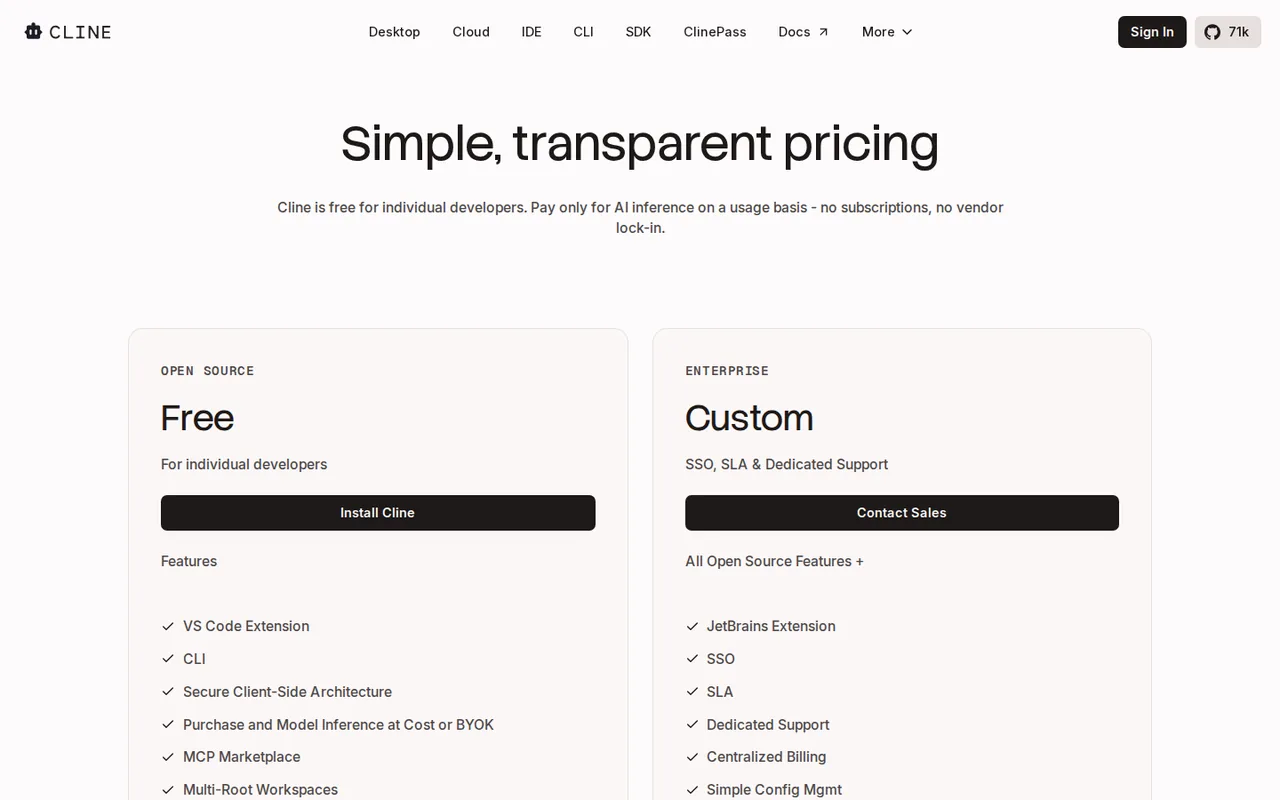
Regional prices: The open source path has no subscription: you pay the model provider directly with your own key, or pay Cline for inference with prepaid credits, which the pricing page describes as purchased at cost.
ClinePass is a separate provider at $9.99 a month; its models are GLM-5.3 and GLM-5.3 Flash, Kimi K3, DeepSeek V4 Pro and V4.1 Flash, MiMo-V2.5 and V2.5-Pro, MiniMax M3, Muse Spark 1.3 Contributor, and Qwen3.8 Max, Qwen3.7 Max and Qwen3.7 Plus, with reference rates such as $1.40 per million input tokens for GLM-5.3. The terms say fees are paid in advance, exclude taxes and are non-refundable, and price changes apply from the billing cycle after notice. The pricing page lists the JetBrains extension under Enterprise, while the install guide offers the JetBrains plugin to everyone.
| Plan | Price | What you get |
|---|---|---|
| Open Source | $0 sourceFrom cline.bot/pricing, checked Oct 24, 2026 (opens in a new tab) | For individual developers: VS Code extension, CLI and desktop app, MCP marketplace, community support; no subscription or seat fee; you pay only for model inference. |
| Cline credits (usage-billing) | Pay as you go; inference at cost | Prepaid Cline credits added from the dashboard, one balance across 100+ models; FREE-tagged promotional models with a limited quota. |
| ClinePass | $9.99/month sourceFrom cline.bot/pricing, checked Oct 24, 2026 (opens in a new tab) | Optional subscription provider for 12 curated open coding models with 2-5x the usage of standard API rates; measured against 5-hour, weekly and monthly limits. |
| Enterprise | Custom quote | SSO, SLA, dedicated support, centralized billing, role-based access, limits on inference providers, team dashboard and authentication logs; the pricing page lists the JetBrains extension here. |
How far does it go?
- One month, three ways to payAssume 200 agent tasks a month, each sending 200,000 uncached input tokens and receiving 10,000 output tokens. With your own Anthropic key on Claude Sonnet 5.5 ($2 input and $10 output per million tokens), a task costs $0.40 + $0.10 = $0.50, so the month is $100, billed by Anthropic; Cline charges nothing. On GLM-5.3 at its ClinePass reference rate ($1.40 and $4.40), a task is $0.28 + $0.044 = $0.324 and the month $64.80 at standard rates. Read as $19.98 to $49.95 of standard-rate usage, the $9.99 ClinePass covers about 61 to 154 of the 200 tasks, before its 5-hour and weekly limits. Prompt caching would lower all three. Editorial arithmetic on published rates and an assumed workload, not a Cline figure.
Arithmetic from the published allowances above, not a usage test.
Taxes, currency and promotions can change the price you see at checkout.
Try Cline free (opens in a new tab)
Key features
| Feature | What it does | Watch out |
|---|---|---|
| Editor agent that reads and writes across files, runs terminal commands and uses a browser, asking for approval before each action unless you change the auto-approve settings (FAQ, docs overview) | Auto Approve is set per category: reading files, editing files, safe commands, all commands, the browser and MCP tools. The model itself flags each command as safe or needing approval; there is no fixed allowlist. | YOLO mode approves everything, including destructive commands, edits outside the workspace and the switch from Plan to Act; the docs call it dangerous. |
| Plan and Act modes: discuss the requirements and agree a plan first, then let Cline carry it out step by step (Plan and Act docs) | — | |
| Checkpoints: after every file edit or command Cline saves a snapshot in a shadow Git repository, with Compare and Restore for files, the conversation or both (Checkpoints docs) | — | |
| Model choice: Cline credits across 100+ models, ClinePass for curated open models, your own key for Anthropic, OpenAI, Google, OpenRouter, AWS Bedrock, GCP Vertex, DeepSeek and 30+ more, or local models through Ollama and LM Studio | — | |
| Several surfaces on one agent core: VS Code extension (also in Cursor, Windsurf, VSCodium and Antigravity), JetBrains plugin, CLI for interactive or headless CI use, Cline Desktop, a Kanban board and an SDK | — | |
| Cloud Agents: give a task on a GitHub repository in the browser; it runs in its own sandbox, commits to a cline/ branch and opens a pull request when asked (Cloud Agents docs) | — | |
| Using a subscription you already pay for | Cline can run on a Claude Pro or Max plan through the Claude CLI, or on an OpenAI plan by signing in with OpenAI Codex, so no API key is needed. | In Claude Code mode responses may not stream token by token and image uploads and prompt caching are limited; the OpenAI models offered depend on your plan. |
| Free model promotions | Any Cline account gets rotating, limited-time free models with a usage quota, tagged FREE in the model picker under both Cline providers. | Free models are not available through the Cline API, and the docs say free usage may be used to help improve model performance. |
What does “free” cover in Cline?
The software. The pricing page says the open source extension is free for individual developers and that you pay only for AI inference, with no subscriptions or seat fees on that path. Every task still calls a model, and someone bills for that call. Cline leaves the choice to you: paste your own key from Anthropic, OpenAI, Google, OpenRouter or another supported provider and that provider bills you; sign in and spend prepaid Cline credits; or subscribe to ClinePass for a set of open models.
Truly free use comes from two places. Free model promotions give any Cline account a limited quota on models tagged FREE, and the selection changes over time. Local models through Ollama or LM Studio cost nothing per token, but the work then depends on your own hardware.
Where does Cline run?
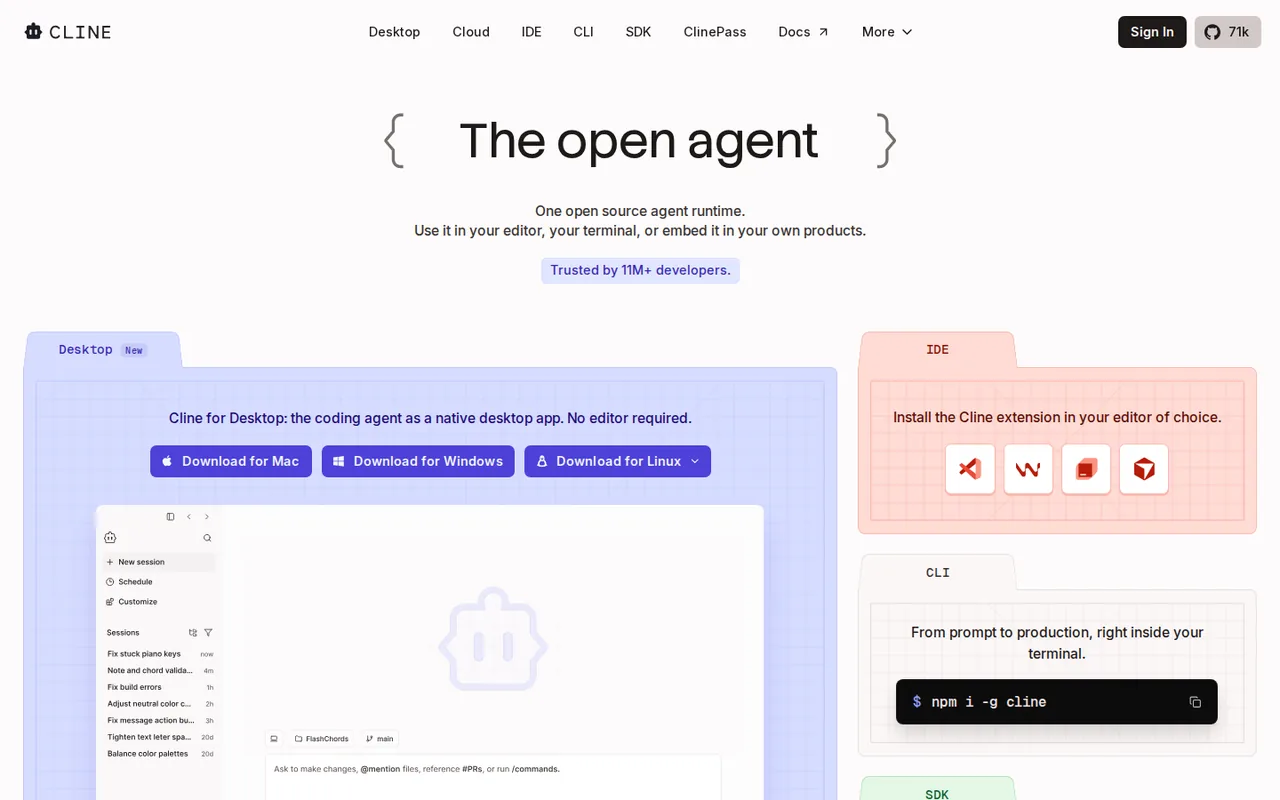
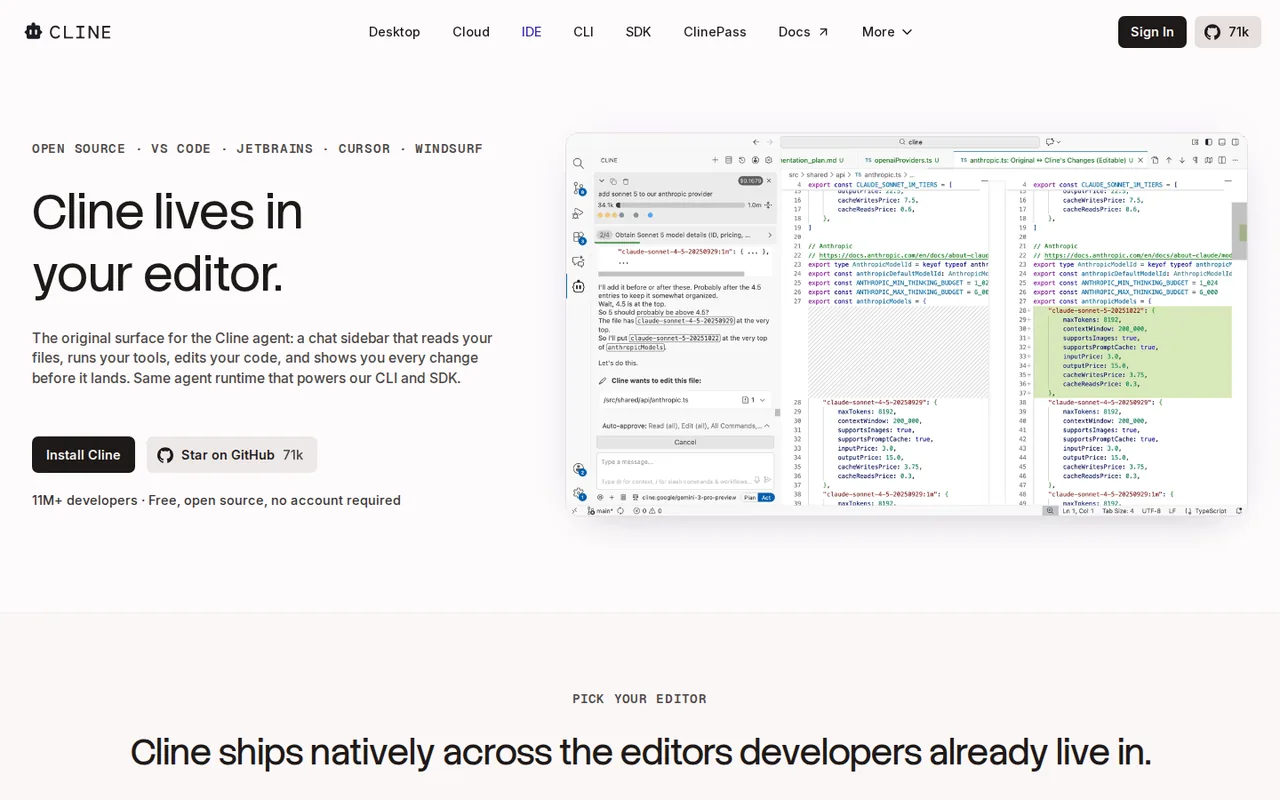
One agent core sits behind several apps, according to the docs overview. The VS Code extension also installs in Cursor, VSCodium, Windsurf and Antigravity through Open VSX, and a JetBrains plugin covers IntelliJ IDEA, PyCharm, WebStorm and the rest of that family. The CLI (Node.js 20 or later) runs as an interactive terminal session or fully headless for CI pipelines and scripts. Cline Desktop is a separate app for parallel sessions and scheduled tasks, and the SDK lets you build your own agent on the same engine.
Cloud Agents run in the browser on a GitHub repository you connect. Each session gets its own sandbox and its own cline/ branch, never commits to the default branch, and pauses after 15 minutes idle. You can run up to 10 sessions at once and start 50 a day. If you prefer a single editor app with the agent built in, the Cursor profile covers that model.
How much control do you keep over edits and commands?
By default Cline asks before it edits a file or runs a command. Auto Approve lets you lift that per category, and the docs suggest starting with only “Read project files” on. Commands are not checked against a fixed allowlist: the model marks each one as safe or as needing approval, so a build or test command may run unprompted while an install or delete should stop for you. YOLO mode switches every check off.
Checkpoints are the safety net. After each tool use Cline commits the project state to a shadow Git repository separate from yours, so you can compare a step’s diff or restore files, the conversation or both. On very large repositories this can take noticeable storage and slow Cline down. The deprecations page also warns that .clineignore never blocked access, because shell commands could still read the files, and is being removed.
Where do your code and prompts go?
The client runs on your machine. The FAQ says that with your own key, requests go from your environment to the model provider you chose; with Cline credits, code and prompts pass through Cline’s infrastructure, which Cline says it never uses to train models. The free model docs add that free usage may be used to improve model performance.
The Privacy Notice says that when you use keys provided by Cline, your request goes to the model provider under that provider’s privacy terms, and some providers may train on content unless you opt out where they allow it. The notice also describes advertising cookies and partners on Cline’s websites, and says the services are not meant for anyone under 18.
What do the terms say about paying?
The Terms of Service name Cline Bot Inc. as the provider and apply Delaware law with an arbitration clause. Fees are paid in advance and exclude taxes. Unless the law requires otherwise, cancelling gives no refund for unused credits or unused subscription time. Any free trial bills the saved payment method the day after it ends unless you cancel by 11:59 PM Eastern Time on the last day. Cline may change credit prices, with changes taking effect in the billing cycle after notice.
How could you check Cline before paying for a model?
Proposed evaluation · not performed yet
Run one small, reversible change on a throwaway branch with a free model, then price the same task on a paid one.
- Install the extension in VS Code, sign in to a Cline account and pick a model tagged FREE.
- Leave Auto Approve at read-only, open a small repository on a new branch and ask Cline to rename one function across its callers in Plan mode first.
- Switch to Act, approve each edit and command, and note every command Cline marked as safe.
- Open Compare on the last checkpoint, run the tests, then use Restore Files and confirm your own Git history is unchanged.
- Repeat the task with your own API key and record the token counts and cost Cline reports.
Accept if the rename is complete, the tests pass and the restore leaves no stray changes. Reject if Cline edits files outside the request, runs a command without asking, or the cost per task makes your monthly volume too expensive. If you want a predictable seat price instead, the GitHub Copilot profile lists its plan limits. No result is recorded here.
Cline alternatives
Other coding tools checked with the same method. Pick by the job, not by a score.

Developers evaluating controlled repository edits with their own test suite

Developers reviewing small repository changes

Running an open model locally for code and text work

Reviewing small code changes in an existing editor

Builders evaluating a small operational app

Agentic coding in a desktop IDE on a metered budget

Developers who work in the terminal and want an agent there, paid per use or through their own API key

Reviewing refactoring suggestions within JetBrains IDEs
Used Cline? Write the first review. Visitor opinions are moderated and kept separate from our source checks.
Frequently asked questions
Is Cline free to use?
The Cline software is free for individual developers: the extension, CLI and desktop app carry no subscription or seat fee. Model use is what costs money. You can pay a provider through your own key, spend Cline credits, subscribe to ClinePass, or stay at no cost with promotional free models or a local model you run yourself.
How much is ClinePass and what does it include?
ClinePass costs $9.99 a month and works as its own provider inside Cline. It covers 12 curated open models, including GLM-5.3, Kimi K3, DeepSeek V4 Pro, MiniMax M3 and Qwen3.8 Max, with 2-5x the usage of standard API rates. Claude and GPT models are not on the list. The same models can also be called from your own scripts through the Cline API.
Can Cline run entirely on local models?
Yes. Cline connects to Ollama, LM Studio or Atomic Chat on your machine with no API key, and the docs recommend turning on Use Compact Prompt. Their hardware guide suggests 16 to 32 GB of RAM for small or quantized models, 32 to 64 GB for mid-size coding models, and 64 GB or more for larger models and longer context windows.
Does Cline work in JetBrains IDEs and Cursor?
The install guide covers VS Code, Cursor, Windsurf, VSCodium and Antigravity through the VS Code extension, and IntelliJ-based IDEs through the JetBrains Marketplace plugin. The pricing page, however, lists the JetBrains extension as an Enterprise feature, so check whether your account can use it before planning a team rollout on JetBrains.
Who makes Cline and how is it licensed?
Cline Bot Inc. runs the service and names itself the provider in the terms, which apply Delaware law. The agent's source code is public in the cline/cline GitHub repository under the Apache License 2.0, which allows use, modification and redistribution. Enterprise features such as SSO and centralized billing are sold separately under a custom contract.
Sources and method22 official sources · 26 details checked · Oct 24, 2026
How we checked this profile
26 details on this page were checked against Cline's own pages and help documentation (Oct 24, 2026).
See the checks by section25 documented1 editorial assessment
| Section | Checks | Last checked | Sources |
|---|---|---|---|
| Plans and prices | 7 documented 1 editorial | cline.bot/pricingdocs.cline.bot/cline-providerdocs.cline.bot/clinepassplatform.claude.com/pricing | |
| Strengths and limits | 3 documented | docs.cline.bot/clinepassdocs.cline.bot/deprecationsgithub.com/LICENSE | |
| Features | 8 documented | docs.cline.bot/free-modelscline.bot/faqdocs.cline.bot/checkpointsdocs.cline.bot/auto-approvedocs.cline.bot/anthropicdocs.cline.bot/openaidocs.cline.bot/cline-overview | |
| Questions | 1 documented | docs.cline.bot/overview | |
| Article text | 5 documented | docs.cline.bot/installing-clinedocs.cline.bot/cloud-agentscline.bot/faqcline.bot/privacycline.bot/tos | |
| Official channels and media | 1 documented | cline.bot |
Sources for this profile
- Pricing page and pricing FAQcline.bot
- Cline homepagecline.bot
- Cline FAQcline.bot
- Docs: Cline overviewdocs.cline.bot
All 22 sources
- Docs: installing Clinedocs.cline.bot
- Docs: authorization and providersdocs.cline.bot
- Docs: Cline (usage-billing)docs.cline.bot
- Docs: ClinePassdocs.cline.bot
- Docs: Cline Free Modelsdocs.cline.bot
- Docs: Anthropic / Claude Code providerdocs.cline.bot
- Docs: OpenAI (Codex) providerdocs.cline.bot
- Docs: local modelsdocs.cline.bot
- Docs: Auto Approve and YOLO modedocs.cline.bot
- Docs: Checkpointsdocs.cline.bot
- Docs: Plan and Act modedocs.cline.bot
- Docs: Cloud Agentsdocs.cline.bot
- Docs: deprecationsdocs.cline.bot
- Terms of Service, last modified 25 September 2025cline.bot
- Privacy Notice, last updated 24 September 2025cline.bot
- GitHub repository cline/clinegithub.com
- GitHub LICENSE file (Apache License 2.0)github.com
- Anthropic API pricing (for the editorial cost example)platform.claude.com
Official pages read on 24 Oct 2026 with plain HTTP requests (the docs site serves Markdown copies): homepage, pricing page and its FAQ, Cline FAQ, docs on installation, providers, usage-billing, ClinePass, free models, Anthropic and OpenAI sign-in, local models, Auto Approve, Checkpoints, Plan and Act, Cloud Agents and deprecations, the Terms of Service (25 Sep 2025), the Privacy Notice (24 Sep 2025) and the GitHub repository and LICENSE file (Apache 2.0). We did not install Cline or run a task. ClinePass usage limits are named but not quantified, and the pricing page and install guide disagree on whether the JetBrains extension is Enterprise-only. Developer counts on the homepage are the provider's and were not used. Anthropic's API pricing page was read for the cost example. Third-party prices and reviews, including a reported first-month ClinePass discount, were not used.
Sources checked Oct 24, 2026. Found something out of date? See how we correct profiles.