

TRAE: coding agent billed as dollars of model usage, with Free limited to Auto mode and Pro at $20 outside the US
Updated October 2, 2026 · By Elias Brandt · Documentation review, not tested hands-on
Pros
- A free way to start
- Itemized usage records
- Prorated refund on upgrades
Cons
- A budget, not unlimited use
- Chats may train models by default
- Plans and prices differ by region
Bottom line
Auto mode only; limited usage allowance; 5,000 autocompletions a month; standard queue; 2 concurrent cloud tasks. The US pricing page shows no Free plan card.
You want to try agentic coding before paying: outside the US the Free plan runs Auto mode with limited usage, and US visitors get a one-time 7-day Pro trial instead.
You need to pick a specific model on the free tier: Free is limited to Auto mode, and manual model selection starts on paid plans.
Best forFormer MarsCode extension usersDevelopers trying agentic coding on a budgetTeams with proprietary codeHeavy agent users
Strengths, limits and who it suits, in full
Strengths
- A free way to start Outside the US, Free includes Auto mode, a limited allowance and 5,000 autocompletions a month; first-time US subscribers get a one-time 7-day Pro trial.
- Itemized usage records The Usage page lists each charge with the model, time and amount deducted.
- Prorated refund on upgrades Moving to a higher tier refunds the unused share of the old plan automatically.
Limits
- A budget, not unlimited use Paid plans include a fixed dollar allowance; heavy agent work needs a higher tier or pay-as-you-go.
- Chats may train models by default Chat content, code snippets and outputs can be used for training unless Privacy mode is on while signed in.
- Plans and prices differ by region Subscriptions are sold only in listed countries, Lite in fewer still, and US visitors see a separate price list without a Free card.
Who it suits
- Former MarsCode extension users the extension continues in VS Code and JetBrains under the TRAE name; plan coverage for the plugin is not spelled out, so check your usage page.
- Developers trying agentic coding on a budget outside the US, Free shows how Auto mode handles your repository before any payment; in the US, the 7-day Pro trial or $3 Lite plays that role.
- Teams with proprietary code switch on Privacy mode and prefer the desktop app without cloud features; stored data sits in Singapore and Malaysia under the privacy policy.
- Heavy agent users Pro+ or Ultra, or On-Demand Usage, fits long SOLO sessions that exhaust $20 of usage.
How much does TRAE cost?
Prices confirmed · checked
Regional prices: Prices are in USD before tax, which may apply in some US jurisdictions.
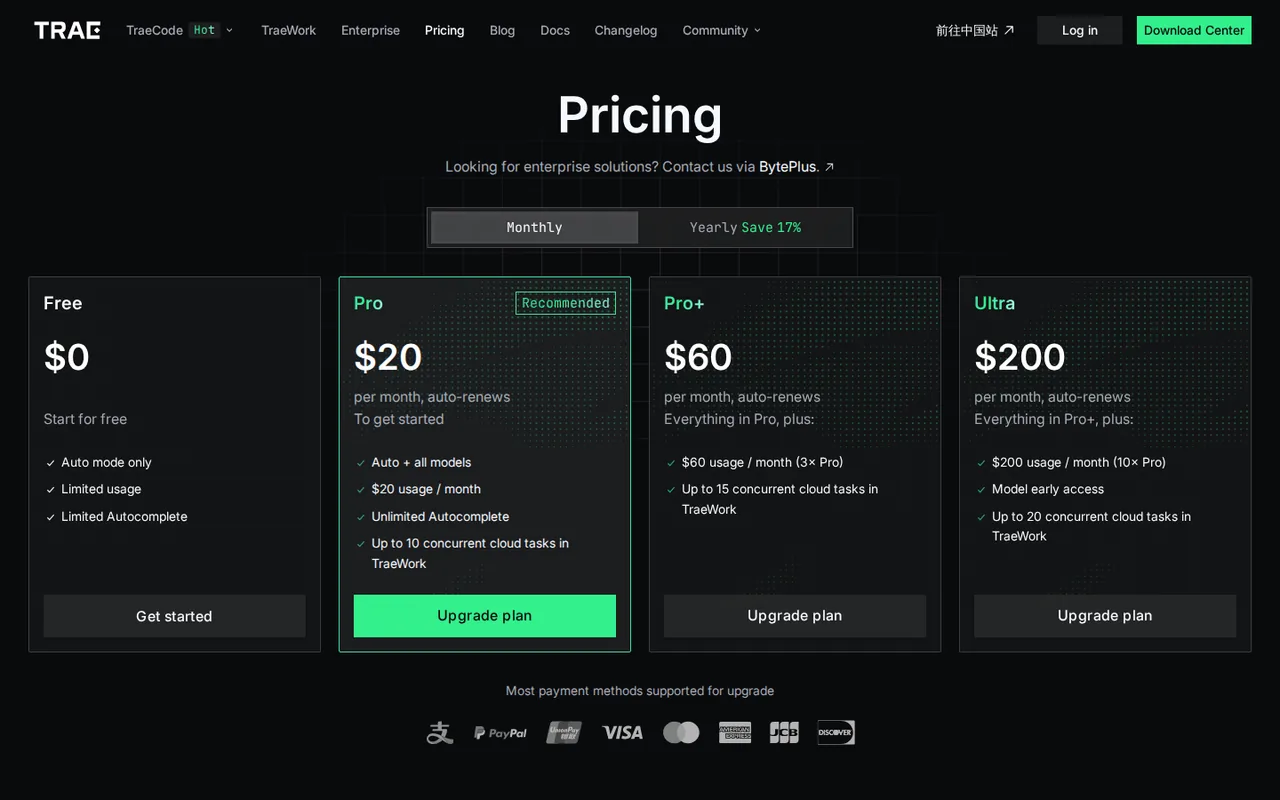
Outside the United States, the pricing page shows yearly plans as $16.67, $50 and $166.67 a month billed yearly, and the billing documentation lists the yearly totals of $200, $600 and $2,000. A Lite plan at $8 a month or $80 a year, with $8 of usage, is sold there only in 12 listed countries. The US pricing page lists Lite, Pro, Pro+ and Ultra at $3, $10, $30 and $100 a month, 25% less when billed yearly, or $4.50, $15, $45 and $150 for a single month billed once; first-time subscribers get a one-time 7-day Pro trial, and any Bonus Usage sits outside the plan. Yearly plans under the international terms are paid upfront and do not renew automatically. A refund is possible within 24 hours of purchase only if no usage has been consumed.
| Plan | Price | What you get |
|---|---|---|
| Free | $0 outside the US sourceFrom trae.ai/pricing, checked Oct 2, 2026 (opens in a new tab) | Auto mode only; limited usage allowance; 5,000 autocompletions a month; standard queue; 2 concurrent cloud tasks. The US pricing page shows no Free plan card. |
| Lite | $3 per month in the US$2.25 a month billed yearly; $8 per month in 12 listed countries sourceFrom trae.ai/pricing, checked Oct 2, 2026 (opens in a new tab) | US: $5 of Basic usage a month; elsewhere: $8 of Dollar Usage. Manual model selection, SOLO mode and 2 concurrent cloud tasks. |
| Pro | $20 per month outside the US$200 billed yearly; $10 per month in the US · $7.50 a month billed yearly sourceFrom trae.ai/pricing, checked Oct 2, 2026 (opens in a new tab) | $20 of usage a month in both price lists; all models with manual selection; unlimited autocompletion; fast queue; 10 concurrent cloud tasks. |
| Pro+ | $60 per month outside the US$600 billed yearly; $30 per month in the US · $22.50 a month billed yearly sourceFrom trae.ai/pricing, checked Oct 2, 2026 (opens in a new tab) | $60 of Dollar Usage a month outside the US, $90 of Basic usage in the US; 15 concurrent cloud tasks. |
| Ultra | $200 per month outside the US$2,000 billed yearly; $100 per month in the US · $75 a month billed yearly sourceFrom trae.ai/pricing, checked Oct 2, 2026 (opens in a new tab) | $200 of Dollar Usage a month outside the US, $400 of Basic usage in the US; early access to new models; 20 concurrent cloud tasks. |
How far does it go?
- Pay-as-you-go after the Pro allowanceOutside the US, Pro costs $20 and includes $20 of Dollar Usage a month. With On-Demand Usage enabled, extra token cost is charged each time $3 accrues, so three such charges add $9 and the month costs $20 + $9 = $29 before tax. Request cost = tokens × model list price, so no request count follows from a dollar figure.
- Usage per dollar in the US price listUS Lite gives $5 of Basic usage for $3, about 1.7 dollars of usage per dollar paid; Pro gives $20 for $10 (2), Pro+ $90 for $30 (3) and Ultra $400 for $100 (4). Outside the US every tier gives usage equal to its price, so moving up buys more allowance but not cheaper usage.
Arithmetic from the published allowances above, not a usage test.
Taxes, currency and promotions can change the price you see at checkout.
Try TRAE free (opens in a new tab)
Key features
| Feature | What it does | Watch out |
|---|---|---|
| IDE mode with AI chat and an agent inside the editor | — | |
| SOLO mode, an autonomous agent for multi-step coding tasks | Runs a coding agent that plans work, edits files, calls tools and can deploy, with a switch back to the classic IDE view. | The terms say agent actions may run without manual confirmation, so set permission approval before letting it execute commands. |
| Custom agents and sub-agents with MCP tool access | — | |
| Next-edit prediction with Tab and code autocompletion | — | |
| Manual model selection across several providers on paid plans | — | |
| TraeCode Plugin for VS Code and JetBrains IDEs | — | |
| Concurrent cloud tasks in TraeWork | — | |
| Dollar Usage metering | Each request is charged as tokens times the model list price and deducted from the monthly dollar allowance. | Cost per request varies with model, prompt and context size, so the same allowance buys very different amounts of work. |
| Codebase indexing | Uploads code temporarily to compute embeddings for repository-aware answers, then deletes the plaintext copy. | Embeddings and metadata are kept, and web or cloud features store the codebase on TRAE servers. |
What happened to MarsCode, and what replaces it?
MarsCode was the earlier name of this AI coding assistant and its editor extensions. The marscode.com page now promotes the Trae plugin, and the extension listings carry the new name while still showing MarsCode as publisher: TraeCode: Coding Assistant in the VS Code Marketplace and TRAE AI: Coding Assistant for JetBrains IDEs.
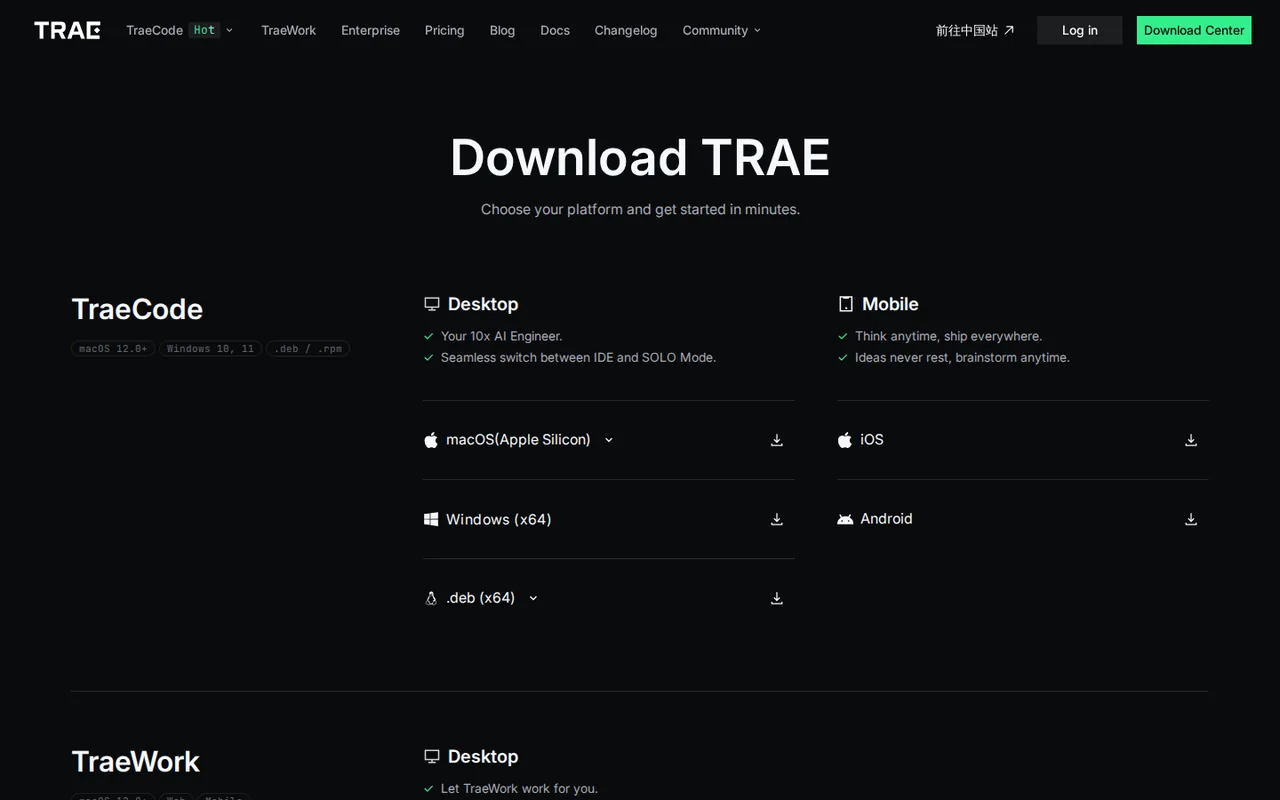
TRAE itself has grown into three products. TraeCode is a desktop IDE for macOS, Windows and Linux with an IDE mode and the autonomous SOLO mode, TraeWork is a general work assistant, and the TraeCode Plugin keeps completion, explanation, test generation and bug fixing inside VS Code or JetBrains. The pricing documentation describes the TraeCode plans; it does not say whether plugin use draws on the same allowance.
How much can you do on the Free plan?
Free runs in Auto mode only, so TRAE picks the model, and requests wait in the standard queue. The pricing table lists 5,000 autocompletions a month and 2 concurrent cloud tasks. Once the dollar allowance is used up, AI chat stops until the allowance returns; On-Demand Usage is not available on Free.
The two official pages disagree on that return. The pricing FAQ says the free allowance is one-time and does not reset, while the billing FAQ says Free users receive a limited allowance each month. Neither states the dollar amount. Treat Free as a trial of Auto mode on a real repository rather than a plan for daily agent work.
The US pricing page lists no Free card. First-time US subscribers get a one-time 7-day Pro trial instead, and the cheapest listed plan is Lite at $3 a month.
How is a dollar of usage spent?
Every model request is metered separately: request cost equals token usage multiplied by the list price of the model used, and the result is deducted from the dollar allowance. Models have different compute costs, so a long agent session on a large model can use as much as many short questions on a cheaper one.
If a request fails on the TRAE or model provider side, nothing is deducted; if the model finished but delivery failed because of a local network or device problem, the usage may still be charged. After the allowance runs out, paid plans can switch on On-Demand Usage, which bills actual token cost at the provider list price and charges the card each time $3 accrues. A failed payment stops AI features until it clears.
Which paid tier fits your workload?
Tiers differ mainly in the size of the dollar allowance and the number of cloud tasks that can run at once; model access is the same from Pro upward, apart from early access on Ultra. Editorial assessment: start on Pro, watch the Usage page for two weeks, and move up only if the allowance runs out before the renewal date, since an upgrade refunds the unused share of the old plan.
The price depends on where you buy. Outside the US each tier includes usage equal to its price; the separate US price list charges less and includes more usage per dollar on every tier above Lite.
- Lite: $8 a month for $8 of usage, sold only in 12 countries including India, Brazil and Indonesia; in the US, $3 a month for $5 of Basic usage. Both add manual model choice and 2 cloud tasks.
- Pro: $20 a month outside the US or $10 in the US, each with $20 of usage, fast queue, unlimited autocompletion and 10 cloud tasks.
- Pro+: $60 a month for $60 of usage outside the US, or $30 for $90 of Basic usage in the US; 15 cloud tasks.
- Ultra: $200 a month for $200 of usage outside the US, or $100 for $400 of Basic usage in the US; early model access and 20 cloud tasks.
What do yearly billing, upgrades and refunds commit you to?
Monthly plans renew automatically every 30 days until cancelled, and cancelling keeps the plan to the end of the paid cycle without a refund. Under the international terms, yearly plans are a single upfront payment for 12 months that does not renew; after switching from monthly to yearly you cannot switch back.
Refunds are narrow. The pricing FAQ allows one only within 24 hours of purchase and only if no usage was consumed. Upgrades work differently: the current plan ends immediately and TRAE refunds the amount paid multiplied by the unused share of the allowance. In the documentation example, $30 paid for a $90 allowance with $60 left returns $30 × ($60 ÷ $90) = $20.
What happens to your code and chat history?
The terms allow TRAE to use your content, including code, to improve the service and to train its own and affiliated models. The Privacy mode page says chat interactions, related code snippets and AI outputs may be used for analytics, product improvement and model training unless Privacy mode is enabled, and that the setting works only while you are signed in.
Codebase files are handled separately. Regardless of Privacy mode, TRAE says codebase files are not used for training; indexing uploads them temporarily to compute embeddings and then deletes the plaintext, keeping embeddings and metadata. Web access and cloud features store the codebase on TRAE servers, the privacy policy names servers in Singapore and Malaysia, and content can be shared with third-party model providers to generate output.
Can the Free plan fix one failing test in a small repository?
Proposed evaluation · not performed yet
On a Free account in TraeCode IDE mode with Privacy mode switched on, open a small repository you own that has one deliberately broken unit test. Use Auto mode only and keep command approval enabled.
- Record the remaining usage shown in the lower-right Usage entry.
- Ask the agent to find why the test fails and fix the code without editing the test.
- Approve or reject each proposed command and file change.
- Run the test suite locally outside the agent.
- Check the Usage page for the number of requests and dollars deducted.
Accept a passing suite, a diff limited to the faulty function and a clear record of usage. Reject edits to the test, changes to unrelated files or a session that stops because the allowance ran out. No result is reported until the exercise is run.
For a VS Code-based AI editor sold by request tiers, compare Cursor. If your team already works inside GitHub, see GitHub Copilot, and for JetBrains-first teams, JetBrains AI Assistant.
Is TRAE worth it?
Documentation review plus dated public user reports. Documentation review, not tested hands-on. Not scored.
Worth it if
- You want to try agentic coding before paying: outside the US the Free plan runs Auto mode with limited usage, and US visitors get a one-time 7-day Pro trial instead.
- You can plan around a fixed usage budget: Pro includes $20 of usage a month, so a steady workload stays predictable when the allowance is not exhausted.
- You use VS Code or JetBrains today: the TraeCode Plugin brings the assistant into those editors, though plan coverage for it is not spelled out.
Probably not if
- You need to pick a specific model on the free tier: Free is limited to Auto mode, and manual model selection starts on paid plans.
- You expect flat unlimited agent use: heavy SOLO sessions can exhaust the allowance, and extra usage is charged by tokens at model list prices.
- You handle sensitive code and leave defaults alone: chats may be used for training unless Privacy mode is switched on while signed in.
TRAE alternatives
Other coding tools checked with the same method. Pick by the job, not by a score.

Developers who want an approval-based coding agent and choose and pay for their own models

Developers evaluating controlled repository edits with their own test suite

Developers reviewing small repository changes

Running an open model locally for code and text work

Reviewing refactoring suggestions within JetBrains IDEs

Developers who want spec-driven agent work in a VS Code-style IDE with a fixed monthly credit cap

Agent-driven coding with a monthly credit budget

Builders evaluating a small operational app
Used TRAE? Write the first review. Visitor opinions are moderated and kept separate from our source checks.
What has changed recently?
- Price Listed prices updated after a pricing check: now includes $1, $2.25, $3, $4, $5 and 5 more. Source
Release entries use the vendor's own announcement date. Price entries show the day we updated the listed prices after checking the vendor's pricing page.
Frequently asked questions
How much does a TRAE subscription cost?
It depends on where you buy. Outside the United States, Pro is $20 a month ($200 billed yearly) with $20 of usage, Pro+ is $60 and Ultra is $200. The US pricing page shows lower prices: Lite $3, Pro $10, Pro+ $30 and Ultra $100 a month, with yearly billing 25% less. Lite also costs $8 a month in 12 listed countries. Prices are in USD before tax.
Is TRAE AI completely free?
Not completely. Outside the United States there is a $0 Free plan, limited to Auto mode with a limited usage allowance and 5,000 autocompletions a month. The US pricing page shows no Free plan card, only a one-time 7-day Pro trial for first-time subscribers. Manual model selection and larger usage allowances need a paid plan.
Can I subscribe to a paid TRAE plan from any country?
No. The billing documentation lists the countries where paid plans are sold, including the United States, United Kingdom, Germany, France, Japan, India and Brazil. Elsewhere the checkout reports that subscriptions are unavailable in your region. The cheaper Lite plan is limited further, to 12 countries such as Indonesia, Vietnam, Turkey and Nigeria, while US visitors see their own price list that includes Lite.
Is TRAE free for students, or is there a team discount?
The billing FAQ says there is currently no student plan or student discount. Teams are pointed to TRAE Enterprise, sold through a separate enterprise page and BytePlus contact rather than the public price table. Plan benefits cannot be transferred to another account, so each developer needs a separate subscription on the public plans.
Why did my card show an extra $1.10 charge?
According to the billing FAQ, that amount is a temporary authorization when a bank card is linked, and it is refunded automatically to the same payment method. Timing depends on the card issuer. The FAQ also notes that TRAE attempts each automatic renewal only once, so a renewal declined for insufficient funds is not retried.
Where should United States users send billing questions?
The billing FAQ gives a separate address for the United States, ussupport@mail.traeai.us, and feedback@mail.trae.ai for everyone else. In the US, TRAE is operated by TikTok USDS Joint Venture LLC under its own terms, last updated January 22, 2026, and the pricing page shows different prices, so read the version shown to your account before relying on refund or data clauses.
Do existing subscribers keep their old prices after the new plans?
The documentation offers price protection to subscribers with an uninterrupted monthly subscription, so an existing Pro subscriber can keep renewing at $10 a month after moving to the new plan. Existing subscribers can also buy a yearly plan at half the new yearly price, even after their current plan expires.
Sources and method14 official sources · 12 details checked · Sep 29 – Oct 2, 2026
How we checked this profile
12 details on this page were checked against TRAE's own pages and help documentation (Sep 29 – Oct 2, 2026).
See the checks by section12 documented
| Section | Checks | Last checked | Sources |
|---|---|---|---|
| Plans and prices | 7 documented | trae.ai/pricingdocs.trae.ai/on-demand-usagetrae.ai/terms-of-servicedocs.trae.ai/new-plans-and-billing | |
| Features | 1 documented | docs.trae.ai/new-plans-and-billing | |
| Strengths and limits | 2 documented | docs.trae.ai/privacy-modetrae.ai/pricing | |
| Article text | 1 documented | trae.ai/terms-of-service | |
| Questions | 1 documented | trae.ai/terms-of-service |
Sources for this profile
- Plans and pricing, international and US viewstrae.ai
- TRAE product overviewtrae.ai
- Plans and billing documentationdocs.trae.ai
- On-Demand Usagedocs.trae.ai
All 14 sources
- Plans and billing FAQsdocs.trae.ai
- Manage subscriptionsdocs.trae.ai
- Privacy modedocs.trae.ai
- Terms of service (international, updated September 17, 2026; US version, updated January 22, 2026)trae.ai
- Privacy policy (updated May 20, 2026)trae.ai
- Download centertrae.ai
- TraeCode Plugin documentationdocs.trae.ai
- MarsCode site (now the Trae plugin page)marscode.com
- VS Code extension listingmarketplace.visualstudio.com
- JetBrains plugin listingplugins.jetbrains.com
The applicable terms are the international version, last updated September 17, 2026, under Singapore law; they say US users are governed by separate TRAE US Terms of Service. Shown to a US visitor, those terms name TikTok USDS Joint Venture LLC as operator and were last updated January 22, 2026, and the pricing page shows a separate US price list. That page describes Pro+ and Ultra as 3.5x and 20x more usage than Pro, while its table lists $90 and $400 against $20; the dollar figures are used here. The privacy policy covers users outside the United States. The pricing FAQ calls the free allowance one-time, while the billing FAQ says Free receives a limited allowance each month. The pricing page lists 5,000 free autocompletions, the documentation only "limited". The documentation gives renewal charging as 20 hours and as one day before the period ends. marscode.com now promotes the Trae plugin; its older MarsCode terms are not treated as current. Whether plugin use draws on plan usage is not stated.
Sources checked Sep 29 – Oct 2, 2026. Found something out of date? See how we correct profiles.