

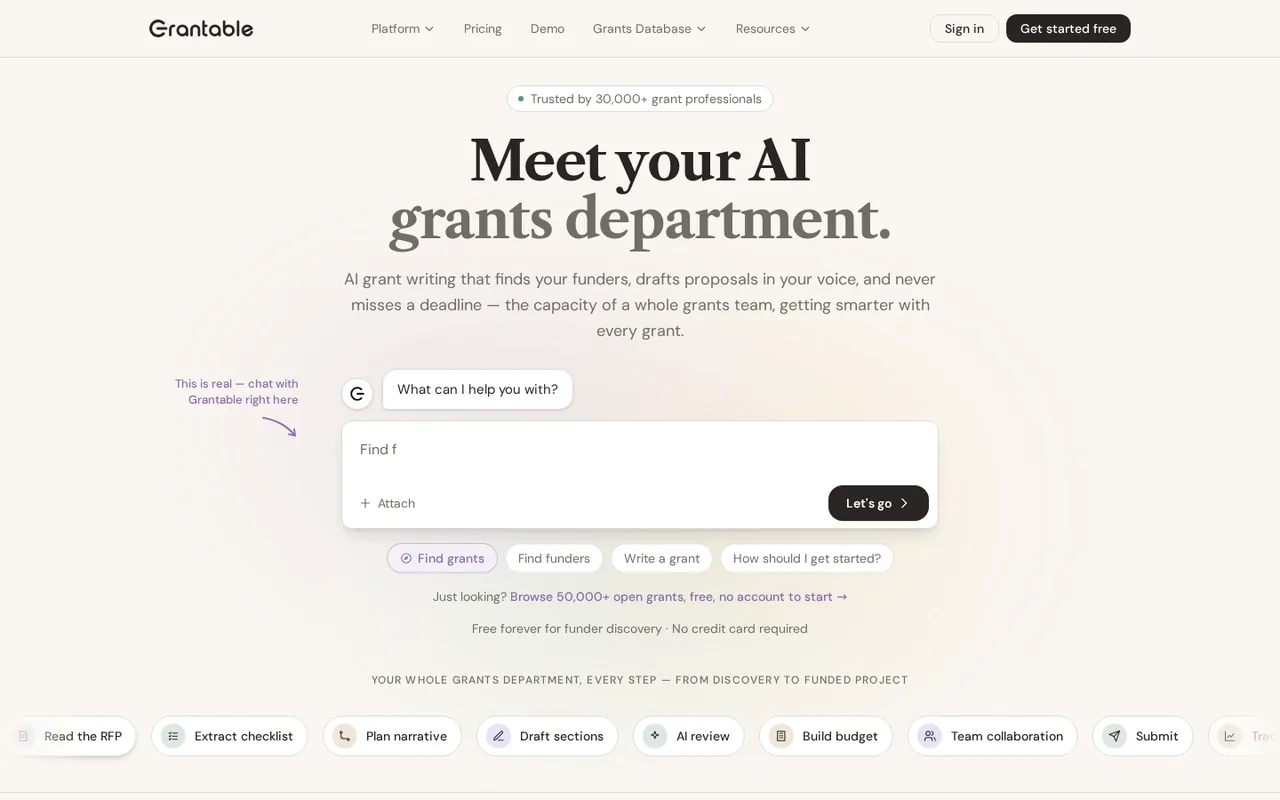
Grantable: funder research and drafting, but Free stops at 5 chat messages a day and paid starts at $50 a month
Updated September 29, 2026 · By Elias Brandt · Documentation review, not tested hands-on
Pros
- Free plan without a time limit
- No per-seat fees
- Clear data terms
Cons
- Capacity is relative
- Plan pages disagree on features
- Annual plans need early notice
Bottom line
5 AI chat messages a day; file imports up to 10 MB; funder search, documents, save and share; no card required.
You run a 501(c)(3) with a budget under $500K and write a few grants a quarter: the nonprofit rate brings Starter to $25 a month for a year, though you must email a recent Form 990.
You need heavy daily drafting on Free: 5 messages a day and 10 MB file imports cover a short check or one section, not a full application.
Best forSmall 501(c)(3) nonprofitsSolo grant writers testing AIDevelopment teams with many open grantsGrant consultants with several clients
Strengths, limits and who it suits, in full
Strengths
- Free plan without a time limit Funder search, AI chat, documents and sharing need no card and do not expire.
- No per-seat fees One subscription covers the whole team in a workspace.
- Clear data terms You own content and AI output, and the terms say your data is not used to train AI models.
Limits
- Capacity is relative Paid tiers are described as 20x or 60x of Free; only daily messages and file size are absolute.
- Plan pages disagree on features The pricing page says every plan has every capability, while help docs reserve some for Pro.
- Annual plans need early notice Cancel at least 30 days before an annual term ends, and fees are generally non-refundable.
Who it suits
- Small 501(c)(3) nonprofits under a $500K budget, the half-price Starter year fits an organization writing a few grants a quarter.
- Solo grant writers testing AI Free shows whether drafts from your own files are usable, within 5 messages a day.
- Development teams with many open grants Pro raises daily messages to 200, and help docs tie scheduled scans to it.
- Grant consultants with several clients the Agency Hub add-on gives each client its own workspace and consolidated billing.
How much does Grantable cost?
Prices confirmed · checked
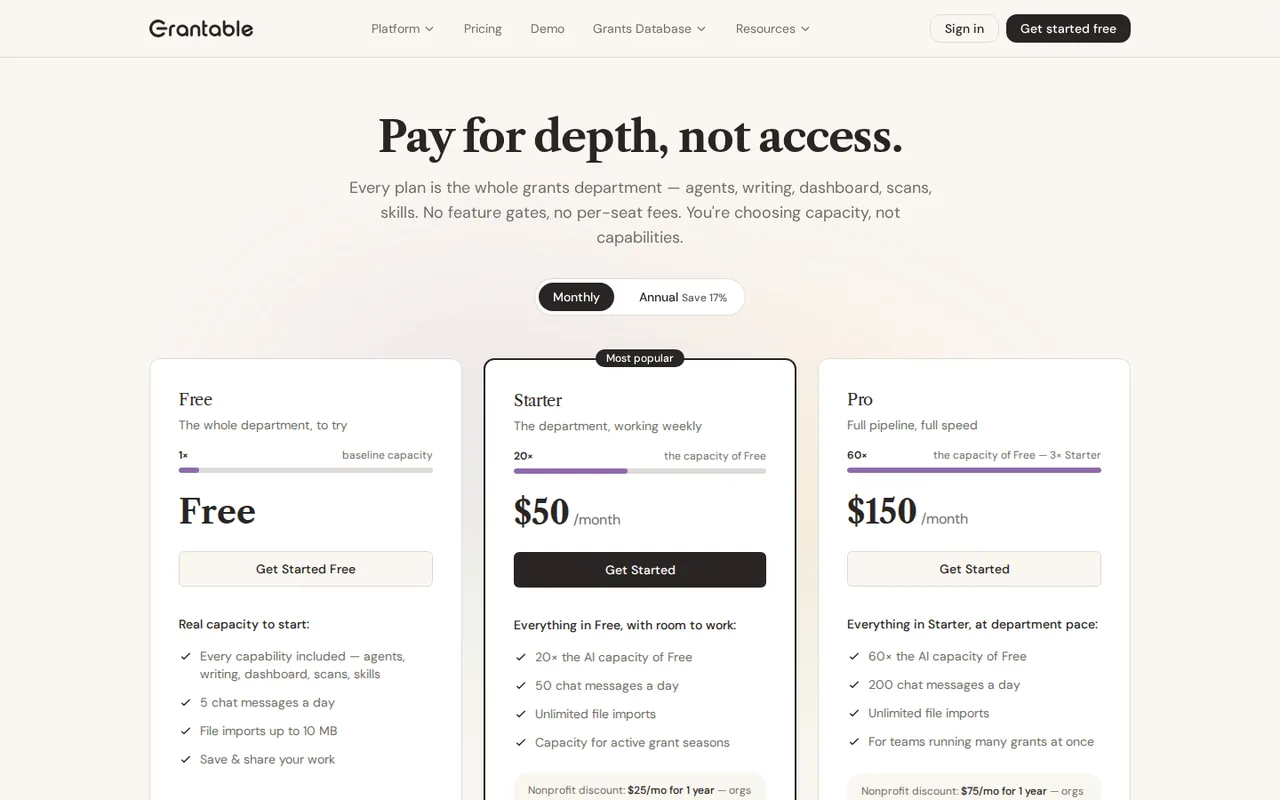
- $50Starter
- $150Pro
Regional prices: Prices are in USD and exclude applicable taxes, according to the terms.
The annual option is labelled Save 17%. The nonprofit rate needs a recent IRS Form 990 emailed for verification, lasts 12 months and can be renewed with a new 990; the pages do not say whether it combines with annual billing. Subscriptions are generally non-refundable, and annual plans must be cancelled at least 30 days before the term ends.
| Plan | Price | What you get |
|---|---|---|
| Free | $0no time limit sourceFrom grantable.co/pricing, checked Oct 21, 2026 (opens in a new tab) | 5 AI chat messages a day; file imports up to 10 MB; funder search, documents, save and share; no card required. |
| Starter | $50 per monthbilled monthly · or $42 per month, $500 billed annually sourceFrom grantable.co/pricing, checked Oct 21, 2026 (opens in a new tab) | 50 chat messages a day; about 20x the AI capacity of Free; unlimited file imports; no per-seat fees. Nonprofit rate: $25 per month for 1 year, 501(c)(3) organizations under a $500K budget. |
| Pro | $150 per monthbilled monthly · or $125 per month, $1,500 billed annually sourceFrom grantable.co/pricing, checked Oct 21, 2026 (opens in a new tab) | 200 chat messages a day; about 60x the AI capacity of Free; unlimited file imports. Nonprofit rate: $75 per month for 1 year. |
| Agency Hub | $300 per month add-on to any paid plan sourceFrom grantable.co/pricing, checked Oct 21, 2026 (opens in a new tab) | Multi-client dashboards, consolidated billing, cross-client reporting and shared asset libraries; set up with the Grantable team. |
| Enterprise | Custom pricing | SSO/SAML, custom data retention, dedicated support and API access. |
How far does it go?
- Nonprofit first year on Starter12 x $25 = $300 at the nonprofit rate, against 12 x $50 = $600 on monthly billing or $500 on annual billing. Free: 5 messages a day is at most 5 x 30 = 150 messages in a 30-day month. The 20x and 60x capacity figures are approximate guidelines, not hard limits, so no message or document count is derived from them.
Arithmetic from the published allowances above, not a usage test.
Taxes, currency and promotions can change the price you see at checkout.
Try Grantable free (opens in a new tab)
Key features
| Feature | What it does | Watch out |
|---|---|---|
| Funder prospecting agents using 990 filings and giving history | Agents screen 990 filings and giving histories against your organization profile and return ranked matches with a written rationale. | Fit scores are the tool estimate; confirm eligibility and deadlines on the funder site. |
| Drafting from an uploaded content library in your voice | — | |
| RFP checklist built from pasted application rules | Turns pasted application rules into a checklist and drafts sections from your past proposals and reports. | The terms warn that AI output may contain inaccuracies, so every figure needs checking. |
| Pipeline dashboard in list, board and calendar views | — | |
| Scheduled funder scans with email results | Standing searches run on a schedule and email new opportunities. | They draw on the AI budget even when nobody is in the app, and the help docs list them on Pro. |
| Reusable Skills written in plain English | — | |
| Workspace email inbox for handing off work | — | |
| Comments, mentions and team roles without per-seat fees | — |
How far does the Free plan go?
Free has no time limit and needs no card. The pricing page includes funder search, AI chat, documents and sharing, but caps AI chat at 5 messages a day and file imports at 10 MB. The limit resets daily, so Free suits a short daily check of funders or a single section draft rather than a full application.
Each message in a long chat replays the earlier conversation to the model, so a long thread uses more budget than several short ones. Upload the proposal or report you want to draw on before you start, and ask for one specific output per message.
What do 20x and 60x capacity actually mean?
Paid plans are described relative to Free: Starter roughly 20 times its AI capacity and Pro roughly 60 times. The pricing FAQ calls these approximate guidelines, not hard limits. The only absolute figures are chat messages, 50 a day on Starter and 200 on Pro, and unlimited file imports on both.
Behind the messages sits a monthly AI budget metered by model tier and conversation length: Fast uses Claude Haiku and costs least, Auto and Pro use Claude Sonnet, and Pro costs most per message. When the budget runs out, AI features pause while files stay available; you can buy an overage pack or upgrade.
When does the nonprofit discount make sense?
Qualifying nonprofits get 50% off Starter or Pro for 12 months: $25 or $75 a month. Eligibility is a 501(c)(3) with an annual operating budget under $500,000, confirmed by emailing the latest IRS Form 990. The discount can be renewed with a new 990, and on an existing paid plan it starts at the next billing cycle.
Editorial assessment
For a small nonprofit writing a few applications a quarter, the half-price Starter year is the clear step up from 5 messages a day. Pro makes sense when several grants run at once or scheduled scans matter. The pages do not say whether the discount stacks with annual billing, so ask before paying a year upfront.
Do all plans really include every feature?
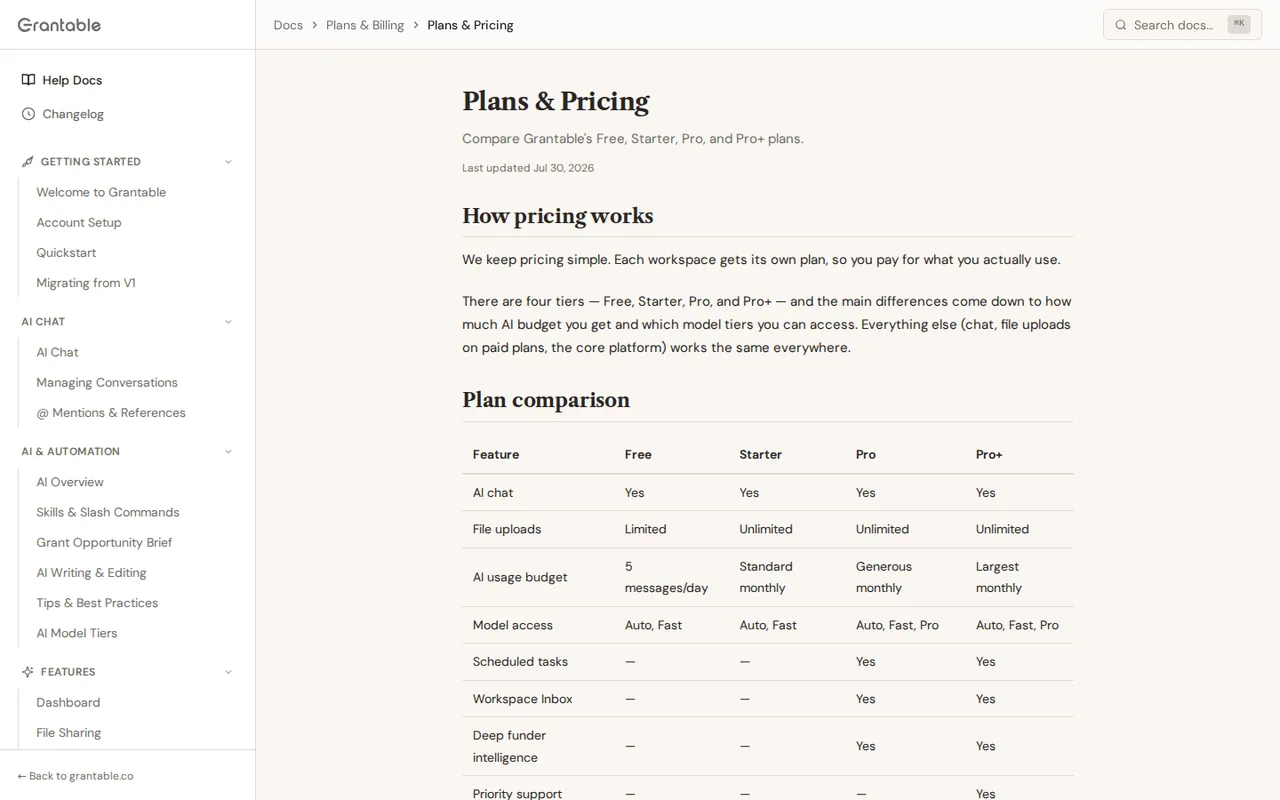
The pricing page says there are no feature gates and that every plan includes agents, writing, dashboard, scans and skills. The help page on plans, updated July 30, 2026, draws a different line: scheduled tasks, deep funder intelligence and the Pro model tier are listed only on Pro and a Pro+ tier, and extra usage cannot be bought on Free.
Pro+ does not appear on the current pricing page. Until the two pages match, treat scheduled scans and the higher-quality model tier as Pro features, and confirm access in the app before choosing Starter for automated monitoring.
Where do your proposals and funder notes go?
The terms say you own your content and AI output and that your data is not used to train AI models. The sub-processor list, updated September 27, 2026, names Anthropic as the only AI provider that reads what you write or upload, with workspace data stored by Supabase on AWS in North Virginia. The pricing FAQ and terms name further model providers, so the lists do not fully agree.
After you ask to delete an account, the terms allow 30 days to export content in a machine-readable format and then deletion from production systems within 90 days. Cancelling a plan is not deletion: workspaces and documents stay on the Free plan until you remove them in account settings.
Can an AI draft go to a funder as written?
The terms describe AI output as assistive, not authoritative: it may contain inaccuracies, and you must review and verify it before submitting, particularly in grant applications. They also state that Grantable does not guarantee funding outcomes and that the accuracy of every submitted application is your responsibility.
Some funders set their own rules on AI-assisted applications, so check the guidelines before drafting. Keep each statistic tied to a source document in the library, and compare the RFP checklist with the funder text rather than trusting the checklist alone.
Can the Free plan turn a real RFP into a checked needs statement?
Proposed evaluation · not performed yet
On a Free account, use a public RFP from a foundation and a past proposal or annual report you are allowed to share, under 10 MB, with confidential details removed. Stay within the 5 daily messages.
- Upload the source document and paste the RFP requirements.
- Message 1: ask for the RFP checklist.
- Message 2: ask for a 300-word needs statement using only the uploaded document.
- Messages 3 and 4: request one revision and a list of every figure with its source page.
- Check each figure against the document and each checklist item against the RFP.
Accept a statement whose figures all trace to the source and a checklist that matches the RFP. Reject invented statistics, missed requirements or a draft that needs more than the daily limit. Leave the observed result blank until the exercise is run.
For general drafting without funder research, compare Claude and ChatGPT. For checking statistics against published studies before they go into a proposal, see Elicit or Consensus.
Is Grantable worth it?
Documentation review plus dated public user reports. Documentation review, not tested hands-on. Not scored.
Worth it if
- You run a 501(c)(3) with a budget under $500K and write a few grants a quarter: the nonprofit rate brings Starter to $25 a month for a year, though you must email a recent Form 990.
- You want to see whether drafts built from your own uploaded proposals are usable: Free has no time limit and needs no card, within 5 chat messages a day.
- You juggle several open applications: Pro raises the limit to 200 chat messages a day, and the help docs list scheduled scans under Pro.
Probably not if
- You need heavy daily drafting on Free: 5 messages a day and 10 MB file imports cover a short check or one section, not a full application.
- You need scheduled funder scans and plan to buy Starter for them: the pricing page and help docs disagree on which plan includes scheduled tasks.
- You want to pay a year upfront at the nonprofit rate without asking first: the pages do not say whether the discount combines with annual billing.
Grantable alternatives
Other writing & content tools checked with the same method. Pick by the job, not by a score.

Self-publishing authors, ghostwriters and non-fiction writers who want one place to outline, draft in their own style, edit and prepare a book for Amazon KDP

General drafting, files and everyday research

Drafting, document work and coding

Brand-consistent sales and marketing content for teams

Shortlisting brand names before buying a domain

Pay-per-use access to many AI models without separate subscriptions

AI help inside a Notion team workspace

Students and writers who rewrite their own short passages and want to review each change
Used Grantable? Write the first review. Visitor opinions are moderated and kept separate from our source checks.
Frequently asked questions
Does Grantable charge per user or per seat?
No. The pricing page lists no per-seat fees on any plan, and the subscription covers everyone you invite to a workspace. Each workspace has its own plan, so an organization can keep a Free workspace for experiments while paying for Starter or Pro in the workspace where active applications live.
Can I switch between monthly and annual billing?
Yes. The pricing FAQ says you can switch to annual billing at any time, labelled as a 17% saving, while a move from annual back to monthly takes effect at the next renewal date. Under the terms, an annual plan must be cancelled at least 30 days before the term ends to avoid renewal.
Can I get a refund after paying?
Usually not. The terms call subscriptions generally non-refundable, with discretionary refunds for cases such as accidental charges or technical problems that block access, and refunds where the law requires them. A cancelled plan stays active until the paid period ends, then the account moves to Free.
Can I hand work to Grantable by email?
Yes. Each workspace has an inbox address, and the pricing page says you can send work to it by email the way you would to a colleague. The sub-processor list shows these emails, including attachments, pass through the Resend email service. Scheduled scans also report new opportunities by email.
What is the Agency Hub, and who needs it?
It is a $300 a month add-on for grant consultants and agencies managing several client organizations. It adds multi-client dashboards, consolidated billing, cross-client reporting and shared asset libraries, and works with any paid plan. The pricing FAQ says it is set up with the Grantable team rather than self-serve.
Sources and method8 official sources · 8 details checked · Sep 29, 2026
How we checked this profile
8 details on this page were checked against Grantable's own pages and help documentation (Sep 29, 2026).
See the checks by section8 documented
| Section | Checks | Last checked | Sources |
|---|---|---|---|
| Plans and prices | 4 documented | grantable.co/pricinggrantable.co/terms | |
| Article text | 1 documented | grantable.co/pricing | |
| Strengths and limits | 1 documented | grantable.co/terms | |
| Other details | 1 documented | grantable.co/sub-processors | |
| Features | 1 documented | grantable.co/plans |
Sources for this profile
- Plans, nonprofit pricing and FAQgrantable.co
- Product overviewgrantable.co
- Help: plans and billing (updated July 30, 2026)grantable.co
- Help: AI usage and budgets (updated May 8, 2026)grantable.co
All 8 sources
The pricing page says every plan includes every capability, while the help page on plans (July 30, 2026) lists scheduled tasks, the Pro model tier and deep funder intelligence only on Pro and a Pro+ tier; Pro+ does not appear on the pricing page. The pricing FAQ names Anthropic, OpenAI and Google models, the terms name Anthropic and OpenAI, and the sub-processor list says Anthropic is the only AI provider that reads your content. Replace-your-stack claims were not used.
Sources checked Sep 29, 2026. Found something out of date? See how we correct profiles.