

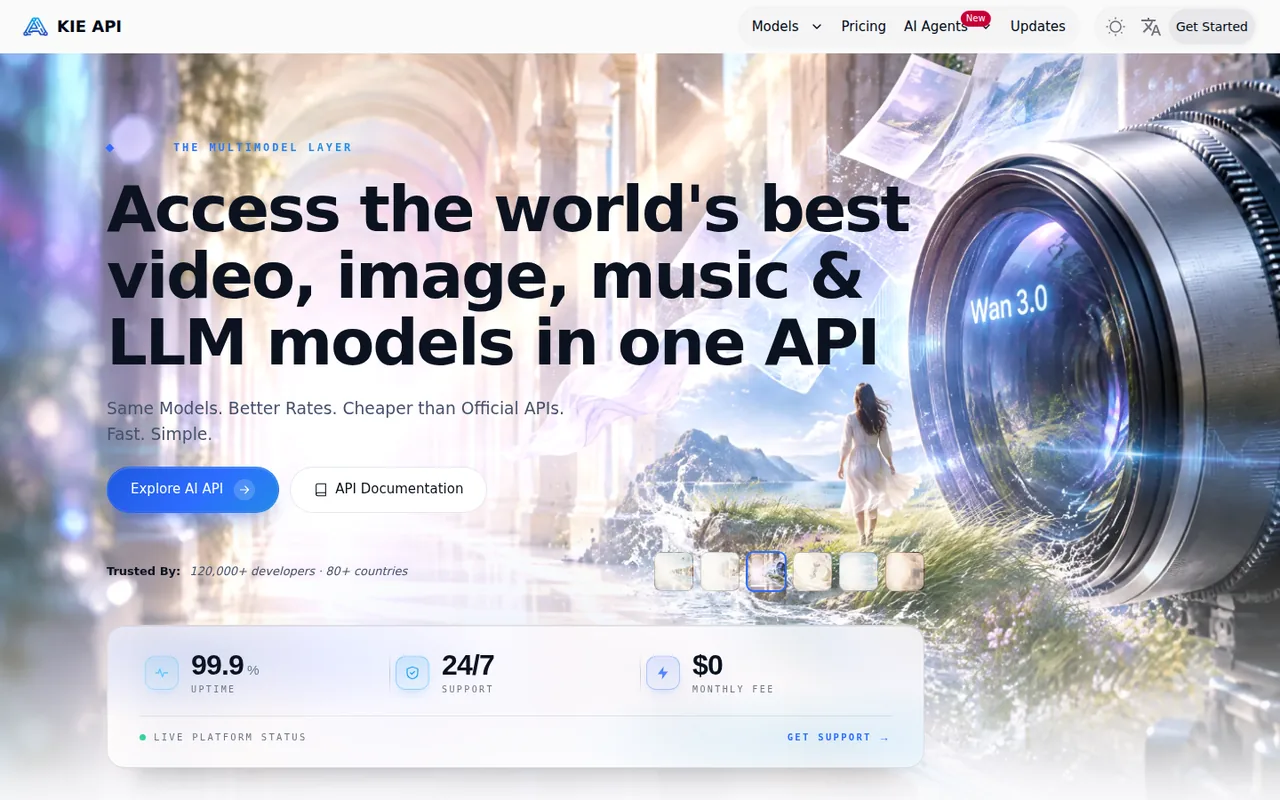
What is Kie.ai, in short?
Updated October 11, 2026 · By Elias Brandt · Documentation review, not tested hands-on
Pros
- One credit balance for many models
- Prices visible before sign-up
- Failed tasks are not billed
- Credits do not expire
Cons
- Free trial is small
- Outputs and commercial terms are not stated
- Files expire in 14 days
- Company and reliability signals are mixed
- Savings claims are the provider's own
Best forDevelopers who need several generative models behind one APIBuilders running video or image generation at volumeTeams producing client or ad work
Strengths, limits and who it suits, in full
Strengths
- One credit balance for many models The docs and homepage describe a single API key and balance for video, image, audio and chat models.
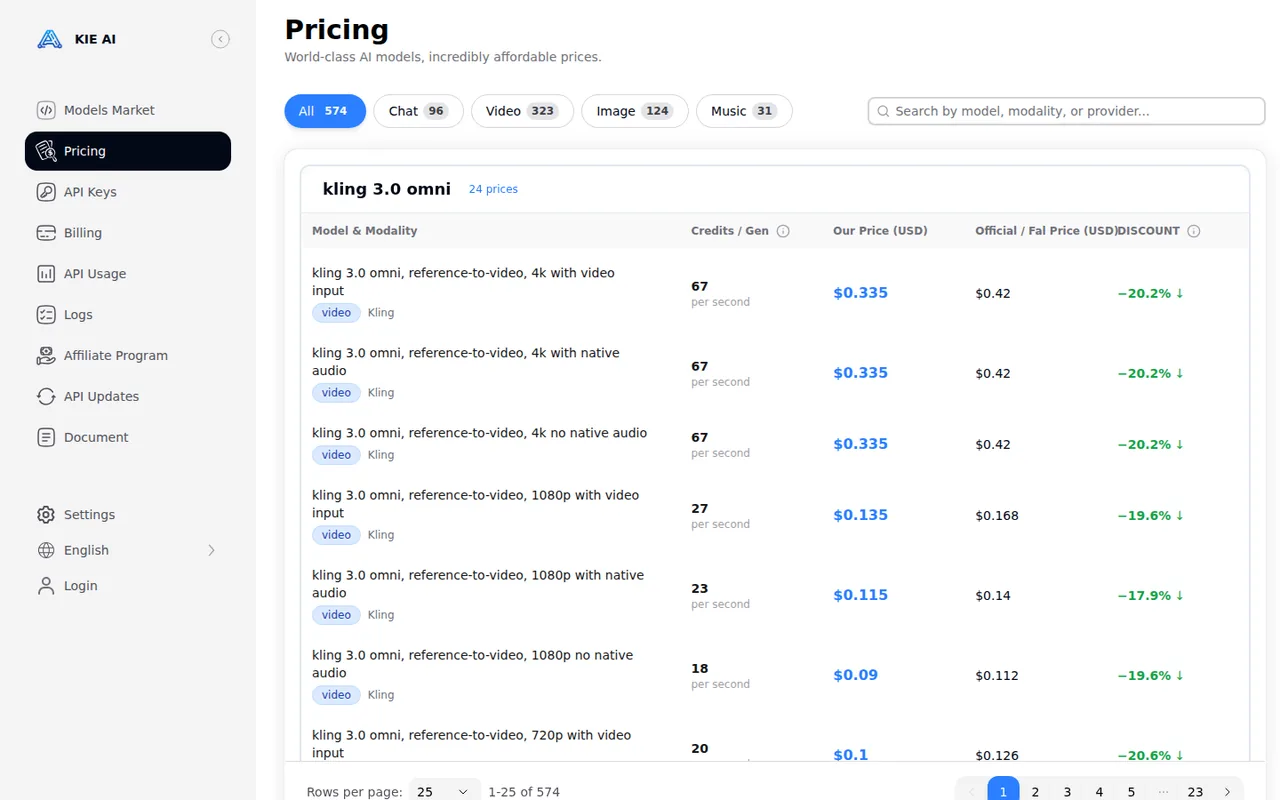
- Prices visible before sign-up The pricing page lists per-image, per-second, per-video and per-token prices for 574 model options with the USD price and the provider's official comparison price.
- Failed tasks are not billed The homepage and FAQ say failed tasks cost no credits, and the log page shows credit use per task.
- Credits do not expire The Terms, FAQ and refund policy say purchased credits never expire.
Limits
- Free trial is small 80 free credits is about $0.40, and the pages do not say which models it covers.
- Outputs and commercial terms are not stated The Terms cover the website and are silent on generated outputs, commercial use and the underlying models' terms.
- Files expire in 14 days Media is deleted after 14 days and logs after 2 months, so results must be downloaded.
- Company and reliability signals are mixed Two operating companies are named in the Terms, a third in the footer, and the docs call the service a small startup with occasional instability while the homepage FAQ calls it production-ready.
- Savings claims are the provider's own The 'vs official' discounts are not independently checked, and one homepage comparison (GPT Image 2 official 2K $0.428 versus 4K $0.40) looks inconsistent.
Who it suits
- Developers who need several generative models behind one API one key, one balance and published per-model prices let you try several models without separate provider accounts, though the minimum top-up and bonus tiers are not visible before sign-up.
- Builders running video or image generation at volume the lowest listed prices and the failed-task policy suit cost-sensitive batch work, but the 14-day file retention means you need to store outputs yourself.
- Teams producing client or ad work because the pages do not state output or underlying-model terms, get written confirmation from support before commercial use.
How much does Kie.ai cost?
Some prices not published · checked
Regional prices: Prices are USD list prices read from the homepage, pricing page and docs on 11 Oct 2026; the homepage table shows 26 sample rows and the pricing page lists 574.
The $0.005 credit value and the $0.40 value of the 80 free credits are our arithmetic from the pricing rows. Credits never expire and refunds are by email, with no stated window. The 10% bonus on a $1,250 top-up is the only bonus example; the minimum top-up and bonus schedule are not visible because the billing page needs a Google sign-in. The pages agree on 20 new requests per 10 seconds; the docs say this typically allows 100+ concurrent tasks and the FAQ says there is no strict concurrency limit. Tax and regional pricing were not checked. The 'vs official' prices are the provider's own comparison.
| Plan | Price | What you get |
|---|---|---|
| Free test credits | 80 free credits for new users; card requirement not stated sourceFrom kie.ai/pricing, checked Oct 11, 2026 (opens in a new tab) | About $0.40 at the pricing page's rate of $0.005 per credit (our arithmetic). The FAQ does not say which models they cover or whether they expire, so they may not cover expensive video models. |
| Pay as you go | No monthly fee; prepaid credits charged per outputpriced per model | Credits are priced at $0.005 each. Sample USD prices: images $0.03 (GPT Image 2, 1K), $0.04 (Nano Banana 2, 1K), $0.09 (Nano Banana Pro, 1K/2K); video $0.0225 a second (Grok Imagine Video 720p), $0.325 a video (Veo 3.1 Fast 1080p), $1.275 a video (Veo 3.1 Quality 1080p); chat per 1M tokens, for example Claude Opus 5.5 at $1.60 input and $8.00 output. Failed tasks are not charged. The pricing page lists 574 prices, and the minimum top-up is not published. |
| Large top-up bonus | Bonus credits on bigger top-upsfor example 10% extra on $1,250 sourceFrom kie.ai/pricing, checked Oct 11, 2026 (opens in a new tab) | The homepage FAQ gives only this example, saying it makes the effective cost about 10% lower. The full schedule and the minimum top-up are not visible without an account. |
| Rate limit | Default for every account: 20 new requests per 10 seconds sourceFrom kie.ai/pricing, checked Oct 11, 2026 (opens in a new tab) | The docs say this typically allows 100+ concurrent tasks and that a higher limit can be requested from support, who review it cautiously. Rejected requests return code 429 and are not queued. |
How far does it go?
- What $20 of credits buys at sample pricesThere is no base fee, so cost is only the per-output price, and $20 is 4,000 credits at $0.005 each. At the homepage sample prices that is about 666 GPT Image 2 images at $0.03 (1K), 500 Nano Banana 2 images at $0.04 (1K), 61 Veo 3.1 Fast 1080p videos at $0.325, or about 888 seconds of Grok Imagine Video 720p at $0.0225 a second. Higher resolutions, longer clips and other models cost more, and failed tasks are not charged. The 80 free credits are about $0.40, enough for roughly 13 of the 1K GPT Image 2 images. Arithmetic on published prices only; no output was generated.
Arithmetic from the published allowances above, not a usage test.
Taxes, currency and promotions can change the price you see at checkout.
Try Kie.ai free (opens in a new tab)
Key features
| Feature | What it does | Watch out |
|---|---|---|
| One API key and one credit balance for video, image, audio and chat models (homepage, docs) | The homepage and docs describe video, image, audio and chat models from other companies behind one API, with a market page and a playground for each model. | The model list and its changes are the provider's own; this profile did not test any model or compare output with the same model on its original provider. |
| Browser playground on each model page and a REST API with callbacks or polling for asynchronous image, video and music tasks (docs) | Image, video and music jobs return a task id; you poll for the result or give a callback URL, while chat models answer directly. | A 200 response only means the task was created, and API errors on the main endpoints are returned as HTTP 200 with a code in the body, so integrations must read the code. |
| Per-key hourly, daily and total usage caps and IP whitelisting (docs) | — | |
| Task log with model, inputs, status and credit use per task (docs) | — | |
| KIE skills for coding agents and chat models usable from Claude Code, Codex or Grok Build with KIE credits (homepage FAQ) | — | |
| Spending controls | Keys can carry hourly, daily and total caps and an IP allow-list, and the task log shows credits used per task. | The docs frame these as protection against overuse; they do not publish a spending alert or budget feature. |
| Failed tasks and credits | Failed tasks are not charged and purchased credits never expire; refunds are by email with the order number. | The refund policy gives no time window or conditions, and the billing page needs a sign-in. |
| Coding-agent access | The homepage FAQ says installing KIE skills lets agents such as Claude Code, Codex or Cursor find models, run tasks and download results, and that chat models can power Claude Code, Codex or Grok Build. | This describes the provider's own setup guides; compatibility and quality of those agent setups were not tested. |
What Kie.ai charges
Kie.ai does not sell plans. The pricing page lists a price for each model in credits and in USD, at a constant $0.005 per credit, and the homepage says there is no monthly fee. Sample prices include $0.03 for a 1K GPT Image 2 image, $0.0225 a second for Grok Imagine Video 720p and $0.325 for a Veo 3.1 Fast 1080p video. Failed tasks are not charged and purchased credits never expire. New users get 80 free credits, about $0.40, and the homepage says larger top-ups may earn bonus credits, for example 10% extra on $1,250.
Each price is shown next to an “official” price from the model maker, with discounts from roughly 17% to 88%. Those comparisons are Kie.ai’s own, and one homepage pair is inconsistent: GPT Image 2 is shown at $0.428 official for 2K but $0.40 for 4K. Treat the savings as a claim to check against the maker’s current price, not as a measured fact.
What $20 buys, and what the pages leave open
At the sample prices, $20 (4,000 credits) buys about 666 GPT Image 2 1K images, 500 Nano Banana 2 1K images, 61 Veo 3.1 Fast 1080p videos or about 888 seconds of Grok Imagine Video 720p. Higher resolutions and longer clips cost more, and the minimum top-up is not published on pages readable without an account.
The harder question is rights. The Terms of Use cover the website: you keep ownership of what you upload and grant a licence to operate and improve the service. They do not say who owns generated outputs, whether commercial use is allowed, or what the underlying model providers require, and the Privacy Policy does not say whether inputs or outputs train models. Because the service resells access to other companies’ models at a discount, ask support in writing about the specific model before client work.
Files and logs are temporary: per the docs, media is deleted after 14 days and logs after 2 months. Reliability is described two ways: the docs say occasional instability can happen, while the homepage FAQ says the service is built for production use.
How could you check Kie.ai before paying?
Proposed evaluation · not performed yet
Use the free credits on one task that mirrors your real use before topping up.
- Sign up and note whether the 80 free credits appear and which models they can run.
- Pick one model you plan to use and run one short job at the lowest setting.
- Compare the credits charged in the task log with the price on the pricing page.
- Ask support whether commercial use of that model’s outputs is allowed, and keep the answer in writing.
- Download the output, then check the log after 14 days to see what remains.
Accept it if the charge matches the pricing page, the free credits cover a real test and support confirms your use. Reject it if the model is not covered or the charge differs without explanation. No quality, speed or cost result is recorded here.
Kie.ai alternatives
Other images & design tools checked with the same method. Pick by the job, not by a score.

AI images, video and audio inside an Adobe workflow

Rigged 3D avatars from a selfie for games and apps

AI images placed straight into templated designs

Turning a written story into a character-consistent comic series, and optionally a short film

Making a business logo and matching brand assets with AI

Low-cost image generation paid per request, without a subscription

Sellers cleaning backgrounds on photos they own

Testing FLUX prompts and edits before an API build
Used Kie.ai? Write the first review. Visitor opinions are moderated and kept separate from our source checks.
Frequently asked questions
Is Kie AI free?
Only as a small trial. The homepage FAQ says new users receive 80 free credits for testing, which is about $0.40 at the pricing page's $0.005 per credit. After that Kie.ai has no free plan: you top up credits and pay per output, with no monthly fee. The pages do not say which models the free credits cover, so check that your target model is covered before planning a test.
Is Kie AI trustworthy?
We have not tested it, so this is what the pages show. Credits never expire, failed tasks are not charged and refunds are available by email, but the Terms name two operating companies while the footer shows a third, the docs call it a small startup that is 'not perfect', and the Terms disclaim warranties. The pages also compare prices with official ones without saying how access to the underlying models is licensed. Start with a small top-up and read the terms for any model you plan to use commercially.
Does Kie AI charge for failed tasks?
No, according to the homepage and its FAQ: a failed generation task is not charged. The docs add that a 200 response only means a task was created, not finished, and that API errors on the main endpoints come back as HTTP 200 with an error code in the body, so check the code. The task log page shows the credits used per task, and the docs call it the source of truth for disputes.
How long does Kie AI keep generated files?
Media files are kept for 14 days and log records for 2 months, then permanently deleted, according to the docs and homepage FAQ. Download or copy results as they finish, or use callbacks to collect them automatically. Credits are different: they never expire.
Can I use Kie AI outputs commercially?
The pages do not say. The Terms of Use cover the website, state that you keep ownership of content you upload, and are silent on ownership or commercial use of generated outputs and on the terms of the underlying models, which belong to other providers. For client or ad work, ask support for written confirmation about the specific model before you rely on it.
Sources and method6 official sources · 19 details checked · Oct 11, 2026
How we checked this profile
19 details on this page were checked against Kie.ai's own pages and help documentation (Oct 11, 2026).
See the checks by section19 documented
| Section | Checks | Last checked | Sources |
|---|---|---|---|
| Article text | 1 documented | kie.ai | |
| Plans and prices | 8 documented | kie.aikie.ai/pricingkie.ai/refund-policydocs.kie.ai | |
| Strengths and limits | 6 documented | kie.ai/pricingdocs.kie.aikie.ai/terms-of-servicekie.ai/privacy-policy | |
| Features | 3 documented | docs.kie.ai | |
| Platforms and integrations | 1 documented | kie.ai |
Sources for this profile
- Kie.ai pricing pagekie.ai
- Kie.ai homepage and FAQkie.ai
- Kie.ai docs: Getting Started with KIE APIdocs.kie.ai
- Kie.ai Terms of Use, effective Aug 1, 2025kie.ai
Official Kie.ai pages (homepage and FAQ, pricing, docs, Terms of Use, Privacy Policy, refund policy) were read on 11 Oct 2026; the pricing page was read through the official-page fetcher because it renders in the browser. Not tested or not found: output quality and speed of any model, which models the 80 free credits cover, the minimum top-up and bonus schedule (billing page requires sign-in), generated-output ownership and commercial terms, training use of inputs or outputs, how access to the underlying models is licensed, and the basis of the uptime and developer-count figures. Third-party reviews and directories were not used as sources. The proposed evaluation has not been performed.
Sources checked Oct 11, 2026. Found something out of date? See how we correct profiles.