

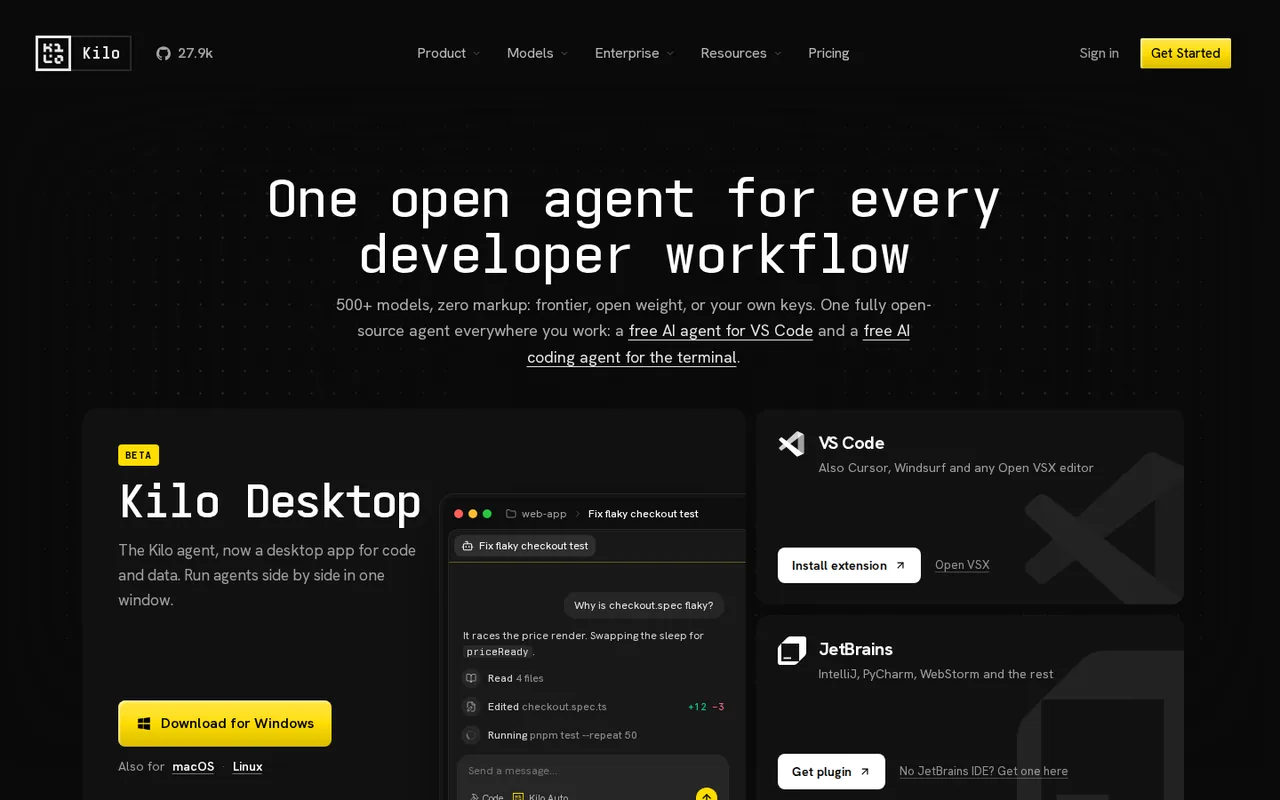
What is Kilo Code, in short?
Updated November 5, 2026 · By Elias Brandt · Documentation review, not tested hands-on
Pros
- Free open-source clients
- Many ways to pay for models
- Several surfaces, one agent
- Public source and issue tracker
Cons
- Total cost is not one number
- Cloud compute is extra even with your own keys
- Paid credits expire
- Pass bonus schedule is hard to read
- Ownership changed recently
Best forDevelopers who want to choose their own modelsTeams that want shared billing and controlsNot for anyone who wants one flat monthly price
Strengths, limits and who it suits, in full
Strengths
- Free open-source clients The VS Code extension, JetBrains plugin and CLI are MIT-licensed and free to install, with no mandatory subscription for individuals.
- Many ways to pay for models Free models, local models, your own provider keys or Gateway credits at provider rates, so you can avoid Kilo inference spend entirely.
- Several surfaces, one agent The same agent is offered in VS Code, JetBrains, the terminal, the cloud and Slack, and cloud sessions can be resumed locally per the FAQ.
- Public source and issue tracker The repository is public on GitHub under the MIT license.
Limits
- Total cost is not one number Platform, model inference, a 5% processing fee on top-ups and cloud compute are billed as separate parts, so a monthly bill has to be assembled.
- Cloud compute is extra even with your own keys The pricing FAQ says bringing your own keys covers model inference, not the container that runs a cloud agent.
- Paid credits expire Paid credits, including automatic top-ups, expire one calendar year after purchase; the 5% processing fee is non-refundable.
- Pass bonus schedule is hard to read The pricing page shows up to 50% bonus credits in one place and a 40% maximum bonus in its calculator, so the bonus you would get is not a single fixed figure.
- Ownership changed recently The site says Kilo has been acquired by Anaconda, and the Terms now name Anaconda, Inc. alongside Kilo Code Inc.; terms may keep changing.
- Vendor benchmarks only Auto Model and leaderboard figures are Kilo's own KiloBench results, not independent tests.
Who it suits
- Developers who want to choose their own models Bring your own keys, use local models, or route through the Gateway at provider rates.
- Teams that want shared billing and controls Teams adds usage analytics, shared agents and centralized billing at $15 per user a month; Enterprise adds SSO, audit logs and SLAs.
- Not for anyone who wants one flat monthly price Model usage, credits and cloud compute are metered separately, so cost varies with how much you run.
How much does Kilo Code cost?
Prices confirmed · checked
Regional prices: Amounts are the US dollar figures on the pricing page on 2026-11-05.
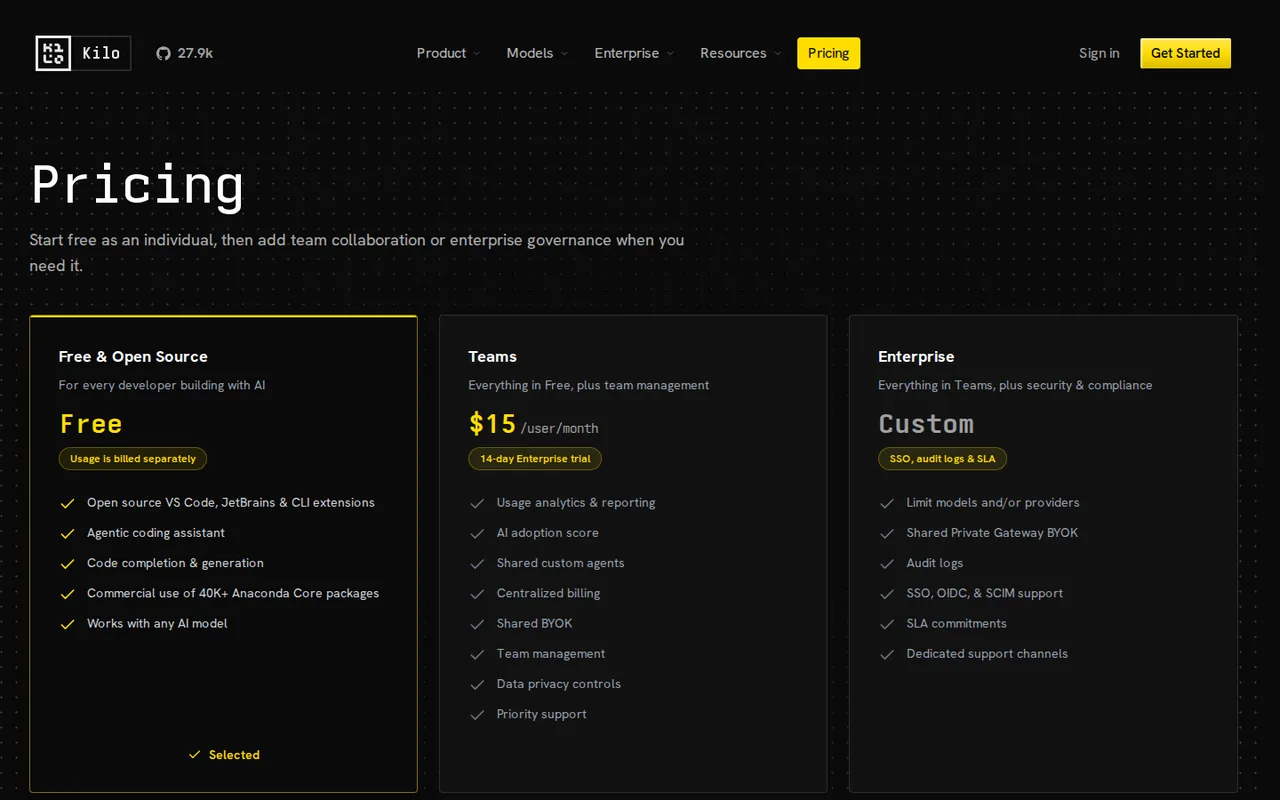
The platform plan is $0 for individuals and Teams is $15 per user per month; AI inference, Kilo Pass credits and cloud compute are separate lines. Kilo Pass tiers are $19, $49 and $199 a month, with credits shown as up to $26.60, $68.60 and $278.60; the page also shows a 50% bonus in month 2 and a 40% maximum bonus later, so the bonus is not a single fixed figure. The pricing page calculator also shows an annual option at $588 a year for one tier; which tier that figure belongs to was not stated, so no annual Pass price is listed here. Credit purchases carry a 5% processing fee, which does not apply to Teams and Enterprise seat subscriptions or invoice payments. Cloud agents need at least $5 in the credit balance to start a container; this is not a launch fee. Paid credits expire one calendar year after purchase.
| Plan | Price | What you get |
|---|---|---|
| Free and open source | $0 sourceFrom kilo.ai/pricing, checked Nov 5, 2026 (opens in a new tab) | Platform plan for individuals: VS Code, JetBrains and CLI extensions, agentic coding assistant, works with any AI model. AI usage is billed separately. |
| Auto Free, BYOK or local | $0 a month sourceFrom kilo.ai/pricing, checked Nov 5, 2026 (opens in a new tab) | No hosted credit required. Auto Free routes to free models through Kilo Gateway where available; you can bring Anthropic, OpenAI, Google, Azure, AWS Bedrock or other keys, or run Ollama or LM Studio. |
| Kilo Gateway | $0 a month plus usage sourceFrom kilo.ai/pricing, checked Nov 5, 2026 (opens in a new tab) | Pay-as-you-go credits at exact provider rates across 500+ models; 5% credit purchase processing fee; paid credits expire one calendar year after purchase. |
| Kilo Pass Starter | $19 per month sourceFrom kilo.ai/pricing, checked Nov 5, 2026 (opens in a new tab) | Optional credit subscription; the pricing page shows up to $26.60 a month in credits with bonus credits. 5% processing fee applies to Pass purchases. |
| Kilo Pass Pro | $49 per month sourceFrom kilo.ai/pricing, checked Nov 5, 2026 (opens in a new tab) | Up to $68.60 a month in credits per the pricing page calculator. |
| Kilo Pass Expert | $199 per month sourceFrom kilo.ai/pricing, checked Nov 5, 2026 (opens in a new tab) | Up to $278.60 a month in credits per the pricing page calculator. |
| Teams | $15 per user per month sourceFrom kilo.ai/pricing, checked Nov 5, 2026 (opens in a new tab) | Everything in Free plus team management, usage analytics, shared custom agents, centralized billing, shared BYOK, data privacy controls and priority support; 14-day Enterprise trial. |
| Enterprise | Custom | Adds custom SSO, audit logs, SLA, model and provider limits, shared private Gateway BYOK and SCIM; contact sales. |
| Cloud compute | $0.33 to $1.20 per hourbilled per second sourceFrom kilo.ai/pricing, checked Nov 5, 2026 (opens in a new tab) | Code Review $0.33 an hour, Cloud Agent Docker and Small $0.60, Standard $1.20; model inference is charged separately. |
How far does it go?
- Five developers on TeamsTeams is $15 per user a month, so five seats are $75 a month in platform fees before any model usage, Kilo Pass or cloud compute. Separately, a $20 credit top-up costs $21 under the 5% processing fee, which does not apply to the seat subscription itself. Two hours of a Standard cloud agent is $2.40 of compute at $1.20 an hour, billed per second, plus model inference. Arithmetic on published amounts, not a statement by Kilo; model spend, which is the largest variable, depends on the models chosen and was not estimated.
Arithmetic from the published allowances above, not a usage test.
Taxes, currency and promotions can change the price you see at checkout.
Try Kilo Code free (opens in a new tab)
Key features
| Feature | What it does | Watch out |
|---|---|---|
| Open-source agent in VS Code, JetBrains and a CLI, with a desktop beta, mobile apps and a Slack integration (homepage and features page) | The VS Code extension, JetBrains plugin and CLI are MIT-licensed; the FAQ says Kilo Gateway and the Cloud backend are published separately as source available code. | So the hosted pieces are not the same license as the clients. |
| Code, Plan, Debug and Ask agents, plus custom agents with your own prompts, tool permissions and model choice (homepage FAQ) | Agents run in cloud containers tied to a GitHub or GitLab repo and can be started from the IDE, CLI, Slack or a web dashboard; compute is billed per second on top of model usage. | You need at least $5 in your credit balance to start a container, and bringing your own keys does not cover compute. |
| 500+ models through Kilo Gateway, your own provider keys, or local models via Ollama and LM Studio (homepage and pricing page) | The platform plan is $0 for individuals and AI inference is a separate cost: free models, local models, your own keys, Gateway credits or a Kilo Pass subscription. | Total spend therefore depends on which models you run; the pricing page gives no monthly estimate for a typical developer. |
| Auto Model routing in three tiers, Efficient, Frontier and Free, that picks a model per session (Auto Model page) | You pick Efficient, Frontier or Free, and Kilo classifies the session and routes it to a model; the page says Auto Efficient reached 71% of published frontier completion at 72% lower cost on Kilo's own KiloBench. | The figures come from Kilo's own benchmark and were not reproduced here. |
| Cloud Agents that run in isolated containers connected to a GitHub or GitLab repo, and a Code Reviewer for pull requests (homepage FAQ and features page) | — | |
| MCP client with a built-in marketplace for one-click server installs (homepage FAQ) | — |
What does Kilo Code cost?
The agent is free; the models are not, unless you choose free or local ones. The pricing page splits cost into three parts: a platform plan ($0 for individuals, $15 per user a month for Teams), AI inference, and cloud compute. For inference you can use Auto Free, local models through Ollama or LM Studio, your own provider keys, Kilo Gateway credits at provider rates, or an optional Kilo Pass subscription from $19 a month. Credit purchases carry a 5% processing fee, and paid credits expire a year after purchase.
What changes when you use cloud agents?
Cloud agents run in containers billed per second: $0.60 an hour for the Docker and Small sizes and $1.20 for Standard, with Code Review at $0.33. The pricing FAQ says you need $5 in your balance to start a container, that this is not a launch fee, and that bringing your own keys does not cover compute. Model inference is charged on top.
Is it really open source?
The VS Code extension, JetBrains plugin and CLI are MIT-licensed in the public repository. The homepage FAQ says Kilo Gateway and the Cloud backend are published separately as source available code, so the hosted services are not under the same license. The site also says Kilo has been acquired by Anaconda, and the Terms now name Anaconda, Inc. with Kilo Code Inc.
How could you check Kilo Code before relying on it?
Proposed evaluation · not performed yet
Run it on a small task you already know the answer to.
- Install the extension and start on Auto Free with no payment method.
- Ask for a fix to a failing test in one of your repositories and note how many files it reads and edits.
- Repeat the task with one of your own provider keys and compare the result and the provider bill.
- If you plan to use cloud agents, add the minimum balance and record the compute charge for one short session.
Accept if the free-model run produces a usable fix and the combined bill is predictable. Reject if you need a single flat price or the free models cannot handle your codebase. No result is recorded here.
Kilo Code alternatives
Other coding tools checked with the same method. Pick by the job, not by a score.

Developers who want an approval-based coding agent and choose and pay for their own models

Developers evaluating controlled repository edits with their own test suite

Developers reviewing small repository changes

Running an open model locally for code and text work

Builders evaluating a small operational app

Agentic coding in a desktop IDE on a metered budget

Developers who work in the terminal and want an agent there, paid per use or through their own API key

Reviewing small code changes in an existing editor
Used Kilo Code? Write the first review. Visitor opinions are moderated and kept separate from our source checks.
Frequently asked questions
Is Kilo Code free?
The VS Code extension, JetBrains plugin and CLI are open source under the MIT license and free to install, with no mandatory subscription for individuals. AI usage is billed separately unless you use free models, local models or your own keys, and cloud agents add compute charges.
How much does Kilo Code cost?
The platform plan is $0 for individuals and Teams is $15 per user a month; Enterprise is custom. Kilo Pass credits start at $19 a month and Gateway credits are billed at provider rates with a 5% processing fee on purchases. Cloud compute runs from $0.33 to $1.20 an hour.
Can I use my own API keys with Kilo Code?
Yes. You can bring Anthropic, OpenAI, Google, Azure, AWS Bedrock or other provider keys and pay those providers directly, or run local models with Ollama or LM Studio. Your own keys cover model inference but not the compute for cloud agents.
What is the difference between Kilo Gateway and Kilo Pass?
Gateway is pay-as-you-go: you add credits and use them across 500+ models at provider rates. Kilo Pass is a monthly subscription from $19 that converts into credits and adds bonus credits on top; the bonus is stated as up to 50%.
Do Kilo Code credits expire?
Paid credits, including automatic top-ups, expire one calendar year after purchase. Free bonus and promotional credits keep their own deadlines, and the 5% processing fee is non-refundable.
Does Kilo Code work in VS Code and JetBrains?
Yes. It runs in VS Code and VS Code-based editors, in JetBrains IDEs, and as a CLI. The site also lists a desktop app in beta, mobile apps, a Slack integration and browser-based cloud agents.
Sources and method7 official sources · 15 details checked · Nov 5, 2026
How we checked this profile
15 details on this page were checked against Kilo Code's own pages and help documentation (Nov 5, 2026).
See the checks by section15 documented
| Section | Checks | Last checked | Sources |
|---|---|---|---|
| Article text | 1 documented | kilo.ai | |
| Strengths and limits | 5 documented | kilo.aigithub.com/kilocodekilo.ai/pricingkilo.ai/terms | |
| Plans and prices | 5 documented | kilo.ai/pricing | |
| Features | 3 documented | kilo.aikilo.ai/auto-model | |
| Official channels and media | 1 documented | kilo.ai |
Sources for this profile
- Pricing page and pricing FAQkilo.ai
- Homepage and FAQkilo.ai
- Kilo Gateway pagekilo.ai
- Auto Model pagekilo.ai
Official pages read on 2026-11-05: homepage and FAQ, pricing page and pricing FAQ (including the page's structured FAQ data), Gateway, Auto Model, features, Terms of Service, and the public GitHub repository for the MIT license. We did not install the extension, run an agent, open checkout, or read the Anaconda announcement, so output quality, speed, real monthly spend and the Pass bonus schedule were not observed. Social links are the ones on the provider's site: GitHub, Reddit and YouTube; X and LinkedIn names appear in the footer without links we could verify. Benchmarks and user counts on the site (for example '5M+ Kilo Coders') are the provider's own statements. Review sites and search-volume figures were not used.
Sources checked Nov 5, 2026. Found something out of date? See how we correct profiles.