

Krea: image generation and upscaling from 100 free daily units, but API billing terms are unclear
Updated October 4, 2026 · By Elias Brandt · Documentation review, not tested hands-on
Pros
- Iterative visual work
- Usage record
- Free entry point
Cons
- Resolution is not fidelity
- API billing ambiguity
- Units do not roll over
Bottom line
100 units daily; real-time models and limited upscaling; no card required.
You want to try image generation and limited upscaling before paying: Free gives 100 units daily with no card, so you can see whether the output suits your work.
You plan to budget production API calls from an app plan: the API page describes both a separate dollar balance and shared compute, so the arrangement is unresolved.
Best forDesigners checking image detailDevelopers assuming web credits cover API callsPeople trying image tools before paying
Strengths, limits and who it suits, in full
Strengths
- Iterative visual work Real-time generation can support exploration before committing to a final render.
- Usage record The account usage view provides a place to reconcile the cost of each attempt.
- Free entry point The Free plan includes 100 daily units, real-time models and limited upscaling, with no card required.
Limits
- Resolution is not fidelity A larger output does not prove that small product details survived enhancement.
- API billing ambiguity The API FAQ describes a separate dollar balance while other text mentions shared compute.
- Units do not roll over Individual-plan units currently do not roll over, and purchased packs must be used within 90 days.
Who it suits
- Designers checking image detail Useful when an enlarged asset can be inspected against its original.
- Developers assuming web credits cover API calls Confirm the API billing arrangement in the account first.
- People trying image tools before paying The Free plan offers 100 daily units without a card.
How much does Krea cost?
Some details not confirmed · checked
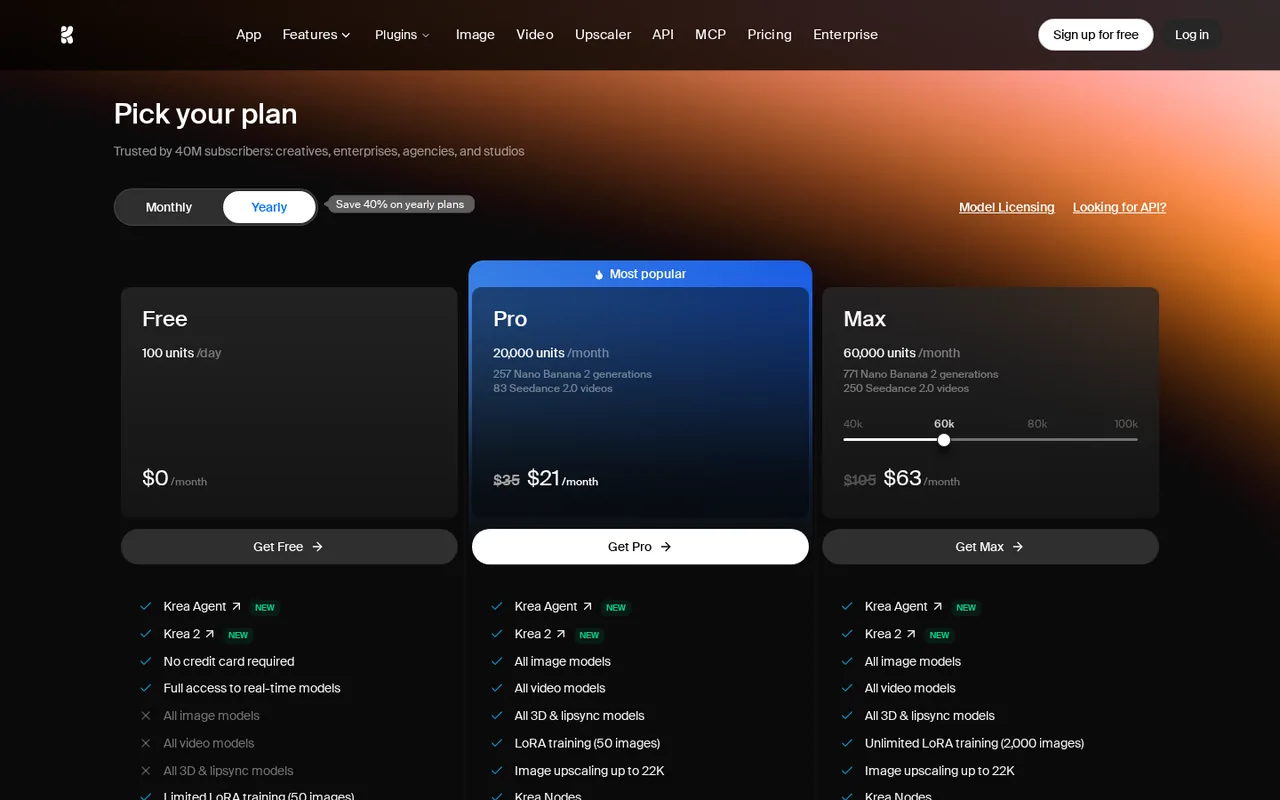
Regional prices: USD figures visually checked with Yearly selected; rounded monthly equivalents are not multiplied into annual invoices.
Free card exclusions were checked visually because plain text also contains excluded features. API billing remains uncertain. Tax and region were not stated.
| Plan | Price | What you get |
|---|---|---|
| Free | $0 sourceFrom krea.ai/pricing, checked Oct 4, 2026 (opens in a new tab) | 100 units daily; real-time models and limited upscaling; no card required. |
| Basic | $5/month displayed with Yearly selected sourceFrom krea.ai/pricing, checked Oct 4, 2026 (opens in a new tab) | 5,000 monthly units; selected video models. |
| Pro | $21/month displayed with Yearly selected sourceFrom krea.ai/pricing, checked Oct 4, 2026 (opens in a new tab) | 20,000 monthly units; broader video access. |
| Max | $63/month at the displayed Yearly tier sourceFrom krea.ai/pricing, checked Oct 4, 2026 (opens in a new tab) | 60,000 monthly units; other tiers available. |
| Business / Enterprise | Tiered or custom | Workspace and enterprise conditions differ. |
Taxes, currency and promotions can change the price you see at checkout.
Try Krea free (opens in a new tab)
Key features
| Feature | What it does | Watch out |
|---|---|---|
| Generate and enhance images | — | |
| Inspect usage by account | — | |
| Model-dependent video options | — | |
| App workflows, developer API and model licensing are distinct routes | — | |
| Real-time models and limited upscaling on the Free plan | — |
What must survive an upscale?
Choose three small details that matter to the image’s purpose: a seam, a label character and a straight edge. Inspect those areas at the same displayed size in the original and enlarged versions. Added texture may look attractive while changing the object. A product listing needs fidelity, whereas an illustrative background may permit creative detail.
Keep the original file. Name the output with the selected model and settings, and compare it without resaving either file through another tool. This makes it easier to distinguish an enhancement problem from later compression.
Keep the consumption record useful
Krea’s usage guide describes near-real-time reporting, individual-plan credits that do not roll over, and purchased packs with a 90-day lifetime. Record the balance before an attempt and allow the usage view to update before recording the balance after it. Do not divide a subscription allowance by a guessed cost per image.
Budget API use separately
The API page is internally inconsistent about sharing app compute. Its detailed FAQ describes dollar-based API charges from a separate balance. Treat an API budget as unresolved until the account’s billing terms confirm it; do not buy an app plan solely on an assumption that it includes production API calls.
Run an image-fidelity check
Proposed evaluation, not performed: use a Free account and a self-owned, non-confidential photo small enough for the available free upscaler. If the intended model or size is paid, stop at that boundary.
- Record the original pixel dimensions and select the three inspection details.
- Choose an available upscaler and note its shown unit cost before submitting.
- Open the output at 100% and compare the same crops. Look for rewritten lettering, false edges and invented texture.
- Check actual dimensions and file size, then reconcile the account usage after it updates.
Accept only an output that preserves the details required by the intended use. Leave the outcome and consumed units blank until this check is performed.
Is Krea worth it?
Documentation review plus dated public user reports. Documentation review, not tested hands-on. Not scored.
Worth it if
- You want to try image generation and limited upscaling before paying: Free gives 100 units daily with no card, so you can see whether the output suits your work.
- You judge upscales by inspecting small details against the original: the usage view lets you reconcile what each attempt cost.
Probably not if
- You plan to budget production API calls from an app plan: the API page describes both a separate dollar balance and shared compute, so the arrangement is unresolved.
- You need unused individual-plan units to carry over: the usage guide says they currently do not roll over, and purchased packs must be used within 90 days.
Krea alternatives
Other images & design tools checked with the same method. Pick by the job, not by a score.

AI images, video and audio inside an Adobe workflow

Rigged 3D avatars from a selfie for games and apps

AI images placed straight into templated designs

Turning a written story into a character-consistent comic series, and optionally a short film

Developers who want one prepaid account for many third-party AI models and will confirm commercial terms for each

AI images with a daily free allowance

AI images and short image-to-video clips from text and image prompts

Homeowners, stagers, short-term rental hosts and designers who want quick room redesign concepts from a real photo before spending on furniture or paint
Used Krea? Write the first review. Visitor opinions are moderated and kept separate from our source checks.
Frequently asked questions
Do unused Krea compute units roll over?
The usage guide says units currently do not roll over for individual plans, while business and enterprise plans can roll over (up to 12 months on annual plans). Purchased compute packs must be used within 90 days.
Does a Krea app plan cover API calls?
The API FAQ says app compute and API balance are separate and that API usage is billed in dollars per generation from a prepaid balance. The same page also uses compute-unit wording elsewhere, so confirm the terms in your account before budgeting.
Does Krea have a free plan?
Yes. The pricing page lists a Free plan at $0 with 100 units daily, real-time models and limited upscaling, and no card is required. Paid video models and larger tiers sit behind Basic, Pro or Max, so check the exact model and output size you need against the plan card before relying on the free allowance.
What do the paid Krea plans include?
Basic is shown at $5/month with Yearly selected and includes 5,000 monthly units and selected video models. Pro is $21/month with 20,000 units and broader video access, and Max is $63/month with 60,000 units. Rounded monthly equivalents are not annual invoices, and Business and Enterprise terms differ by workspace.
Sources and method3 official sources · Oct 4, 2026
Sources for this profile
- Krea plan cards and included featureskrea.ai
- Compute units and expirationkrea.ai
- API pricing and conflicting descriptionskrea.ai
Official product and help pages were reviewed. The proposed evaluation below has not been performed. Provider demonstrations are not our test results.
Sources checked Oct 4, 2026. Found something out of date? See how we correct profiles.