


Pika: Starter at $10 a month excludes commercial use, which begins on the Creator plan at $35
Updated October 4, 2026 · By Elias Brandt · Documentation review, not tested hands-on
Pros
- Budget visibility
- Commercial option
- Clean exports
Cons
- Paid is not always commercial
- Credit scope
- No refunds
Bottom line
Zero monthly credits; credit packs are paid; no commercial license.
You need licensed short clips and can budget for Creator, because it is the first listed plan that includes a commercial license.
You expect to generate video every month without paying, since the Free account has no monthly credits and only paid packs.
Best forCreators planning short licensed clipsUsers expecting recurring free video creditsTeams that generate several clips at once
Strengths, limits and who it suits, in full
Strengths
- Budget visibility The provider publishes examples for particular models, durations and resolutions.
- Commercial option Creator provides a clear starting point for a licensed commercial evaluation.
- Clean exports The plan table lists no watermark on all four plans, so a free account can still export unmarked files.
Limits
- Paid is not always commercial Starter is a paid plan without the commercial license listed on Creator.
- Credit scope Pika Create top-ups do not pay for the API, MCP, iOS app or legacy site.
- No refunds Subscription payments and purchased credits are non-refundable, so a cancelled plan runs to the end of its period with nothing returned for the remainder.
Who it suits
- Creators planning short licensed clips Compare model cost and acceptable takes before choosing a credit tier.
- Users expecting recurring free video credits The current Free card does not provide that allowance.
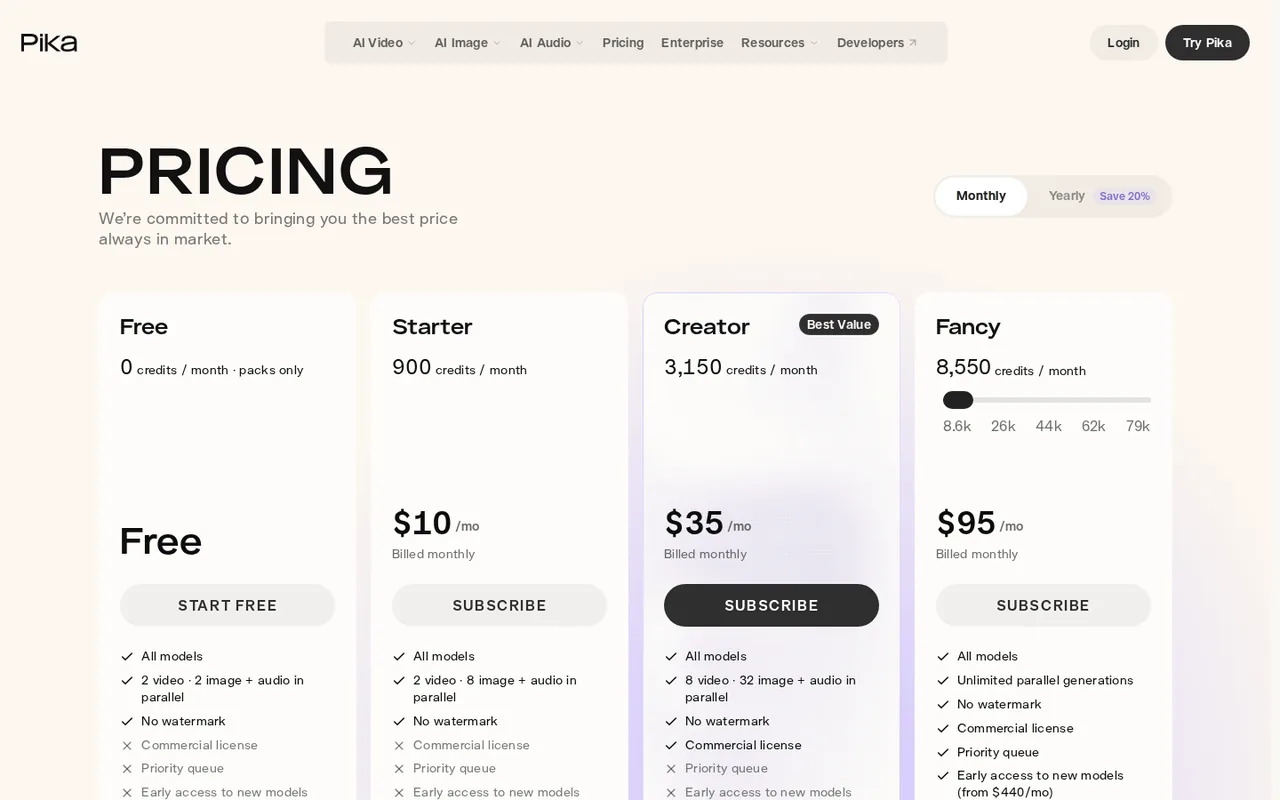
- Teams that generate several clips at once Parallel video generations go from 2 on Free and Starter to 8 on Creator and unlimited on Fancy.
How much does Pika cost?
Prices confirmed · checked
- $10Starter
- $35Creator
- $95Fancy
Regional prices: USD monthly billing shown.
Annual discounts exist but are not treated as monthly cancellation prices. Watermark-free export and commercial permission are separate. Subscription credits reset; purchased top-ups expire after 365 days. Tax and region are not specified.
| Plan | Price | What you get |
|---|---|---|
| Free account | $0 subscription sourceFrom pika.art/pricing, checked Oct 4, 2026 (opens in a new tab) | Zero monthly credits; credit packs are paid; no commercial license. |
| Starter | $10/month billed monthly sourceFrom pika.art/pricing, checked Oct 4, 2026 (opens in a new tab) | 900 monthly credits; no commercial license. |
| Creator | $35/month billed monthly sourceFrom pika.art/pricing, checked Oct 4, 2026 (opens in a new tab) | 3,150 monthly credits; commercial license included. |
| Fancy | From $95/month billed monthly sourceFrom pika.art/pricing, checked Oct 4, 2026 (opens in a new tab) | 8,550 credits at the entry tier; commercial license. |
| Enterprise | Custom quote | Contracted volume and support. |
Which plan fits?
Smallest plan whose monthly credits cover your number with 15% spare for regenerations. Arithmetic from the plan table above, not a usage test.
How far does it go?
- Credits per clip and cost per clipOne 5-second, 720p Seedance 2.5 generation is listed at 122 credits. Starter: 900 / 122 = 7 clips (7.4 rounded down). Creator: 3,150 / 122 = 25 clips (25.8 rounded down). The $95 Fancy entry tier: 8,550 / 122 = 70 clips (70.1 rounded down). At monthly billing each plan works out to about $1.36 per clip ($35 x 122 / 3,150), so the plan tiers differ in volume and licensing rather than in credit price. Top-up credits at 60 per $1 put the same clip at about $2.03. Three attempts at one setting use 366 credits, so Creator covers eight such sets (8.6 rounded down). Arithmetic on published rates, not measured usage; accepted takes will cost more per usable clip.
Arithmetic from the published allowances above, not a usage test.
Taxes, currency and promotions can change the price you see at checkout.
Try Pika free (opens in a new tab)
Key features
| Feature | What it does | Watch out |
|---|---|---|
| Multiple media models in one creation workspace | — | |
| Model- and setting-specific credit consumption | — | |
| Subscription credits and separately purchased top-ups | — | |
| Parallel video, image and audio generations that rise with the plan | — | |
| No-watermark export listed on every plan, including Free | — | |
| Priority queue on the Fancy tier | — |
Budget for accepted takes, not just generated seconds
A five-second clip that distorts the subject is a rejected take, even if its export completes. Define the action, framing and details that must remain intact before spending credits. Keep the shot short enough that you can inspect the whole motion, including the first and last frames.
The pricing table gives 122 credits for one five-second, 720p Seedance 2.5 generation. Three attempts at those exact settings would consume 366 credits. That is a planning calculation, not a promise of three usable clips; changes to the model or settings change the cost. Reserve a retry budget and stop when it is spent.
Pick the model before the plan
Credit cost varies widely by model. The same pricing table lists 33 credits for a five-second, 720p Wan 3.0 video, 8 credits for one 1K Nano Banana 2 image and 2 credits for one 1K GPT Image 2.5 image. A workflow built on stills and short drafts stretches a plan much further than one built on Seedance clips, so decide which model carries the final shot before comparing tiers.
Check a commercial clip before scaling up
Proposed evaluation, not performed: use an active Creator plan with the model available and sufficient credits. Use a photo you own of an unbranded ceramic cup, with no people or third-party artwork.
- Write a one-action brief: a slow camera move around the stationary cup. Name the handle shape, rim and printed-free surface as details that must remain unchanged.
- Confirm the displayed model, duration, resolution and credit charge. Save those settings in your evaluation notes.
- Generate one take and inspect the handle through the entire motion. Reject geometry changes, flicker or invented markings even when a still frame looks convincing.
- Download the clip and check its actual dimensions and playback in the intended editor. Keep the original input and settings with the file.
- Make at most two more attempts under the same recorded budget, then decide whether manual footage would be more reliable.
Record accepted takes divided by total attempts after the exercise. Do not call the result a repeatable production cost until you have several comparable jobs.
Know where credits can and cannot be spent
Subscription credits refresh every billing period and do not roll over, so a large plan only pays off if you use the allowance. Top-up packs carry over for 365 days, but they apply to Pika Create on the website alone, not to the API, MCP, iOS app or legacy site. If your pipeline touches one of those surfaces, plan its budget separately.
Is Pika worth it?
Documentation review plus dated public user reports. Documentation review, not tested hands-on. Not scored.
Worth it if
- You need licensed short clips and can budget for Creator, because it is the first listed plan that includes a commercial license.
- You want one workspace for video, image and audio models and are fine paying different credit amounts per model and setting.
Probably not if
- You expect to generate video every month without paying, since the Free account has no monthly credits and only paid packs.
- You plan client or advertising work on Starter, because its listing excludes the commercial license.
Pika alternatives
Other video & editing tools checked with the same method. Pick by the job, not by a score.

Developers and small teams who want a conversational video avatar for support, sales or tutoring and need to budget by minutes

Short animated stories from a script or prompt

Teachers, students and math YouTubers who want 3Blue1Brown-style explainer clips from a description, with an editable Manim code playground when they want control

Relighting or changing the background of short video clips

Streamers turning Twitch or Kick VODs into vertical clips

TikTok-ready ad videos for accounts that already advertise on TikTok

Presenter-led training and explainer videos with AI avatars

Reducing artifacts in existing footage
Used Pika? Write the first review. Visitor opinions are moderated and kept separate from our source checks.
Frequently asked questions
Does Pika have a free plan?
Yes, but it is an account rather than a monthly allowance. The Free plan lists 0 monthly credits and sells credit packs separately, so you pay before generating much. Exports are listed without a watermark, and the commercial license is not included on Free or on Starter.
Which Pika plan includes a commercial license?
Creator, at $35 per month billed monthly, is the first plan with a commercial license, and Fancy includes it too. The Free account and Starter at $10 per month are both listed as having no commercial license, so a paid subscription alone does not cover commercial use.
Do Pika credits roll over to the next month?
Subscription credits refresh each billing period and do not roll over. Credits bought as top-ups carry over and expire 365 days after purchase. A top-up is a one-off purchase available on any plan, including Free, and does not start a subscription.
Can Pika top-up credits be used with the API or the iOS app?
No. Top-up credits work only for Pika Create on pika.art. The provider states they cannot be used with the API, MCP, the iOS app or the old.pika.art site, so check which surface you generate on before buying a pack.
Can I cancel Pika and get a refund?
You can cancel from the Subscription page, and the plan stays active until the end of the current billing period before you move to Free. Payments are non-refundable, so the rest of the period is not refunded. A downgrade starts with the next billing period and can be undone until then.
Sources and method2 official sources · Oct 4, 2026
Sources for this profile
- Pika plans, licensing, model credit examples and FAQpika.art
- Pika Terms of Service: payments, credits and commercial usepika.art
Plan table, credit examples and billing FAQ come from Pika's official pricing page; refund, credit expiry and commercial-use terms come from its Terms of Service. The evaluation below is a proposal, and provider figures are not our test results.
Sources checked Oct 4, 2026. Found something out of date? See how we correct profiles.